clock MAZDA MODEL 3 5-DOOR 2017 User Guide
[x] Cancel search | Manufacturer: MAZDA, Model Year: 2017, Model line: MODEL 3 5-DOOR, Model: MAZDA MODEL 3 5-DOOR 2017Pages: 612
Page 326 of 612
![MAZDA MODEL 3 5-DOOR 2017 User Guide 5–34
Interior Features
Audio System
Audio set [Type B (touchscreen)]
NOTE
The explanation of functions described in this manual may differ from the actual
operation, and the shapes of screens and b](/img/28/40993/w960_40993-325.png "MAZDA MODEL 3 5-DOOR 2017 User Guide 5–34
Interior Features
Audio System
Audio set [Type B (touchscreen)]
NOTE
The explanation of functions described in this manual may differ from the actual
operation, and the shapes of screens and b")
5–34
Interior Features
Audio System
Audio set [Type B (touchscreen)]
NOTE
The explanation of functions described in this manual may differ from the actual
operation, and the shapes of screens and buttons and the letters and cha\
racters displayed
may also differ from the actual appearance.
Additionally, depending on future software updates, the content may successively cha\
nge
without notice.
Audio Set (Type B) has three different human interfaces.
Commander switch Touch panel Voice recognition with steering switch and microphone
Commander switch operation
NOTE
For safety reasons, some operations are disabled while the vehicle is being driven.
Volume dial operation
Volume dial
Press the volume dial to switch the audio MUTE on and off.
Turn the volume dial to adjust the volume. The volume increases by turning the dial
clockwise, and decreases by turning it counterclockwise.
Mazda3_8FL6-EA-16F_Edition2.indb 342016/08/10 17:37:29
Page 332 of 612
5–40
Interior Features
Audio System
Volume/Display/Sound Controls
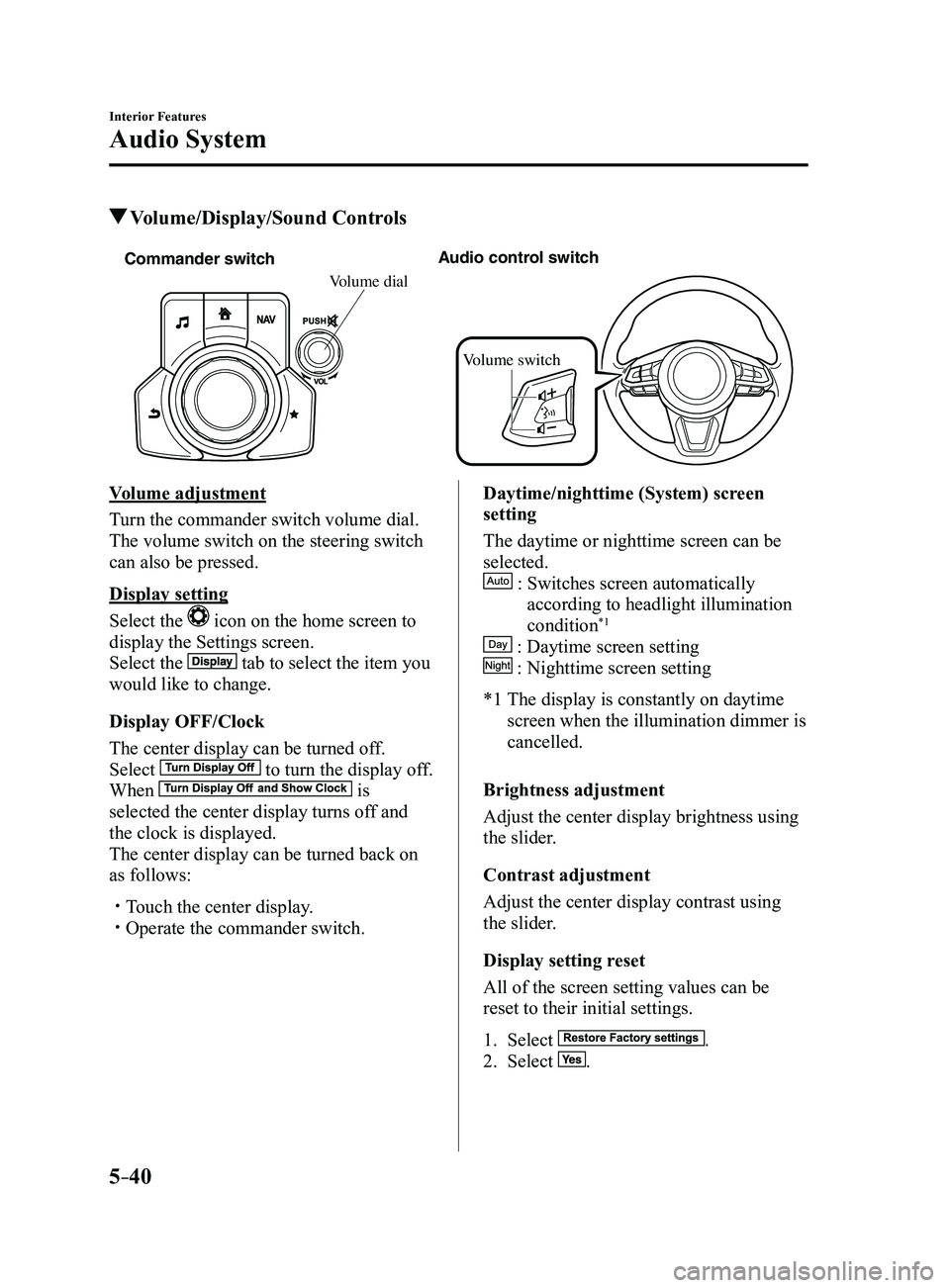
Commander switchAudio control switch
Volume switch
Volume dial
Volume adjustment
Turn the commander switch volume dial.
The volume switch on the steering switch
can also be pressed.
Display setting
Select the
icon on the home screen to
display the Settings screen.
Select the
tab to select the item you
would like to change.
Display OFF/Clock
The center display can be turned off.
Select
to turn the display off.
When is
selected the center display turns off and
the clock is displayed.
The center display can be turned back on
as follows:
Touch the center display. Operate the commander switch.
Daytime/nighttime (System) screen
setting
The daytime or nighttime screen can be
selected.
: Switches screen automatically
according to headlight illumination
condition*1
: Daytime screen setting
: Nighttime screen setting
*1 The display is constantly on daytime
screen when the illumination dimmer is
cancelled.
Brightness adjustment
Adjust the center display brightness using
the slider.
Contrast adjustment
Adjust the center display contrast using
the slider.
Display setting reset
All of the screen setting values can be
reset to their initial settings.
1. Select .
2. Select .
Mazda3_8FL6-EA-16F_Edition2.indb 402016/08/10 17:37:35
Page 345 of 612
5–53
Interior Features
Audio System
Settings
NOTE
Depending on the grade and specification, the screen display may differ.
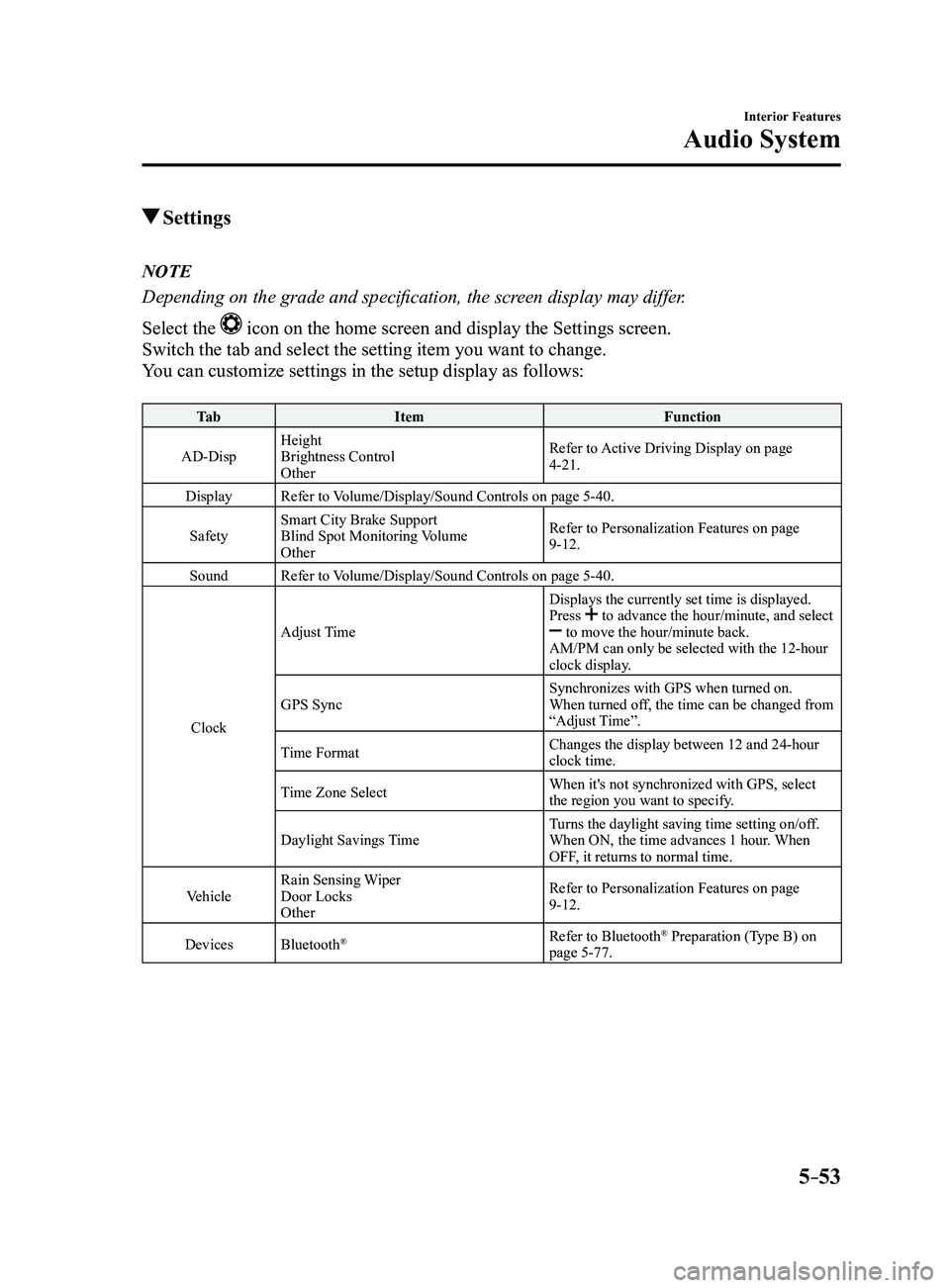
Select the
icon on the home screen and display the Settings screen.
Switch the tab and select the setting item you want to change.
You can customize settings in the setup display as follows:
Ta bItem Function
AD-Disp Height
Brightness Control
Other Refer to Active Driving Display on page
4-21.
Display Refer to Volume/Display/Sound Controls on page
5-40.
Safety Smart City Brake Support
Blind Spot Monitoring Volume
Other Refer to Personalization Features on page
9-12.
Sound Refer to Volume/Display/Sound Controls on page
5-40.
Clock Adjust Time
Displays the currently set time is displayed.
Press
to advance the hour/minute, and select to move the hour/minute back.
AM/PM can only be selected with the 12-hour
clock display.
GPS Sync Synchronizes with GPS when turned on.
When turned off, the time can be changed from
“Adjust Time”.
Time Format Changes the display between 12 and 24-hour
clock time.
Time Zone Select When it's not synchronized with GPS, select
the region you want to specify.
Daylight Savings Time Turns the daylight saving time setting on/off.
When ON, the time advances 1 hour. When
OFF, it returns to normal time.
Vehicle Rain Sensing Wiper
Door Locks
Other Refer to Personalization Features on page
9-12.
Devices Bluetooth
®Refer to Bluetooth® Preparation (Type B) on
page 5-77.
Mazda3_8FL6-EA-16F_Edition2.indb 532016/08/10 17:37:46
Page 459 of 612
6–47
Maintenance and Care
Owner Maintenance
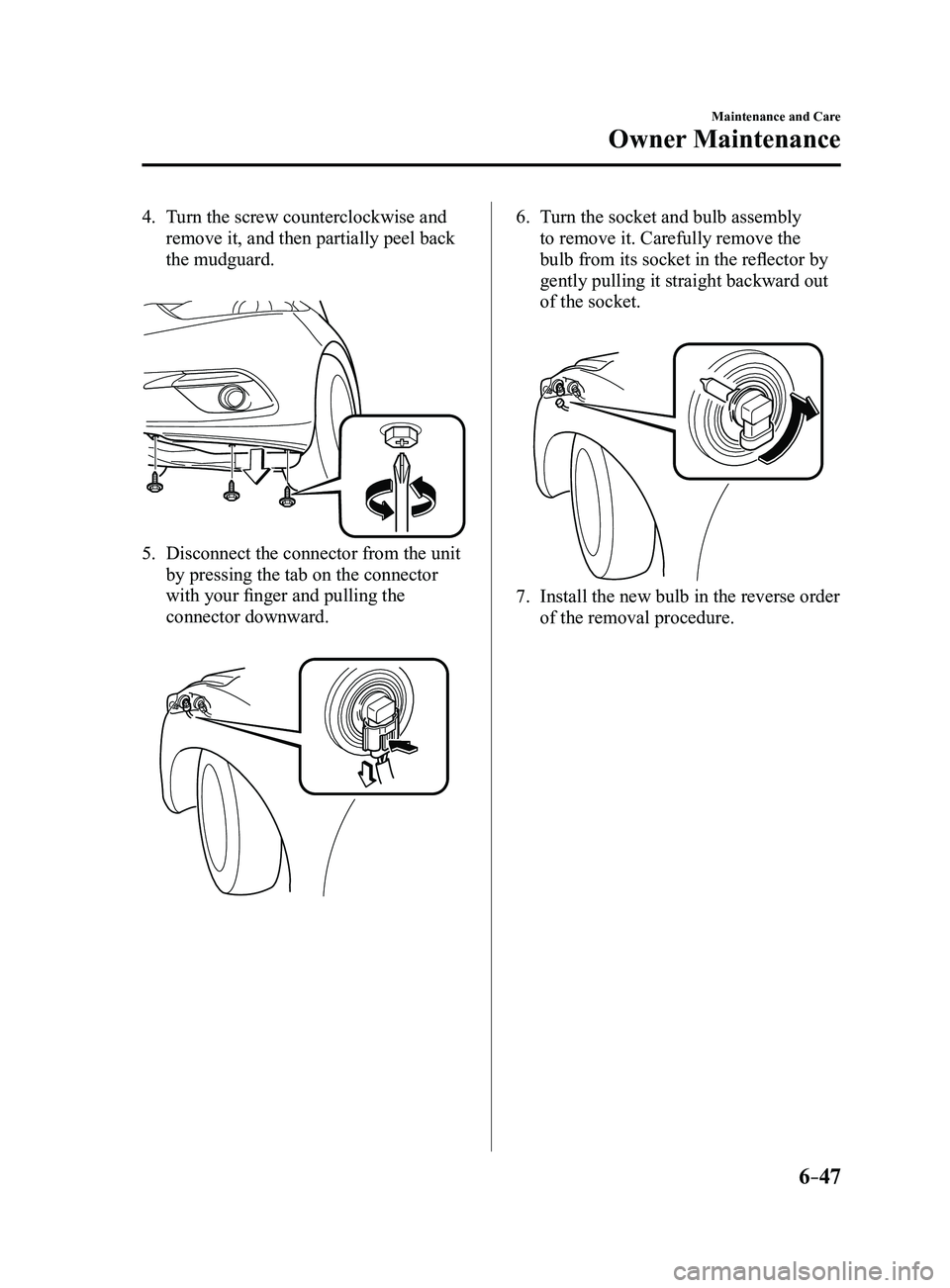
4. Turn the screw counterclockwise and
remove it, and then partially peel back
the mudguard.
5. Disconnect the connector from the unit
by pressing the tab on the connector
with your finger and pulling the
connector downward.
6. Turn the socket and bulb assembly
to remove it. Carefully remove the
bulb from its socket in the reflector by
gently pulling it straight backward out
of the socket.
7. Install the new bulb in the reverse order
of the removal procedure.
Mazda3_8FL6-EA-16F_Edition2.indb 472016/08/10 17:38:51
Page 461 of 612
6–49
Maintenance and Care
Owner Maintenance
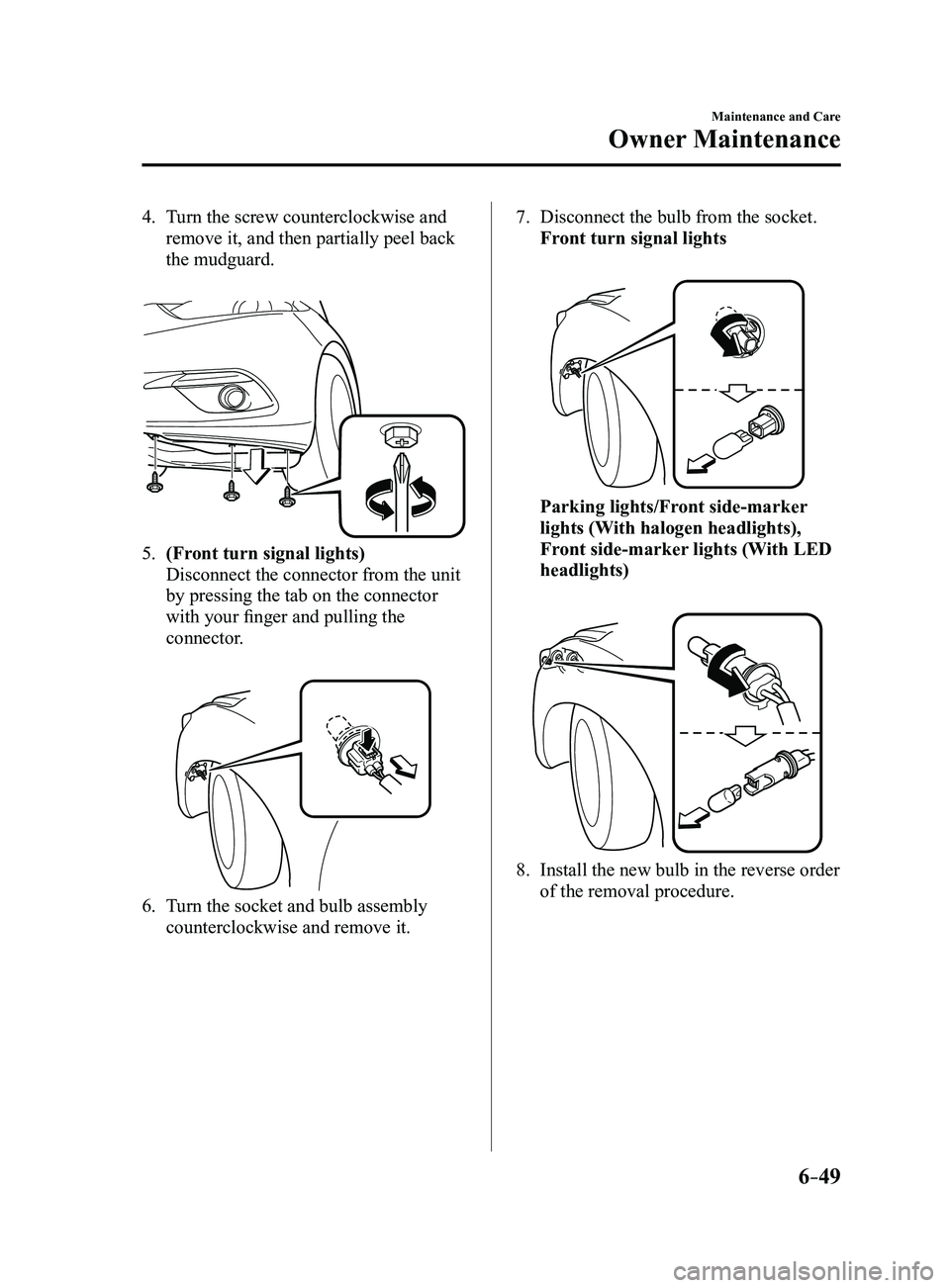
4. Turn the screw counterclockwise and
remove it, and then partially peel back
the mudguard.
5. (Front turn signal lights)
Disconnect the connector from the unit
by pressing the tab on the connector
with your finger and pulling the
connector.
6. Turn the socket and bulb assembly
counterclockwise and remove it.
7. Disconnect the bulb from the socket.
Front turn signal lights
Parking lights/Front side-marker
lights (With halogen headlights),
Front side-marker lights (With LED
headlights)
8. Install the new bulb in the reverse order
of the removal procedure.
Mazda3_8FL6-EA-16F_Edition2.indb 492016/08/10 17:38:52
Page 462 of 612
6–50
Maintenance and Care
Owner Maintenance
*Some models.
Side turn signal lights*, Brake lights
(LED type), Taillights/Rear side-marker
lights (LED type), Taillights (Trunk lid
side/Liftgate side), High-mount brake
light
The LED bulb cannot be replaced as a
single unit because it is an integrated unit.
The LED bulb has to be replaced with the
unit. We recommend an Authorized Mazda
Dealer when the replacement is necessary.
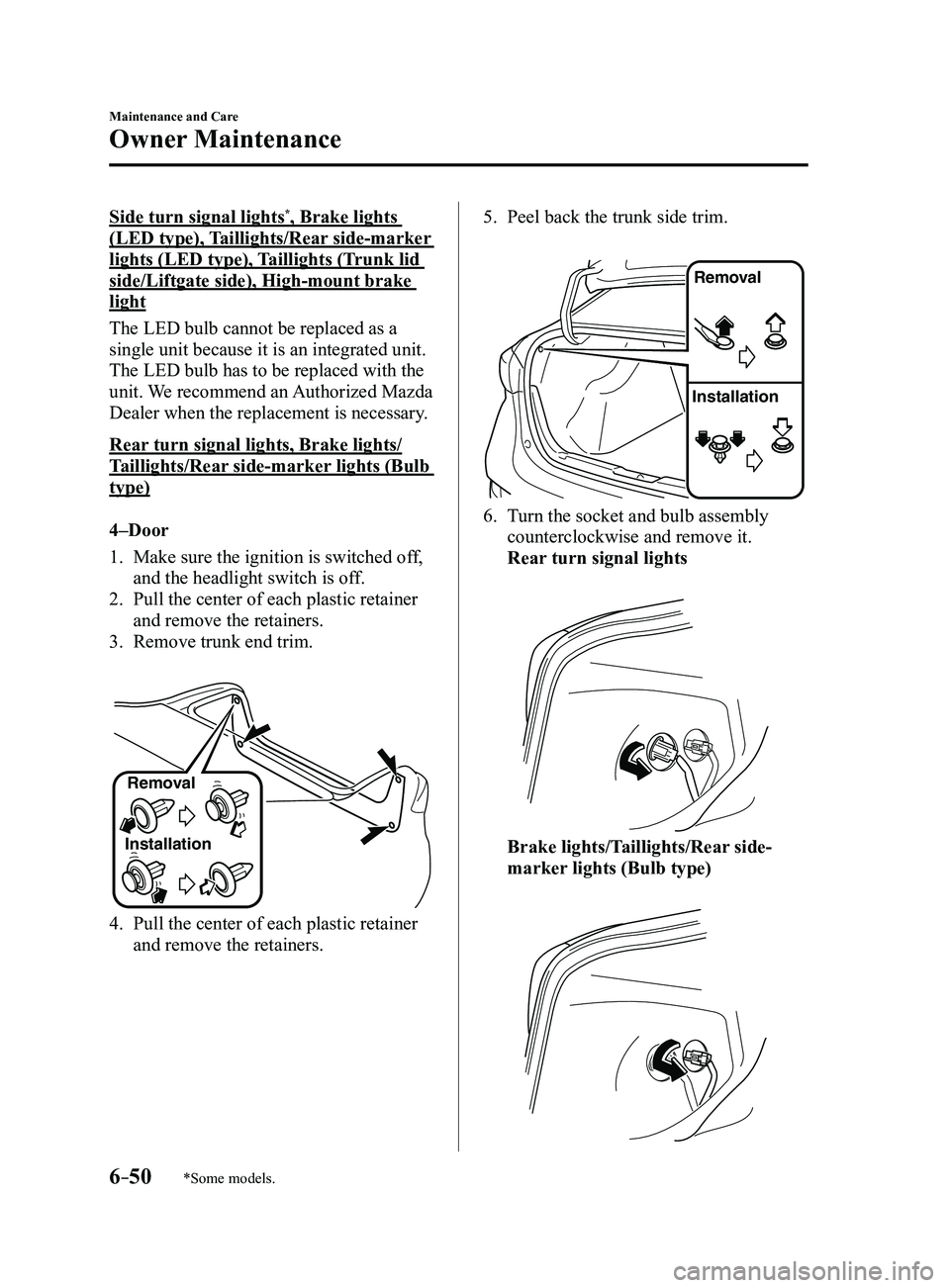
Rear turn signal lights, Brake lights/
Taillights/Rear side-marker lights (Bulb
type)
4–Door
1. Make sure the ignition is switched of f,
and the headlight switch is off.
2. Pull the center of each plastic retainer
and remove the retainers.
3. Remove trunk end trim.
InstallationRemoval
4. Pull the center of each plastic retainer
and remove the retainers.
5. Peel back the trunk side trim.
Remova
l
Installation
6. Turn the socket and bulb assembly
counterclockwise and remove it.
Rear turn signal lights
Brake lights/Taillights/Rear side-
marker lights (Bulb type)
Mazda3_8FL6-EA-16F_Edition2.indb 502016/08/10 17:38:53
Page 464 of 612
6–52
Maintenance and Care
Owner Maintenance
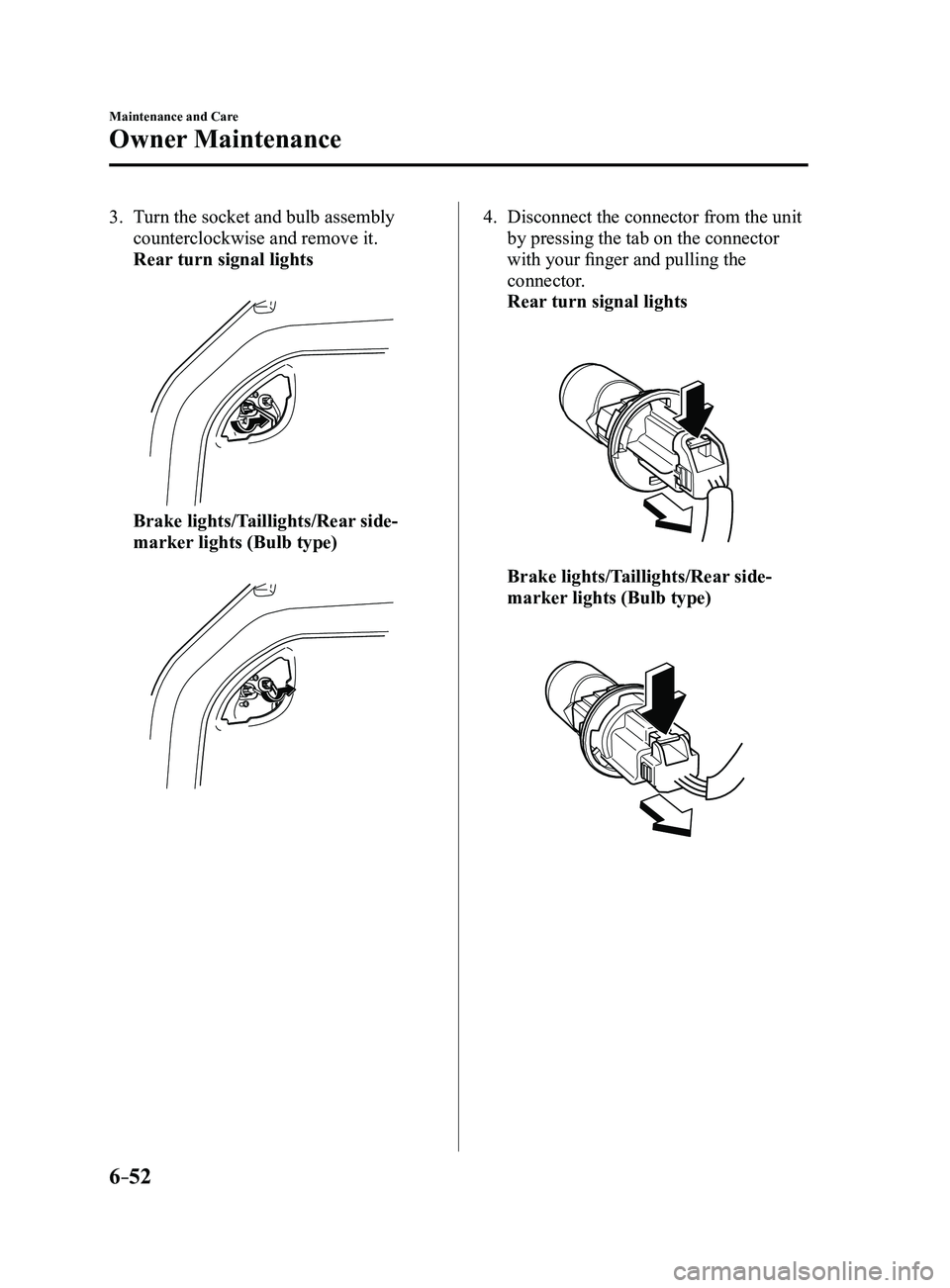
3. Turn the socket and bulb assembly
counterclockwise and remove it.
Rear turn signal lights
Brake lights/Taillights/Rear side-
marker lights (Bulb type)
4. Disconnect the connector from the unit
by pressing the tab on the connector
with your finger and pulling the
connector.
Rear turn signal lights
Brake lights/Taillights/Rear side-
marker lights (Bulb type)
Mazda3_8FL6-EA-16F_Edition2.indb 522016/08/10 17:38:54
Page 465 of 612
6–53
Maintenance and Care
Owner Maintenance
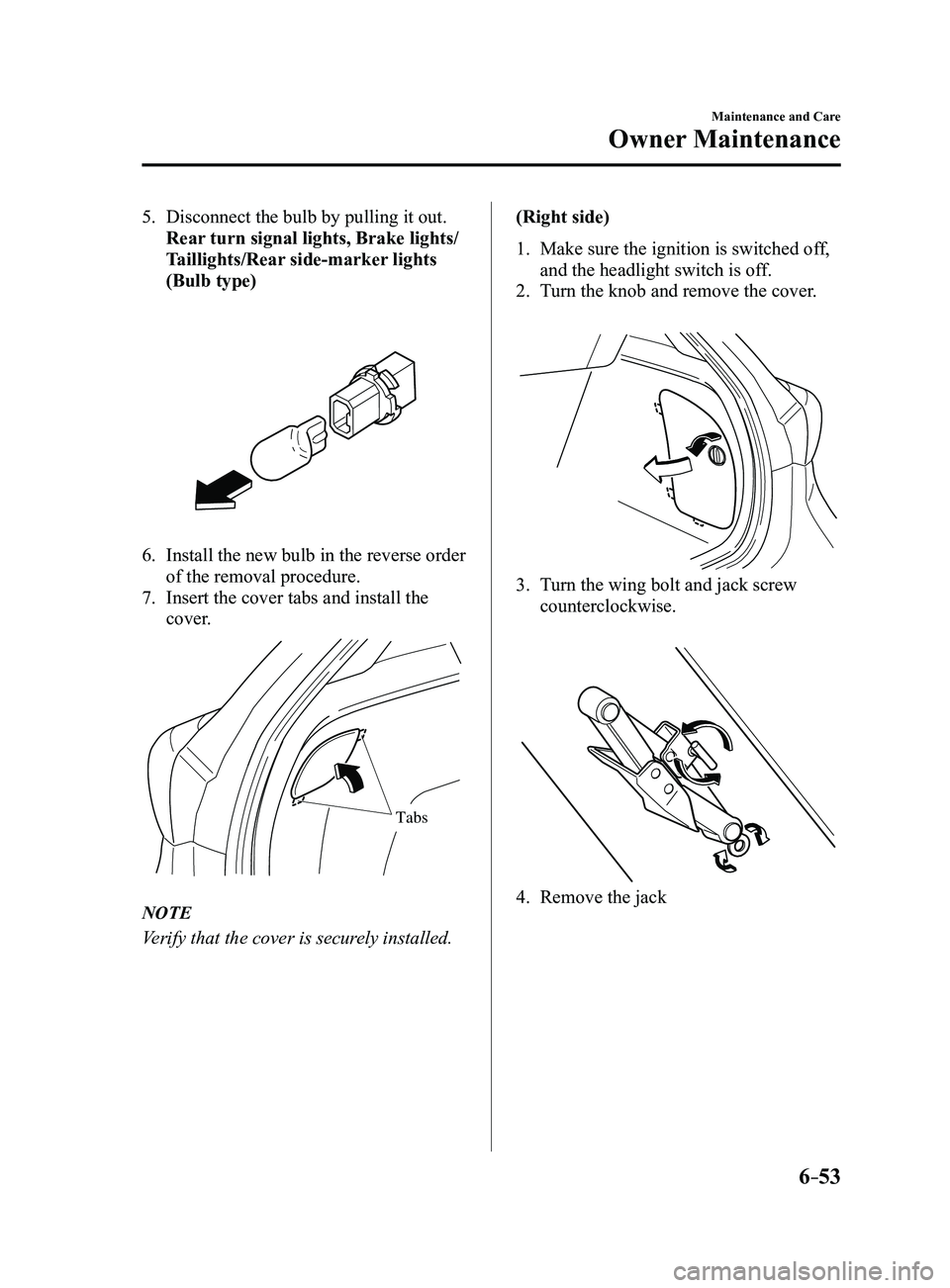
5. Disconnect the bulb by pulling it out.
Rear turn signal lights, Brake lights/
Taillights/Rear side-marker lights
(Bulb type)
6. Install the new bulb in the reverse order
of the removal procedure.
7. Insert the cover tabs and install the
cover.
Tabs
NOTE
Verify that the cover is securely installed.(Right side)
1. Make sure the ignition is switched of
f,
and the headlight switch is off.
2. Turn the knob and remove the cover.
3. Turn the wing bolt and jack screw
counterclockwise.
4. Remove the jack
Mazda3_8FL6-EA-16F_Edition2.indb 532016/08/10 17:38:55
Page 466 of 612
6–54
Maintenance and Care
Owner Maintenance
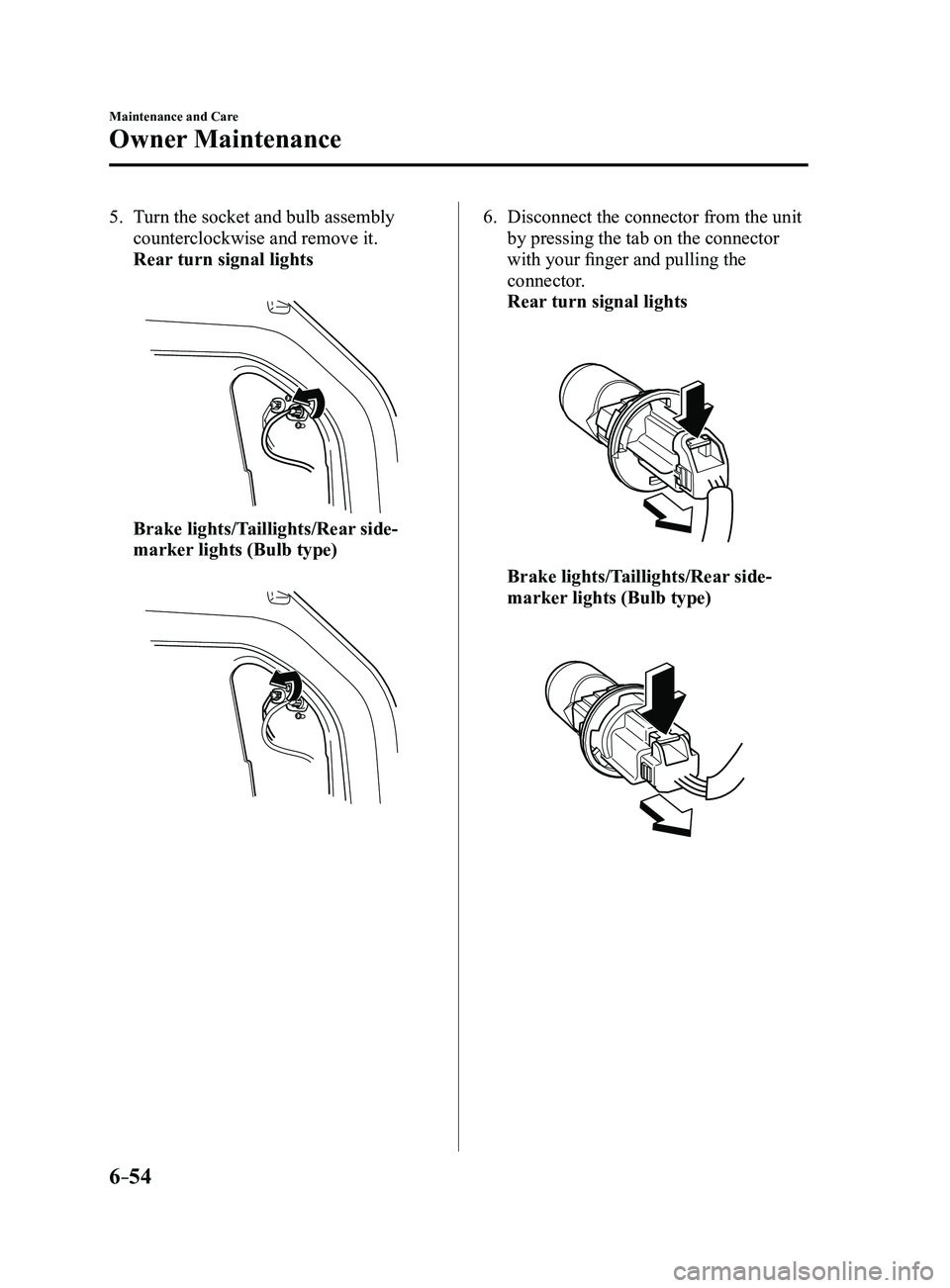
5. Turn the socket and bulb assembly
counterclockwise and remove it.
Rear turn signal lights
Brake lights/Taillights/Rear side-
marker lights (Bulb type)
6. Disconnect the connector from the unit
by pressing the tab on the connector
with your finger and pulling the
connector.
Rear turn signal lights
Brake lights/Taillights/Rear side-
marker lights (Bulb type)
Mazda3_8FL6-EA-16F_Edition2.indb 542016/08/10 17:38:56
Page 467 of 612
6–55
Maintenance and Care
Owner Maintenance
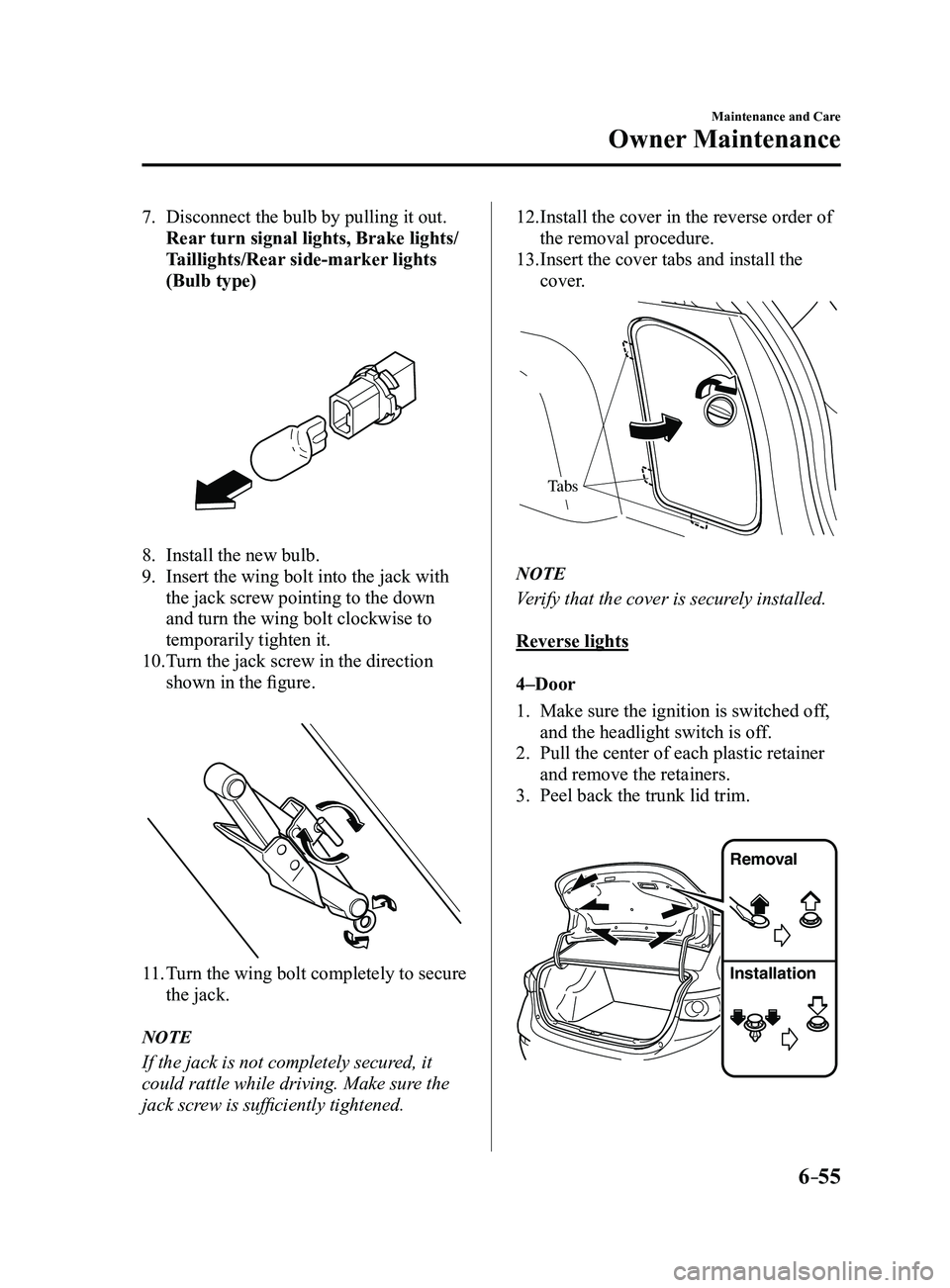
7. Disconnect the bulb by pulling it out.
Rear turn signal lights, Brake lights/
Taillights/Rear side-marker lights
(Bulb type)
8. Install the new bulb.
9. Insert the wing bolt into the jack with
the jack screw pointing to the down
and turn the wing bolt clockwise to
temporarily tighten it.
10. Turn the jack screw in the direction
shown in the figure.
11. Turn the wing bolt completely to secure
the jack.
NOTE
If the jack is not completely secured, it
could rattle while driving. Make sure the
jack screw is sufficiently tightened.
12. Install the cover in the reverse order of
the removal procedure.
13. Insert the cover tabs and install the
cover.
Tabs
NOTE
Verify that the cover is securely installed.
Reverse lights
4–Door
1. Make sure the ignition is switched off,
and the headlight switch is off.
2. Pull the center of each plastic retainer
and remove the retainers.
3. Peel back the trunk lid trim.
Removal
Installation
Mazda3_8FL6-EA-16F_Edition2.indb 552016/08/10 17:38:56