warning MAZDA MODEL 3 5-DOOR 2017 Owners Manual
[x] Cancel search | Manufacturer: MAZDA, Model Year: 2017, Model line: MODEL 3 5-DOOR, Model: MAZDA MODEL 3 5-DOOR 2017Pages: 612
Page 570 of 612
8–36
Customer Information and Reporting Safety Defects
Tire Information (U.S.A.)
Vehicle Loading
WARNING
Do not tow a trailer with this vehicle:
Towing a trailer with this vehicle is dangerous because it has not been designed to tow a
trailer and doing so will affect the drive system which could result in vehicle damage.
This section will guide you in the proper loading of your vehicle, to ke\
ep your loaded
vehicle weight within its design rating capability. Properly loading your vehicle will provide
maximum return of vehicle design performance. Before loading your vehicle, familiarize
yourself with the following terms for determining your vehicle's weight \
ratings, from the
vehicle's Safety Certification Label and Tire and Load Information Label:
WARNING
Overloaded Vehicle:
Overloading a vehicle is dangerous. The results of overloading can have serious
consequences in terms of passenger safety. Too much weight on a vehicle's suspension
system can cause spring or shock absorber failure, brake failure, handling or steering
problems, irregular tire wear, tire failure or other damage.
Overloading makes a vehicle harder to drive and control. It also increases the distance
required for stopping. In cases of serious overloading, brakes can fail completely,
particularly on steep grades. The load a tire will carry safely is a combination of the size of
the tire, its load range, and corresponding inflation pressure.
Never overload the vehicle and always observe the vehicle's weight ratings from the
vehicle's Safety Certification and Tire and Load Information labels.
Mazda3_8FL6-EA-16F_Edition2.indb 362016/08/10 17:39:43
Page 574 of 612
8–40
Customer Information and Reporting Safety Defects
Tire Information (U.S.A.)
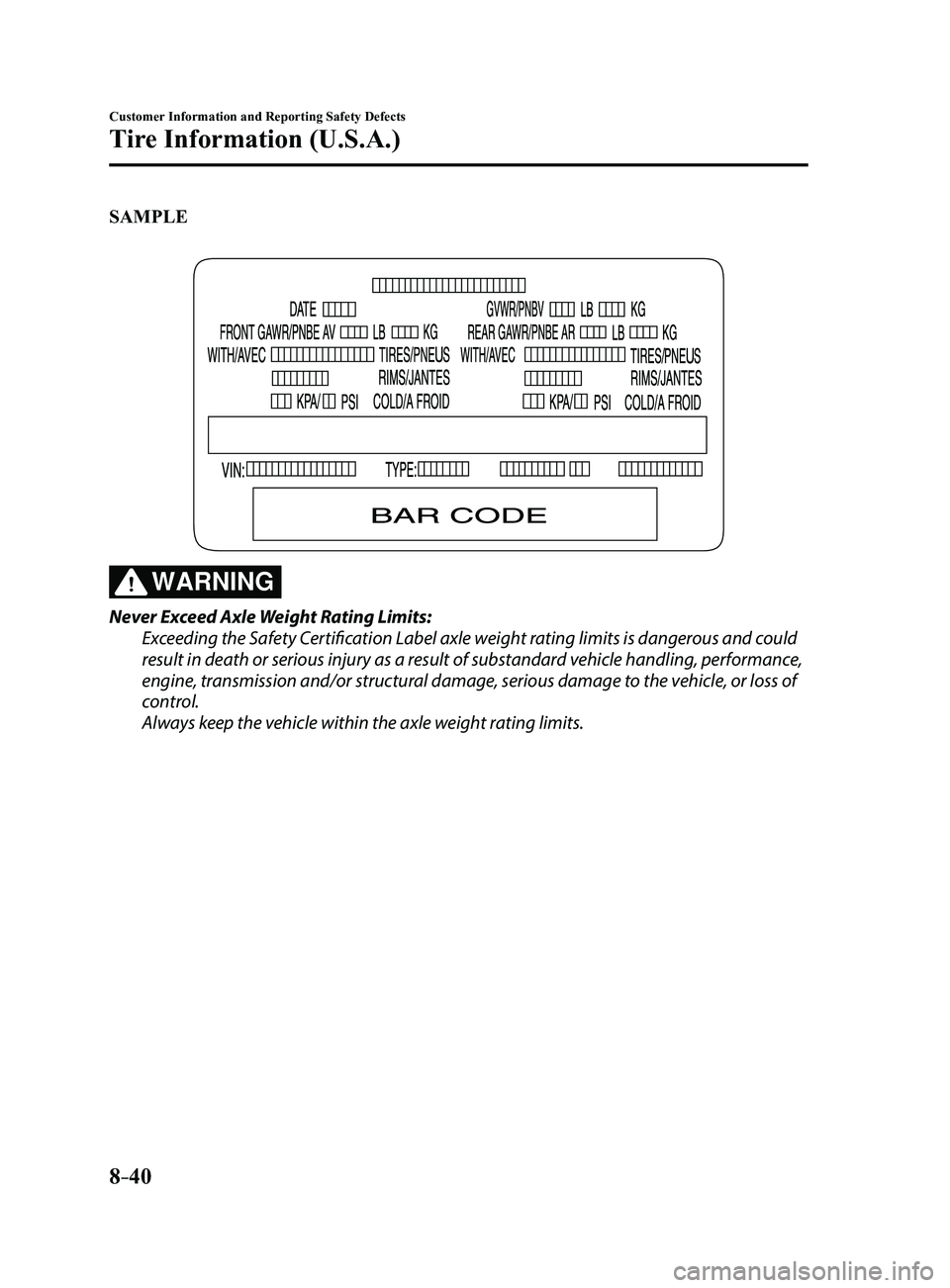
SAMPLE
WARNING
Never Exceed Axle Weight Rating Limits:
Exceeding the Safety Certification Label axle weight rating limits is dangerous and could
result in death or serious injury as a result of substandard vehicle handling, performance,
engine, transmission and/or structural damage, serious damage to the vehicle, or loss of
control.
Always keep the vehicle within the axle weight rating limits.
Mazda3_8FL6-EA-16F_Edition2.indb 402016/08/10 17:39:45
Page 575 of 612
8–41
Customer Information and Reporting Safety Defects
Tire Information (U.S.A.)
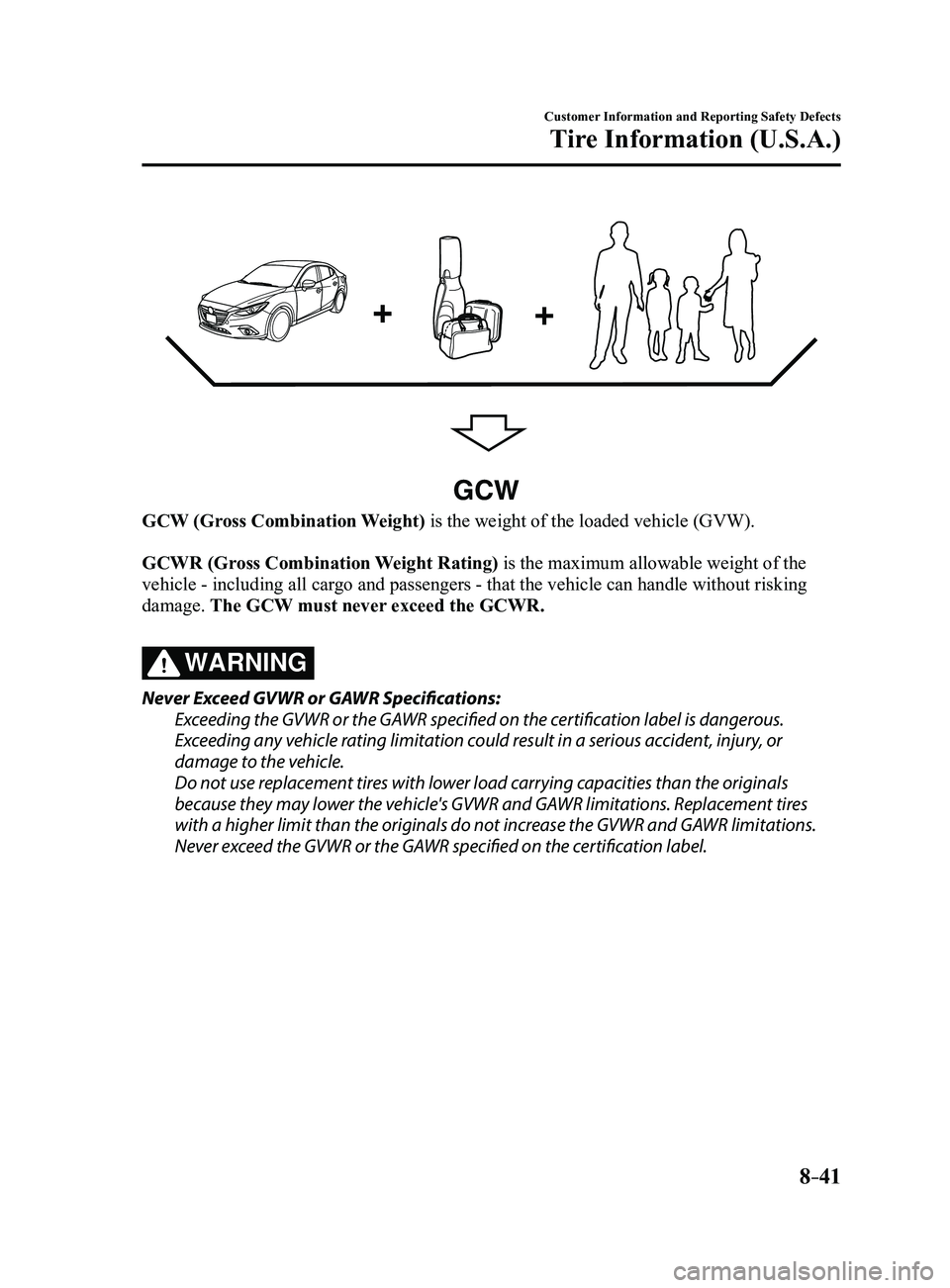
GCW
GCW (Gross Combination Weight) is the weight of the loaded vehicle (GVW).
GCWR (Gross Combination Weight Rating) is the maximum allowable weight of the
vehicle - including all cargo and passengers - that the vehicle can handle without risking
damage. The GCW must never exceed the GCWR.
WARNING
Never Exceed GVWR or GAWR Specifications:
Exceeding the GVWR or the GAWR specified on the certification label is dangerous.
Exceeding any vehicle rating limitation could result in a serious accident, injury, or
damage to the vehicle.
Do not use replacement tires with lower load carrying capacities than the originals
because they may lower the vehicle's GVWR and GAWR limitations. Replacement tires
with a higher limit than the originals do not increase the GVWR and GAWR limitations.
Never exceed the GVWR or the GAWR specified on the certification label.
Mazda3_8FL6-EA-16F_Edition2.indb 412016/08/10 17:39:45
Page 578 of 612
8–44
Customer Information and Reporting Safety Defects
Declaration of Conformity
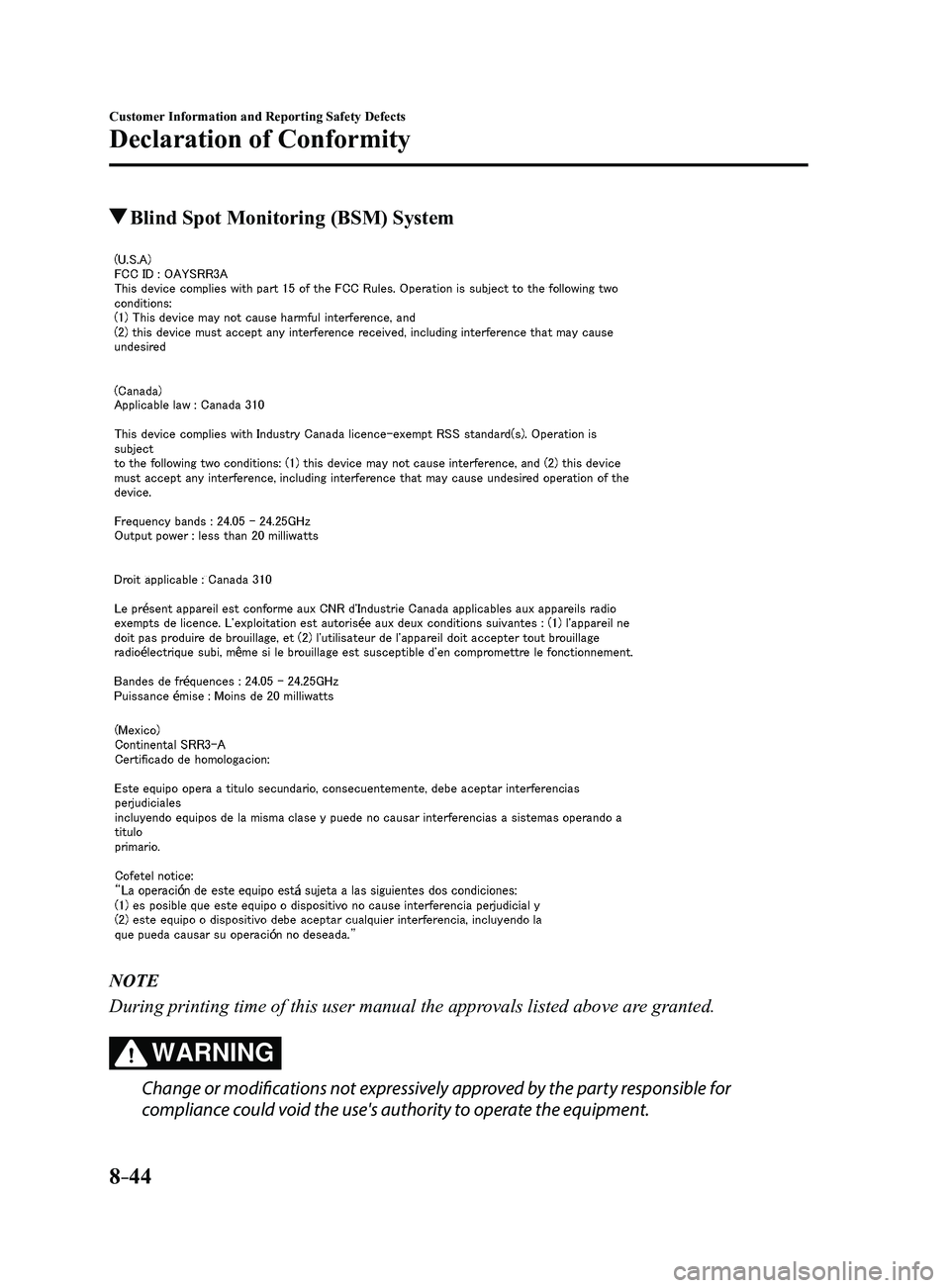
Blind Spot Monitoring (BSM) System
NOTE
During printing time of this user manual the approvals listed above are granted.
WARNING
Change or modifications not expressively approved by the party responsible for
compliance could void the use's authority to operate the equipment.
Mazda3_8FL6-EA-16F_Edition2.indb 442016/08/10 17:39:47
Page 580 of 612
8–46
Customer Information and Reporting Safety Defects
Declaration of Conformity
WARNING
Changes or modifications not expressly approved by the party responsible for compliance
could void the user's authority to operate the equipment.
The term “IC: ” before the radio certification number only signifies that Industry Canada
technical specifications were met.
The antenna used for this transmitter must not be co-located or operatin\
g in conjunction
with any other antenna or transmitter. End-users and installers must be provided with
installation instructions and transmitter operating conditions for satisfying RF exposure
compliance.
Mazda Bluetooth
® Hands-Free Customer Service
U.S.A.
Phone: 800-430-0153 (T oll-free)
Web: www.mazdausa.com/mazdaconnect Canada
Phone: 800-430-0153 (Toll-free)
Web: www.mazdahandsfree.ca
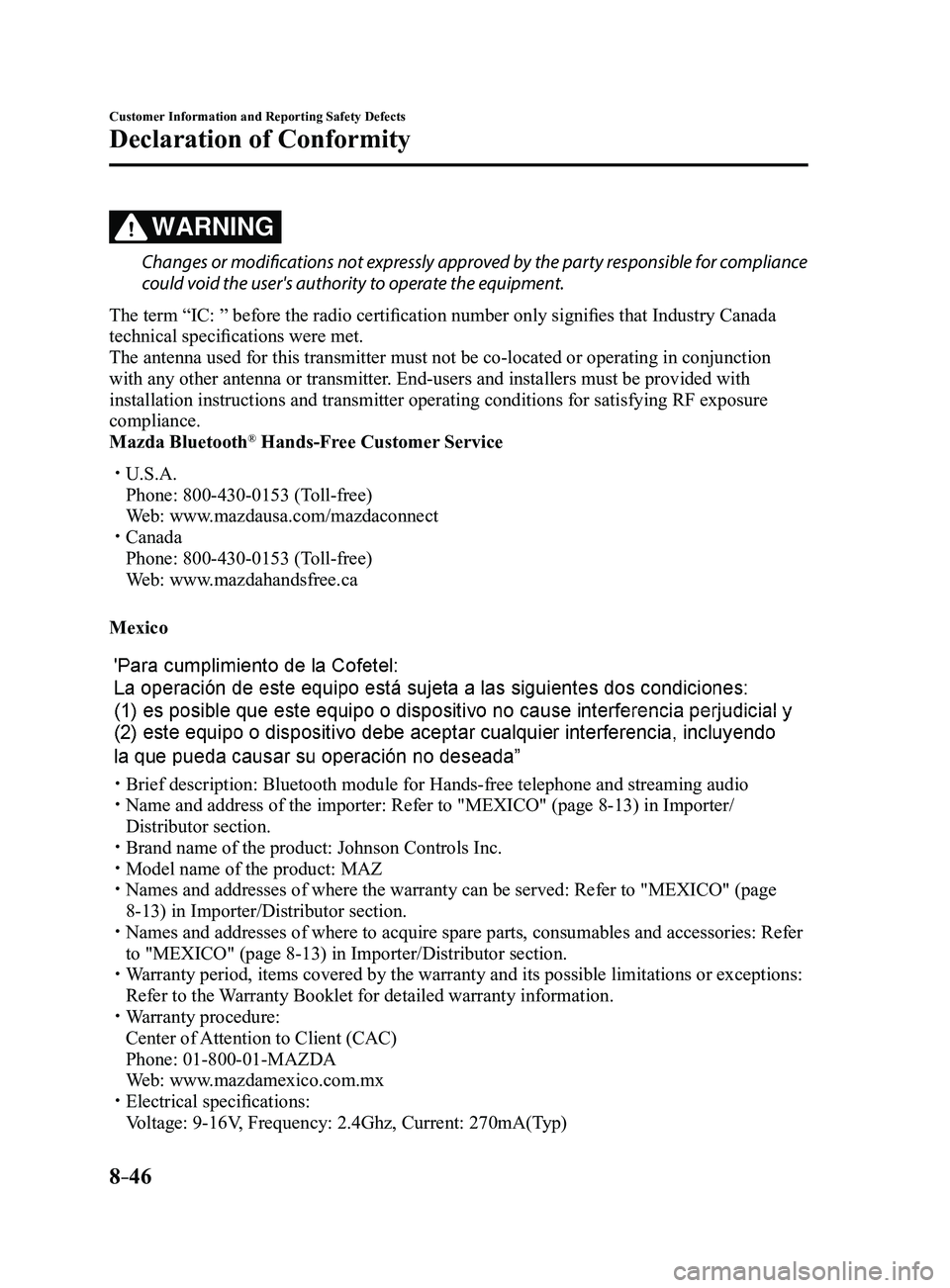
Mexico
Brief description: Bluetooth module for Hands-free telephone an d streaming audio Name and address of the importer: Refer to "MEXICO" (page 8-13) in Importer/
Distributor section.
Brand name of the product: Johnson Controls Inc. Model name of the product: MAZ Names and addresses of where the warranty can be served: Refer to "MEXICO" (page
8-13) in Importer/Distributor section. Names and addresses of where to acquire spare parts, consumable s and accessories: Refer
to "MEXICO" (page 8-13) in Importer/Distributor section. Warranty period, items covered by the warranty and its possible limitatio\
ns or exceptions:
Refer to the Warranty Booklet for detailed warranty information. Warranty procedure:
Center of Attention to Client (CAC)
Phone: 01-800-01-MAZDA
Web: www.mazdamexico.com.mx Electrical specifications:
Voltage: 9-16V, Frequency: 2.4Ghz, Current: 270mA(Typ)
Mazda3_8FL6-EA-16F_Edition2.indb 462016/08/10 17:39:48
Page 596 of 612

9–12
Specifications
Personalization Features
Personalization Features
The following personalization features can be set or changed by the cust\
omer or an
Authorized Mazda Dealer. Consult an Authorized Mazda Dealer for details.
Additionally, some of the personalization features can be changed by the customer
depending on the feature.
Personalization features and settings which can be changed differ depending on the market
and specification.
Settings Change Method
Settings can be changed by operating the center display screen.
A: Refer to Settings on page 5-53.
B: Refer to Fuel Economy Monitor on page
4-75.
C: Refer to Active Driving Display on page
4-21.
Settings can be changed by operating the vehicle switches.
D: Refer to Auto Lock/Unlock Function on page 3-18.
E: Refer to Transmitter on page
3-5.
F: Refer to Locking, Unlocking with Request Switch (W ith the advanced keyless function)
on page 3-14.
Settings can be changed by an Authorized Mazda Dealer.
ItemFeatureFactory
Setting Available
Settings Settings
Change
Method
Safety
Smart City
Brake Support
(SCBS) (page
4-128)
Smart Brake
Support (SBS)
(page
4-133) The system can be changed so that Smart City
Brake Support (SCBS)/Smart Brake Support
(SBS) does not operate.
*1On
On/Off A—
The distance at which the collision warning activates can be changed. Med.
Far/Med./Near A—
The volume of the collision warning can be changed. High
High/Low/Off A—
Mazda3_8FL6-EA-16F_Edition2.indb 122016/08/10 17:39:55
Page 597 of 612
9–13
Specifications
Personalization Features
ItemFeatureFactory
Setting Available
Settings Settings
Change
Method
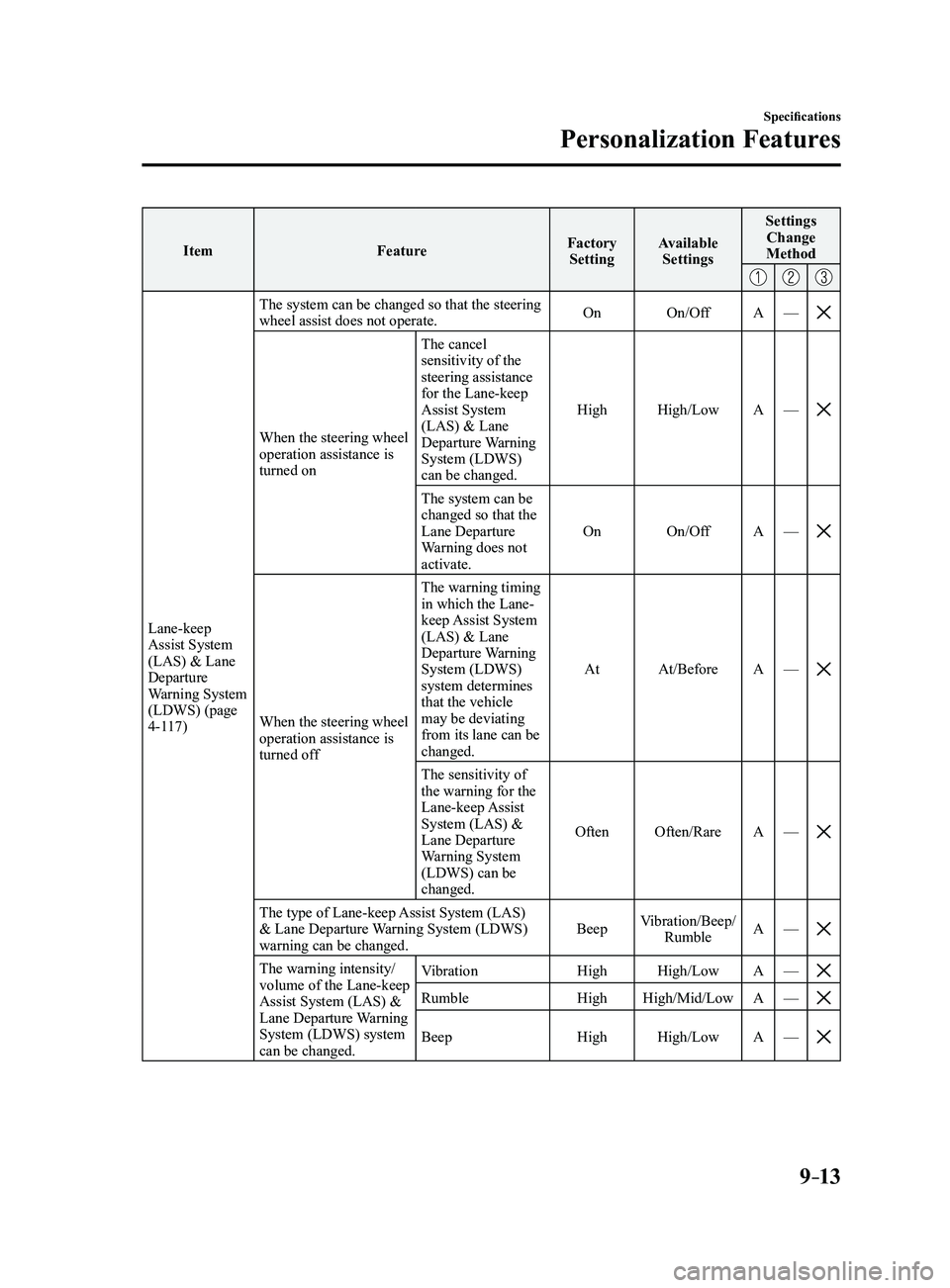
Lane-keep Assist System
(LAS) & Lane
Departure
Warning System
(LDWS) (page
4-117) The system can be changed so that the steering
wheel assist does not operate.
On
On/Off A—
When the steering wheel operation assistance is
turned on The cancel
sensitivity of the
steering assistance
for the Lane-keep
Assist System
(LAS) & Lane
Departure Warning
System (LDWS)
can be changed.
High
High/Low A—
The system can be changed so that the
Lane Departure
Warning does not
activate. On
On/Off A—
When the steering wheel operation assistance is
turned off The warning timing
in which the Lane-
keep Assist System
(LAS) & Lane
Departure Warning
System (LDWS)
system determines
that the vehicle
may be deviating
from its lane can be
changed.
At
At/Before A—
The sensitivity of the warning for the
Lane-keep Assist
System (LAS) &
Lane Departure
Warning System
(LDWS) can be
changed. Often
Often/Rare A—
The type of Lane-keep Assist System (LAS) & Lane Departure Warning System (LDWS)
warning can be changed. Beep
Vibration/Beep/
Rumble A
—
The warning intensity/volume of the Lane-keep
Assist System (LAS) &
Lane Departure Warning
System (LDWS) system
can be changed. Vibration
HighHigh/Low A—RumbleHigh High/Mid/Low A—
BeepHigh High/Low A—
Mazda3_8FL6-EA-16F_Edition2.indb 132016/08/10 17:39:55
Page 598 of 612
9–14
Specifications
Personalization Features
ItemFeatureFactory
Setting Available
Settings Settings
Change
Method
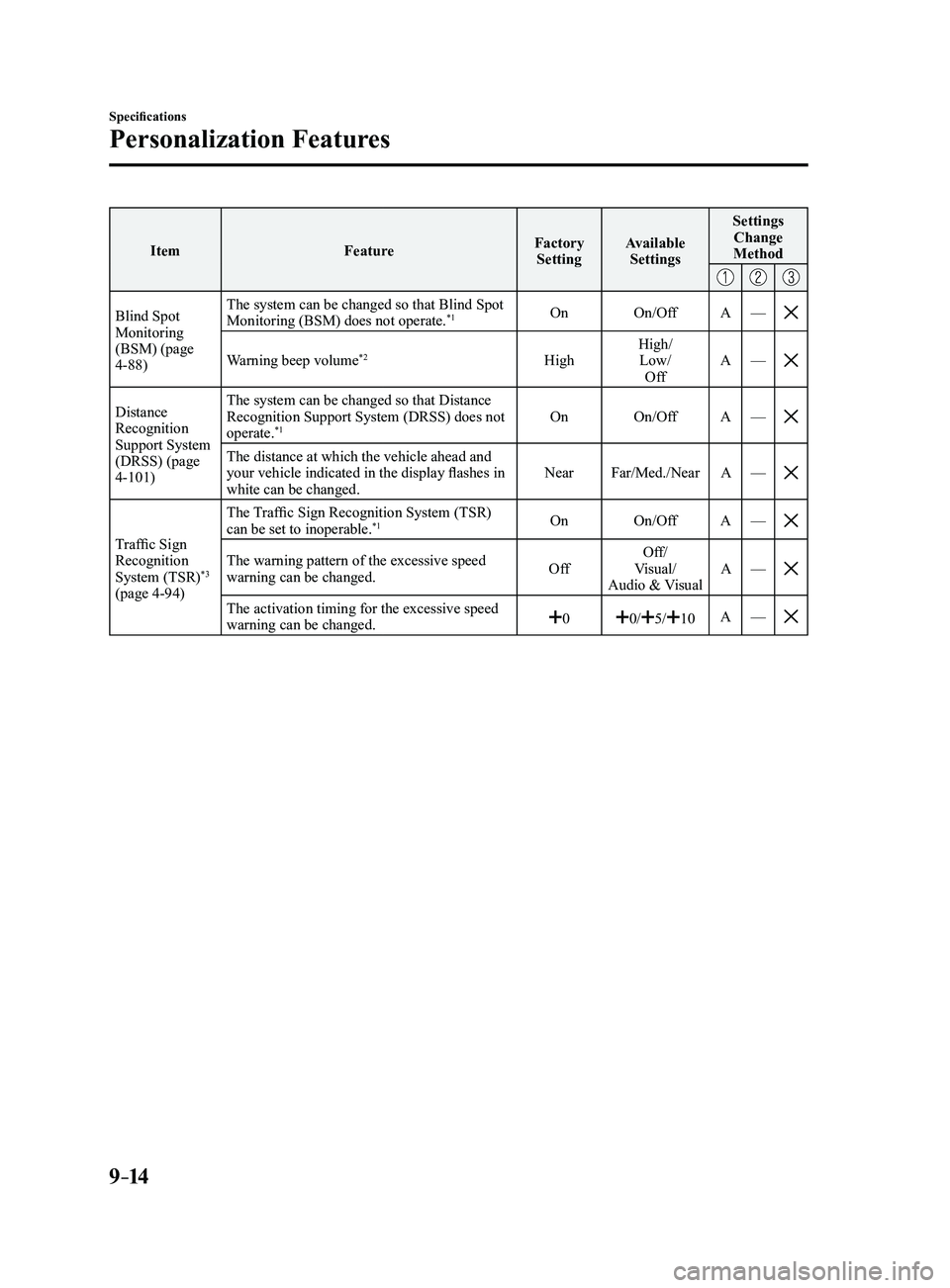
Blind Spot Monitoring
(BSM) (page
4-88) The system can be changed so that Blind Spot
Monitoring (BSM) does not operate.
*1On
On/Off A—
Warning beep volume*2High High/
Low/ Off A
—
Distance Recognition
Support System
(DRSS) (page
4-101) The system can be changed so that Distance
Recognition Support System (DRSS) does not
operate.
*1On
On/Off A—
The distance at which the vehicle ahead and your vehicle indicated in the display flashes in
white can be changed. Near
Far/Med./Near A—
Traffic Sign Recognition
System (TSR)*3
(page 4-94) The Traffic Sign Recognition System (TSR)
can be set to inoperable.
*1On
On/Off A—
The warning pattern of the excessive speed warning can be changed. OffOff/
Visual/
Audio & Visual A
—
The activation timing for the excessive speed warning can be changed.00/5/10A—
Mazda3_8FL6-EA-16F_Edition2.indb 142016/08/10 17:39:56
Page 600 of 612
9–16
Specifications
Personalization Features
ItemFeatureFactory
Setting Available
Settings Settings
Change
Method
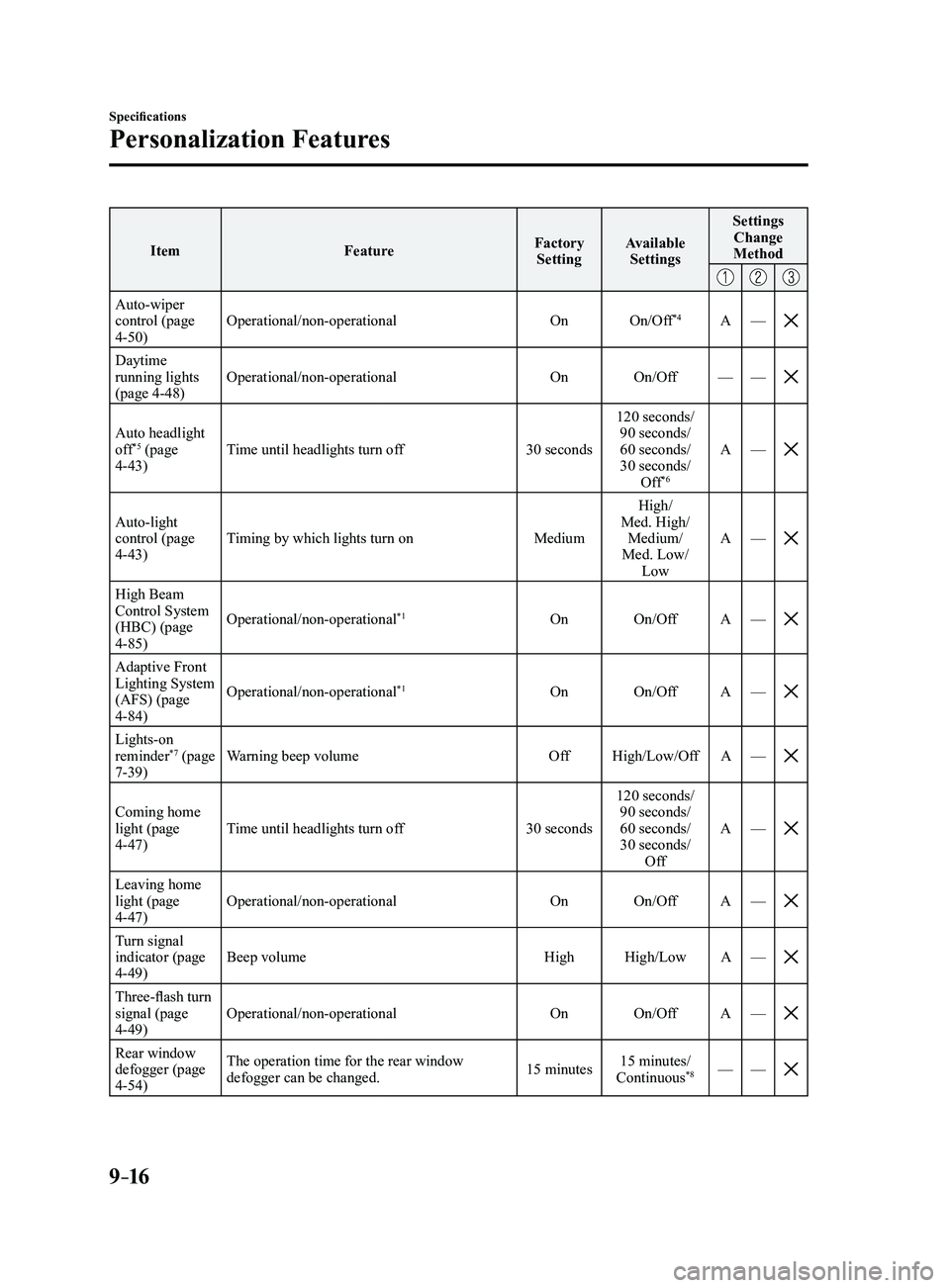
Auto-wiper control (page 4-50) Operational/non-operational
OnOn/Off
*4A—
Daytime running lights
(page 4-48) Operational/non-operational
OnOn/Off ——
Auto headlight off*5 (page 4-43) Time until headlights turn off
30 seconds120 seconds/
90 seconds/
60 seconds/
30 seconds/ Off*6
A —
Auto-light control (page 4-43) Timing by which lights turn on
MediumHigh/
Med. High/ Medium/
Med. Low/ Low A
—
High Beam Control System
(HBC) (page
4-85) Operational/non-operational
*1On
On/Off A—
Adaptive Front Lighting System
(AFS) (page
4-84) Operational/non-operational
*1On
On/Off A—
Lights-on reminder*7 (page 7-39) Warning beep volume
OffHigh/Low/Off A—
Coming home light (page 4-47) Time until headlights turn off
30 seconds120 seconds/
90 seconds/
60 seconds/
30 seconds/ Off A
—
Leaving home light (page 4-47) Operational/non-operational
OnOn/Off A—
Turn signal indicator (page 4-49) Beep volume
HighHigh/Low A—
Three-flash turn signal (page 4-49) Operational/non-operational
OnOn/Off A—
Rear window defogger (page 4-54) The operation time for the rear window
defogger can be changed.
15 minutes15 minutes/
Continuous*8— —
Mazda3_8FL6-EA-16F_Edition2.indb 162016/08/10 17:39:56
Page 602 of 612
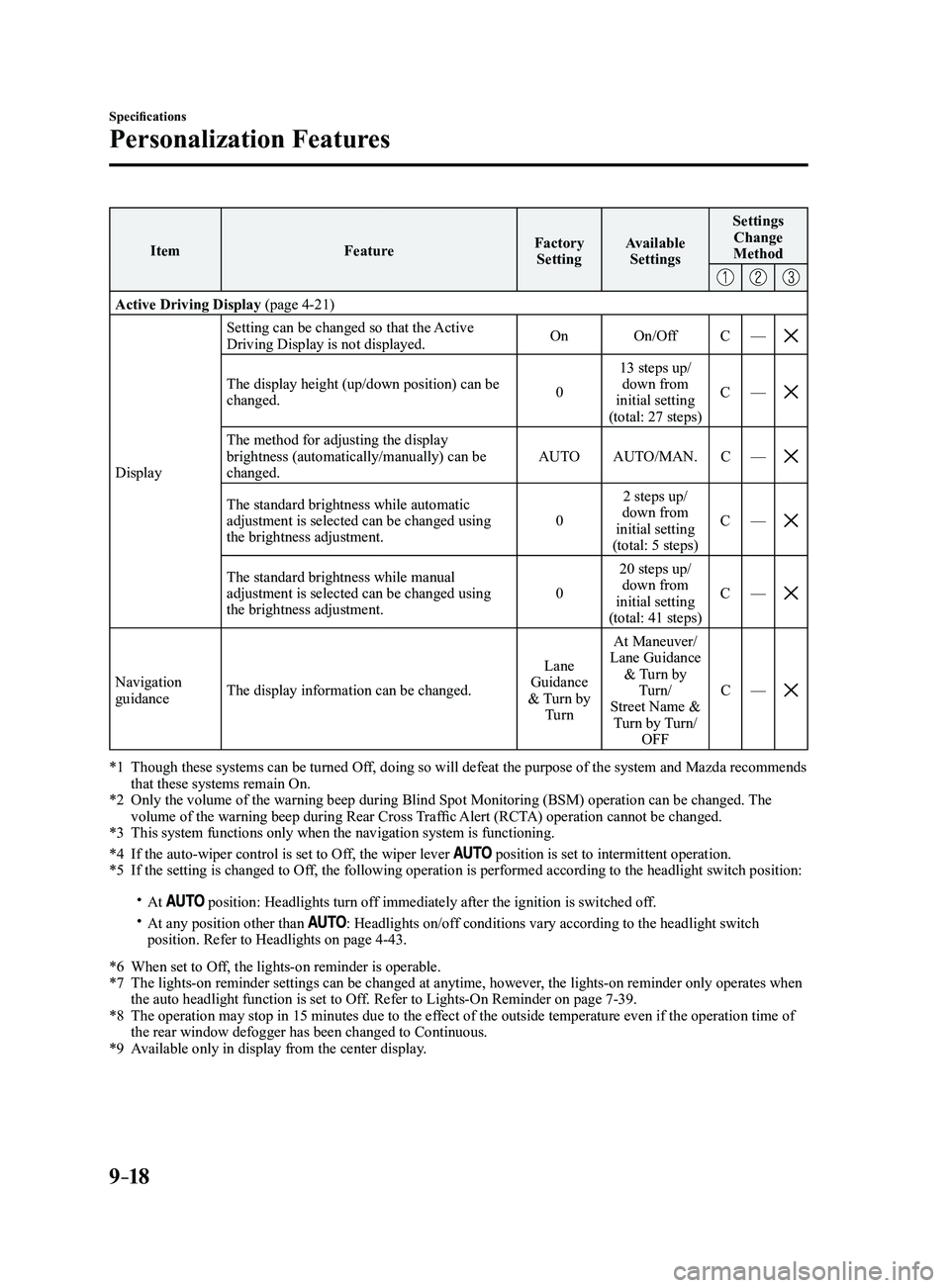
9–18
Specifications
Personalization Features
ItemFeatureFactory
Setting Available
Settings Settings
Change
Method
Active Driving Display (page 4-21)
Display Setting can be changed so that the Active
Driving Display is not displayed.
On
On/Off C—
The display height (up/down position) can be changed. 013 steps up/
down from
initial setting
(total: 27 steps) C
—
The method for adjusting the display brightness (automatically/manually) can be
changed. AUTO
AUTO/MAN. C—
The standard brightness while automatic adjustment is selected can be changed using
the brightness adjustment. 02 steps up/
down from
initial setting
(total: 5 steps) C
—
The standard brightness while manual adjustment is selected can be changed using
the brightness adjustment. 020 steps up/
down from
initial setting
(total: 41 steps) C
—
Navigation guidance The display information can be changed. Lane
Guidance
& Turn by Turn At Maneuver/
Lane Guidance & Turn by Turn/
Street Name & Turn by Turn/ OFF C
—
*1 Though these systems can be turned Of f, doing so will defeat the purpose of the system and Mazda recommends that these systems remain On.*2 Only the volume of the warning beep during Blind Spot Monitorin g (BSM) operation can be changed. The volume of the warning beep during Rear Cross Traffic Alert (RCTA) operation cannot be changed.*3 This system functions only when the navigation system is functioning.
*4 If the auto-wiper control is set to Off, the wiper lever position is set to intermittent operation.*5 If the setting is changed to Off, the following operation is performed according to the headlight switc\
h position:
At position: Headlights turn off immediately after the ignition is switched off. At any position other than : Headlights on/off conditions vary according to the headlight switch
position. Refer to Headlights on page 4-43.
*6 When set to Of f, the lights-on reminder is operable.*7 The lights-on reminder settings can be changed at anytime, however , the lights-on reminder only operates when the auto headlight function is set to Off. Refer to Lights-On Reminder on page 7-39.*8 The operation may stop in 15 minutes due to the effect of the outside temperature even if the operation time of the rear window defogger has been changed to Continuous.*9 Available only in display from the center display.
Mazda3_8FL6-EA-16F_Edition2.indb 182016/08/10 17:39:57