sensor MAZDA MODEL 3 5-DOOR 2017 Owner's Manual
[x] Cancel search | Manufacturer: MAZDA, Model Year: 2017, Model line: MODEL 3 5-DOOR, Model: MAZDA MODEL 3 5-DOOR 2017Pages: 612
Page 112 of 612
3–36
Before Driving
Mirrors
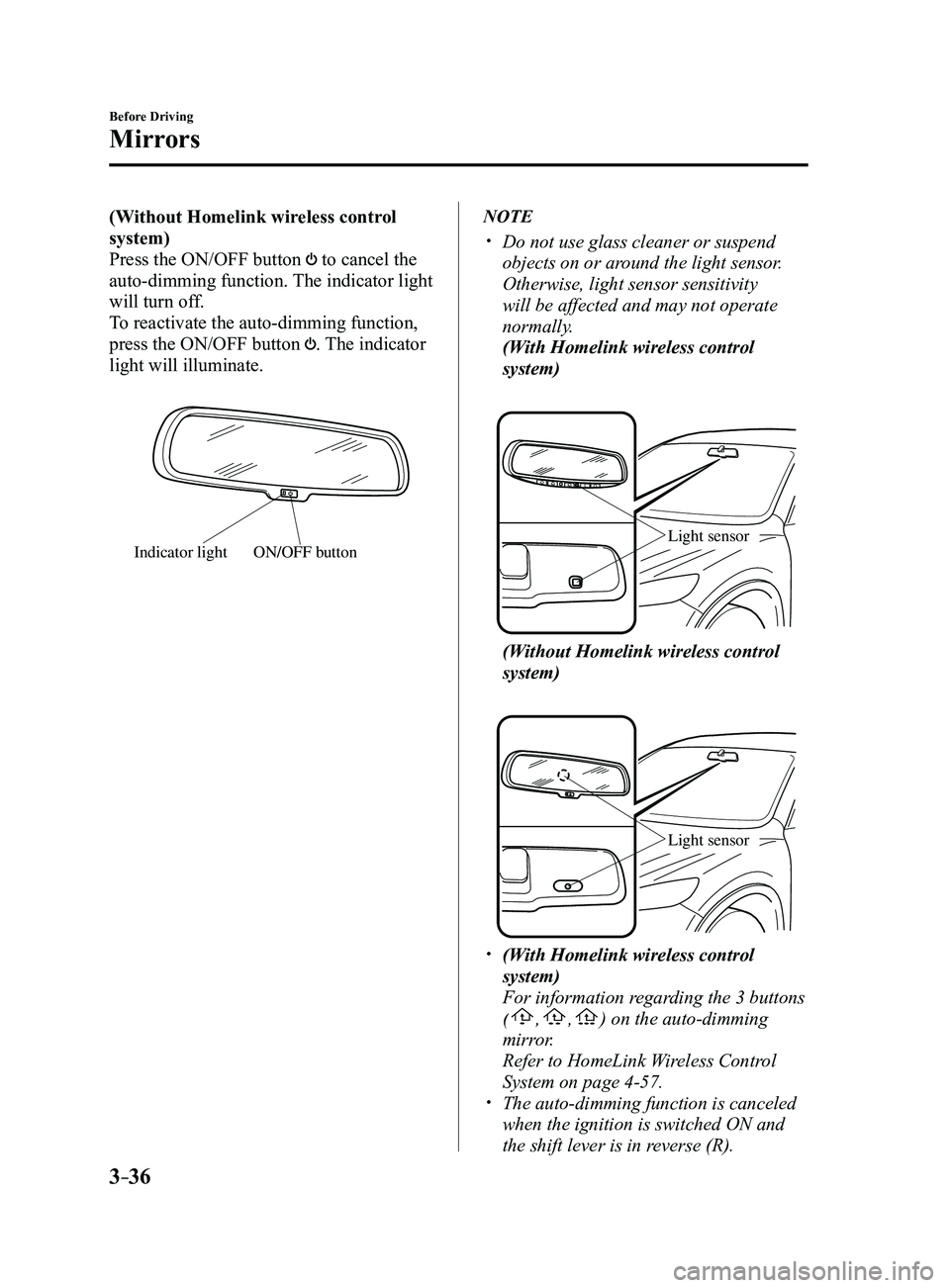
(Without Homelink wireless control
system)
Press the ON/OFF button
to cancel the
auto-dimming function. The indicator light
will turn off.
To reactivate the auto-dimming function,
press the ON/OFF button
. The indicator
light will illuminate.
ON/OFF buttonIndicator light
NOTE
Do not use glass cleaner or suspend
objects on or around the light sensor.
Otherwise, light sensor sensitivity
will be affected and may not operate
normally.
(With Homelink wireless control
system)
Light sensor
(Without Homelink wireless control
system)
Light sensor
(With Homelink wireless control
system)
For information regarding the 3 buttons
(,,) on the auto-dimming
mirror.
Refer to HomeLink W ireless Control
System on page 4-57. The auto-dimming function is canceled
when the ignition is switched ON and
the shift lever is in reverse (R).
Mazda3_8FL6-EA-16F_Edition2.indb 362016/08/10 17:35:33
Page 132 of 612
4–2*Some models.
i-ACTIVSENSE.................................4-81
i-ACTIVSENSE ...........................4-81
Adaptive Front Lighting
System (AFS)* ..............................4-84
High Beam Control System
(HBC)*..........................................4-85
Blind Spot Monitoring (BSM)* ....4-88
Traffic Sign Recognition System
(TSR)* ..........................................4-94
Distance Recognition Support
System (DRSS)* .........................4-101
Rear Cross Traffic Alert
(RCTA)* .....................................4-103
Mazda Radar Cruise Control
(MRCC)* ....................................4-107
Lane-keep Assist System (LAS) &
Lane Departure Warning System
(LDWS)
* ....................................4-117
Smart City Brake Support
(SCBS)* ......................................4-128
Smart Brake Support (SBS)* ......4-133
Forward Sensing Camera
(FSC)
..........................................4-136
Radar Sensor (Front) ..................4-141
Radar Sensors (Rear) .................4-144
Cruise Control .................................4-146
Cruise Control* ...........................4-146
Tire Pressure Monitoring System ...4-151
Tire Pressure Monitoring
System* .......................................4-151
Rear View Monitor ..........................4-155
Rear View Monitor* ...................4-155
Mazda3_8FL6-EA-16F_Edition2.indb 22016/08/10 17:35:40
Page 151 of 612
4–21
When Driving
Instrument Cluster and Display
*Some models.
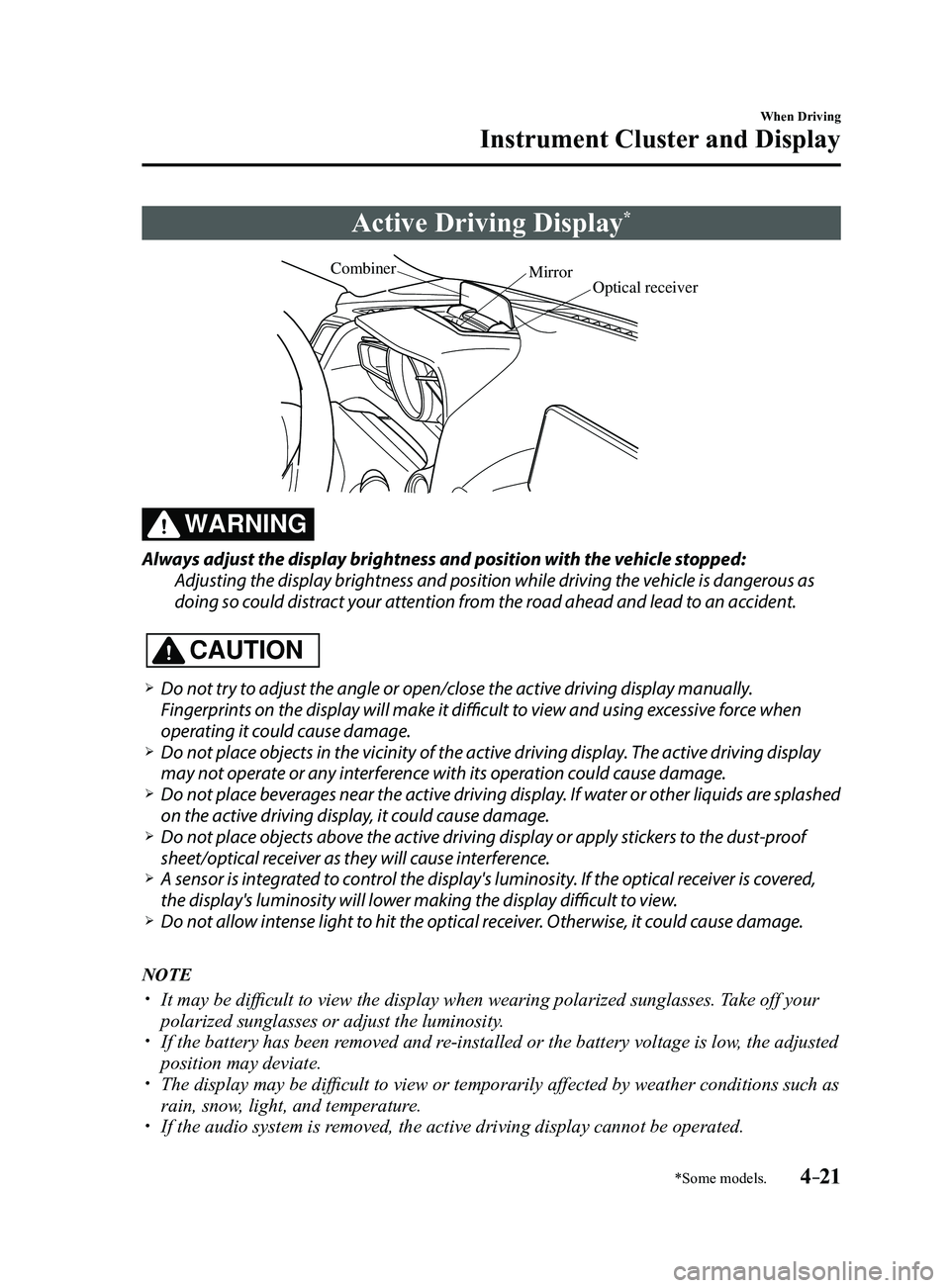
Active Driving Display*
Optical receiver
Mirror
Combiner
WARNING
Always adjust the display brightness and position with the vehicle stopped:
Adjusting the display brightness and position while driving the vehicle is dangerous as
doing so could distract your attention from the road ahead and lead to an accident.
CAUTION
Do not try to adjust the angle or open/close the active driving display manually.
Fingerprints on the display will make it difficult to view and using excessive force when
operating it could cause damage.
Do not place objects in the vicinity of the active driving display. The active driving display
may not operate or any interference with its operation could cause damage. Do not place beverages near the active driving display. If water or other liquids are splashed
on the active driving display, it could cause damage. Do not place objects above the active driving display or apply stickers to the dust-proof
sheet/optical receiver as they will cause interference. A sensor is int
egrated to control the display's luminosity. If the optical receiver is covered,
the display's luminosity will lower making the display difficult to view. Do not allow intense light to hit the optical receiver. Otherwise, it could cause damage.
NOTE
It may be difficult to view the display when wearing polarized s unglasses. Take off your
polarized sunglasses or adjust the luminosity. If the battery has been removed and re-installed or the battery voltage is low, the adjusted
position may deviate. The display may be difficult to view or temporarily affected by weather conditions such as
rain, snow, light, and temperature. If the audio system is removed, the active driving display cannot be operated.
Mazda3_8FL6-EA-16F_Edition2.indb 212016/08/10 17:35:51
Page 158 of 612
4–28
When Driving
Instrument Cluster and Display
Wrench Indicator Light
When the ignition is switched ON, the
wrench indicator light is illuminated and
then turns off after a few seconds.
The wrench indicator light is illuminated
when the preset maintenance period
arrives. Verify the content and perform
maintenance.
Refer to Maintenance Monitor on page
6-18.
Low Engine Coolant Temperature
Indicator Light (Blue)
The light illuminates continuously when
the engine coolant temperature is low and
turns off after the engine is warm.
If the low engine coolant temperature
indicator light remains illuminated after
the engine has been sufficiently warmed
up, the temperature sensor could have
a malfunction. Consult an Authorized
Mazda Dealer.
Mazda3_8FL6-EA-16F_Edition2.indb 282016/08/10 17:36:05
Page 175 of 612
4–45
When Driving
Switches and Controls
*Some models.
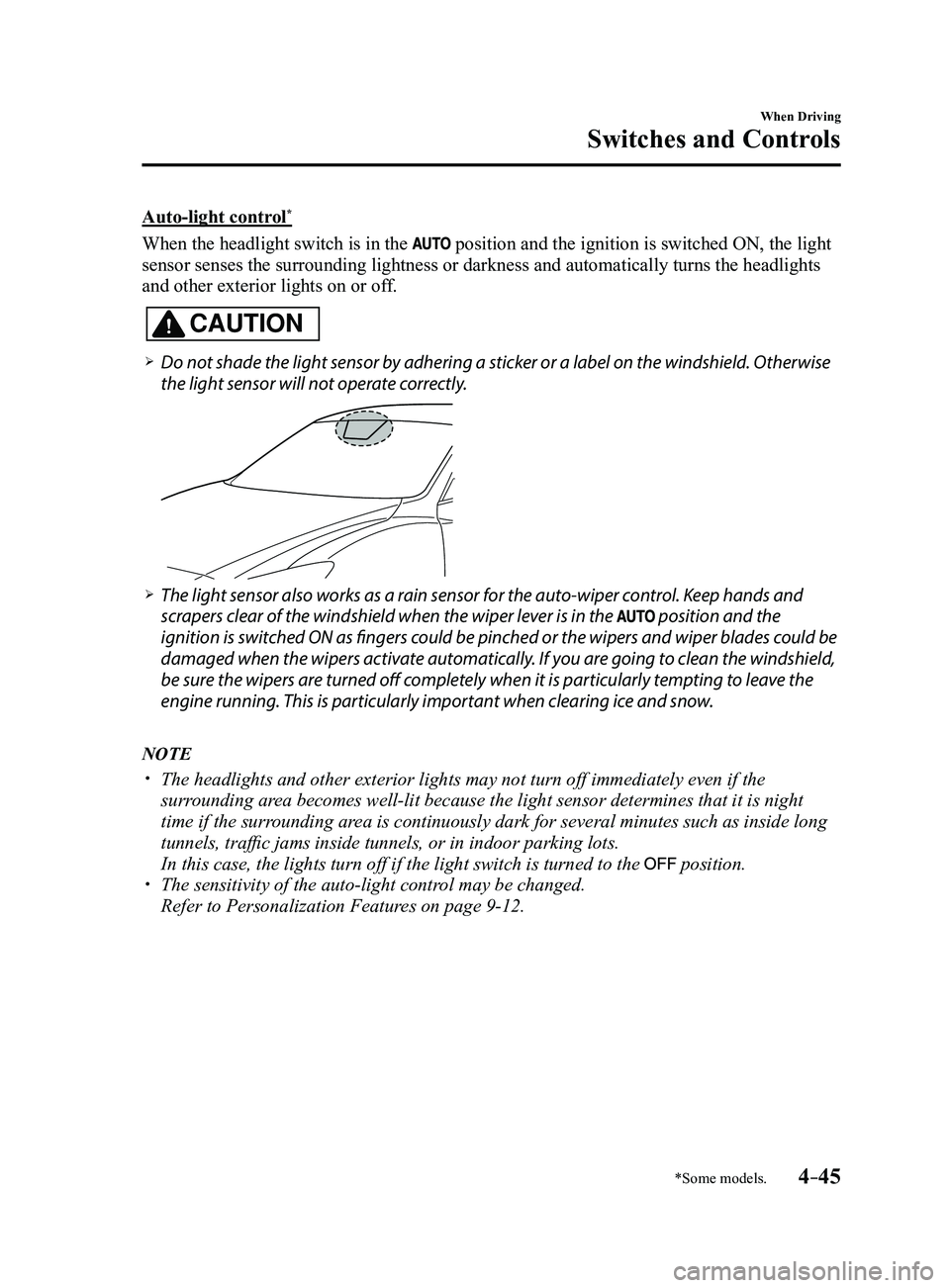
Auto-light control*
When the headlight switch is in the position and the ignition is switched ON, the light
sensor senses the surrounding lightness or darkness and automatically tu\
rns the headlights
and other exterior lights on or off.
CAUTION
Do not shade the light sensor by adhering a sticker or a label on the windshield. Otherwise
the light sensor will not operate correctly.
The light sensor also works as a rain sensor for the auto-wiper control. Keep hands and
scrapers clear of the windshield when the wiper lever is in the position and the
ignition is switched ON as fingers could be pinched or the wipers and wiper blades could be
damaged when the wipers activate automatically. If you are going to clean the windshield,
be sure the wipers are turned off completely when it is particularly tempting to leave the
engine running. This is particularly important when clearing ice and snow.
NOTE
The headlights and other exterior lights may not turn off immediately ev\
en if the
surrounding area becomes well-lit because the light sensor determines that it is night\
time if the surrounding area is continuously dark for several minutes such as inside long
tunnels, traffic jams inside tunnels, or in indoor parking lots.
In this case, the lights turn off if the light switch is turned to the position. The sensitivity of the auto-light control may be changed.
Refer to Personalization Features on page 9-12.
Mazda3_8FL6-EA-16F_Edition2.indb 452016/08/10 17:36:15
Page 181 of 612
4–51
When Driving
Switches and Controls
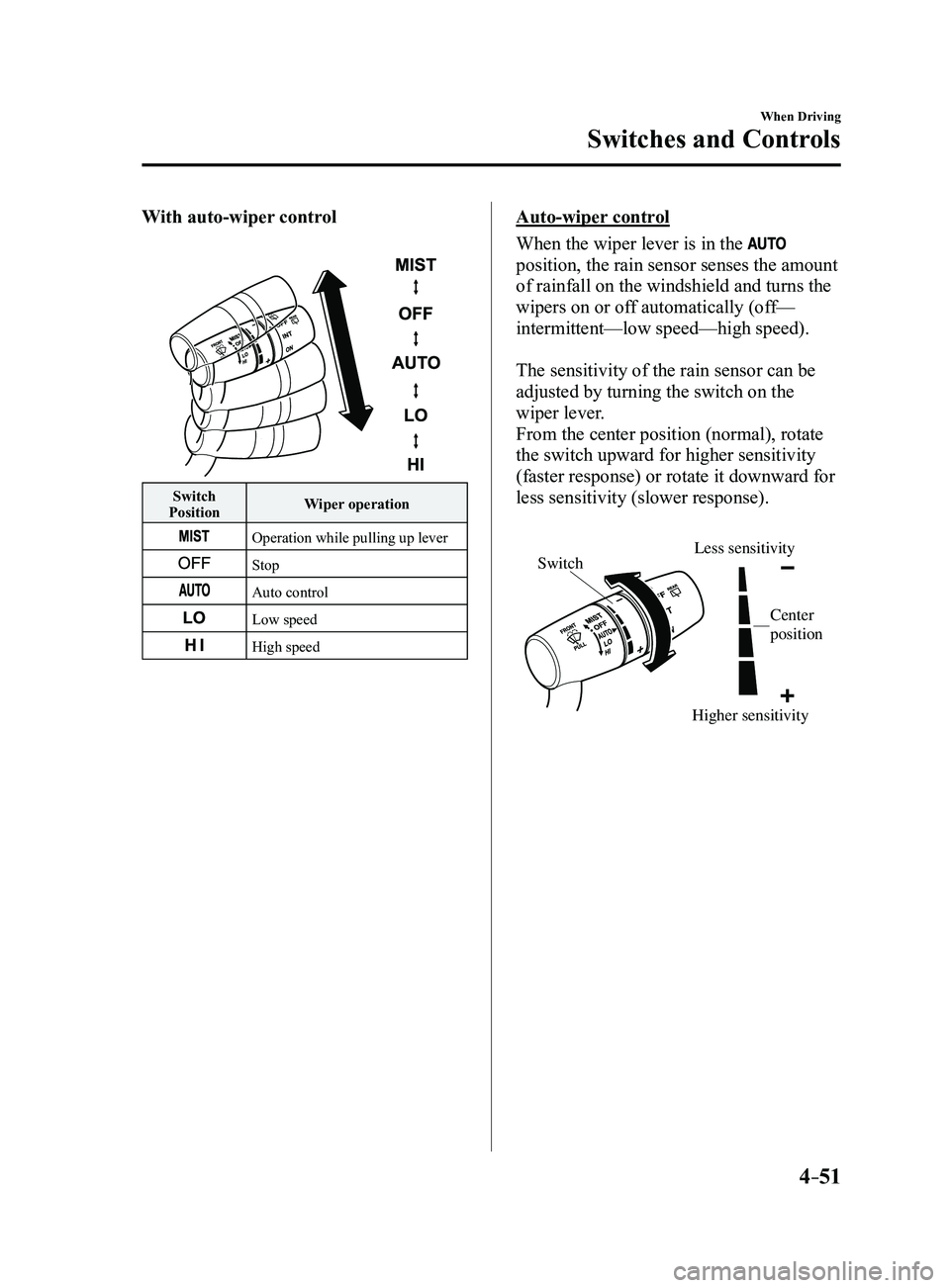
With auto-wiper control
Switch
Position Wiper operation
Operation while pulling up lever
Stop
Auto control
Low speed
High speed
Auto-wiper control
When the wiper lever is in the
position, the rain sensor senses the amount
of rainfall on the windshield and turns the
wipers on or off automatically (off—
intermittent—low speed—high speed).
The sensitivity of the rain sensor can be
adjusted by turning the switch on the
wiper lever.
From the center position (normal), rotate
the switch upward for higher sensitivity
(faster response) or rotate it downward for
less sensitivity (slower response).
Higher sensitivity
Less sensitivitySwitch
Center
position
Mazda3_8FL6-EA-16F_Edition2.indb 512016/08/10 17:36:20
Page 182 of 612
4–52
When Driving
Switches and Controls
CAUTION
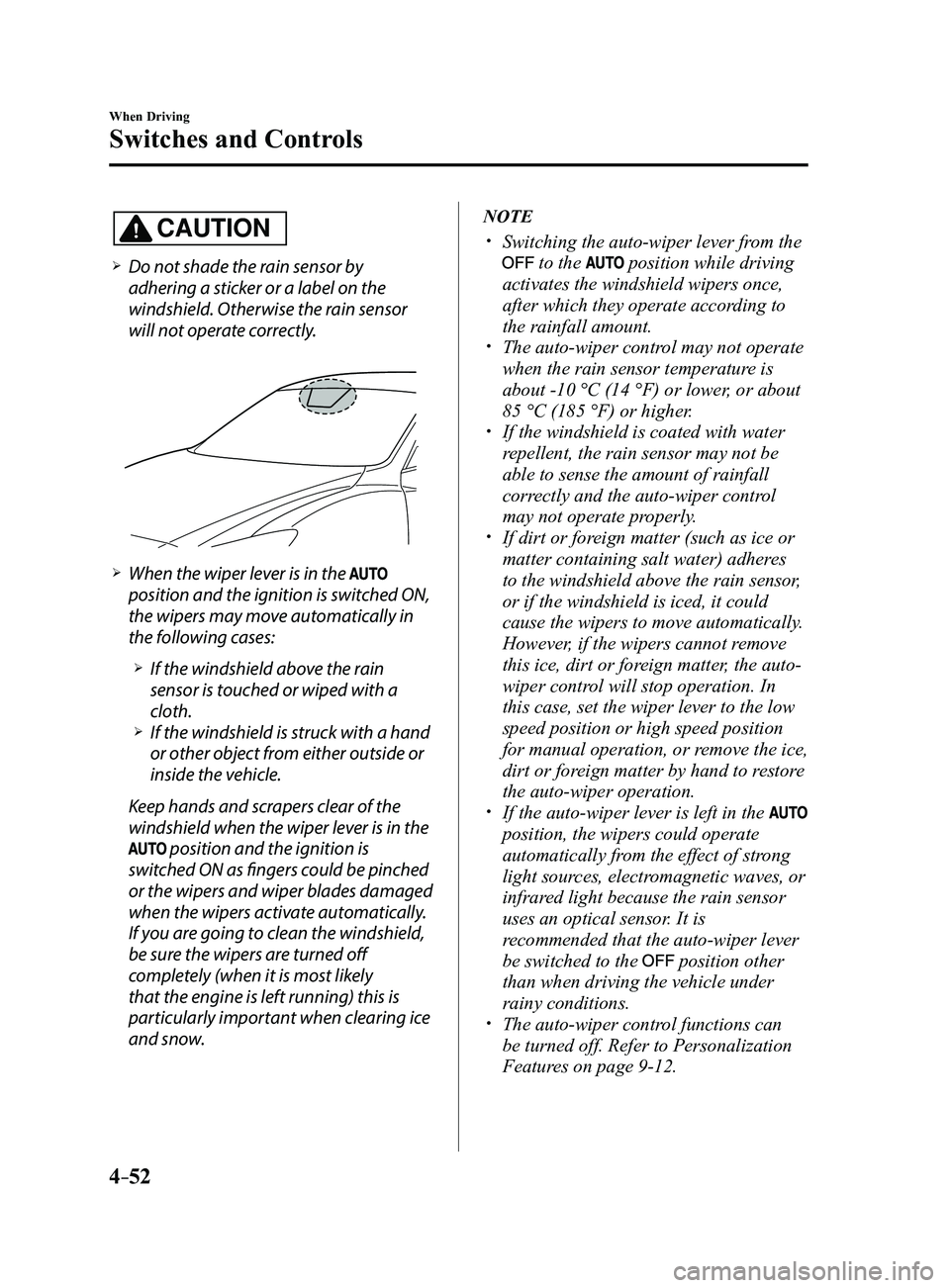
Do not shade the rain sensor by
adhering a sticker or a label on the
windshield. Otherwise the rain sensor
will not operate correctly.
When the wiper lever is in the
position and the ignition is switched ON,
the wipers may move automatically in
the following cases:
If the windshield above the rain
sensor is touched or wiped with a
cloth.
If the windshield is struck with a hand
or other object from either outside or
inside the vehicle.
Keep hands and scrapers clear of the
windshield when the wiper lever is in the
position and the ignition is
switched ON as fingers could be pinched
or the wipers and wiper blades damaged
when the wipers activate automatically.
If you are going to clean the windshield,
be sure the wipers are turned off
completely (when it is most likely
that the engine is left running) this is
particularly important when clearing ice
and snow.
NOTE
Switching the auto-wiper lever from the
to the position while driving
activates the windshield wipers once,
after which they operate according to
the rainfall amount.
The auto-wiper control may not operate
when the rain sensor temperature is
about -10 °C (14 °F) or lower, or about
85 °C (185 °F) or higher.
If the windshield is coated with water
repellent, the rain sensor may not be
able to sense the amount of rainfall
correctly and the auto-wiper control
may not operate properly.
If dirt or foreign matter (such as ice or
matter containing salt water) adheres
to the windshield above the rain sensor,
or if the windshield is iced, it could
cause the wipers to move automatically.
However, if the wipers cannot remove
this ice, dirt or foreign matter, the auto-
wiper control will stop operation. In
this case, set the wiper lever to the low
speed position or high speed position
for manual operation, or remove the ice,
dirt or foreign matter by hand to restore
the auto-wiper operation.
If the auto-wiper lever is left in the
position, the wipers could operate
automatically from the effect of strong
light sources, electromagnetic waves, or
infrared light because the rain sensor
uses an optical sensor. It is
recommended that the auto-wiper lever
be switched to the
position other
than when driving the vehicle under
rainy conditions.
The auto-wiper contr ol functions can
be turned off. Refer to Personalization
Features on page
9-12.
Mazda3_8FL6-EA-16F_Edition2.indb 522016/08/10 17:36:21
Page 212 of 612

4–82
When Driving
i-ACTIVSENSE
Pre-Crash Safety Technology
Pre-crash safety technology is designed to assist the driver in averting\
collisions or reduce
their severity in situations where they cannot be avoided.
Collision damage reduction in low vehicle speed range
Forward driving
Smart City Brake Support (SCBS)
........................................................................\
...........4-128
Collision damage reduction in medium/high speed range
Smart Brake Support (SBS)
........................................................................\
......................4-133
Camera and Sensors
Forward Sensing Camera (FSC)
The Forward Sensing Camera (FSC) detects lane indications and recogniz\
es headlights,
taillights and city lights during nighttime driving. In addition, it als\
o detects the vehicle
ahead, pedestrians, or obstructions. The following systems also use the Forward Sensing
Camera (FSC).
High Beam Control system (HBC) Lane-keep Assist System (LAS) & Lane Departure Warning System (LDWS) Traffic Sign Recognition System (TSR) Smart City Brake Support (SCBS) Smart Brake Support (SBS)
The Forward Sensing Camera (FSC) is installed at the top of the windsh\
ield near the
rearview mirror.
Refer to Forward Sensing Camera (FSC) on page
4-136.
Radar sensor (front)
The radar sensor (front) functions by detecting the radio waves reflected off a vehicle ahead
sent from the radar sensor. The following systems also use the radar sensor (front).
Mazda Radar Cruise Control (MRCC) Distance Recognition Support System (DRSS) Smart Brake Support (SBS)
The radar sensor (front) is mounted behind the radiator grille.
Refer to Radar Sensor (Front) on page
4-141.
Mazda3_8FL6-EA-16F_Edition2.indb 822016/08/10 17:36:36
Page 213 of 612
4–83
When Driving
i-ACTIVSENSE
Radar sensors (rear)
The radar sensors (rear) function by detecting the radio waves reflected off a vehicle
approaching from the rear or an obstruction sent from the radar sensors.\
The following
systems also use the radar sensors (rear).
Blind Spot Monitoring (BSM) Rear Cross Traffic Alert (RCTA)
The radar sensors (rear) are installed inside the rear bumper, one each on the left and right
sides.
Refer to Radar Sensors (Rear) on page
4-144.
Mazda3_8FL6-EA-16F_Edition2.indb 832016/08/10 17:36:36
Page 219 of 612
 will operate when all of the following\
conditions are
met:
The ignition is switched ON. The Blind Spot Monitoring (B")
4–89
When Driving
i-ACTIVSENSE
NOTE
The Blind Spot Monitoring (BSM) will operate when all of the following\
conditions are
met:
The ignition is switched ON. The Blind Spot Monitoring (BSM) OFF indicator light in the instrument \
cluster is
turned off. The vehicle speed is about 10 km/h (6.3 mph) or faster.
The Blind Spot Monitoring (BSM) will not operate under the following c\
ir cumstances.
The vehicle speed falls below about 10 km/h (6.3 mph) even though the \
Blind Spot
Monitoring (BSM) OFF switch indicator light is turned off. The shift lever (manual transaxle)/selector lever (automatic transaxl\
e) is shifted to
reverse (R) and the vehicle is reversing.
In the following cases, the Blind Spot Monitoring (BSM) warning indica\
tion/warning
light turns on and operation of the system is stopped. If the Blind Spot\
Monitoring (BSM)
warning indication/warning light remains illuminated, have the vehicle inspected at an
Authorized Mazda Dealer as soon as possible.
Some problem with the system including the Blind Spot Monitoring (BSM) warnin\
g
indicator lights is detected. A large deviation in the installation position of a radar sensor (rear) on the vehicle has
occurred. There is a large accumulation of snow or ice on the rear bumper near a radar sensor
(rear). Remove any snow, ice or mud on the rear bumper. Driving on snow-covered roads for long periods. The temperature near the radar sensors (rear) becomes extremely hot due to driving
for long periods on slopes during the summer. The battery voltage has decr eased.
Under the following conditions, the radar sensors (r ear) cannot detect target objects or it
may be difficult to detect them.
A vehicle is in the detection area at the rear in an adjacent driving lane but it does not
approach. The Blind Spot Monitoring (BSM) determines the condition based o\
n radar
detection data.
A vehicle is traveling alongside your vehicle at nearly the same speed fo\
r an extended
period of time. Vehicles approaching in the opposite direction. A vehicle in an adjacent driving lane is attempting to pass your vehicle.\
A vehicle is in an adjacent lane on a road with extremely wide driving lanes. The
detection area of the radar sensors (rear) is set at the road width of expressways.
Mazda3_8FL6-EA-16F_Edition2.indb 892016/08/10 17:36:37