charging MAZDA MODEL 3 5-DOOR 2017 Owners Manual
[x] Cancel search | Manufacturer: MAZDA, Model Year: 2017, Model line: MODEL 3 5-DOOR, Model: MAZDA MODEL 3 5-DOOR 2017Pages: 612
Page 154 of 612
4–24
When Driving
Instrument Cluster and Display
*Some models.
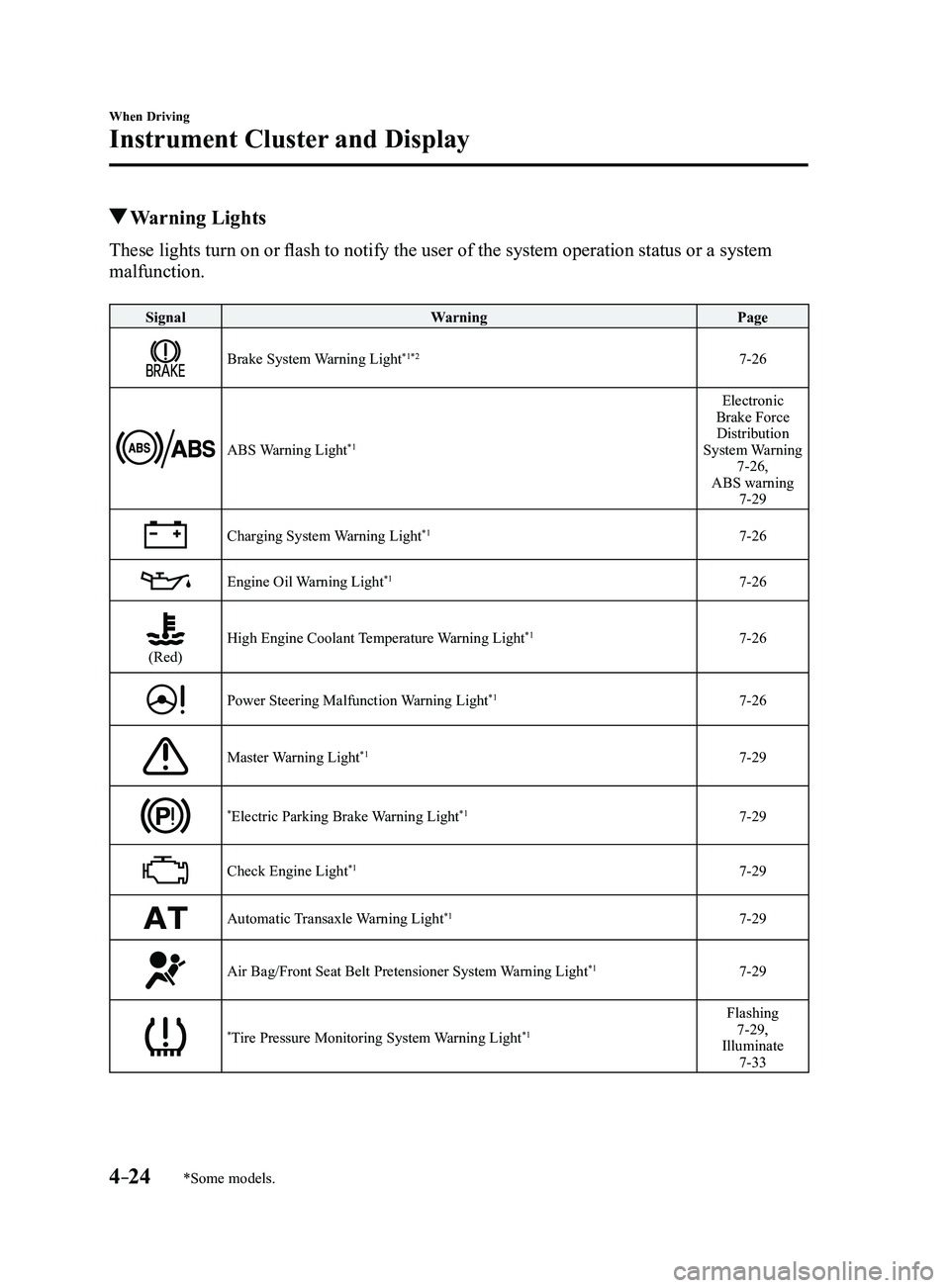
Warning Lights
These lights turn on or flash to notify the user of the system operation status or a system
malfunction.
SignalWarning Page
Brake System Warning Light*1*27-26
ABS Warning Light*1
Electronic
Brake Force Distribution
System Warning
7-26,
ABS warning
7-29
Charging System Warning Light*17-26
Engine Oil Warning Light*17-26
(Red)High Engine Coolant Temperature Warning Light*17-26
Power Steering Malfunction Warning Light*17-26
Master Warning Light*17-29
*Electric Parking Brake Warning Light*17-29
Check Engine Light*17-29
Automatic Transaxle Warning Light*17-29
Air Bag/Front Seat Belt Pretensioner System Warning Light*17-29
*Tire Pressure Monitoring System Warning Light*1
Flashing 7-29,
Illuminate
7-33
Mazda3_8FL6-EA-16F_Edition2.indb 242016/08/10 17:35:55
Page 173 of 612

4–43
When Driving
Switches and Controls
Lighting Control
Headlights
Turn the headlight switch to turn the headlights and other exterior light\
s on or off.
When the lights are turned on, the lights-on indicator light in the inst\
rument cluster turns on.
NOTE
If the light switch is left on, the lights will automatically switch off\
approximately 30
seconds after switching the ignition off.
The time setting can be changed.
Refer to Personalization Features on page 9-12. To prevent discharging the battery, do not leave the lights on while the engine is off unless
safety requires them.
Without auto-light control
Switch Position
Ignition PositionON ACC or
OFF ONACC or
OFF ONACC or
OFF
Headlights OffOffOffOff OnOn
*2
Daytime running lights On*1OffOn*1Off OffOff
Taillights
Parking lights
License lights
Side-marker lights Off
Off OnOn
*2OnOn*2
*1 The lights are turned on while the vehicle is driven.*2 The lights are turned on for the specified period by the auto he adlight off function.
Mazda3_8FL6-EA-16F_Edition2.indb 432016/08/10 17:36:14
Page 351 of 612
5–59
Interior Features
Audio System
NOTE
This mode may not be usable depending
on the portable audio device to be
connected.
Before using the auxiliary jack/USB
port, refer to the instruction manual for
the portable audio device.
Use a commercially-available, non-
impedance (3.5) stereo mini plug for
connecting the portable audio unit to
the auxiliary jack. Before using the
auxiliary jack, read the manufacturer's
instructions for connecting a portable
audio unit to the auxiliary jack.
To prevent discharging of the battery,
do not use the auxiliary input for long
periods with the engine off or idling.
When connecting a device to the
auxiliary jack or USB port, noise may
occur depending on the connected
device. If the device is connected to the
vehicle's accessory socket, the noise can
be reduced by unplugging it from the
accessory socket.
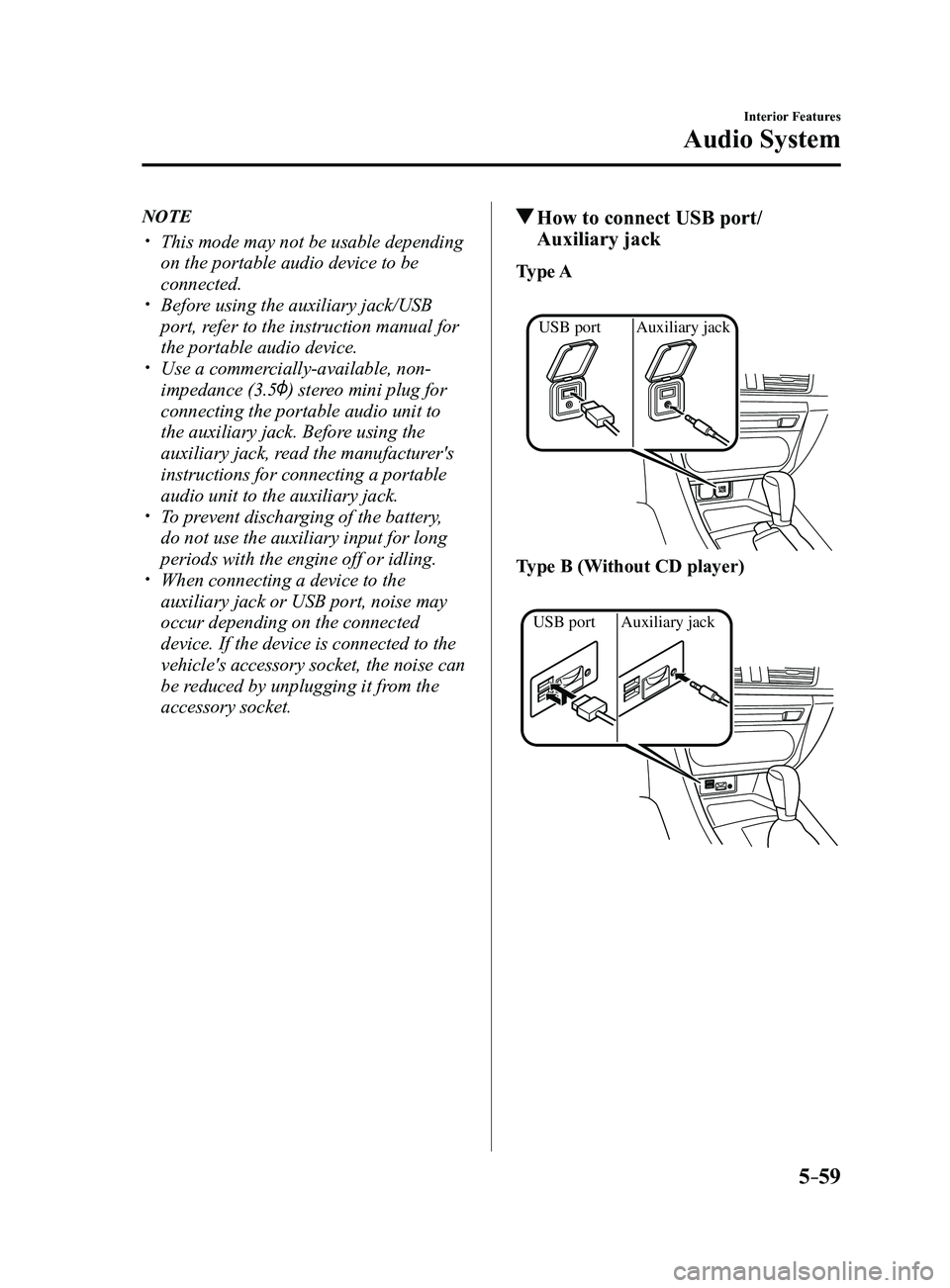
How to connect USB port/
Auxiliary jack
Type A
Auxiliary jack
USB port
Type B (Without CD player)
Auxiliary jack
USB port
Mazda3_8FL6-EA-16F_Edition2.indb 592016/08/10 17:37:50
Page 406 of 612
5–114
Interior Features
Interior Equipment
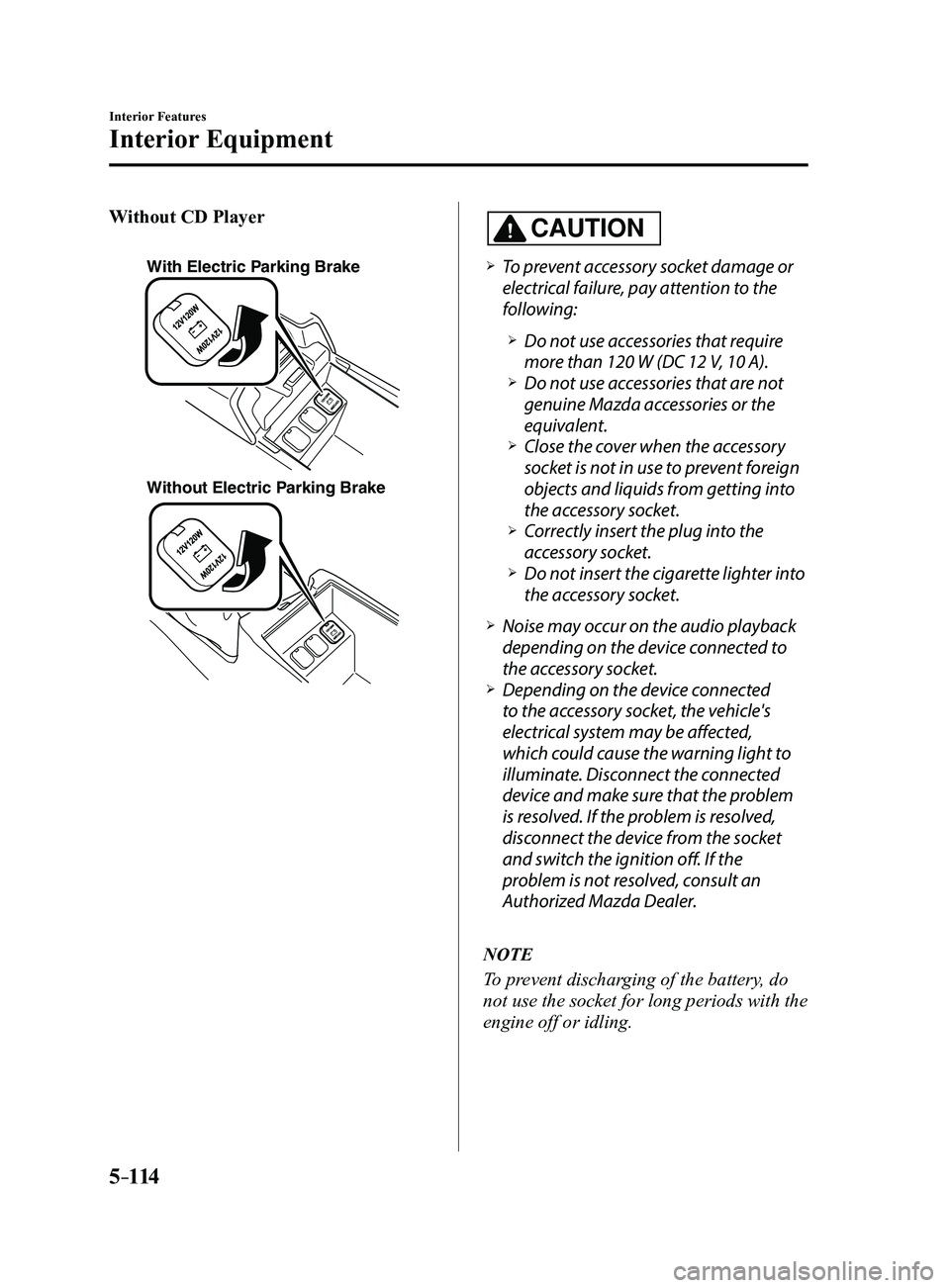
Without CD Player
With Electric Parking Brake
Without Electric Parking Brake
CAUTION
To prevent accessory socket damage or
electrical failure, pay attention to the
following:
Do not use accessories that require
more than 120 W (DC 12 V, 10 A). Do not use accessories that are not
genuine Mazda accessories or the
equivalent.
Close the cover when the accessory
socket is not in use to prevent foreign
objects and liquids from getting into
the accessory socket.
Correctly insert the plug into the
accessory socket. Do not insert the cigarette lighter into
the accessory socket.
Noise may occur on the audio playback
depending on the device connected to
the accessory socket.
Depending on the device connected
to the accessory socket, the vehicle's
electrical system may be affected,
which could cause the warning light to
illuminate. Disconnect the connected
device and make sure that the problem
is resolved. If the problem is resolved,
disconnect the device from the socket
and switch the ignition off. If the
problem is not resolved, consult an
Authorized Mazda Dealer.
NOTE
To prevent discharging of the battery, do
not use the socket for long periods with the
engine off or idling.
Mazda3_8FL6-EA-16F_Edition2.indb 1142016/08/10 17:38:24
Page 506 of 612
7–18
If Trouble Arises
Battery Runs Out
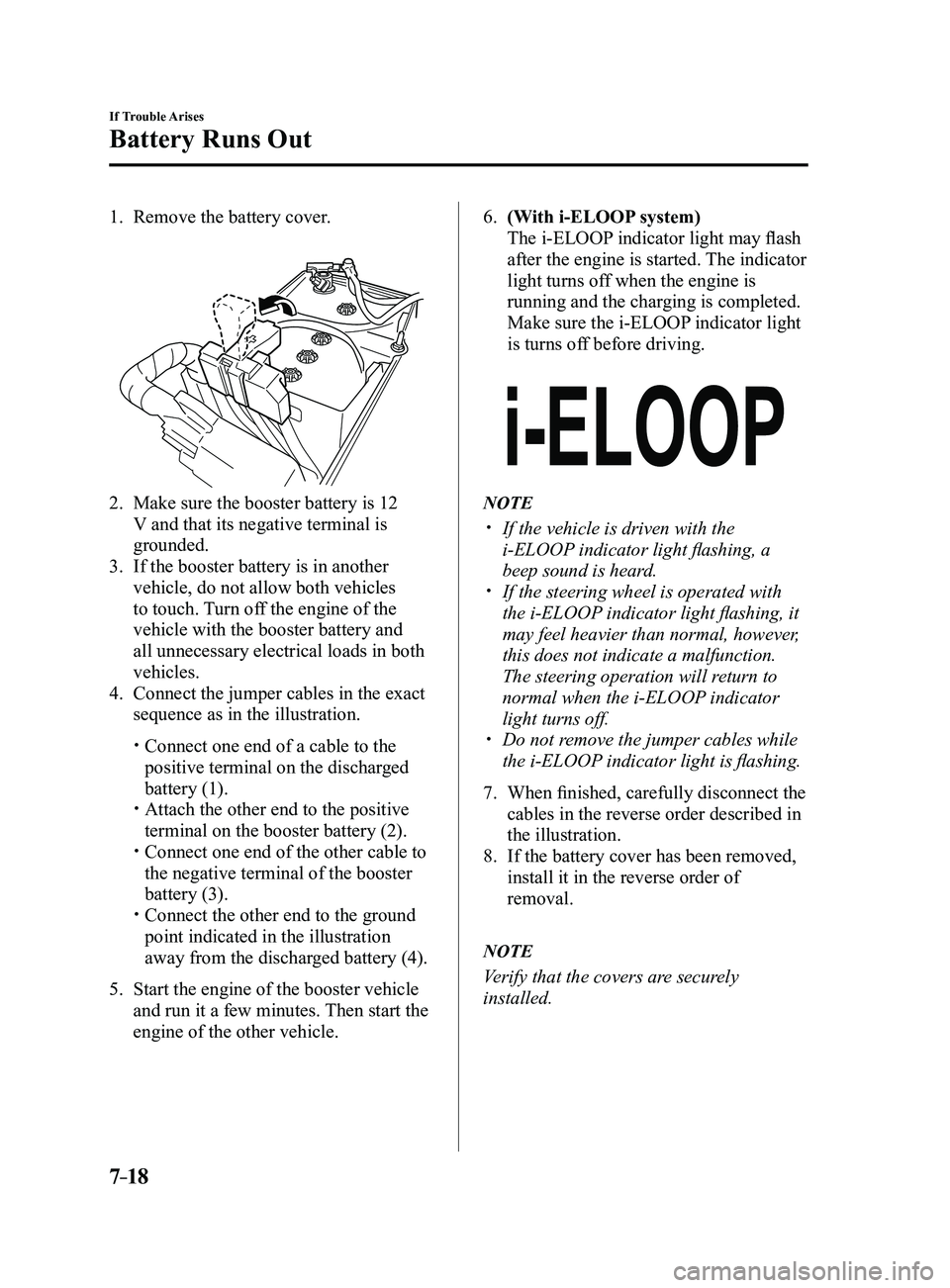
1. Remove the battery cover.
2. Make sure the booster battery is 12
V and that its negative terminal is
grounded.
3. If the booster battery is in another
vehicle, do not allow both vehicles
to touch. Turn off the engine of the
vehicle with the booster battery and
all unnecessary electrical loads in both
vehicles.
4. Connect the jumper cables in the exact
sequence as in the illustration.
Connect one end of a cable to the
positive terminal on the discharged
battery (1).
Attach the other end to the positive
terminal on the booster battery (2). Connect one end of the other cable to
the negative terminal of the booster
battery (3).
Connect the other end to the ground
point indicated in the illustration
away from the discharged battery (4).
5. Start the engine of the booster vehicle
and run it a few minutes. Then start the
engine of the other vehicle.
6. (With i-ELOOP system)
The i-ELOOP indicator light may flash
after the engine is started. The indicator
light turns off when the engine is
running and the charging is completed.
Make sure the i-ELOOP indicator light
is turns off before driving.
NOTE
If the vehicle is driven with the
i-ELOOP indicator light flashing, a
beep sound is heard.
If the steering wheel is operated with
the i-ELOOP indicator light flashing, it
may feel heavier than normal, however,
this does not indicate a malfunction.
The steering operation will return to
normal when the i-ELOOP indicator
light turns off.
Do not remove the jumper cables while
the i-ELOOP indicator light is flashing.
7. When finished, carefully disconnect the
cables in the reverse order described in
the illustration.
8. If the battery cover has been removed,
install it in the reverse order of
removal.
NOTE
Verify that the covers are securely
installed.
Mazda3_8FL6-EA-16F_Edition2.indb 182016/08/10 17:39:17
Page 515 of 612
7–27
If Trouble Arises
Warning/Indicator Lights and Warning Sounds
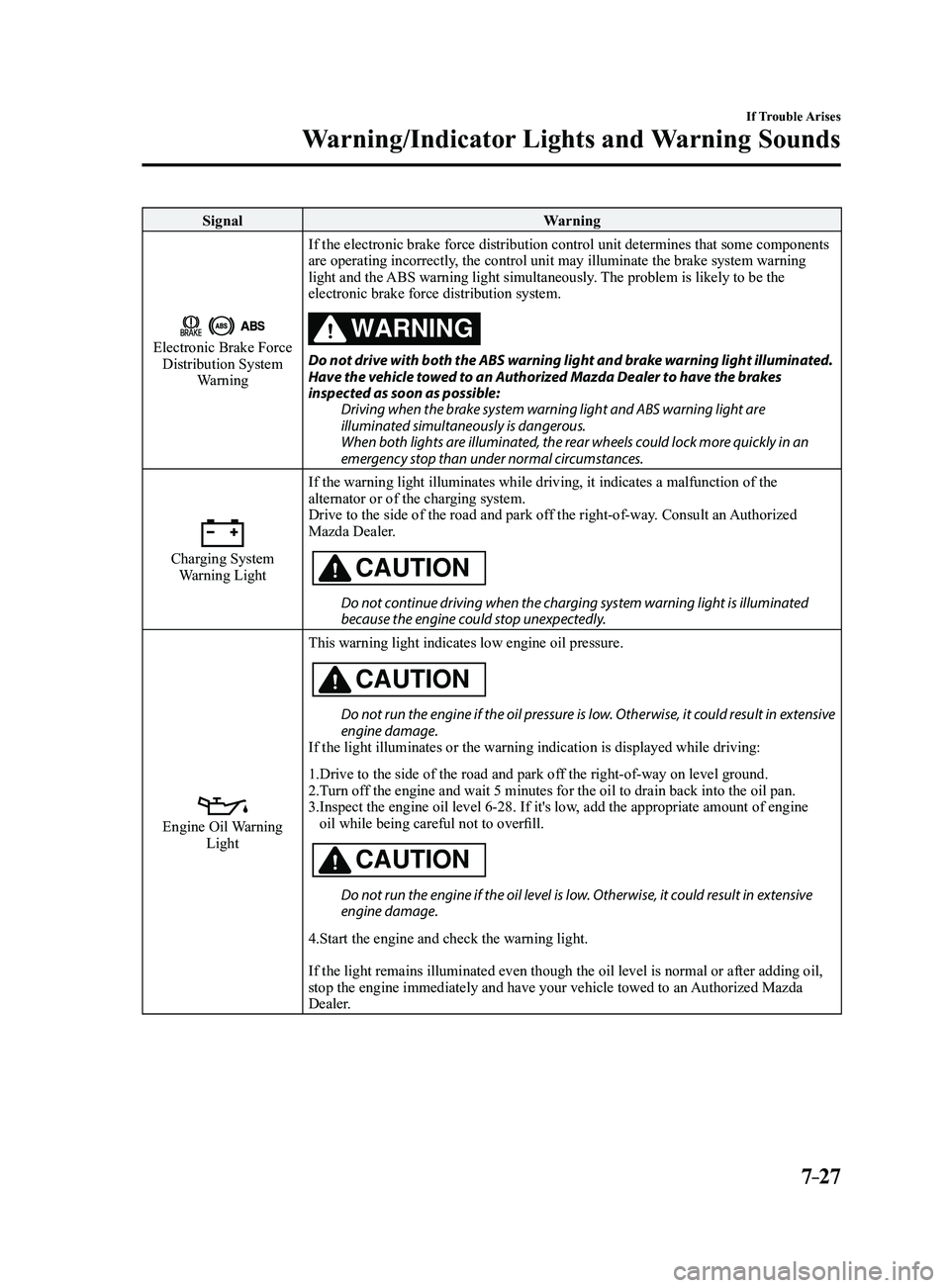
SignalWarning
Electronic Brake Force Distribution System
Warning If the electronic brake force distribution control unit determines that \
some components
are operating incorrectly, the control unit may illuminate the brake system warning
light and the ABS warning light simultaneously. The problem is likely to be the
electronic brake force distribution system.
WARNING
Do not drive with both the ABS warning light and brake warning light illuminated. Have the vehicle towed to an Authorized Mazda Dealer to have the brakes
inspected as soon as possible:
Driving when the brake system warning light and ABS warning light are
illuminated simultaneously is dangerous.
When both lights are illuminated, the rear wheels could lock more quickly in an
emergency stop than under normal circumstances.
Charging System Warning Light If the warning light illuminates while driving, it indicates a malfuncti\
on of the
alternator or of the charging system.
Drive to the side of the road and park off the right-of-way. Consult an Authorized
Mazda Dealer.CAUTION
Do not continue driving when the charging system warning light is illuminated because the engine could stop unexpectedly.
Engine Oil Warning LightThis warning light indicates low engine oil pressure.
CAUTION
Do not run the engine if the oil pressure is low. Otherwise, it could result in extensive engine damage.
If the light illuminates or the warning indication is displayed while dr\
iving:
1.Drive to the side of the road and park off the right-of-way on level ground.
2.Turn off the engine and wait 5 minutes for the oil to drain back into the oil p\
an.
3. Inspect the engine oil level 6-28. If it's low, add the appropriate amount of engine
oil while being careful not to overfill.
CAUTION
Do not run the engine if the oil level is low. Otherwise, it could result in extensive engine damage.
4.Start the engine and check the warning light.
If the light remains illuminated even though the oil level is normal or \
after adding oil,
stop the engine immediately and have your vehicle towed to an Authorized Mazda
Dealer.
Mazda3_8FL6-EA-16F_Edition2.indb 272016/08/10 17:39:23
Page 525 of 612
7–37
If Trouble Arises
Warning/Indicator Lights and Warning Sounds
*Some models.
Message Indicated on Display*
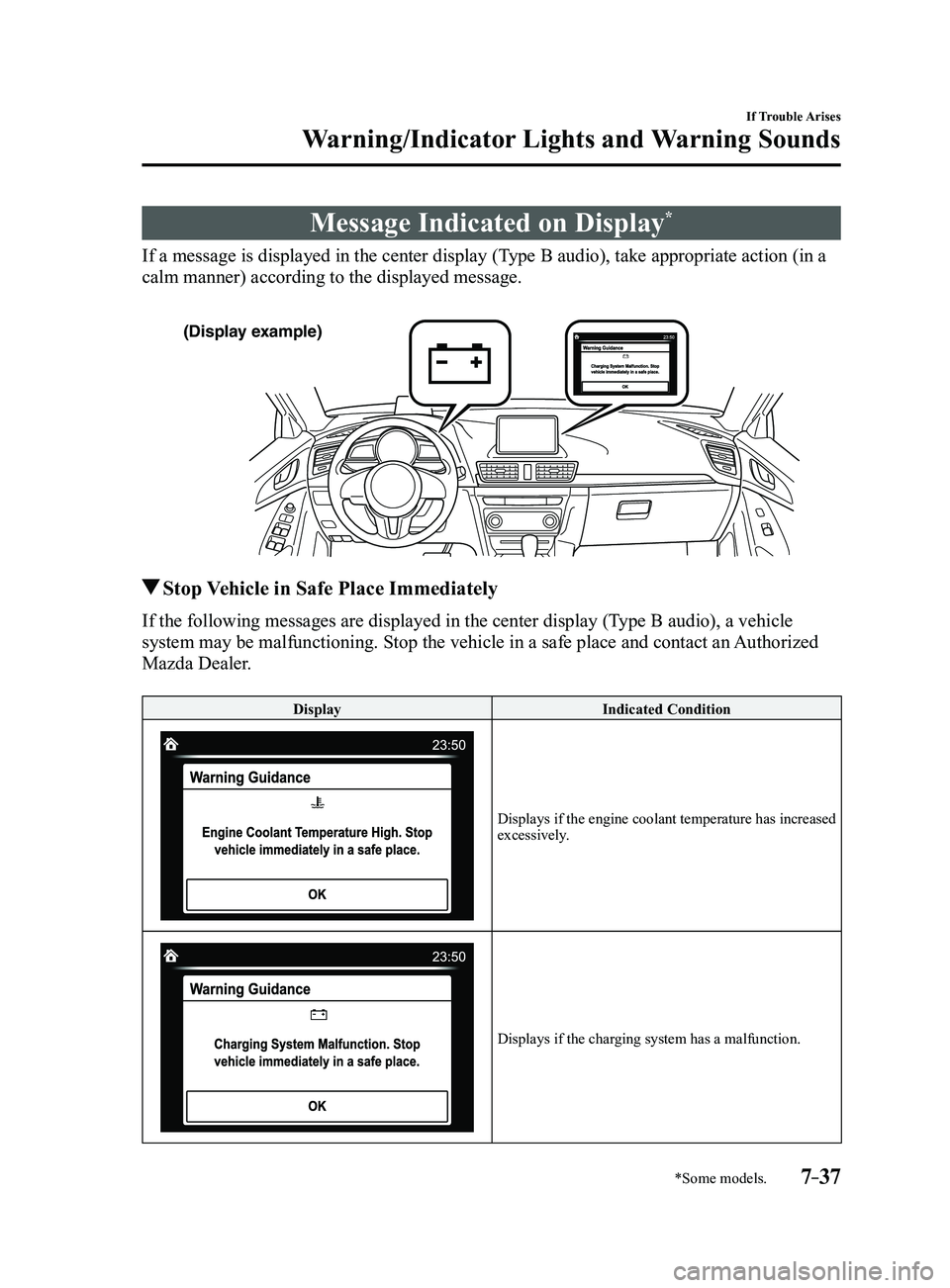
If a message is displayed in the center display (Type B audio), take appropriate action (in a
calm manner) according to the displayed message.
(Display example)
Stop Vehicle in Safe Place Immediately
If the following messages are displayed in the center display (Type B audio), a vehicle
system may be malfunctioning. Stop the vehicle in a safe place and conta\
ct an Authorized
Mazda Dealer.
DisplayIndicated Condition
Displays if the engine coolant temperature has increased excessively.
Displays if the charging system has a malfunction.
Mazda3_8FL6-EA-16F_Edition2.indb 372016/08/10 17:39:32
Page 526 of 612
7–38
If Trouble Arises
Warning/Indicator Lights and Warning Sounds
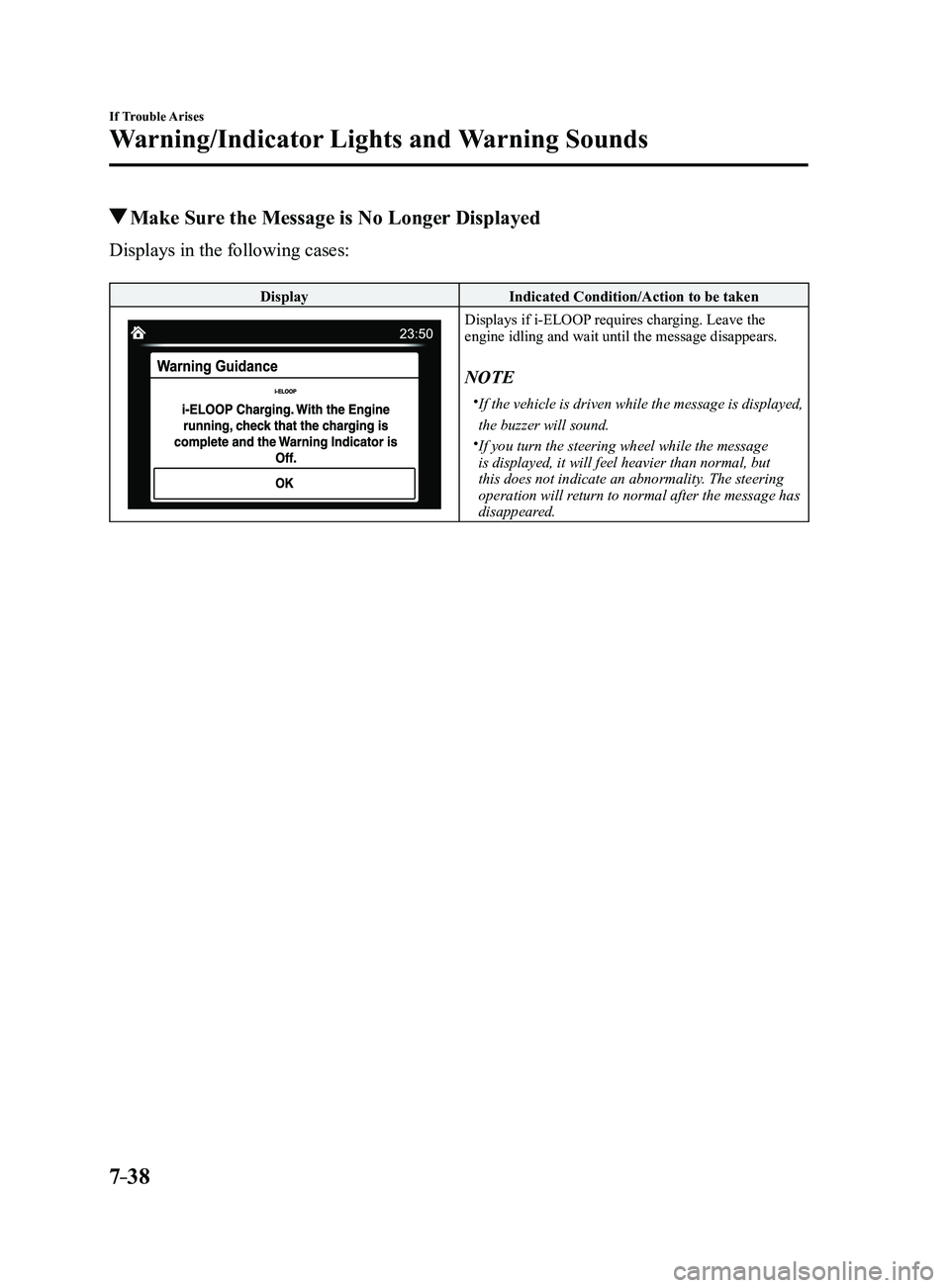
Make Sure the Message is No Longer Displayed
Displays in the following cases:
DisplayIndicated Condition/Action to be taken
Displays if i-ELOOP requires charging. Leave the engine idling and wait until the message disappears.
NOTE
If the vehicle is driven while the message is displayed,
the buzzer will sound.
If you turn the steering wheel while the message
is displayed, it will feel heavier than normal, but
this does not indicate an abnormality. The steering
operation will return to normal after the message has
disappeared.
Mazda3_8FL6-EA-16F_Edition2.indb 382016/08/10 17:39:32
Page 529 of 612
7–41
If Trouble Arises
Warning/Indicator Lights and Warning Sounds
*Some models.
Key Left-in-luggage Compartment
Warning Beep (With the advanced
keyless function)
If the key is left in the luggage
compartment/trunk with all the doors
locked and the liftgate/trunk lid closed,
a beep will be heard outside for about 10
seconds to notify the driver that the key
is in the luggage compartment/trunk. In
this case, take out the key by pressing
the electric liftgate/trunk lid opener and
opening the liftgate/trunk lid. The key
taken out of the luggage compartment/
trunk may not operate because its
functions have been temporarily stopped.
To restore the key's functions, perform the
applicable procedure (page
3-9).
Key Left-in-vehicle Warning Beep
(With the advanced keyless
function)
If all the doors and luggage compartment/
trunk are locked using another key while
the key is left in the cabin, the beep
which sounds outside of the vehicle will
be heard for about 10 seconds to notify
the driver that the key is in the cabin. In
this case, take out the key by opening the
door. A key taken out of the vehicle using
this method may not operate because its
functions have been temporarily stopped.
To restore the key's functions, perform the
applicable procedure (page
3-9).
i-ELOOP Warning Beep*
The beep will activate if you attempt to
drive the vehicle under the following
conditions.
The i-ELOOP indicator light is flashing
green. “i-ELOOP Charging” is indicated in the
center display (Type B audio).
The beep will stop when the vehicle is
stopped. Make sure the indicator light is
no longer illuminated and the message
is no longer displayed before driving the
vehicle.
Tire Inflation Pressure Warning
Beep*
The warning beep sound will be heard
for about 3 seconds when there is any
abnormality in tire inflation pressures
(page
4-151).
Lane Departur e Warning Sound
While the system is operating, if the
system determines that the vehicle may
depart from the lane, it sounds a warning
sound.
NOTE
The volume of the Lane-keep Assist
System (LAS) & Lane Departure
Warning System (LDWS) warning sound
can be changed.
Refer to Personalization Featur es on
page 9-12. The type of the Lane-keep Assist System
(LAS) & Lane Departure Warning
System (LDWS) warning sound can be
changed.
Refer to Personalization Featur es on
page 9-12.
Mazda3_8FL6-EA-16F_Edition2.indb 412016/08/10 17:39:34
Page 592 of 612
9–8
Specifications
Specifications
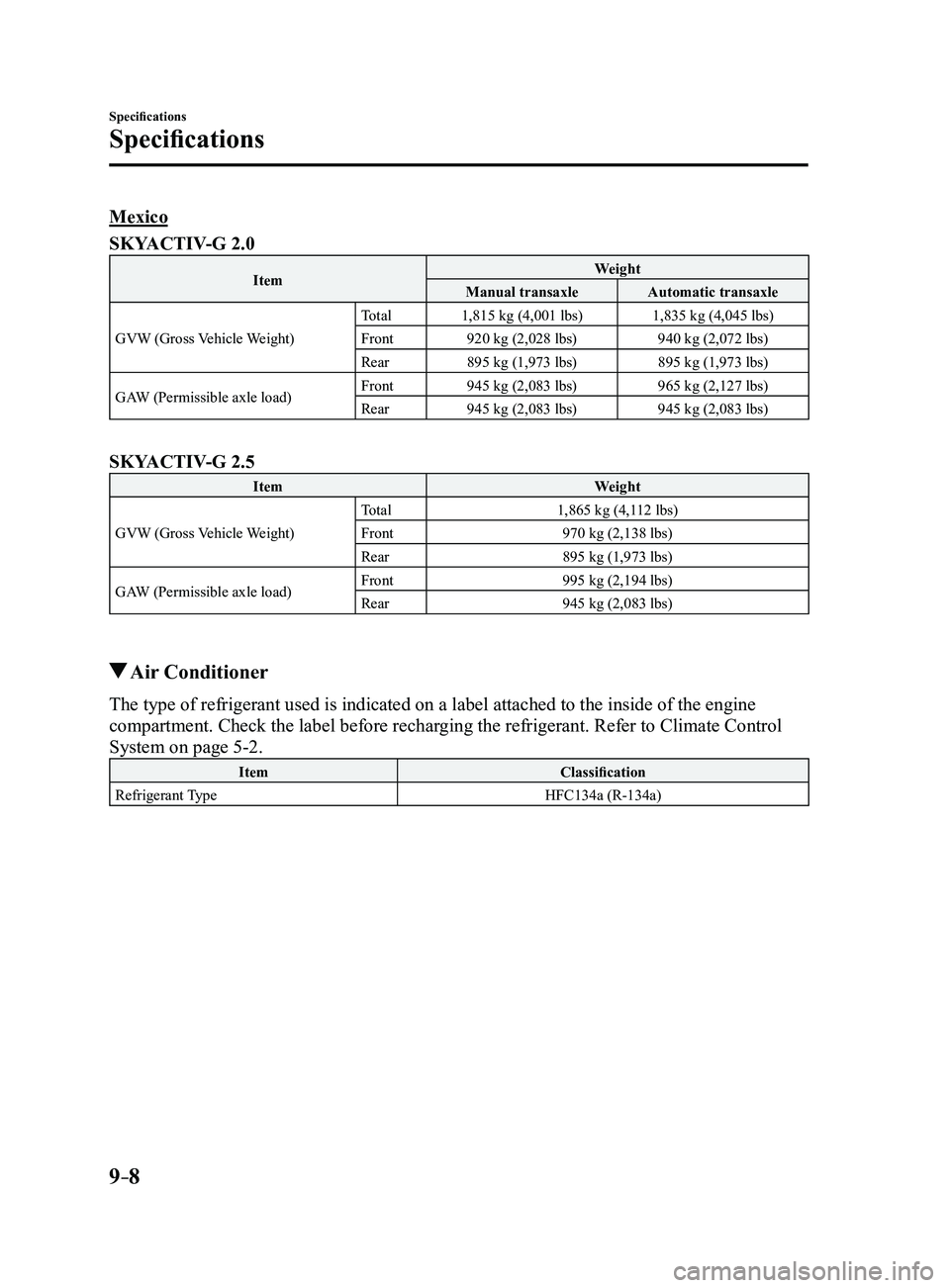
Mexico
SKYACTIV-G 2.0
ItemWeight
Manual transaxle Automatic transaxle
GVW (Gross Vehicle Weight) Total
1,815 kg (4,001 lbs) 1,835 kg (4,045 lbs)
Front 920 kg (2,028 lbs) 940 kg (2,072 lbs)
Rear 895 kg (1,973 lbs) 895 kg (1,973 lbs)
GAW (Permissible axle load) Front
945 kg (2,083 lbs) 965 kg (2,127 lbs)
Rear 945 kg (2,083 lbs) 945 kg (2,083 lbs)
SKYACTIV-G 2.5
Item Weight
GVW (Gross Vehicle Weight) Total
1,865 kg (4,112 lbs)
Front 970 kg (2,138 lbs)
Rear 895 kg (1,973 lbs)
GAW (Permissible axle load) Front
995 kg (2,194 lbs)
Rear 945 kg (2,083 lbs)
Air Conditioner
The type of refrigerant used is indicated on a label attached to the ins\
ide of the engine
compartment. Check the label before recharging the refrigerant. Refer to Climate Control
System on page
5-2.
Item Classification
Refrigerant Type HFC134a (R-134a)
Mazda3_8FL6-EA-16F_Edition2.indb 82016/08/10 17:39:53