height MAZDA MODEL 3 5-DOOR 2017 Owners Manual
[x] Cancel search | Manufacturer: MAZDA, Model Year: 2017, Model line: MODEL 3 5-DOOR, Model: MAZDA MODEL 3 5-DOOR 2017Pages: 612
Page 19 of 612
2–5
Essential Safety Equipment
Seats
Front Seat
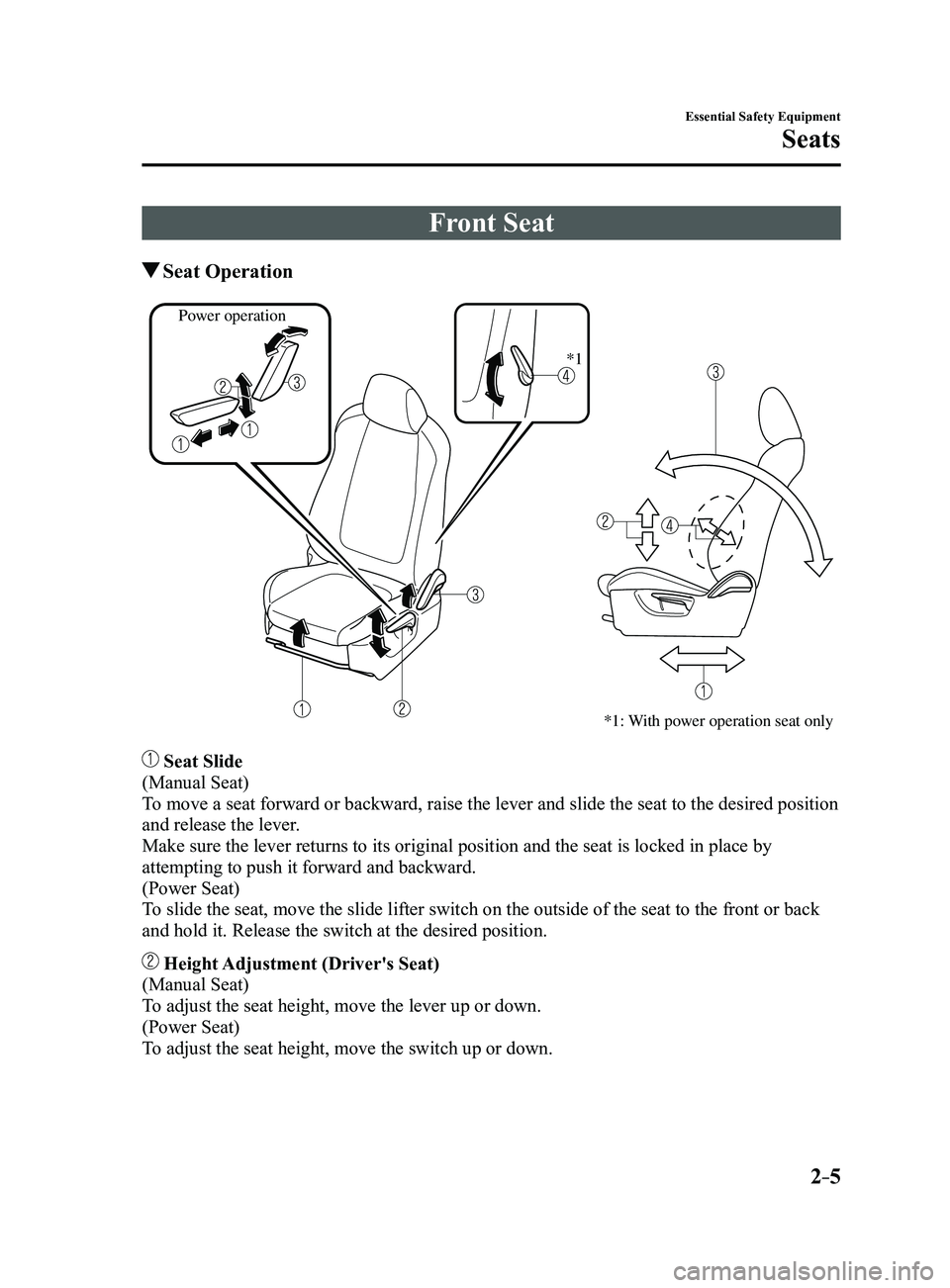
Seat Operation
*1: With power operation seat only
Power operation*1
Seat Slide
(Manual Seat)
To move a seat forward or backward, raise the lever and slide the seat to\
the desired position
and release the lever.
Make sure the lever returns to its original position and the seat is loc\
ked in place by
attempting to push it forward and backward.
(Power Seat)
To slide the seat, move the slide lifter switch on the outside of the sea\
t to the front or back
and hold it. Release the switch at the desired position.
Height Adjustment (Driver's Seat)
(Manual Seat)
To adjust the seat height, move the lever up or down.
(Power Seat)
To adjust the seat height, move the switch up or down.
Mazda3_8FL6-EA-16F_Edition2.indb 52016/08/10 17:34:51
Page 23 of 612
2–9
Essential Safety Equipment
Seats
WARNING
Do not drive the vehicle with occupants
on folded down seatback(s) or in the
luggage compartment.Putting occupants in the luggage
compartment is dangerous because
seat belts cannot be fastened which
could lead to serious injury or death
during sudden braking or a collision.
Do not allow children to play inside the
vehicle with the seatback(s) lowered. Allowing children to play in the
vehicle with the seatback(s) folded
down is dangerous. If a child enters
the luggage compartment and the
seatback(s) were raised back up, the
child may become trapped in the
luggage compartment which could
lead to an accident.
Tightly secure cargo in the luggage
compartment when it is transported
with the seatback(s) folded down. Driving without tightly securing cargo
and luggage is dangerous as it could
move and become an obstruction to
driving during emergency braking or
a collision resulting in an unexpected
accident.
When transporting cargo, do not allow
the cargo to exceed the height of the
seatback(s). Transporting cargo stacked higher
than the seatback(s) is dangerous as
visibility to the rear and sides of the
vehicle is reduced which could interfere
with driving operations and lead to an
accident.
Lowering the seatback(s)
CAUTION
Check the position of a front seat
before folding a rear seatback.
Depending on the position of a front
seat, it may not be possible to fold
a rear seatback all the way down
because it may hit the seatback of
the front seat which could scratch or
damage the front seat or its pocket.
Lower or remove the head restraint on
the rear outboard seat if necessary.
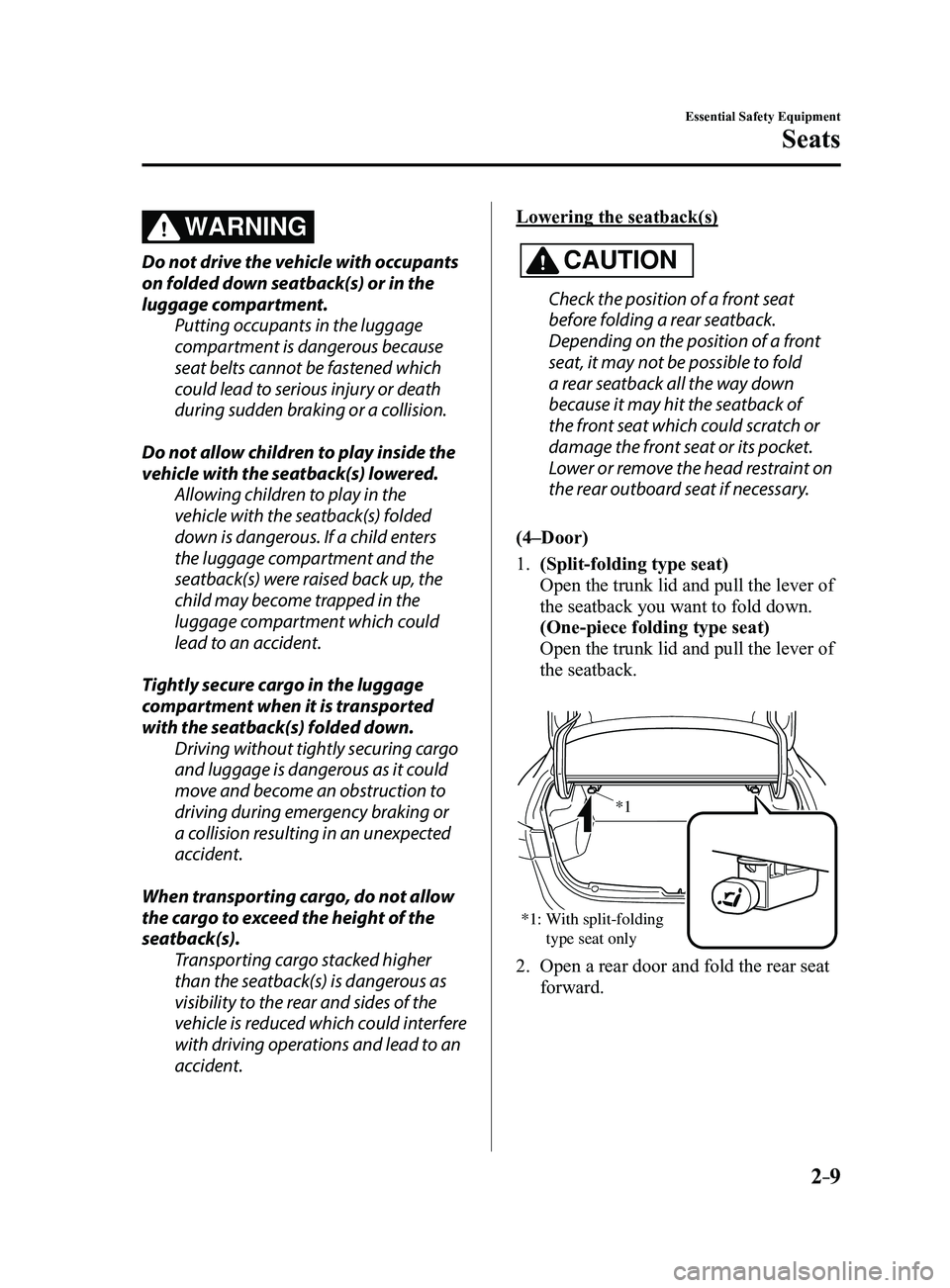
(4–Door)
1. (Split-folding type seat)
Open the trunk lid and pull the lever of
the seatback you want to fold down.
(One-piece folding type seat)
Open the trunk lid and pull the lever of
the seatback.
*1: With split-folding type seat only *1
2. Open a rear door and fold the rear seat
forward.
Mazda3_8FL6-EA-16F_Edition2.indb 92016/08/10 17:34:53
Page 26 of 612
2–12
Essential Safety Equipment
Seats
Head Restraints
Your vehicle is equipped with head
restraints on all outboard seats and the
rear center seat. The head restraints are
intended to help protect you and the
passengers from neck injury.
WARNING
Always drive with the head restraints
installed when seats are being used and
make sure they are properly adjusted:Driving with the head restraints
adjusted too low or removed is
dangerous. With no support behind
your head, your neck could be seriously
injured in a collision.
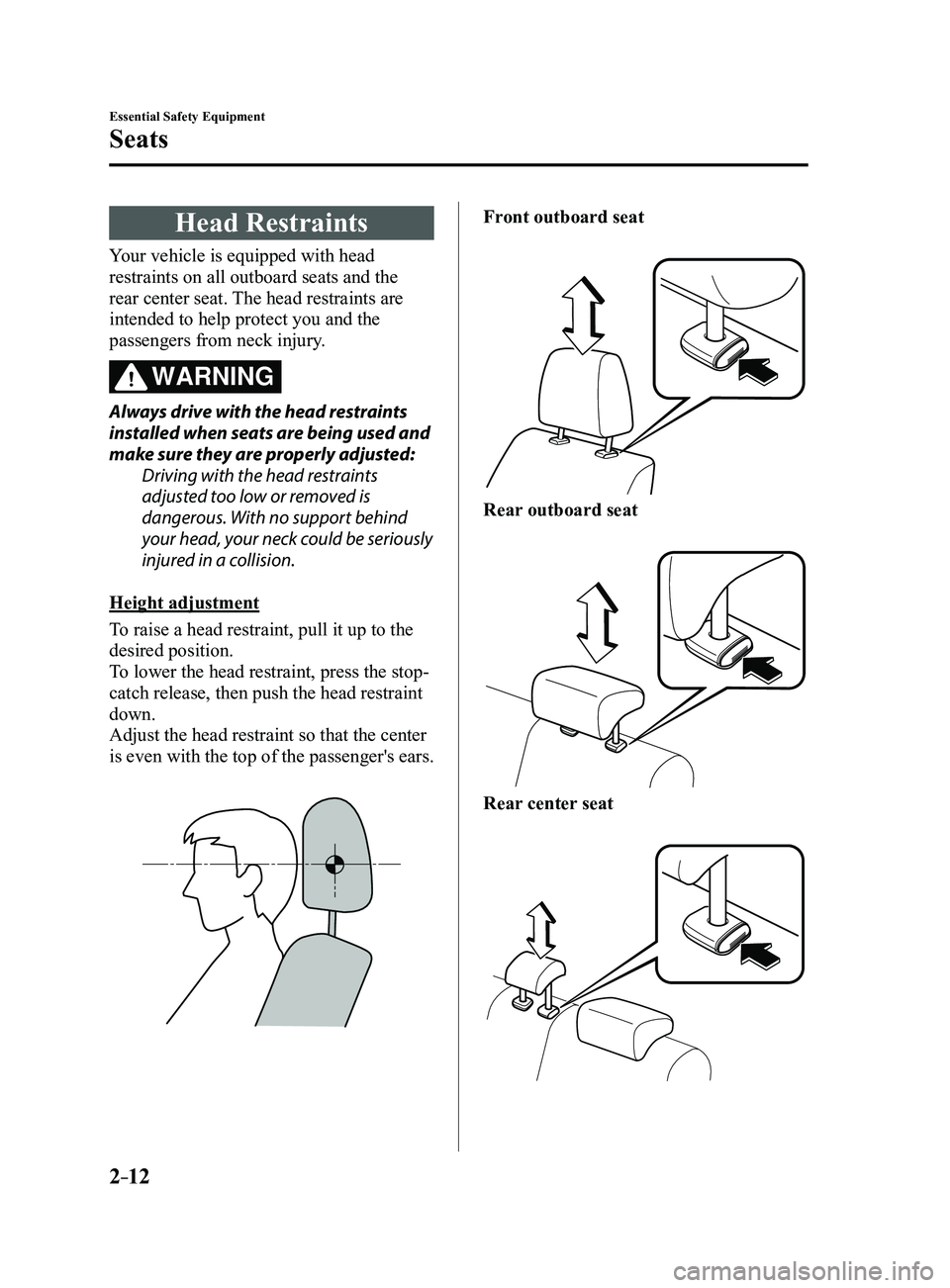
Height adjustment
To raise a head restraint, pull it up to the
desired position.
To lower the head restraint, press the stop-
catch release, then push the head restraint
down.
Adjust the head restraint so that the center
is even with the top of the passenger's ears.
Front outboard seat
Rear outboard seat
Rear center seat
Mazda3_8FL6-EA-16F_Edition2.indb 122016/08/10 17:34:55
Page 58 of 612
2–44
Essential Safety Equipment
SRS Air Bags
Do not attach objects on or around the area where a side air bag deploys:Attaching objects to the front seat in such a way as to cover the outboard side of the
seat in any way is dangerous. In an accident the object could interfere with the side
air bag, which inflates from the outboard side of the front seats, impeding the added
protection of the side air bag system or redirecting the air bag in a way that is dangerous.
Furthermore, the bag could be cut open releasing the gas.
Do not hang net bags, map pouches or backpacks with side straps on the front seats.
Never use seat covers on the front seats. Always keep the side air bag modules in your
front seats free to deploy in the event of a side collision.
Do not attach objects on or around the area where a curtain air bag deploys: Attaching objects to the areas where the curtain air bag activates such as on the
windshield glass, side door glass, front and rear window pillars and along the roof edge
and assist grips is dangerous. In an accident the object could interfere with the curtain
air bag, which inflates from the front and rear window pillars and along the roof edge,
impeding the added protection of the curtain air bag system or redirecting the air bag in
a way that is dangerous. Furthermore, the bag could be cut open releasing the gas.
Do not place hangers or any other objects on the assist grips. When hanging clothes,
hang them on the coat hook directly. Always keep the curtain air bag modules free to
deploy in the event of a side collision or roll-over accident.
Do not touch the components of the supplemental restraint system after the air bags
have inflated: Touching the components of the supplemental restraint system after the air bags have
inflated is dangerous. Immediately after inflation, they are very hot. You could get burned.
Never install any front-end equipment to your vehicle: Installation of front-end equipment, such as frontal protection bar (kangaroo bar, bull
bar, push bar, or other similar devices), snowplow, or winches, is dangerous. The air bag
crash sensor system could be affected. This could cause air bags to inflate unexpectedly,
or it could prevent the air bags from inflating during an accident. Front occupants could
be seriously injured.
Do not modify the suspension: Modifying the vehicle suspension is dangerous. If the vehicle's height or the suspension is
modified, the vehicle will be unable to accurately detect a collision or roll-over accident
resulting in incorrect or unexpected air bag deployment and the possibility of serious
injuries.
Mazda3_8FL6-EA-16F_Edition2.indb 442016/08/10 17:35:06
Page 152 of 612
4–22
When Driving
Instrument Cluster and Display
The active driving display indicates the following information:
Blind Spot Monitoring (BSM) Operation Conditions and Warnings
Refer to Blind Spot Monitoring (BSM) on page 4-88.
Distance Recognition Support System (DRSS) Warnings
Refer to Distance Recognition Support System (DRSS) on page 4-101.
Traffic Sign Recognition System (TSR) traffic signs and Warnings
Refer to Traffic Sign Recognition System (TSR) on page 4-94.
Mazda Radar Cruise Control (MRCC) Operation Conditions and Warnings
Refer to Mazda Radar Cruise Control (MRCC) on page 4-107.
Lane-keep Assist System (LAS) & Lane Departure Warning System (LDWS) Operation
Conditions and Warnings
Refer to Lane-keep Assist System (LAS) & Lane Departure Warning System (LDWS) on
page 4-117.
Smart City Brake Support (SCBS) Warnings
Refer to Smart City Brake Support (SCBS) on page 4-128.
Smart Brake Support (SBS) Warnings
Refer to Smart Brake Support (SBS) on page 4-133.
Cruise Control Operation Conditions
Refer to Cruise Control on page 4-146.
Navigation Guidance (vehicles with navigation system)
Speed limit indicator (vehicles with navigation system)
Vehicle Speed
Each setting/adjustment for the active driving display can be performed on the center display.
1. Select the icon on the home screen and display the Settings screen.
2. Select the AD-Disp tab.
3. Select the desired item and perform the setting/adjustment.
Method for adjusting screen brightness (automatically/manually) Screen brightness initial settings (automatic adjustment is selected) Screen brightness adjustment (manual adjustment is selected) Display position of active driving display (display height) Active driving display angle adjustment (display angle correction) The combination of street name display , lane guidance, and turn by turn (TBT) can be
changed. (navigation guidance) Active driving display ON/OFF (indication) Reset settings (reset)
Mazda3_8FL6-EA-16F_Edition2.indb 222016/08/10 17:35:52
Page 216 of 612
4–86
When Driving
i-ACTIVSENSE
CAUTION
Do not adjust the vehicle height, modify the headlight units, or remove the camera,
otherwise the system will not operate normally. Do not rely excessively on the High Beam Control System (HBC) and drive the vehicle while
paying sufficient attention to safety. Switch the headlights between the high beams and
low beams manually if necessary.
NOTE
The timing in which the system switches the headlights changes under the\
following
conditions. If the system does not switch the headlights appropriately, manually switch
between high and low beams according to the visibility as well as road and traffic
conditions.
When there are sources of light in the area such as street lamps, illuminated signboards,
and traffic signals. When there are reflective objects in the surrounding area such as reflective plates and
signs. When visibility is reduced under rain, snow and foggy conditions. When driving on roads with sharp turn or hilly terrain. When the headlights/r ear lamps of vehicles in front of you or in the opposite lane are dim
or not illuminated. When there is sufficient darkness such as at dawn or dusk. When the luggage compartment is loaded with heavy objects or the r ear passenger seats
are occupied. When visibility is reduced due to a vehicle in front of you spraying water from its tires
onto your windshield.
Mazda3_8FL6-EA-16F_Edition2.indb 862016/08/10 17:36:36
Page 220 of 612
4–90
When Driving
i-ACTIVSENSE
In the following case, the flashing of the Blind Spot Monitoring (BSM) warning indicator
light, and the activation of the warning sound and the warning screen indicator display
may not occur or they may be delayed.
A vehicle makes a lane change from a driving lane two lanes over to an adjacent lane. Driving on steep slopes. Crossing the summit of a hill or mountain pass. The turning radius is small (making a sharp turn, turning at intersecti\
ons). When there is a difference in the height between your driving lane and the adjacent
lane. Directly after pressing the Blind Spot Monitoring (BSM) OFF switch and the system
becomes operable.
If the road width is extremely narrow, vehicles two lanes over may be detected.
The detection area of the radar sensors (rear) is set according to the road width of
expressways.
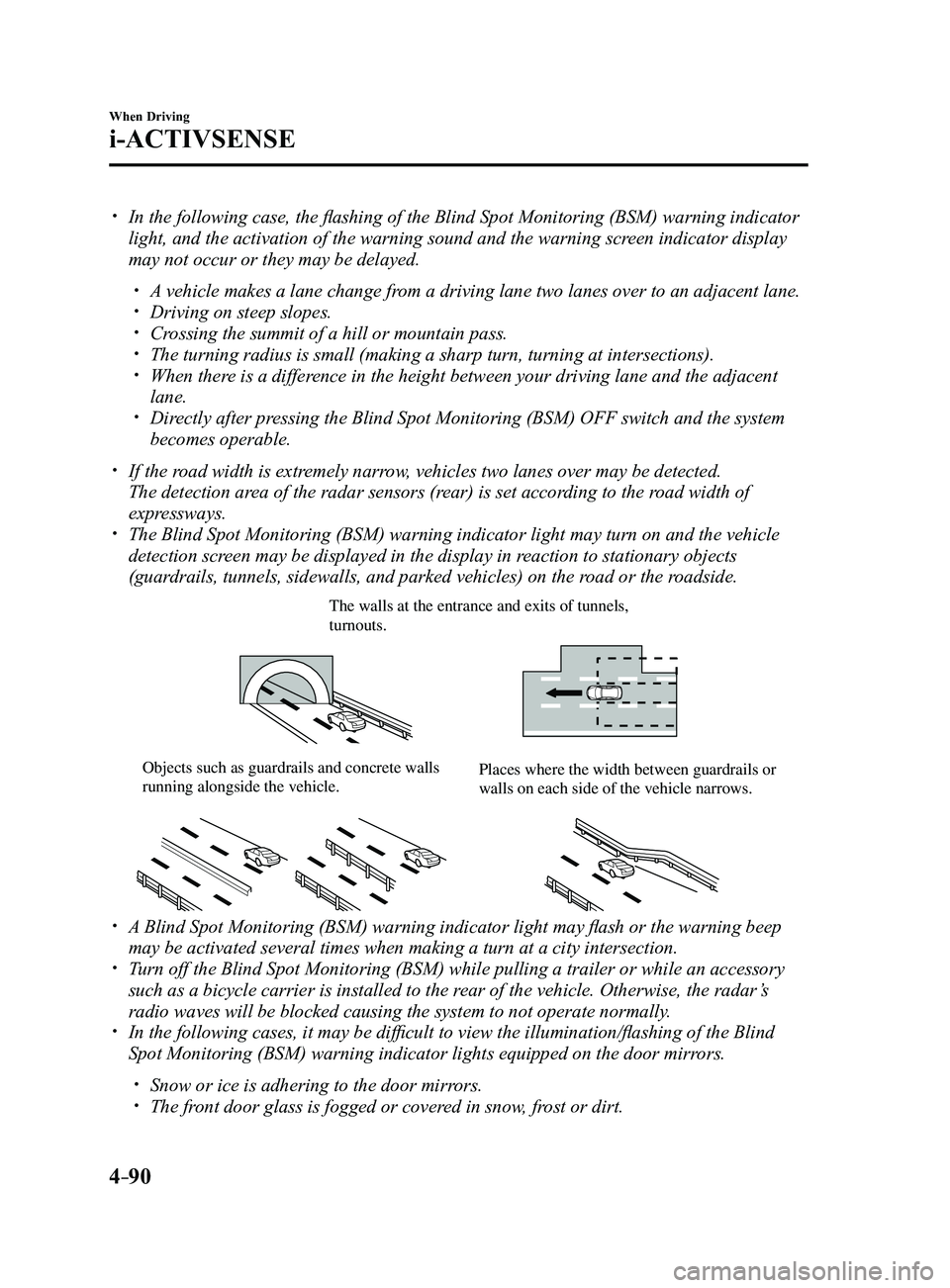
The Blind Spot Monitoring (BSM) warning indicator light may turn on an\
d the vehicle
detection screen may be displayed in the display in reaction to stationary objects
(guardrails, tunnels, sidewalls, and parked vehicles) on the road or the roadside.
The walls at the entrance and exits of tunnels, turnouts.
Objects such as guardrails and concrete walls running alongside the vehicle.Places where the width between guardrails or walls on each side of the vehicle narrows.
A Blind Spot Monitoring (BSM) warning indicator light may flash or the warning beep
may be activated several times when making a turn at a city intersection\
. Turn off the Blind Spot Monitoring (BSM) while pulling a trailer or whi\
le an accessory
such as a bicycle carrier is installed to the rear of the vehicle. Otherwise, the radar’s
radio waves will be blocked causing the system to not operate normally.
In the following cases, it may be difficult to view the illumination/flashing of the Blind
Spot Monitoring (BSM) warning indicator lights equipped on the door mi\
rrors.
Snow or ice is adhering to the door mirrors. The front door glass is fogged or covered in snow, frost or dirt.
Mazda3_8FL6-EA-16F_Edition2.indb 902016/08/10 17:36:38
Page 266 of 612
4–136
When Driving
i-ACTIVSENSE
Forward Sensing Camera (FSC)
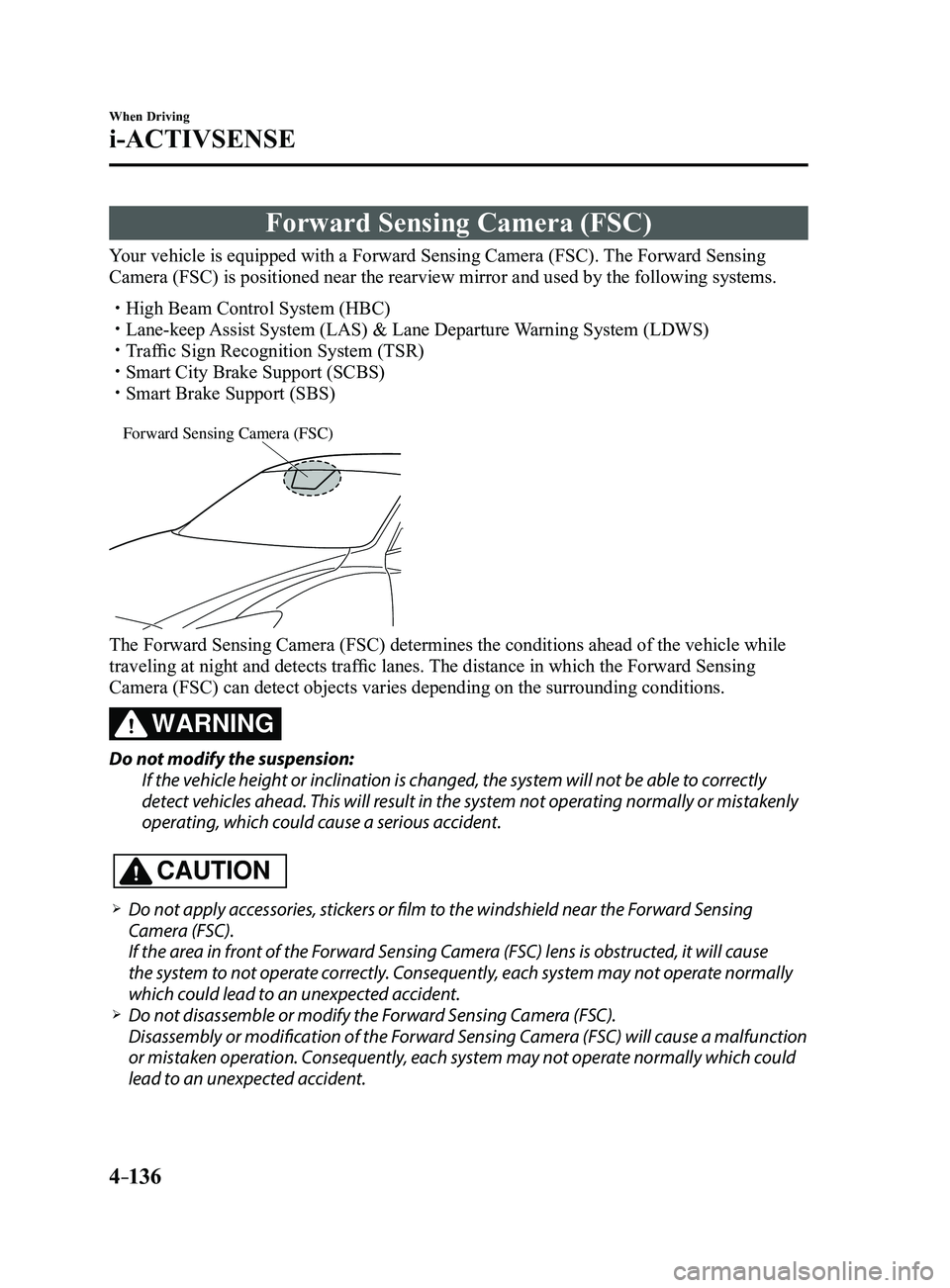
Your vehicle is equipped with a Forward Sensing Camera (FSC). The Forward Sensing
Camera (FSC) is positioned near the rearview mirror and used by the fo\
llowing systems.
High Beam Control System (HBC) Lane-keep Assist System (LAS) & Lane Departure Warning System (LDWS) Traffic Sign Recognition System (TSR) Smart City Brake Support (SCBS) Smart Brake Support (SBS)
Forward Sensing Camera (FSC)
The Forward Sensing Camera (FSC) determines the conditions ahead of th\
e vehicle while
traveling at night and detects traffic lanes. The distance in which the Forward Sensing
Camera (FSC) can detect objects varies depending on the surrounding co\
nditions.
WARNING
Do not modify the suspension:
If the vehicle height or inclination is changed, the system will not be able to correctly
detect vehicles ahead. This will result in the system not operating normally or mistakenly
operating, which could cause a serious accident.
CAUTION
Do not apply accessories, stickers or film to the windshield near the Forward Sensing
Camera (FSC).
If the area in front of the Forward Sensing Camera (FSC) lens is obstructed, it will cause
the system to not operate correctly. Consequently, each system may not operate normally
which could lead to an unexpected accident.
Do not disassemble or modify the Forward Sensing Camera (FSC).
Disassembly or modification of the Forward Sensing Camera (FSC) will cause a malfunction
or mistaken operation. Consequently, each system may not operate normally which could
lead to an unexpected accident.
Mazda3_8FL6-EA-16F_Edition2.indb 1362016/08/10 17:36:59
Page 268 of 612
4–138
When Driving
i-ACTIVSENSE
NOTE
In the following cases, the Forward Sensing Camera (FSC) cannot detect target objects
correctly, and each system may be unable to operate normally.
The height of the vehicle ahead is low . You drive your vehicle at the same speed as the vehicle ahead. Headlights are not turned on during the night or when going through a tunnel.
Mazda3_8FL6-EA-16F_Edition2.indb 1382016/08/10 17:36:59
Page 273 of 612
4–14 3
When Driving
i-ACTIVSENSE
NOTE
Under the following conditions, the radar sensor (front) may not be able to detect
vehicles ahead or obstructions correctly and each system may not operate normally.
The rear surface of a vehicle ahead does not reflect radio waves effectively, such as
an unloaded trailer or an automobile with a loading platform covered by a soft top,
vehicles with a hard plastic tailgate, and round-shaped vehicles.
Vehicles ahead with low vehicle height and thus less area for reflecting radio waves. Visibility is reduced due to a vehicle ahead casting off water, snow, or sand from its
tires and onto your windshield. The trunk/luggage compartment is loaded with heavy objects or the r ear passenger
seats are occupied. Ice, snow, or soiling is on the front surface of the front emblem. During inclement weather such as rain, snow, or sand storms. When driving near facilities or objects emitting str ong radio waves.
Under the following conditions, the radar sensor (fr ont) may not be able to detect
vehicles ahead or obstructions.
The beginning and end of a curve. Roads with continuous curves. Narrow lane roads due to road construction or lane closures. The vehicle ahead enters the radar sensor's blind spot. The vehicle ahead is running abnormally due to accident or vehicle damag\
e. Roads with repeated up and down slopes Driving on poor r oads or unpaved roads. The distance between your vehicle and the vehicle ahead is extr emely short. A vehicle suddenly comes close such as by cutting into the lane.
To prevent incorrect operation of the system, use tires of the same specified size,
manufacturer, brand, and tread pattern on all four wheels. In addition, do not use tires
with significantly different wear patterns or tire pressures on the same vehicle (Including
the temporary spare tire).
If the battery power is weak, the system may not operate correctly. If the vehicle is driven on a road with little traffic and few vehicles ahead or obstructions
for the radar sensor (front) to detect, the sensor detects that the radar sensor (front) is
dirty and the Smart Brake Support/Smart City Brake Support (SBS/SCBS) \
Warning Light
(amber) may be temporarily turned on. However, it does not indicate a malfunction.
Mazda3_8FL6-EA-16F_Edition2.indb 1432016/08/10 17:37:00