ABS MAZDA MODEL 3 5-DOOR 2018 User Guide
[x] Cancel search | Manufacturer: MAZDA, Model Year: 2018, Model line: MODEL 3 5-DOOR, Model: MAZDA MODEL 3 5-DOOR 2018Pages: 624, PDF Size: 59.23 MB
Page 248 of 624
▼System Operation
If the LAS&LDWS OFF indicator li
ght in the instrument cluster turns off when the ignition
is switched ON, the system goes on standby.
If the LAS&LDWS OFF indicator li ght in the instrument cluster turns on when the ignition
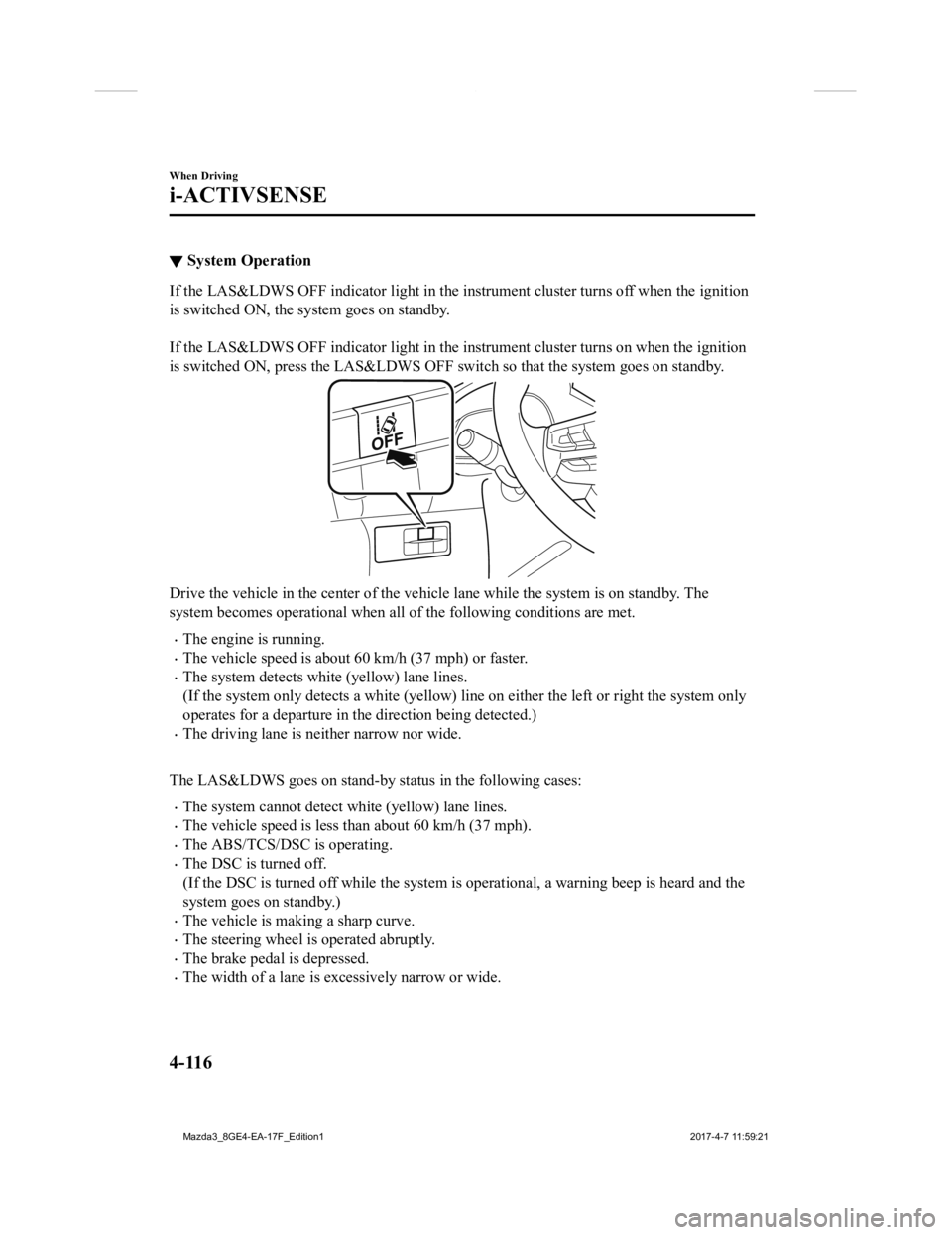
is switched ON, press the LAS&LDWS OFF switch so that the syste m goes on standby.
Drive the vehicle in the center of the vehicle lane while the system is on standby. The
system becomes operational when all of the following conditions are met.
The engine is running.
The vehicle speed is about 60 km/h (37 mph) or faster.
The system detects white (yellow) lane lines.
(If the system only detects a wh ite (yellow) line on either the left or right the system only
operates for a departure in the direction being detected.)
The driving lane is neither narrow nor wide.
The LAS&LDWS goes on stand-by status in the following cases:
The system cannot detect white (yellow) lane lines.
The vehicle speed is less than about 60 km/h (37 mph).
The ABS/TCS/DSC is operating.
The DSC is turned off.
(If the DSC is turned off while the system is operational, a warning beep is heard and the
system goes on standby.)
The vehicle is making a sharp curve.
The steering wheel is operated abruptly.
The brake pedal is depressed.
The width of a lane is excessively narrow or wide.
When Driving
i-ACTIVSENSE
4-116
Mazda3_8GE4-EA-17F_Edition1 2017-4-7 11:59:21
Page 278 of 624

Tire Pressure Monitoring System*
The Tire Pressure Monitoring System (TPMS) monitors the air pressure of all four tires. If
the air pressure of one or more tires is too low, the system warns the driver b y indicating the
tire pressure monitoring system warning light in the instrument cluster and operating a beep
sound. The system monitors the tire pressures indirectly using the data sent from the ABS
wheel speed sensors.
To allow the system to operate c orrectly, the system needs to be initialized with the specified
tire pressure (value on the tire pressure label). Follow the pr ocedure and perform the
initialization.
Refer to Tire Pressure Monitorin g System Initialization on page 4-148.
The warning light flashes when the system has a malfunction.
Refer to Warning Lights on page 4-24.
ABS wheel speed sensor
When Driving
Tire Pressure Monitoring System
4-146*Some models.
Mazda3_8GE4-EA-17F_Edition1 2017-4-7 11:59:21
Page 290 of 624
▼Picture Quality Adjustment
WA R N I N G
Always adjust the picture quality of the rear view monitor while the vehicle is stopped:
Do not adjust the picture quality of the rear view monitor while driving the vehicle. Adjusting
the picture quality of the rear view monitor such
as brightness, contrast, color, and tint while
driving the vehicle is dangerous as it could dist ract your attention from the vehicle operation
which could lead to an accident.
Picture quality adjustment must b e done while the shift lever/selector lever is in reverse (R).
There are four settings which can be adjusted including, bright ness, contrast, tint, and color.
When adjusting, pay sufficient attention to the vehicle surroun dings.
1. Select the
icon on the screen to display the tabs.
2. Select the desired tab item.
3. Adjust the brightness, contrast, tint, and color using the sl ider.
If you need to reset, p ress the reset button.
4. Select the
icon on the screen to close the tab.
When Driving
Rear View Monitor
4-158
Mazda3_8GE4-EA-17F_Edition1 2017-4-7 11:59:21
Page 478 of 624
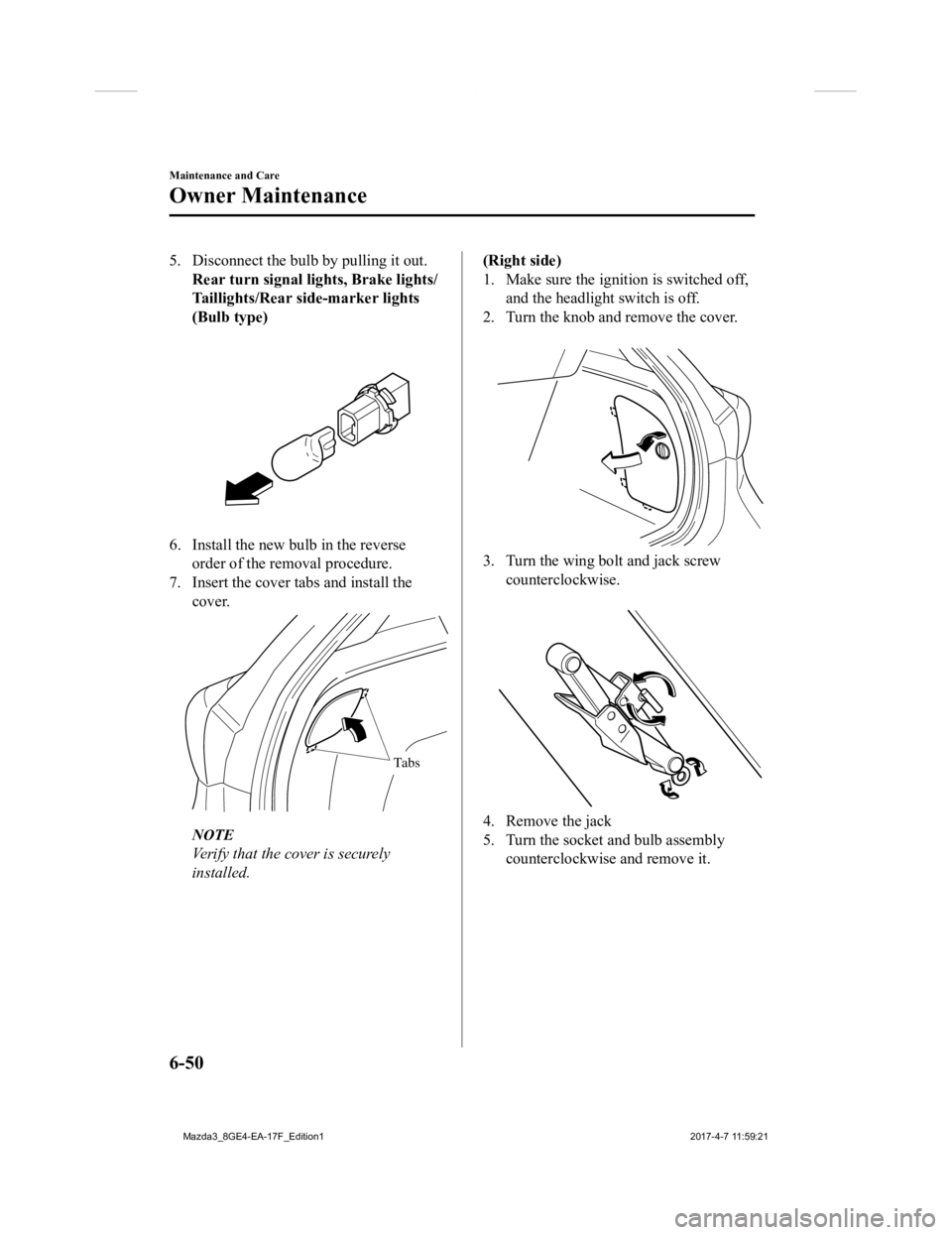
5. Disconnect the bulb by pulling it out.Rear turn signal lights, Brake lights/
Taillights/Rear side-marker lights
(Bulb type)
6. Install the new bulb in the reverseorder of the removal procedure.
7. Insert the cover tabs and install the cover.
Tabs
NOTE
Verify that the cover is securely
installed.
(Right side)
1. Make sure the ignition is switched off,and the headligh t switch is off.
2. Turn the knob and remove the cover.
3. Turn the wing bolt and jack screw
counterclockwise.
4. Remove the jack
5. Turn the socket and bulb assemblycounterclockwise and remove it.
Maintenance and Care
Owner Maintenance
6-50
Mazda3_8GE4-EA-17F_Edition1 2017-4-7 11:59:21
Page 480 of 624
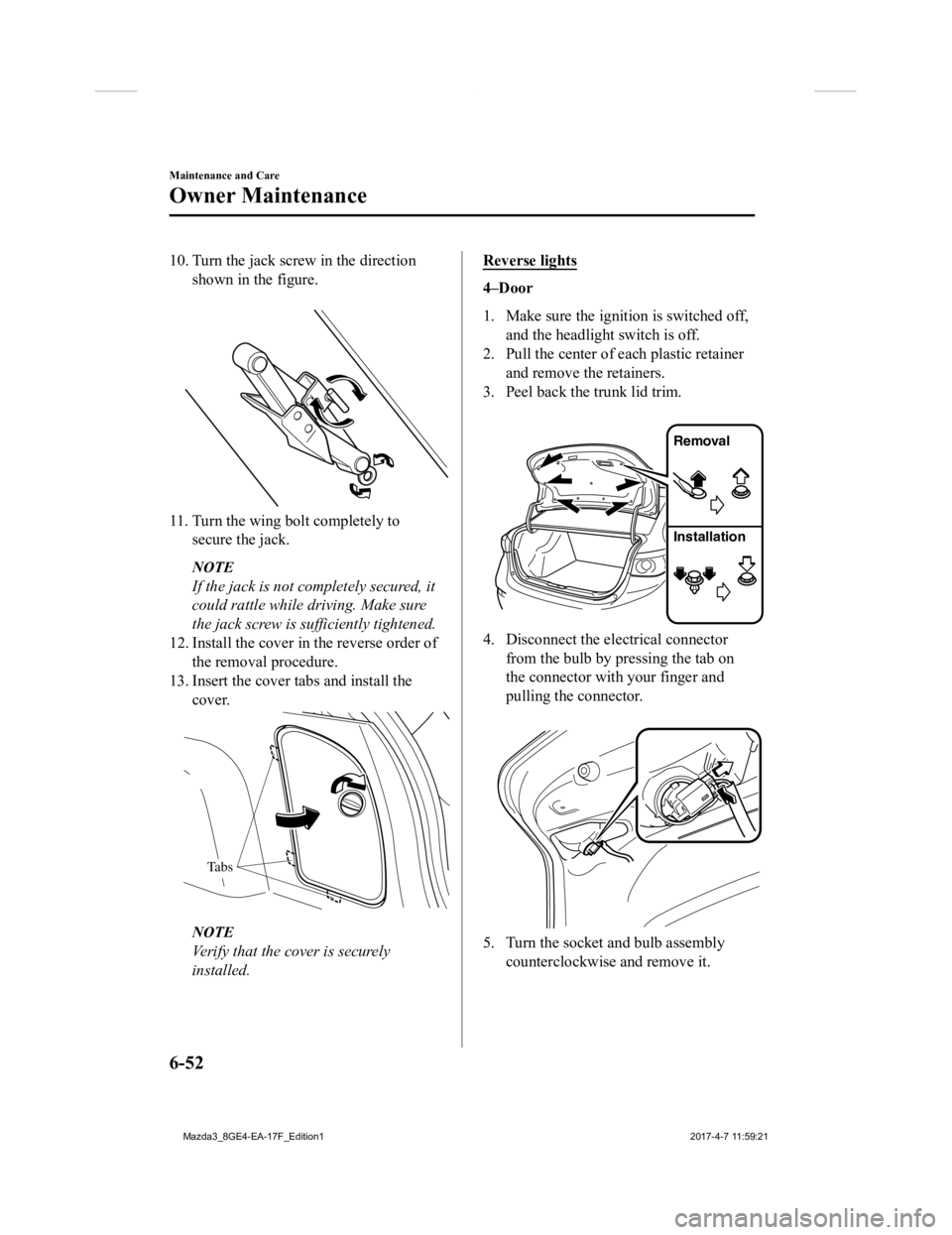
10. Turn the jack screw in the directionshown in the figure.
11. Turn the wing bolt completely tosecure the jack.
NOTE
If the jack is not completely secured, it
could rattle while driving. Make sure
the jack screw is sufficiently tightened.
12. Install the cover in the reverse order of the removal procedure.
13. Insert the cover tabs and install the cover.
Tabs
NOTE
Verify that the cover is securely
installed.
Reverse lights
4–Door
1. Make sure the ignition is switched off,
and the headligh t switch is off.
2. Pull the center of each plastic retainer
and remove the retainers.
3. Peel back the trunk lid trim.
Removal
Installation
4. Disconnect the electrical connectorfrom the bulb by pressing the tab on
the connector with your finger and
pulling the connector.
5. Turn the socket and bulb assemblycounterclockwise and remove it.
Maintenance and Care
Owner Maintenance
6-52
Mazda3_8GE4-EA-17F_Edition1 2017-4-7 11:59:21
Page 487 of 624
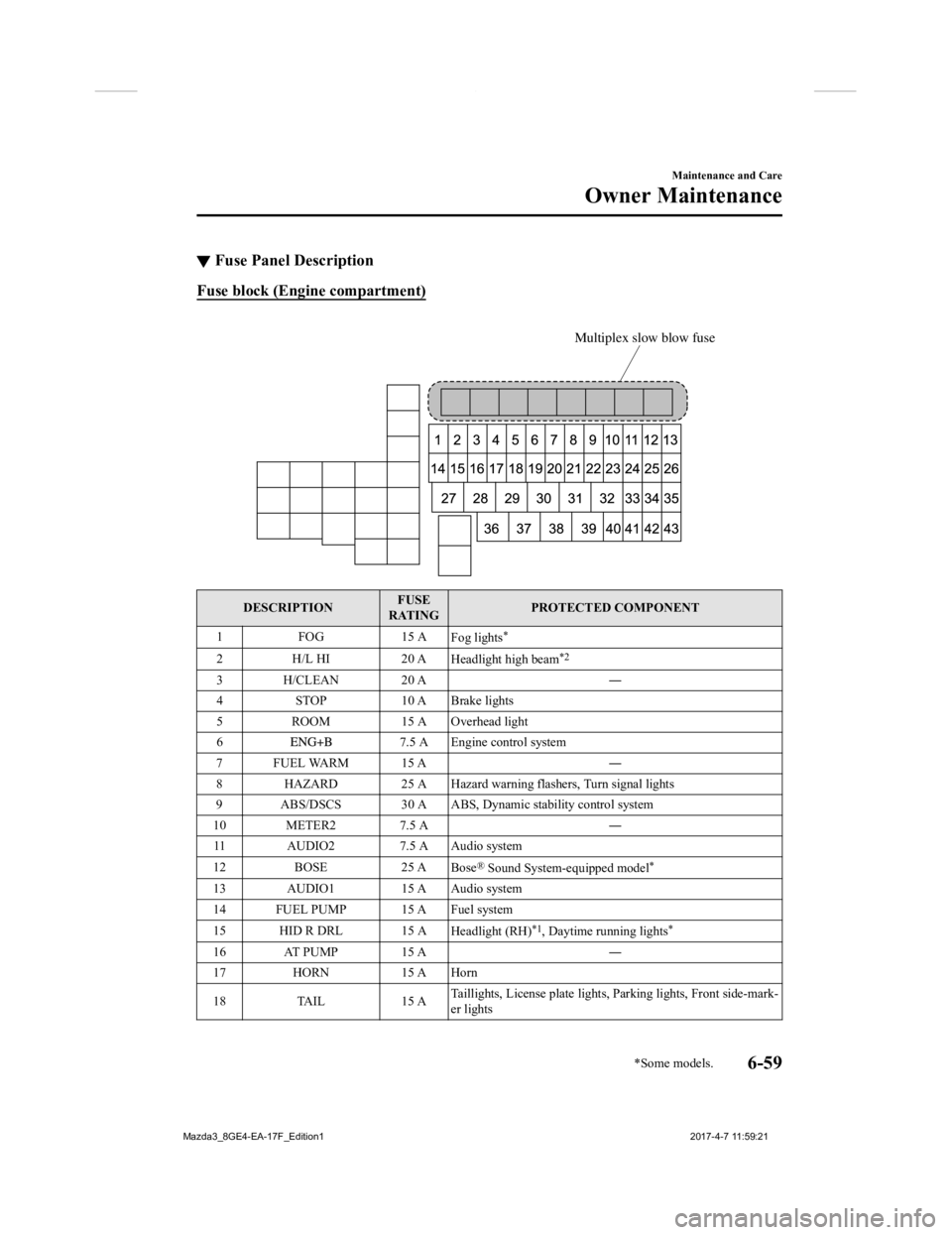
▼Fuse Panel Description
Fuse block (Engine compartment)
Multiplex slow blow fuse
DESCRIPTION FUSE
RATING PROTECTED COMPONENT
1F OG 1 5 A
Fog lights
*
2H /L H I 2 0 A
Headlight high beam*2
3 H/CLEAN 20 A ―
4 STOP 10 A Brake lights
5 ROOM 15 A Overhead light
6
7.5 A Engine control system
7FUEL WARM 15 A ―
8 HAZARD 25 A Hazard warning flashers, Turn signal lights
9 ABS/DSCS 30 A ABS, Dynamic stability control system
10 METER2 7.5 A ―
11 AUDIO2 7.5 A Audio system
12 BOSE 25 A
Bose
® Sound System-equipped model*
13 AUDIO1 15 A Audio system
14 FUEL PUMP 15 A Fuel system
15 HID R DRL 15 A Headlight (RH)
*1, Daytime running lights*
16 AT PUMP 15 A ―
17 HORN 15 A Horn
18 TAIL 15 ATaillights, License plate lights,
Parking lights, Front side-mark-
er lights
Maintenance and Care
Owner Maintenance
*Some models.6-59
Mazda3_8GE4-EA-17F_Edition1 2017-4-7 11:59:21
Page 489 of 624
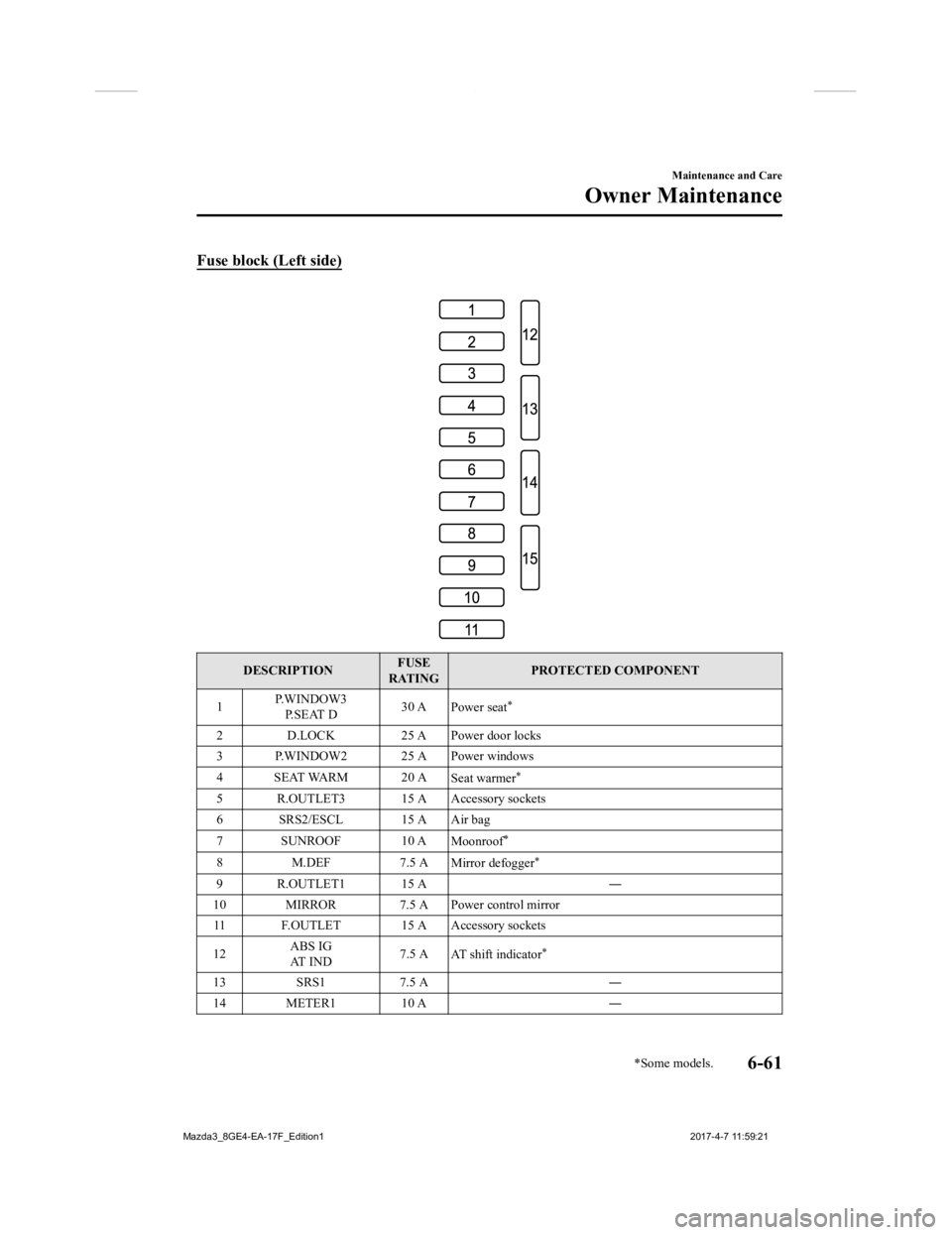
Fuse block (Left side)
DESCRIPTIONFUSE
RATING PROTECTED COMPONENT
1 P.WINDOW3
P. S E AT D 30 A
Power seat
*
2 D.LOCK 25 A Power door locks
3 P.WINDOW2 25 A Power windows
4 SEAT WARM 20 A Seat warmer
*
5 R.OUTLET3 15 A Accessory sockets
6 SRS2/ESCL 15 A Air bag
7 SUNROOF 10 AMoonroof
*
8M.DEF 7.5 A
Mirror defogger*
9 R.OUTLET1 15 A ―
10 MIRROR 7.5 A Power control mirror 11 F.OUTLET 15 A Accessory sockets
12 ABS IG
AT I N D 7.5 A
AT shift indicator
*
13 SRS1 7.5 A ―
14 METER1 10 A ―
Maintenance and Care
Owner Maintenance
*Some models.6-61
Mazda3_8GE4-EA-17F_Edition1 2017-4-7 11:59:21
Page 504 of 624
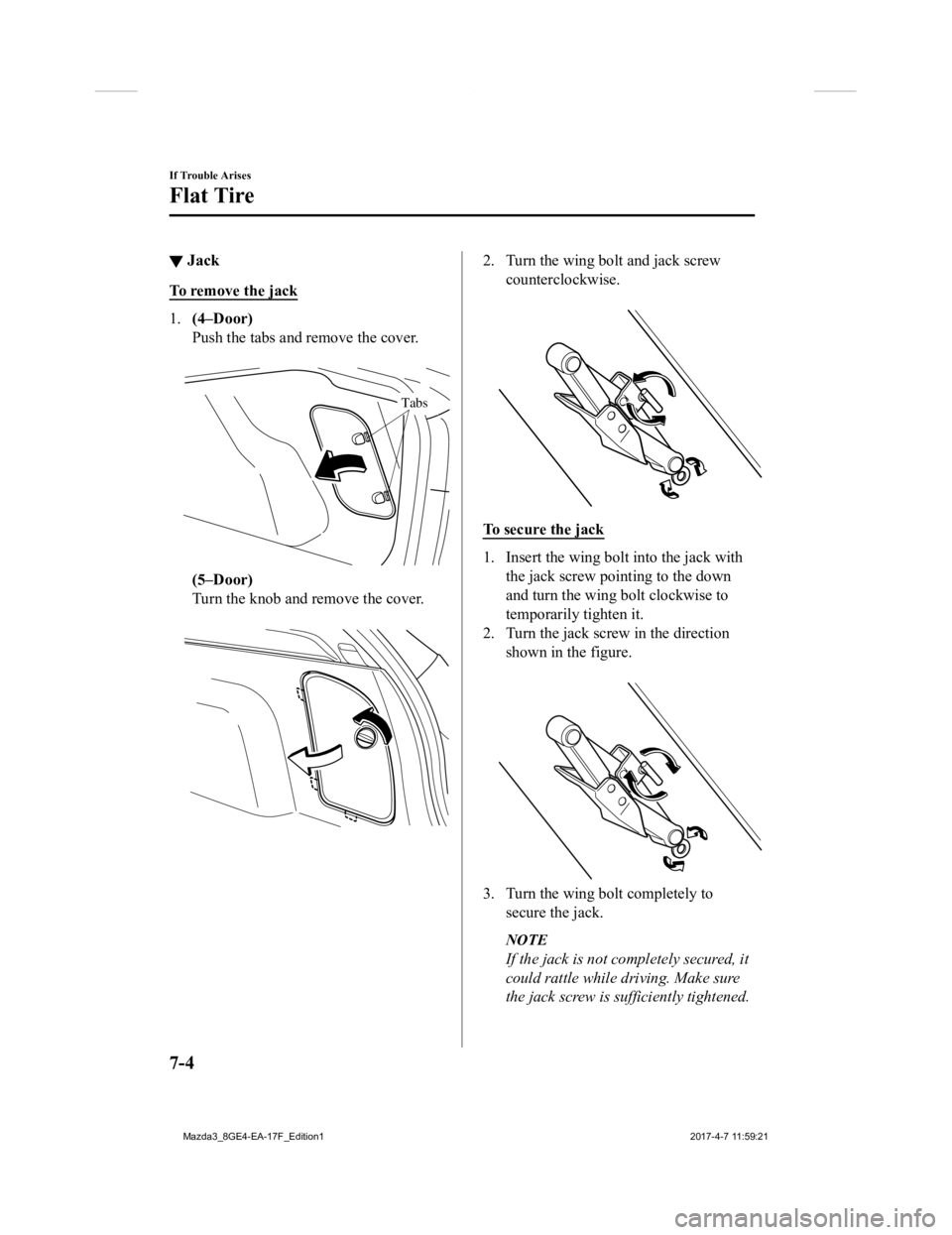
▼Jack
To remove the jack
1.
(4–Door)
Push the tabs and remove the cover.
Tabs
(5–Door)
Turn the knob and remove the cover.
2. Turn the wing bolt and jack screw
counterclockwise.
To secure the jack
1. Insert the wing bo lt into the jack with
the jack screw pointing to the down
and turn the wing bolt clockwise to
temporarily tighten it.
2. Turn the jack screw in the direction shown in the figure.
3. Turn the wing bolt completely to
secure the jack.
NOTE
If the jack is not completely secured, it
could rattle while driving. Make sure
the jack screw is sufficiently tightened.
If Trouble Arises
Flat Tire
7-4
Mazda3_8GE4-EA-17F_Edition1 2017-4-7 11:59:21
Page 505 of 624
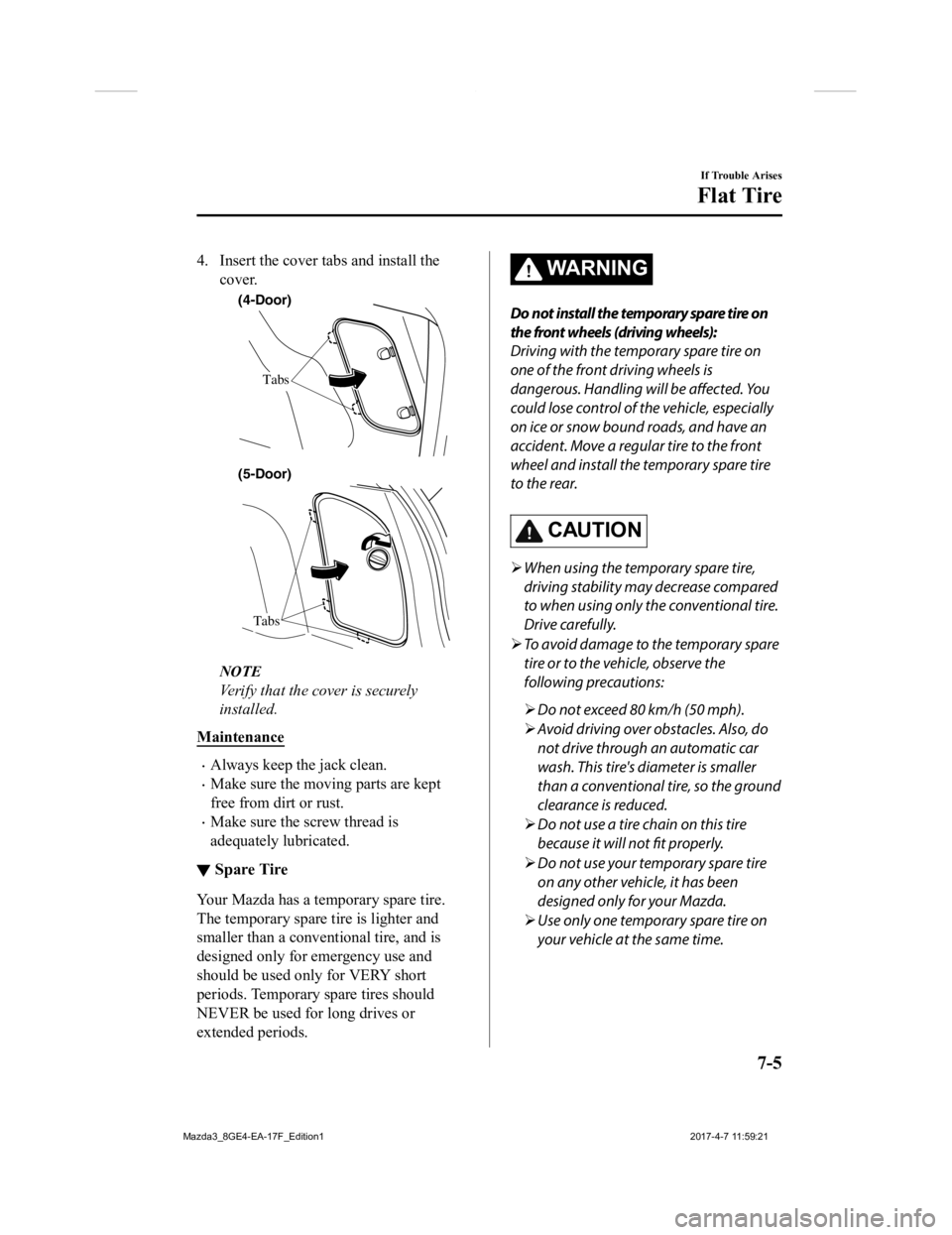
4. Insert the cover tabs and install thecover.
(4-Door)
Tabs
Tabs
(5-Door)
NOTE
Verify that the cover is securely
installed.
Maintenance
Always keep the jack clean.
Make sure the moving parts are kept
free from dirt or rust.
Make sure the screw thread is
adequately lubricated.
▼ Spare Tire
Your Mazda has a temporary spare tire.
The temporary spare tire is lighter and
smaller than a conventional tire, and is
designed only for emergency use and
should be used only for VERY short
periods. Temporary spare tires should
NEVER be used for long drives or
extended periods.
WA R N I N G
Do not install the temporary spare tire on
the front wheels (driving wheels):
Driving with the temporary spare tire on
one of the front driving wheels is
dangerous. Handling will be
affected. Yo u
could lose control of the vehicle, especially
on ice or snow bound roads, and have an
accident. Move a regular tire to the front
wheel and install the temporary spare tire
to the rear.
CAUTION
When using the temporary spare tire,
driving stability may decrease compared
to when using only the conventional tire.
Drive carefully.
To avoid damage to the temporary spare
tire or to the vehicle, observe the
following precautions:
Do not exceed 80 km/h (50 mph).
Avoid driving over obstacles. Also, do
not drive through an automatic car
wash. This tire's diameter is smaller
than a conventional tire, so the ground
clearance is reduced.
Do not use a tire chain on this tire
because it will not fit properly.
Do not use your temporary spare tire
on any other vehicle, it has been
designed only for your Mazda.
Use only one temporary spare tire on
your vehicle at the same time.
If Trouble Arises
Flat Tire
7-5
Mazda3_8GE4-EA-17F_Edition1 2017-4-7 11:59:21
Page 526 of 624
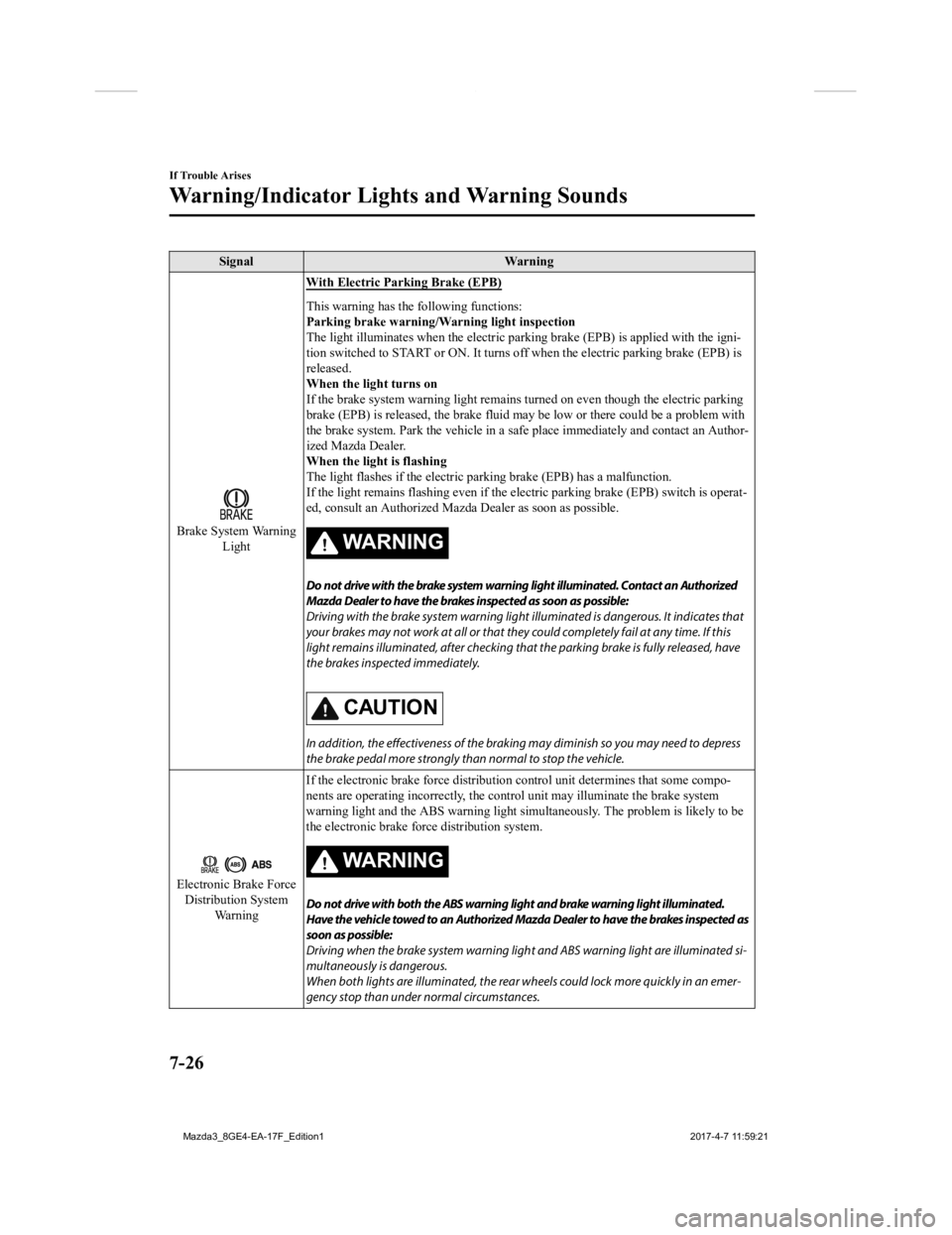
SignalWarning
Brake System Warning
Light With Electric Parking Brake (EPB)
This warning has the following functions:
Parking brake warning/Warning light inspection
The light illuminates when the electric parking brake (EPB) is
applied with the igni-
tion switched to START or ON. It turns off when the electric pa rking brake (EPB) is
released.
When the light turns on
If the brake system warning light remains turned on even though the electric parking
brake (EPB) is released, the brak e fluid may be low or there could be a problem with
the brake system. Park the vehicle in a safe place immediately and contact an Author-
ized Mazda Dealer.
When the light is flashing
The light flashes if the electric parking brake (EPB) has a mal function.
If the light remains flashing ev en if the electric parking brake (EPB) switch is operat-
ed, consult an Authorized Mazd a Dealer as soon as possible.
WARNING
Do not drive with the brake system warning light illuminated. Contact an Authorized
Mazda Dealer to have the brakes inspected as soon as possible:
Driving with the brake system warning light illuminated is dangerous. It indicates that
your brakes may not work at all or that they could completely fail at any time. If this
light remains illuminated, after checking that the parking brake is fully released, have
the brakes inspected immediately.
CAUTION
In addition, the effectiveness of the braking may diminish so you may need to depress
the brake pedal more strongly than normal to stop the vehicle.
Electronic Brake Force Distribution System Wa r n i n g If the electronic brake force di
stribution control unit determines that some compo-
nents are operating incorrectly , the control unit may illuminate the brake system
warning light and the ABS warni ng light simultaneously. The problem is likely to be
the electronic brake force distribution system.
WARNING
Do not drive with both the ABS warning light and brake warning light illuminated.
Have the vehicle towed to an Authorized Mazda Dealer to have the brakes inspected as
soon as possible:
Driving when the brake system warning ligh t and ABS warning light are illuminated si‐
multaneously is dangerous.
When both lights are illuminated, the rear wheels could lock more quickly in an emer‐
gency stop than under normal circumstances.
If Trouble Arises
Warning/Indicator Lights and Warning Sounds
7-26
Mazda3_8GE4-EA-17F_Edition1 2017-4-7 11:59:21