air condition MAZDA MODEL 3 HATCHBACK 2021 Owner's Guide
[x] Cancel search | Manufacturer: MAZDA, Model Year: 2021, Model line: MODEL 3 HATCHBACK, Model: MAZDA MODEL 3 HATCHBACK 2021Pages: 612, PDF Size: 89.06 MB
Page 402 of 612
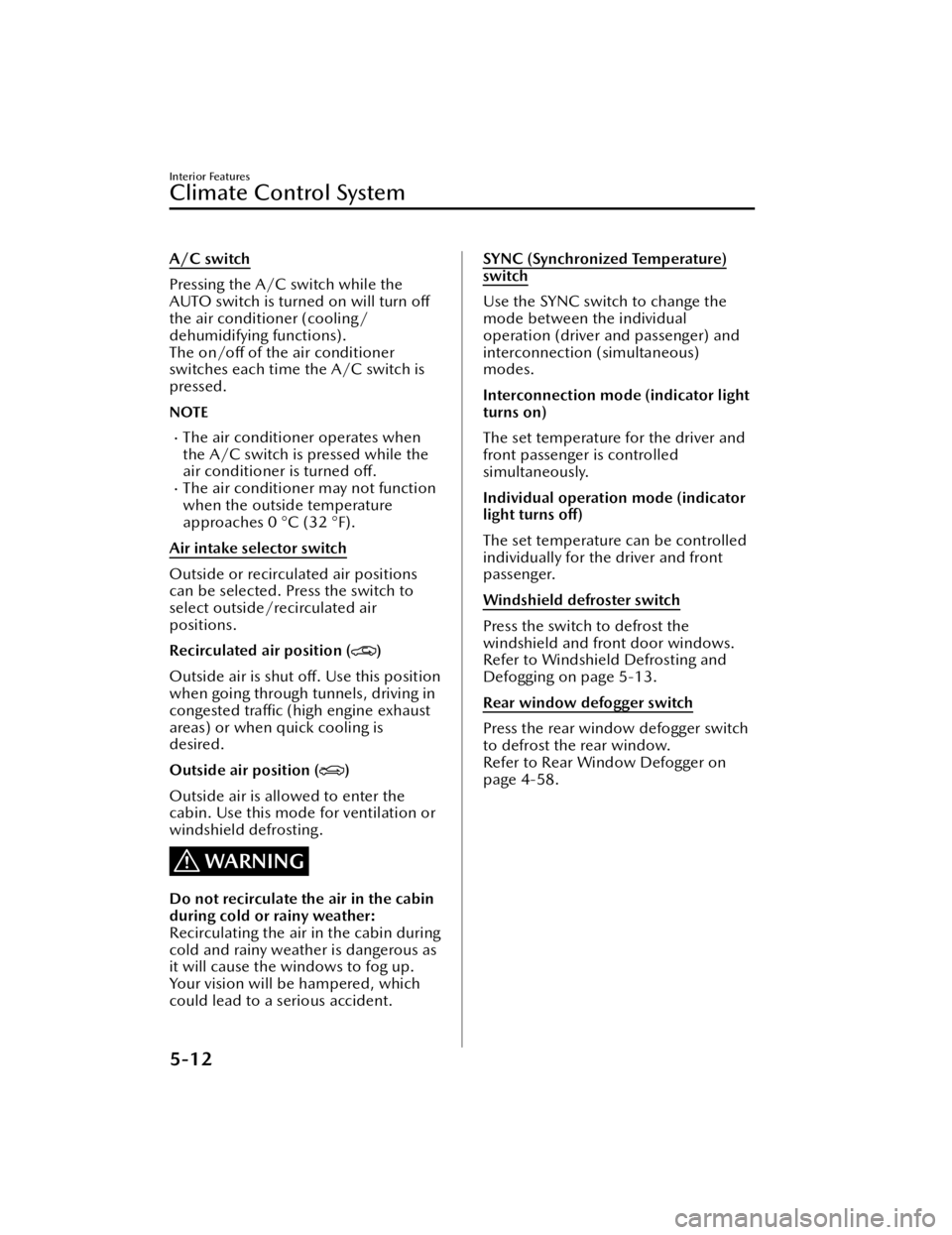
A/C switch
Pressing the A/C switch while the
AUTO switch is turned on will turn off
the air conditioner (cooling/
dehumidifying functions).
The on/off of the air conditioner
switches each time the A/C switch is
pressed.
NOTE
The air conditioner operates when
the A/C switch is pressed while the
air conditioner is turned o ff.
The air conditione r may not function
when the outside temperature
approaches 0 °C (32 °F).
Air intake selector switch
Outside or recircu lated air positions
can be selected. Press the switch to
select outside/recirculated air
positions.
Recirculated air position (
)
Outside air is shut o ff. Use this position
when going through tunnels, driving in
congested tra ffic (high engine exhaust
areas) or when quick cooling is
desired.
Outside air position (
)
Outside air is allowed to enter the
cabin. Use this mode for ventilation or
windshield defrosting.
WARNING
Do not recirculate the air in the cabin
during cold or rainy weather:
Recirculating the air in the cabin during
cold and rainy weather is dangerous as
it will cause the windows to fog up.
Your vision will be hampered, which
could lead to a serious accident.
SYNC (Synchronized Temperature)
switch
Use the SYNC switch to change the
mode between the individual
operation (driver and passenger) and
interconnection (simultaneous)
modes.
Interconnection mode (indicator light
turns on)
The set temperature for the driver and
front passenger is controlled
simultaneously.
Individual operation mode (indicator
light turns off)
The set temperature can be controlled
individually for the driver and front
passenger.
Windshield defroster switch
Press the switch to defrost the
windshield and front door windows.
Refer to Windshield Defrosting and
Defogging on page 5-13.
Rear window defogger switch
Press the rear window defogger switch
to defrost the rear window.
Refer to Rear Window Defogger on
page 4-58.
Interior Features
Climate Control System
5-12
Mazda3_8JM2-EA -20H_Edition1_new 2020-7-10 17:21:34
Page 403 of 612
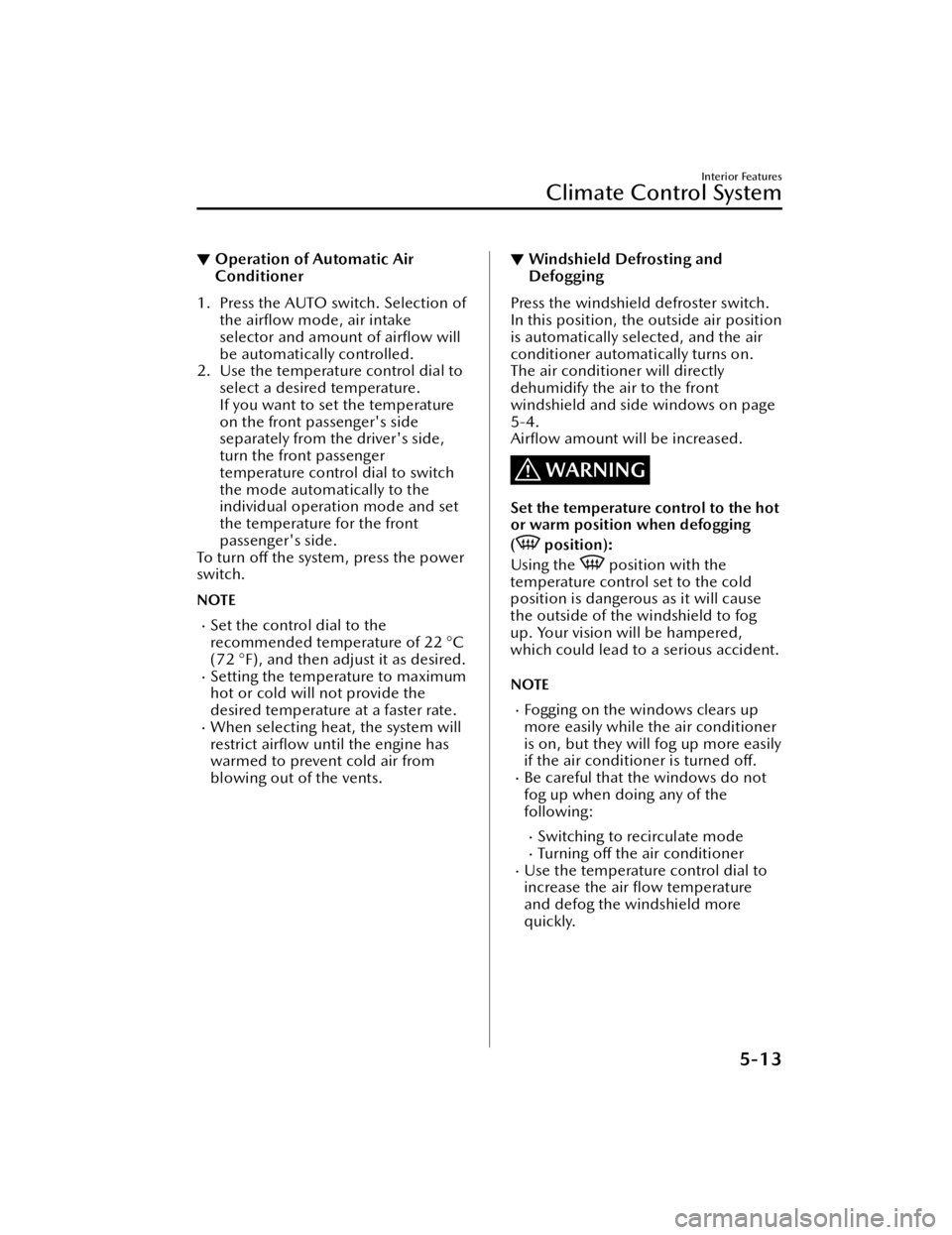
▼Operation of Automatic Air
Conditioner
1. Press the AUTO switch. Selection of
the airflow mode, air intake
selector and amount of air flow will
be automatically controlled.
2. Use the temperature control dial to select a desired temperature.
If you want to set the temperature
on the front passenger's side
separately from the driver's side,
turn the front passenger
temperature control dial to switch
the mode automatically to the
individual operation mode and set
the temperature for the front
passenger's side.
To t u r n o ff the system, press the power
switch.
NOTE
Set the control dial to the
recommended temperature of 22 °C
(72 °F), and then adjust it as desired.
Setting the temperature to maximum
hot or cold will not provide the
desired temperature at a faster rate.
When selecting heat, the system will
restrict air flow until the engine has
warmed to prevent cold air from
blowing out of the vents.
▼ Windshield Defrosting and
Defogging
Press the windshield defroster switch.
In this position, the outside air position
is automatically selected, and the air
conditioner automatically turns on.
The air conditioner will directly
dehumidify the air to the front
windshield and side windows on page
5-4.
Air
flow amount will be increased.
WARNING
Set the temperature control to the hot
or warm position when defogging
(
position):
Using the
position with the
temperature control set to the cold
position is dangerous as it will cause
the outside of the windshield to fog
up. Your vision wi ll be hampered,
which could lead to a serious accident.
NOTE
Fogging on the windows clears up
more easily while the air conditioner
is on, but they will fog up more easily
if the air conditioner is turned off .
Be careful that the windows do not
fog up when doing any of the
following:
Switching to recirculate modeTu r n i n g
off the air conditionerUse the temperature control dial to
increase the air
flow temperature
and defog the windshield more
quickly.
Interior Features
Climate Control System
5-13
Mazda3_8JM2-EA -20H_Edition1_new 2020-7-10 17:21:34
Page 417 of 612

To prevent misunderstood voice commands, be aware of the following points:
Connect your mobile phone to Bluetooth® before operating the mobile phone
using voice recognition.
After pressing the talk/pick-up button, wait for the beep before speaking a
command.
Speaking in a slightly louder voice will improve voice recognition, but an
excessively loud voice is unnecessary. Try to speak in a slightly louder voice than
when talking to other passengers in the vehicle.
You do not need to speak slowly. Speak at a normal speed.When calling a person in the device's phone book, the recognition rate increases
the longer the name is. Errors may oc cur with names that are short such as
“Mama”, “Home”, or “wife”.
Speak clearly, without pausing between words or numbers.Voice commands other than those specified, cannot be recognized. Speak in the
wording speci fied by the voice commands.
It is not necessary to face the microphone or approach it. Speak the voice
commands while maintaining a safe driving position.
Close the windows and the moonroof* to reduce loud noises from outside the
vehicle and to prevent the air flow of the air-conditioning system from being a
disturbance when using Bluetooth
® Hands-Free.Make sure that the air flow from the air conditioner is not blowing on the
microphone.
If the voice recognition is poor with th e guidance volume set to high, set the
Barge-In to OFF.
Examples of available voice commands
The speci fied name and number are put into the {}.
Common
BackHelp (You can listen to help guidance at each screen.){Line Number} (You can select the line number on the screen.)Next PagePrevious PageCancel
Menu
AllNavigationEntertainment
Interior Features
Mazda Connect
*Some models.5-27
Mazda3_8JM2-EA -20H_Edition1_new 2020-7-10 17:21:34
Page 422 of 612

AS EXAMPLES, AND WITHOUT LIMITATION, MAZDA DISCLAIMS ANY
WARRANTY REGARDING THE ACCURACY OF DATA PROVIDED BY THE
APPLICATION, SUCH AS THE ACCURACY OF DIRECTIONS, ESTIMATED TRAVEL
TIME, SPEED LIMITS, ROAD CONDITIONS, NEWS, WEATHER, TRAFFIC, OR
OTHER CONTENT PROVIDED BY APPLE, ITS AFFILIATES, OR THIRD PARTY
PROVIDERS; MAZDA DOES NOT GUARANTEE AGAINST LOSS OF APPLICATION
DATA, WHICH MAY BE LOST AT ANY TIME; MAZDA DOES NOT GUARANTEE
THAT THE APPLICATION OR ANY SERVICES PROVIDED THROUGH THEM WILL
BE PROVIDED AT ALL TIMES OR THAT ANY OR ALL SERVICES WILL BE AVAILABLE
AT ANY PARTICULAR TIME OR LOCATION. FOR EXAMPLE, SERVICES MAY BE
SUSPENDED OR INTERRUPTED WITHOUT NOTICE FOR REPAIR, MAINTENANCE,
SECURITY FIXES, UPDATES, ETC., SERVICES MAY BE UNAVAILABLE IN YOUR AREA
OR LOCATION, ETC.
IN ADDITION, YOU UNDERSTAND THAT CHANGES IN THIRD PARTY
TECHNOLOGY OR GOVERNMENT REGULATION MAY RENDER THE SERVICES
AND/OR APPLICATIONS OBSOLETE AND/OR UNUSABLE. TO THE EXTENT NOT
PROHIBITED BY LAW, IN NO EVENT SHALL MAZDA OR ITS AFFILIATES BE LIABLE
FOR PERSONAL INJURY, OR ANY INCIDENTAL, SPECIAL, INDIRECT OR
CONSEQUENTIAL DAMAGES WHATSOEVER, INCLUDING, WITHOUT
LIMITATION, DAMAGES FOR LOSS OF PROFITS, CORRUPTION OR LOSS OF
DATA, FAILURE TO TRANSMIT OR RECEIVE ANY DATA, BUSINESS INTERRUPTION
OR ANY OTHER COMMERCIAL DAMAGES OR LOSSES, ARISING OUT OF OR
RELATED TO THE APPLICATION OR YOUR USE OF OR INABILITY TO USE THE
APPLICATION OR INFORMATION ON THE APPLICATION.
When using Apple CarPlay™, please avoid distraction and use Apple CarPlay™
responsibly.
Stay fully aware of driving conditions and always obey applicable laws.
NOTE
Apple CarPlay™ is provided by Apple® and its use is subject to your agreement to
the Apple CarPlay™ terms of use, which are included as part of the Apple iOS
terms of use.
When using Apple CarPlay™, location, speed, and other vehicle data is transferred
to your iPhone®. For further details, refer to Apple®’s Privacy Policy.
Interior Features
Mazda Connect
5-32
Mazda3_8JM2-EA -20H_Edition1_new 2020-7-10 17:21:34
Page 423 of 612

Android Auto™
CAUTION
YOU EXPRESSLY ACKNOWLEDGE AND AGREE THAT USE OF ANDROID AUTO™
(“THE APPLICATION”) IS AT YOUR SOLE RISK AND THAT THE ENTIRE RISK AS TO
SATISFACTORY QUALITY, PERFORMANCE, ACCURACY AND EFFORT IS WITH
YOU TO THE MAXIMUM EXTENT PERMITTED BY APPLICABLE LAW, AND THAT
THE APPLICATION AND INFORMATION ON THE APPLICATION IS PROVIDED “AS
IS” AND “AS AVAILABLE,” WITH ALL FAULTS AND WITHOUT WARRANTY OF ANY
KIND, AND MAZDA HEREBY DISCLAIMS ALL WARRANTIES AND CONDITIONS
WITH RESPECT TO THE APPLICATION AND INFORMATION ON THE
APPLICATION, EITHER EXPRESS, IMPLIED OR STATUTORY, INCLUDING, BUT NOT
LIMITED TO, THE IMPLIED WARRANTIES AND/OR CONDITIONS OF
MERCHANTABILITY, SATISFACTORY QUALITY, FITNESS FOR A PARTICULAR
PURPOSE, ACCURACY, QUIET ENJOYMENT, AND NONINFRINGEMENT OF
THIRD PARTY RIGHTS.
AS EXAMPLES, AND WITHOUT LIMITATION, MAZDA DISCLAIMS ANY
WARRANTY REGARDING THE ACCURACY OF DATA PROVIDED BY THE
APPLICATION, SUCH AS THE ACCURACY OF DIRECTIONS, ESTIMATED TRAVEL
TIME, SPEED LIMITS, ROAD CONDITIONS, NEWS, WEATHER, TRAFFIC, OR
OTHER CONTENT PROVIDED BY GOOGLE, ITS AFFILIATES, OR THIRD PARTY
PROVIDERS; MAZDA DOES NOT GUARANTEE AGAINST LOSS OF APPLICATION
DATA, WHICH MAY BE LOST AT ANY TIME; MAZDA DOES NOT GUARANTEE
THAT THE APPLICATION OR ANY SERVICES PROVIDED THROUGH THEM WILL
BE PROVIDED AT ALL TIMES OR THAT ANY OR ALL SERVICES WILL BE AVAILABLE
AT ANY PARTICULAR TIME OR LOCATION. FOR EXAMPLE, SERVICES MAY BE
SUSPENDED OR INTERRUPTED WITHOUT NOTICE FOR REPAIR, MAINTENANCE,
SECURITY FIXES, UPDATES, ETC., SERVICES MAY BE UNAVAILABLE IN YOUR AREA
OR LOCATION, ETC.
IN ADDITION, YOU UNDERSTAND THAT CHANGES IN THIRD PARTY
TECHNOLOGY OR GOVERNMENT REGULATION MAY RENDER THE SERVICES
AND/OR APPLICATIONS OBSOLETE AND/OR UNUSABLE. TO THE EXTENT NOT
PROHIBITED BY LAW, IN NO EVENT SHALL MAZDA OR ITS AFFILIATES BE LIABLE
FOR PERSONAL INJURY, OR ANY INCIDENTAL, SPECIAL, INDIRECT OR
CONSEQUENTIAL DAMAGES WHATSOEVER, INCLUDING, WITHOUT
LIMITATION, DAMAGES FOR LOSS OF PROFITS, CORRUPTION OR LOSS OF
DATA, FAILURE TO TRANSMIT OR RECEIVE ANY DATA, BUSINESS INTERRUPTION
OR ANY OTHER COMMERCIAL DAMAGES OR LOSSES, ARISING OUT OF OR
RELATED TO THE APPLICATION OR YOUR USE OF OR INABILITY TO USE THE
APPLICATION OR INFORMATION ON THE APPLICATION.
When using Android Auto™, please avoid distraction and use Android Auto™
responsibly.
Stay fully aware of driving conditions and always obey applicable laws.
Interior Features
Mazda Connect
5-33
Mazda3_8JM2-EA -20H_Edition1_new 2020-7-10 17:21:34
Page 442 of 612
Scheduled Maintenance
▼Scheduled Maintenance (U.S.A. and Puerto Rico)
Vehicles utilizing the vehicle status monitor feature:
The vehicle status monitor feature alerts you of maintenance needs by turning on the
wrench indicator light or displaying a message in the instrument panel, or both.
Every maintenance must be done when the display/wrench indication comes on.
The display/wrench indication will come
on before reaching the maximum interval
of 16,000 km (10,000 miles), or 12 mont hs (after the previous maintenance).
If you drive your vehicle under any of th e following conditions, follow the Severe
Driving Scheduled Maintenance and replace the engine oil and filter every 8,000 km
(5,000 miles) or 6 months, whichever comes first.
Otherwise, follow the Normal Driv ing Scheduled Maintenance intervals.
1. The vehicle is idled for long periods or driven at low speeds, such as with police cars, taxis, or driver's education school car.
2. Driving under dusty conditions.
3. Driving for long periods in cold temperatures or driving regularly for short distan- ces only.
4. Driving under extremely high temperature conditions.
5. Driving continuously in mountainous regions.
If you are following the Severe Driving Scheduled Maintenance (8,000 km (5,000
miles) or 6 months oil replacement interval), set the vehicle status monitor manually.
Refer to the Information section in the Mazda Connect Owner's Manual. Please
contact an Authorized Mazda Dealer if necessary.
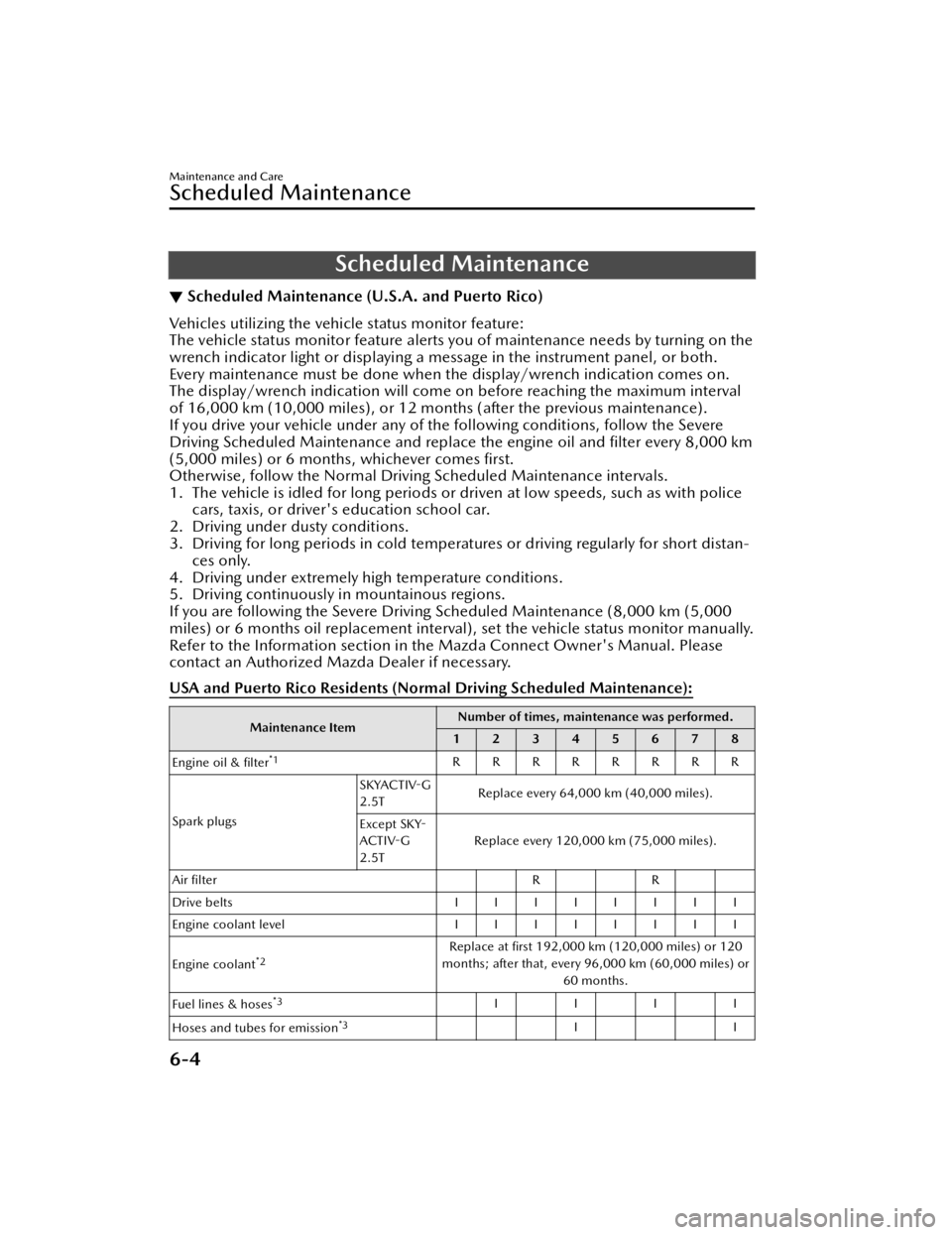
USA and Puerto Rico Residents (Nor mal Driving Scheduled Maintenance):
Maintenance ItemNumber of times, maintenance was performed.
12345678
Engine oil & filter
*1RRRRRRRR
Spark plugs SKYACTIV
-G
2.5T Replace every 64,000 km (40,000 miles).
Except SKY -
ACTIV -G
2.5T Replace every 120,000 km (75,000 miles).
Air filter RR
Drive belts IIIIIIII
Engine coolant level IIIIIIII
Engine coolant
*2Replace at first 192,000 km (120,000 miles) or 120
months; after that, every 96,000 km (60,000 miles) or 60 months.
Fuel lines & hoses
*3IIII
Hoses and tubes for emission
*3II
Maintenance and Care
Scheduled Maintenance
6-4
Mazda3_8JM2-EA -20H_Edition1_new 2020-7-10 17:21:34
Page 445 of 612
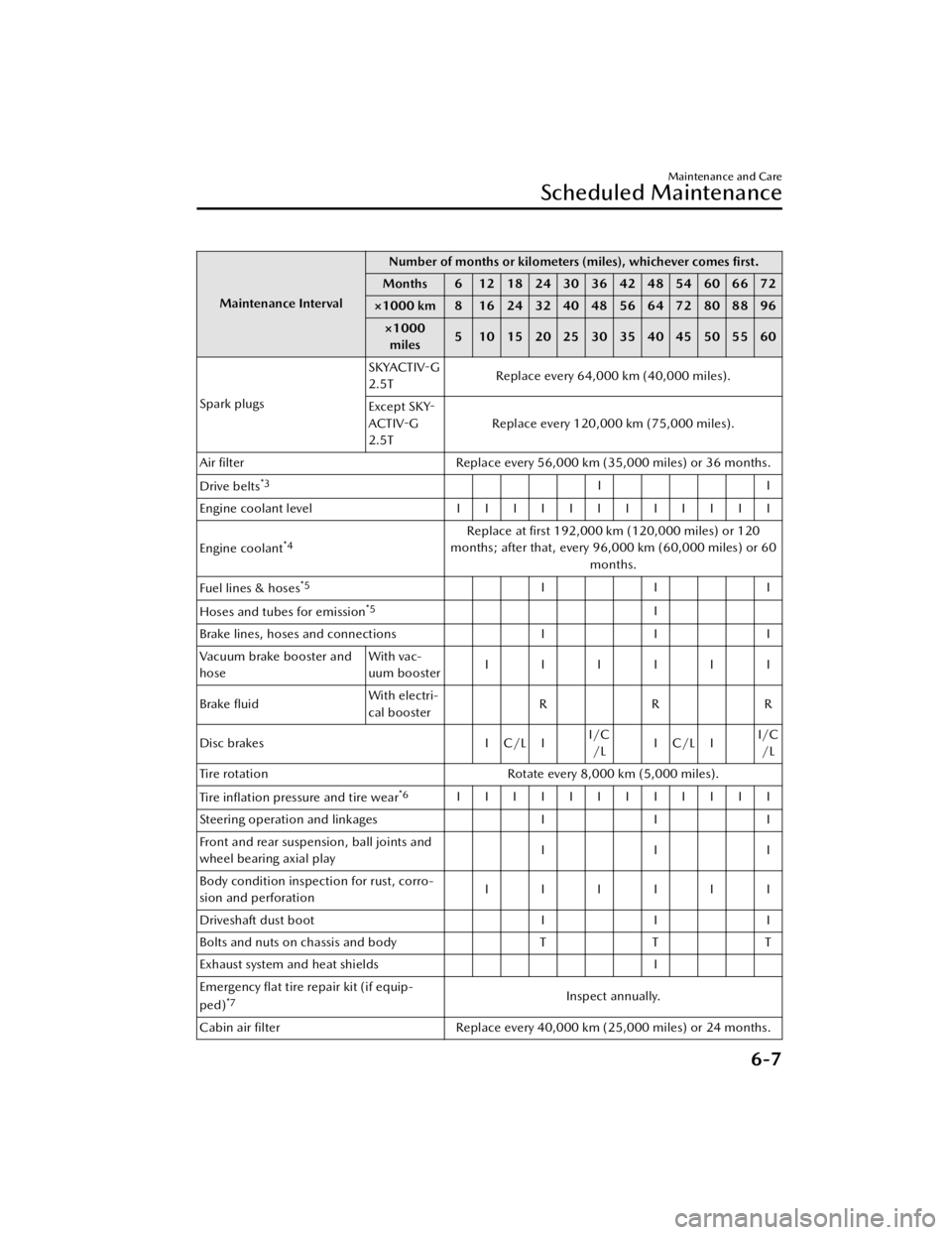
Maintenance IntervalNumber of months or kilometers (miles), whichever comes
first.
Months 6 1218243036424854606672
×1000 km 8 16 24 32 40 48 56 64 72 80 88 96
×1000miles 5 1015202530354045505560
Spark plugs SKYACTIV
-G
2.5T Replace every 64,000 km (40,000 miles).
Except SKY -
ACTIV -G
2.5T Replace every 120,000 km (75,000 miles).
Air filter Replace every 56,000 km (35,000 miles) or 36 months.
Drive belts
*3II
Engine coolant level IIIIIIIIIIII
Engine coolant
*4Replace at first 192,000 km (120,000 miles) or 120
months; after that, every 96,000 km (60,000 miles) or 60
months.
Fuel lines & hoses
*5III
Hoses and tubes for emission
*5I
Brake lines, hoses and connections III
Vacuum brake booster and
hose With vac-
uum booster
IIIIII
Brake fluid With electri-
cal booster
RRR
Disc brakes I C/L II/C
/L IC/LI I/C
/L
Tire rotation Rotate every 8,000 km (5,000 miles).
Tire in flation pressure and tire wear
*6IIIIIIIIIIII
Steering operation and linkages III
Front and rear suspension, ball joints and
wheel bearing axial play III
Body condition inspection for rust, corro-
sion and perforation IIIIII
Driveshaft dust boot III
Bolts and nuts on chassis and body TTT
Exhaust system and heat shields I
Emergency flat tire repair kit (if equip-
ped)
*7Inspect annually.
Cabin air filter Replace every 40,000 km (25,000 miles) or 24 months.
Maintenance and Care
Scheduled Maintenance
6-7
Mazda3_8JM2-EA-20H_Edition1_new 2020-7-10 17:21:34
Page 446 of 612

Chart symbols:
I: Inspect: Inspect and clean, repair, adjust, fill up, or replace if necessary.
R : Replace
C : Clean
L : Lubricate
T: Tighten
Remarks:
*1 Reset the engine oil data whenever replacing the engine oil regardless of the message/wrench indicator light display.
*2 If you drive your vehicle under any of the following conditions, replace the engine oil & filter every
8,000 km (5,000 miles) or 6 months, whichever comes first.
1. The vehicle is idled for long periods or driven at low speeds, such as with police cars, taxis, or
driver's education school vehicles.
2. Driving under dusty conditions.
3. Driving for long periods in cold temperatures or driving regularly for short distances only.
4. Driving under extremely high temperature conditions.
5. Driving continuously in mountainous regions.
*3 Also inspect the air conditioner drive belts, if equipped.
If the vehicle is operated primarily under any of the following conditions, inspect the drive belts more
often than the recommended intervals.
a) Driving under dusty conditions.
b) The vehicle is idled for long periods or driven at low speeds.
c) Driving for long periods in cold temperatures or driving regularly for short distances only.
d) Driving under extremely high temperature conditions.
e) Driving continuously in mountainous regions.
f) Driving for long period in extremely wet or heavy rain condition.
*4Use of FL -22 is recommended when replacing engine c oolant. Using engine coolant other than FL-22
may cause serious damage to the engine and cooling system.
*5 According to state/provincial and federal regulati ons, failure to perform maintenance on these items
will not void your emissions warranties. However, Mazda recommends that all maintenance services
be performed at the recommended time or mileage/kilometer period to ensure long-term reliability.
*6 Inspect a spare tire if equipped.*7Check the tire repair fl uid expiration date every year when performing the periodic maintenance.
Replace the tire repair fluid bottle with a new one before the expiration date.
Maintenance and Care
Scheduled Maintenance
6-8
Mazda3_8JM2-EA -20H_Edition1_new 2020-7-10 17:21:34
Page 447 of 612
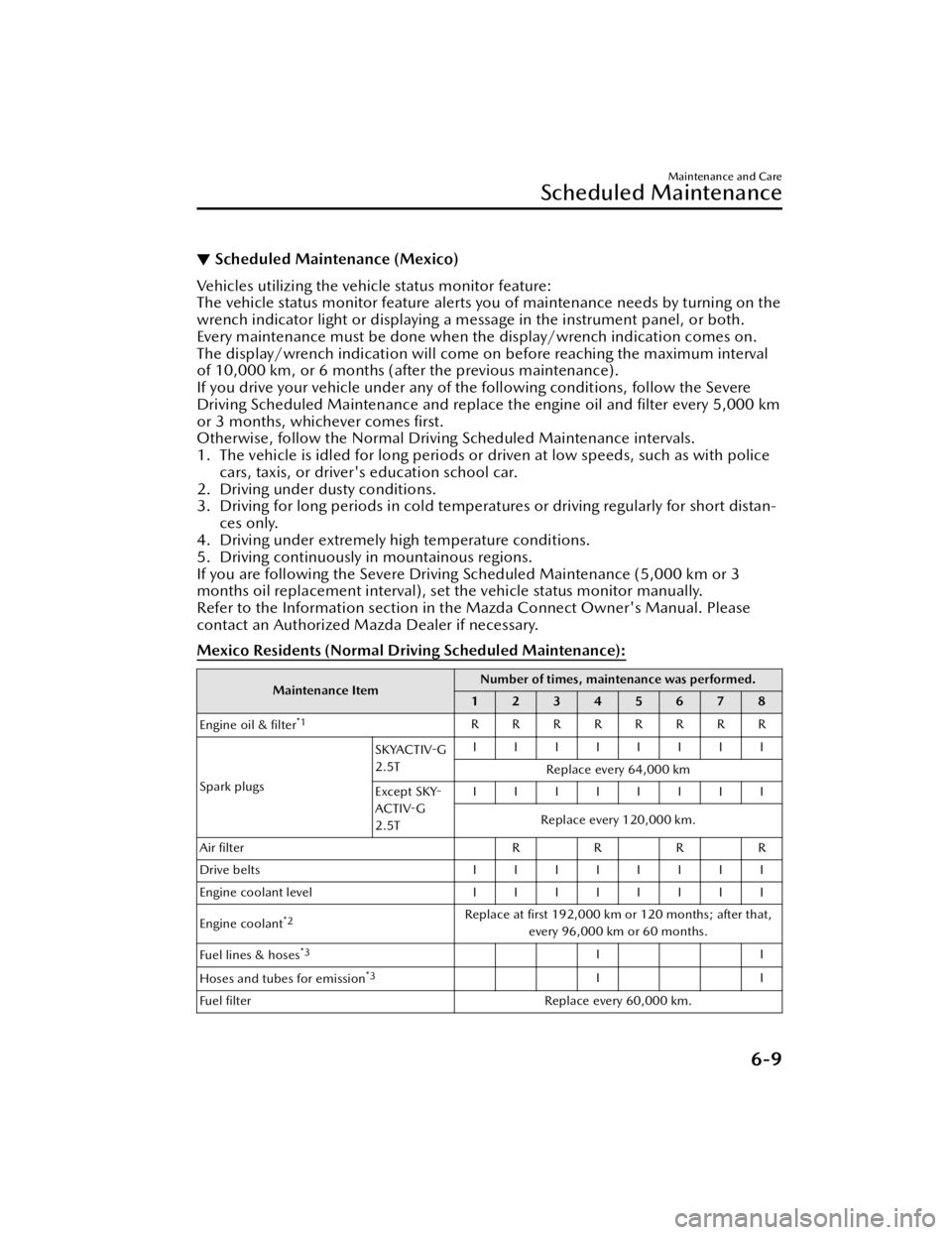
▼Scheduled Maintenance (Mexico)
Vehicles utilizing the vehicle status monitor feature:
The vehicle status monitor feature alerts you of maintenance needs by turning on the
wrench indicator light or displaying a message in the instrument panel, or both.
Every maintenance must be done when the display/wrench indication comes on.
The display/wrench indication will come on before reaching the maximum interval
of 10,000 km, or 6 months (aft
er the previous maintenance).
If you drive your vehicle under any of the following conditions, follow the Severe
Driving Scheduled Maintenance and replace the engine oil and filter every 5,000 km
or 3 months, whichever comes first.
Otherwise, follow the Normal Driving Scheduled Maintenance intervals.
1. The vehicle is idled for long periods or driven at low speeds, such as with police cars, taxis, or driver's education school car.
2. Driving under dusty conditions.
3. Driving for long periods in cold temperat ures or driving regularly for short distan-
ces only.
4. Driving under extremely high temperature conditions.
5. Driving continuously in mountainous regions.
If you are following the Severe Driving Scheduled Maintenance (5,000 km or 3
months oil replacement interval), set the vehicle status monitor manually.
Refer to the Information section in th e Mazda Connect Owner's Manual. Please
contact an Authorized Mazda Dealer if necessary.
Mexico Residents (Normal Driv ing Scheduled Maintenance):
Maintenance Item Number of times, maintenance was performed.
12345678
Engine oil & filter
*1RRRRRRRR
Spark plugs SKYACTIV
-G
2.5T IIIIIIII
Replace every 64,000 km
Except SKY -
ACTIV -G
2.5T IIIIIIII
Replace every 120,000 km.
Air filte r RRRR
Drive belts IIIIIIII
Engine coolant level IIIIIIII
Engine coolant
*2Replace at first 192,000 km or 120 months; after that,
every 96,000 km or 60 months.
Fuel lines & hoses
*3II
Hoses and tubes for emission
*3II
Fuel filter Replace every 60,000 km.
Maintenance and Care
Scheduled Maintenance
6-9
Mazda3_8JM2-EA-20H_Edition1_new 2020-7-10 17:21:34
Page 472 of 612

▼Tire In
flation Pressure
WARNING
Always in flate the tires to the correct
pressure:
Overin flation or underin flation of tires
is dangerous. Adverse handling or
unexpected tire failure could result in a
serious accident.
Refer to Tires on page 9-10.
Use only a Mazda-genuine tire valve
cap:
Use of a non-genuine part is
dangerous as the correct tire air
pressure cannot be maintained if the
tire valve becomes damaged. If the
vehicle is driven under this condition,
the tire air pressure will decrease
which could result in a serious
accident. Do not use any part for the
tire valve cap that is not a
Mazda-genuine part.
Inspect all tire pressures monthly
(including the spare) when the tires are
cold. Maintain recommended
pressures for the best ride, handling ,
and minimum tire wear.
Refer to the specification charts (page
9-10).
NOTE
Always check tire pressure when tires
are cold.
Warm tires normally exceed
recommended pressures. Do not
release air from warm tires to adjust
the pressure.
Underin flation can cause reduced
fuel economy, uneven and
accelerated tire wear, and poor
sealing of the tire bead, which will
deform the wheel and cause
separation of tire from rim.
Overin flation can produce a harsh
ride, uneven and accelerated tire
wear, and a greater possibility of
damage from road hazards.
Keep your tire pressure at the correct
levels. If one frequently needs in flating, have it inspected.
▼ Tire Rotation
WARNING
Rotate tires periodically:
Irregular tire wear is dangerous. To
equalize tread wear for maintaining
good performance in handling and
braking , rotate the tires periodically or
sooner if irregular wear develops.
Please refer to Scheduled maintenance
for your tire rotation interval.
During rotation, inspect them for
correct balance.
1. Forward
Do not include (TEMPORARY USE
ONLY) spare tire in rotation.
Maintenance and Care
Owner Maintenance
6-34
Mazda3_8JM2-EA
-20H_Edition1_new 2020-7-10 17:21:34