change wheel MAZDA MODEL 3 SEDAN 2019 User Guide
[x] Cancel search | Manufacturer: MAZDA, Model Year: 2019, Model line: MODEL 3 SEDAN, Model: MAZDA MODEL 3 SEDAN 2019Pages: 592, PDF Size: 75.35 MB
Page 257 of 592

Slippery roads such as ice or snow-bound
roads (Tires could spin causing you to
lose vehicle control, or the stop hold
control may not operate.)
Long, descending slopes (to maintain
distance between vehicles, the system
automatically and continuously applies
the brakes which could result in the loss
of brake power.)
Two-wheeled vehicles such as
motorcycles or bicycles are ahead.
Slopes with a steep gradient (The vehicle
ahead may not be detected correctly,
your vehicle may slide while stopped by
the stop hold control, and it may
accelerate suddenly after it starts
moving.)
For safety purposes, switch the MRCC
system off when it is not being used.
CAUTION
If your vehicle is towed or you are towing
something, switch the MRCC system off to
prevent an unexpected operation.
NOTE
The MRCC system does not detect the
following as physical objects.
Vehicles approaching in the opposite
direction
Pedestrians
Stationary objects (stopped vehicles,
obstructions)
If a vehicle ahead is traveling at an
extremely low speed, the system may
not detect it correctly.
If there is a structure on the road or an
object (such as a monorail) at a low
height off the ground in front of the
vehicle, the system may operate.
Therefore, do not use the MRCC.
Do not use the MRCC system under
conditions in which close proximity
warnings are frequently activated.
During headway control travel, the
system accelerates and decelerates your
vehicle in conjunction with the speed of
the vehicle ahead. However, if it is
necessary to accelerate for a lane
change or if the vehicle ahead brakes
suddenly causing you to close in on the
vehicle rapidly, accelerate using the
accelerator pedal or decelerate using
the brake pedal depending on the
conditions.
While the MRCC system is in use, it
does not cancel even if the shift lever is
operated and any intended engine
braking will not occur. If deceleration is
required, lower the vehicle speed setting
or depress the brake pedal.
The sound of the automatic brakes
operating may be heard, however, it
does not indicate a problem.
The brake lights tu
rn on while the
MRCC automatic braking is operating.
When Driving
i-ACTIVSENSE
4-117
Mazda3_8HE9-EA-18K_Edition3 2018-11-21 14:31:58
Page 265 of 592

AUTOHOLD (page 4-68)
Forward Sensing Camera (FSC) (page
4-198)
Front radar sensor (page 4-202)
WA R N I N G
Do not rely completely on the MRCC with
Stop & Go function:
The MRCC with Stop & Go function system
has detection limitations depending on the
type of vehicle ahead and its conditions,
the weather conditions, and the road
conditions. Additionally, the system may be
unable to decelerate sufficiently to avoid
hitting the vehicle ahead if the vehicle
ahead applies the brakes suddenly or
another vehicle cuts into the driving lane,
which could result in an accident.
Always drive carefully and verify the
surrounding conditions and depress the
brake pedal or accelerator pedal while
keeping a safe distance from vehicles
ahead or on-coming vehicles.
Do not use the MRCC with Stop & Go
function system in the following locations.
Using the MRCC with Stop & Go function
system at the following locations may
result in an unexpected accident:
General roads other than highways
(Driving under these conditions using the
MRCC with Stop & Go function system is
not possible.)
Roads with sharp curves and where
vehicle traffic is heavy and there is
insufficient space between vehicles.
Roads where frequent and repetitive
acceleration and deceleration occur
(Driving under these conditions using the
MRCC with Stop & Go function system is
not possible).
When entering and exiting interchanges,
service areas, and parking areas of
highways (If you exit a highway while
headway control is in use, the vehicle
ahead will no longer be tracked and your
vehicle may accelerate to the set speed).
Slippery roads such as ice or snow-bound
roads (Tires could spin causing you to
lose vehicle control, or the stop hold
control may not operate.)
Long, descending slopes (to maintain
distance between vehicles, the system
automatically and continuously applies
the brakes which could result in the loss
of brake power.)
Two-wheeled vehicles such as
motorcycles or bicycles are ahead.
Slopes with a steep gradient (The vehicle
ahead may not be detected correctly,
your vehicle may slide while stopped by
the stop hold control, and it may
accelerate suddenly after it starts
moving.)
When Driving
i-ACTIVSENSE
4-125
Mazda3_8HE9-EA-18K_Edition3 2018-11-21 14:31:58
Page 276 of 592

When entering and exiting interchanges,
service areas, and parking areas of
expressways (If you exit an expressway
while headway control is in use, the
vehicle ahead will no longer be tracked
and your vehicle may accelerate to the
set speed).
Long, descending slopes (to maintain
distance between vehicles, the system
automatically and continuously applies
the brakes which could result in the loss
of brake power.)
The vehicle ahead is traveling at an
extremely slow speed.
Two-wheeled vehicles such as
motorcycles or bicycles are ahead.
(Automatic transmission vehicle)
Slopes with a steep gradient (The vehicle
ahead may not be detected correctly,
your vehicle may slip while stopped by
the stop hold control, or it may
accelerate suddenly after it starts
moving.)
Driving under bad weather conditions
(rain, fog, and snow).
The TJA cannot detect lane lines.
Narrow roads resulting from road
construction or lane closures.
The vehicle is driven on slippery roads
such as icy or snow -covered roads and
unpaved roads (Tires could spin causing
you to lose vehicle control, or the stop
hold control may not operate.)
Tires of a
different
specified size are used,
such as a temporary spare tire.
Tires with insufficient tread are used.
The tire pressures are not adjusted to the
specified pressure.
The vehicle is being used to tow a
camper or boat trailer.
Tire chains are used.The vehicle is driven on roads with lane
lines other than white (yellow) lines, such
as an expressway.
(Automatic transmission vehicle)
Do not get out of the vehicle while the stop
hold control is operating.
Getting out of the vehicle while the stop
hold control is operating is dangerous as
the vehicle may move unexpectedly and
result in an accident. Before getting out of
the vehicle, switch the TJA off, apply the
parking brake, and then shift the selector
lever to the P position.
CAUTION
Turn the system off when the vehicle is
running on a chassis roller.
Heed the following cautions so that the TJA
can operate normally.
Do not modify the vehicle's suspensions.
Always use wheels of the
specified type
and size for the front and rear wheels.
Consult an Authorized Mazda Dealer for
tire replacement.
NOTE
The headway control does not detect the
following as physical objects.
Vehicles approaching in the opposite
direction
Pedestrians
Stationary objects (stopped vehicles,
obstructions)
When Driving
i-ACTIVSENSE
4-136
Mazda3_8HE9-EA-18K_Edition3 2018-11-21 14:31:58
Page 297 of 592

Do not apply a strong force to a rear
ultrasonic sensor and rear camera:
When washing the vehicle, do not spray
highly pressurized water against a rear
ultrasonic sensor and rear camera, or rub it
strongly. In addition, do not hit the rear
bumper forcefully when loading and
unloading cargo Otherwise, the sensors
may not detect obstructions correctly
which could cause the SBS-R system to not
operate normally, or it could operate
unnecessarily.
CAUTION
When driving
off-road in areas where
there is grass or foliage, it is
recommended that the SBS-R system be
turned off.
Always use tires of the specified size and
the same manufacturer, brand, and
tread pattern on all 4 wheels. In addition,
do not use tires with significantly
different wear patterns on the same
vehicle. Otherwise, the SBS-R system may
not operate normally.
If ice or snow is stuck on the rear
ultrasonic sensor and rear camera they
may not be able to detect obstructions
correctly depending on the conditions. In
such cases, the system may not be able
to perform controls correctly. Always
drive carefully and pay attention to the
rear of the vehicle.
NOTE
The vehicle posture changes depending
on the accelerator pedal, brake pedal
and steering wheel operations, which
could make it difficult for the system to
recognize an obstruction, or it could
facilitate unnecessary detection. In such
cases, the SBS-R may or may not
operate.
The SBS-R system will operate under the
following conditions.
The engine is running.
The shift lever (manual transmission
vehicle) or the selector lever
(automatic transmission vehicle) is in
the R (reverse) position.
The slope is less than 5 %.
i-ACTIVSENSE warning indication/
warning light is no t displayed in the
multi-information display.
The vehicle speed is between about 2
to 8 km/h (2 to 4 mph).
The SBS-R is not turned off.
The DSC is not malfunctioning.
In the following cases, the rear
ultrasonic sensor and rear camera
cannot detect obstructions and the
SBS-R may not operate.
The height of the obstruction is low
such as low walls or trucks with low
loading platforms.
The height of the obstruction is high
such as trucks with high loading
platforms.
The obstruction is small.
The obstruction is thin such as a
signpost.
The surface of the obstruction is not
pointed vertically relative to the
vehicle.
When Driving
i-ACTIVSENSE
4-157
Mazda3_8HE9-EA-18K_Edition3 2018-11-21 14:31:58
Page 318 of 592

Viewing the screen
Display/IconContent
(1) Tire icon Indicates the tire direction. Moves in conjunction with the
steering wheel operation.
(2) Projected vehicle path lines (yellow & red) Indicates the approximate projected path of the vehicle.
Moves in conjunction with the steering wheel operation.
a) Indicates the path where the
edge of the front bumper is ex‐
pected to travel.
b) Indicates the path where the inner side of the vehicle is ex ‐
pected to travel.
(3) Extended vehicle width lines (blue) Indicates the approximate width of the vehicle.
(4) Projected vehicle path distance guide lines (yellow & red) Indicates the distance (from front end of bumper) in front of
the vehicle.
The red line indicates the point about 0.5 m (19 in) from the
front end of the bumper.
The yellow lines indicate the points about 1.0 m (39 in) and
2.0 m (78 in) from the front end of the bumper.
CAUTION
The parking sensor detection range has limitation
s. For example, obstructions closing in from
the side and objects short in height may not be detected. Always confirm the safety around
the vehicle visually when driving.
For details, refer to the parking sensor obstru ction detection indication and warning sound.
Refer to Parking Sensor System on page 4-233.
NOTE
The setting can be changed so that the projected vehicle path lines are not displayed.
Refer to the Settings section in the Mazda Connect Owner's Manual.
When Driving
i-ACTIVSENSE
4-178
Mazda3_8HE9-EA-18K_Edition3 2018-11-21 14:31:58
Page 323 of 592
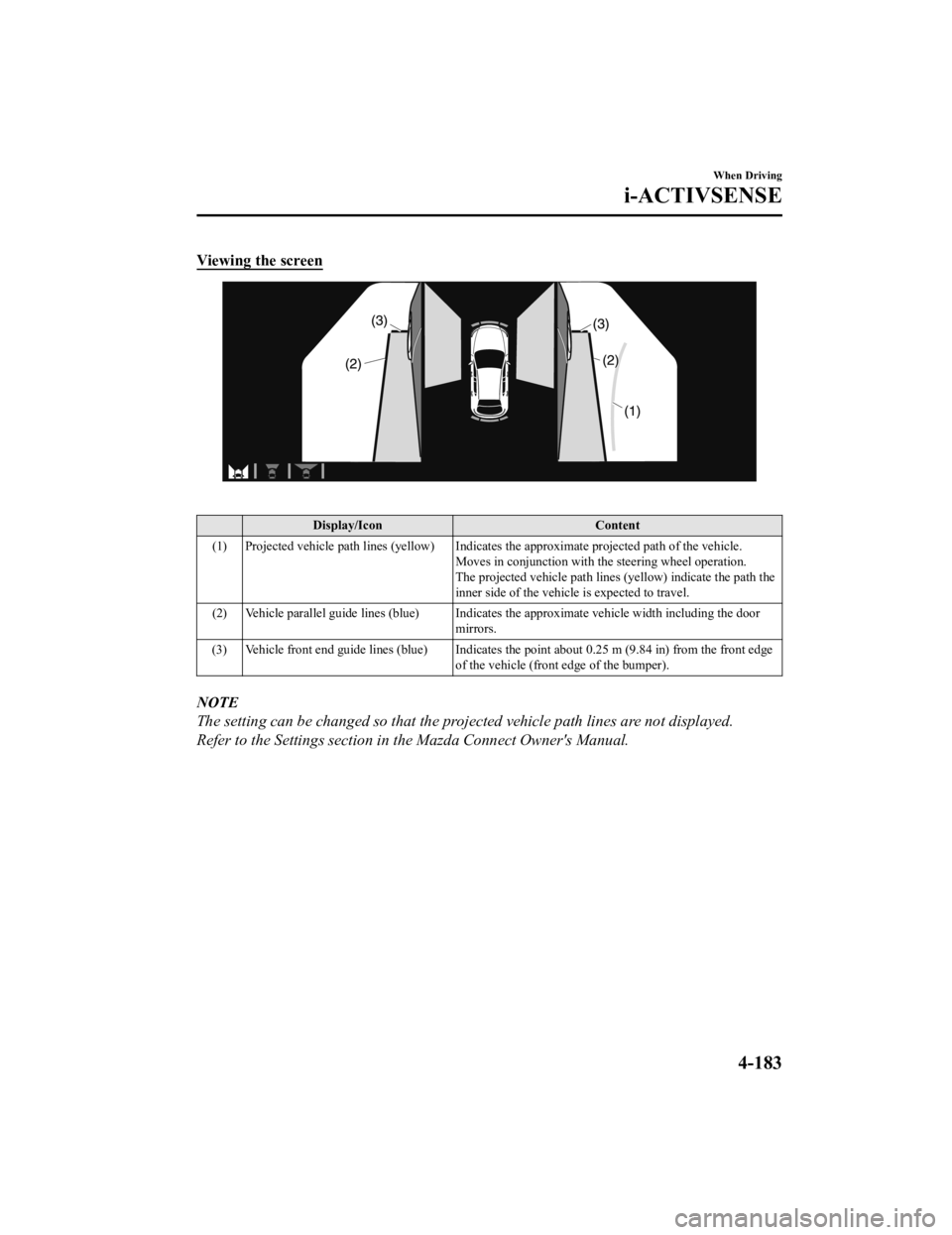
Viewing the screen
Display/IconContent
(1) Projected vehicle path lines (yellow) Indicates the approxima te projected path of the vehicle.
Moves in conjunction with the steering wheel operation.
The projected vehicle path lines (yellow) indicate the path the
inner side of the vehicle is expected to travel.
(2) Vehicle parallel guide lines (blue) Indicates the approximate vehicle width including the door
mirrors.
(3) Vehicle front end guide lines (blue) Indicates the point about 0.25 m (9.84 in) from the front edge of the vehicle (front edge of the bumper).
NOTE
The setting can be changed so that the projected vehicle path lines are not displayed.
Refer to the Settings section in the Mazda Connect Owner's Manual.
When Driving
i-ACTIVSENSE
4-183
Mazda3_8HE9-EA-18K_Edition3 2018-11-21 14:31:58
Page 326 of 592
Obstructions displayed in the rear view may not display on the top view screen.
If the position or angle of each camera changes due to tilting of the vehicle, the image
may appear distorted.
Lines on the road may appear distorted at the seams where each of the camera images
merge.
The screen area for each camera may appear bright/dark depending on the illumination
level around any of the cameras.
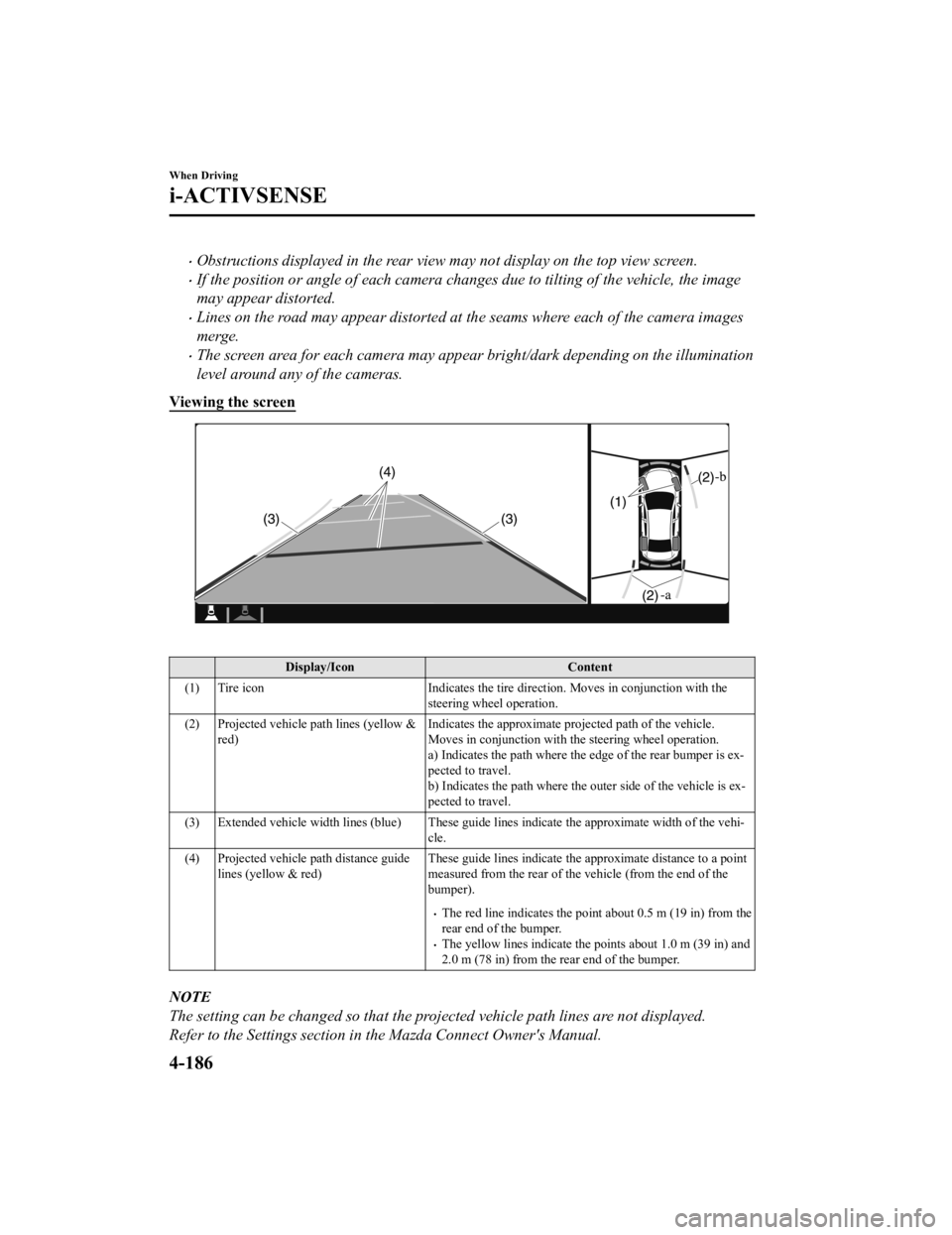
Viewing the screen
Display/Icon Content
(1) Tire icon Indicates the tire direction. Moves in conjunction with the
steering wheel operation.
(2) Projected vehicle path lines (yellow & red) Indicates the approximate projected path of the vehicle.
Moves in conjunction with t
he steering wheel operation.
a) Indicates the path where the edge of the rear bumper is ex‐
pected to travel.
b) Indicates the path where the outer side of the vehicle is ex ‐
pected to travel.
(3) Extended vehicle width lines ( blue) These guide lines indicate the approximate width of the vehi‐
cle.
(4) Projected vehicle path distance guide lines (yellow & red) These guide lines indicate the
approximate distance to a point
measured from the rear of the vehicle (from the end of the
bumper).
The red line indicates the point about 0.5 m (19 in) from the
rear end of the bumper.
The yellow lines indicate the points about 1.0 m (39 in) and
2.0 m (78 in) from the rear end of the bumper.
NOTE
The setting can be changed so that the projected vehicle path lines are not displayed.
Refer to the Settings section in the Mazda Connect Owner's Manual.
When Driving
i-ACTIVSENSE
4-186
Mazda3_8HE9-EA-18K_Edition3 2018-11-21 14:31:58
Page 339 of 592

Be careful not to scratch the Forward
Sensing Camera (FSC) lens or allow it
to get dirty.
Do not remove the Forward Sensing
Camera (FSC) cover.
Do not place objects on the dashboard
which
reflect light.
Always keep the windshield glass
around the camera clean by removing
dirt or fogging. Use the windshield
defroster to remove fogging on the
windshield.
Consult an Authorized Mazda Dealer
regarding cleaning the interior side of
the windshield around the Forward
Sensing Camera (FSC).
Consult an Authorized Mazda Dealer
before performing repairs around the
Forward Sensing Camera (FSC).
The Forward Sensing Camera (FSC) is
installed to the windshield. Consult an
Authorized Mazda Dealer for
windshield repair and replacement.
When cleaning the windshield, do not
allow glass cleaners or similar cleaning
fluids to get on the Forward Sensing
Camera (FSC) lens. In addition, do not
touch the Forward Sensing Camera
(FSC) lens.
When performing repairs around the
rearview mirror, consult an Authorized
Mazda Dealer.
Consult an Authorized Mazda Dealer
regarding cleaning of the camera lens.Do not hit or apply strong force to the
Forward Sensing Camera (FSC) or the
area around it. If the Forward Sensing
Camera (FSC) is severely hit or if there
are cracks or damage caused by
flying
gravel or debris in the area around it,
stop using the following systems and
consult an Authorized Mazda Dealer.
High Beam Control System (HBC)
Lane Departure Warning System
(LDWS)
Traffic Sign Recognition System
(TSR)
Distance & Speed Alert (DSA)
Driver Attention Alert (DAA)
Driver Monitoring (DM)
Mazda Radar Cruise Control (MRCC)
Mazda Radar Cruise Control with
Stop & Go function (MRCC with Stop
& Go function)
Lane-keep Assist System (LAS)
Traffic Jam Assist (TJA)
Smart Brake Support (SBS)
The direction in which the Forward
Sensing Camera (FSC) is pointed has
been finely adjusted. Do not change
the installation position of the Forward
Sensing Camera (FSC) or remove it.
Otherwise, it could result in damage or
malfunction.
Always use tires for all wheels that are of
the specified size, and the same
manufacturer, brand, and tread pattern.
In addition, do not use tires with
significantly different wear patterns on
the same vehicle as the system may not
operate normally.
When Driving
i-ACTIVSENSE
4-199
Mazda3_8HE9-EA-18K_Edition3 2018-11-21 14:31:58
Page 349 of 592
Driver MonitoringCamera
*
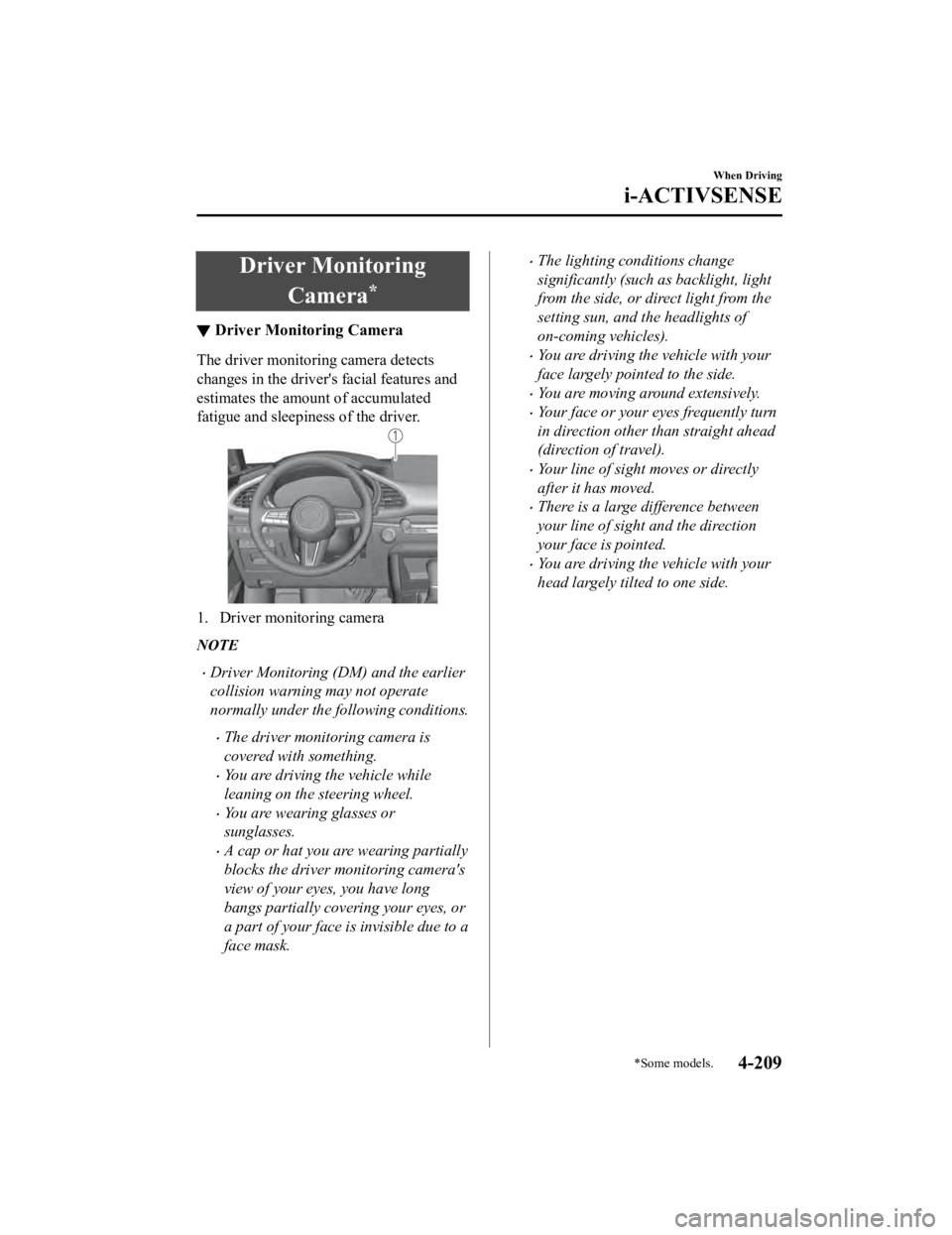
▼Driver Monitoring Camera
The driver monitoring camera detects
changes in the driver'
s facial features and
estimates the amount of accumulated
fatigue and sleepiness of the driver.
1. Driver monitoring camera
NOTE
Driver Monitoring (DM) and the earlier
collision warning may not operate
normally under the following conditions.
The driver monitoring camera is
covered with something.
You are driving the vehicle while
leaning on the steering wheel.
You are wearing glasses or
sunglasses.
A cap or hat you are wearing partially
blocks the driver monitoring camera's
view of your eyes, you have long
bangs partially covering your eyes, or
a part of your face is invisible due to a
face mask.
The lighting conditions change
significantly (such as backlight, light
from the side, or direct light from the
setting sun, and the headlights of
on-coming vehicles).
You are driving the vehicle with your
face largely pointed to the side.
You are moving around extensively.
Your face or your eyes frequently turn
in direction other than straight ahead
(direction of travel).
Your line of sight moves or directly
after it has moved.
There is a large difference between
your line of sight and the direction
your face is pointed.
You are driving the vehicle with your
head largely tilted to one side.
When Driving
i-ACTIVSENSE
*Some models.4-209
Mazda3_8HE9-EA-18K_Edition3 2018-11-21 14:31:58
Page 361 of 592
It may be difficult to see the display under the following conditions, however, it does not
indicate a malfunction.
In darkened areas.
When the temperature around the lens is high/low.
When the camera is wet such as on a rainy day or during periods of high humidity.
When foreign material such as mud is stuck around the camera.
When the camera lens reflects sunlight or headlight beams.
The surroundings are illuminated by vehicle lights, fluorescent lights, or LED lights
(Display may flicker).
Extremely small dark or white dots appear on the screen (dots may flicker).
Image display may be delayed if the temperature around the camera is low.
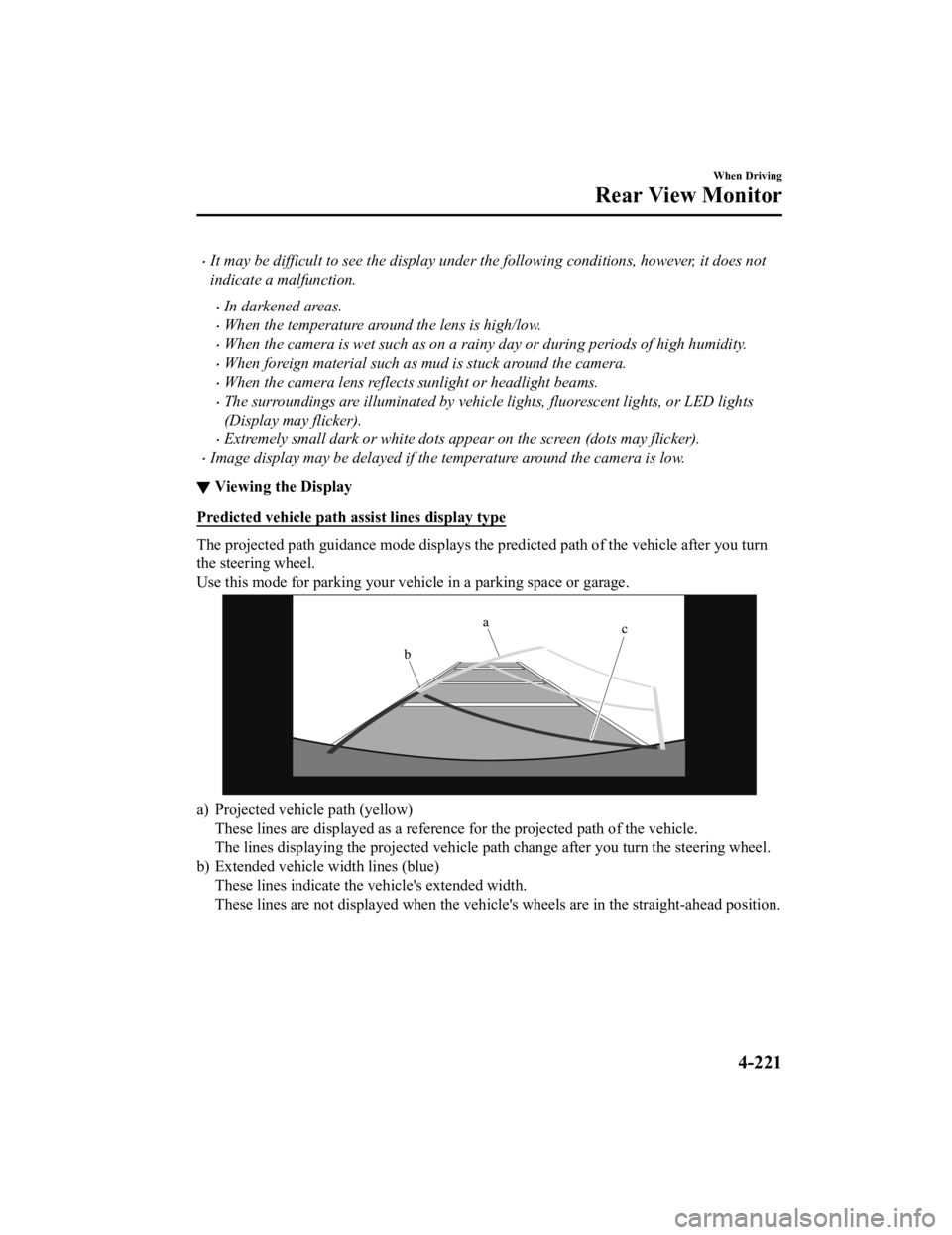
▼Viewing the Display
Predicted vehicle path a
ssist lines display type
The projected path guidance mode displays the predicted path of the vehicle after you turn
the steering wheel.
Use this mode for parking your v ehicle in a parking space or garage.
a) Projected vehicle path (yellow)
These lines are displayed as a re ference for the projected path of the vehicle.
The lines displaying the projected vehicle path change after yo u turn the steering wheel.
b) Extended vehicle w idth lines (blue)
These lines indicate the vehicle's extended width.
These lines are not displayed when the vehicle's wheels are in the straight-ahead position.
When Driving
Rear View Monitor
4-221
Mazda3_8HE9-EA-18K_Edition3 2018-11-21 14:31:58