height MAZDA MODEL 3 SEDAN 2019 User Guide
[x] Cancel search | Manufacturer: MAZDA, Model Year: 2019, Model line: MODEL 3 SEDAN, Model: MAZDA MODEL 3 SEDAN 2019Pages: 592, PDF Size: 75.35 MB
Page 228 of 592
High Beam ControlSystem (HBC)
*
▼ High Beam Control System (HBC)
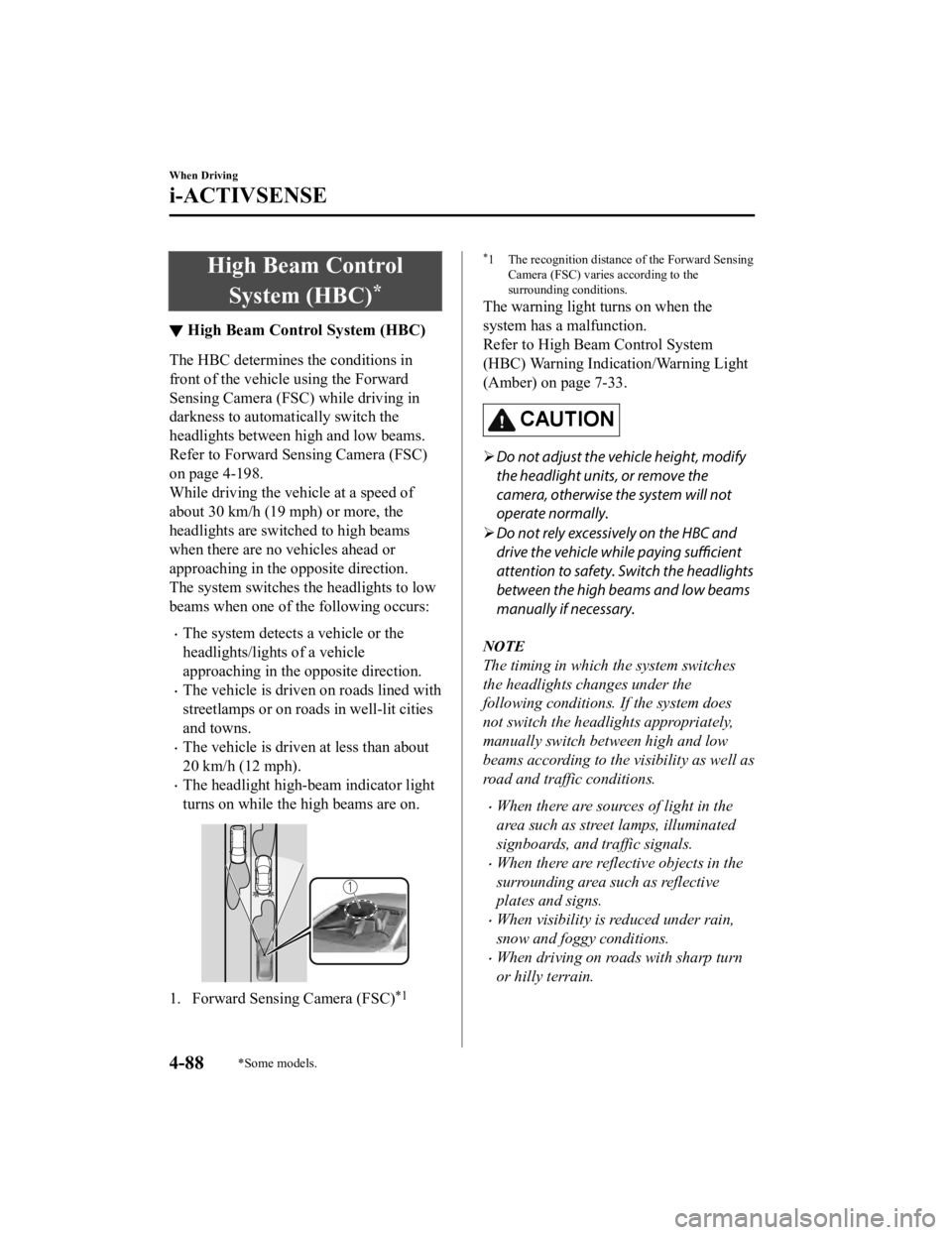
The HBC determines the conditions in
front of the vehicle using the Forward
Sensing Camera (FSC) while driving in
darkness to automatically switch the
headlights between high and low beams.
Refer to Forward Sen
sing Camera (FSC)
on page 4-198.
While driving the vehicle at a speed of
about 30 km/h (19 mph) or more, the
headlights are switched to high beams
when there are no vehicles ahead or
approaching in the opposite direction.
The system switches the headlights to low
beams when one of th e following occurs:
The system detects a vehicle or the
headlights/lights of a vehicle
approaching in the opposite direction.
The vehicle is driven on roads lined with
streetlamps or on roads in well-lit cities
and towns.
The vehicle is driven at less than about
20 km/h (12 mph).
The headlight high-beam indicator light
turns on while the high beams are on.
1. Forward Sensing Camera (FSC)*1
*1 The recognition distance of the Forward Sensing
Camera (FSC) varies according to the
surrounding conditions.
The warning light turns on when the
system has a malfunction.
Refer to High Be am Control System
(HBC) Warning Indication/Warning Light
(Amber) on page 7-33.
CAUTION
Do not adjust the vehicle height, modify
the headlight units, or remove the
camera, otherwise the system will not
operate normally.
Do not rely excessively on the HBC and
drive the vehicle while paying sufficient
attention to safety. Switch the headlights
between the high beams and low beams
manually if necessary.
NOTE
The timing in which the system switches
the headlights changes under the
following conditions. If the system does
not switch the headlights appropriately,
manually switch between high and low
beams according to the visibility as well as
road and traffic conditions.
When there are sources of light in the
area such as street lamps, illuminated
signboards, and traffic signals.
When there are reflective objects in the
surrounding area such as reflective
plates and signs.
When visibility is reduced under rain,
snow and foggy conditions.
When driving on roads with sharp turn
or hilly terrain.
When Driving
i-ACTIVSENSE
4-88*Some models.
Mazda3_8HE9-EA-18K_Edition3 2018-11-21 14:31:58
Page 235 of 592

Under the following conditions, the rear
side radar sensor cannot detect target
objects or it may be difficult to detect
them.
The rear bumper around the rear side
radar sensor is deformed.
Radio wave interference from a radar
sensor equipped on a nearby vehicle.
The approaching vehicle is any of the
following shapes.
a) The size of the vehicle body isextremely small.
b) The vehicle height is extremely low or high.
c) A special type of vehicle with a complex shape.
A vehicle is in the detection area at
the rear in an adjacent driving lane
but it does not approach. The BSM
determines the condition based on
radar detection data.
A vehicle is traveling alongside your
vehicle at nearly the same speed for
an extended period of time.
Vehicles approaching in the opposite
direction.
A vehicle in an adjacent driving lane
is attempting to pass your vehicle.
A vehicle is in an adjacent lane on a
road with extremely wide driving
lanes. The detection area of the rear
side radar sensor is set at the road
width of expressways.
In the following case, the flashing of the
BSM warning indicator light, and the
activation of the warning sound and the
warning screen indicator display may
not occur or they may be delayed.
A vehicle makes a lane change from a
driving lane two lanes over to an
adjacent lane.
Driving on steep slopes.
Crossing the summit of a hill or
mountain pass.
When there is a difference in the
height between your driving lane and
the adjacent lane.
Directly after the BSM system
becomes operable by changing the
setting.
If the road width is extremely narrow,
vehicles two lanes over may be detected.
The detection area of the rear side radar
sensor is set according to the road width
of expressways.
The BSM warning indicator light may
turn on and the vehicle detection screen
may be displayed in the display in
reaction to stationary objects
(guardrails, tunnels, sidewalls, and
parked vehicles) on the road or the
roadside.
1. Objects such as guardrails and concrete walls running alongside the
vehicle.
When Driving
i-ACTIVSENSE
4-95
Mazda3_8HE9-EA-18K_Edition3 2018-11-21 14:31:58
Page 251 of 592

NOTE
The system may operate under the
following conditions even if a vehicle is
not approaching.
An object that reflects the radio waves
of the radar such as a parked vehicle,
guardrail, or wall is directly next to
your vehicle.
Vehicles are stopped in the area
around your vehicle such as during
heavy traffic.
A vehicle approaching from the front
or side of your vehicle slows down.
A vehicle approaching from the front
or left side of your vehicle makes a
right or left turn directly in front of
your vehicle.
A vehicle or pedestrian moves in the
parking lot or on the sidewalk in the
area surrounding your vehicle.
After making a left or right turn, an
on-coming vehicle is present.
When passing an on-coming vehicle.
A vehicle overtakes your vehicle while
it is stopped.
Your vehicle is in an area where
strong radio waves or electrical noise
may occur such as near a television
tower or power plant.
Under the following conditions, the front
side radar sensor cannot detect
approaching vehicles or it might be
difficult to detect them, and the system
may not operate normally.
The front side radar sensor detection
area is obstructed by a nearby wall or
vehicle.
Directly after the system becomes
operable.
Radio wave interference from a radar
sensor equipped on a nearby vehicle.
The approaching vehicle has any of
the following shapes.
a) The size of the vehicle body is extremely small.
b) The vehicle height is extremely low or high.
c) A special type of vehicle with a
complex shape
A vehicle suddenly enters the
detection area from the front or side of
your vehicle.
A vehicle that has stopped suddenly
starts to move.
Multiple objects move at the same
time.
The vehicle is driven in bad weather
conditions such as heavy rain, fog,
snow, or sand storms.
The vehicle is driven on a sharp curve
or on bumpy roads.
An object that reflects the radio waves
of the radar such as a parked vehicle,
guardrail, or wall is directly next to
your vehicle.
A vehicle approaches while turning
(Such as roundabout)
The vehicle is driven at an extremely
slow speed.
In the following cases, the system turns
on the i-ACTIVSENSE warning
indication/warning light and operation
of the system is stopped. If the
i-ACTIVSENSE warning indication/
warning light remains on, have the
vehicle inspected by an Authorized
Mazda Dealer as soon as possible.
Some problem with the system has
occurred.
When Driving
i-ACTIVSENSE
4 - 111
Mazda3_8HE9-EA-18K_Edition3 2018-11-21 14:31:58
Page 257 of 592

Slippery roads such as ice or snow-bound
roads (Tires could spin causing you to
lose vehicle control, or the stop hold
control may not operate.)
Long, descending slopes (to maintain
distance between vehicles, the system
automatically and continuously applies
the brakes which could result in the loss
of brake power.)
Two-wheeled vehicles such as
motorcycles or bicycles are ahead.
Slopes with a steep gradient (The vehicle
ahead may not be detected correctly,
your vehicle may slide while stopped by
the stop hold control, and it may
accelerate suddenly after it starts
moving.)
For safety purposes, switch the MRCC
system off when it is not being used.
CAUTION
If your vehicle is towed or you are towing
something, switch the MRCC system off to
prevent an unexpected operation.
NOTE
The MRCC system does not detect the
following as physical objects.
Vehicles approaching in the opposite
direction
Pedestrians
Stationary objects (stopped vehicles,
obstructions)
If a vehicle ahead is traveling at an
extremely low speed, the system may
not detect it correctly.
If there is a structure on the road or an
object (such as a monorail) at a low
height off the ground in front of the
vehicle, the system may operate.
Therefore, do not use the MRCC.
Do not use the MRCC system under
conditions in which close proximity
warnings are frequently activated.
During headway control travel, the
system accelerates and decelerates your
vehicle in conjunction with the speed of
the vehicle ahead. However, if it is
necessary to accelerate for a lane
change or if the vehicle ahead brakes
suddenly causing you to close in on the
vehicle rapidly, accelerate using the
accelerator pedal or decelerate using
the brake pedal depending on the
conditions.
While the MRCC system is in use, it
does not cancel even if the shift lever is
operated and any intended engine
braking will not occur. If deceleration is
required, lower the vehicle speed setting
or depress the brake pedal.
The sound of the automatic brakes
operating may be heard, however, it
does not indicate a problem.
The brake lights tu
rn on while the
MRCC automatic braking is operating.
When Driving
i-ACTIVSENSE
4-117
Mazda3_8HE9-EA-18K_Edition3 2018-11-21 14:31:58
Page 266 of 592

For safety purposes, switch the MRCC with
Stop & Go function system off when it is not
being used.
Do not get out of the vehicle while the stop
hold control is operating:
Getting out of the vehicle while the stop
hold control is operating is dangerous as
the vehicle may move unexpectedly and
result in an accident. Before getting out of
the vehicle, switch the MRCC with Stop &
Go function system off, shift the selector
lever to the P position, and apply the
parking brake.
CAUTION
If your vehicle is towed or you are towing
something, switch the MRCC with Stop &
Go function system off to prevent an
unexpected operation.
NOTE
The MRCC with Stop & Go function
system does not detect the following as
physical objects.
Vehicles approaching in the opposite
direction
Pedestrians
Stationary objects (stopped vehicles,
obstructions)
If a vehicle ahead is traveling at an
extremely low speed, the system may
not detect it correctly.
If there is a structure on the road or an
object (such as a monorail) at a low
height off the ground in front of the
vehicle, the system may operate.
Therefore, do not use the MRCC with
Stop & Go function.
Do not use the MRCC with Stop & Go
function system under conditions in
which close proximity warnings are
frequently activated.
During headway control travel, the
system accelerates and decelerates your
vehicle in conjunction with the speed of
the vehicle ahead. However, if it is
necessary to accelerate for a lane
change or if the vehicle ahead brakes
suddenly causing you to close in on the
vehicle rapidly, accelerate using the
accelerator pedal or decelerate using
the brake pedal depending on the
conditions.
While the MRCC with Stop & Go
function system is in use, it does not
cancel even if the selector lever is
operated and any intended engine
braking does not occur. If deceleration
is required, lower the set speed or
depress the brake pedal.
The sound of the automatic brakes
operating may be heard, however, it
does not indicate a problem.
The brake lights turn on while the
MRCC with Stop & Go function
automatic braking is operating.
When Driving
i-ACTIVSENSE
4-126
Mazda3_8HE9-EA-18K_Edition3 2018-11-21 14:31:58
Page 277 of 592

If a vehicle ahead is traveling at an
extremely low speed, the system may
not detect it correctly.
If there is a structure on the road or an
object (such as a monorail) at a low
height off the ground in front of the
vehicle, the system may operate.
Therefore, do not use the TJA.
Do not use the TJA under conditions in
which close proximity warnings are
frequently activated.
If it is necessary to accelerate for a lane
change or the vehicle ahead brakes
suddenly causing you to close in on the
vehicle rapidly, accelerate using the
accelerator pedal or decelerate using
the brake pedal depending on the
conditions.
While the TJA is in use, it does not
cancel even if the selector lever is
operated and any intended engine
braking does not occur. If deceleration
is required, lower the set speed or
depress the brake pedal.
You might hear the sound of the
automatic brakes operating; however, it
does not indicate a problem.
The brake lights turn on while the TJA
automatic braking is operating.
Under the following conditions, the TJA
may not be able to detect white (yellow)
lines correctly and the TJA may not
operate normally.
The forward sensing camera (FSC)
cannot recognize the area in front of
the vehicle due to soiling or fog.
The white (yellow) lane lines are less
visible because of dirt or paint
flaking.
White (yellow) lane lines are less
visible because of bad weather (rain,
fog, or snow).
The vehicle is driven on a temporary
lane or section with a closed lane
resulting from construction where
there might be multiple white (yellow)
lane lines, or they are interrupted.
The camera picks up an obscure line,
such as a temporary line being used
for construction, or because of shade,
unmelted snow, or grooves filled with
water.
The road surface is wet and shiny
after rain, or there are puddles on the
road.
Heavy luggage is loaded in the
luggage compartment or on the rear
seat causing the vehicle to tilt.
A vehicle in front of your vehicle is
running near a white (yellow) lane
line making it less visible.
The windshield is dirty or foggy.
The tire pressures are not adjusted to
the specified pressure.
Tires other than standard tires are
equipped.
The vehicle is driven through an
intersection, a junction, or a fork in
the road.
While white (yellow) lane lines cannot
be detected due to road or weather
conditions.
The surrounding brightness suddenly
changes such as when entering or
exiting a tunnel.
The illumination of the headlights is
weakened because of dirt or the
optical axis is deviated at night.
Back-light is reflected off the road
surface or the road surface is wet and
shiny after rain.
When Driving
i-ACTIVSENSE
4-137
Mazda3_8HE9-EA-18K_Edition3 2018-11-21 14:31:58
Page 296 of 592
![MAZDA MODEL 3 SEDAN 2019 User Guide Smart Brake Support[Rear] (SBS-R)
*
▼Smart Brake Support [Rear]
(SBS-R)
The SBS-R is a syste m which is designed
to reduce damage in the event of a
collision by operating the brake control
(SBS brak](/img/28/40986/w960_40986-295.png "MAZDA MODEL 3 SEDAN 2019 User Guide Smart Brake Support[Rear] (SBS-R)
*
▼Smart Brake Support [Rear]
(SBS-R)
The SBS-R is a syste m which is designed
to reduce damage in the event of a
collision by operating the brake control
(SBS brak")
Smart Brake Support[Rear] (SBS-R)
*
▼Smart Brake Support [Rear]
(SBS-R)
The SBS-R is a syste m which is designed
to reduce damage in the event of a
collision by operating the brake control
(SBS brake) when the system’s sensors
detect an obstruction at the rear of the
vehicle while driving at a speed of about 2
to 8 km/h (2 to 4 mph) and the system
determines that a collision is unavoidable.
WARNING
Do not rely completely on the SBS-R
system:
The SBS-R system is only designed to
reduce damage in the event of a
collision. Over reliance on the system
leading to the accelerator pedal or brake
pedal being mistakenly operated could
result in an accident.
To assure the correct operation of the
SBS-R, heed the following cautions.
Do not apply a sticker to a rear
ultrasonic sensor and rear camera.
Otherwise, the rear ultrasonic sensor
and rear camera may not be able to
detect vehicles or obstructions which
could result in an accident.
Do not disassemble a rear ultrasonic
sensor and rear camera.
If cracks or damage caused by flying
gravel or debris is visible around a rear
ultrasonic sensor and rear camera,
stop using the SBS-R system
immediately and have your vehicle
inspected by an Authorized Mazda
Dealer. If the vehicle continues to be
driven with cracks or scratch marks left
around an ultrasonic sensor, the
system may operate unnecessarily and
cause an unexpected accident.
Refer to Stopping the Smart Brake
Support [Rear] (SBS-R) System
Operation on page 4-159.
Consult an Authorized Mazda Dealer
for rear bumper replacement.
Do not modify the suspension:
If the vehicle height or inclination is
changed, the SBS-R system may not
operate correctly because it cannot detect
obstructions correctly.
When Driving
i-ACTIVSENSE
4-156*Some models.
Mazda3_8HE9-EA-18K_Edition3 2018-11-21 14:31:58
Page 297 of 592

Do not apply a strong force to a rear
ultrasonic sensor and rear camera:
When washing the vehicle, do not spray
highly pressurized water against a rear
ultrasonic sensor and rear camera, or rub it
strongly. In addition, do not hit the rear
bumper forcefully when loading and
unloading cargo Otherwise, the sensors
may not detect obstructions correctly
which could cause the SBS-R system to not
operate normally, or it could operate
unnecessarily.
CAUTION
When driving
off-road in areas where
there is grass or foliage, it is
recommended that the SBS-R system be
turned off.
Always use tires of the specified size and
the same manufacturer, brand, and
tread pattern on all 4 wheels. In addition,
do not use tires with significantly
different wear patterns on the same
vehicle. Otherwise, the SBS-R system may
not operate normally.
If ice or snow is stuck on the rear
ultrasonic sensor and rear camera they
may not be able to detect obstructions
correctly depending on the conditions. In
such cases, the system may not be able
to perform controls correctly. Always
drive carefully and pay attention to the
rear of the vehicle.
NOTE
The vehicle posture changes depending
on the accelerator pedal, brake pedal
and steering wheel operations, which
could make it difficult for the system to
recognize an obstruction, or it could
facilitate unnecessary detection. In such
cases, the SBS-R may or may not
operate.
The SBS-R system will operate under the
following conditions.
The engine is running.
The shift lever (manual transmission
vehicle) or the selector lever
(automatic transmission vehicle) is in
the R (reverse) position.
The slope is less than 5 %.
i-ACTIVSENSE warning indication/
warning light is no t displayed in the
multi-information display.
The vehicle speed is between about 2
to 8 km/h (2 to 4 mph).
The SBS-R is not turned off.
The DSC is not malfunctioning.
In the following cases, the rear
ultrasonic sensor and rear camera
cannot detect obstructions and the
SBS-R may not operate.
The height of the obstruction is low
such as low walls or trucks with low
loading platforms.
The height of the obstruction is high
such as trucks with high loading
platforms.
The obstruction is small.
The obstruction is thin such as a
signpost.
The surface of the obstruction is not
pointed vertically relative to the
vehicle.
When Driving
i-ACTIVSENSE
4-157
Mazda3_8HE9-EA-18K_Edition3 2018-11-21 14:31:58
Page 301 of 592

To assure the correct operation of the
SBS-RC, heed the following cautions.
Do not apply a sticker to a rear radar and
rear camera. Otherwise, the rear radar
and rear camera may not be able to
detect vehicles or obstructions which
could result in an accident.
Do not disassemble a rear radar and rear
camera.
If cracks or damage caused by flying
gravel or debris is visible around a rear
radar and rear camera, stop using the
SBS-RC system immediately and have
your vehicle inspected by an Authorized
Mazda Dealer. If the vehicle continues to
be driven with cracks or scratch marks
left around an ultrasonic sensor, the
system may operate unnecessarily and
cause an unexpected accident.
Refer to Stopping the Smart Brake
Support [Rear Crossing] (SBS-RC) System
Operation on page 4-164.
Consult an Authorized Mazda Dealer for
rear bumper replacement.
Do not modify the suspension:
If the vehicle height or inclination is
changed, the SBS-RC system may not
operate correctly because it cannot detect
obstructions correctly.Do not apply a strong force to a rear radar
and rear camera:
When washing the vehicle, do not spray
highly pressurized water against a rear
radar and rear camera, or rub it strongly. In
addition, do not hit the rear bumper
forcefully when loading and unloading
cargo Otherwise, the sensors may not
detect obstructions correctly which could
cause the SBS-RC system to not operate
normally, or it could operate unnecessarily.
NOTE
The SBS-RC system will operate under
the following conditions.
The engine is running.
The shift lever (manual transmission
vehicle) or the selector lever
(automatic transmission vehicle) is in
the R (reverse) position.
i-ACTIVSENSE warning indication/
warning light is no t displayed in the
multi-information display.
The vehicle speed is under about 10
km/h (6 mph).
The vehicle speed of an approaching
vehicle is about 3 km/h (2 mph) or
faster.
The SBS-R is not turned off.
The DSC is not malfunctioning.
In the following cases, the
i-ACTIVSENSE warning indication/
warning light turns on and operation of
the system is stopped. If the
i-ACTIVSENSE warning indication/
warning light remains illuminated, have
the vehicle inspected at an Authorized
Mazda Dealer as soon as possible.
Some problem with the system
including the SBS-RC system.
When Driving
i-ACTIVSENSE
4-161
Mazda3_8HE9-EA-18K_Edition3 2018-11-21 14:31:58
Page 318 of 592

Viewing the screen
Display/IconContent
(1) Tire icon Indicates the tire direction. Moves in conjunction with the
steering wheel operation.
(2) Projected vehicle path lines (yellow & red) Indicates the approximate projected path of the vehicle.
Moves in conjunction with the steering wheel operation.
a) Indicates the path where the
edge of the front bumper is ex‐
pected to travel.
b) Indicates the path where the inner side of the vehicle is ex ‐
pected to travel.
(3) Extended vehicle width lines (blue) Indicates the approximate width of the vehicle.
(4) Projected vehicle path distance guide lines (yellow & red) Indicates the distance (from front end of bumper) in front of
the vehicle.
The red line indicates the point about 0.5 m (19 in) from the
front end of the bumper.
The yellow lines indicate the points about 1.0 m (39 in) and
2.0 m (78 in) from the front end of the bumper.
CAUTION
The parking sensor detection range has limitation
s. For example, obstructions closing in from
the side and objects short in height may not be detected. Always confirm the safety around
the vehicle visually when driving.
For details, refer to the parking sensor obstru ction detection indication and warning sound.
Refer to Parking Sensor System on page 4-233.
NOTE
The setting can be changed so that the projected vehicle path lines are not displayed.
Refer to the Settings section in the Mazda Connect Owner's Manual.
When Driving
i-ACTIVSENSE
4-178
Mazda3_8HE9-EA-18K_Edition3 2018-11-21 14:31:58