tires MAZDA MODEL 3 SEDAN 2019 User Guide
[x] Cancel search | Manufacturer: MAZDA, Model Year: 2019, Model line: MODEL 3 SEDAN, Model: MAZDA MODEL 3 SEDAN 2019Pages: 592, PDF Size: 75.35 MB
Page 215 of 592
Traction Control System(TCS)
▼Traction Control System (TCS)
The Traction Control System (TCS)
enhances traction and
safety by controlling
engine torque and braking. When the TCS
detects driving wheel slippage, it lowers
engine torque and operates the brakes to
prevent loss of traction.
This means that on a slick surface, the
engine adjusts automatically to provide
optimum power to the drive wheels,
limiting wheel spin and loss of traction.
The warning light turns on when the
system has a malfunction.
Refer to TCS/DSC Indication/Indicator
Light (Turns on) on page 7-31.
WA R N I N G
Do not rely on the Traction Control System
(TCS) as a substitute for safe driving:
The Traction Control System (TCS) cannot
compensate for unsafe and reckless
driving, excessive speed, tailgating
(following another vehicle too closely), and
hydroplaning (reduced tire friction and
road contact because of water on the road
surface). You can still have an accident.
Use snow tires or tire chains and drive at
reduced speeds when roads are covered
with ice and/or snow:
Driving without proper traction devices on
snow and/or ice-covered roads is
dangerous. The Traction Control System
(TCS) alone cannot provide adequate
traction and you co uld still have an
accident.
NOTE
To turn off the TCS, press the DSC OFF
switch (page 4-77).
▼ TCS/DSC Indicator Light
This indicator light stays on for a few
seconds when the ignition is switched ON.
If the TCS or DSC
is operating, the
indicator light flashes.
If the light stays on, the TCS, DSC or the
brake assist system may have a
malfunction and they may not operate
correctly. Take your vehicle to an
Authorized Mazda Dealer.
NOTE
In addition to the indicator light
flashing, a slight lugging sound will
come from the engine. This indicates
that the TCS/DSC is operating properly.
On slippery surfaces, such as fresh
snow, it will be impossible to achieve
high rpm when the TCS is on.
When Driving
ABS/TCS/DSC
4-75
Mazda3_8HE9-EA-18K_Edition3 2018-11-21 14:31:58
Page 216 of 592
Dynamic Stability Control(DSC)
▼Dynamic Stability Control (DSC)
The Dynamic Stability Control (DSC)
automatically controls braking and engine
torque in conjunction with systems such as
ABS and TCS to help control side slip
when driving on slippery surfaces, or
during sudden or evasive maneuvering,
enhancing vehicle safety.
Refer to ABS (page 4-74) and TCS (page
4-75).
DSC operation is possible at speeds
greater than 20 km/h (12 mph).
The warning light
turns on when the
system has a malfunction.
Refer to TCS/DSC I ndication/Indicator
Light (Turns on) on page 7-31.
WA R N I N G
Do not rely on the Dynamic Stability
Control as a substitute for safe driving:
The Dynamic Stability Control (DSC)
cannot compensate for unsafe and reckless
driving, excessive speed, tailgating
(following another vehicle too closely), and
hydroplaning (reduced tire friction and
road contact because of water on the road
surface). You can still have an accident.
CAUTION
The DSC may not operate correctly
unless the following are observed:
Use tires of the correct size
specified for
your Mazda on all 4 wheels.
Use tires of the same manufacturer,
brand and tread pattern on all 4
wheels.
Do not mix worn tires.
The DSC may not operate correctly when
tire chains are used or a temporary spare
tire is installed because the tire diameter
changes.
NOTE
If there is a problem w ith the DSC, the Hill
Launch Assist (HLA) may not operate.
Refer to Hill Launch Assist (HLA) on page
4-72.
▼ TCS/DSC Indicator Light
This indicator light stays on for a few
seconds when the ignition is switched ON.
If the TCS or DSC is operating, the
indicator light flashes.
If the light stays on, the TCS, DSC or the
brake assist system may have a
malfunction and they may not operate
correctly. Take your vehicle to an
Authorized Mazda Dealer.
When Driving
ABS/TCS/DSC
4-76
Mazda3_8HE9-EA-18K_Edition3
2018-11-21 14:31:58
Page 220 of 592
i-ACTIV AWD Operation*
▼i-ACTIV AWD Operation
AWD provides excellent drivability on
snow-covered and ice-packed roads, sand
and mud, as well as on steep slopes and
other slippery surfaces.
A system malfunction or operation
conditions are indicated by a warning.
Refer to Contact Authorized Mazda
Dealer and AWD Warning Indication/
Warning Light on page 7-30.
WA R N I N G
Never spin a wheel that is
off the ground:
Spinning a wheel that is off the ground as a
result of the vehicle being stuck or in a
ditch is dangerous. The drive assembly
could be seriously damaged which could
lead to an accident or could even lead to
overheating, oil leakage, and a fire.
▼ AWD Driving
This vehicle has not been designed for the
purpose of off-road driving or rallies. Do
not attempt to drive over uneven or rocky
surfaces, or across rivers.
Although this vehicle is equipped with
AWD, acceleration, steering and braking
operations should be conducted in the
same manner as with a non-AWD vehicle,
with the emphasis placed on safe driving.
▼Tires and Tire Chains
The condition of the tires plays a large role
in the performance
of the vehicle.
Moreover, to prevent adverse effects to the
drive assembly, please note the following:
Tires
When replacing tires, always replace all
front and rear tires at the same time.
All tires must be of the same size,
manufacture, brand and tread pattern.
Pay particular attention when equipping
snow or other types of winter tires.
Do not mix tread-worn tires with normal
tires.
Inspect tire inflation pressures at the
specified periods adjust to the specified
pressures.
NOTE
Check the tire inflation pressure label
attached to driver's door frame for the
correct tire inflation pressure.
Make sure to equip the vehicle with
genuine wheels of the specified size, on
all wheels. With AWD, the system is
calibrated for all 4 wheels being of the
same dimensions.
Tire chains
Install tire chains to the front tires.
Do not use tire chains on the rear
wheels.
Do not drive the veh icle faster than 30
km/h (19 mph) with the tire chains
installed.
Do not drive the vehicle with tire chains
on road conditions other than snow or
ice.
▼ To w i n g
If the vehicle requires towing, have it
towed with all 4 wheels completely off the
ground.
Refer to Towing Description on page
7-22.
When Driving
i-ACTIV AWD
4-80*Some models.
Mazda3_8HE9-EA-18K_Edition3
2018-11-21 14:31:58
Page 229 of 592
When the headlights/rear lamps of
vehicles in front of you or in the
opposite lane are dim or not
illuminated.
When there is insufficient darkness such
as at dawn or dusk.
When the luggage compartment is
loaded with heavy objects or the rear
passenger seats are occupied.
When visibility is reduced due to a
vehicle in front of you spraying water
from its tires onto your windshield.
▼To Operate the System
The HBC operates to s
witch the headlights
automatically between high and low
beams after the igni tion is switched ON
and the headlight sw itch is in the AUTO
and low beam position.
The HBC determines that it is dark based
on the brightness of the surrounding area.
At the same time, the HBC indicator light
(green) in the instrument cluster
illuminates.
NOTE
Operation of the HBC function can be
disabled.
Refer to the Settings section in the Mazda
Connect Owner's Manual.
▼ Manual Switching
Switching to low beams
Switch the headlight switch to the
position, or press the high beam control
switch.
The HBC indicator ligh
t (green) turns off.
1. High beam control switch
If the HBC is turned off using the high
beam control switch, press the high beam
control switch again to turn the HBC back
on.
Switching to high beams
Shift the lever to the high beam position.
The HBC indicator ligh t (green) turns off
and the headlight high-beam indicator
light is illuminated.
When Driving
i-ACTIVSENSE
4-89
Mazda3_8HE9-EA-18K_Edition3 2018-11-21 14:31:58
Page 230 of 592
Lane Departure WarningSystem (LDWS)
*
▼Lane Departure Warning System
(LDWS)
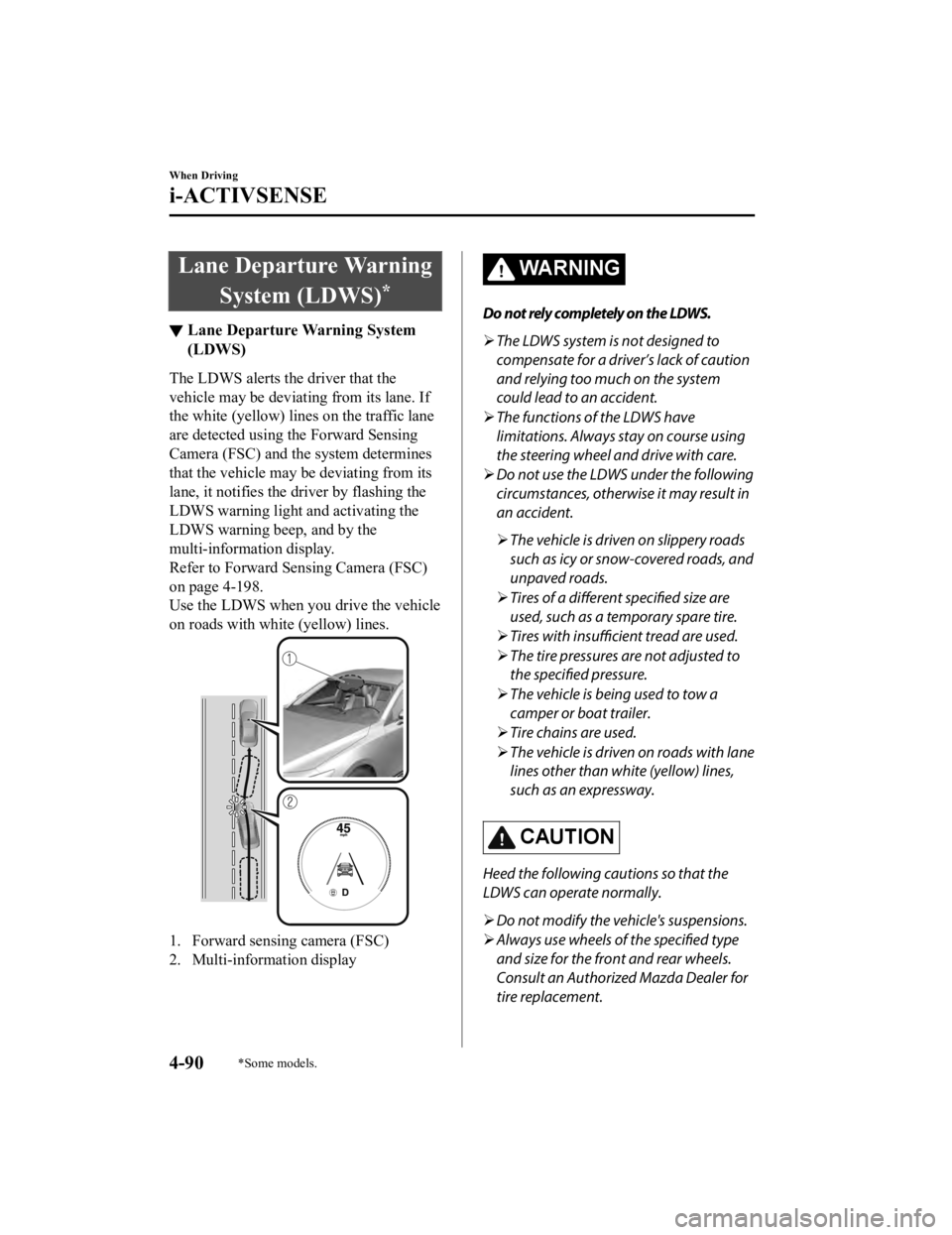
The LDWS alerts the driver that the
vehicle may be deviating from its lane. If
the white (yellow) lin
es on the traffic lane
are detected using the Forward Sensing
Camera (FSC) and the system determines
that the vehicle may be deviating from its
lane, it notifies the driver by flashing the
LDWS warning light and activating the
LDWS warning beep, and by the
multi-information display.
Refer to Forward Sen sing Camera (FSC)
on page 4-198.
Use the LDWS when you drive the vehicle
on roads with white (yellow) lines.
1. Forward sensing camera (FSC)
2. Multi-information display
WA R N I N G
Do not rely completely on the LDWS.
The LDWS system is not designed to
compensate for a driver’s lack of caution
and relying too much on the system
could lead to an accident.
The functions of the LDWS have
limitations. Always stay on course using
the steering wheel and drive with care.
Do not use the LDWS under the following
circumstances, otherwise it may result in
an accident.
The vehicle is driven on slippery roads
such as icy or snow-covered roads, and
unpaved roads.
Tires of a different specified size are
used, such as a temporary spare tire.
Tires with insufficient tread are used.
The tire pressures are not adjusted to
the specified pressure.
The vehicle is being used to tow a
camper or boat trailer.
Tire chains are used.
The vehicle is driven on roads with lane
lines other than white (yellow) lines,
such as an expressway.
CAUTION
Heed the following cautions so that the
LDWS can operate normally.
Do not modify the vehicle's suspensions.
Always use wheels of the specified type
and size for the front and rear wheels.
Consult an Authorized Mazda Dealer for
tire replacement.
When Driving
i-ACTIVSENSE
4-90*Some models.
Mazda3_8HE9-EA-18K_Edition3 2018-11-21 14:31:58
Page 240 of 592

Under the following conditions, the TSR may not operate normally.
An object placed on the dashboard is reflected in the windshield and picked up by the
camera.
Heavy luggage is loaded in the luggage compartment or on the rear seat and the
vehicle is tilted.
The tire pressures are not adjusted to the specified pressure.
Tires other than standard tires are equipped.
The vehicle is driven on the ramp and surrounding area to or from a rest area or a
tollgate on a highway.
When surrounding brightness suddenly changes such as when entering or exiting a
tunnel.
The illumination of the headlights is weakened because of dirt or the optical axis is
deviated.
The windshield is dirty or foggy.
The windshield and camera are fogged (water droplets).
Strong light is directed at the front of the vehicle (such as backlight or high-beam
headlights of on-coming vehicles).
The vehicle is making a sharp turn.
Strong light reflects off the road.
A traffic sign is in a position which makes it difficult to reflect the light from the
vehicle's headlights, such as when the vehicle is driven at night or in a tunnel.
The vehicle is driven under weather conditions such as rain, fog, or snow.
The stored map data for the navigation system is not current.
A traffic sign is obscured by mud or snow.
A traffic sign is concealed by trees or a vehicle.
A traffic sign is partially shaded.
A traffic sign is bent or warped.
A traffic sign is too low or too high.
A traffic sign is too bright or too da rk (including electronic traffic signs).
A traffic sign is too big or too small.
There is an object similar to the traffic sign being read (such as another traffic sign or
other signs resembling it).
The TSR can be set to invisible on the active driving display.
Refer to the Settings section in the Mazda Connect Owner's Manual.
▼Traffic Sign Display Indication
The following traffic signs are displayed
on the active driving display/instrument
cluster.
Speed limit signs
Do not enter signs
When Driving
i-ACTIVSENSE
4-100
Mazda3_8HE9-EA-18K_Edition3
2018-11-21 14:31:58
Page 257 of 592

Slippery roads such as ice or snow-bound
roads (Tires could spin causing you to
lose vehicle control, or the stop hold
control may not operate.)
Long, descending slopes (to maintain
distance between vehicles, the system
automatically and continuously applies
the brakes which could result in the loss
of brake power.)
Two-wheeled vehicles such as
motorcycles or bicycles are ahead.
Slopes with a steep gradient (The vehicle
ahead may not be detected correctly,
your vehicle may slide while stopped by
the stop hold control, and it may
accelerate suddenly after it starts
moving.)
For safety purposes, switch the MRCC
system off when it is not being used.
CAUTION
If your vehicle is towed or you are towing
something, switch the MRCC system off to
prevent an unexpected operation.
NOTE
The MRCC system does not detect the
following as physical objects.
Vehicles approaching in the opposite
direction
Pedestrians
Stationary objects (stopped vehicles,
obstructions)
If a vehicle ahead is traveling at an
extremely low speed, the system may
not detect it correctly.
If there is a structure on the road or an
object (such as a monorail) at a low
height off the ground in front of the
vehicle, the system may operate.
Therefore, do not use the MRCC.
Do not use the MRCC system under
conditions in which close proximity
warnings are frequently activated.
During headway control travel, the
system accelerates and decelerates your
vehicle in conjunction with the speed of
the vehicle ahead. However, if it is
necessary to accelerate for a lane
change or if the vehicle ahead brakes
suddenly causing you to close in on the
vehicle rapidly, accelerate using the
accelerator pedal or decelerate using
the brake pedal depending on the
conditions.
While the MRCC system is in use, it
does not cancel even if the shift lever is
operated and any intended engine
braking will not occur. If deceleration is
required, lower the vehicle speed setting
or depress the brake pedal.
The sound of the automatic brakes
operating may be heard, however, it
does not indicate a problem.
The brake lights tu
rn on while the
MRCC automatic braking is operating.
When Driving
i-ACTIVSENSE
4-117
Mazda3_8HE9-EA-18K_Edition3 2018-11-21 14:31:58
Page 265 of 592

AUTOHOLD (page 4-68)
Forward Sensing Camera (FSC) (page
4-198)
Front radar sensor (page 4-202)
WA R N I N G
Do not rely completely on the MRCC with
Stop & Go function:
The MRCC with Stop & Go function system
has detection limitations depending on the
type of vehicle ahead and its conditions,
the weather conditions, and the road
conditions. Additionally, the system may be
unable to decelerate sufficiently to avoid
hitting the vehicle ahead if the vehicle
ahead applies the brakes suddenly or
another vehicle cuts into the driving lane,
which could result in an accident.
Always drive carefully and verify the
surrounding conditions and depress the
brake pedal or accelerator pedal while
keeping a safe distance from vehicles
ahead or on-coming vehicles.
Do not use the MRCC with Stop & Go
function system in the following locations.
Using the MRCC with Stop & Go function
system at the following locations may
result in an unexpected accident:
General roads other than highways
(Driving under these conditions using the
MRCC with Stop & Go function system is
not possible.)
Roads with sharp curves and where
vehicle traffic is heavy and there is
insufficient space between vehicles.
Roads where frequent and repetitive
acceleration and deceleration occur
(Driving under these conditions using the
MRCC with Stop & Go function system is
not possible).
When entering and exiting interchanges,
service areas, and parking areas of
highways (If you exit a highway while
headway control is in use, the vehicle
ahead will no longer be tracked and your
vehicle may accelerate to the set speed).
Slippery roads such as ice or snow-bound
roads (Tires could spin causing you to
lose vehicle control, or the stop hold
control may not operate.)
Long, descending slopes (to maintain
distance between vehicles, the system
automatically and continuously applies
the brakes which could result in the loss
of brake power.)
Two-wheeled vehicles such as
motorcycles or bicycles are ahead.
Slopes with a steep gradient (The vehicle
ahead may not be detected correctly,
your vehicle may slide while stopped by
the stop hold control, and it may
accelerate suddenly after it starts
moving.)
When Driving
i-ACTIVSENSE
4-125
Mazda3_8HE9-EA-18K_Edition3 2018-11-21 14:31:58
Page 276 of 592

When entering and exiting interchanges,
service areas, and parking areas of
expressways (If you exit an expressway
while headway control is in use, the
vehicle ahead will no longer be tracked
and your vehicle may accelerate to the
set speed).
Long, descending slopes (to maintain
distance between vehicles, the system
automatically and continuously applies
the brakes which could result in the loss
of brake power.)
The vehicle ahead is traveling at an
extremely slow speed.
Two-wheeled vehicles such as
motorcycles or bicycles are ahead.
(Automatic transmission vehicle)
Slopes with a steep gradient (The vehicle
ahead may not be detected correctly,
your vehicle may slip while stopped by
the stop hold control, or it may
accelerate suddenly after it starts
moving.)
Driving under bad weather conditions
(rain, fog, and snow).
The TJA cannot detect lane lines.
Narrow roads resulting from road
construction or lane closures.
The vehicle is driven on slippery roads
such as icy or snow -covered roads and
unpaved roads (Tires could spin causing
you to lose vehicle control, or the stop
hold control may not operate.)
Tires of a
different
specified size are used,
such as a temporary spare tire.
Tires with insufficient tread are used.
The tire pressures are not adjusted to the
specified pressure.
The vehicle is being used to tow a
camper or boat trailer.
Tire chains are used.The vehicle is driven on roads with lane
lines other than white (yellow) lines, such
as an expressway.
(Automatic transmission vehicle)
Do not get out of the vehicle while the stop
hold control is operating.
Getting out of the vehicle while the stop
hold control is operating is dangerous as
the vehicle may move unexpectedly and
result in an accident. Before getting out of
the vehicle, switch the TJA off, apply the
parking brake, and then shift the selector
lever to the P position.
CAUTION
Turn the system off when the vehicle is
running on a chassis roller.
Heed the following cautions so that the TJA
can operate normally.
Do not modify the vehicle's suspensions.
Always use wheels of the
specified type
and size for the front and rear wheels.
Consult an Authorized Mazda Dealer for
tire replacement.
NOTE
The headway control does not detect the
following as physical objects.
Vehicles approaching in the opposite
direction
Pedestrians
Stationary objects (stopped vehicles,
obstructions)
When Driving
i-ACTIVSENSE
4-136
Mazda3_8HE9-EA-18K_Edition3 2018-11-21 14:31:58
Page 277 of 592

If a vehicle ahead is traveling at an
extremely low speed, the system may
not detect it correctly.
If there is a structure on the road or an
object (such as a monorail) at a low
height off the ground in front of the
vehicle, the system may operate.
Therefore, do not use the TJA.
Do not use the TJA under conditions in
which close proximity warnings are
frequently activated.
If it is necessary to accelerate for a lane
change or the vehicle ahead brakes
suddenly causing you to close in on the
vehicle rapidly, accelerate using the
accelerator pedal or decelerate using
the brake pedal depending on the
conditions.
While the TJA is in use, it does not
cancel even if the selector lever is
operated and any intended engine
braking does not occur. If deceleration
is required, lower the set speed or
depress the brake pedal.
You might hear the sound of the
automatic brakes operating; however, it
does not indicate a problem.
The brake lights turn on while the TJA
automatic braking is operating.
Under the following conditions, the TJA
may not be able to detect white (yellow)
lines correctly and the TJA may not
operate normally.
The forward sensing camera (FSC)
cannot recognize the area in front of
the vehicle due to soiling or fog.
The white (yellow) lane lines are less
visible because of dirt or paint
flaking.
White (yellow) lane lines are less
visible because of bad weather (rain,
fog, or snow).
The vehicle is driven on a temporary
lane or section with a closed lane
resulting from construction where
there might be multiple white (yellow)
lane lines, or they are interrupted.
The camera picks up an obscure line,
such as a temporary line being used
for construction, or because of shade,
unmelted snow, or grooves filled with
water.
The road surface is wet and shiny
after rain, or there are puddles on the
road.
Heavy luggage is loaded in the
luggage compartment or on the rear
seat causing the vehicle to tilt.
A vehicle in front of your vehicle is
running near a white (yellow) lane
line making it less visible.
The windshield is dirty or foggy.
The tire pressures are not adjusted to
the specified pressure.
Tires other than standard tires are
equipped.
The vehicle is driven through an
intersection, a junction, or a fork in
the road.
While white (yellow) lane lines cannot
be detected due to road or weather
conditions.
The surrounding brightness suddenly
changes such as when entering or
exiting a tunnel.
The illumination of the headlights is
weakened because of dirt or the
optical axis is deviated at night.
Back-light is reflected off the road
surface or the road surface is wet and
shiny after rain.
When Driving
i-ACTIVSENSE
4-137
Mazda3_8HE9-EA-18K_Edition3 2018-11-21 14:31:58