warning lights MAZDA MODEL 3 SEDAN 2019 Owner's Manual
[x] Cancel search | Manufacturer: MAZDA, Model Year: 2019, Model line: MODEL 3 SEDAN, Model: MAZDA MODEL 3 SEDAN 2019Pages: 592, PDF Size: 75.35 MB
Page 234 of 592
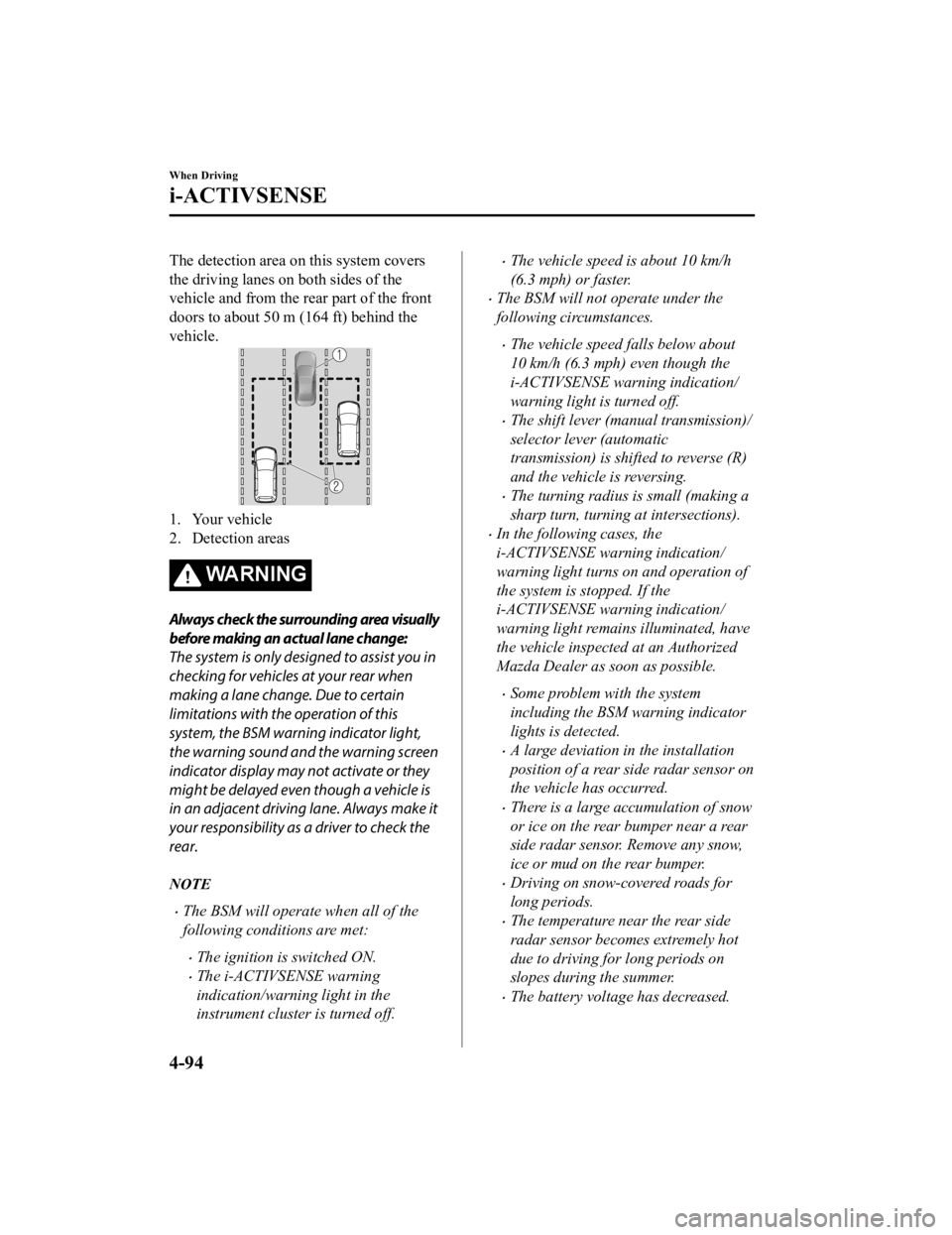
The detection area on this system covers
the driving lanes on both sides of the
vehicle and from the rear part of the front
doors to about 50 m (164 ft) behind the
vehicle.
1. Your vehicle
2. Detection areas
WA R N I N G
Always check the surrounding area visually
before making an actual lane change:
The system is only designed to assist you in
checking for vehicles at your rear when
making a lane change. Due to certain
limitations with the operation of this
system, the BSM warning indicator light,
the warning sound and the warning screen
indicator display may not activate or they
might be delayed even though a vehicle is
in an adjacent driving lane. Always make it
your responsibility as a driver to check the
rear.
NOTE
The BSM will operate when all of the
following conditions are met:
The ignition is switched ON.
The i-ACTIVSENSE warning
indication/warning light in the
instrument cluster is turned off.
The vehicle speed is about 10 km/h
(6.3 mph) or faster.
The BSM will not operate under the
following circumstances.
The vehicle speed falls below about
10 km/h (6.3 mph) even though the
i-ACTIVSENSE warning indication/
warning light is turned off.
The shift lever (manual transmission)/
selector lever (automatic
transmission) is shifted to reverse (R)
and the vehicle is reversing.
The turning radius is small (making a
sharp turn, turning at intersections).
In the following cases, the
i-ACTIVSENSE warning indication/
warning light turns on and operation of
the system is stopped. If the
i-ACTIVSENSE warning indication/
warning light remains illuminated, have
the vehicle inspected at an Authorized
Mazda Dealer as soon as possible.
Some problem with the system
including the BSM warning indicator
lights is detected.
A large deviation in the installation
position of a rear side radar sensor on
the vehicle has occurred.
There is a large accumulation of snow
or ice on the rear bumper near a rear
side radar sensor. Remove any snow,
ice or mud on the rear bumper.
Driving on snow-covered roads for
long periods.
The temperature near the rear side
radar sensor becomes extremely hot
due to driving for long periods on
slopes during the summer.
The battery voltage has decreased.
When Driving
i-ACTIVSENSE
4-94
Mazda3_8HE9-EA-18K_Edition32018-11-21 14:31:58
Page 236 of 592

1. Places where the width betweenguardrails or walls on each side of
the vehicle narrows.
1. The walls at the entrance and exits of tunnels, turnouts.
A BSM warning indicator light may
flash or the warning beep may be
activated several times when making a
turn at a city intersection.
Turn off the BSM while pulling a trailer
or while an accessory such as a bicycle
carrier is installed to the rear of the
vehicle. Otherwise, the radar’s radio
waves will be blocked causing the
system to not operate normally.
In the following cases, it may be difficult
to view the illumination/flashing of the
BSM warning indicator lights equipped
on the door mirrors.
Snow or ice is adhering to the door
mirrors.
The front door glass is fogged or
covered in snow, frost or dirt.
The rear side radar sensor of the BSM
may be regulated under the radio wave
related laws of the country where the
vehicle is driven. If this system is used
abroad, it may be necessary to turn off
the system.
Refer to Rear Side Radar Sensor on
page 4-206.
The system switches to the Rear Cross
Traffic Alert (RCTA) function when the
shift lever (manual transmission) or the
selector lever (automatic transmission)
is shifted to the reverse (R) position.
Refer to Rear Cross Traffic Alert
(RCTA) on page 4-112.
▼Blind Spot Monitoring (BSM)
Warning Indicator Lights/Display
Indicator/Blind Spot Monitoring
(BSM) Warning Beep
The BSM system notifie
s the driver of the
presence of vehicles in adjacent lanes or at
the rear of the vehicle using the BSM
warning indicator light , the warning sound
and the display indicator while the systems
are operational.
BSM warning indicator lights
The BSM warning indicator lights are
equipped on the left and right door
mirrors. The warning indicator lights turn
on when a vehicle approaching from the
rear in an adjacent lane is detected.
When Driving
i-ACTIVSENSE
4-96
Mazda3_8HE9-EA-18K_Edition3 2018-11-21 14:31:58
Page 237 of 592
When the ignition is switched ON, the
warning indicator light turns on
momentarily and then turns off after a few
seconds.
Function for cancelling illumination
dimmer
If the BSM warning indicator lights turn
on when the parking lights are turned on,
the brightness of the BSM warning
indicator lights is dimmed.
If the BSM warning indicator lights are
difficult to see due to glare from
surrounding brightness when traveling on
snow-covered roads or under foggy
conditions, press the dimmer cancellation
button to cancel the dimmer and increase
the brightness of BSM warning indicator
lights when they turn on.
Refer to Dashboard Illumination on page
4-18.
Display indicator
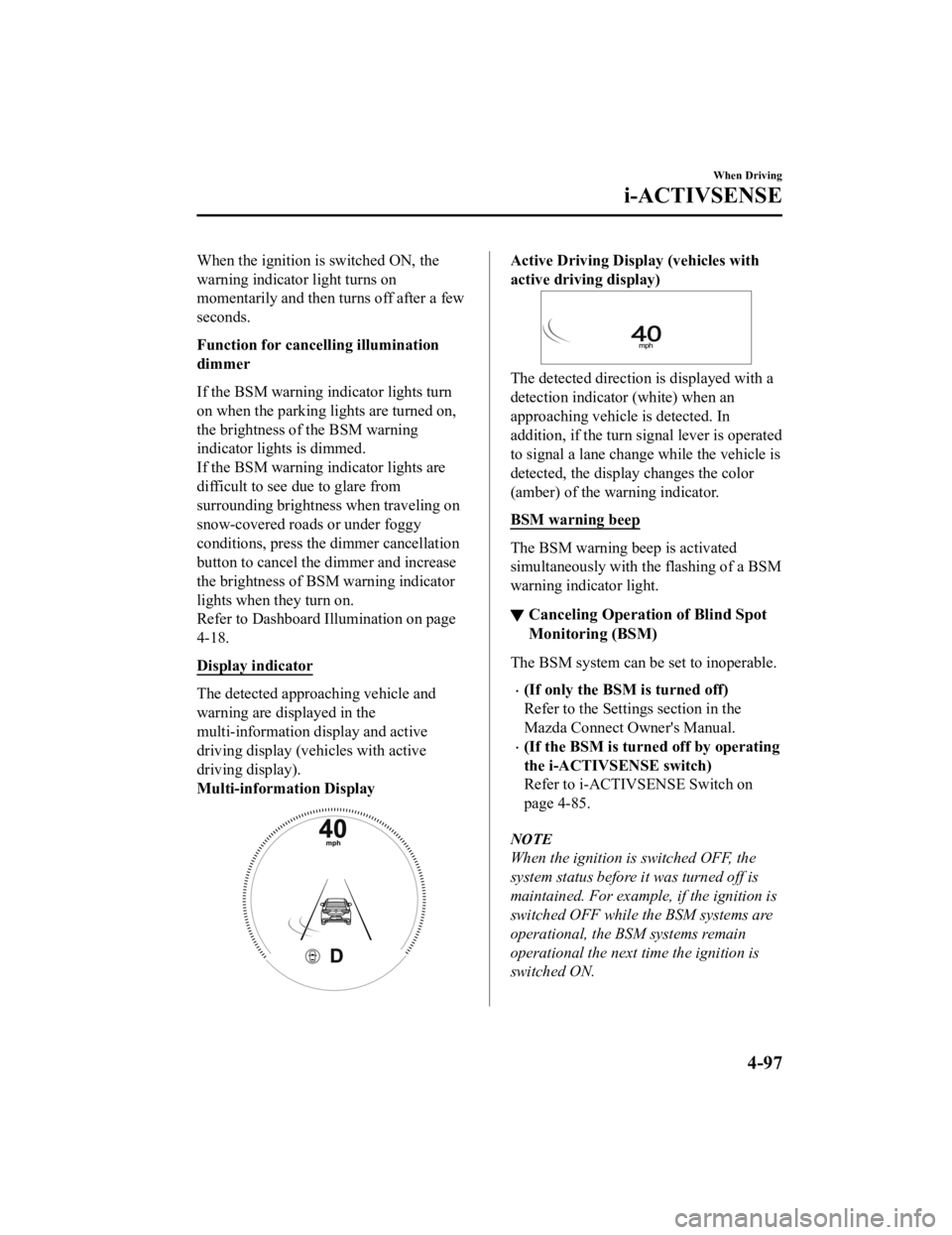
The detected approaching vehicle and
warning are displayed in the
multi-information display and active
driving display (veh icles with active
driving display).
Multi-information Display
Active Driving Display (vehicles with
active driving display)
The detected direction is displayed with a
detection indicator (white) when an
approaching vehicle is detected. In
addition, if the turn signal lever is operated
to signal a lane change while the vehicle is
detected, the display changes the color
(amber) of the warning indicator.
BSM warning beep
The BSM warning beep is activated
simultaneously with the flashing of a BSM
warning indicator light.
▼ Canceling Operation of Blind Spot
Monitoring (BSM)
The BSM system can be set to inoperable.
(If only the BSM is turned off)
Refer to the Settings section in the
Mazda Connect Owner's Manual.
(If the BSM is turned off by operating
the i-ACTIVSENSE switch)
Refer to i-ACTIV
SENSE Switch on
page 4-85.
NOTE
When the ignition is switched OFF, the
system status before it was turned off is
maintained. For exampl e, if the ignition is
switched OFF while the BSM systems are
operational, the BSM systems remain
operational the next time the ignition is
switched ON.
When Driving
i-ACTIVSENSE
4-97
Mazda3_8HE9-EA-18K_Edition3 2018-11-21 14:31:58
Page 252 of 592

The front side radar sensor
installation position is greatly
deviated.
There is a large accumulation of snow
or ice on the front bumper near a front
side radar sensor.
The temperature near the radar
sensors becomes extremely hot due to
driving for a long time on slopes
during the summer.
The battery voltage has decreased.
The front side radar sensor of the
FCTA may be regulated under the
radio wave related laws of the country
where the vehicle is driven. If this
system is used abroad, it may be
necessary to turn off the system.
Refer to Front Side Radar Sensor on
page 4-204.
▼ Canceling Operation of Front Cross
Traffic Alert (FCTA)
The FCTA can be set to inoperable.
(If only the FCTA is turned off)
Refer to the Settings section in the
Mazda Connect Owner's Manual.
(If the FCTA is turned off by
operating the i-ACT
IVSENSE switch)
Refer to i-ACTIVSENSE Switch on
page 4-85.
NOTE
When the ignition is switched OFF, the
system status before it was turned off is
maintained. For exampl e, if the ignition is
switched OFF with the FCTA operable,
the system will be operable when the
ignition is switched ON the next time.
Rear Cross Traffic Alert
(RCTA)
*
▼Rear Cross Traffic Alert (RCTA)
The RCTA system is des
igned to assist the
driver in checking the area to the rear left
and right sides of your vehicle while your
vehicle is reversing by alerting the driver
to the presence of vehicles approaching
the rear of your vehicle.
The RCTA system detects vehicles
approaching from the rear left and right
sides of your vehicle and the rear of your
vehicle while your vehicle is being
reversed out of a parking space, and
notifies the driver of possible danger using
the Blind Spot Monitoring (BSM) warning
indicator lights and the warning buzzer.
1. Your vehicle
2. Detection areas
When Driving
i-ACTIVSENSE
4-112*Some models.
Mazda3_8HE9-EA-18K_Edition3 2018-11-21 14:31:58
Page 253 of 592
WA R N I N G
Always check the surrounding area visually
before actually putting the vehicle in
reverse:
The system is only designed to assist you in
checking for vehicles at the rear when
putting the vehicle in reverse. Due to
certain limitations with the operation of
this system, the Blind Spot Monitoring
(BSM) warning indicator lights may not
flash or it might be delayed even though a
vehicle is behind your vehicle. Always make
it your responsibility as a driver to check
the rear.
RCTA operation
1. The RCTA system operates when the shift lever (manual transmission) or the
selector lever (automatic transmission)
is shifted to the reverse (R) position.
2. If there is the poss ibility of a collision
with an approaching vehicle, the Blind
Spot Monitoring (BSM) warning
indicator lights flashes and the warning
beep is activated simultaneously.
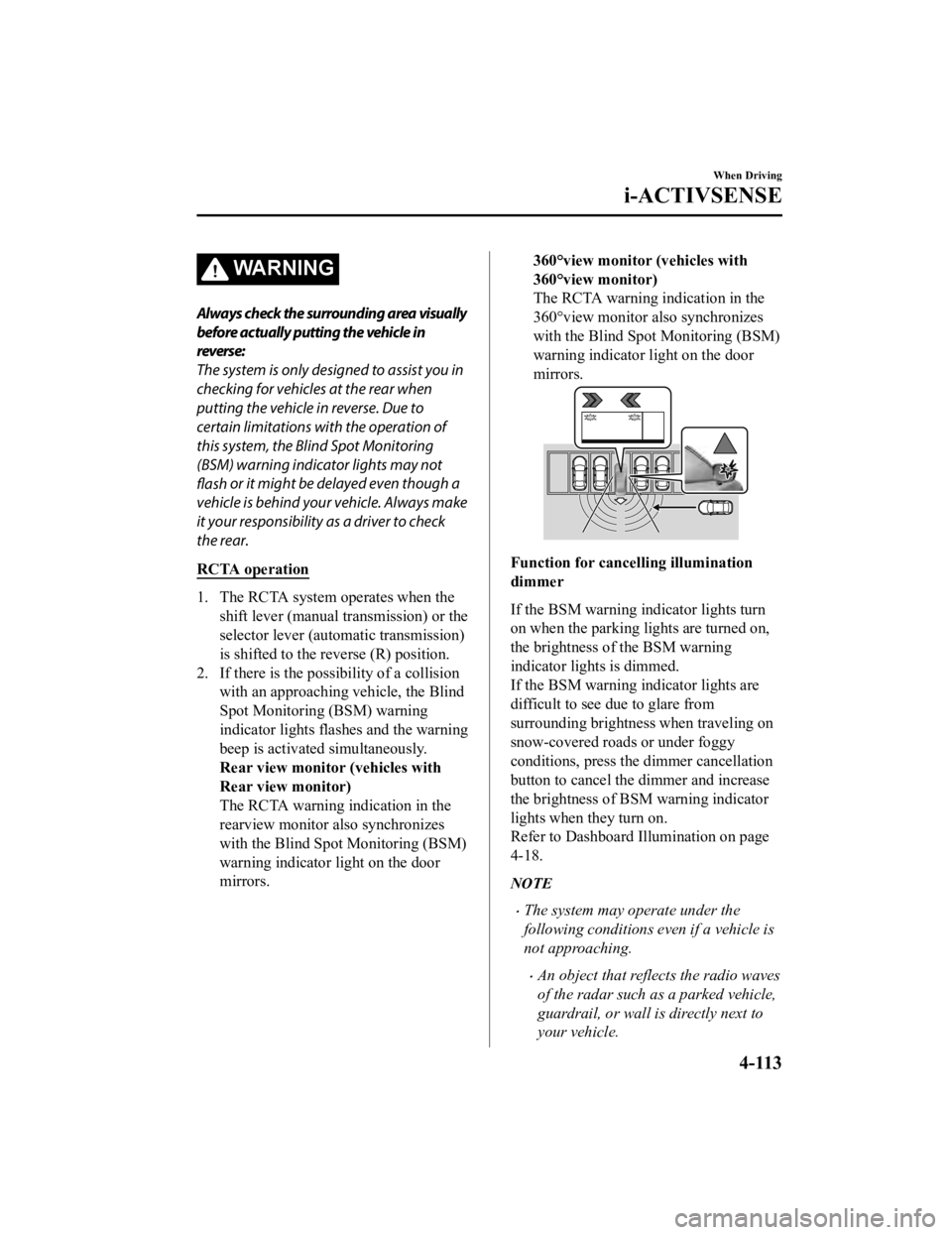
Rear view monitor (vehicles with
Rear view monitor)
The RCTA warning indication in the
rearview monitor also synchronizes
with the Blind Spot Monitoring (BSM)
warning indicator light on the door
mirrors.
360°view monitor (vehicles with
360°view monitor)
The RCTA warning indication in the
360°view monitor also synchronizes
with the Blind Spot Monitoring (BSM)
warning indicator light on the door
mirrors.
Function for cancelling illumination
dimmer
If the BSM warning i ndicator lights turn
on when the parking lights are turned on,
the brightness of the BSM warning
indicator lights is dimmed.
If the BSM warning i ndicator lights are
difficult to see due to glare from
surrounding brightness when traveling on
snow-covered roads or under foggy
conditions, press the dimmer cancellation
button to cancel the dimmer and increase
the brightness of BSM warning indicator
lights when they turn on.
Refer to Dashboard Illumination on page
4-18.
NOTE
The system may operate under the
following conditions even if a vehicle is
not approaching.
An object that reflects the radio waves
of the radar such as a parked vehicle,
guardrail, or wall is directly next to
your vehicle.
When Driving
i-ACTIVSENSE
4-113
Mazda3_8HE9-EA-18K_Edition3 2018-11-21 14:31:58
Page 254 of 592

A vehicle approaching from the rear
left and right side of your vehicle
slows down.
A vehicle approaching from the rear
left and right side of your vehicle
makes a right or left turn directly in
front of your vehicle.
A vehicle overtakes your vehicle while
it is stopped.
Your vehicle is in an area where
strong radio waves or electrical noise
may occur such as near a television
tower or power plant.
In the following cases, the
i-ACTIVSENSE warning indication/
warning light turns on and operation of
the system is stopped. If the
i-ACTIVSENSE warning indication/
warning light remains illuminated, have
the vehicle inspected at an Authorized
Mazda Dealer as soon as possible.
Some problem with the system
including the Blind Spot Monitoring
(BSM) warning indicator lights has
occurred.
A large deviation in the installation
position of a rear side radar sensor on
the vehicle has occurred.
There is a large accumulation of snow
or ice on the rear bumper near a rear
side radar sensor.
Driving on snow-covered roads for
long periods.
The temperature near the radar
sensors becomes extremely hot due to
driving for long periods on slopes
during the summer.
The battery voltage has decreased.
Under the following conditions, the rear
side radar sensor cannot detect
approaching vehicles or it might be
difficult to detect them, and the system
may not operate normally.
The vehicle speed when reversing is
about 15 km/h (9 mph) or faster.
The rear side radar sensor detection
area is obstructed by a nearby wall or
parked vehicle. (Reverse the vehicle to
a position where the radar sensor
detection area is no longer
obstructed.)
1. Your vehicle
A vehicle is approaching directly from
the rear of your vehicle.
1. Your vehicle
The vehicle is parked on a slant.
1. Your vehicle
When Driving
i-ACTIVSENSE
4-114
Mazda3_8HE9-EA-18K_Edition3 2018-11-21 14:31:58
Page 255 of 592

Directly after the RCTA system
becomes operable using the
personalization feature.
Radio wave interference from a radar
sensor equipped on a nearby parked
vehicle.
In the following cases, it may be difficult
to view the illumination/flashing of the
Blind Spot Monitoring (BSM) warning
indicator lights equipped on the door
mirrors.
Snow or ice adheres to the door
mirrors.
The front door glass is fogged or
covered in snow, frost or dirt.
Turn off the RCTA system while pulling
a trailer or while an accessory such as a
bicycle carrier is installed to the rear of
the vehicle. Otherwise, the radio waves
emitted by the radar will be blocked
causing the system to not operate
normally.
The rear side radar sensor of the RCTA
may be regulated under the radio wave
related laws of the country where the
vehicle is driven. If this system is used
abroad, it may be necessary to turn off
the system.
Refer to Rear Side Radar Sensor on
page 4-206.
▼Canceling Operation of Rear Cross
Traffic Alert (RCTA)
The RCTA can be set to inoperable.
(If only the RCT
A is turned off)
Refer to the Settings section in the
Mazda Connect Owner's Manual.
(If the RCTA is turned off by
operating the i-ACTIVSENSE switch)
Refer to i-ACTIV SENSE Switch on
page 4-85.
NOTE
When the ignition is switched OFF, the
system status before it was turned off is
maintained. For exampl e, if the ignition is
switched OFF with the RCTA operable,
the system will be operable when the
ignition is switched ON the next time.
When Driving
i-ACTIVSENSE
4-115
Mazda3_8HE9-EA-18K_Edition3 2018-11-21 14:31:58
Page 257 of 592

Slippery roads such as ice or snow-bound
roads (Tires could spin causing you to
lose vehicle control, or the stop hold
control may not operate.)
Long, descending slopes (to maintain
distance between vehicles, the system
automatically and continuously applies
the brakes which could result in the loss
of brake power.)
Two-wheeled vehicles such as
motorcycles or bicycles are ahead.
Slopes with a steep gradient (The vehicle
ahead may not be detected correctly,
your vehicle may slide while stopped by
the stop hold control, and it may
accelerate suddenly after it starts
moving.)
For safety purposes, switch the MRCC
system off when it is not being used.
CAUTION
If your vehicle is towed or you are towing
something, switch the MRCC system off to
prevent an unexpected operation.
NOTE
The MRCC system does not detect the
following as physical objects.
Vehicles approaching in the opposite
direction
Pedestrians
Stationary objects (stopped vehicles,
obstructions)
If a vehicle ahead is traveling at an
extremely low speed, the system may
not detect it correctly.
If there is a structure on the road or an
object (such as a monorail) at a low
height off the ground in front of the
vehicle, the system may operate.
Therefore, do not use the MRCC.
Do not use the MRCC system under
conditions in which close proximity
warnings are frequently activated.
During headway control travel, the
system accelerates and decelerates your
vehicle in conjunction with the speed of
the vehicle ahead. However, if it is
necessary to accelerate for a lane
change or if the vehicle ahead brakes
suddenly causing you to close in on the
vehicle rapidly, accelerate using the
accelerator pedal or decelerate using
the brake pedal depending on the
conditions.
While the MRCC system is in use, it
does not cancel even if the shift lever is
operated and any intended engine
braking will not occur. If deceleration is
required, lower the vehicle speed setting
or depress the brake pedal.
The sound of the automatic brakes
operating may be heard, however, it
does not indicate a problem.
The brake lights tu
rn on while the
MRCC automatic braking is operating.
When Driving
i-ACTIVSENSE
4-117
Mazda3_8HE9-EA-18K_Edition3 2018-11-21 14:31:58
Page 266 of 592

For safety purposes, switch the MRCC with
Stop & Go function system off when it is not
being used.
Do not get out of the vehicle while the stop
hold control is operating:
Getting out of the vehicle while the stop
hold control is operating is dangerous as
the vehicle may move unexpectedly and
result in an accident. Before getting out of
the vehicle, switch the MRCC with Stop &
Go function system off, shift the selector
lever to the P position, and apply the
parking brake.
CAUTION
If your vehicle is towed or you are towing
something, switch the MRCC with Stop &
Go function system off to prevent an
unexpected operation.
NOTE
The MRCC with Stop & Go function
system does not detect the following as
physical objects.
Vehicles approaching in the opposite
direction
Pedestrians
Stationary objects (stopped vehicles,
obstructions)
If a vehicle ahead is traveling at an
extremely low speed, the system may
not detect it correctly.
If there is a structure on the road or an
object (such as a monorail) at a low
height off the ground in front of the
vehicle, the system may operate.
Therefore, do not use the MRCC with
Stop & Go function.
Do not use the MRCC with Stop & Go
function system under conditions in
which close proximity warnings are
frequently activated.
During headway control travel, the
system accelerates and decelerates your
vehicle in conjunction with the speed of
the vehicle ahead. However, if it is
necessary to accelerate for a lane
change or if the vehicle ahead brakes
suddenly causing you to close in on the
vehicle rapidly, accelerate using the
accelerator pedal or decelerate using
the brake pedal depending on the
conditions.
While the MRCC with Stop & Go
function system is in use, it does not
cancel even if the selector lever is
operated and any intended engine
braking does not occur. If deceleration
is required, lower the set speed or
depress the brake pedal.
The sound of the automatic brakes
operating may be heard, however, it
does not indicate a problem.
The brake lights turn on while the
MRCC with Stop & Go function
automatic braking is operating.
When Driving
i-ACTIVSENSE
4-126
Mazda3_8HE9-EA-18K_Edition3 2018-11-21 14:31:58
Page 277 of 592

If a vehicle ahead is traveling at an
extremely low speed, the system may
not detect it correctly.
If there is a structure on the road or an
object (such as a monorail) at a low
height off the ground in front of the
vehicle, the system may operate.
Therefore, do not use the TJA.
Do not use the TJA under conditions in
which close proximity warnings are
frequently activated.
If it is necessary to accelerate for a lane
change or the vehicle ahead brakes
suddenly causing you to close in on the
vehicle rapidly, accelerate using the
accelerator pedal or decelerate using
the brake pedal depending on the
conditions.
While the TJA is in use, it does not
cancel even if the selector lever is
operated and any intended engine
braking does not occur. If deceleration
is required, lower the set speed or
depress the brake pedal.
You might hear the sound of the
automatic brakes operating; however, it
does not indicate a problem.
The brake lights turn on while the TJA
automatic braking is operating.
Under the following conditions, the TJA
may not be able to detect white (yellow)
lines correctly and the TJA may not
operate normally.
The forward sensing camera (FSC)
cannot recognize the area in front of
the vehicle due to soiling or fog.
The white (yellow) lane lines are less
visible because of dirt or paint
flaking.
White (yellow) lane lines are less
visible because of bad weather (rain,
fog, or snow).
The vehicle is driven on a temporary
lane or section with a closed lane
resulting from construction where
there might be multiple white (yellow)
lane lines, or they are interrupted.
The camera picks up an obscure line,
such as a temporary line being used
for construction, or because of shade,
unmelted snow, or grooves filled with
water.
The road surface is wet and shiny
after rain, or there are puddles on the
road.
Heavy luggage is loaded in the
luggage compartment or on the rear
seat causing the vehicle to tilt.
A vehicle in front of your vehicle is
running near a white (yellow) lane
line making it less visible.
The windshield is dirty or foggy.
The tire pressures are not adjusted to
the specified pressure.
Tires other than standard tires are
equipped.
The vehicle is driven through an
intersection, a junction, or a fork in
the road.
While white (yellow) lane lines cannot
be detected due to road or weather
conditions.
The surrounding brightness suddenly
changes such as when entering or
exiting a tunnel.
The illumination of the headlights is
weakened because of dirt or the
optical axis is deviated at night.
Back-light is reflected off the road
surface or the road surface is wet and
shiny after rain.
When Driving
i-ACTIVSENSE
4-137
Mazda3_8HE9-EA-18K_Edition3 2018-11-21 14:31:58