lock MAZDA MODEL 3 SEDAN 2019 Repair Manual
[x] Cancel search | Manufacturer: MAZDA, Model Year: 2019, Model line: MODEL 3 SEDAN, Model: MAZDA MODEL 3 SEDAN 2019Pages: 592, PDF Size: 75.35 MB
Page 172 of 592
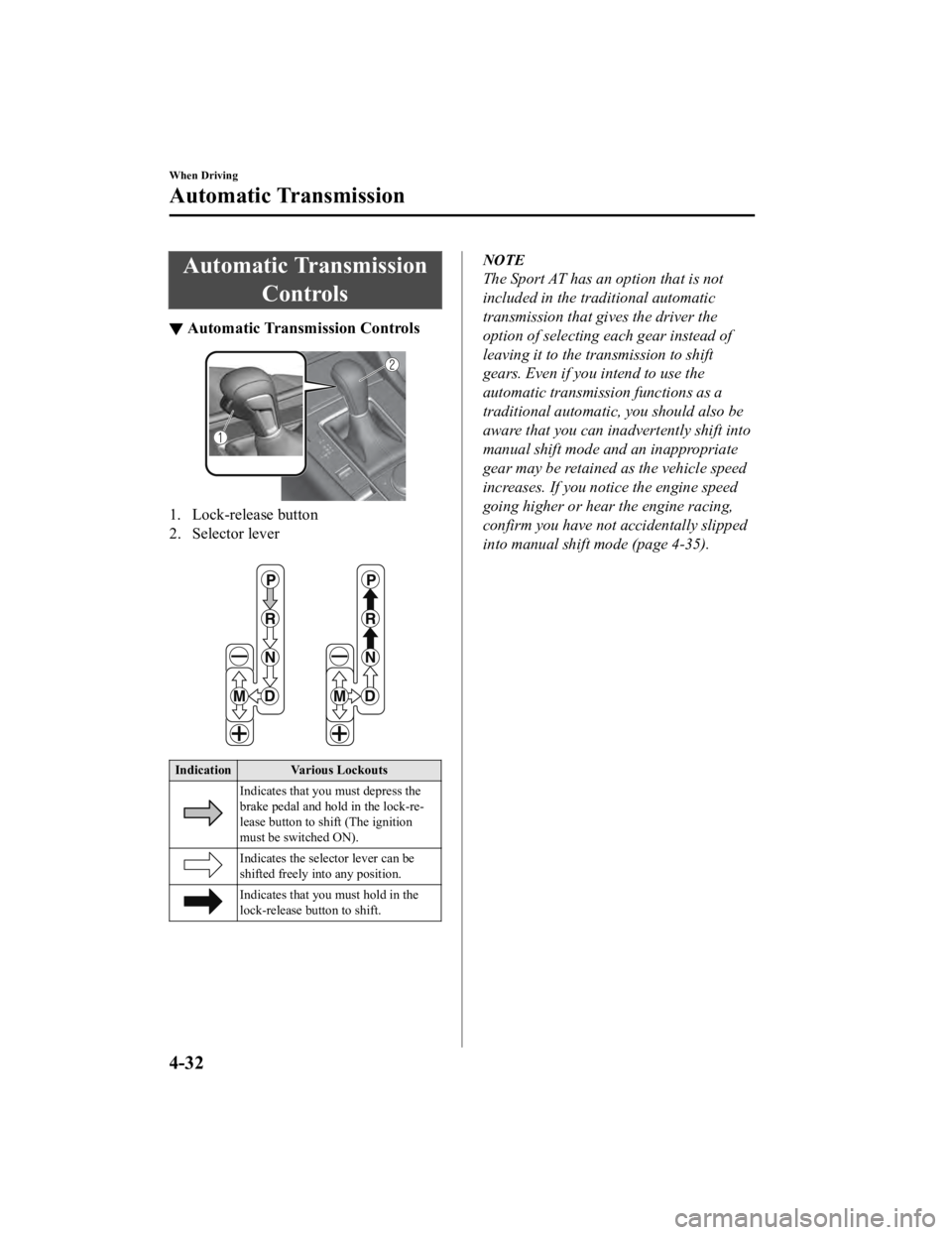
Automatic TransmissionControls
▼Automatic Transmission Controls
1. Lock-release button
2. Selector lever
Indication Various Lockouts
Indicates that you must depress the
brake pedal and hold in the lock-re‐
lease button to shi ft (The ignition
must be switched ON).
Indicates the selector lever can be
shifted freely in to any position.
Indicates that you must hold in the
lock-release button to shift.
NOTE
The Sport AT has an option that is not
included in the tr aditional automatic
transmission that gives the driver the
option of selecting each gear instead of
leaving it to the transmission to shift
gears. Even if you intend to use the
automatic transmission functions as a
traditional automatic, you should also be
aware that you can inadvertently shift into
manual shift mode and an inappropriate
gear may be retained as the vehicle speed
increases. If you notice the engine speed
going higher or hear the engine racing,
confirm you have not accidentally slipped
into manual shift mode (page 4-35).
When Driving
Automatic Transmission
4-32
Mazda3_8HE9-EA-18K_Edition3 2018-11-21 14:31:58
Page 173 of 592
Shift-Lock System
▼Shift-Lock System
The shift-lock system prevents shifting out
of P unless the brake pedal is depressed.
To shift from P:
1. Depress and hold the brake pedal.
2. Start the engine.
3. Press and hold the lock-release button.
4. Move the selector lever.
NOTE
When the ignition is
switched to ACC or
the ignition is switch ed off, the selector
lever cannot be shifted from P position.
The ignition cannot be switched to OFF
if the selector lever is not in P position.
▼ Shift-Lock Override
If the selector lever will not move from P
position using the proper shift procedure,
continue to hold down the brake pedal.
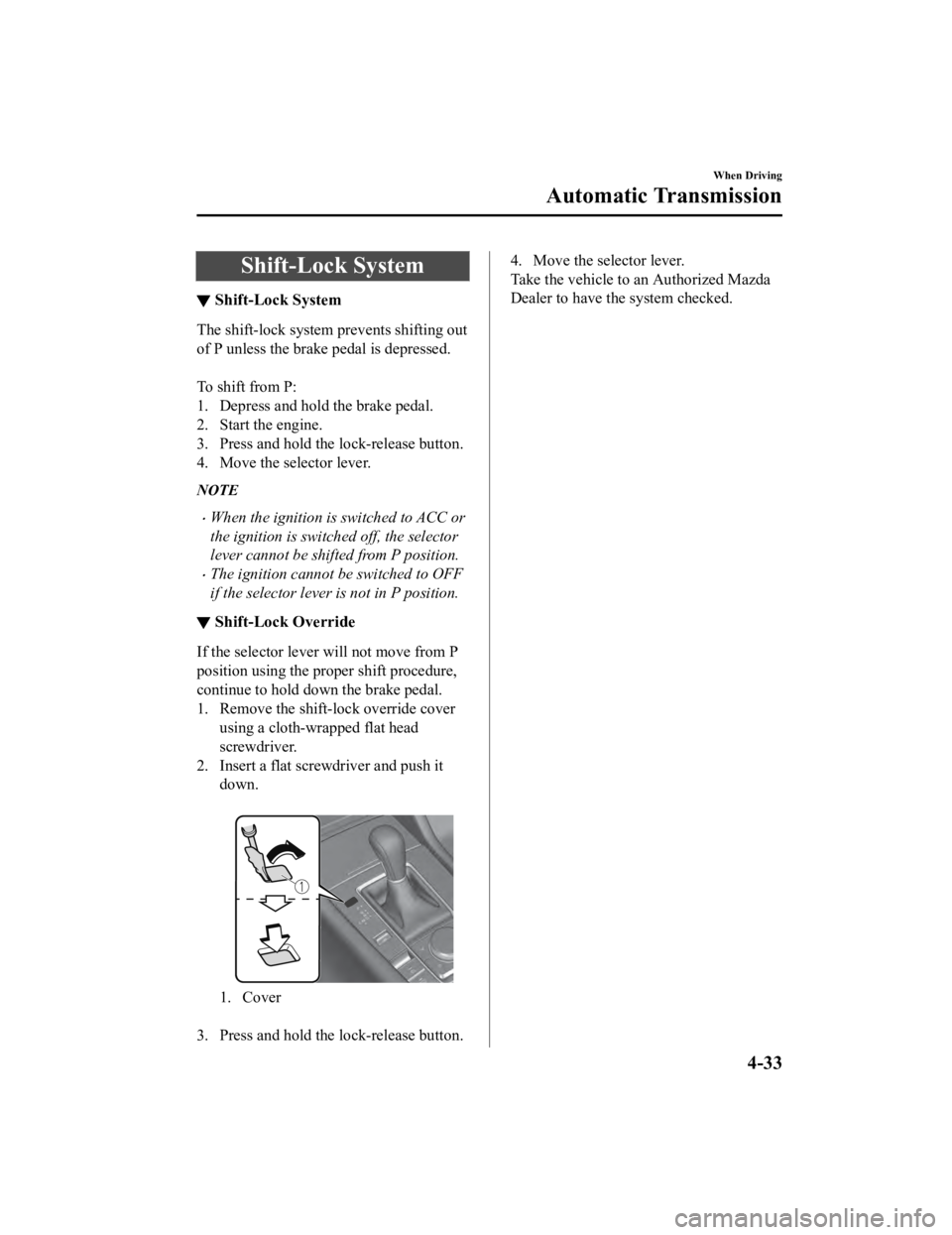
1. Remove the shift-lock override cover
using a cloth-wrapped flat head
screwdriver.
2. Insert a flat screwdriver and push it down.
1. Cover
3. Press and hold the lock-release button.
4. Move the selector lever.
Take the vehicle to an Authorized Mazda
Dealer to have the system checked.
When Driving
Automatic Transmission
4-33
Mazda3_8HE9-EA-18K_Edition3 2018-11-21 14:31:58
Page 174 of 592

Transmission Ranges
▼Transmission Ranges
The shift position indication in the
instrument cluster illuminates.
Refer to Shift Position Indication on
page 4-35.
Shift the selector lever to the P or N
position to start the engine.
P (Park)
P locks the transmission and prevents the
front wheels from rotating.
WA R N I N G
Always set the selector lever to P position
and set the parking brake:
Only setting the selector lever to the P
position without using the parking brake to
hold the vehicle is dangerous. If P fails to
hold, the vehicle could move and cause an
accident.
CAUTION
Shifting into P, N or R while the vehicle is
moving can damage your transmission.
Shifting into a driving gear or reverse
when the engine is running faster than
idle can damage the transmission.
R (Reverse)
In position R, the vehicle moves only
backward. You must be at a complete stop
before shifting to or from R, except under
rare circumstances as explained in
Rocking the Vehicle (page 3-45).
N (Neutral)
In N, the wheels and transmission are not
locked. The vehicle will roll freely even
on the slightest inclin e unless the parking
brake or brakes are on.
WA R N I N G
If the engine is running faster than idle, do
not shift from N or P into a driving gear:
It's dangerous to shift from N or P into a
driving gear when the engine is running
faster than idle. If this is done, the vehicle
could move suddenly, causing an accident
or serious injury.
Do not shift into N when driving the
vehicle:
Shifting into N while driving is dangerous.
Engine braking cannot be applied when
decelerating which could lead to an
accident or se rious injury.
CAUTION
Do not shift into N when driving the
vehicle. Doing so can cause transmission
damage.
NOTE
Apply the parking brake or depress the
brake pedal before moving the selector
lever from N position to prevent the
vehicle from moving unexpectedly.
D (Drive)
D is the normal driv ing position. From a
stop, the transmission will automatically
shift through a 6-gear sequence.
When Driving
Automatic Transmission
4-34
Mazda3_8HE9-EA-18K_Edition3 2018-11-21 14:31:58
Page 187 of 592
▼Coming Home Light
The coming home light turns on the
headlights (low beams)
when the lever is
operated.
To turn on the lights
When the lever is pull ed with the ignition
switched to ACC or OFF, the low beam
headlights turn on.
The headlights turn off after a certain
period of time has elapsed after the doors
are closed.
NOTE
The time until the headlights turn off
after all of the doors are closed can be
changed.
Refer to the Settings section in the
Mazda Connect Owner's Manual.
If no operations are done for 3 minutes
after the lever is pulled, the headlights
turn off.
The headlights turn off if the lever is
pulled again while the headlights are
illuminated.
▼ Leaving Home Light
The leaving home light turns on the lights
when the transmitter unlock button is
pressed while away from the vehicle.
The following lights turn on when the
leaving home light is operated.
Low beams, Parking lights, Taillights,
License plate lights.
To turn on the lights
When the ignition switch and the headlight
switch are in the following conditions, the
headlights will illuminate when the
transmitter unlock button is pressed and
the vehicle receives the transmitter signal.
The headlights turn off after a certain
period of time has elapsed (30 seconds).
Ignition switch: off
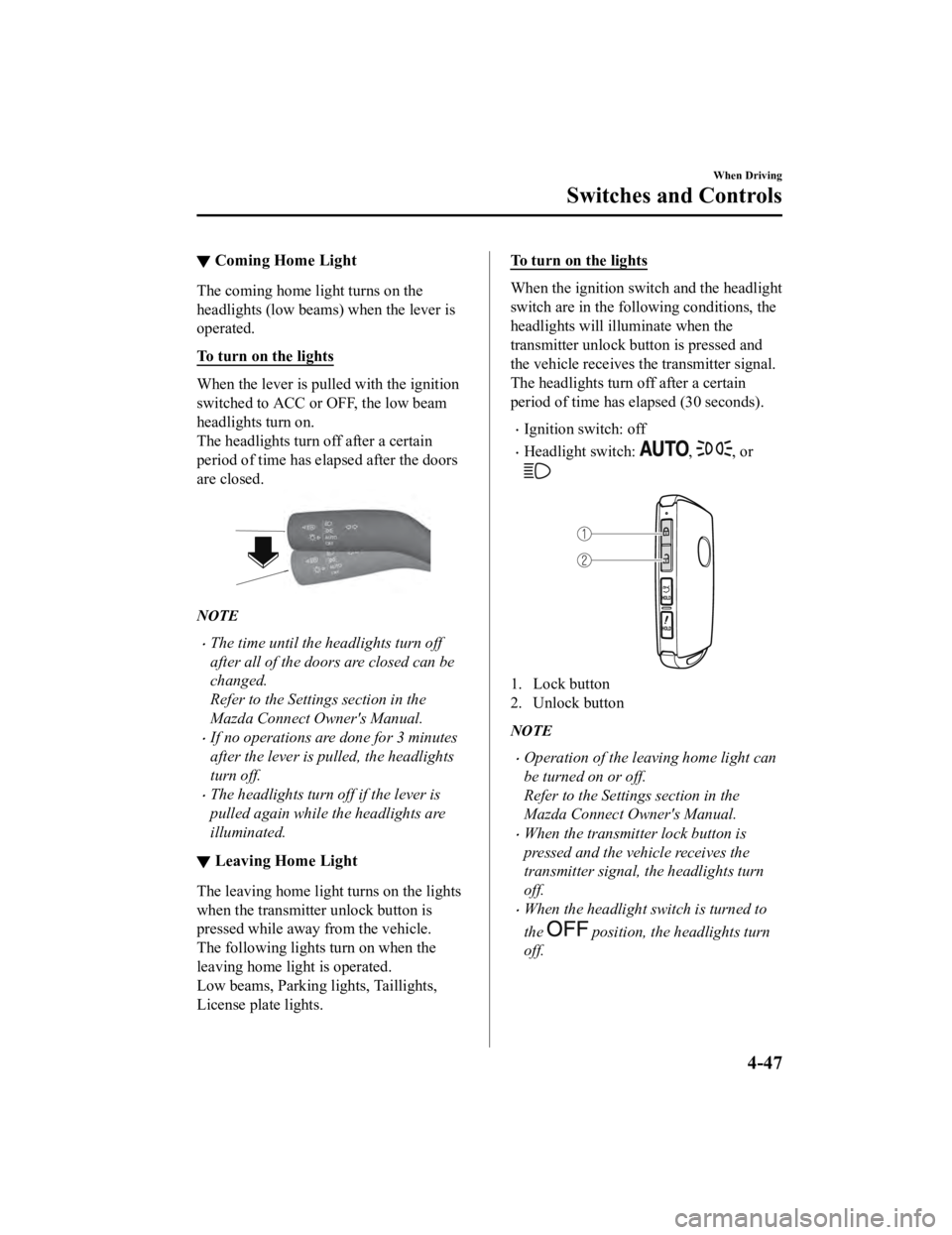
Headlight switch: , , or
1. Lock button
2. Unlock button
NOTE
Operation of the leaving home light can
be turned on or off.
Refer to the Settings section in the
Mazda Connect Owner's Manual.
When the transmitter lock button is
pressed and the vehicle receives the
transmitter signal, the headlights turn
off.
When the headlight switch is turned to
the
position, the headlights turn
off.
When Driving
Switches and Controls
4-47
Mazda3_8HE9-EA-18K_Edition3 2018-11-21 14:31:58
Page 190 of 592
Windshield Wipers andWa s h e r
▼Windshield Wipers and Washer
The ignition must be switched ON to use
the wipers.
WA R N I N G
Use only windshield washer
fluid or plain
water in the reservoir:
Using radiator antifreeze as washer fluid is
dangerous. If sprayed on the windshield, it
will dirty the windshield, affect your
visibility, and could result in an accident.
Only use windshield washer fluid mixed
with anti-freeze protection in freezing
weather conditions:
Using windshield washer fluid without
anti-freeze protection in freezing weather
conditions is dangerous as it could freeze
on the windshield and block your vision
which could cause an accident. In addition,
make sure the windshield is sufficiently
warmed using the defroster before
spraying the washer fluid.
NOTE
If the windshield wipers are operated
under cold weather conditions or during
snowfall, they could stop due to
accumulated snow on the windshield. If
the windshield wipers stop due to
accumulated snow on the windshield, park
the vehicle in a safe place, turn the wiper
switch off, and then remove the
accumulated snow. If the wiper switch is
turned to another position other than OFF,
the wipers will operate. If the wipers do
not operate even though the wiper switch
is turned to a position other than OFF,
consult an Authorized Mazda Dealer as
soon as possible.
▼ Windshield Wipers
Turn the wipers on by pressing the lever
up or down.
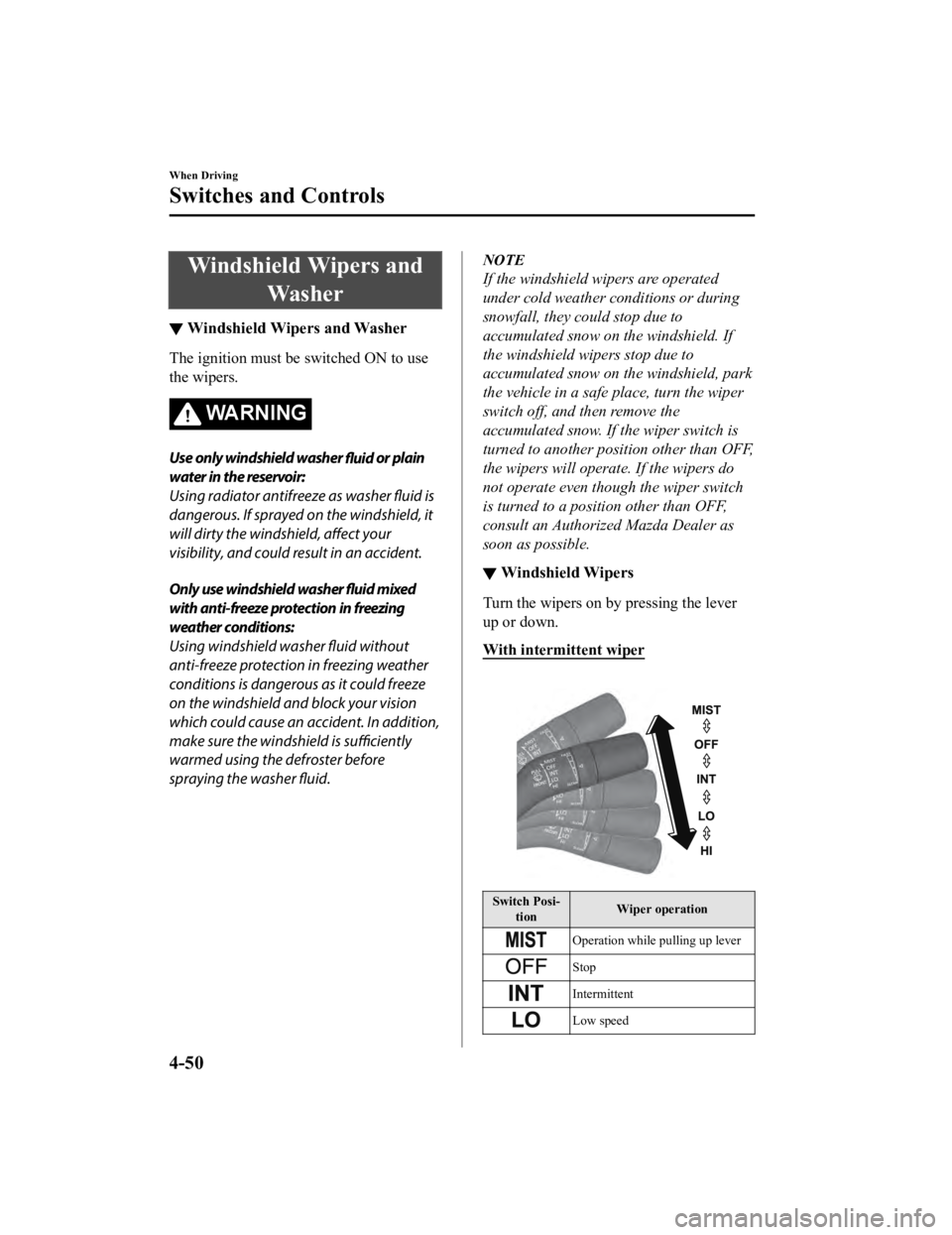
With intermittent wiper
Switch Posi‐
tion Wiper operation
Operation while pulling up lever
Stop
Intermittent
Low speed
When Driving
Switches and Controls
4-50
Mazda3_8HE9-EA-18K_Edition3
2018-11-21 14:31:58
Page 205 of 592

NOTE
To release the parking brake when the
ignition is switched OFF, it is necessary to
cancel the parking brake auto operation.
For details, refer to Canceling the parking
brake automatic operation.
Releasing the parking brake
automatically
If the accelerator pe dal is depressed with
the parking brake applied and all of the
following conditions met, the parking
brake is released automatically. When the
parking brake is released, the EPB
indicator light in the instrument cluster
and the EPB switch indicator light turn
off.
The engine is running.
The driver's door is closed.
The driver's seat belt is fastened.
(Manual transmission vehicle)
The shift lever is in a position other
than neutral.
The clutch pedal is depressed halfway.
(Automatic transmission vehicle)
The selector lever is in the D, M, or R
position.
NOTE
If something such as the driver's foot
contacts the accelerator pedal with the
engine running and the parking brake
applied, the parking brake might be
released automatically. If you do not
intend to start driving the vehicle
immediately, shift the shift lever to the
neutral position for a manual
transmission, or shift the selector lever to
the P or N position for an automatic
transmission.
Canceling the parking brake automatic
operation
The parking brake automatic operation can
be canceled by doing any of the following
after switching the ignition from ON to
OFF.
Auto operation cancel method 1
1. Switch the ignition ON.
2. Turn off the AUTOHOLD.
3. Press the EPB switch continuously for 2 seconds or longer (until a sound is
activated).
4. Release the EPB switch and switch the ignition OFF within 5 seconds after the
sound was activated.
After the auto opera tion is canceled, a
sound is activated one time, and the
EPB switch indicator light switches
from illumination to flashing, and then
turns off after 3 seconds.
Auto operation cancel method 2
1. Switch the ignition ON.
2. Turn off the AUTOHOLD.
3. Switch the ignition OFF with the EPB switch pressed.
When the auto operation is canceled, a
sound is activated one time, and the
EPB switch indicator light from
normal flashing to faster flashing, and
then turns off after 3 seconds.
NOTE
When canceling the parking brake auto
operation and parking the vehicle, shift
the shift lever to the 1st gear or the R
position for a manual transmission, or
shift the selector lever to the P position
for an automatic transmission, and then
use wheel blocks.
When Driving
Brake
4-65
Mazda3_8HE9-EA-18K_Edition3 2018-11-21 14:31:58
Page 214 of 592

Antilock Brake System(ABS)
▼Antilock Brake System (ABS)
The ABS control unit continuously
monitors the speed o
f each wheel. If one
wheel is about to lock up, the ABS
responds by automatically releasing and
reapplying that wheel's brake.
The driver will feel a slight vibration in
the brake pedal and may hear a chattering
noise from the brake system. This is
normal ABS system operation. Continue
to depress the brak e pedal without
pumping the brakes.
The warning light turns on when the
system has a malfunction.
Refer to ABS Warning Indication/Warning
Light on page 7-29.
WA R N I N G
Do not rely on ABS as a substitute for safe
driving:
The ABS cannot compensate for unsafe
and reckless driving, excessive speed,
tailgating (following another vehicle too
closely), driving on ice and snow, and
hydroplaning (reduced tire friction and
road contact because of water on the road
surface). You can still have an accident.
NOTE
Braking distances may be longer on
loose surfaces (snow or gravel, for
example) which usually have a hard
foundation. A vehicle with a normal
braking system may require less
distance to stop under these conditions
because the tires wi ll build up a wedge
of surface layer when the wheels skid.
The sound of the ABS operating may be
heard when starting the engine or
immediately after starting the vehicle,
however, it does not indicate a
malfunction.
When Driving
ABS/TCS/DSC
4-74
Mazda3_8HE9-EA-18K_Edition3 2018-11-21 14:31:58
Page 232 of 592
The system detects white (yellow) lane
lines.
NOTE
When the system does not detect a white
(yellow) lane line on one side only, the
system does not operate on the side that is
not being detected.
When temporarily canceling the system
The LDWS becomes operational in the
following cases: The LDWS operation is
automatically restored when the system's
operation conditions are met.
The system cannot detect white (yellow)
lane lines.
The vehicle speed is less than about 56
km/h (35 mph).
The turn signal lever is operated.
The accelerator pedal is depressed.
The TCS/DSC is operating.
The steering wheel is operated.
The brake pedal is operated.
The function is temporarily stopped.
The LDWS stops functioning in the
following cases:
The temperature in the forward sensing
camera (FSC) is high or low.
The windshield around the forward
sensing camera (FSC) is foggy.
The windshield around the forward
sensing camera (FSC) is blocked by an
obstruction, causing poor forward
visibility.
Strong light (such as sunlight, or
headlights (high-beam) of on-coming
vehicles) is directed at the forward
sensing camera (FSC).
System malfunction
If there is a problem w ith the system, the
i-ACTIVSENSE status symbol (warning/
risk avoidance suppo rt system) (white)
and the i-ACTIVSENSE warning
indication/warning light on the
multi-information di splay turns on and a
message is indicated.
Refer to i-ACTIVSENSE Status Symbol
(Warning/Risk Avoidance Support
System) on page 4-84.
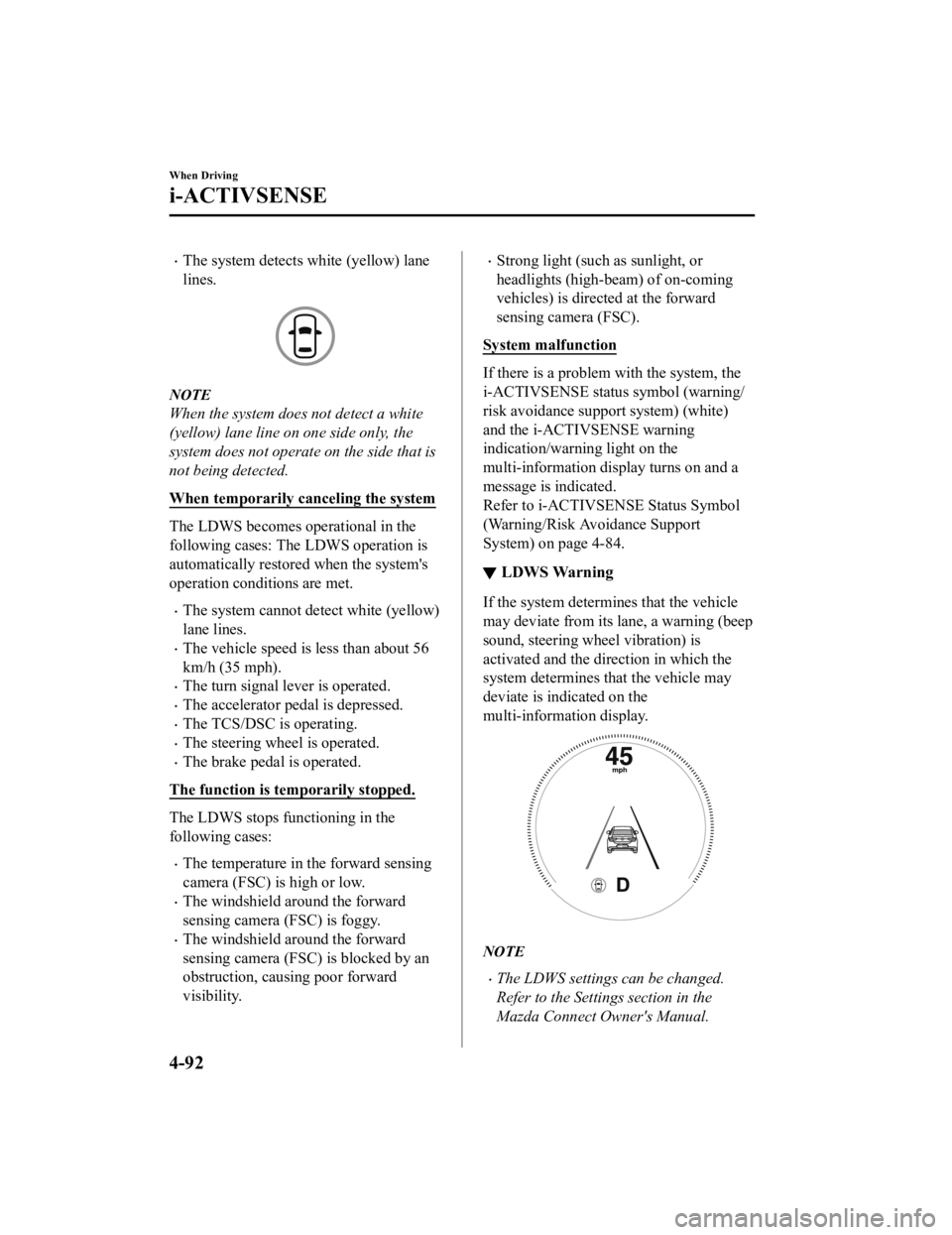
▼ LDWS Warning
If the system determi
nes that the vehicle
may deviate from its lane, a warning (beep
sound, steering wheel vibration) is
activated and the direction in which the
system determines that the vehicle may
deviate is indicated on the
multi-information display.
NOTE
The LDWS settings can be changed.
Refer to the Settings section in the
Mazda Connect Owner's Manual.
When Driving
i-ACTIVSENSE
4-92
Mazda3_8HE9-EA-18K_Edition3 2018-11-21 14:31:58
Page 236 of 592

1. Places where the width betweenguardrails or walls on each side of
the vehicle narrows.
1. The walls at the entrance and exits of tunnels, turnouts.
A BSM warning indicator light may
flash or the warning beep may be
activated several times when making a
turn at a city intersection.
Turn off the BSM while pulling a trailer
or while an accessory such as a bicycle
carrier is installed to the rear of the
vehicle. Otherwise, the radar’s radio
waves will be blocked causing the
system to not operate normally.
In the following cases, it may be difficult
to view the illumination/flashing of the
BSM warning indicator lights equipped
on the door mirrors.
Snow or ice is adhering to the door
mirrors.
The front door glass is fogged or
covered in snow, frost or dirt.
The rear side radar sensor of the BSM
may be regulated under the radio wave
related laws of the country where the
vehicle is driven. If this system is used
abroad, it may be necessary to turn off
the system.
Refer to Rear Side Radar Sensor on
page 4-206.
The system switches to the Rear Cross
Traffic Alert (RCTA) function when the
shift lever (manual transmission) or the
selector lever (automatic transmission)
is shifted to the reverse (R) position.
Refer to Rear Cross Traffic Alert
(RCTA) on page 4-112.
▼Blind Spot Monitoring (BSM)
Warning Indicator Lights/Display
Indicator/Blind Spot Monitoring
(BSM) Warning Beep
The BSM system notifie
s the driver of the
presence of vehicles in adjacent lanes or at
the rear of the vehicle using the BSM
warning indicator light , the warning sound
and the display indicator while the systems
are operational.
BSM warning indicator lights
The BSM warning indicator lights are
equipped on the left and right door
mirrors. The warning indicator lights turn
on when a vehicle approaching from the
rear in an adjacent lane is detected.
When Driving
i-ACTIVSENSE
4-96
Mazda3_8HE9-EA-18K_Edition3 2018-11-21 14:31:58
Page 255 of 592

Directly after the RCTA system
becomes operable using the
personalization feature.
Radio wave interference from a radar
sensor equipped on a nearby parked
vehicle.
In the following cases, it may be difficult
to view the illumination/flashing of the
Blind Spot Monitoring (BSM) warning
indicator lights equipped on the door
mirrors.
Snow or ice adheres to the door
mirrors.
The front door glass is fogged or
covered in snow, frost or dirt.
Turn off the RCTA system while pulling
a trailer or while an accessory such as a
bicycle carrier is installed to the rear of
the vehicle. Otherwise, the radio waves
emitted by the radar will be blocked
causing the system to not operate
normally.
The rear side radar sensor of the RCTA
may be regulated under the radio wave
related laws of the country where the
vehicle is driven. If this system is used
abroad, it may be necessary to turn off
the system.
Refer to Rear Side Radar Sensor on
page 4-206.
▼Canceling Operation of Rear Cross
Traffic Alert (RCTA)
The RCTA can be set to inoperable.
(If only the RCT
A is turned off)
Refer to the Settings section in the
Mazda Connect Owner's Manual.
(If the RCTA is turned off by
operating the i-ACTIVSENSE switch)
Refer to i-ACTIV SENSE Switch on
page 4-85.
NOTE
When the ignition is switched OFF, the
system status before it was turned off is
maintained. For exampl e, if the ignition is
switched OFF with the RCTA operable,
the system will be operable when the
ignition is switched ON the next time.
When Driving
i-ACTIVSENSE
4-115
Mazda3_8HE9-EA-18K_Edition3 2018-11-21 14:31:58