wheel MAZDA MODEL 3 SEDAN 2019 Manual PDF
[x] Cancel search | Manufacturer: MAZDA, Model Year: 2019, Model line: MODEL 3 SEDAN, Model: MAZDA MODEL 3 SEDAN 2019Pages: 592, PDF Size: 75.35 MB
Page 354 of 592

Tire Pressure MonitoringSystem (TPMS)
▼Tire Pressure Monitoring System
(TPMS)
The TPMS monitors the air pressure of
each tire and if it decreases below the
specified value, the system notifies the
driver by turning on the TPMS warning
light in the instrument cluster and
indicating a message on the
multi-information display.
For the TPMS, the air pressure data sent
from the tire pressure s
ensors installed on
each wheel via radio signal is received by
the receiver unit in t he vehicle to monitor
the tire pressures.
1. Tire pressure sensors
In addition, the current tire pressures can
be checked using the center display.
Refer to the Information section in the
Mazda Connect Owner's Manual.
NOTE
When the ambient temperature is low,
the tire temperatures also decrease. If
the tire temperatures decrease, the air
pressure in the tires will also decrease
which could turn on the TPMS warning
light.
Before driving, visually inspect the tires
for abnormalities. Additionally, inspect
the tire pressures monthly. A digital type
air pressure gauge is recommended for
inspecting the tire pressures.
The TPMS is not a substitute for your own
periodic inspection of the tires. Always
inspect the tires yourself periodically.
CAUTION
Each tire, includ ing the spare (if
provided), should be checked monthly
when cold and inflated to the
inflation
pressure recommended by the vehicle
manufacturer on the vehicle placard or
tire inflation pressure label. (If your
vehicle has tires of a different size than
the size indicated on the vehicle placard
or tire inflation pressure label, you should
determine the proper tire inflation
pressure for those tires.)
As an added safety feature, your vehicle
has been equipped with a tire pressure
monitoring system (TPMS) that
illuminates a low tire pressure telltale
when one or more of your tires is
significantly under-inflated. Accordingly,
when the low tire pressure telltale
illuminates, you should stop and check
your tires as soon as possible, and inflate
them to the proper pressure. Driving on a
significantly under-inflated tire causes
the tire to overheat and can lead to tire
failure. Under-inflation also reduces fuel
efficiency and tire tread life, and may
affect the vehicle's handling and
stopping ability.
When Driving
Tire Pressure Monitoring System (TPMS)
4-214
Mazda3_8HE9-EA-18K_Edition3 2018-11-21 14:31:58
Page 355 of 592

Please note that the TPMS is not a
substitute for proper tire maintenance,
and it is the driver's responsibility to
maintain correct tire pressure, even if
under-inflation has not reached the level
to trigger illumination of the TPMS low
tire pressure telltale.
Your vehicle has also been equipped with
a TPMS malfunction indicator to indicate
when the system is not operating
properly.
The TPMS malfunction indicator is
combined with the low tire pressure
telltale. When the system detects a
malfunction, the telltale will flash for
approximately one minute and then
remain continuously illuminated. This
sequence will continue upon subsequent
vehicle start-ups as long as the
malfunction exists. When the
malfunction indicator is illuminated, the
system may not be able to detect or
signal low tire pressure as intended.
TPMS malfunctions may occur for a
variety of reasons, including the
installation of replacement or alternate
tires or wheels on the vehicle that
prevent the TPMS from functioning
properly. Always check the TPMS
malfunction telltale after replacing one
or more tires or wheels on your vehicle to
ensure that the replacement or alternate
tires and wheels allow the TPMS to
continue to function properly.
To avoid false readings, the system
samples for a little while before
indicating a problem. As a result it will
not instantaneously register a rapid tire
deflation or blow out.▼ If there is a problem with the Tire
Pressure Monitoring System
(TPMS)
If the TPMS warning light flashes, there
may be a problem with the system.
Consult an Authorized Mazda Dealer to
have the system inspected.
Refer to Tire Pressu
re Monitoring System
(TPMS) Warning Indication/Warning
Light (Flashing) on page 7-32.
In the following cases, the system cannot
recognize the tire pressures correctly and
the TPMS warning light may flash.
There is equipment or a device nearby
emitting radio signals the same as a tire
pressure sensor.
A metallic object such as a non-genuine
electronic device is installed near the
center of the dashboard (obstructs the
radio signals from the tire pressure
sensors to the receiver).
A device such as one of the following is
used in the cabin.
Electronic devices such as a computer.
Converter devices such as a DC-AC
converter.
There is a large accumulation of snow or
ice around the vehicle tires.
The battery in a tir e pressure sensor is
dead.
A wheel not equipped with a tire
pressure sensor is used.
Tires employing steel in the sidewall of
the tire are installed.
Tire chains are used.
When Driving
Tire Pressure Monitoring System (TPMS)
4-215
Mazda3_8HE9-EA-18K_Edition3 2018-11-21 14:31:58
Page 356 of 592

▼When a tire pressure decreases
If the TPMS warning light turns on, a tire
pressure may be low. Inspect the tire
pressures and adjust them to the correct
inflation pressure.
Refer to Tire Pressure Monitoring System
(TPMS) Warning Ind
ication/Warning
Light (Turns on) on page 7-36.
▼ Tires and Wheels
CAUTION
When inspecting/adjusting the tire
pressures, do not apply excessive force to
the air valve of the tire pressure sensor.
Otherwise, the tire pressure sensor could be
damaged.
When changing tires and wheels
When changing the tires or wheels (such
as installing winter tires), it will be
necessary to register the ID signal code of
the tire pressure s
ensor to the TPMS.
Have an Authorized Mazda Dealer do the
registration or register the ID signal codes
of the tire pressure sensors using the
following procedure.
NOTE
The tire pressure sensors on each wheel
have a unique ID signal code. For the
TPMS to operate correctly, the ID signal
codes of the tire pressure sensors need to
be registered to the system.
1. Wait about 15 minutes after changing a
tire or wheel.
2. After 15 minutes have passed, drive
the vehicle at a speed of about 25 km/h
(16 mph) or faster for 3 minutes or
longer. While driving, the ID signal
codes of the tire pressure sensors are
automatically registered.
NOTE
If you drive the vehicle within 15 minutes
of changing a tire or wheel, the TPMS
warning light will flash because the ID
signal codes for the tire pressure sensors
were not registered. In this case, stop the
vehicle and register the ID signal codes of
the tire pressure sensors following the
procedure.
When replacing tires and wheels
CAUTION
When replacing the tires and wheels,
consult an Authorized Mazda Dealer.
Otherwise, the tire pressure sensors could
be damaged when replacing them.
Do not install non-genuine wheels. If
wheels other than genuine ones are
installed, it may not be possible to install
the tire pressure sensors.
When replacing a tire or wheel, always
install the tire pressure sensor. The
following combinations of tires, wheels, or
tires and wheels are possible.
The tire pressure s ensor from the old
wheel is removed and it is installed to
the new wheel.
Only a tire is replaced without replacing
the tire pressure sensor and wheel.
A new tire pressure se nsor is installed to
a new wheel.
When Driving
Tire Pressure Monitoring System (TPMS)
4-216
Mazda3_8HE9-EA-18K_Edition3 2018-11-21 14:31:58
Page 359 of 592
If the vehicle's front, side, or rear has
been involved in a collision, the
alignment of the rear view parking
camera (location, installation angle)
may have deviated. Always consult an
Authorized Mazda Dealer to have the
vehicle inspected.
If “No camera signal.” is indicated in
the display, there could be a problem
with the camera. Have your vehicle
inspected at an Authorized Mazda
Dealer.
(Predicted vehicle path assist lines
display type)
If force is applied to the steering wheel,
the guide lines may not display. Loosen
your grip on the steering wheel to allow
the guide lines to display.
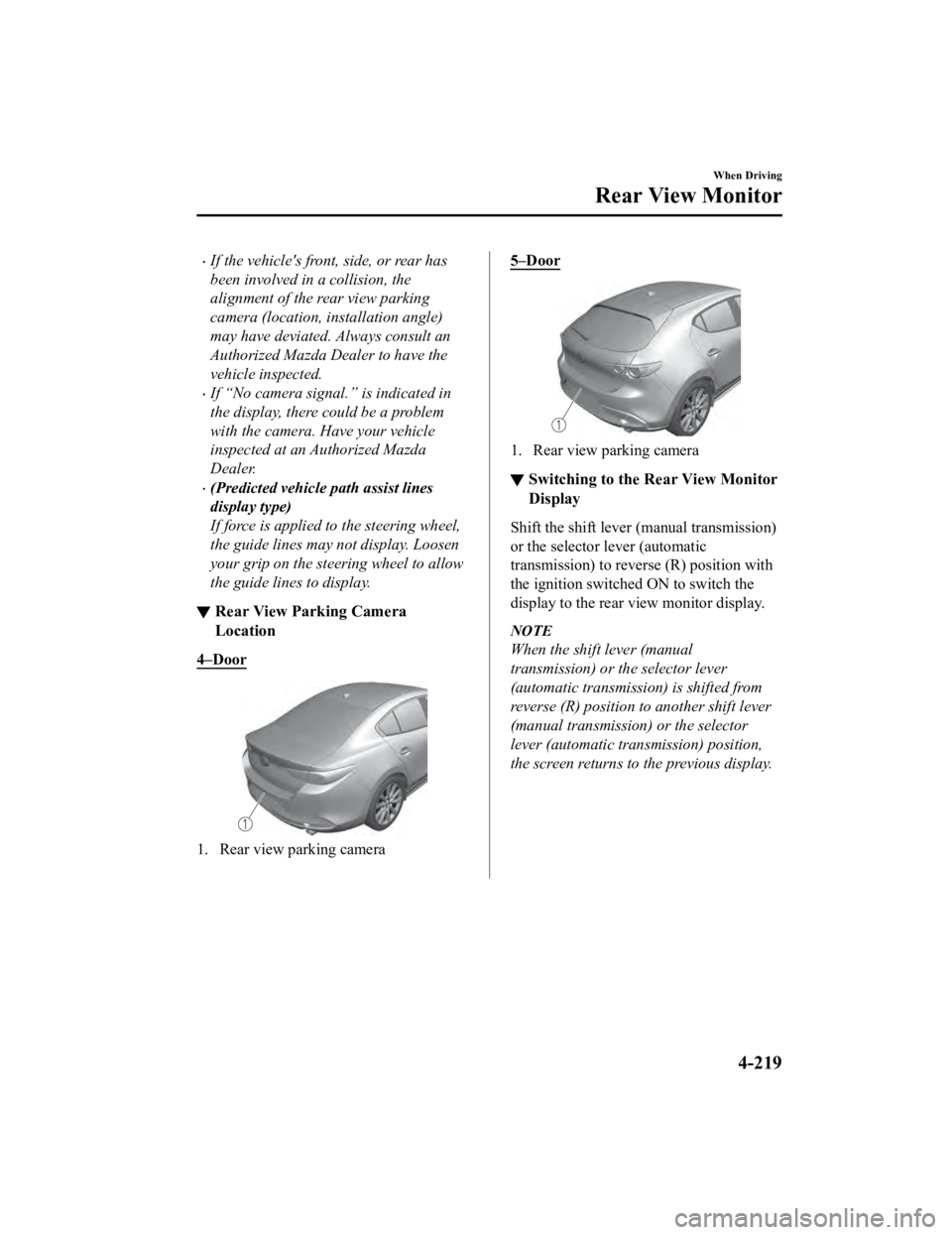
▼ Rear View Parking Camera
Location
4–Door
1. Rear view parking camera
5–Door
1. Rear view parking camera
▼Switching to the R
ear View Monitor
Display
Shift the shift lever (manual transmission)
or the selector lever (automatic
transmission) to reverse (R) position with
the ignition switche d ON to switch the
display to the rear view monitor display.
NOTE
When the shift lever (manual
transmission) or the selector lever
(automatic transmission) is shifted from
reverse (R) position to another shift lever
(manual transmission) or the selector
lever (automatic transmission) position,
the screen returns to the previous display.
When Driving
Rear View Monitor
4-219
Mazda3_8HE9-EA-18K_Edition3 2018-11-21 14:31:58
Page 361 of 592
It may be difficult to see the display under the following conditions, however, it does not
indicate a malfunction.
In darkened areas.
When the temperature around the lens is high/low.
When the camera is wet such as on a rainy day or during periods of high humidity.
When foreign material such as mud is stuck around the camera.
When the camera lens reflects sunlight or headlight beams.
The surroundings are illuminated by vehicle lights, fluorescent lights, or LED lights
(Display may flicker).
Extremely small dark or white dots appear on the screen (dots may flicker).
Image display may be delayed if the temperature around the camera is low.
▼Viewing the Display
Predicted vehicle path a
ssist lines display type
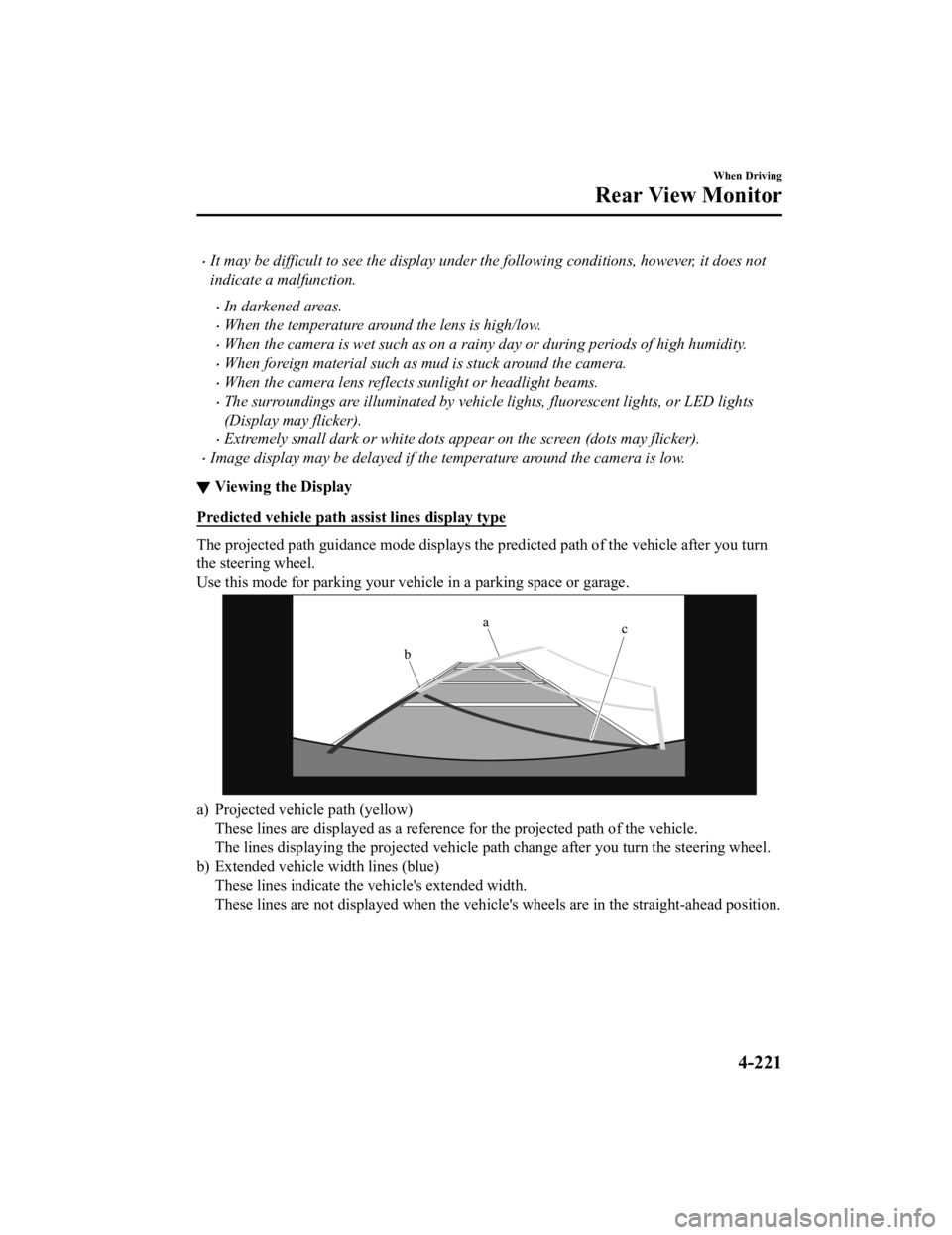
The projected path guidance mode displays the predicted path of the vehicle after you turn
the steering wheel.
Use this mode for parking your v ehicle in a parking space or garage.
a) Projected vehicle path (yellow)
These lines are displayed as a re ference for the projected path of the vehicle.
The lines displaying the projected vehicle path change after yo u turn the steering wheel.
b) Extended vehicle w idth lines (blue)
These lines indicate the vehicle's extended width.
These lines are not displayed when the vehicle's wheels are in the straight-ahead position.
When Driving
Rear View Monitor
4-221
Mazda3_8HE9-EA-18K_Edition3 2018-11-21 14:31:58
Page 362 of 592
c) Distance guide linesThese lines indicate the approximate distance to a point measur ed from the vehicle's rear
(from the end of the bumper).
The blue line indicates the poi nt about 50 cm (19 in) from the rear bumper.
The red and yellow lines, which change position after you turn the steering wheel,
indicate the points about 50 cm (19 in) for the red line and 10 0 cm (39.3 in) for the
yellow lines from the rear bumper (at the center point of each of the lines).
A degree of error occurs when the wheels are not in the straigh t-ahead position.
In the above illustration, the ri ght side of the vehicle is in a position closer to the actual
distance displayed by the distance guide lines (red: about 50 c m (19 in) point, yellow:
about 100 cm (39.3 in) point behind the rear bumper), whereas t he left side is in a
position farther away.
CAUTION
The indicated position of the guide lines on the display changes depending on the vehicle
conditions (such as the number of occupants/ca rgo load) and the road conditions (such as a
steep gradient to the rear of the vehicle).
Always check the area to the vehicle's rear and the surrounding area directly with your eyes
while backing up.
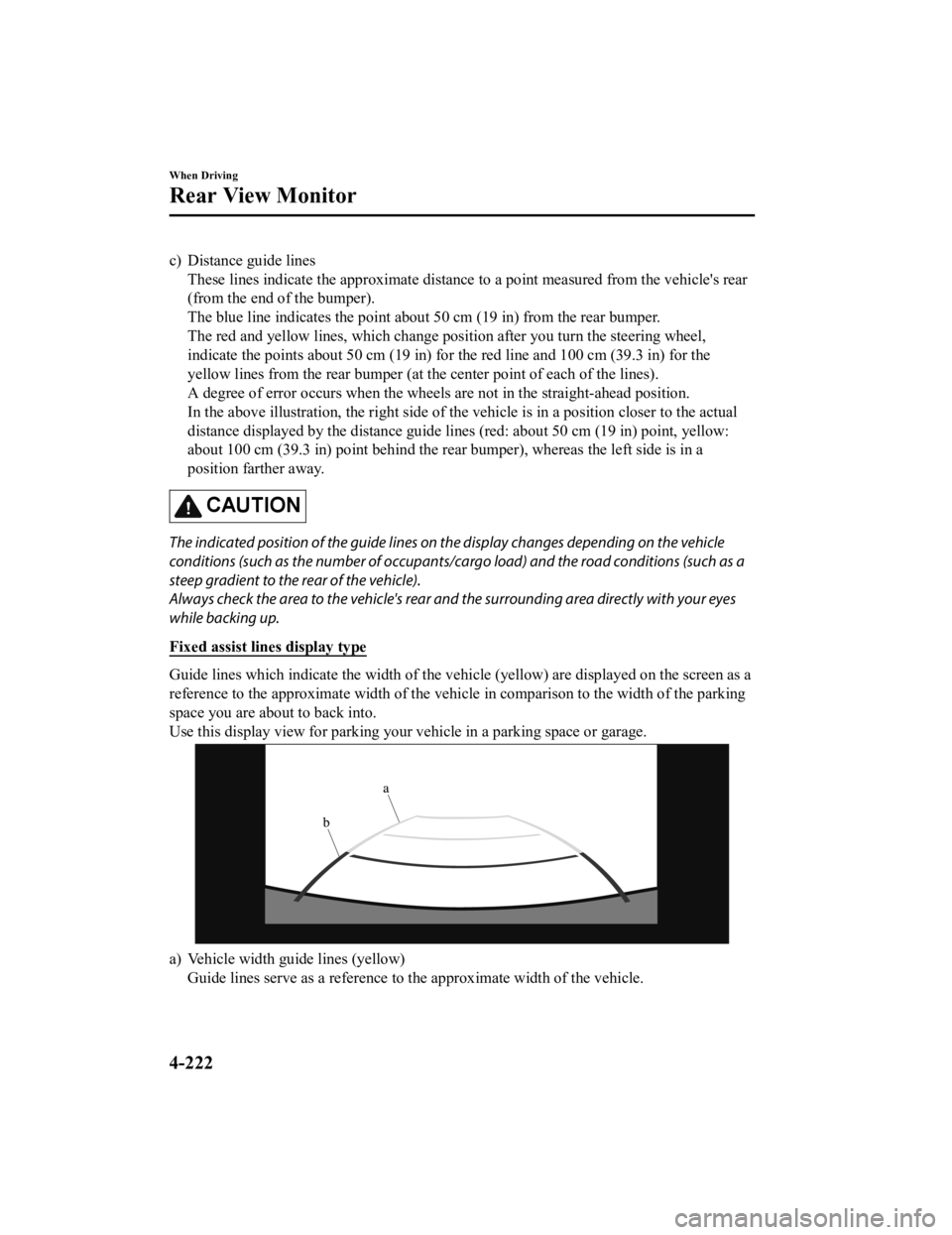
Fixed assist lines display type
Guide lines which indicate the width of the vehicle (yellow) ar e displayed on the screen as a
reference to the approximate width of the vehicle in comparison to the width of the parking
space you are about to back into.
Use this display view for parking your vehicle in a parking spa ce or garage.
a) Vehicle width guide lines (yellow)
Guide lines serve as a reference to the approximate width of th e vehicle.
When Driving
Rear View Monitor
4-222
Mazda3_8HE9-EA-18K_Edition3 2018-11-21 14:31:58
Page 363 of 592
b) Distance guide linesThese guide lines indicate the approximate distance to a point measured from the
vehicle's rear (from the end of the bumper).
The red and yellow lines indicate the points about 50 cm (19 in ) for the red line and 100
cm (39.3 in) for the yellow lines from the rear bumper (at the center point of each of the
lines).
CAUTION
The guide lines on the screen are fixed lines. They are not synced to the driver's turning of the
steering wheel. Always be careful and check the area to the vehicle's rear and the surrounding
area directly with your eyes while backing up.
▼ Rear View Monitor Operation
The operation of the rear view monitor when reversing the vehic
le varies depending on the
traffic, road, and vehicle conditions. The amount of steering a nd the timing also varies
depending on conditions, so conf irm the surrounding conditions directly with your eyes and
steer the vehicle in accordance with the conditions.
Be well aware of the above cautions prior to using the rear vie w monitor.
Predicted vehicle path a ssist lines display type
NOTE
The following shows an example of vehicle parking in which the steering wheel is turned to
the right when backing up the vehicle. The operation is reversed when backing up the
vehicle from the opposite direction.
1. Shift the shift lever (manual t ransmission) or the selector lever (automatic transmission)
to reverse (R) position to switc h the display to the rear view monitor display.
When Driving
Rear View Monitor
4-223
Mazda3_8HE9-EA-18K_Edition3 2018-11-21 14:31:58
Page 364 of 592
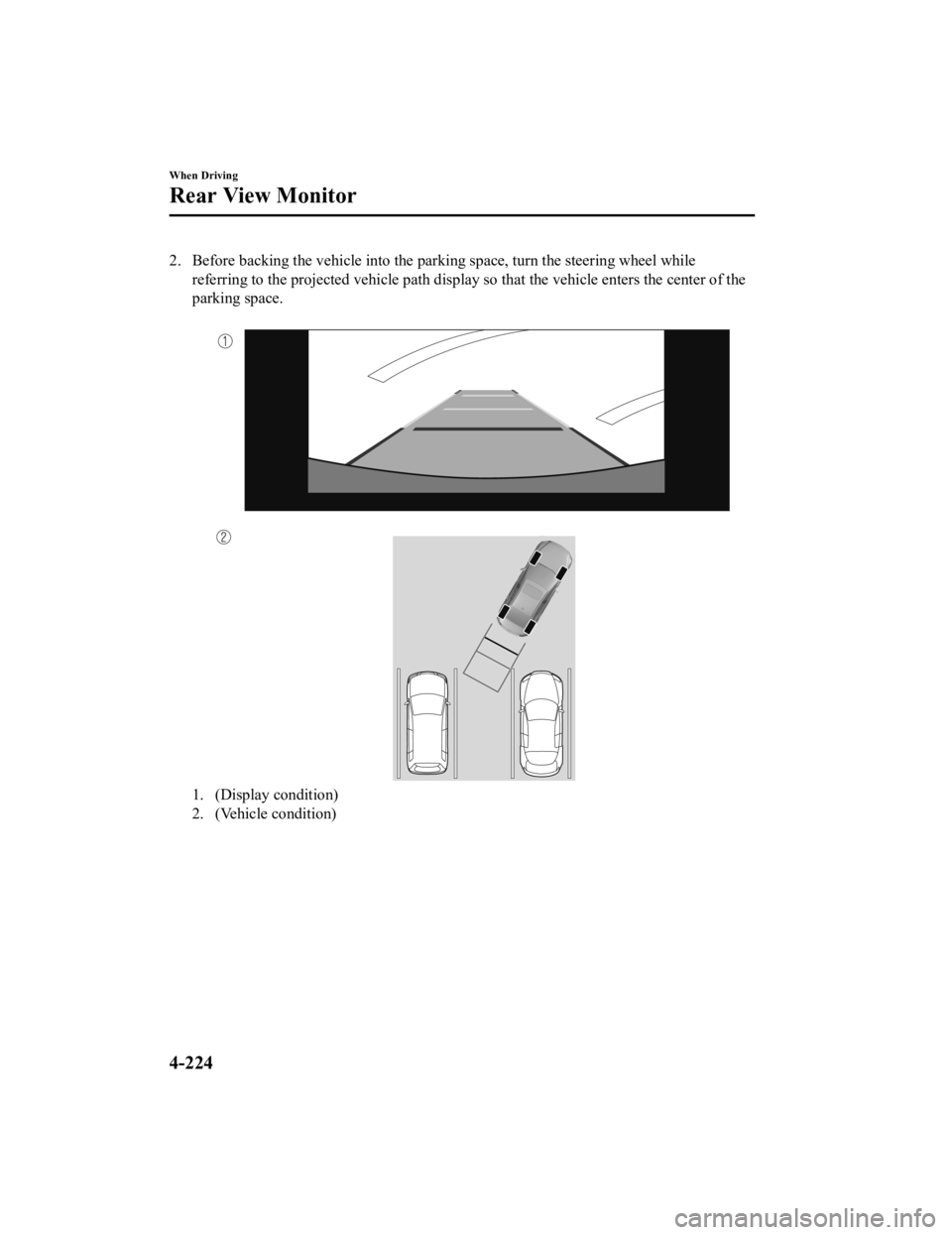
2. Before backing the vehicle into the parking space, turn the steering wheel while
referring to the projected vehicle path display so that the veh icle enters the center of the
parking space.
1. (Display condition)
2. (Vehicle condition)
When Driving
Rear View Monitor
4-224
Mazda3_8HE9-EA-18K_Edition3 2018-11-21 14:31:58
Page 365 of 592
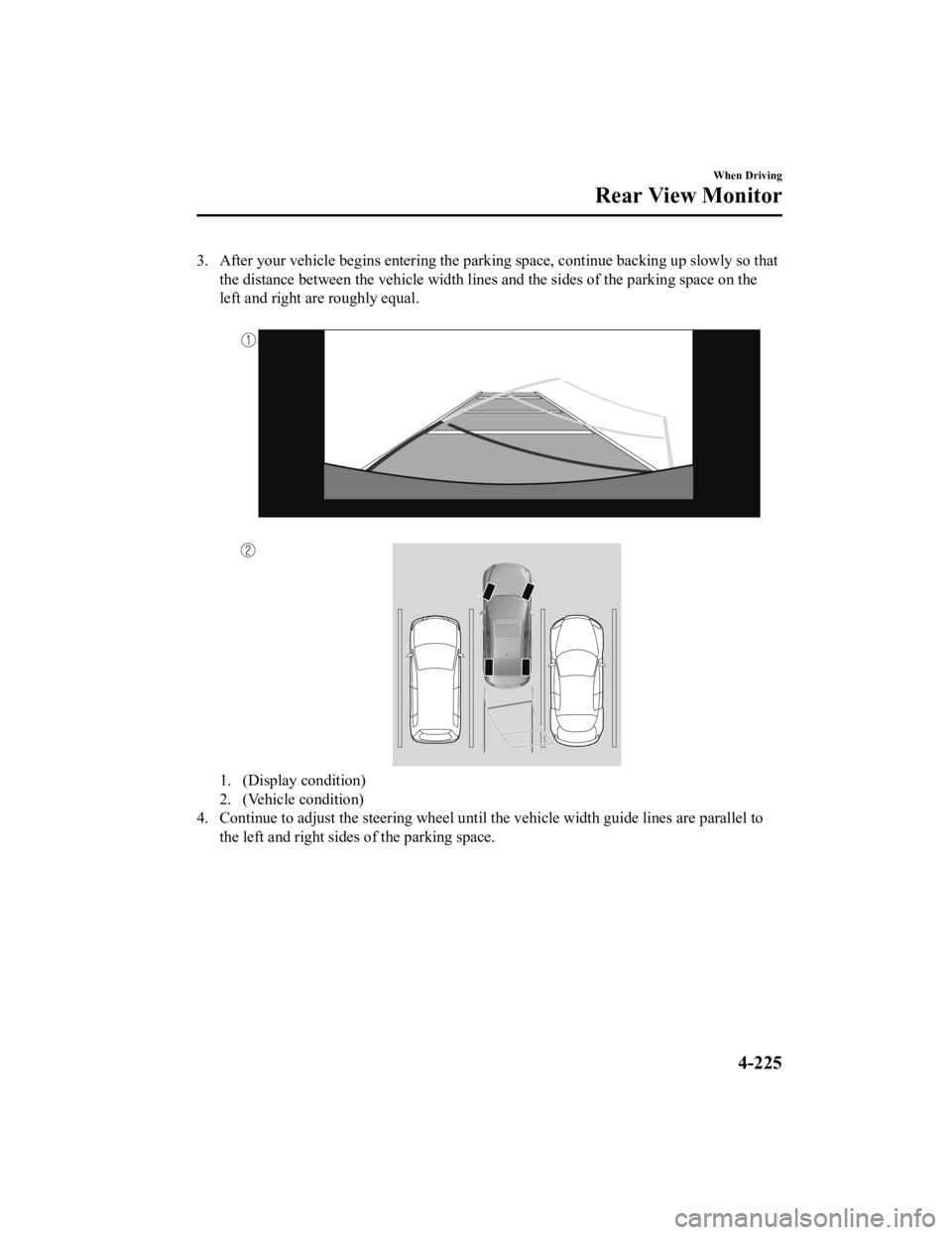
3. After your vehicle begins entering the parking space, continue backing up slowly so that
the distance between the vehicle width lines and the sides of t he parking space on the
left and right are roughly equal.
1. (Display condition)
2. (Vehicle condition)
4. Continue to adjust the steering wheel until the vehicle width guide lines are parallel to
the left and right sides of the parking space.
When Driving
Rear View Monitor
4-225
Mazda3_8HE9-EA-18K_Edition3 2018-11-21 14:31:58
Page 366 of 592
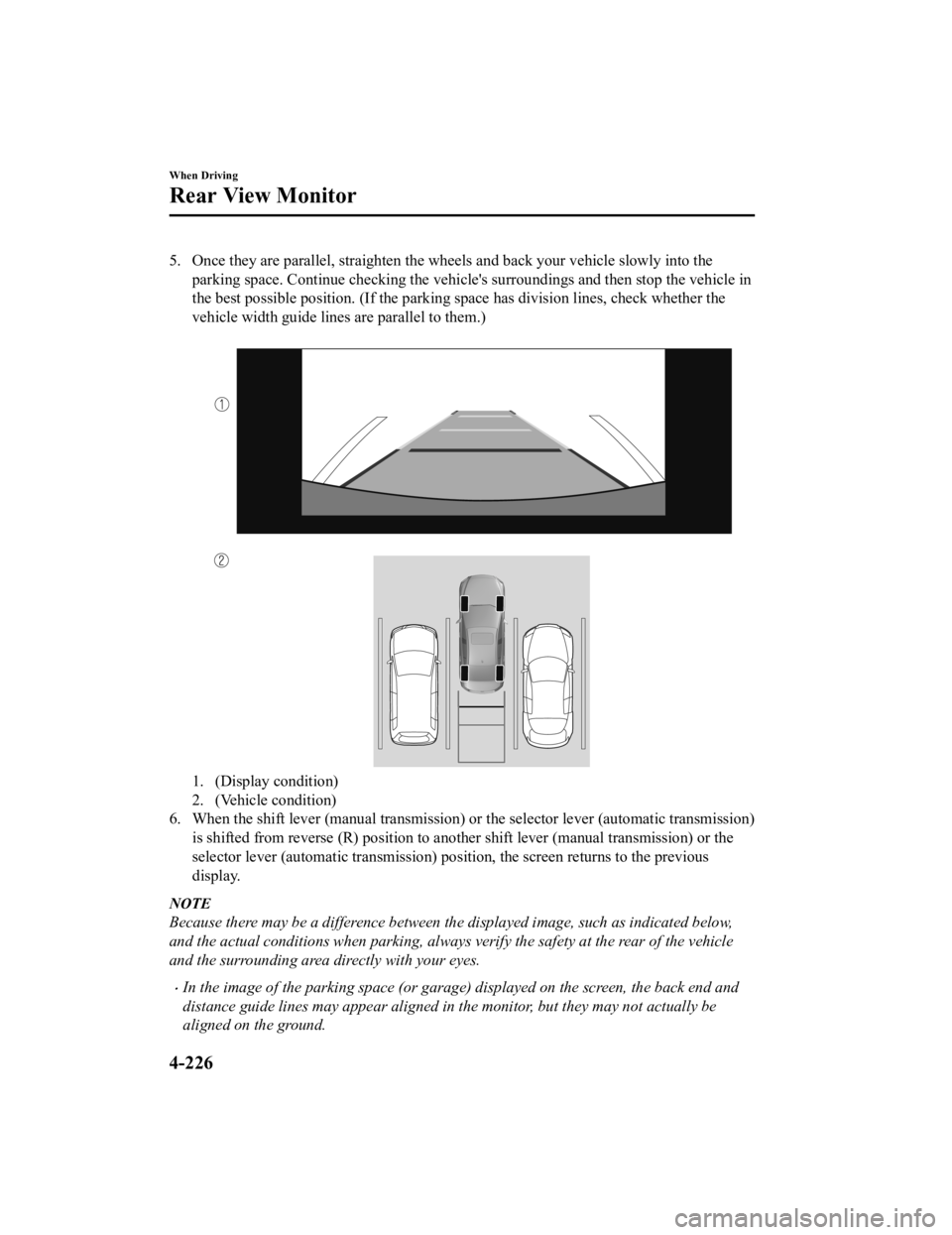
5. Once they are parallel, straighten the wheels and back your vehicle slowly into the
parking space. Continue checking the vehicle's surroundings and then stop the vehicle in
the best possible position. (If the parking space has division lines, check whether the
vehicle width guide lines are parallel to them.)
1. (Display condition)
2. (Vehicle condition)
6. When the shift lever (manual transmission) or the selector lever (automatic transmission)
is shifted from reverse (R) posi tion to another shift lever (manual transmission) or the
selector lever (automatic transm ission) position, the screen returns to the previous
display.
NOTE
Because there may be a difference between the displayed image, such as indicated below,
and the actual conditions when parking, always verify the safety at the rear of the vehicle
and the surrounding area directly with your eyes.
In the image of the parking space (or garage) displayed on the screen, the back end and
distance guide lines may appear aligned in the monitor, but they may not actually be
aligned on the ground.
When Driving
Rear View Monitor
4-226
Mazda3_8HE9-EA-18K_Edition3 2018-11-21 14:31:58