transmission MAZDA MODEL 3 SEDAN 2019 Owners Manual
[x] Cancel search | Manufacturer: MAZDA, Model Year: 2019, Model line: MODEL 3 SEDAN, Model: MAZDA MODEL 3 SEDAN 2019Pages: 592, PDF Size: 75.35 MB
Page 25 of 592
Driver’s seat position (seat slide, height
adjustment, front edge of seat bottom,
seat recline)
Refer to Adjusting the Driver's Seat on
page 2-5.
Active driving display (display position,
brightness level, display information)
Refer to Active Driving Display on page
4-28.
Outside mirror angle
Refer to Outside Mirrors on page 3-29.
CAUTION
Do not place fingers or hands around the
bottom of the seat while the seat memory
function is operatin g. The seat moves
automatically while the seat memory
function is operating and fingers or hands
could get pinched and injured.
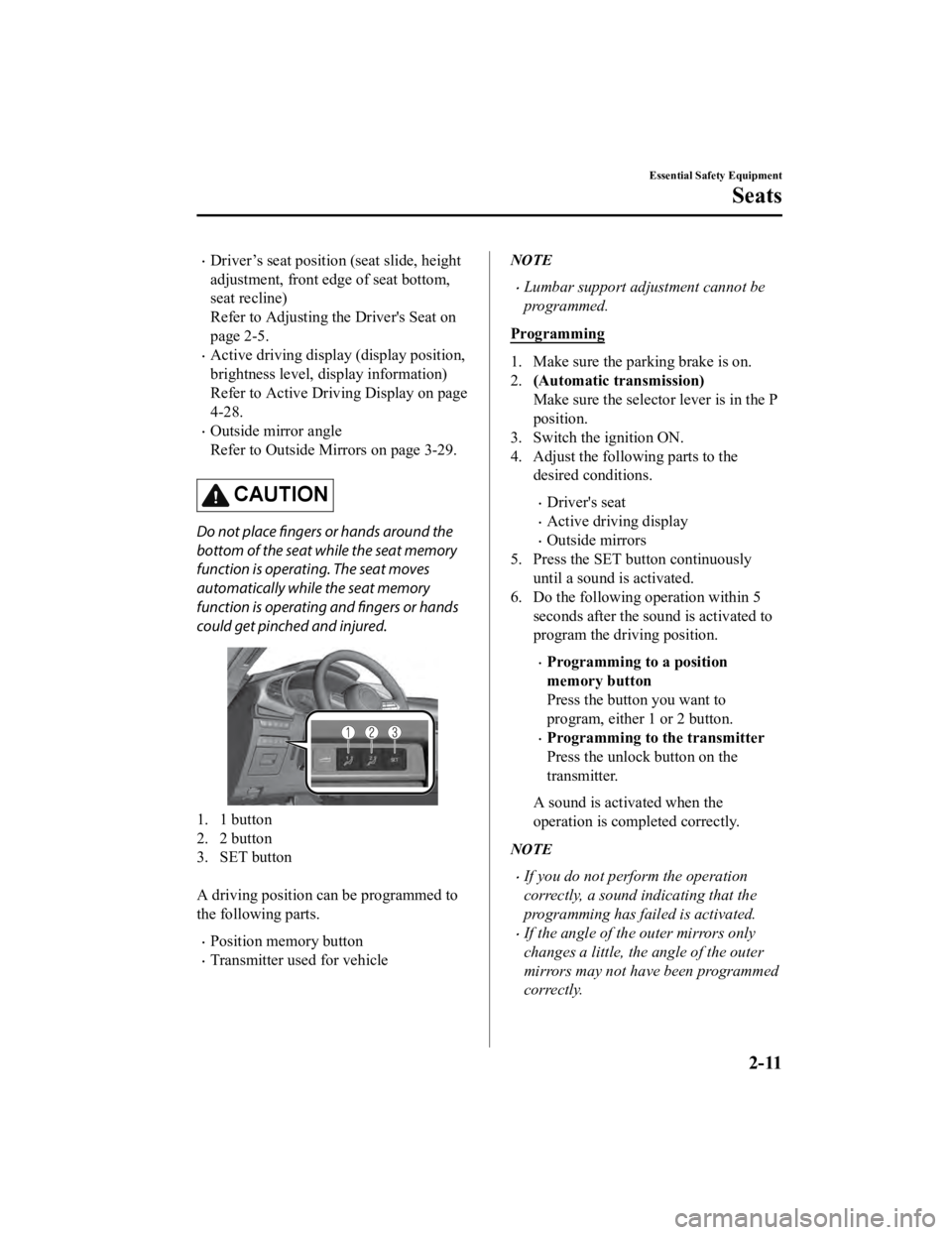
1. 1 button
2. 2 button
3. SET button
A driving position can be programmed to
the following parts.
Position memory button
Transmitter used for vehicle
NOTE
Lumbar support adjustment cannot be
programmed.
Programming
1. Make sure the parking brake is on.
2. (Automatic transmission)
Make sure the selector lever is in the P
position.
3. Switch the ignition ON.
4. Adjust the following parts to the desired conditions.
Driver's seat
Active driving display
Outside mirrors
5. Press the SET button continuously
until a sound is activated.
6. Do the following operation within 5
seconds after the sound is activated to
program the driving position.
Programming to a position
memory button
Press the button you want to
program, either 1 or 2 button.
Programming to the transmitter
Press the unlock button on the
transmitter.
A sound is activated when the
operation is completed correctly.
NOTE
If you do not perform the operation
correctly, a sound indicating that the
programming has failed is activated.
If the angle of the outer mirrors only
changes a little, the angle of the outer
mirrors may not have been programmed
correctly.
Essential Safety Equipment
Seats
2-11
Mazda3_8HE9-EA-18K_Edition3 2018-11-21 14:31:58
Page 26 of 592

If the angle of the outer mirrors is
adjusted close to the limits of its range
of motion, the driving position can be
successfully programmed, but it may fail
when calling up the programmed
driving position.
Calling up the programmed driving
position
Using the positio n memory button
1. Make sure the parking brake is on.
2. (Automatic transmission)
Make sure the selector lever is in the P
position.
3. Switch the ignition ON.
4. Press the programming button for the driving position you want to call up
(button 1 or 2).
5. A sound is activated when the
adjustment to the programmed driving
position is completed.
NOTE
When adjustment of the driving position
is not necessary, a sound is not
activated.
The driving position adjustment is
canceled in the following cases:
The seat adjustment switch on the
driver's seat is operated.
The angle of the outer mirrors is
adjusted.
The SET button is pressed.
Programming button 1 or 2 is pressed.
The lock button or unlock button on
the transmitter is pressed.
The vehicle starts moving.
The active driving display is adjusted.
(Manual transmission)
The parking brake is released.
(Automatic transmission)
The selector lever is shifted to a
position other than P.
Using the transmitter
1. Unlock the driver's door using one of the following methods.
Touch the sensing area of the door
release touch sensor.
Press the unlock button on the
transmitter.
2. When you open the driver's door within 90 seconds after unlocking the
doors, the adjustment of the following
parts starts.
Driver's seat
Active driving display (When the
ignition is switched ON, the adjusted
active driving display is activated.)
Outside mirrors
A sound is activated when the
adjustment is completed.
NOTE
When adjustment of the driving position
is not necessary, a sound is not
activated.
The driving position adjustment is
canceled in the following cases:
The seat adjustment switch on the
driver's seat is operated.
The angle of the outer mirrors is
adjusted.
The SET button is pressed.
Programming button 1 or 2 is pressed.
The lock button or unlock button on
the transmitter is pressed.
The vehicle starts moving.
The active driving display is adjusted.
Essential Safety Equipment
Seats
2-12
Mazda3_8HE9-EA-18K_Edition3 2018-11-21 14:31:58
Page 27 of 592
(Manual transmission)
The parking brake is released.
(Automatic transmission)
The selector lever is shifted to a
position other than P.
Erasing programmed driving positions
Erasing the dr iving positions
programmed to the key
1. Switch the ignition OFF.
2. Press the SET button continuously until a sound is activated.
3. Press the lock button on the transmitter within 5 seconds after the sound is
activated.
NOTE
If you do not perform the operation
correctly, a sound indicating that the
programming has failed is activated.
▼Adjusting the Front Passenger's
Seat
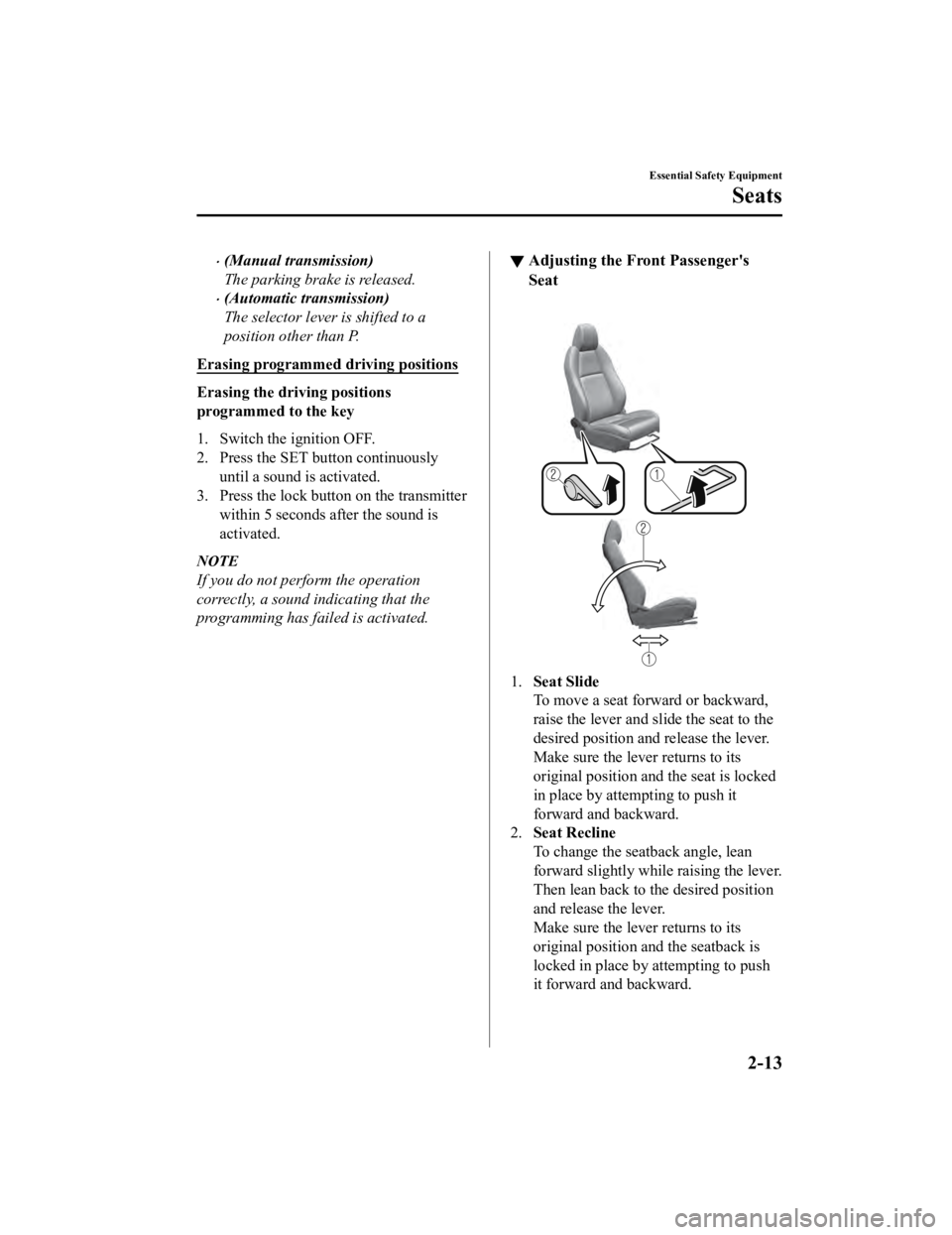
1.
Seat Slide
To move a seat forwa rd or backward,
raise the lever and slide the seat to the
desired position and release the lever.
Make sure the lever returns to its
original position a nd the seat is locked
in place by attempting to push it
forward and backward.
2. Seat Recline
To change the seatback angle, lean
forward slightly while raising the lever.
Then lean back to the desired position
and release the lever.
Make sure the lever returns to its
original position a nd the seatback is
locked in place by attempting to push
it forward and backward.
Essential Safety Equipment
Seats
2-13
Mazda3_8HE9-EA-18K_Edition3 2018-11-21 14:31:58
Page 130 of 592

NOTE
The keys carry a unique electronic code.
For this reason, and to assure your
safety, obtaining a replacement key
requires some waiting time. They are
only available through an Authorized
Mazda Dealer.
Always keep a spare key in case one is
lost. If a key is lost, consult an
Authorized Mazda Dealer as soon as
possible.
If you lose a key, an Authorized Mazda
Dealer will reset the electronic codes of
your remaining keys and immobilizer
system. Bring all the remaining keys to
an Authorized Mazda Dealer to reset.
Starting the vehicle with a key that has
not been reset is not possible.
▼Operation
NOTE
The engine may not start and security
indicator light may illuminate or flash if
the key is placed in an area where it is
difficult for the system to detect the
signal, such as on the dashboard or in
the glove compartment. Move the key to
a location within
the signal range,
switch the ignition off, and then restart
the engine.
Signals from a TV or radio station, or
from a transceiver or mobile telephone
could interfere with your immobilizer
system. If you are using the proper key
and the engine fails to start, check the
security indicator light.
Arming
The system is armed when the ignition is
switched from ON to off.
The security indicator light in the
instrument cluster fla shes every 2 seconds
until the system is disarmed.
Disarming
The system is disarmed when the ignition
is switched ON with the correct
programmed key. The security indicator
light illuminates for about 3 seconds and
then turns off. If the engine does not start
with the correct key, and the security
indicator light remains illuminated or
flashing, try the following:
Make sure the key is within the
operational range for signal transmission.
Switch the ignition off, and then restart the
engine. If the engine d oes not start after 3
or more tries, contact an Authorized
Mazda Dealer.
NOTE
If the security indicator light flashes
continuously while you are driving, do
not shut off the engine. Go to an
Authorized Mazda Dealer and have it
checked. If the engine is shut off while
the indicator light is flashing, you will
not be able to restart it.
Because the electronic codes are reset
when the immobilizer system is repaired,
the keys are needed. Make sure to bring
all the keys to an Authorized Mazda
Dealer so that they can be programmed.
Before Driving
Security System
3-40
Mazda3_8HE9-EA-18K_Edition3 2018-11-21 14:31:58
Page 135 of 592
Floor Mat
▼Floor Mat
We recommend the use of Genuine
Mazda floor mats.
WA R N I N G
Make sure the
floor mats are hooked on the
retention pins to prevent them from
bunching up under the foot pedals:
Using a floor mat that is not secured is
dangerous as it will interfere with the
accelerator and brake pedal operation,
which could result in an accident.
Do not install two floor mats, one on top of
the other, on the driver's side:
Installing two floor mats, one on top of the
other, on the driver's side is dangerous as
the retention pins can only keep one floor
mat from sliding forward.
Loose floor mat(s) will interfere with the
foot pedals and could result in an accident.
If using an all-weather mat for winter use
always remove the original floor mat.
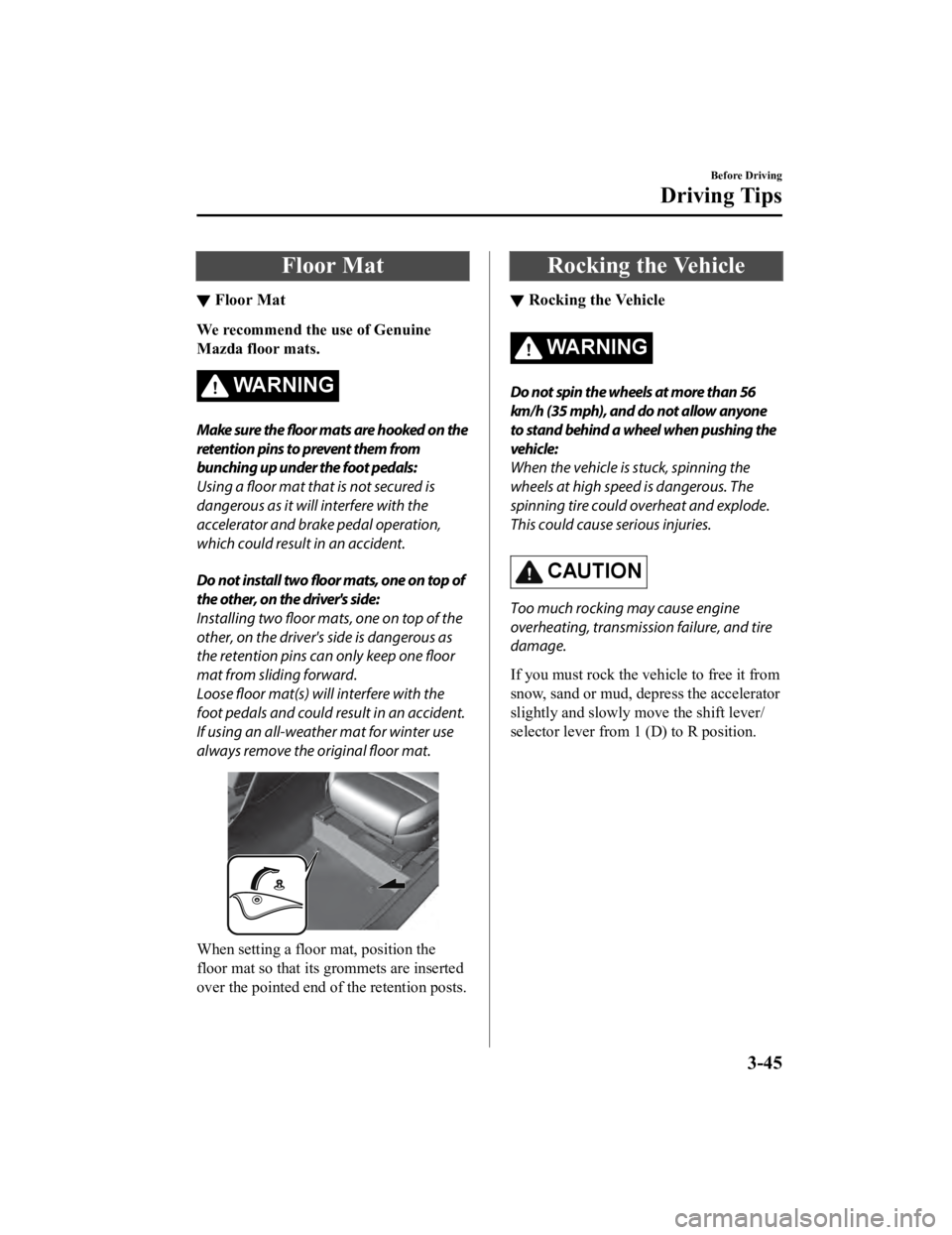
When setting a floor mat, position the
floor mat so that its g rommets are inserted
over the pointed end of the retention posts.
Rocking the Vehicle
▼ Rocking the Vehicle
WA R N I N G
Do not spin the wheels at more than 56
km/h (35 mph), and do not allow anyone
to stand behind a wheel when pushing the
vehicle:
When the vehicle is stuck, spinning the
wheels at high speed is dangerous. The
spinning tire could
overheat and explode.
This could cause serious injuries.
CAUTION
Too much rocking may cause engine
overheating, transmission failure, and tire
damage.
If you must rock the vehicle to free it from
snow, sand or mud, depress the accelerator
slightly and slowly move the shift lever/
selector lever from 1 (D) to R position.
Before Driving
Driving Tips
3-45
Mazda3_8HE9-EA-18K_Edition3 2018-11-21 14:31:58
Page 140 of 592
Trailer Towing
▼Trailer Towing
Your Mazda is not designed for towing.
Never tow a trailer with your Mazda.
Recreational Towing
▼ Recreational Towing
An example of "recreational towing" is
towing your vehicle behind a motorhome.
The transmission is not designed for
towing this vehicle on all 4 wheels.
When doing recreational towing refer to
"Towing Description" (page 7-22) and
"Tiedown Hooks" (page 7-23) and
carefully follow the instructions.
Before Driving
To w i n g
3-50
Mazda3_8HE9-EA-18K_Edition3
2018-11-21 14:31:58
Page 141 of 592

4When Driving
Information concerning safe driving and stopping.
Start/Stop Engine.............................. 4-4 Ignition Switch........ ..................... 4-4
Starting the Engine....................... 4-5
Turning the Engine Off...............4-10
Cylinder Deactivation
*............... 4-11
Instrument Cluster and Display ............
........................................................... 4-12 Instrument Cluster and
Display........................................4-12
Instrument Cluster...................... 4-12
Active Driving Display
*............. 4-28
Manual Transmission
Operation......................................... 4-30 Manual Transmission Shift
Pattern......................................... 4-30
Automatic Transmission................. 4-32 Automatic Transmission
Controls...................................... 4-32
Shift-Lock System...................... 4-33
Transmission Ranges.................. 4-34
Manual Shift Mode..................... 4-35
Direct Mode
*.............................. 4-41
Driving Tips................................4-42
Switches and Controls..................... 4-43 Lighting Control......................... 4-43
Turn and Lane-Change
Signals........................................ 4-49
Windshield Wipers and
Washer........................................ 4-50
Rear Window Wiper and Washer
*.....
.................................................... 4-54
Rear Window Defogg er.............. 4-55
Horn............................................ 4-56
Hazard Warning Flasher............. 4-57
HomeLink Wireless Control
System
*.......................................4-57
Brake................................................ 4-62 Brake System.............................. 4-62
AUTOHOLD.............................. 4-68
Hill Launch Assist (HLA).......... 4-72
ABS/TCS/DSC................................. 4-74 Antilock Brake System
(ABS)..........................................4-74
Traction Control System
(TCS).......................................... 4-75
Dynamic Stability Control
(DSC)..........................................4-76
Drive Selection................................. 4-78 Drive Selection
*..........................4-78
i-ACTIV AWD................................. 4-80 i-ACTIV AWD Operation
*.........4-80
*Some models.4-1
Mazda3_8HE9-EA-18K_Edition3 2018-11-21 14:31:58
Page 142 of 592

Power Steering................................. 4-81Power Steering............................4-81
i-ACTIVSENSE............................... 4-82 i-ACTIVSENSE
*........................4-82
Adaptive Front Lighting System
(AFS)
*........................................ 4-87
High Beam Control System
(HBC)
*........................................4-88
Lane Departure Warning System
(LDWS)
*.................................... 4-90
Blind Spot Monitoring (BSM)
*.........
.................................................... 4-93
Traffic Sign Recognition System
(TSR)
*........................................ 4-98
Distance & Speed Alert (DSA)
*........
.................................................. 4-104
Driver Attenti on Alert (DAA)
*..........
.................................................. 4-105
Driver Monitoring (DM)
*.........4-107
Front Cross Traffic Alert
(FCTA)
*.................................... 4-109
Rear Cross Traffic Alert (RCTA)
*.....
.................................................. 4-112
Mazda Radar Cruise Control
(MRCC) (Manual Transmission)
*.....
.................................................. 4-116
Mazda Radar Cruise Control with
Stop & Go function (MRCC with
Stop & Go function) (Automatic
Transmission)
*.......................... 4-124
Traffic Jam Assist (TJA)
*.........4-135
Lane-keep Assist System (LAS)*......
.................................................. 4-150
Smart Brake Support (SBS)
*.... 4-153
Smart Brake Support [Rear] (SBS-
R)
*............................................ 4-156
Smart Brake Support [Rear
Crossing] (SBS-RC)
*............... 4-160
360° View Monitor
*................. 4-164
Forward Sensing Camera (FSC)
*......
.................................................. 4-198
Front Radar Sensor
*................. 4-202
Front Side Radar Sensor
*......... 4-204
Rear Side Radar Sensor
*.......... 4-206
Rear/Rear corner/Rear Side
Ultrasonic Sensor
*....................4-207
Front Camera/Side Cameras/Rear
Camera
*.................................... 4-208
Driver Monitoring Camera
*..... 4-209
Cruise Control............................... 4-210 Cruise Control
*.........................4-210
Tire Pressure Monitoring System
(TPMS)........................................... 4-214 Tire Pressure Monitoring System
(TPMS)..................................... 4-214
Rear View Monitor....................... 4-218 Rear View Monitor
*................. 4-218
Parking Sensor System................. 4-233 Parking Sensor System
*........... 4-233
4-2*Some models.
Mazda3_8HE9-EA-18K_Edition3 2018-11-21 14:31:58
Page 144 of 592

Ignition Switch
▼Push Button Start Positions
The system operates only when the key is
within operational range.
Each time the push button start is pressed,
the ignition switches
in the order of off,
ACC, and ON. Pressing the push button
start again from ON switches the ignition
off.
1. Indicator light
2. Push button start
NOTE
The engine starts by pressing the push
button start while depressing the clutch
pedal (manual transmission) or the
brake pedal (automatic transmission).
To switch the ignition position, press the
push button start without depressing the
pedal.
Do not leave the ignition switched ON
while the engine is not running. Doing
so could result in the battery going
dead. If the ignition is left in ACC (For
automatic transmission, the selector
lever is in the P position, and the
ignition is in ACC), the ignition switches
off automatically af ter about 25 minutes.
Off
The power supply to electrical devices
turns off and the indicator light (amber)
also turns off.
WA R N I N G
Before leaving the driver's seat, always
switch the ignition off, set the parking
brake, and make sure the selector lever is in
P (automatic transmission) position or in
1st gear or R (manual transmission):
Leaving the driver's seat without switching
the ignition off, setting the parking brake,
and shifting the selector lever to P
(automatic transmission) position or to 1st
gear or R (manual transmission) is
dangerous. Unexpected vehicle movement
could occur which could result in an
accident.
In addition, if your intention is to leave the
vehicle for even a short period, it is
important to switch the ignition off, as
leaving it in another position will disable
some of the vehicle's security systems and
run the battery down.
ACC (Accessory)
Some electrical accessories will operate
and the indicator light (amber) illuminates.
NOTE
The keyless entry system does not function
while the push button start has been
pressed to ACC, and the doors will not
lock/unlock even if they have been locked
manually.
When Driving
Start/Stop Engine
4-4
Mazda3_8HE9-EA-18K_Edition3 2018-11-21 14:31:58
Page 146 of 592

After starting a cold engine, the engine
speed increases and a whining sound
from the engine compartment can be
heard.
This is for improved exhaust gas
purification and does not indicate any
parts defect.
Engine-starting is controlled by the
spark ignition system.
This system meets all Canadian
Interference-Causing Equipment
Standard requirements regulating the
impulse electrical field strength of radio
noise.
1. Make sure you are carrying the key.
2. Occupants should fasten their seat belts.
3. Make sure the parking brake is on.
4. Continue to depress the brake pedal firmly until the engine has completely
started.
5. (Manual transmission)
Continue to depress the clutch pedal
firmly until the engine has completely
started.
(Automatic transmission)
Put the vehicle in park (P). If you must
restart the engine while the vehicle is
moving, shift into neutral (N).
NOTE
(Manual transmission)
The starter will not operate if the
clutch pedal is not depressed
sufficiently.
(Automatic transmission)
The starter will not operate if the
selector lever is not in P or N
position and the brake pedal is not
depressed sufficiently.
6. Make sure that the push button start
indicator light (green) turns on.
1. Indicator light
2. Push button start
NOTE
If the push button start indicator
light (green) flashes, make sure that
the key is being carried.
If the push button start indicator
light (green) flashes with the key
being carried, touch the key to the
push button start and start the
engine.
Refer to Engine Start Function When
Key Battery is Dead on page 4-8.
CAUTION
If the KEY warning indication (red) is
displayed, or the push button start
indicator light (amber) flashes, this
could indicate a problem with the
engine starting system. This may
prevent the engine from starting or
from switching the ignition to ACC or
ON (page 7-32). Have your vehicle
inspected at an Authorized Mazda
Dealer as soon as possible.
When Driving
Start/Stop Engine
4-6
Mazda3_8HE9-EA-18K_Edition3 2018-11-21 14:31:58