ad blue MAZDA MODEL 3-SEDAN 2020 User Guide
[x] Cancel search | Manufacturer: MAZDA, Model Year: 2020, Model line: MODEL 3-SEDAN, Model: MAZDA MODEL 3-SEDAN 2020Pages: 598, PDF Size: 77.31 MB
Page 406 of 598
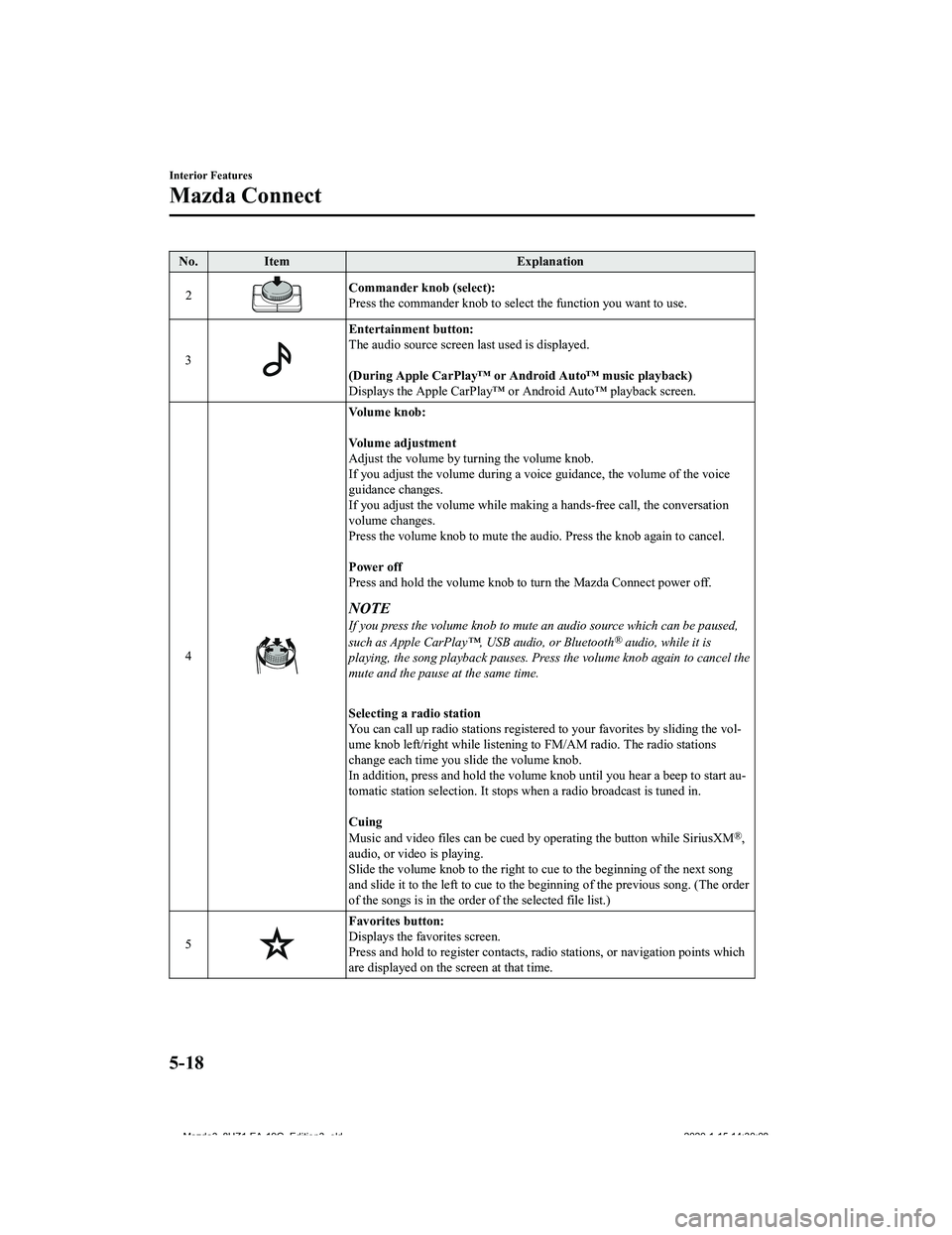
No.Item Explanation
2
Commander knob (select):
Press the commander knob to select the function you want to use .
3
Entertainment button:
The audio source screen last used is displayed.
(During Apple CarPlay™ or Android Auto™ music playback)
Displays the Apple CarPlay™ or Android Auto™ playback screen.
4
Vo l u m e k n o b :
Vo l u m e a d j u s t m e n t
Adjust the volume by turning the volume knob.
If you adjust the volume during a voice guidance, the volume of the voice
guidance changes.
If you adjust the volume while making a hands-free call, the co nversation
volume changes.
Press the volume knob to mute t he audio. Press the knob again to cancel.
Power off
Press and hold the volume knob to turn the Mazda Connect power off.
NOTE
If you press the volume knob to mute an audio source which can be paused,
such as Apple CarPlay™, USB audio, or Bluetooth® audio, while it is
playing, the song playback pauses. Press the volume knob again to cancel the
mute and the pause at the same time.
Selecting a radio station
You can call up radio stations r egistered to your favorites by sliding the vol‐
ume knob left/right while listeni ng to FM/AM radio. The radio s tations
change each time you s lide the volume knob.
In addition, press and hold the volume knob until you hear a beep to start au‐
tomatic station selection. It st ops when a radio broadcast is t uned in.
Cuing
Music and video files can be cued by operating the button while SiriusXM
®,
audio, or video is playing.
Slide the volume knob to the righ t to cue to the beginning of the next song
and slide it to the left to cue to the beginning of the previou s song. (The order
of the songs is in the order of the selected file list.)
5
Favorites button:
Displays the favorites screen.
Press and hold to register contacts, radio stations, or navigat ion points which
are displayed on the screen at that time.
Interior Features
Mazda Connect
5-18
Mazda3_8HZ1-EA-19G_Edition3_old 2020-1-15 14:30:08
Page 409 of 598

No.Item Explanation
6
Mute button:
Press the button to mute.
Press it again to cancel the mute.
NOTE
If you press the mute button to mute an audio source which can be paused,
such as Apple CarPlay™, USB audio, or Bluetooth® audio, while it is
playing, the song playback pauses. Press the mute button again to cancel the
mute and the pause at the same time.
*1 You can also use the voice recognition for the talk/pick-up bu tton, and hang-up button.
For details, refer to Operation Using Voice Recognition Functio n (page 5-21).
▼Operation Using Voice Recognition Function
The shape of the switches may differ depending on the vehicle m
odel.
No.Item Explanation
1
Talk/Pick-up button :
When the button is pressed, th e voice recognition top screen is displayed and
the voice recognition is activated.
(While voice guidance is being announced)
Press the button to skip the voice guidance.
2
Hang-up button:
Press the button to end the voice recognition.
Voice recognition activation
When the talk/pick-up button on the audio remote control switch is pressed, top screen of
the voice recognition will be displayed.
Interior Features
Mazda Connect
5-21
Mazda3_8HZ1-EA-19G_Edition3_old 2020-1-15 14:30:08
Page 411 of 598

To prevent misunderstood voice commands, be aware of the following points:
Connect your mobile phone to Bluetooth® before operating the mobile phone using voice
recognition.
After pressing the talk/pick-up button, wait for the beep befor e speaking a command.
Speaking in a slightly louder voice will improve voice recognit ion, but an excessively
loud voice is unnecessary. Try t o speak in a slightly louder voice than when talking to
other passengers in the vehicle.
You do not need to speak slowly. Speak at a normal speed.
When calling a person in the device's phone book, the recognition rate increases the
longer the name is. Errors may occur with names that are short such as “Mama”, “Home”,
or “wife”.
Speak clearly, without pausing between words or numbers.
Voice commands other than those specified, cannot be recognized . Speak in the wording
specified by the voice commands.
It is not necessary to face the microphone or approach it. Spea k the voice commands
while maintaining a safe driving position.
Close the windows and the moonro of to reduce loud noises from outside the vehicle and
to prevent the airflow of the a ir-conditioning system from bein g a disturbance when using
Bluetooth
® Hands-Free.
Make sure that the air flow from the air conditioner is not blowing on the microphone.
If the voice recognition is poor with the guidance volume set t o high, set the Barge-In to
OFF.
Examples of available voice commands
The specified name and number are put into the {}.
Common
Back
Help (You can listen to help guidance at each screen.)
{Line Number} (You can select the line number on the screen.)
Next Page
Previous Page
Cancel
Menu
All
Navigation
Entertainment
Interior Features
Mazda Connect
5-23
Mazda3_8HZ1-EA-19G_Edition3_old 2020-1-15 14:30:08
Page 412 of 598

Communication
Owner's Manual (the In-vehicle Digital Owner's Manual voice rec ognition can be
displayed.)
Setting
Voice Recognition Settings
Owner's Manual (the In-vehicle Digital Owner's Manual voice rec ognition can be
displayed.)
Display Off
Music
Play Artist (You can also use “Play Artist {Artist name}”.)
Play Album (You can also use “Play Album {Album Name}”.)
Play Playlist (You can also use “ Play Playlist {Playlist Name}”.)
Play Song (You can also use “Play Song {Song Name}”.)
Play Audiobook (You can also use “Play Audiobook {Audiobook Nam e}”.)
Play Podcast (You can also use “Play Podcast {Podcast Name}”.)
Radio
Tune to {Frequency} AM
Tune to {Frequency} FM
Tune to {Frequency} HD {Sub Channel}
SiriusXM Channel {Channel Number}
SiriusXM {Station Name}
SiriusXM Genre (You can also us e “SiriusXM {Genre Name}”.)
Source
Change Source (You can also use “Change Source to USB”*1 and “USB”*1.)
Audio OFF (You can also use “Change Source to Audio OFF”.)
Phone
Dial Phone Number (You can also use “Dial {Phone Number}”.)
Call History
Call a Contact (You can also use “Call {Contact Name}” and “Cal l {Contact Name} at
{Number Type}”.)
Redial
*1 : Audio source names other than “USB” can also be used as foll ows:
Bluetooth/AM/FM/Sirius XM/Pandora/USB1 Audio/USB2 Audio/USB1 Vid eo/USB2
Vi d e o
Interior Features
Mazda Connect
5-24
Mazda3_8HZ1-EA-19G_Edition3_old 2020-1-15 14:30:08
Page 413 of 598

NOTE
Some commands may not be usable depending on the region and equipment.
Some commands cannot be used depending on the device connection conditions and the
use conditions.
▼Appendix
Gracenote® Database
When audio CDs are played, the unit searches the database store
d in the vehicle for the
album name, artist name, genre, title, and album art, and if th ere is a match in the vehicle's
database compilation to the music being played, each type of mu sic information is
automatically added (Album art only for MP3/WMA/AAC CDs and whe n playing USB
audio and Bluetooth
® audio). The database information stored in this device uses database
information in the Gracenote
® music recognitions service.
SiriusXM Travel Link
®*
CAUTION
ADVISORY ONLY
The weather information is subject to service interruptions and may contain errors or
inaccuracies and consequently sh ould not be relied upon exclusively. You are urged to check
alternate weather information sources prior to making safety related decisions. You
acknowledge and agree that you sh all be solely responsible for use of the information and all
decisions taken with respect thereto. By using this weather service, you release and waive any
claims against Sirius XM Radio Inc. and Mazd a Motor Corporation and all of their respective
affiliates with regard to this service.
SiriusXM
® Satellite Radio*
Products/applications shall display “Call [Appropriate Phone Nu mber] to Enable Services”
for any unsubscribed SiriusXM Data Service(s).
This shall be shown on the same screen as the Radio ID and the service subscription status:
Contact your SiriusXM Representative for the appropriate call c enter phone number.
U.S.A.: 1-877-447-0011
Canada: 1-877-438-9677
Interior Features
Mazda Connect
*Some models.5-25
Mazda3_8HZ1-EA-19G_Edition3_old 2020-1-15 14:30:08
Page 419 of 598

iPod nano (7th generation)
Google, Android, Android Auto and other related marks are trademarks of Google LLC.
AudioPilot is a registered trademark of Bose Corporation.
Centerpoint is a registered trademark of Bose Corporation.
Windows Media and Microsoft are registered trademarks of Micros oft Corporation U.S.
in the United States and other countries.
This product is protected by certain intellectual property righ ts of Microsoft Corporation
and third parties.
Use or distribution of such tech nology outside of this product is prohibited without a
license from Microsoft or an aut horized Microsoft subsidiary and third parties.
The Bluetooth® word mark and logos are registe red trademarks owned by Bluetoo th SIG,
Inc. and any use of such marks by Panasonic Corporation is unde r license. Other
trademarks and trade names are those of their respective owners .
SDHC Logo is a trademark of SD-3C, LLC.
Gracenote, the Gracenote logo and logotype are either a registered trademark or a
trademark of Gracenote, Inc. in the United States and/or other countries.
Interior Features
Mazda Connect
5-31
Mazda3_8HZ1-EA-19G_Edition3_old 2020-1-15 14:30:08
Page 421 of 598

Connected Service (U.S.A only)
▼Connected Service Overview
There are several types of connected services available via Maz
da Connect. Some services
may require you to download the MyMazda app to your smartphone and subscribe to the
services, while others may require you to pair your smartphone to the vehicle via
Bluetooth
®. In addition, on a regular basis and unless you opt-out, your vehicle will
automatically transmit certain geo-location, driving behavior data, and vehicle health
information to Mazda for product quality, data analysis, resear ch, and product development.
Using the QR codes or URLs below, refer to the Connected Servic e Owner's Manual and
Privacy Policy for more details and opt-out options.
Connected Service Owner's Manual
https://www.mazdausa.com/static/manuals/mazda-connected-service /index.html
Privacy
Mazda maintains a Privacy Statement which describes how we collect, use, share, store and
secure data from your vehicle equipped with connected services.
We provide you with connected services by collecting and using your personal information
and vehicle location, health and driving data.
To learn more about our Privacy Statement, please visit: https: //www.mazdausa.com/site/
privacy-connectedservices
Interior Features
Mazda Connect
5-33
Mazda3_8HZ1-EA-19G_Edition3_old 2020-1-15 14:30:08