display MAZDA MODEL 3 SEDAN 2022 Owners Manual
[x] Cancel search | Manufacturer: MAZDA, Model Year: 2022, Model line: MODEL 3 SEDAN, Model: MAZDA MODEL 3 SEDAN 2022Pages: 627, PDF Size: 92.03 MB
Page 350 of 627

3. Once the vehicle width lines and the sides of the parking space on the left andright are parallel, straighten the wheels and back the vehicle slowly into the
parking space. Continue checking the vehicle's surroundings and then stop the
vehicle in the best possible position. (I f the parking space has division lines,
check whether the vehicle width guide lines are parallel to them.)
1. (Screen display)
2. (Actual condition)
When Driving
i-ACTIVSENSE
4-203
Mazda3_8KH1-EA-21K_Edition1_new 2021-7-27 16:02:22
Page 351 of 627
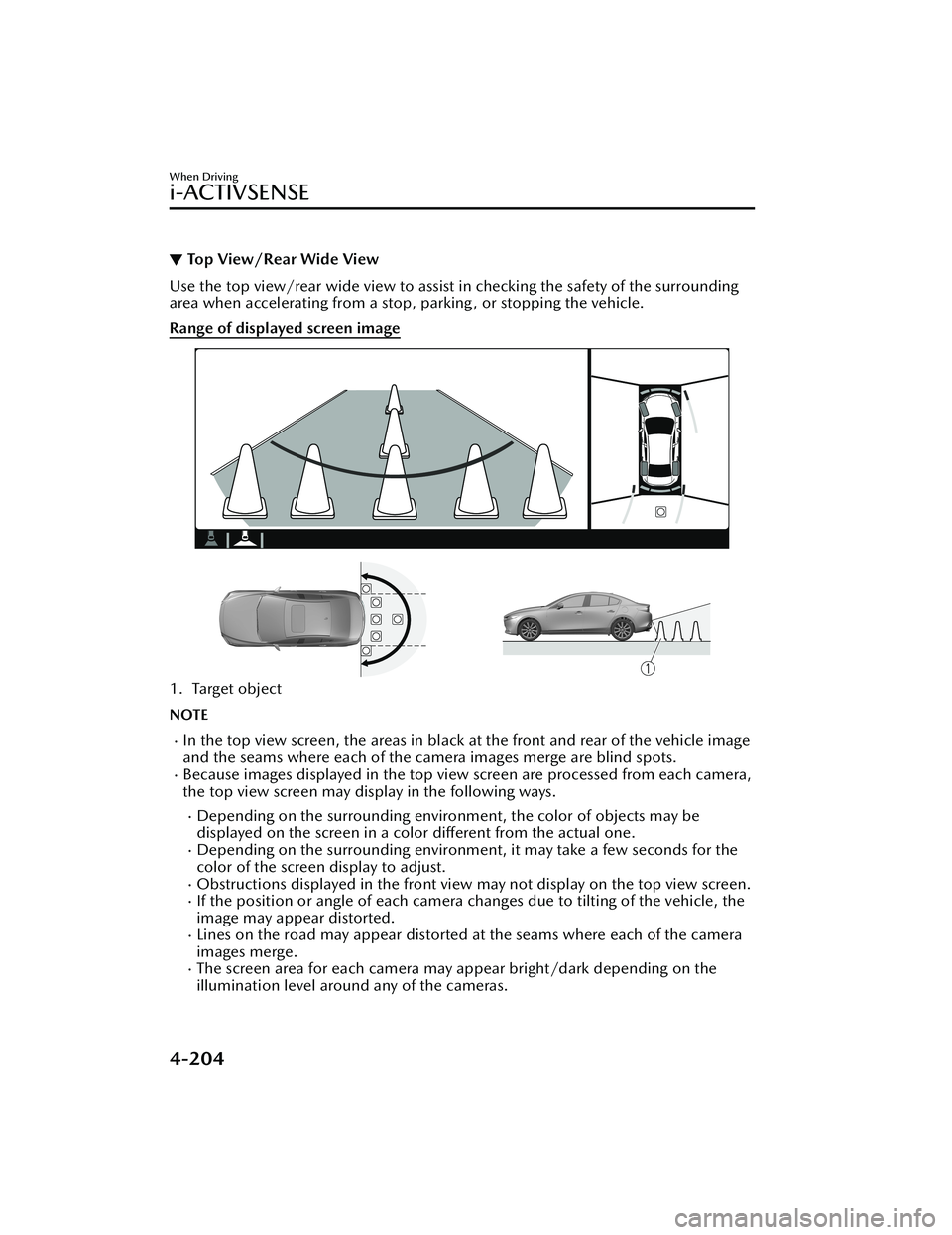
▼To p V i e w/ R e a r Wi d e Vi e w
Use the top view/rear wide view to assist
in checking the safety of the surrounding
area when accelerating from a stop, parking, or stopping the vehicle.
Range of displayed screen image
1. Target object
NOTE
In the top view screen, the areas in black at the front and rear of the vehicle image
and the seams where each of the camera images merge are blind spots.
Because images displayed in the top view screen are processed from each camera,
the top view screen may display in the following ways.
Depending on the surrounding enviro nment, the color of objects may be
displayed on the screen in a color different from the actual one.
Depending on the surrounding environment, it may take a few seconds for the
color of the screen display to adjust.
Obstructions displayed in the front view may not display on the top view screen.If the position or angle of each camera changes due to tilting of the vehicle, the
image may appear distorted.
Lines on the road may appear distorted at the seams where each of the camera
images merge.
The screen area for each camera may appear bright/dark depending on the
illumination level around any of the cameras.
When Driving
i-ACTIVSENSE
4-204
Mazda3_8KH1-EA-21K_Edition1_new 2021-7-27 16:02:22
Page 352 of 627

Viewing the screen
Display/IconContent
(1) Extended vehicle width lines and distance guide lines (blue & red) These guide lines indicate the approximate width of the
vehicle and distance to a point measured from the rear
of the vehicle (from the end of the bumper).
The red lines indicate the points up to about 0.5 m
(19 in) from the rear end of the bumper.
NOTE
The top view/rear wide view screen displays the image at the rear of the vehicle at a
wide angle and corrects the image to help
detect approaching obstructions from the
side. Therefore, it differs from the actual view.
When Driving
i-ACTIVSENSE
4-205
Mazda3_8KH1-EA-21K_Edition1_new 2021-7-27 16:02:22
Page 356 of 627
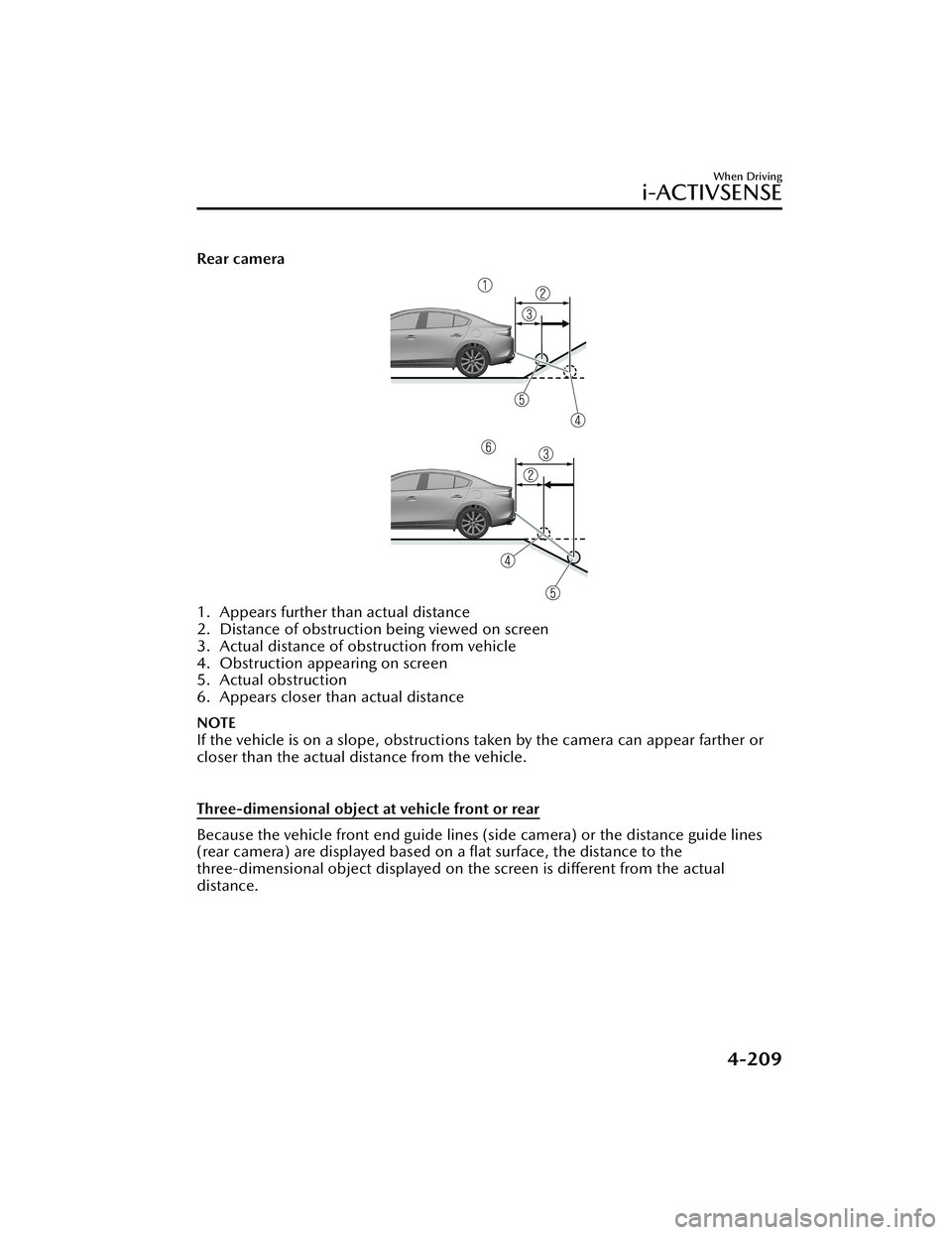
Rear camera
1. Appears further than actual distance
2. Distance of obstruction being viewed on screen
3. Actual distance of obstruction from vehicle
4. Obstruction appearing on screen
5. Actual obstruction
6. Appears closer than actual distance
NOTE
If the vehicle is on a slope, obstructions taken by the camera can appear farther or
closer than the actual distance from the vehicle.
Three-dimensional object at vehicle front or rear
Because the vehicle front end guide lines (side camera) or the distance guide lines
(rear camera) are displayed based on a flat surface, the distance to the
three-dimensional object displayed on the screen is different from the actual
distance.
When Driving
i-ACTIVSENSE
4-209
Mazda3_8KH1-EA-21K_Edition1_new 2021-7-27 16:02:22
Page 357 of 627
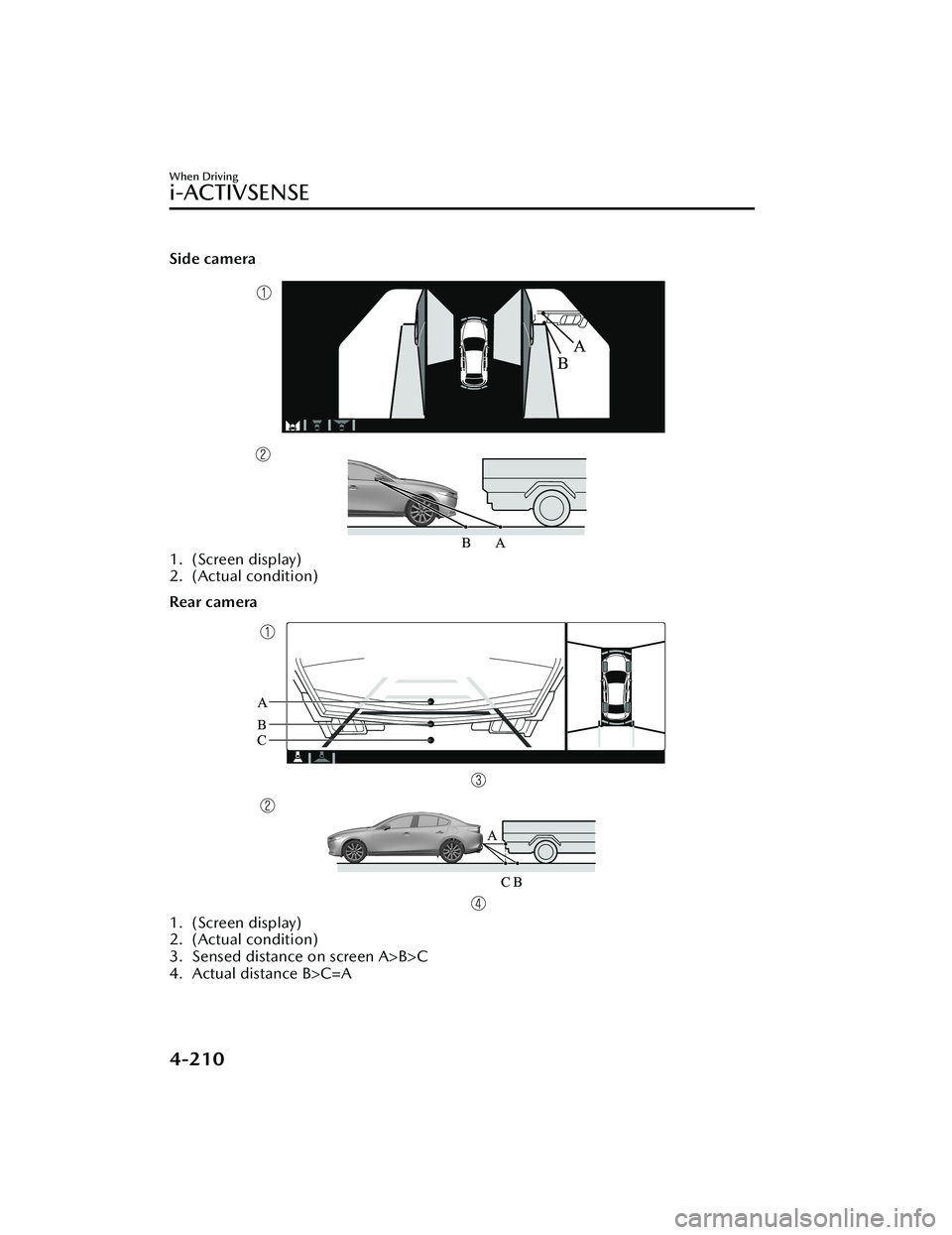
Side camera
1. (Screen display)
2. (Actual condition)
Rear camera
1. (Screen display)
2. (Actual condition)
3. Sensed distance on screen A>B>C
4. Actual distance B>C=A
When Driving
i-ACTIVSENSE
4-210
Mazda3_8KH1-EA-21K_Edition1_new2021-7-27 16:02:22
Page 358 of 627
▼System Problem Indication
Center display indication
CauseAction to be taken
“No camera signal.” is displayed The control unit might be damaged. Have your vehicle inspected by an Authorized Mazda
Dealer.
Screen is pitch-black and blank The camera might be damaged.
When Driving
i-ACTIVSENSE
4-211
Mazda3_8KH1-EA-21K_Edition1_new
2021-7-27 16:02:22
Page 363 of 627

A pedestrian is in a dark location
such as during the night, or blends
into the background by wearing
clothes matching the background
color.Front Radar Sensor*
▼Front Radar Sensor
Your vehicle is equipped with a front
radar sensor.
The following systems also use the
front radar sensor.
Distance & Speed Alert (DSA)Mazda Radar Cruise Control
(MRCC)
Mazda Radar Cruise Control with
Stop & Go function (MRCC with
Stop & Go function)
Traffic Jam Assist (TJA)Smart Brake Support (SBS) forward
drive detection
The front radar sensor functions by
detecting the radio waves reflected off
a vehicle ahead or an obstruction sent
from the radar sensor.
The front radar sensor is mounted
behind the front emblem.
1. Front radar sensor
If “Safety and Driver Support Systems
Temporarily Disabled. Front Radar
Obscured. Drive Safely” is displayed on
the multi-information display of the
instrument cluster, clean the area
around the front radar sensor.
When Driving
i-ACTIVSENSE
4-216*Some models.
Mazda3_8KH1-EA-21K_Edition1_new 2021-7-27 16:02:22
Page 365 of 627
Under the following conditions, the
front radar sensor may not be able to
detect vehicles ahead or
obstructions.
The beginning and end of a curve.Roads with continuous curves.Narrow lane roads due to road
construction or lane closures.
The vehicle ahead enters the radar
sensor's blind spot.
The vehicle ahead is running
abnormally due to accident or
vehicle damage.
Roads with repeated up and down
slopes
Driving on poor roads or unpaved
roads.
The distance between your vehicle
and the vehicle ahead is extremely
short.
A vehicle suddenly comes close,
such as by cutting into your lane.
To prevent incorrect operation of the
system, use tires of the samespecified size, manufacturer, brand,
and tread pattern on all four wheels.
In addition, do not use tires with
significantly
different wear patterns
or tire pressures on the same vehicle
(Including the temporary spare tire).
If the battery power is weak, the
system may not operate correctly.
When driving on roads with little traffic and few vehicles ahead or
obstructions for the front radar
sensor to detect, “Safety and Driver
Support Systems Temporarily
Disabled. Front Radar Obscured.
Drive Safely” may be temporarily
displayed, however, this does not
indicate a problem.
The radar sensors are regulated by
the relevant radio wave laws of the
country in which the vehicle is
driven. If the vehicle is driven
abroad, authorization from the
country in which the vehicle is driven
may be required.
When Driving
i-ACTIVSENSE
4-218
Mazda3_8KH1-EA-21K_Edition1_new 2021-7-27 16:02:22
Page 374 of 627
The cruise control will cancel if the
vehicle speed decreases below 20
km/h (12 mph) when the cruise
control is activated, such as when
climbing a steep grade.
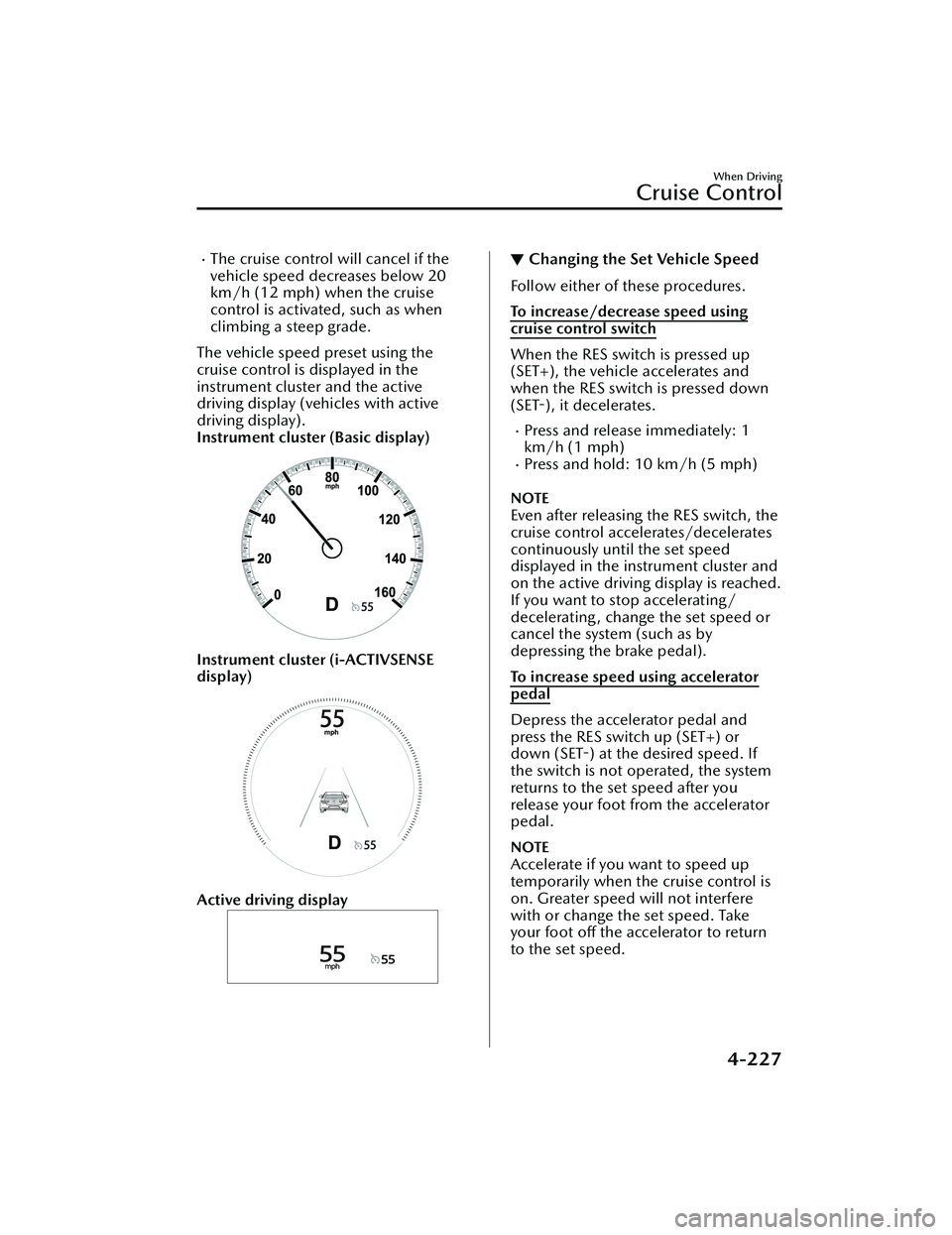
The vehicle speed preset using the
cruise control is displayed in the
instrument cluster and the active
driving display (vehicles with active
driving display).
Instrument cluster (Basic display)
Instrument cluster (i-ACTIVSENSE
display)
Active driving display
▼ Changing the Set Vehicle Speed
Follow either of these procedures.
To increase/decrease speed using
cruise control switch
When the RES switch is pressed up
(SET+), the vehicle accelerates and
when the RES switch is pressed down
(SET-),
it decelerates.
Press and release immediately: 1
km/h (1 mph)
Press and hold: 10 km/h (5 mph)
NOTE
Even after releasing the RES switch, the
cruise control accelerates/decelerates
continuously until the set speed
displayed in the instrument cluster and
on the active driving display is reached.
If you want to stop accelerating/
decelerating , change the set speed or
cancel the system (such as by
depressing the brake pedal).
To increase speed using accelerator
pedal
Depress the accelerator pedal and
press the RES switch up (SET+) or
down (SET-) at the desired speed. If
the switch is not operated, the system
returns to the set speed after you
release your foot from the accelerator
pedal.
NOTE
Accelerate if you want to speed up
temporarily when the cruise control is
on. Greater speed will not interfere
with or change the set speed. Take
your foot off the accelerator to return
to the set speed.
When Driving
Cruise Control
4-227
Mazda3_8KH1-EA-21K_Edition1_new
2021-7-27 16:02:22
Page 376 of 627
Tire Pressure MonitoringSystem (TPMS)
▼Tire Pressure Monitoring System
(TPMS)
The TPMS monitors the air pressure of
each tire and if it decreases below the
specified
value, the system
notifies the
driver by turning on the TPMS warning
light in the instrument cluster and
indicating a message on the
multi-information display.
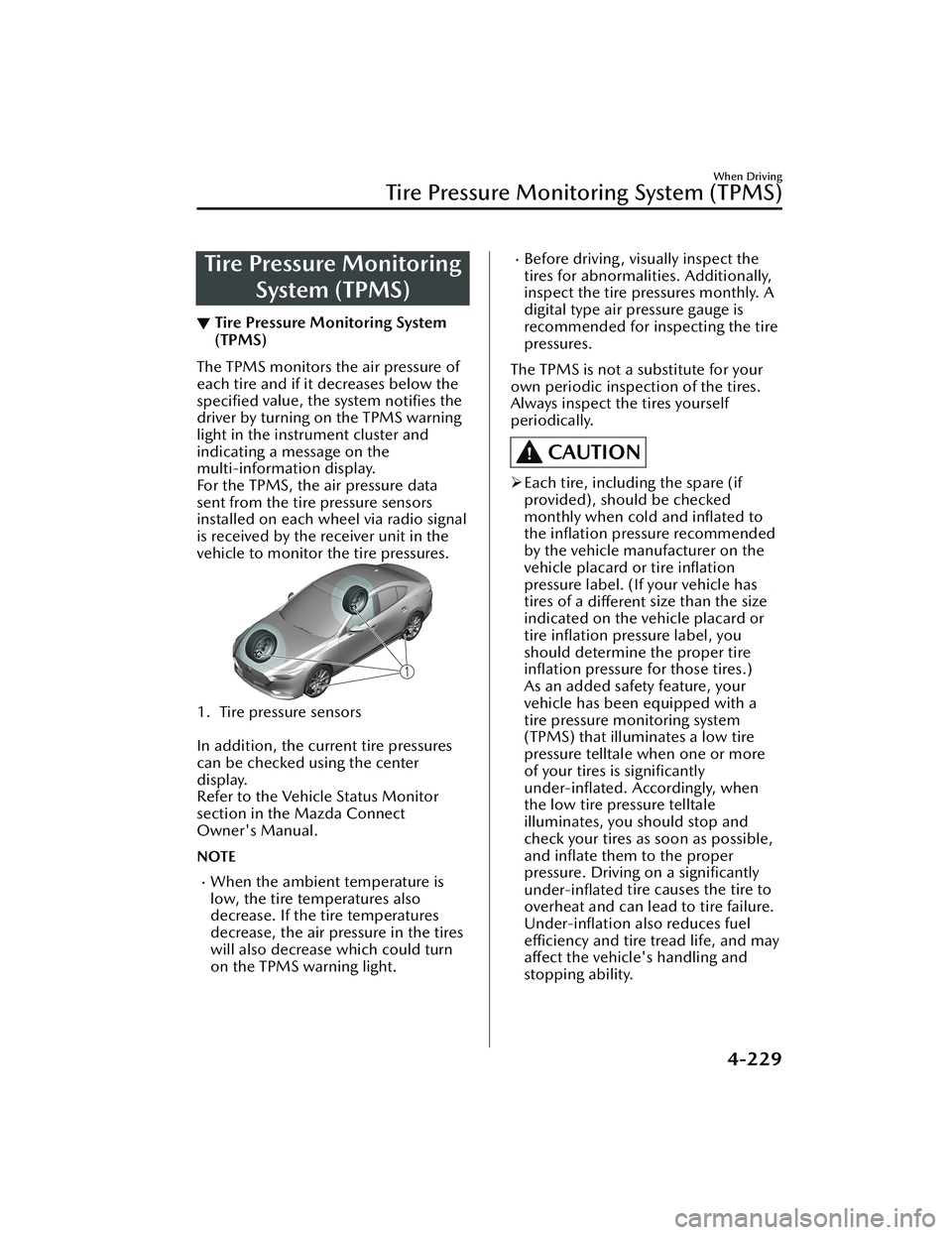
For the TPMS, the air pressure data
sent from the tire pressure sensors
installed on each wheel via radio signal
is received by the receiver unit in the
vehicle to monitor the tire pressures.
1. Tire pressure sensors
In addition, the current tire pressures
can be checked using the center
display.
Refer to the Vehicle Status Monitor
section in the Mazda Connect
Owner's Manual.
NOTE
When the ambient temperature is
low, the tire temperatures also
decrease. If the tire temperatures
decrease, the air pressure in the tires
will also decrease which could turn
on the TPMS warning light.
Before driving, visually inspect the
tires for abnormalities. Additionally,
inspect the tire pressures monthly. A
digital type air pressure gauge is
recommended for inspecting the tire
pressures.
The TPMS is not a substitute for your
own periodic inspection of the tires.
Always inspect the tires yourself
periodically.
CAUTION
Each tire, including the spare (if
provided), should be checked
monthly when cold and
inflated to
the inflation pressure recommended
by the vehicle manufacturer on the
vehicle placard or tire inflation
pressure label. (If your vehicle has
tires of a different size than the size
indicated on the vehicle placard or
tire inflation pressure label, you
should determine the proper tire inflation pressure for those tires.)
As an added safety feature, your
vehicle has been equipped with a
tire pressure monitoring system
(TPMS) that illuminates a low tire
pressure telltale when one or more
of your tires is significantly
under-inflated. Accordingly, when
the low tire pressure telltale
illuminates, you should stop and
check your tires as soon as possible,
and inflate them to the proper
pressure. Driving on a significantly
under-inflated tire causes the tire to
overheat and can lead to tire failure.
Under-inflation also reduces fuel
efficiency and tire tread life, and may
affect the vehicle's handling and
stopping ability.
When Driving
Tire Pressure Monitoring System (TPMS)
4-229
Mazda3_8KH1-EA-21K_Edition1_new 2021-7-27 16:02:22