ECO mode MAZDA MODEL 3 SEDAN 2022 Owner's Manual
[x] Cancel search | Manufacturer: MAZDA, Model Year: 2022, Model line: MODEL 3 SEDAN, Model: MAZDA MODEL 3 SEDAN 2022Pages: 627, PDF Size: 92.03 MB
Page 184 of 627

The active driving display indicates the following information:
Lane Departure Warning System (LDWS) Warnings*
Refer to Lane Departure Warning System (LDWS) on page 4-106.Blind Spot Monitoring (BSM) Operation Conditions and Warnings*
Refer to Blind Spot Monitoring (BSM) on page 4-107.Traffic Sign Recognition System (TSR) traffic signs and Warnings*
Refer to Traffic Sign Recognitio n System (TSR) on page 4-112.Front Cross Traffic Alert (FCTA) Operation Conditions and Warning*
Refer to Front Cross Traffic Alert (FCTA) on page 4-124.Mazda Radar Cruise Control (MRCC) Operation Conditions and Warnings*
Refer to Mazda Radar Cruise Co ntrol (MRCC) on page 4-131.Mazda Radar Cruise Control with Stop & Go function (MRCC with Stop & Go
function) Operation Co nditions and Warnings*
Refer to Mazda Radar Cruise Control with Stop & Go function (MRCC with Stop
& Go function) on page 4-140.
Traffic Jam Assist (TJA) Operation Conditions and Warnings*
Refer to Traffic Jam Assist (TJA) on page 4-151.Lane-keep Assist System (LAS) Warnings*
Refer to Lane-keep Assist System (LAS) on page 4-165.Smart Brake Support (SBS) Operation Conditions and Warnings
Refer to Smart Brake Support (SBS) on page 4-169.
Cruise Control Operation Conditions
Refer to Cruise Control on page 4-225.
Navigation Guidance (vehicles with navigation system)Intersection Name (vehicles with navigation system)Street name (vehicles with navigation system)Lane Guidance (vehicles with navigation system)Speed limit indicator (vehicles with navigation system)Vehicle Speed
The active driving display settings can be changed or adjusted.
Refer to the Settings section in the Mazda Connect Owner's Manual.
When Driving
Instrument Cluster and Display
*Some models.4-37
Mazda3_8KH1-EA-21K_Edition1_new 2021-7-27 16:02:22
Page 192 of 627

▼Indications
1. Manual shift mode indication
2. Gear position indication
Manual shift mode indication
In manual shift mode, the “M” of the
shift position indication in the
instrument panel illuminates.
Gear position indication
The numeral for the selected gear
illuminates.
NOTE
If the gears cannot be shifted down
when driving at higher speeds, the
gear position indication will
flash
twice to signal that the gears cannot
be shifted down (to protect the
transmission).
If the automatic transmission fluid
(ATF) temperature becomes too
high, there is the possibility that the
transmission will switch to automatic
shift mode, canceling manual shift
mode and turning off the gear
position indication illumination. This
is a normal function to protect the
AT. After the ATF temperature has
decreased, the gear position
indication illumination turns back on
and driving in manual shift mode is
restored.
▼ Manually Shifting Up
You can shift gears up by operating the
selector lever or the steering shift
switches
*.
M1 → M2 → M3 → M4 → M5 → M6
Using selector lever
To shift up to a higher gear, tap the
selector lever back + once.
Using steering shift switch*
To shift up to a higher gear with the
steering shift switches, pull the UP
switch (+/OFF) toward you once with
your fingers.
1. UP switch (+/OFF)
When Driving
Automatic Transmission
*Some models.4-45
Mazda3_8KH1-EA-21K_Edition1_new 2021-7-27 16:02:22
Page 194 of 627

WARNING
Do not use engine braking on slippery
road surfaces or at high speeds:
Shifting down while driving on wet,
snowy, or frozen roads, or while
driving at high speeds causes sudden
engine braking, which is dangerous.
The sudden change in tire speed could
cause the tires to skid. This could lead
to loss of vehicle control and an
accident.
Keep your hands on the steering
wheel rim when using fingers on the
steering shift switches:
Putting your hands inside the rim of
the steering wheel when using the
steering shift switches is dangerous. If
the driver's air bag were to deploy in a
collision, your hands could be
impacted causing injury.
NOTE
When driving at high speeds, the
gear may not shift down.
During deceleration, the gear may
automatically shift down depending
on vehicle speed.
When depressing the accelerator
fully, the transmission will shift to a
lower gear, depending on vehicle
speed. However, the transmission
does not kickdown while the DSC is
turned off or the Off-Road Traction
Assist is operating.
▼Second Gear Fixed Mode
When the selector lever is moved back
+ while the vehicle speed is about 10
km/h (6.2 mph) or less, the
transmission is set in the second gear
fixed mode. The gear is fixed in second
while in this mode for easier
acceleration from a stop and driving on
slippery roads such as snow-covered
roads.
If the selector lever is moved back + or
forward – while in the second gear
fixed mode, the mode will be
canceled.
When Driving
Automatic Transmission
4-47
Mazda3_8KH1-EA-21K_Edition1_new
2021-7-27 16:02:22
Page 195 of 627

▼Shift Gear (Shifting) Speed Limit
For each gear position while in the manual
mode, the speed limit is set as follows:
When the selector lever is operated within the range of the speed limit, the gear is
shifted.
1. 1st
2. 2nd
3. 3rd
4. 4th
5. 5th
6. 6th
Shift up
The gear does not shift up while the vehi cle speed is lower than the speed limit.
Shift down
The gear does not shift down while th e vehicle speed exceeds the speed limit.
If the vehicle speed exceeds the speed limi t and the gear does not shift down, the
gear position indication flashes 2 times to notify the driver that the gear cannot be
shifted.
Kickdown
When the accelerator pedal is depressed fu lly while driving, the gear shifts down.
However, the transmission does not kick down while the DSC is turned off or the
Off-Road Traction Assist is operating.
NOTE
The gear also shifts down using kickdown
while in the second gear fixed mode.
Auto-shift down
The gear shifts down automatically depending on the vehicle speed during
deceleration.
When Driving
Automatic Transmission
4-48
Mazda3_8KH1-EA-21K_Edition1_new 2021-7-27 16:02:22
Page 196 of 627

NOTE
If the vehicle comes to a stop while in the second gear fixed mode, the gear remains
in second.
▼Recommendations for Shifting
Upshifting
For normal acceleration and cruising, Mazda recommends these shift points:
(U.S.A. and Canada)
Gear
Vehicle speed*1
M1 to M224 km/h (15 mph)
M2 to M3 40 km/h (25 mph)
M3 to M4 65 km/h (40 mph)
M4 to M5 73 km/h (45 mph)
M5 to M6 81 km/h (50 mph)
*1 Always observe local speed limit regulations.
Downshifting
When you must slow down in heavy traffic or on a steep upgrade, downshift before
the engine starts to overwork. This gives better acceleration when you need more
speed.
On a steep downgrade, downshifting helps ma intain safe speed and prolongs brake
life.
When Driving
Automatic Transmission
4-49
Mazda3_8KH1-EA-21K_Edition1_new 2021-7-27 16:02:22
Page 197 of 627

Direct Mode*
▼Direct Mode
Direct mode can be used for
temporarily switching gears by
operating the steering shift switch
while the vehicle is being driven with
the selector lever in the D position.
While in direct mode, the D and M
indication illuminate and the gear
position in use is illuminated.
1. Direct mode indication
2. Gear position indication
Direct mode is canceled (released)
under the following conditions.
The UP switch (+/OFF) is pulled
rearward for a certain amount of
time or longer.
The vehicle is driven for a certain
amount of time or longer (time
differs depending on the driving
conditions while operating).
The vehicle is stopped or moving at a
slow speed.
NOTE
Shifting up and down while in direct
mode may not be possible depending
on the vehicle speed. In addition,
because direct mode is canceled
(released) depending on the rate of
acceleration or if the accelerator is fully
depressed, use of the manual shift
mode is recommended if you need to
drive the vehicle in a particular gear for
long periods.
When Driving
Automatic Transmission
4-50*Some models.
Mazda3_8KH1-EA-21K_Edition1_new 2021-7-27 16:02:22
Page 199 of 627
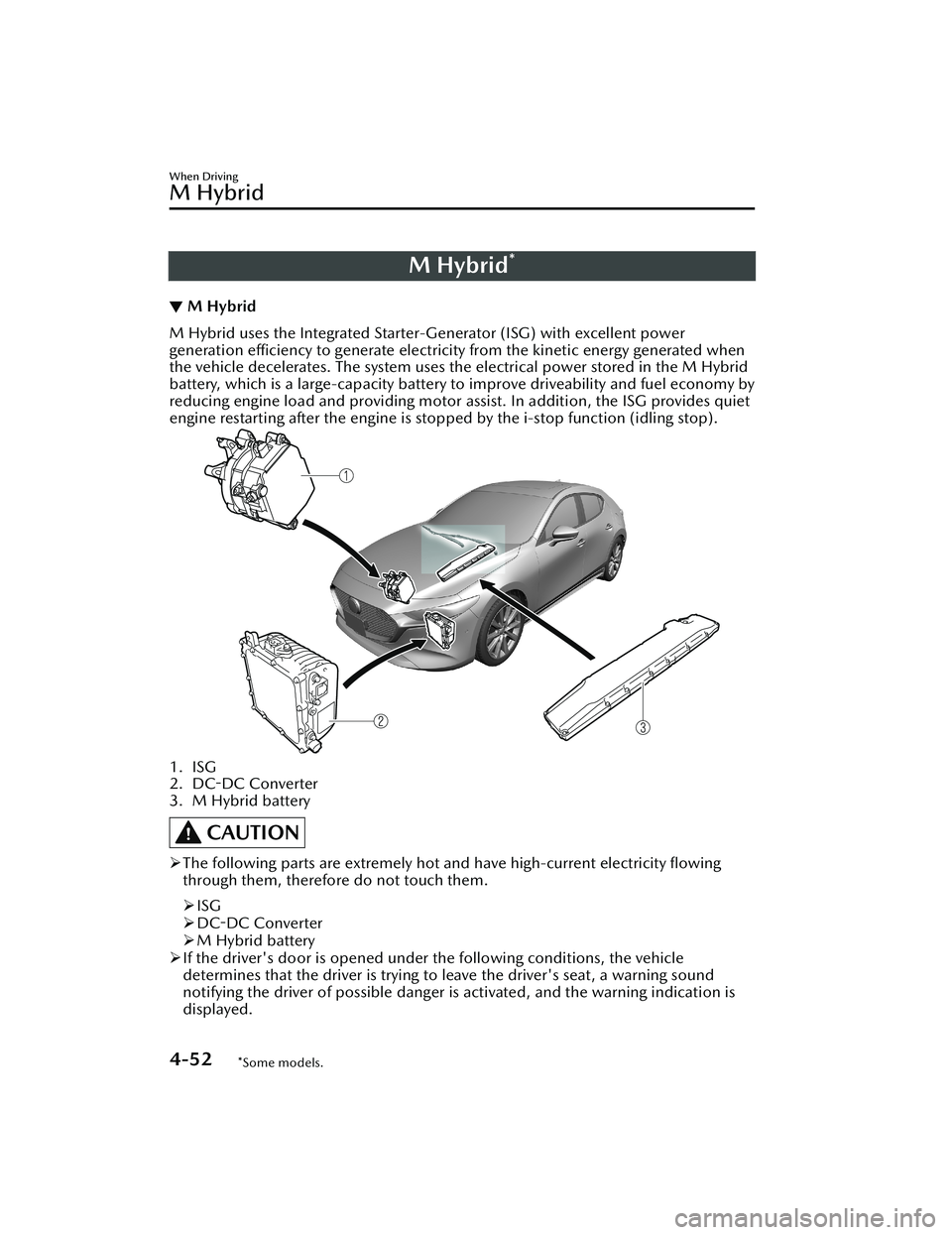
M Hybrid*
▼M Hybrid
M Hybrid uses the Integrated Starter-Generator (ISG) with excellent power
generation efficiency to generate electricity from the kinetic energy generated when
the vehicle decelerates. The system uses the electrical power stored in the M Hybrid
battery, which is a large-capacity battery to
improve driveability and fuel economy by
reducing engine load and providing motor a ssist. In addition, the ISG provides quiet
engine restarting after the engine is stop ped by the i-stop function (idling stop).
1. ISG
2.
DC-DC Converter
3. M Hybrid battery
CAUTION
The following parts are extremely hot and have high-current electricity flowing
through them, therefore do not touch them.
ISG
DC-DC Converter
M Hybrid battery
If the driver's door is opened under the following conditions, the vehicle
determines that the driver is trying to leave the driver's seat, a warning sound
notifying the driver of possible danger is activated, and the warning indication is
displayed.
When Driving
M Hybrid
4-52*Some models.
Mazda3_8KH1-EA-21K_Edition1_new 2021-7-27 16:02:22
Page 239 of 627

Drive Selection*
▼Drive Selection
Drive selection is a system to switch
the vehicle's drive mode. When the
sport mode is selected, vehicle's
response against accelerator operation
is enhanced. This provides additional
quick acceleration which may be
needed to safely make maneuvers such
as lane changes, merging onto
freeways, or passing other vehicles.
CAUTION
Do not use the sport mode when
driving on slippery roads such as wet
or snow-covered roads. It may cause
tire slipping.
NOTE
When the sport mode is selected,
driving at higher engine speeds
increases and it may increase fuel
consumption. Mazda recommends
that you cancel the sport mode on
normal driving.
Drive mode cannot be switched in
the following conditions:
ABS/TCS/DSC is operatingCruise control* is operating.The Mazda Radar Cruise Control
(MRCC) system* is operating.The Mazda Radar Cruise Control
with Stop & Go function (MRCC
with Stop & Go function) System
*
is operating.Tra ffi c
Jam Assist (TJA) is operating.Steering wheel is being operated
abruptly
▼Drive Selection Switch
Press the drive selection switch forward
(SPORT) to select the sport mode.
Pull the drive selection switch back
(OFF) to cancel the sport mode.
NOTE
In the following cases, the drive
selection is canceled.
The ignition is switched OFF.Mazda Radar Cruise Control with
Stop & Go function (MRCC with
Stop & Go function) System/cruise
control is set.
Traffic Jam Assist (TJA) is set.Depending on the driving conditions
when sport mode is selected, the
vehicle may perform shift-down or
slightly accelerate.
When Driving
Drive Selection
4-92*Some models.
Mazda3_8KH1-EA-21K_Edition1_new
2021-7-27 16:02:22
Page 243 of 627

i-ACTIVSENSE*
▼i-ACTIVSENSE
i-ACTIVSENSE is a collective term
covering a series
of advanced safety
and driver support systems which
make use of cameras and sensors. The
systems consist of active safety and
pre-crash safety systems.
These systems are designed to assist
the driver in safer driving by reducing
the load on the driver and helping to
avert collisions or reduce their severity.
However, because each system has its
limitations, always drive carefully and
do not rely solely on the systems.
▼ Active Safety Technology
Active Safety Technology supports safer
driving by helping the driver to
recognize potential hazards and avert
accidents.
Driver awareness support systems
Nighttime visibility
Adaptive Front Lighting System
(AFS)................................ page 4-101
High Beam Control System
(HBC).............................. page 4-101
Left/right side and rear side detection
Lane Departure Warning System
(LDWS)............................ page 4-103
Blind Spot Monitoring (BSM)...............
........................................ page 4-107
Road sign recognition
Traffic Sign Recognition System
(TSR)................................ page 4-112
Inter-vehicle distance recognition
Distance & Speed Alert (DSA) .............
........................................ page 4-119
Front obstruction detection when
approaching a crosswalk
Front Cross Traffic Alert (FCTA) ............
........................................ page 4-124
Rear obstruction detection when
leaving a parking space
Rear Cross Traffic Alert (RCTA) .............
........................................ page 4-127
Full-surround recognition
360°View Monitor............ page 4-178
Driver fatigue detection
Driver Attention Alert (DAA) ...............
........................................ page 4-120
Driver Monitoring (DM).... page 4-122
Driver support systems
Inter-vehicle distance
Mazda Radar Cruise Control
(MRCC)........................... page 4-131
Mazda Radar Cruise Control with Stop
& Go function (MRCC with Stop & Go
function).......................... page 4-140
Lane departure
Lane-keep Assist System (LAS) .............
........................................ page 4-165
Inter-vehicle distance and lane
keeping
Traffic Jam Assist (TJA)........ page 4-151
When Driving
i-ACTIVSENSE
4-96*Some models.
Mazda3_8KH1-EA-21K_Edition1_new
2021-7-27 16:02:22
Page 259 of 627

Traffic Sign Recognition System (TSR)*
▼Tra ffi c
Sign Recognition System (TSR)
The TSR helps prevent the driver from overlooking traffic signs, and provides support
for safer driving by displaying traffic sign
s on the active driving display/instrument
cluster which are recognized by the Forward Sensing Camera (FSC) or recorded in
the navigation system while the vehicle is driven.
The TSR displays the speed limit (including auxiliary signs), do not enter, and traffic
stop signs.
If the vehicle speed exceeds the speed limi t sign indicated in the active driving
display/instrument cluster while the vehicle is driven, the system notifies the driver
using the indication in the active drivin g display/instrument cluster and a warning
sound.
Speed limit and do not enter signs
1. Sign recognized
2. Sign displayed
3. Active driving display indication
When Driving
i-ACTIVSENSE
4-112*Some models.
Mazda3_8KH1-EA-21K_Edition1_new 2021-7-27 16:02:22