ignition MAZDA MODEL 5 2007 Workshop Manual
[x] Cancel search | Manufacturer: MAZDA, Model Year: 2007, Model line: MODEL 5, Model: MAZDA MODEL 5 2007Pages: 409, PDF Size: 7.16 MB
Page 191 of 409

Black plate (192,1)
qOperating the Cassette Tape Playerí
Rewind
button Fast-
forward
button
APC
button:(next
program)
(one being
played)
Program button
Repeat button Cassette tape play button
Dolby NR button Cassette tape slot
Cassette tape eject button
Cassette tape insert
Insert the cassette tape into the slot, open
edge to the right and cassette tape will
begin play, and “TAPE PLAY ”will be
displayed. At the end of the cassette tape,
the unit automatically reverses cassette
tape play. When
is lit, the cassette
tape's top side is playing. When
is lit,
the bottom side is on.
Playing
Press the cassette tape play button
(
) to start play when a cassette tape
is in the unit. If there isn't a cassette tape
in the unit when the cassette tape play
button (
) is pressed, “NO TAPE ”
will flash on and off.
Dolby noise reduction
When using a tape with Dolby NR
*, push
the Dolby NR button (
). The
symbol will be displayed. To play a tape
without Dolby NR, push the button once
again.
* Noise reduction system manufactured
under license from Dolby Laboratories
Licensing Corporation.
Dolby and the double-D symbol
are trademarks of Dolby Laboratories
Licensing Corporation.
Ejecting the cassette tape
Press the cassette tape eject button (
)to
eject the cassette tape.
NOTE
The cassette tape can be ejected when the
ignition switch is in the OFF position.
6-32
Interior Comfort
íSome models.
Audio System
Mazda5_8X91-EA-07E_Edition1 Page192
Tuesday, June 26 2007 8:47 PM
Form No.8X91-EA-07E
Page 197 of 409

Black plate (198,1)
NOTE
If the button is not pressed and about 5
seconds have elapsed while“DISC ”“OUT ”is
flashing, CDs are automatically ejected.
3. Pull out the CD, then the next CD will be ejected.
NOTE
lCDs will be ejected starting with the one
with the lowest number.
lAll CDs in the tray will be ejected
continuously.
lCDs can be ejected when the ignition
switch is off. Press and hold the CD eject
button (
) for about 2 seconds and all
CDs will eject.
l(Music CD player)
If the CD is not removed from the slot
within approximately 10 seconds after
ejection, it will be re- inserted
automatically.
Playing
Press the CD play button (
) to start
play when a CD is in the unit.
If there isn't a CD in the unit when the CD
play button (
) is pressed, “NO DISC ”
will flash on and off.
Fast-forward/Reverse
Press and hold the fast-forward button
(
) to advance through a track at high
speed.
Press and hold the reverse button (
)
to reverse through a track at high speed.
Track search
Press the track up button (
) once to skip
forward to the beginning of the next track.
Press the track down button (
)onceto
skip back to the beginning of the current
track.
Disc search
During music CD playback
To change the disc, press the DISC button
(
or) during playback.
During MP3 CD playback
To change the disc, press the DISC button
(
or) for 1.5 seconds or
more during playback.
Folder search (during MP3 CD
playback)
To change to the previous folder, press the
folder down button (
) for less than
1.5 seconds, or press the folder up button
(
) for less than 1.5 seconds to
advance to the next folder.
Music scan
This feature helps to find a program by
playing about the first 10 seconds of each
track.
Press the scan button (
) during play
to start scan play operation (the track
number will flash).
Press the scan button (
) once again
to cancel scan play.
NOTE
If the unit is left in scan, normal play will
resume where scan was selected.
Repeat play
During music CD playback
1. Press the repeat button (
) during
playback to play the current track
repeatedly. “RPT ”is displayed.
2. Press the button again to cancel the repeat play.
6-38
Interior Comfort
Audio System
Mazda5_8X91-EA-07E_Edition1 Page198
Tuesday, June 26 2007 8:47 PM
Form No.8X91-EA-07E
Page 201 of 409
Black plate (202,1)
Audio Control Switch
Operation (Steering Wheel)
í
When the audio unit is turned on,
operation of the audio unit from the
steering wheel is possible.
NOTE
Because the audio unit will be turned off under
the following conditions, the switches will be
inoperable.
lWhen the ignition switch is turned to the
LOCK position.
lWhen the power button on the audio unit is
pressed and the audio unit is turned off.
lWhen a cassette tape/CD being played is
ejected. (For the In-dash CD changer, when
all CDs are ejected.)
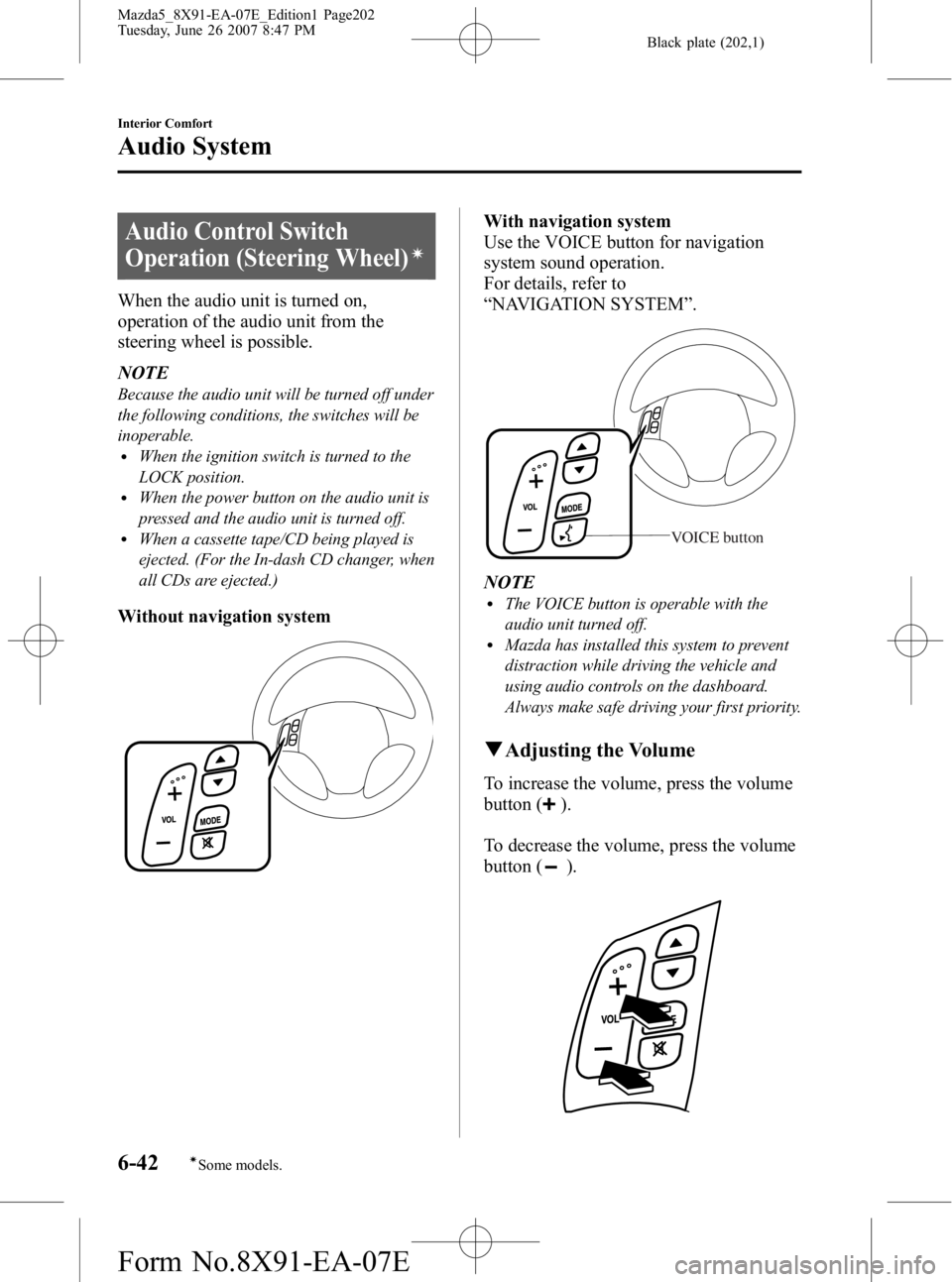
Without navigation system
With navigation system
Use the VOICE button for navigation
system sound operation.
For details, refer to
“NAVIGATION SYSTEM ”.
VOICE button
NOTElThe VOICE button is operable with the
audio unit turned off.
lMazda has installed this system to prevent
distraction while driving the vehicle and
using audio controls on the dashboard.
Always make safe driving your first priority.
q Adjusting the Volume
To increase the volume, press the volume
button (
).
To decrease the volume, press the volume
button (
).
6-42
Interior Comfort
íSome models.
Audio System
Mazda5_8X91-EA-07E_Edition1 Page202
Tuesday, June 26 2007 8:47 PM
Form No.8X91-EA-07E
Page 203 of 409
Black plate (204,1)
qMute Switch
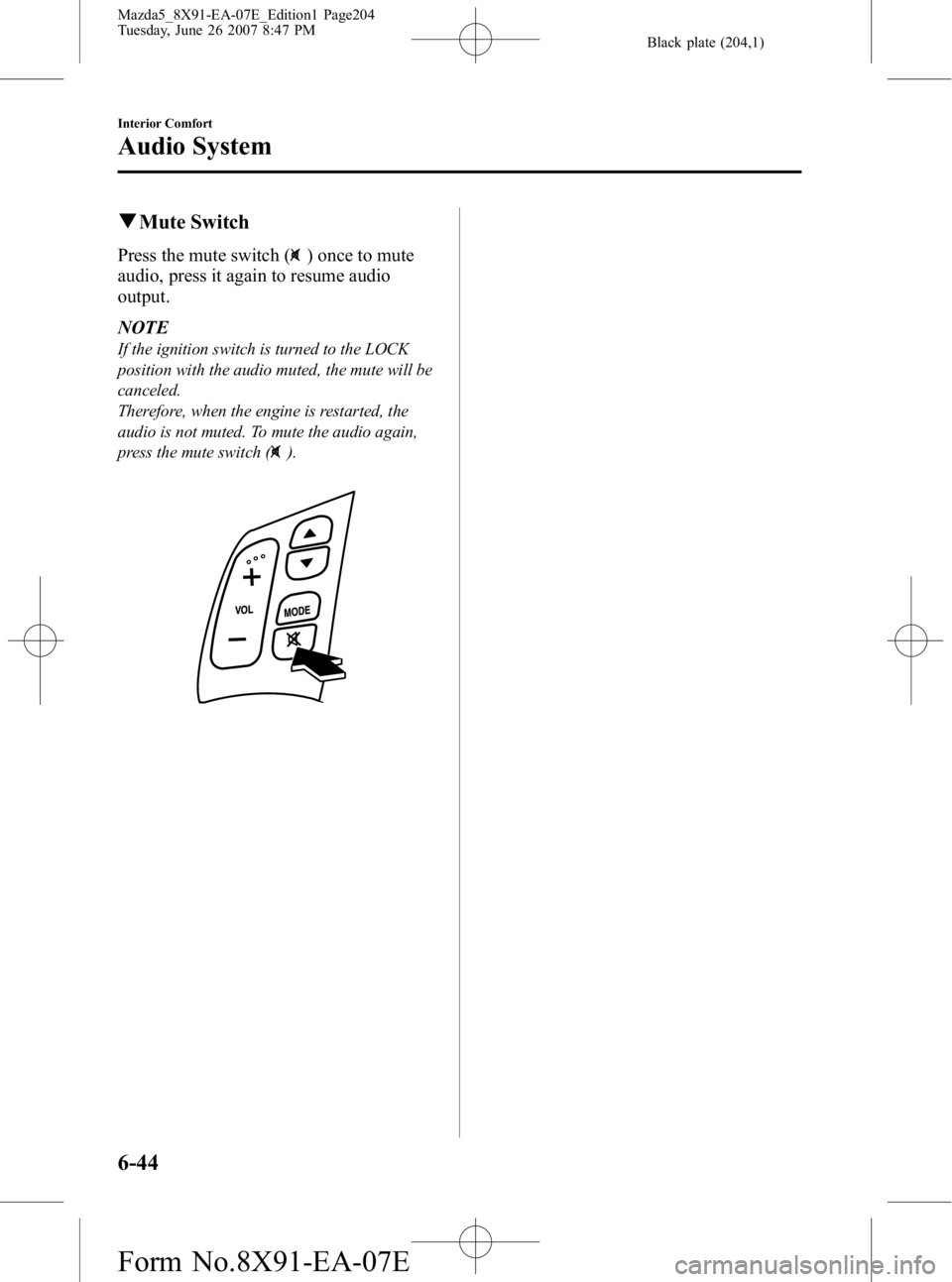
Press the mute switch () once to mute
audio, press it again to resume audio
output.
NOTE
If the ignition switch is turned to the LOCK
position with the audio muted, the mute will be
canceled.
Therefore, when the engine is restarted, the
audio is not muted. To mute the audio again,
press the mute switch (
).
6-44
Interior Comfort
Audio System
Mazda5_8X91-EA-07E_Edition1 Page204
Tuesday, June 26 2007 8:47 PM
Form No.8X91-EA-07E
Page 205 of 409

Black plate (206,1)
Sunvisors
When you need a sunvisor, lower it for
use in front or swing it to the side.
Sunvisor
qVanity Mirrors
To use the vanity mirror, lower the
sunvisor.
Interior Lights
qIlluminated Entry System
When the illuminated entry system
operates, the overhead light (switch is in
the DOOR position) turns on for:
lAbout 30 seconds after the driver's
door is unlocked and the ignition
switch is in the LOCK position (with
the ignition key removed).
lAbout 15 seconds after all doors are
closed.
lAbout 15 seconds after the ignition
switch is in the LOCK position (with
the ignition key removed) with all
doors closed.
The light also turns off when:
lThe ignition switch is turned to the ON
position and all doors are closed.
lThe driver's door is locked.
NOTE
Battery saver
If any door is left opened, the light goes out
after about 30 minutes to save the battery.
The light turns on again when the ignition
switch is turned to the ON position, or when
any door is opened after all doors have been
closed.
6-46
Interior Comfort
Interior Equipment
Mazda5_8X91-EA-07E_Edition1 Page206
Tuesday, June 26 2007 8:47 PM
Form No.8X91-EA-07E
Page 208 of 409
Black plate (209,1)
qClock
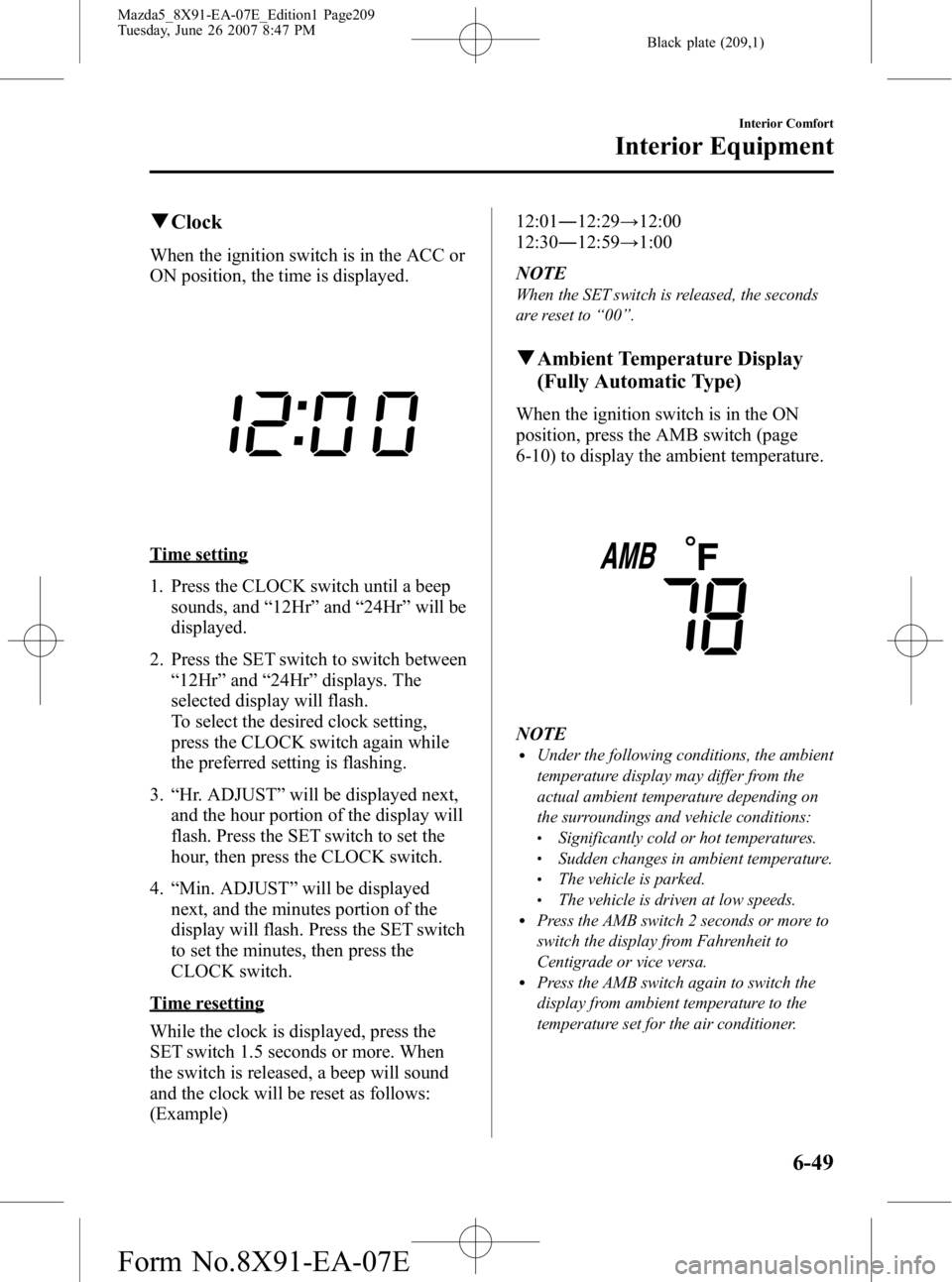
When the ignition switch is in the ACC or
ON position, the time is displayed.
Time setting
1. Press the CLOCK switch until a beep
sounds, and “12Hr ”and “24Hr ”will be
displayed.
2. Press the SET switch to switch between “12Hr ”and “24Hr ”displays. The
selected display will flash.
To select the desired clock setting,
press the CLOCK switch again while
the preferred setting is flashing.
3. “Hr. ADJUST ”will be displayed next,
and the hour portion of the display will
flash. Press the SET switch to set the
hour, then press the CLOCK switch.
4. “Min. ADJUST ”will be displayed
next, and the minutes portion of the
display will flash. Press the SET switch
to set the minutes, then press the
CLOCK switch.
Time resetting
While the clock is displayed, press the
SET switch 1.5 seconds or more. When
the switch is released, a beep will sound
and the clock will be reset as follows:
(Example) 12:01
―12:29 →12:00
12:30 ―12:59 →1:00
NOTE
When the SET switch is released, the seconds
are reset to “00 ”.
q Ambient Temperature Display
(Fully Automatic Type)
When the ignition switch is in the ON
position, press the AMB switch (page
6-10) to display the ambient temperature.
NOTElUnder the following conditions, the ambient
temperature display may differ from the
actual ambient temperature depending on
the surroundings and vehicle conditions:
lSignificantly cold or hot temperatures.lSudden changes in ambient temperature.lThe vehicle is parked.lThe vehicle is driven at low speeds.lPress the AMB switch 2 seconds or more to
switch the display from Fahrenheit to
Centigrade or vice versa.
lPress the AMB switch again to switch the
display from ambient temperature to the
temperature set for the air conditioner.
Interior Comfort
Interior Equipment
6-49
Mazda5_8X91-EA-07E_Edition1 Page209
Tuesday, June 26 2007 8:47 PM
Form No.8X91-EA-07E
Page 215 of 409
Black plate (216,1)
qLuggage Compartment
A golf bag can be carried in the luggage
compartment.
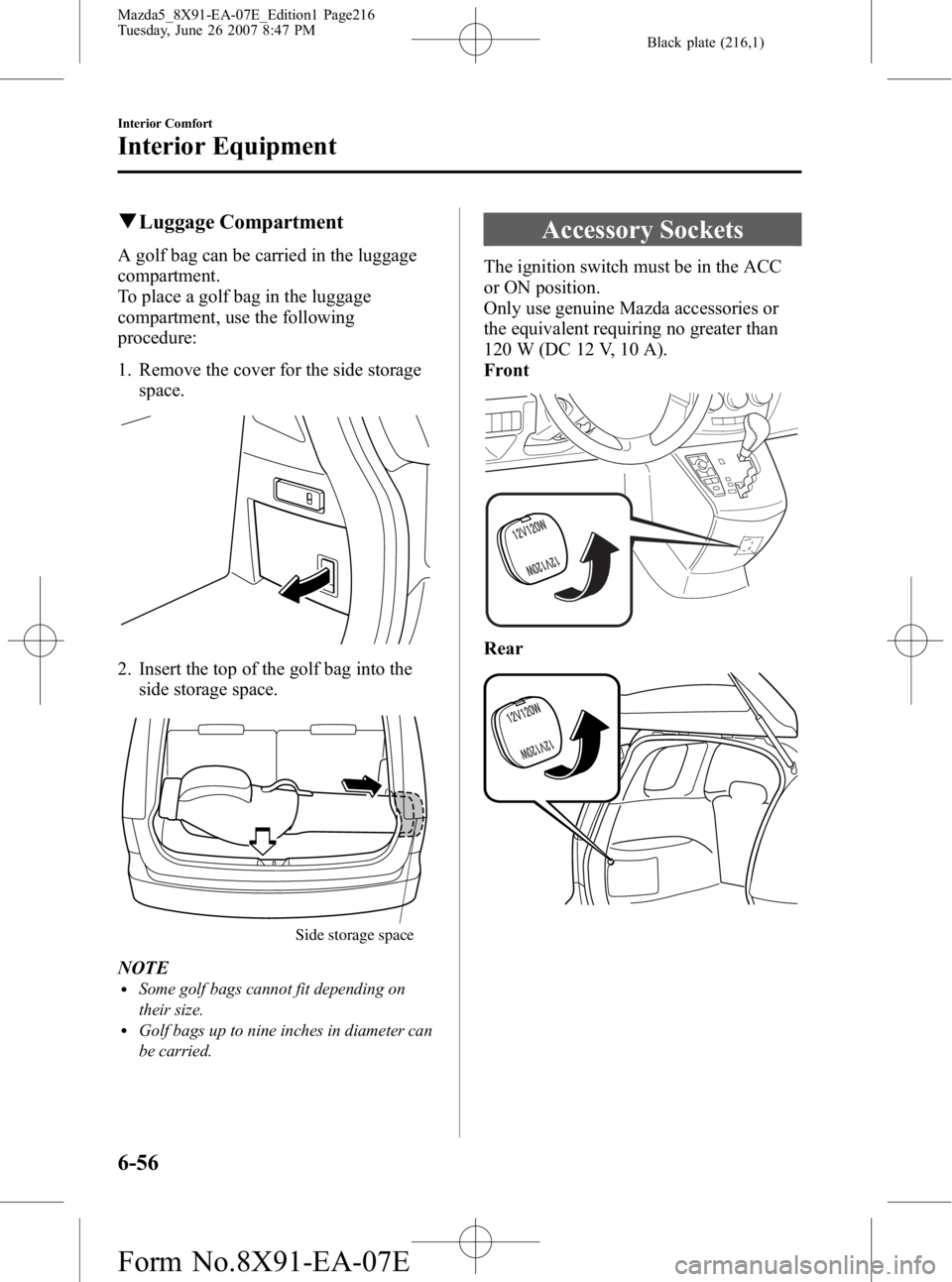
To place a golf bag in the luggage
compartment, use the following
procedure:
1. Remove the cover for the side storage
space.
2. Insert the top of the golf bag into theside storage space.
Side storage space
NOTElSome golf bags cannot fit depending on
their size.
lGolf bags up to nine inches in diameter can
be carried.
Accessory Sockets
The ignition switch must be in the ACC
or ON position.
Only use genuine Mazda accessories or
the equivalent requiring no greater than
120 W (DC 12 V, 10 A).
Front
Rear
6-56
Interior Comfort
Interior Equipment
Mazda5_8X91-EA-07E_Edition1 Page216
Tuesday, June 26 2007 8:47 PM
Form No.8X91-EA-07E
Page 230 of 409

Black plate (231,1)
Overheating
If the temperature gauge indicates
overheating, the vehicle loses power, or
you hear a loud knocking or pinging
noise, the engine is probably too hot.
WARNING
Turn the ignition switch off and
remove the key from the ignition switch
when you inspect the engine:
Inspecting the engine with the
ignition switch in the ON position is
dangerous. The cooling fan could
turn on unexpectedly even when the
engine is not running. You could be
seriously injured by the fan.
Do not remove either cooling
system caps when the engine and
radiator are hot: When the engine and radiator are
hot, scalding coolant and steam may
shoot out under pressure and cause
serious injury.
Open the hood ONLY after steam is no
longer escaping from the engine: Steam from an overheated engine is
dangerous. The escaping steam could
seriously burn you.
If the temperature gauge indicates
overheating:
1. Drive safely to the side of the road and park off the right-of-way.
2. Put a vehicle with an automatic transaxle in park (P), a manual
transaxle in neutral. 3. Apply the parking brake.
4. Turn off the air conditioner.
5. Check whether coolant or steam is
escaping from under the hood or from
the engine compartment.
If steam is coming from the engine
compartment:
Don't go near the front of the vehicle.
Stop the engine.
Wait until the steam dissipates, then
open the hood and start the engine.
If neither coolant nor steam is
escaping:
Open the hood and idle the engine until
it cools.
CAUTION
If the cooling fan does not operate
while the engine is running, the
engine temperature will increase.
Stop the engine and call an
Authorized Mazda Dealer.
6. Make sure the cooling fan is operating, then turn off the engine after the
temperature has decreased.
7. When cool, check the coolant level. If it's low, look for coolant leaks from
the radiator and hoses.
In Case of an Emergency
Overheating
7-13
Mazda5_8X91-EA-07E_Edition1 Page231
Tuesday, June 26 2007 8:47 PM
Form No.8X91-EA-07E
Page 232 of 409

Black plate (233,1)
Starting a Flooded Engine
If the engine fails to start, it may be
flooded (excessive fuel in the engine).
Follow this procedure:
1. Depress the accelerator all the way andhold it there.
2. Turn the ignition switch to the START position and hold it there ―for up to 10
seconds. If the engine starts, release the
key and accelerator immediately
because the engine will suddenly rev
up.
3. If the engine fails to start, crank it without depressing the accelerator ―for
up to 10 seconds.
In Case of an Emergency
Emergency Starting
7-15
Mazda5_8X91-EA-07E_Edition1 Page233
Tuesday, June 26 2007 8:47 PM
Form No.8X91-EA-07E
Page 234 of 409

Black plate (235,1)
Keep all flames, including cigarettes, and sparks away from open battery cells:
Flames and sparks near open battery cells are dangerous. Hydrogen gas, produced
during normal battery operation, could ignite and cause the battery to explode. An
exploding battery can cause serious burns and injuries.
Do not jump-start a frozen battery or one with a low fluid level: Jump-starting a frozen battery or one with a low fluid level is dangerous. It may
rupture or explode, causing serious injury.
Connect the negative cable to a good ground point away from the battery: Connecting the end of the second jumper cable to the negative (
) terminal of the
discharged battery is dangerous.
A spark could cause the gas around the battery to explode and injure someone.
Route the jumper cables away from parts that will be moving: Connecting a jumper cable near or to moving parts (cooling fans, belts) is dangerous.
The cable could get caught when the engine starts and cause serious injury.
CAUTION
Use only a 12 V booster system. You can damage a 12 V starter, ignition system, and
other electrical parts beyond repair with a 24 V power supply (two 12 V batteries in
series or a 24 V motor generator set).
Connect cables in numerical order and disconnect in reverse order.
Jumper cables
Booster battery
Discharged
battery
In Case of an Emergency
Emergency Starting
7-17
Mazda5_8X91-EA-07E_Edition1 Page235
Tuesday, June 26 2007 8:47 PM
Form No.8X91-EA-07E