light MAZDA MODEL 5 2007 Manual PDF
[x] Cancel search | Manufacturer: MAZDA, Model Year: 2007, Model line: MODEL 5, Model: MAZDA MODEL 5 2007Pages: 409, PDF Size: 7.16 MB
Page 150 of 409
Black plate (151,1)
NOTE
If the headlights flicker, or the brightness
weakens, the bulb-life may be depleted and a
replacement is necessary. Consult an
Authorized Mazda Dealer.
qLights-On Reminder
If lights are on and the key is removed
from the ignition switch, a continuous
beep sound will be heard when the
driver's door is opened.
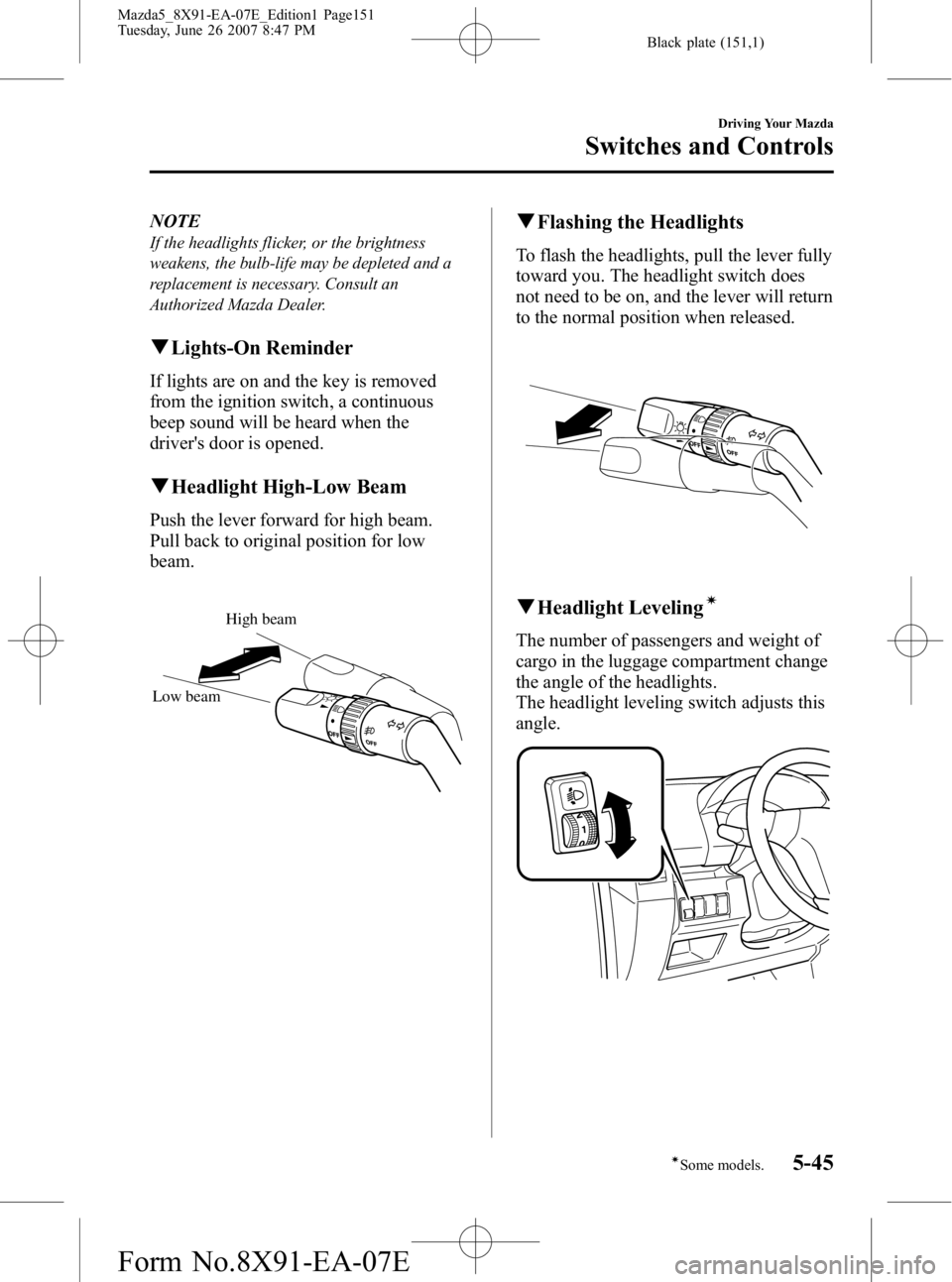
qHeadlight High-Low Beam
Push the lever forward for high beam.
Pull back to original position for low
beam.
High beam
Low beam
q Flashing the Headlights
To flash the headlights, pull the lever fully
toward you. The headlight switch does
not need to be on, and the lever will return
to the normal position when released.
qHeadlight Levelingí
The number of passengers and weight of
cargo in the luggage compartment change
the angle of the headlights.
The headlight leveling switch adjusts this
angle.
Driving Your Mazda
Switches and Controls
5-45íSome models.
Mazda5_8X91-EA-07E_Edition1 Page151
Tuesday, June 26 2007 8:47 PM
Form No.8X91-EA-07E
Page 151 of 409

Black plate (152,1)
Select the proper setting from the following chart.Front seat Rear
seat Load Switch
Position
Driver Passenger
× ――― 0
×× ――0
×× × ―1
×× ×× 2
× ―― ×3
×: Yes
― :No
qDaytime Running Lights (Canada)
In Canada, vehicles must be driven with
the headlights on during daytime
operation.
For that reason, the daytime running lights
automatically turn on when the ignition
switch is turned to the ON position.
NOTE
The Daytime Running Lights turn off when the
parking brake is applied.
Turn and Lane-Change
Signals
q Turn Signal
Move the signal lever down (for a left
turn) or up (for a right turn) to the stop
position. The signal will self-cancel after
the turn is completed.
If the indicator light continues to flash
after a turn, manually return the lever to
its original position.
Right turn
Left turn OFF
Right lane
change
Left lane
change
Green indicators on the dashboard show
which signal is working.
Lane-change signals
Move the lever slightly toward the
direction of the change ―until the
indicator flashes ―and hold it there. It
will return to the off position when
released.
NOTE
If an indicator light stays on without flashing
or if it flashes abnormally, one of the turn
signal bulbs may be burned out.
5-46
Driving Your Mazda
Switches and Controls
Mazda5_8X91-EA-07E_Edition1 Page152
Tuesday, June 26 2007 8:47 PM
Form No.8X91-EA-07E
Page 152 of 409

Black plate (153,1)
Front Fog Lightsí
The fog lights help you to see as well as
to be seen.
The headlights must be turned on to turn
on the front fog lights.
To turn the front fog lights on, rotate the
fog light switch to the
position.
Fog light switch
To turn the front fog lights off, rotate the
fog light switch to the OFF position or
turn the headlights off.
NOTE
lThe fog lights will turn off when the
headlights are set at high beam.
l(With auto-light control)
If the headlight switch is in the AUTO
position, the front fog lights can be turned
on when the headlights, the exterior lights
and dashboard illumination are on.
Windshield Wipers and
Washer
The ignition switch must be in the ON
position.
WARNING
Use only windshield washer fluid or
plain water in the reservoir:Using radiator antifreeze as washer
fluid is dangerous. If sprayed on the
windshield, it will dirty the
windshield, affect your visibility, and
could result in an accident.
Do not use the washer without first
warming the windshield and never use
plain tap water: Using windshield washer fluid
without anti-freeze protection in
freezing temperatures is dangerous.
The washer fluid could freeze on the
windshield and block your vision. You
could have an accident.
NOTE
Because heavy ice and snow can jam the wiper
blades, the wiper motor is protected from
motor breakdown, overheating and possible
fire by a circuit breaker. This mechanism will
automatically stop operation of the blades, but
only for about 5 minutes.
If this happens, turn off the wiper switch and
park off the right-of-way, and remove the snow
and ice.
After 5 minutes, turn on the switch and the
blades should operate normally. If they don't
resume functioning, consult an Authorized
Mazda Dealer as soon as possible. Drive to
the side of the road and park off the right-of-
way. Wait until the weather clears before trying
to drive with the wipers inoperative.
Driving Your Mazda
Switches and Controls
5-47íSome models.
Mazda5_8X91-EA-07E_Edition1 Page153
Tuesday, June 26 2007 8:47 PM
Form No.8X91-EA-07E
Page 156 of 409

Black plate (157,1)
Rear Window Wiper and
Washer
The ignition switch must be in the ON
position.
qRear Window Wiper
Turn the wiper on by turning the rear
wiper/washer switch.
ON ―Normal
INT ―Intermittent
qRear Window Washer
To spray washer fluid, turn the rear wiper/
washer switch to the
position. After
the switch is released, the washer will
stop.
If the washer doesn't work, inspect the
fluid level (page 8-25). If it's OK and the
washer still doesn't work, consult an
Authorized Mazda Dealer.
Rear Window Defroster
The rear window defroster clears frost,
fog, and thin ice from the rear window.
The ignition switch must be in the ON
position.
Press the switch to turn on the rear
window defroster. The rear window
defroster operates for about 10 ―15
minutes and turns off automatically.
The indicator light illuminates during
operation.
To turn off the rear window defroster
before the 10 ―15 minutes has elapsed,
press the switch again.
With manual type air conditioner
Indicator light
Driving Your Mazda
Switches and Controls
5-51
Mazda5_8X91-EA-07E_Edition1 Page157
Tuesday, June 26 2007 8:47 PM
Form No.8X91-EA-07E
Page 157 of 409

Black plate (158,1)
With fully automatic type air
conditioner
Indicator light
CAUTION
Don't use sharp instruments or
window cleaners with abrasives to
clean the inside of the rear window
surface. They may damage the
defroster grid inside the window.
NOTE
This defroster is not designed for melting snow.
If there is an accumulation of snow on the rear
window, remove it before using the defroster.
Horn
To sound the horn, press themark on
the steering wheel.
5-52
Driving Your Mazda
Switches and Controls
Mazda5_8X91-EA-07E_Edition1 Page158
Tuesday, June 26 2007 8:47 PM
Form No.8X91-EA-07E
Page 158 of 409

Black plate (159,1)
Hazard Warning Flasher
The hazard warning lights should always
be used when you stop on or near a
roadway in an emergency.
The hazard warning lights warn other
drivers that your vehicle is a traffic hazard
and that they must take extreme caution
when near it.
Depress the hazard warning flasher and all
the turn signals will flash.
NOTE
lThe turn signals don't work when the
hazard warning lights are on.
lCheck local regulations about the use of
hazard warning lights while the vehicle is
being towed. They may forbid it.
Driving Your Mazda
Switches and Controls
5-53
Mazda5_8X91-EA-07E_Edition1 Page159
Tuesday, June 26 2007 8:47 PM
Form No.8X91-EA-07E
Page 160 of 409

Black plate (161,1)
6Interior Comfort
Use of various features for drive comfort, including air-conditioning and audio
system.
Climate Control System ............................................................... 6-2Operating Tips ........................................................................... 6-2
Vent Operation .......................................................................... 6-3
Types of the Climate Control System ....................................... 6-5
Manual Type
í.......................................................................... 6-6
Fully Automatic Typeí.......................................................... 6-10
Audio System ............................................................................... 6-15 Antenna ................................................................................... 6-15
Operating Tips for Audio System ........................................... 6-15
Audio Set ................................................................................ 6-25
Audio Control Switch Operation (Steering Wheel)
í............. 6-42
Safety Certification ................................................................. 6-45
Interior Equipment ..................................................................... 6-46 Sunvisors ................................................................................. 6-46
Interior Lights ......................................................................... 6-46
Information Display ................................................................ 6-48
Cup Holder .............................................................................. 6-50
Bottle Holder ........................................................................... 6-52
Storage Compartments ............................................................ 6-52
Accessory Sockets .................................................................. 6-56
6-1íSome models.
Mazda5_8X91-EA-07E_Edition1 Page161
Tuesday, June 26 2007 8:47 PM
Form No.8X91-EA-07E
Page 161 of 409

Black plate (162,1)
Operating Tips
qOperating the Climate Control
System
Operate the climate control system with
the engine running.
NOTE
To prevent the battery from being discharged,
do not leave the fan control dial on for a long
period of time with the ignition switch in the
ACC position when the engine is not running.
qClearing the Air Inlet
Clear all obstructions like leaves, snow
and ice from the hood and the air inlet in
the cowl grille to improve the system
efficiency.
qFoggy Windows
The windows may fog up easily in humid
weather. Use the climate control system to
defog the windows.
To help defog the windows, operate the
air conditioner to dehumidify the air.
NOTE
The air conditioner may be used along with the
heater to dehumidify the air.
qOutside/Recirculated Air Position
Use the outside air position in normal
conditions. The recirculated air position
should be used only when driving on
dusty roads or for quick cooling of the
interior.
qParking in Direct Sunlight
If the vehicle has been parked in direct
sunlight during hot weather, open the
windows to let warm air escape, then run
the climate control system.
qNot Using for a Long Period
Run the air conditioner about 10 minutes
at least once a month to keep internal
parts lubricated.
qCheck the Refrigerant before the
Weather Gets Hot
Have the air conditioner checked before
the weather gets hot. Lack of refrigerant
may make the air conditioner less
efficient. Consult an Authorized Mazda
Dealer for refrigerant inspection.
The air conditioner is filled with
HFC134a (R134a), a refrigerant that will
not damage the ozone layer.
If the air conditioner is low on refrigerant
or has a malfunction, consult an
Authorized Mazda Dealer.
qReplacement of the Cabin Air Filter
If your vehicle is equipped with an air
filter for the air conditioner, it is necessary
to change the filter periodically as
indicated in scheduled maintenance (page
8-3). Consult an Authorized Mazda
Dealer for replacement of the cabin air
filter.
6-2
Interior Comfort
Climate Control System
Mazda5_8X91-EA-07E_Edition1 Page162
Tuesday, June 26 2007 8:47 PM
Form No.8X91-EA-07E
Page 166 of 409

Black plate (167,1)
Mode selector dial
Turn the mode selector dial to select
airflow mode (page 6-4).
NOTE
lIf you want to slightly adjust the airflow
amount, set the mode selector dial at
.lFor example, when the mode selector dial is
at the
position between theand
positions, airflow from the floor vent is less
than that of the
position.
A/C switchí
Push the A/C switch to turn the air
conditioner on. The indicator light on the
switch will illuminate when the fan
control dial is set at position 1, 2, 3, or 4.
Push the switch once again to turn the air
conditioner off.
NOTE
The air conditioner may not function when the
outside temperature approaches 0 °C (32 °F).
Air intake selector
This switch controls the source of air
entering the vehicle.
Press the
switch to alternate
between the outside air and recirculated
air modes.
It is recommended that under normal
conditions the switch be kept in the
outside air mode.
Outside air mode (Indicator light is off)
Outside air is taken into the vehicle. Use
this mode for normal ventilation and
heating.
Recirculated air mode (Indicator light
is on)
Outside air is shut off. Air within the
vehicle is recirculated.
This mode can be used when driving on a
dusty road or in similar conditions. It also
helps to provide quicker cooling of the
interior.
WARNING
Do not use the recirculated air mode in
cold or rainy weather:
Using the recirculated air mode in
cold or rainy weather is dangerous as
it will cause the windows to fog up.
Your vision will be hampered, which
could lead to a serious accident.
Interior Comfort
Climate Control System
6-7íSome models.
Mazda5_8X91-EA-07E_Edition1 Page167
Tuesday, June 26 2007 8:47 PM
Form No.8X91-EA-07E
Page 167 of 409

Black plate (168,1)
qHeating
1. Set the mode selector dial to the
position.
2. Set the temperature control dial to the hot position.
3. Set the fan control dial to the desired speed.
NOTE
lIf the windshield fogs up easily, set the
mode selector dial to the
position.lIf cooler air is desired at face level, set the
mode selector dial at the
position and
adjust the temperature control dial to
maintain maximum comfort.
lThe air to the floor is warmer than air to
the face (except when the temperature
control dial is set at the extreme hot or cold
position).
lIn the,,orposition, the air
conditioner is automatically turned on
(however, the indicator light does not
illuminate) and the outside air mode is
automatically selected to defrost the
windshield.
In the
orposition, the outside air
mode cannot be changed to the recirculated
air mode.
q Cooling (With Air Conditioner)í
1. Set the mode selector dial to the
position.
2. Set the temperature control dial to the cold position.
3. Set the fan control dial to the desired speed.
4. Turn on the air conditioner by pressing the A/C switch. 5. Adjust the fan control dial and
temperature control dial to maintain
maximum comfort.
CAUTION
When using the air conditioner while
driving up long hills or in heavy
traffic, closely monitor the
temperature gauge (page 5-29).
The air conditioner may cause engine
overheating. If the gauge indicates
overheating, turn the air conditioner
off (page 7-13).
NOTE
lWhen maximum cooling is desired, set the
temperature control dial to the extreme cold
position and set the air intake selector to
the recirculated air mode, then set the fan
control dial to position 4.
lIf warmer air is desired at floor level, set
the mode selector dial at the
position
and adjust the temperature control dial to
maintain maximum comfort.
lThe air to the floor is warmer than air to
the face (except when the temperature
control dial is set at the extreme hot or cold
position).
q Ventilation
1. Set the mode selector dial to the
position.
2. Set the air intake selector to the outside air mode.
3. Set the temperature control dial to the desired position.
4. Set the fan control dial to the desired speed.
6-8
Interior Comfort
íSome models.
Climate Control System
Mazda5_8X91-EA-07E_Edition1 Page168
Tuesday, June 26 2007 8:47 PM
Form No.8X91-EA-07E