door lock MAZDA MODEL 5 2008 User Guide
[x] Cancel search | Manufacturer: MAZDA, Model Year: 2008, Model line: MODEL 5, Model: MAZDA MODEL 5 2008Pages: 376, PDF Size: 4.7 MB
Page 75 of 376

Black plate (75,1)
qLocking, Unlocking with Key
The driver's door can be locked/unlocked
with the key.
Turn the key toward the front to unlock,
toward the back to lock.
Unlock
Lock
qLocking, Unlocking with Transmitter
The doors can be locked/unlocked by
operating the keyless entry system
transmitter, refer to Keyless Entry System
(page 3-3).
qLocking, Unlocking with Door-
Lock Knob
Front doors
To lock either front door from the inside,
push the door-lock knob.
To unlock, pull it out.
Unlock Lock
To lock either front door with the door-
lock knob from the outside, push the
door-lock knob to the lock position and
close the door (pulling the door handle is
not required).
Door-lock knob
NOTE
When locking the doors using the door-lock
knob from the outside, be careful not to leave
the key inside the vehicle.
Sliding doors
To lock a sliding door from the inside,
slide the door-lock knob toward the front.
To unlock, slide it toward the back.
UnlockLock
Door-lock knob
Knowing Your Mazda
Doors and Locks
3-7
Mazda5_8X53-EA-07I_Edition3 Page75
Thursday, March 20 2008 4:11 PM
Form No.8X53-EA-07I
Page 76 of 376

Black plate (76,1)
To lock a sliding door with the door-lock
knob from the outside, slide the door-lock
knob toward the front to the lock position
and close the door (pulling the door
handle is not required).
Door-lock
knob
qPower Door Locks
Vehicle lock-out prevention
The vehicle lock-out prevention feature
prevents you from locking yourself out of
the vehicle. With the key in the ignition
switch, all doors and the liftgate will
automatically unlock if they are locked
using the power door locks with any door
or the liftgate open.
Locking, unlocking with key
All doors and the liftgate lock
automatically when the driver's door is
locked with the key. All doors and the
liftgate unlock when the driver's door is
unlocked and the key is held in the unlock
position for one second or longer.
Unlock
Lock
NOTE
Holding the key in the unlocked position in the
driver's door lock for about a second unlocks
all doors and the liftgate. To unlock only the
driver's door, insert the key into the driver's
door lock and turn the key briefly to the unlock
position and then immediately return it to the
center position.
3-8
Knowing Your Mazda
Doors and Locks
Mazda5_8X53-EA-07I_Edition3 Page76
Thursday, March 20 2008 4:11 PM
Form No.8X53-EA-07I
Page 77 of 376

Black plate (77,1)
Locking, unlocking with door-lock
switch
All doors and the liftgate lock
automatically when LOCK is pushed.
They all unlock when the unmarked part
of the door-lock switch is pushed.
UnlockLock
q Sliding Door Open/Close
WARNING
After closing the sliding doors, always
verify that they are securely closed:
Sliding doors not securely closed are
dangerous, if the vehicle is driven
with a sliding door not securely
closed, the door could open
unexpectedly resulting in an accident.
CAUTION
When opening/closing a sliding door,
follow the cautions below. If the
cautions are not heeded, hands, feet,
or even a head may be caught in a
door resulting in an injury.
ØUse the door handle.
Ø Keep your hands, feet, and head
away from the sliding door
openings.
Ø Make sure that there is nothing
behind the sliding doors.
Ø Keep your hands and feet away
from the sliding door rails, arms
and pillars.
Pillar
Arm
Rail Door handle
NOTE
When you leave the vehicle, stop the engine
and lock the doors. And do not put valuables
in your vehicle to prevent theft.
Knowing Your Mazda
Doors and Locks
3-9
Mazda5_8X53-EA-07I_Edition3 Page77
Thursday, March 20 2008 4:11 PM
Form No.8X53-EA-07I
Page 78 of 376

Black plate (78,1)
Opening/closing from inside
To open, pull the inner door handle
toward the back.
To close, push the inner door handle
toward the front.
Open Close
Opening/closing from outside
Pull the outer door handle and slide the
door.
NOTE
The right sliding door cannot fully open when
the fuel-filler lid is open. Close the fuel filler
lid before opening the sliding door.
NOTE
When closing the sliding door from the fully-
opened position and from outside the vehicle,
pull the outside door handle outward to
release the latch, and slide the door toward the
front.
q
Rear Door Child Safety Locks
These locks are intended to help prevent
children from accidentally opening the
sliding doors. Use them both whenever a
child rides in the vehicle.
If you slide the child safety lock to the
lock position before closing that door, the
door cannot be opened from the inside.
The door can be opened only by pulling
the outside handle.
Unlock
Lock
3-10
Knowing Your Mazda
Doors and Locks
Mazda5_8X53-EA-07I_Edition3 Page78
Thursday, March 20 2008 4:11 PM
Form No.8X53-EA-07I
Page 79 of 376

Black plate (79,1)
qEasy Closureí
The Easy Closure system automatically
closes the doors completely from the near-
shut position.
WARNING
When closing a sliding door, always
keep hands and fingers away from the
door:
Placing hands or fingers around a
sliding door is dangerous because the
door closes automatically from the
near-shut position, which could
cause hands and fingers to be
pinched and injured.
NOTE
If a door handle is pulled while the easy
closure function is operating, the easy closure
function can be stopped.
Liftgate
WARNING
Never allow a person to ride in the
luggage compartment: Allowing a person to ride in the
luggage compartment is dangerous.
The person in the luggage
compartment could be seriously
injured or killed during sudden
braking or a collision.
Do not drive with the liftgate open: Exhaust gas in the cabin of a vehicle
is dangerous. An open liftgate in a
moving vehicle will cause exhaust
gas to be drawn into the cabin. This
gas contains CO (carbon monoxide),
which is colorless, odorless, and
highly poisonous, and it can cause
loss of consciousness and death.
Moreover, an open liftgate could
cause occupants to fall out in an
accident.
qLocking, Unlocking with Key
The liftgate can be locked/unlocked by
inserting the key into the driver's door key
slot, refer to Power Door Locks (page
3-8).
qLocking, Unlocking with Transmitter
The liftgate can be locked/unlocked by
operating the keyless entry system
transmitter, refer to Keyless Entry System
(page 3-3).
Knowing Your Mazda
Doors and Locks
3-11íSome models.
Mazda5_8X53-EA-07I_Edition3 Page79
Thursday, March 20 2008 4:11 PM
Form No.8X53-EA-07I
Page 80 of 376

Black plate (80,1)
qLocking, Unlocking with Door-
Lock Switch
The liftgate can be locked/unlocked by
operating the door-lock switch, refer to
Power Door Locks (page 3-8).
qOpening and Closing the Liftgate
Opening the liftgate
Pull up on the handle.
NOTE
The liftgate opens to a position () slightly
lower than the fully open position. To fully
open the liftgate (
), push it up around the
area indicated by the arrow. Do not apply
excessive force when pushing it up.
NOTE
If the vehicle battery is dead or there is a
malfunction in the electrical system and the
liftgate cannot be unlocked, perform the
following procedure as an emergency measure
to unlock it:
1. Remove the cover on the interior surface of the liftgate.
Cover
2. Turn the lever to the right to unlock theliftgate.
Lever
After performing this emergency measure,
have the vehicle inspected at an Authorized
Mazda Dealer as soon as possible.
3-12
Knowing Your Mazda
Doors and Locks
Mazda5_8X53-EA-07I_Edition3 Page80
Thursday, March 20 2008 4:11 PM
Form No.8X53-EA-07I
Page 81 of 376

Black plate (81,1)
Closing the liftgate
Use both hands to push the liftgate down
until the lock snaps shut. Do not slam it.
Pull up on the liftgate to make sure it is
securely latched.Power Windows
The ignition switch must be in the ON
position for the power windows to
operate.
WARNING
Make sure the opening is clear before
closing a window:Closing power windows are
dangerous. A person's hands, head,
or even neck could be caught by the
window and result in serious injury
or even death.
This warning applies especially to
children.
Always lock all passenger power
windows with the power window lock
switch on the driver's side while
children are in the vehicle, and never
allow children to play with power
window switches: Leaving the power window switches
unlocked while children are in the
vehicle is dangerous. Power window
switches that are not locked with the
power window lock switch would
allow children to operate power
windows unintentionally which could
result in serious injury if a child's
hands, head or neck becomes caught
by the window.
CAUTION
To prevent burning out the fuse and
damaging the power window system,
do not open or close more than three
windows at once.
Knowing Your Mazda
Doors and Locks
3-13
Mazda5_8X53-EA-07I_Edition3 Page81
Thursday, March 20 2008 4:11 PM
Form No.8X53-EA-07I
Page 82 of 376
Black plate (82,1)
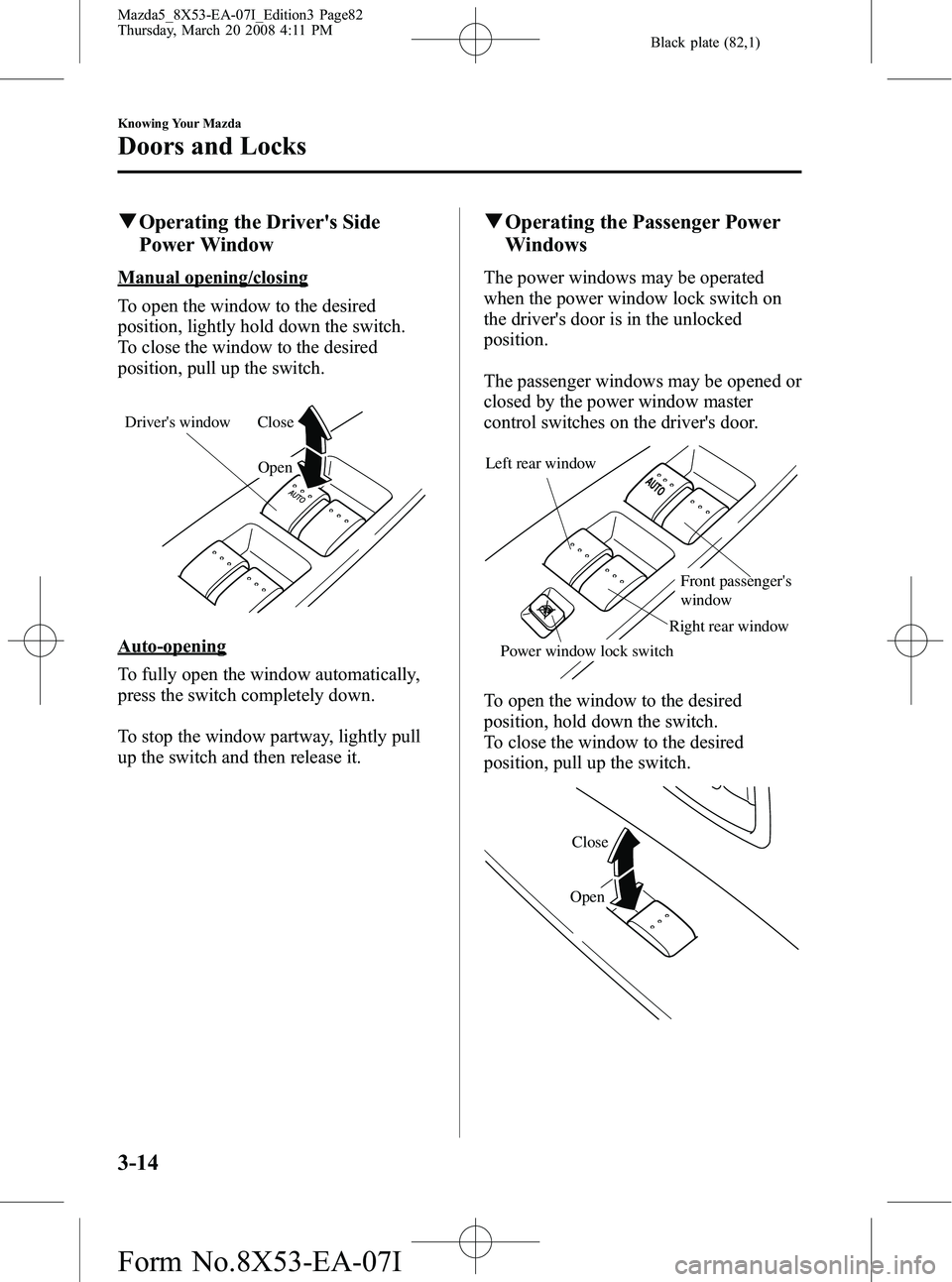
qOperating the Driver's Side
Power Window
Manual opening/closing
To open the window to the desired
position, lightly hold down the switch.
To close the window to the desired
position, pull up the switch.
Open
Close
Driver's window
Auto-opening
To fully open the window automatically,
press the switch completely down.
To stop the window partway, lightly pull
up the switch and then release it.
q Operating the Passenger Power
Windows
The power windows may be operated
when the power window lock switch on
the driver's door is in the unlocked
position.
The passenger windows may be opened or
closed by the power window master
control switches on the driver's door.
Left rear window
Power window lock switch Front passenger's
window
Right rear window
To open the window to the desired
position, hold down the switch.
To close the window to the desired
position, pull up the switch.
Close
Open
3-14
Knowing Your Mazda
Doors and Locks
Mazda5_8X53-EA-07I_Edition3 Page82
Thursday, March 20 2008 4:11 PM
Form No.8X53-EA-07I
Page 83 of 376

Black plate (83,1)
qPower Window Lock Switch
With the lock switch in the unlocked
position, all power windows on each door
can be operated.
With the lock switch in the locked
position, only the driver's side power
window can be operated.
Locked position
Unlocked position
WARNING
Unless a passenger needs to operate a
power window, keep the power window
lock switch in the locked position: Unintentional power window
operation is dangerous. A person's
hands, head, or neck could be caught
by the window and result in serious
injury.
Fuel-Filler Lid and Cap
WARNING
When removing the fuel cap, loosen the
cap slightly and wait for any hissing to
stop. Then remove it:Fuel spray is dangerous. Fuel can
burn skin and eyes and cause illness
if ingested. Fuel spray is released
when there is pressure in the fuel
tank and the fuel cap is removed too
quickly.
Before refueling, stop the engine, and
always keep sparks and flames away
from the filler neck: Fuel vapor is dangerous. It could be
ignited by sparks or flames causing
serious burns and injuries.
Additionally, use of the incorrect fuel
filler cap or not using a fuel filler cap
may result in fuel leak, which could
result in serious burns or death in an
accident.
CAUTION
Always use only a genuine Mazda
fuel cap or an approved equivalent,
available at an Authorized Mazda
Dealer. The wrong cap can result in a
serious malfunction of the fuel and
emission control systems. It may also
cause the check engine light in the
instrument cluster to illuminate.
Knowing Your Mazda
Doors and Locks
3-15
Mazda5_8X53-EA-07I_Edition3 Page83
Thursday, March 20 2008 4:11 PM
Form No.8X53-EA-07I
Page 84 of 376

Black plate (84,1)
qFuel-Filler Lid
To open, pull up the remote fuel-filler lid
release.
Remote fuel-filler
lid release
NOTE
The fuel-filler lid cannot be opened when the
right-side sliding door is open. Close the
sliding door to open the fuel-filler lid.
qFuel-Filler Cap
To remove the fuel-filler cap, turn it
counterclockwise.
To close the fuel-filler cap, turn it
clockwise until two or more clicks are
heard.
Open Close
CAUTION
Make sure the fuel-filler cap is
tightened securely. The check engine
light may illuminate when the cap
isn't tightened securely. If the light
remains on (even after you have
tightened the cap securely, driven,
and restarted the engine several
times), it may indicate a different
problem. Contact an Authorized
Mazda Dealer as soon as possible.
3-16
Knowing Your Mazda
Doors and Locks
Mazda5_8X53-EA-07I_Edition3 Page84
Thursday, March 20 2008 4:11 PM
Form No.8X53-EA-07I