warning MAZDA MODEL 5 2009 Owners Manual
[x] Cancel search | Manufacturer: MAZDA, Model Year: 2009, Model line: MODEL 5, Model: MAZDA MODEL 5 2009Pages: 376, PDF Size: 4.71 MB
Page 205 of 376

Black plate (205,1)
WARNING
Do not adjust the portable audio unit
or a similar product while driving the
vehicle:Adjusting the portable audio unit or
a similar product while driving the
vehicle is dangerous as it could
distract your attention from the
vehicle operation which could lead to
a serious accident. Always adjust the
portable audio unit or a similar
product while the vehicle is stopped.
Do not allow the connection plug cord
to get tangled with the parking brake
or the shift lever: Allowing the plug cord to become
tangled with the parking brake or
the shift lever is dangerous as it
could interfere with driving, resulting
in an accident.
CAUTION
ØClose the cover when the auxiliary
jack is not in use to prevent
foreign objects and liquids from
penetrating the auxiliary jack.
Ø Do not place objects or apply force
to the auxiliary jack with the plug
connected.
Ø Noise may occur during playback
if the accessory socket equipped
on the vehicle is used. (If noise
occurs, do not use the accessory
socket.) NOTE
lBefore using the auxiliary jack, read the
manufacturer's instructions for the product
being connected.
lUse a commercially-available, non-
impedance (3.5
) stereo mini plug for
connecting the portable audio unit to the
auxiliary jack. Before using the auxiliary
jack, read the manufacture's instructions
for connecting a portable audio unit to the
auxiliary jack.
lTo prevent discharging of the battery, do
not use the auxiliary input for long periods
with the engine off or idling.
lNoise may occur depending on the product
connected to the auxiliary jack.
lWith regard to connecting a portable audio
or similar device to a power source, use the
battery for the device, not the accessory
socket.
lInsert the plug to the auxiliary jack
securely.
lInsert or remove the plug with the plug
perpendicular to the auxiliary jack hole.
lInsert or remove the plug by holding its
base.
To operate the portable audio unit
1. Turn the ignition switch to the ACC or ON position.
2. Insert the connection plug into the auxiliary jack.
3. Press the power/volume dial to turn the audio system on.
Interior Comfort
Audio System
6-43
Mazda5_8Z98-EA-08F_Edition1 Page205
Friday, May 30 2008 9:26 AM
Form No.8Z98-EA-08F
Page 208 of 376
Black plate (208,1)
Bluetooth Hands-Freeí
qWhat is Bluetooth Hands-Free?
Bluetooth Hands-Free Outline
By connecting a Bluetooth equipped
mobile telephone to the hands-free unit
equipped on the vehicle, making and
receiving calls are possible using the
voice recognition/hands-free switch
located on the steering wheel, and saying
the voice commands.
WARNING
Perform phonebook registration related
operations while the vehicle is parked:
Performing phonebook registration
while driving the vehicle could be a
distraction to your driving and result
in an unexpected accident. In
addition, a mistake in performing the
phonebook operation could result in
the loss of important data.
Bluetooth equipped mobile telephone
A Bluetooth equipped mobile telephone
communicates with the hands-free unit
equipped on the vehicle using radio
transmission (Bluetooth).
For example, if the mobile telephone is
placed in a coat pocket, the phone calls
can be made through your mobile service
without direct use of the mobile
telephone.
CAUTION
The types of mobile phones which
can be connected to the hands-free
unit are limited, so before purchasing
or changing your mobile phone
model, consult an Authorized Mazda
Dealer.
Mobile phones which can be
connected to the hands-free system
need to be compliant with Bluetooth
specifications and the appropriate
profile, however, even among these
Bluetooth phones are some which
will not connect with your Mazda or
will have limited function. Therefore,
consult Mazda Bluetooth Hands-Free
Customer Service for information
regarding mobile phone
compatibility:
Phone: 800-430-0153
Web: www.MazdaUSA.com/
bluetooth
Applicable Bluetooth specification
Ver. 1.1 or higher
Response profile
lHFP (Hands Free Profile) Ver. 1.0lDUN (Dial-up Networking Profile)
Ver. 1.1
Bluetooth is the registered trademark of
Bluetooth SIG. Inc.
6-46
Interior Comfort
íSome models.
Bluetooth Hands-Free
Mazda5_8Z98-EA-08F_Edition1 Page208
Friday, May 30 2008 9:26 AM
Form No.8Z98-EA-08F
Page 225 of 376
Black plate (225,1)
Safety Certification
FCC ID: CB2MBLUEC07 IC:279B-
MBLUEC07
This device complies with Part 15 of the
FCC Rules and with RSS-210 of Industry
Canada. Operation is subject to the
following two conditions:
(1) This device may not cause harmfulinterference, and
(2) This device must accept any interference received, including
interference that may cause undesired
operation.
WARNING
Changes or modifications not
expressively approved by the party
responsible for compliance could void
the user's authority to operate the
equipment.
The term “IC: ”before the radio
certification number only signifies that
Industry Canada technical specifications
were met.
The antenna used for this transmitter must
not be co-located or operating in
conjunction with any other antenna or
transmitter. End-users and installers must
be provided with installation instructions
and transmitter operating conditions for
satisfying RF exposure compliance.
Mazda Bluetooth Hands-
Free Customer Service
For toll-free Bluetooth Hands-Free
customer service call 800-430-0153 or go
to www.MazdaUSA.com/bluetooth for
assistance.
Interior Comfort
Bluetooth Hands-Free
6-63
Mazda5_8Z98-EA-08F_Edition1 Page225
Friday, May 30 2008 9:26 AM
Form No.8Z98-EA-08F
Page 230 of 376

Black plate (230,1)
NOTElUnder the following conditions, the ambient
temperature display may differ from the
actual ambient temperature depending on
the surroundings and vehicle conditions:
lSignificantly cold or hot temperatures.lSudden changes in ambient temperature.lThe vehicle is parked.lThe vehicle is driven at low speeds.lPress the AMB switch a few seconds or
more to switch the display from Fahrenheit
to Centigrade or vice versa.
lPress the AMB switch again to switch the
display from ambient temperature to the
temperature set for the air conditioner.
qClimate Control Display (Fully
Automatic Type)
The climate control system status is
displayed. To operate the climate control
system, refer to “Climate Control System ”
(page 6-2).
q Audio Display
The audio system status is displayed. To
operate the audio system, refer to
“Audio System ”(page 6-18).
Cup Holder
WARNING
Never use a cup holder to hold hot
liquids while the vehicle is moving:
Using a cup holder to hold hot liquids
while the vehicle is moving is
dangerous. If the contents spill, you
could be scalded.
Do not put anything other than cups or
drink cans in cup holders: Putting objects other than cups or
drink cans in a cup holder is
dangerous.
During sudden braking or
maneuvering, occupants could be hit
and injured, or objects could be
thrown around the vehicle, causing
interference with the driver and the
possibility of an accident. Only use a
cup holder for cups or drink cans.
CAUTION
To reduce the possibility of injury in
an accident or a sudden stop, keep
cup holders closed when not in use.
6-68
Interior Comfort
Interior Equipment
Mazda5_8Z98-EA-08F_Edition1 Page230
Friday, May 30 2008 9:26 AM
Form No.8Z98-EA-08F
Page 233 of 376

Black plate (233,1)
Storage Compartments
WARNING
Keep storage boxes closed when
driving:Driving with the storage boxes open
is dangerous. To reduce the
possibility of injury in an accident or
a sudden stop, keep the storage
boxes closed when driving.
CAUTION
Do not leave lighters or eyeglasses in
the storage boxes while parked under
the sun. A lighter could explode or
the plastic material in eyeglasses
could deform and crack from high
temperature.
qGlove Box
To open the glove box, pull the latch
toward you.
Insert the key and turn it clockwise to
lock, counterclockwise to unlock.
Lock
Unlock
q
Center Console
To open, pull the left release latch.
Type A
Type B
Small items can be placed in the tray of
the center console lid.
To open it, pull the right release latch.
Interior Comfort
Interior Equipment
6-71
Mazda5_8Z98-EA-08F_Edition1 Page233
Friday, May 30 2008 9:26 AM
Form No.8Z98-EA-08F
Page 236 of 376

Black plate (236,1)
3. More items can be stowed if the coveris removed.
NOTE
The cover can be kept in the seatback pocket of
the driver's seat.
4. Carefully lower the seat bottom
backward until it locks in place.
Attempt to lift the seat bottom to make
sure it is firmly locked down.
To stow the storage box
1. Clean out the inside of the storage box,and then attach the cover to it.
2. Pull the strap and lift the seat bottom up and forward.
3. Make sure the underseat storage area is empty before storing it.
4. Carefully lower the seat bottom backward until it locks in place.
Attempt to lift the seat bottom to make
sure it is firmly locked down.
When folding the seatback of the right
second-row seat, make sure the storage
box is stowed. If the storage box is not
stowed, it could be damaged.
CAUTION
When returning the seat-bottom to
its upright position, make sure there
is no object lodged between the
seatback and the seat belt buckle. If
the seat-bottom is returned to its
upright position in this condition it
could damage the seat belt buckle. If
the seat belt buckle does not return
to its position after removing the
obstruction, move the buckle
rearward with your hand and then
lower the seat-bottom.
Buckle
q Cargo Securing Loops
WARNING
Make sure luggage and cargo is
secured before driving:
Not securing cargo while driving is
dangerous as it could move or be
crushed during sudden braking or a
collision and cause injury.
6-74
Interior Comfort
Interior Equipment
Mazda5_8Z98-EA-08F_Edition1 Page236
Friday, May 30 2008 9:26 AM
Form No.8Z98-EA-08F
Page 240 of 376

Black plate (240,1)
Parking in an Emergency
The hazard warning lights should always
be used when you stop on or near a
roadway in an emergency.
The hazard warning lights warn other
drivers that your vehicle is a traffic hazard
and that they must take extreme caution
when near it.
Depress the hazard warning flasher and all
the turn signals will flash.
NOTE
lThe turn signals do not work when the
hazard warning lights are on.
lCheck local regulations about the use of
hazard warning lights while the vehicle is
being towed to verify that it is not in
violation of the law.
7-2
In Case of an Emergency
Parking in an Emergency
Mazda5_8Z98-EA-08F_Edition1 Page240
Friday, May 30 2008 9:26 AM
Form No.8Z98-EA-08F
Page 243 of 376

Black plate (243,1)
qSpare Tire
The temporary spare tire is lighter and
smaller than a conventional tire, and is
designed only for emergency use and
should be used only for VERY short
periods. Temporary spare tires should
NEVER be used for long drives or
extended periods.
WARNING
Do not install the temporary spare tire
on the front wheels (driving wheels):
Driving with the temporary spare tire
on one of the front driving wheels is
dangerous. Handling will be affected.
You could lose control of the vehicle,
especially on ice or snow bound
roads, and have an accident. Move a
regular tire to the front wheel and
install the temporary spare tire to the
rear.
CAUTION
ØWhen using the temporary spare
tire, driving stability may decrease
compared to when using only the
conventional tire.
Drive carefully.
Ø To avoid damage to the temporary
spare tire or to the vehicle, observe
the following precautions:
ØDo not exceed 80 km/h (50
mph).
ØAvoid driving over obstacles.
Also, do not drive through an
automatic car wash. This tire's
diameter is smaller than a
conventional tire, so the ground
clearance is reduced about
25 mm (1 in).
ØDo not use a tire chain on this
tire because it won't fit
properly.
ØDo not use your temporary
spare tire on any other vehicle;
it has been designed only for
your Mazda.
ØUse only one temporary spare
tire on your vehicle at the same
time.
NOTE
(With Tire Pressure Monitoring System)
A tire pressure sensor is not installed to the
temporary spare tire. The warning light will
flash continuously while the temporary spare
tire is being used (page 5-24).
To remove the spare tire
1. Fold the third-row seat forward (page 2-9).
In Case of an Emergency
Flat Tire
7-5
Mazda5_8Z98-EA-08F_Edition1 Page243
Friday, May 30 2008 9:26 AM
Form No.8Z98-EA-08F
Page 245 of 376
Black plate (245,1)
Changing a Flat Tire
NOTE
If the following occurs while driving, it could
indicate a flat tire.
lSteering becomes difficult.lThe vehicle begins to vibrate excessively.lThe vehicle pulls in one direction.
If you have a flat tire, drive slowly to a
level spot that is well off the road and out
of the way of traffic to change the tire.
Stopping in traffic or on the shoulder of a
busy road is dangerous.
WARNING
Be sure to follow the directions for
changing a tire, and never get under a
vehicle that is supported only by a jack:Changing a tire is dangerous if not
done properly. The vehicle can slip off
the jack and seriously injure
someone.
Never allow anyone inside a vehicle
supported by a jack: Allowing someone to remain in a
vehicle supported by a jack is
dangerous. The occupant could cause
the vehicle to fall resulting in serious
injury.
CAUTION
(With Tire Pressure Monitoring
System)
The wheels equipped on your Mazda
are specially designed for installation
of the tire pressure sensors. Do not
use non-genuine wheels, otherwise it
may not be possible to install the tire
pressure sensors. NOTE
lMake sure the jack is well lubricated before
using it.
(With Tire Pressure Monitoring System)
lBe sure to register the tire pressure sensor
ID signal code whenever tires or wheels are
changed (page 5-26).
1. Park on a level surface off the right-of- way and firmly set the parking brake.
2. Put a vehicle with an automatic transaxle in Park (P), a manual
transaxle in Reverse (R) or 1, and turn
off the engine.
3. Turn on the hazard warning flasher.
4. Have everyone get out of the vehicle and away from the vehicle and traffic.
5. Remove the jack, tool, and spare tire (page 7-3).
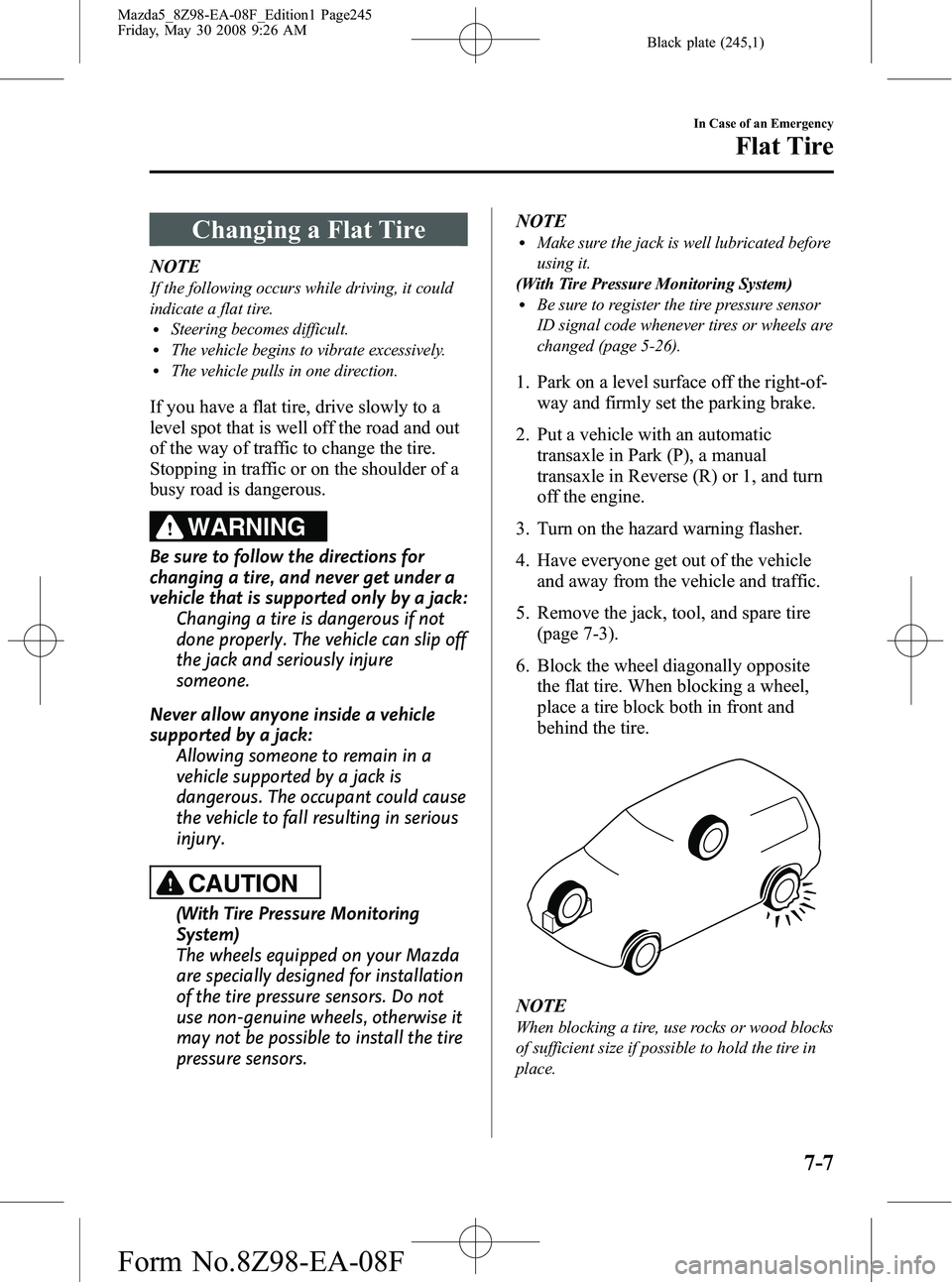
6. Block the wheel diagonally opposite the flat tire. When blocking a wheel,
place a tire block both in front and
behind the tire.
NOTE
When blocking a tire, use rocks or wood blocks
of sufficient size if possible to hold the tire in
place.
In Case of an Emergency
Flat Tire
7-7
Mazda5_8Z98-EA-08F_Edition1 Page245
Friday, May 30 2008 9:26 AM
Form No.8Z98-EA-08F
Page 246 of 376

Black plate (246,1)
qRemoving a Flat Tire
1. Loosen the lug nuts by turning them
counterclockwise one turn each, but
don't remove any lug nuts until the tire
has been raised off the ground.
2. Place the jack under the jacking
position closest to the tire being
changed.
Jacking position
WARNING
Use only the front and rear jacking
positions recommended in this manual: Attempting to jack the vehicle in
positions other than those
recommended in this manual is
dangerous. The vehicle could slip off
the jack and seriously injure or even
kill someone. Use only the front and
rear jacking positions recommended
in this manual.
Use only the jack provided with your
Mazda: Using a jack that is not designed for
your Mazda is dangerous. The vehicle
could slip off the jack and seriously
injure someone.
Never place objects under the jack: Jacking the vehicle with an object
under the jack is dangerous. The jack
could slip and someone could be
seriously injured by the jack or the
falling vehicle.
3. Insert the jack lever and attach the lug wrench to tire jack.
7-8
In Case of an Emergency
Flat Tire
Mazda5_8Z98-EA-08F_Edition1 Page246
Friday, May 30 2008 9:26 AM
Form No.8Z98-EA-08F