fan MAZDA MODEL 5 2009 User Guide
[x] Cancel search | Manufacturer: MAZDA, Model Year: 2009, Model line: MODEL 5, Model: MAZDA MODEL 5 2009Pages: 376, PDF Size: 4.71 MB
Page 174 of 376
Black plate (174,1)
qControl Switches
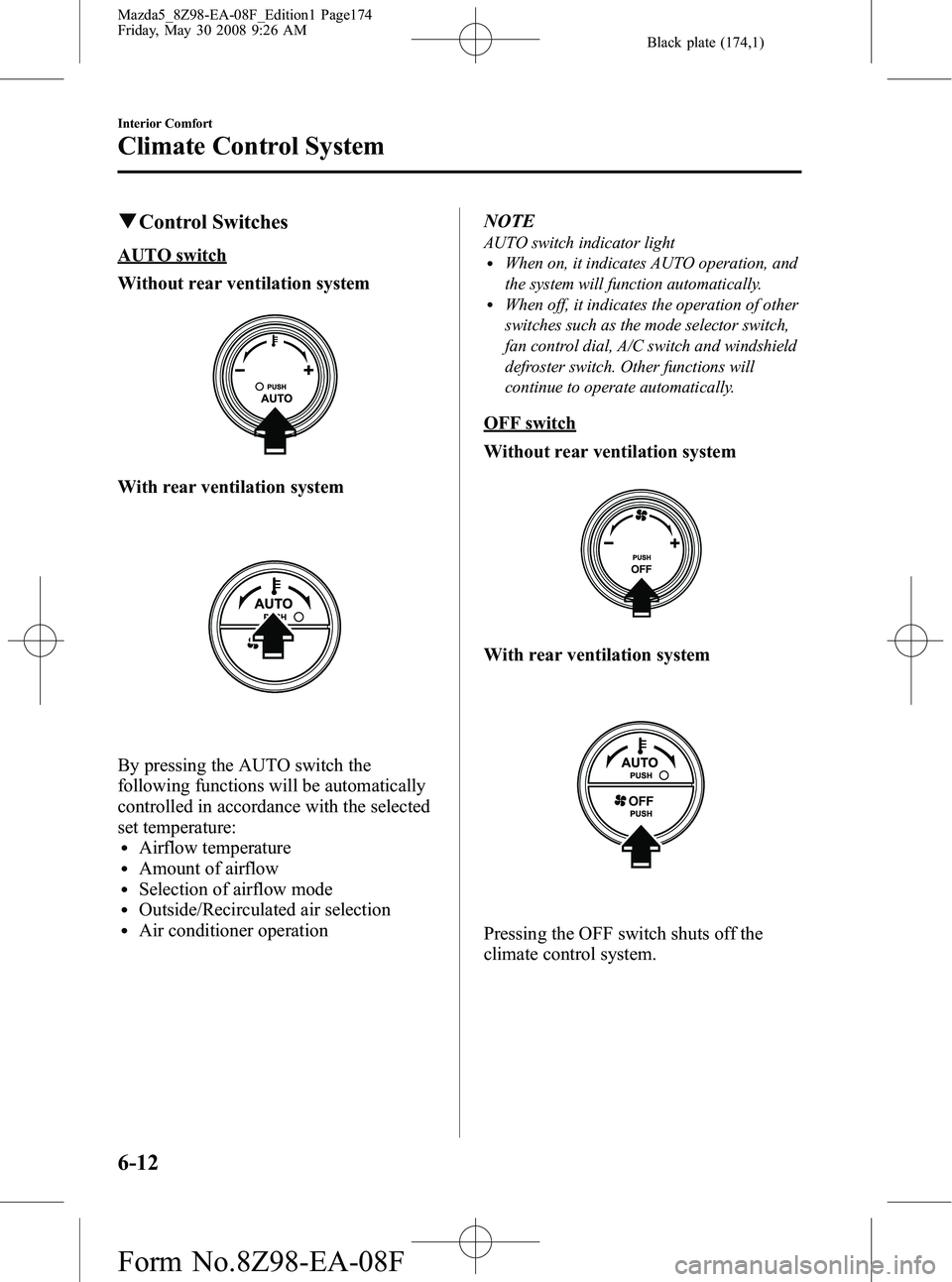
AUTO switch
Without rear ventilation system
With rear ventilation system
By pressing the AUTO switch the
following functions will be automatically
controlled in accordance with the selected
set temperature:
lAirflow temperaturelAmount of airflowlSelection of airflow modelOutside/Recirculated air selectionlAir conditioner operation NOTE
AUTO switch indicator lightlWhen on, it indicates AUTO operation, and
the system will function automatically.
lWhen off, it indicates the operation of other
switches such as the mode selector switch,
fan control dial, A/C switch and windshield
defroster switch. Other functions will
continue to operate automatically.
OFF switch
Without rear ventilation system
With rear ventilation system
Pressing the OFF switch shuts off the
climate control system.
6-12
Interior Comfort
Climate Control System
Mazda5_8Z98-EA-08F_Edition1 Page174
Friday, May 30 2008 9:26 AM
Form No.8Z98-EA-08F
Page 175 of 376

Black plate (175,1)
Temperature control dial
Without rear ventilation system
ColdHot
With rear ventilation system
ColdHot
This dial controls temperature.Turn it
clockwise for hot and counterclockwise
for cold.
Fan control dial
Without rear ventilation system
Slow
Fast
With rear ventilation system
Slow Fast
The fan has seven speeds. The selected
speed will be displayed.
Mode selector switch
The desired airflow mode can be selected
(page 6-4).
NOTE
lWith the airflow mode set toposition
and the temperature control dial set at a
medium temperature, heated air is directed
to the feet and a comparably lower air
temperature will flow through the central,
left and right vents.
lTo set the air vent to, press the
windshield defroster switch.
Interior Comfort
Climate Control System
6-13
Mazda5_8Z98-EA-08F_Edition1 Page175
Friday, May 30 2008 9:26 AM
Form No.8Z98-EA-08F
Page 176 of 376
Black plate (176,1)
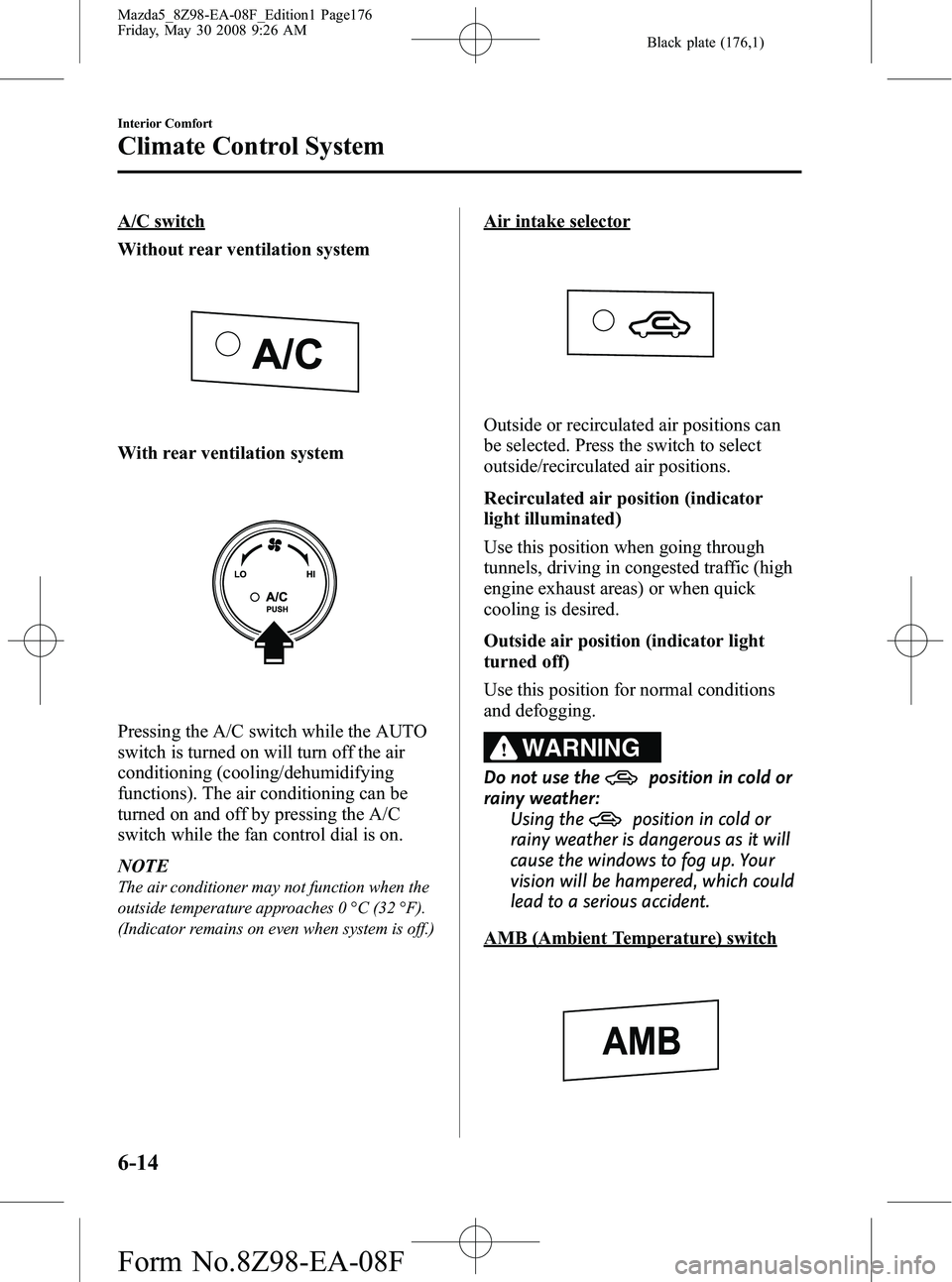
A/C switch
Without rear ventilation system
With rear ventilation system
Pressing the A/C switch while the AUTO
switch is turned on will turn off the air
conditioning (cooling/dehumidifying
functions). The air conditioning can be
turned on and off by pressing the A/C
switch while the fan control dial is on.
NOTE
The air conditioner may not function when the
outside temperature approaches 0 °C (32 °F).
(Indicator remains on even when system is off.)
Air intake selector
Outside or recirculated air positions can
be selected. Press the switch to select
outside/recirculated air positions.
Recirculated air position (indicator
light illuminated)
Use this position when going through
tunnels, driving in congested traffic (high
engine exhaust areas) or when quick
cooling is desired.
Outside air position (indicator light
turned off)
Use this position for normal conditions
and defogging.
WARNING
Do not use theposition in cold or
rainy weather:
Using the
position in cold or
rainy weather is dangerous as it will
cause the windows to fog up. Your
vision will be hampered, which could
lead to a serious accident.
AMB (Ambient Temperature) switch
6-14
Interior Comfort
Climate Control System
Mazda5_8Z98-EA-08F_Edition1 Page176
Friday, May 30 2008 9:26 AM
Form No.8Z98-EA-08F
Page 179 of 376
Black plate (179,1)
Rear Ventilation Systemí
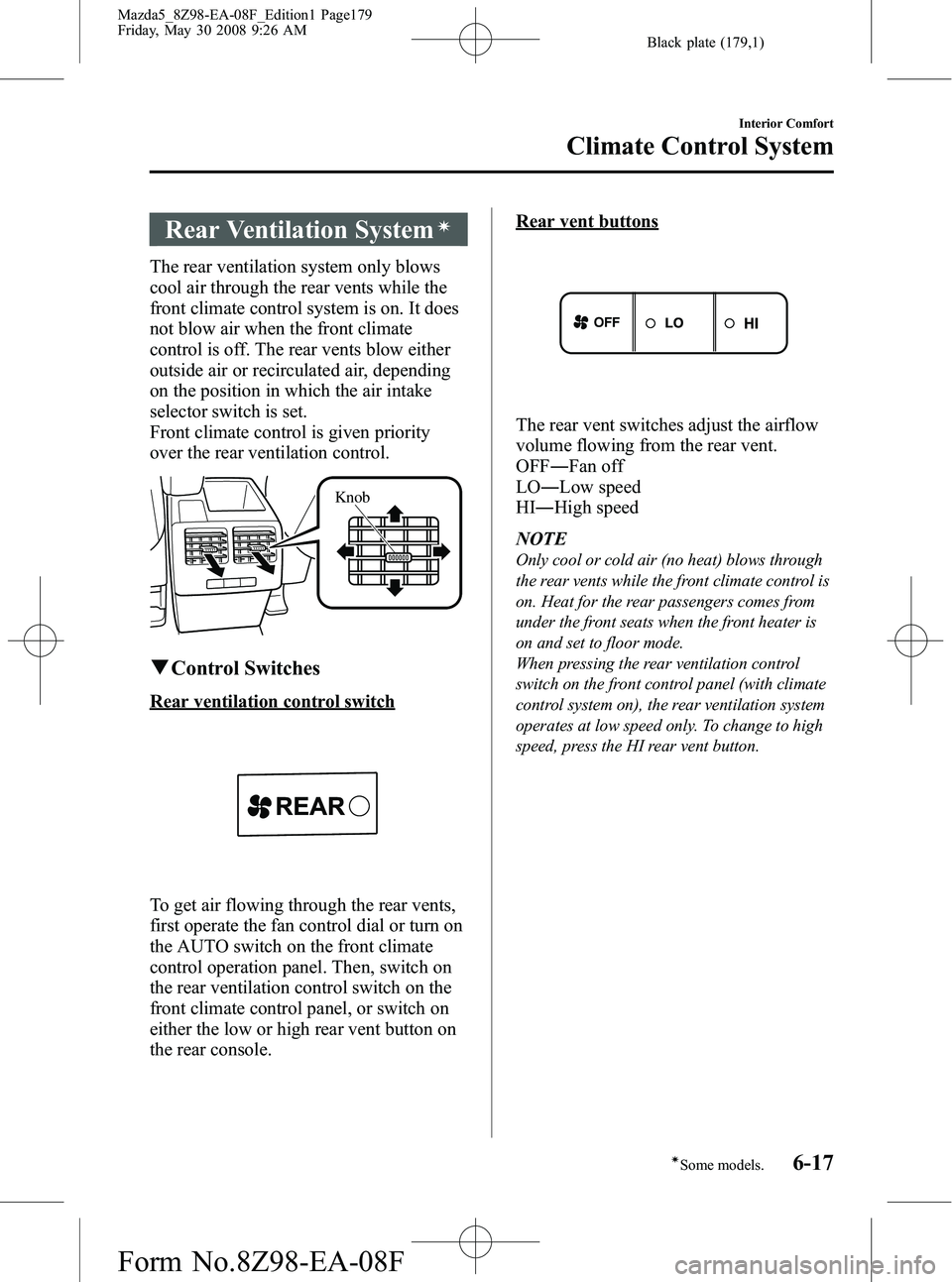
The rear ventilation system only blows
cool air through the rear vents while the
front climate control system is on. It does
not blow air when the front climate
control is off. The rear vents blow either
outside air or recirculated air, depending
on the position in which the air intake
selector switch is set.
Front climate control is given priority
over the rear ventilation control.
Knob
qControl Switches
Rear ventilation control switch
To get air flowing through the rear vents,
first operate the fan control dial or turn on
the AUTO switch on the front climate
control operation panel. Then, switch on
the rear ventilation control switch on the
front climate control panel, or switch on
either the low or high rear vent button on
the rear console.
Rear vent buttons
The rear vent switches adjust the airflow
volume flowing from the rear vent.
OFF ―Fan off
LO ―Low speed
HI ―High speed
NOTE
Only cool or cold air (no heat) blows through
the rear vents while the front climate control is
on. Heat for the rear passengers comes from
under the front seats when the front heater is
on and set to floor mode.
When pressing the rear ventilation control
switch on the front control panel (with climate
control system on), the rear ventilation system
operates at low speed only. To change to high
speed, press the HI rear vent button.
Interior Comfort
Climate Control System
6-17íSome models.
Mazda5_8Z98-EA-08F_Edition1 Page179
Friday, May 30 2008 9:26 AM
Form No.8Z98-EA-08F
Page 251 of 376
Black plate (251,1)
Overheating
If the temperature gauge indicates
overheating, the vehicle loses power, or
you hear a loud knocking or pinging
noise, the engine is probably too hot.
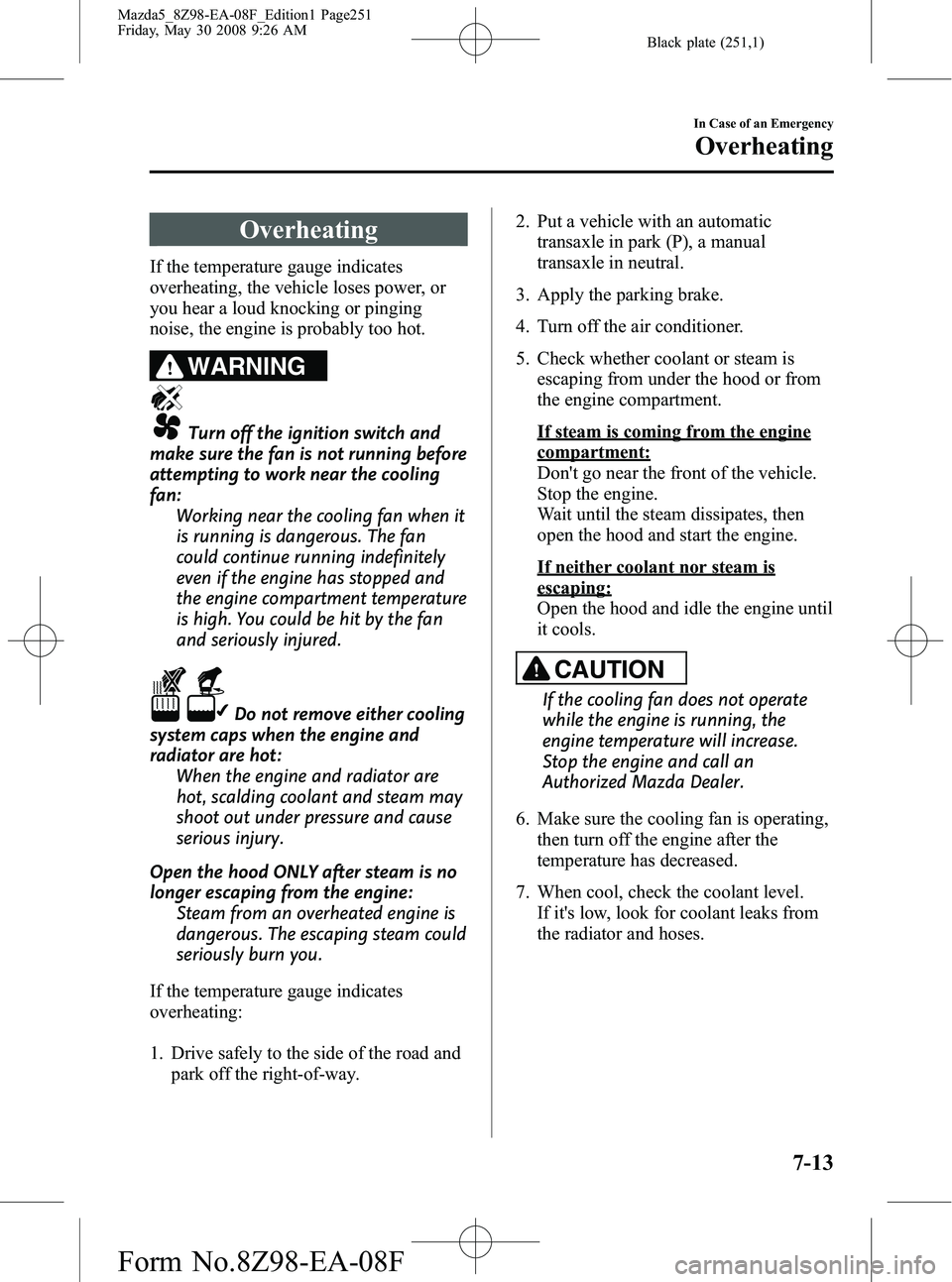
WARNING
Turn off the ignition switch and
make sure the fan is not running before
attempting to work near the cooling
fan: Working near the cooling fan when it
is running is dangerous. The fan
could continue running indefinitely
even if the engine has stopped and
the engine compartment temperature
is high. You could be hit by the fan
and seriously injured.
Do not remove either cooling
system caps when the engine and
radiator are hot: When the engine and radiator are
hot, scalding coolant and steam may
shoot out under pressure and cause
serious injury.
Open the hood ONLY after steam is no
longer escaping from the engine: Steam from an overheated engine is
dangerous. The escaping steam could
seriously burn you.
If the temperature gauge indicates
overheating:
1. Drive safely to the side of the road and park off the right-of-way. 2. Put a vehicle with an automatic
transaxle in park (P), a manual
transaxle in neutral.
3. Apply the parking brake.
4. Turn off the air conditioner.
5. Check whether coolant or steam is escaping from under the hood or from
the engine compartment.
If steam is coming from the engine
compartment:
Don't go near the front of the vehicle.
Stop the engine.
Wait until the steam dissipates, then
open the hood and start the engine.
If neither coolant nor steam is
escaping:
Open the hood and idle the engine until
it cools.
CAUTION
If the cooling fan does not operate
while the engine is running, the
engine temperature will increase.
Stop the engine and call an
Authorized Mazda Dealer.
6. Make sure the cooling fan is operating, then turn off the engine after the
temperature has decreased.
7. When cool, check the coolant level. If it's low, look for coolant leaks from
the radiator and hoses.
In Case of an Emergency
Overheating
7-13
Mazda5_8Z98-EA-08F_Edition1 Page251
Friday, May 30 2008 9:26 AM
Form No.8Z98-EA-08F
Page 252 of 376
Black plate (252,1)
If you find a leak or other damage, or if
coolant is still leaking:
Stop the engine and call an Authorized
Mazda Dealer.
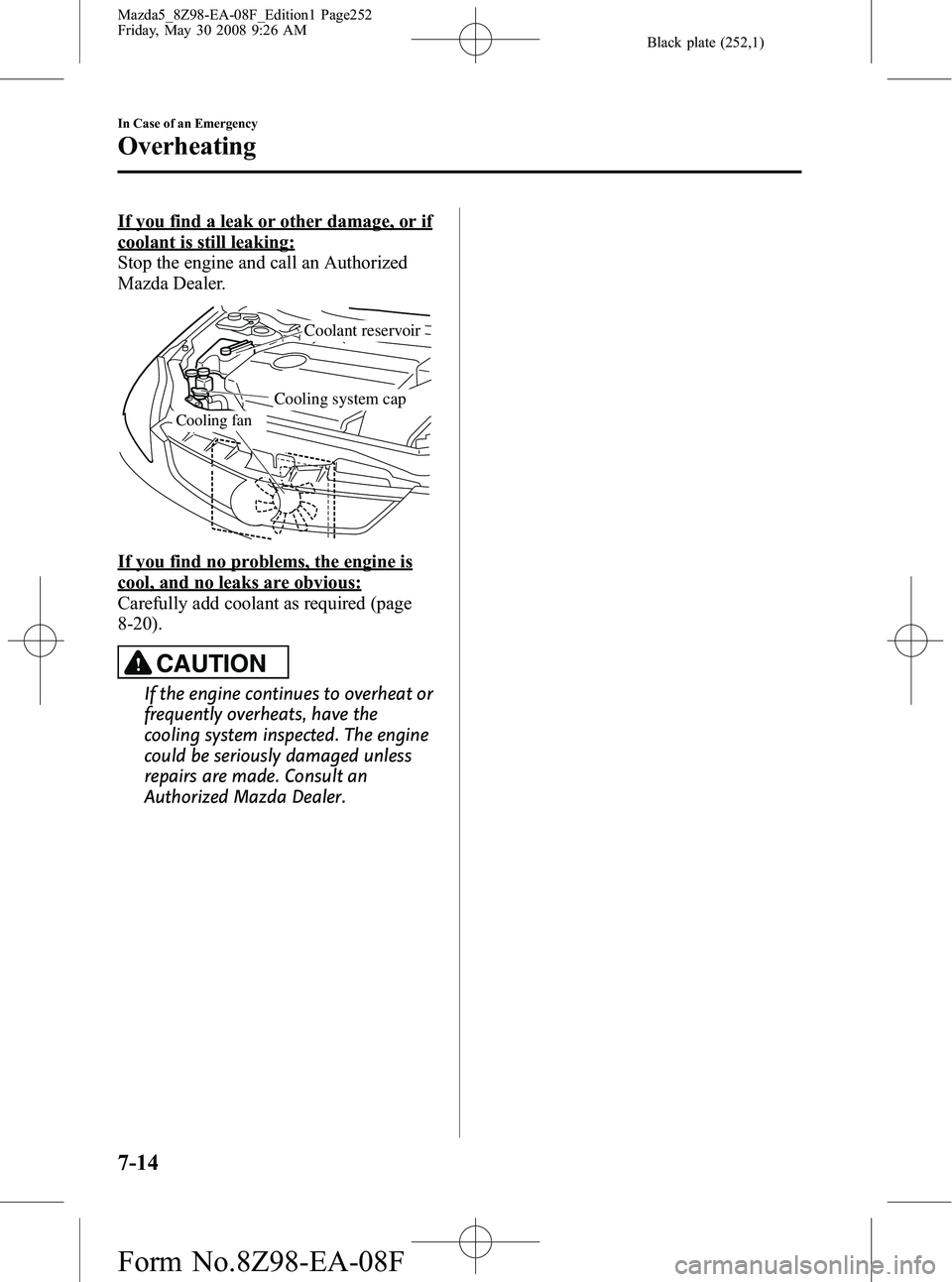
Cooling fan
Coolant reservoir
Cooling system cap
If you find no problems, the engine is
cool, and no leaks are obvious:
Carefully add coolant as required (page
8-20).
CAUTION
If the engine continues to overheat or
frequently overheats, have the
cooling system inspected. The engine
could be seriously damaged unless
repairs are made. Consult an
Authorized Mazda Dealer.
7-14
In Case of an Emergency
Overheating
Mazda5_8Z98-EA-08F_Edition1 Page252
Friday, May 30 2008 9:26 AM
Form No.8Z98-EA-08F
Page 255 of 376
Black plate (255,1)
Keep all flames, including cigarettes, and sparks away from open battery cells:
Flames and sparks near open battery cells are dangerous. Hydrogen gas, produced
during normal battery operation, could ignite and cause the battery to explode. An
exploding battery can cause serious burns and injuries.
Do not jump-start a frozen battery or one with a low fluid level: Jump-starting a frozen battery or one with a low fluid level is dangerous. It may
rupture or explode, causing serious injury.
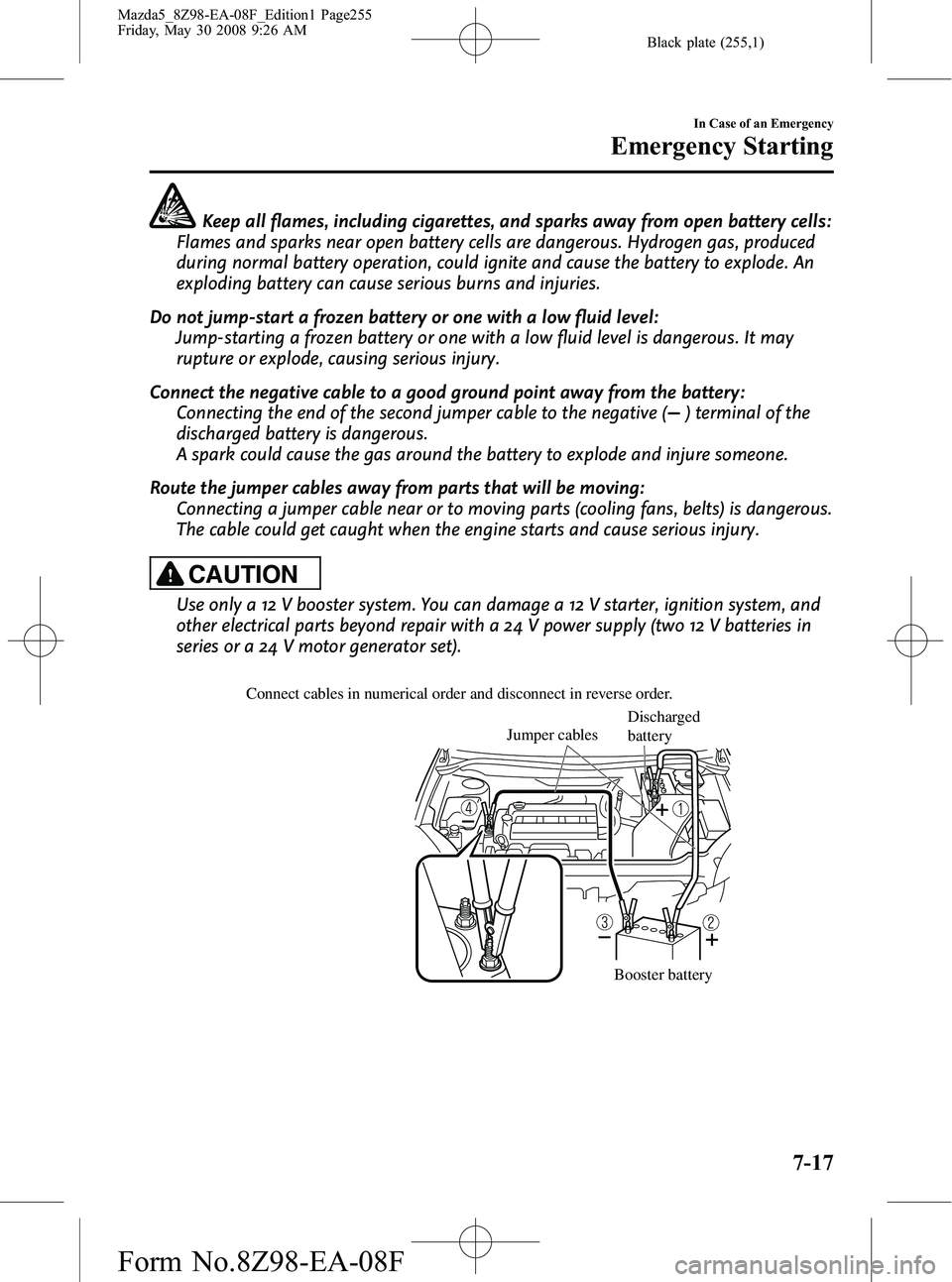
Connect the negative cable to a good ground point away from the battery: Connecting the end of the second jumper cable to the negative (
) terminal of the
discharged battery is dangerous.
A spark could cause the gas around the battery to explode and injure someone.
Route the jumper cables away from parts that will be moving: Connecting a jumper cable near or to moving parts (cooling fans, belts) is dangerous.
The cable could get caught when the engine starts and cause serious injury.
CAUTION
Use only a 12 V booster system. You can damage a 12 V starter, ignition system, and
other electrical parts beyond repair with a 24 V power supply (two 12 V batteries in
series or a 24 V motor generator set).
Connect cables in numerical order and disconnect in reverse order.
Jumper cables
Booster battery
Discharged
battery
In Case of an Emergency
Emergency Starting
7-17
Mazda5_8Z98-EA-08F_Edition1 Page255
Friday, May 30 2008 9:26 AM
Form No.8Z98-EA-08F
Page 278 of 376
Black plate (278,1)
Owner Maintenance Precautions
Improper or incomplete service may result in problems. This section gives instructions only
for items that are easy to perform.
As explained in the Introduction (page 8-2), several procedures can be done only by a
qualified service technician with special tools.
Improper owner maintenance during the warranty period may affect warranty coverage.
For details, read the separate Mazda Warranty statement provided with the vehicle. If
you're unsure about any servicing or maintenance procedure, have it done by an
Authorized Mazda Dealer.
There are strict environmental laws regarding the disposal of waste oil and fluids. Please
dispose of your waste properly and with due regard to the environment.
We recommend that you entrust the oil and fluid changes of your vehicle to an Authorized
Mazda Dealer.
WARNING
Do not perform maintenance work if you lack sufficient knowledge and experience or
the proper tools and equipment to do the work. Have maintenance work done by a
qualified technician:Performing maintenance work on a vehicle is dangerous if not done properly. You
can be seriously injured while performing some maintenance procedures.
If you must run the engine while working under the hood, make certain that you
remove all jewelry (especially rings, bracelets, watches, and necklaces) and all
neckties, scarves, and similar loose clothing before getting near the engine or cooling
fan which may turn on unexpectedly: Working under the hood with the engine running is dangerous. It becomes even
more dangerous when you wear jewelry or loose clothing.
Either can become entangled in moving parts and result in injury.
Turn off the ignition switch and make sure the fan is not running before attempting
to work near the cooling fan: Working near the cooling fan when it is running is dangerous. The fan could
continue running indefinitely even if the engine has stopped and the engine
compartment temperature is high. You could be hit by the fan and seriously injured.
Do not leave items in the engine compartment: After you have finished checking or doing servicing in the engine compartment, do
not forget and leave items such as tools or rags in the engine compartment.
Tools or other items left in the engine compartment could cause engine damage or a
fire leading to an unexpected accident.
8-16
Maintenance and Care
Owner Maintenance
Mazda5_8Z98-EA-08F_Edition1 Page278
Friday, May 30 2008 9:27 AM
Form No.8Z98-EA-08F
Page 282 of 376
Black plate (282,1)
Engine Coolant
qInspecting Coolant Level
WARNING
Do not use a match or live flame in the
engine compartment. DO NOT ADD
COOLANT WHEN THE ENGINE IS HOT:
A hot engine is dangerous. If the
engine has been running, parts of the
engine compartment can become
very hot. You could be burned.
Carefully inspect the engine coolant
in the coolant reservoir, but do not
open it.
Turn off the ignition switch and
make sure the fan is not running before
attempting to work near the cooling
fan: Working near the cooling fan when it
is running is dangerous. The fan
could continue running indefinitely
even if the engine has stopped and
the engine compartment temperature
is high. You could be hit by the fan
and seriously injured.
Do not remove either cooling
system cap when the engine and
radiator are hot: When the engine and radiator are
hot, scalding coolant and steam may
shoot out under pressure and cause
serious injury.
NOTE
Changing the coolant should be done by an
Authorized Mazda Dealer.
Inspect the antifreeze protection and
coolant level in the coolant reservoir at
least once a year ―at the beginning of the
winter season ―and before traveling
where temperatures may drop below
freezing.
Inspect the condition and connections of
all cooling system and heater hoses.
Replace any that are swollen or
deteriorated.
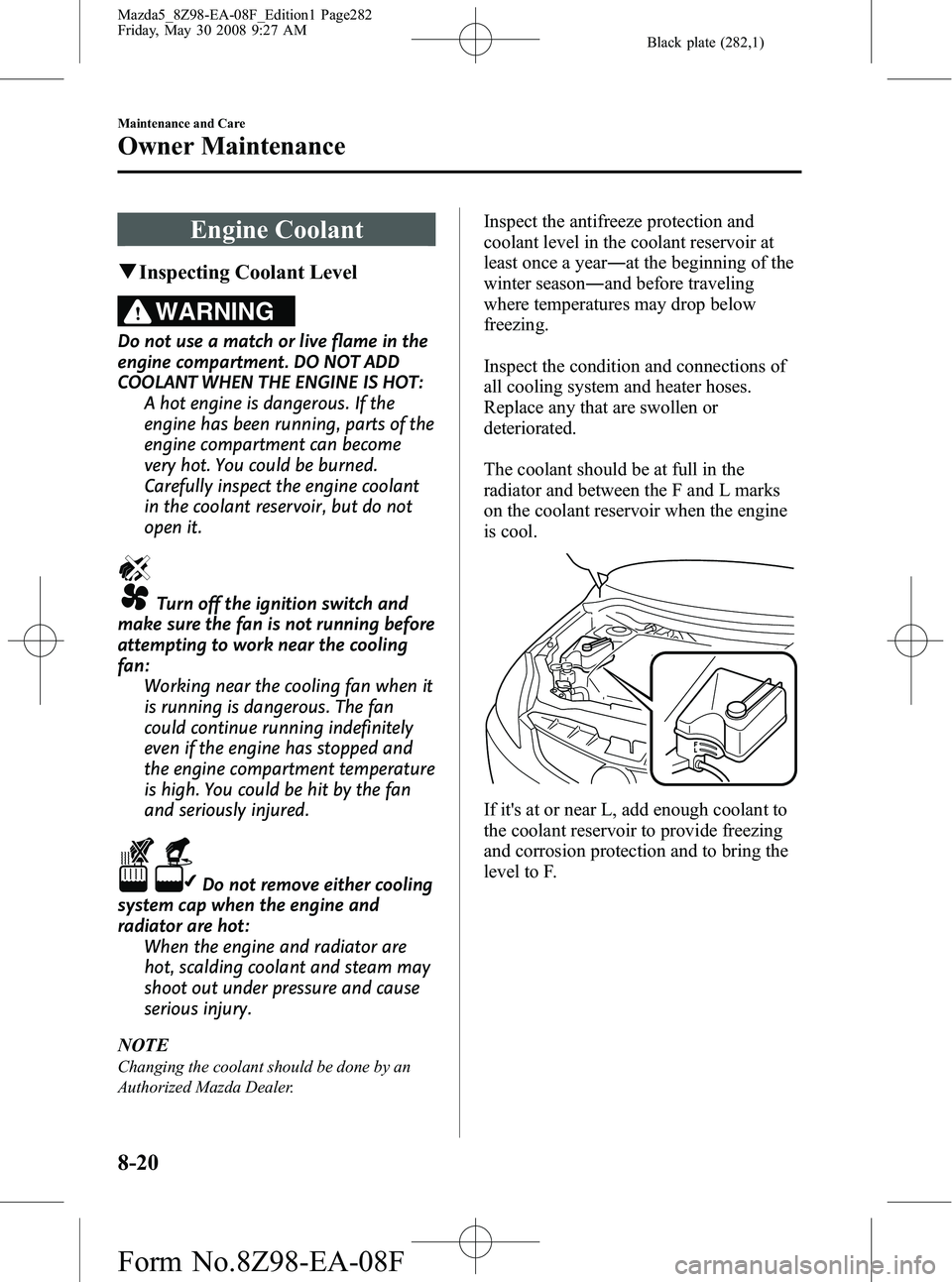
The coolant should be at full in the
radiator and between the F and L marks
on the coolant reservoir when the engine
is cool.
If it's at or near L, add enough coolant to
the coolant reservoir to provide freezing
and corrosion protection and to bring the
level to F.
8-20
Maintenance and Care
Owner Maintenance
Mazda5_8Z98-EA-08F_Edition1 Page282
Friday, May 30 2008 9:27 AM
Form No.8Z98-EA-08F
Page 307 of 376
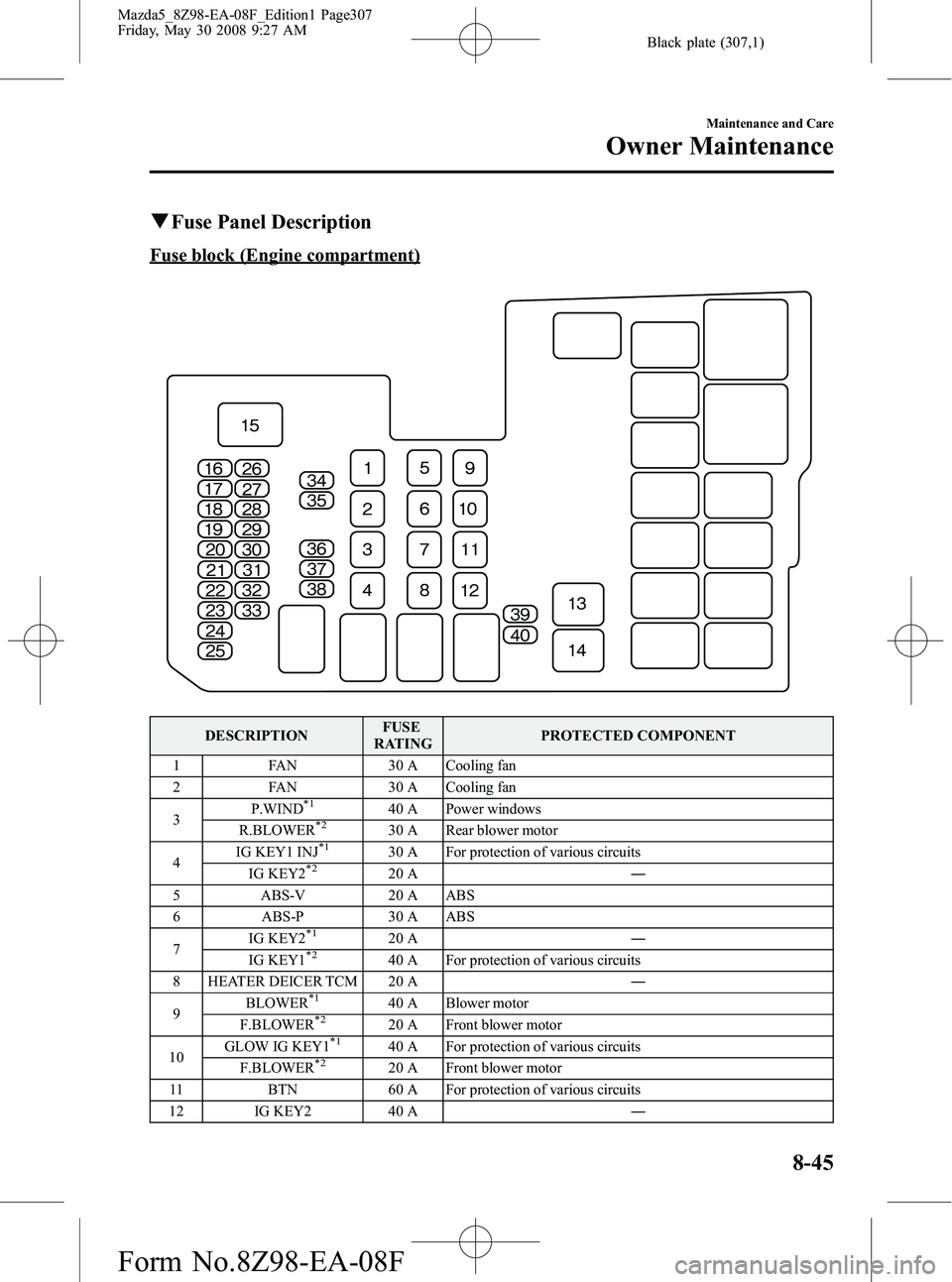
Black plate (307,1)
qFuse Panel Description
Fuse block (Engine compartment)
DESCRIPTION FUSE
RATING PROTECTED COMPONENT
1 FAN 30 A Cooling fan
2 FAN 30 A Cooling fan
3 P.WIND
*140 A Power windows
R.BLOWER*230 A Rear blower motor
4 IG KEY1 INJ*130 A For protection of various circuits
IG KEY2*220 A ―
5 ABS-V 20 A ABS
6 ABS-P 30 A ABS
7 IG KEY2
*120 A
―
IG KEY1*240 A For protection of various circuits
8 HEATER DEICER TCM 20 A ―
9 BLOWER
*140 A Blower motor
F.BLOWER*220 A Front blower motor
10 GLOW IG KEY1*140 A For protection of various circuits
F.BLOWER*220 A Front blower motor
11 BTN 60 A For protection of various circuits
12 IG KEY2 40 A ―
Maintenance and Care
Owner Maintenance
8-45
Mazda5_8Z98-EA-08F_Edition1 Page307
Friday, May 30 2008 9:27 AM
Form No.8Z98-EA-08F