warning MAZDA MODEL 5 2010 Owners Manual
[x] Cancel search | Manufacturer: MAZDA, Model Year: 2010, Model line: MODEL 5, Model: MAZDA MODEL 5 2010Pages: 392, PDF Size: 4.81 MB
Page 181 of 392

Black plate (181,1)
A/C switch
Without rear ventilation system
With rear ventilation system
Pressing the A/C switch while the AUTO
switch is turned on will turn off the air
conditioning (cooling/dehumidifying
functions). The air conditioning can be
turned on and off by pressing the A/C
switch while the fan control dial is on.
NOTE
The air conditioner may not function when the
outside temperature approaches 0 °C (32 °F).
(Indicator remains on even when system is off.)
Air intake selector
Outside or recirculated air positions can
be selected. Press the switch to select
outside/recirculated air positions.
Recirculated air position (indicator
light illuminated)
Use this position when going through
tunnels, driving in congested traffic (high
engine exhaust areas) or when quick
cooling is desired.
Outside air position (indicator light
turned off)
Use this position for normal conditions
and defogging.
WARNING
Do not use theposition in cold or
rainy weather:
Using the
position in cold or
rainy weather is dangerous as it will
cause the windows to fog up. Your
vision will be hampered, which could
lead to a serious accident.
AMB (Ambient Temperature) switch
Interior Comfort
Climate Control System
6-13
Mazda5_8AU7-EA-09H_Edition4 Page181
Tuesday, March 30 2010 1:10 PM
Form No.8AU7-EA-09H
Page 183 of 392
Black plate (183,1)
NOTElSetting the temperature to maximum high
or low will not provide the desired
temperature at a faster rate.
lWhen selecting heat, the system will restrict
airflow until it has warmed to prevent cold
air from blowing out of the vents.
qWindshield Defrosting and Defogging
Press the windshield defroster switch.
In this position, the outside air position is
automatically selected, and the air
conditioner automatically turns on. The
air conditioner will directly dehumidify
the air to the front windshield and side
windows (page 6-4). Airflow amount will
be increased.
WARNING
Set the temperature control to the hot
or warm position when defogging (
position):Using the
position with the
temperature control set to the cold
position is dangerous as it will cause
the outside of the windshield to fog
up. Your vision will be hampered,
which could lead to a serious
accident. NOTE
Use the temperature control dial to increase
the air flow temperature and defog the
windshield more quickly.
q
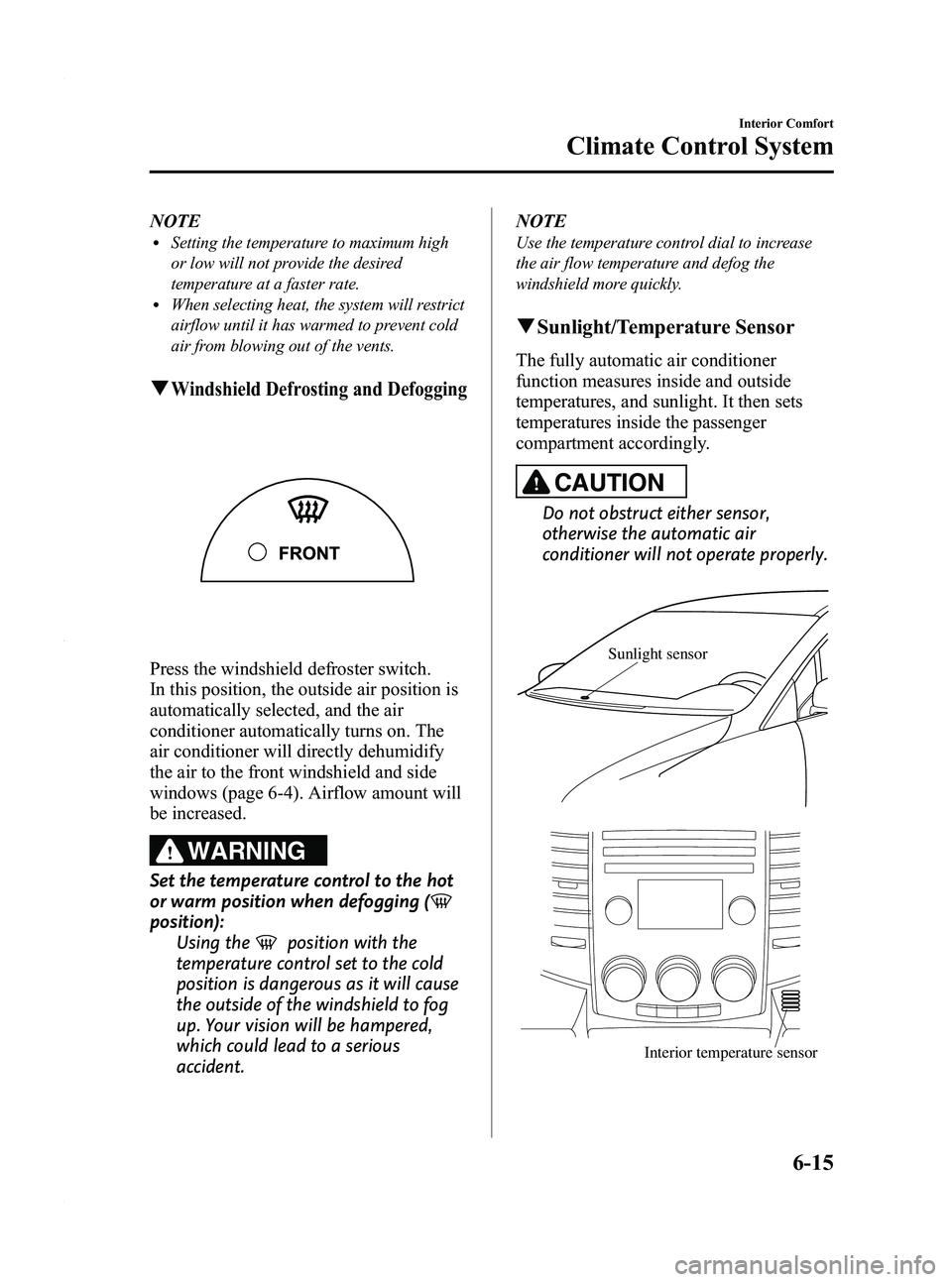
Sunlight/Temperature Sensor
The fully automatic air conditioner
function measures inside and outside
temperatures, and sunlight. It then sets
temperatures inside the passenger
compartment accordingly.
CAUTION
Do not obstruct either sensor,
otherwise the automatic air
conditioner will not operate properly.
Sunlight sensor
Interior temperature sensor
Interior Comfort
Climate Control System
6-15
Mazda5_8AU7-EA-09H_Edition4 Page183
Tuesday, March 30 2010 1:10 PM
Form No.8AU7-EA-09H
Page 185 of 392
Black plate (185,1)
Antenna
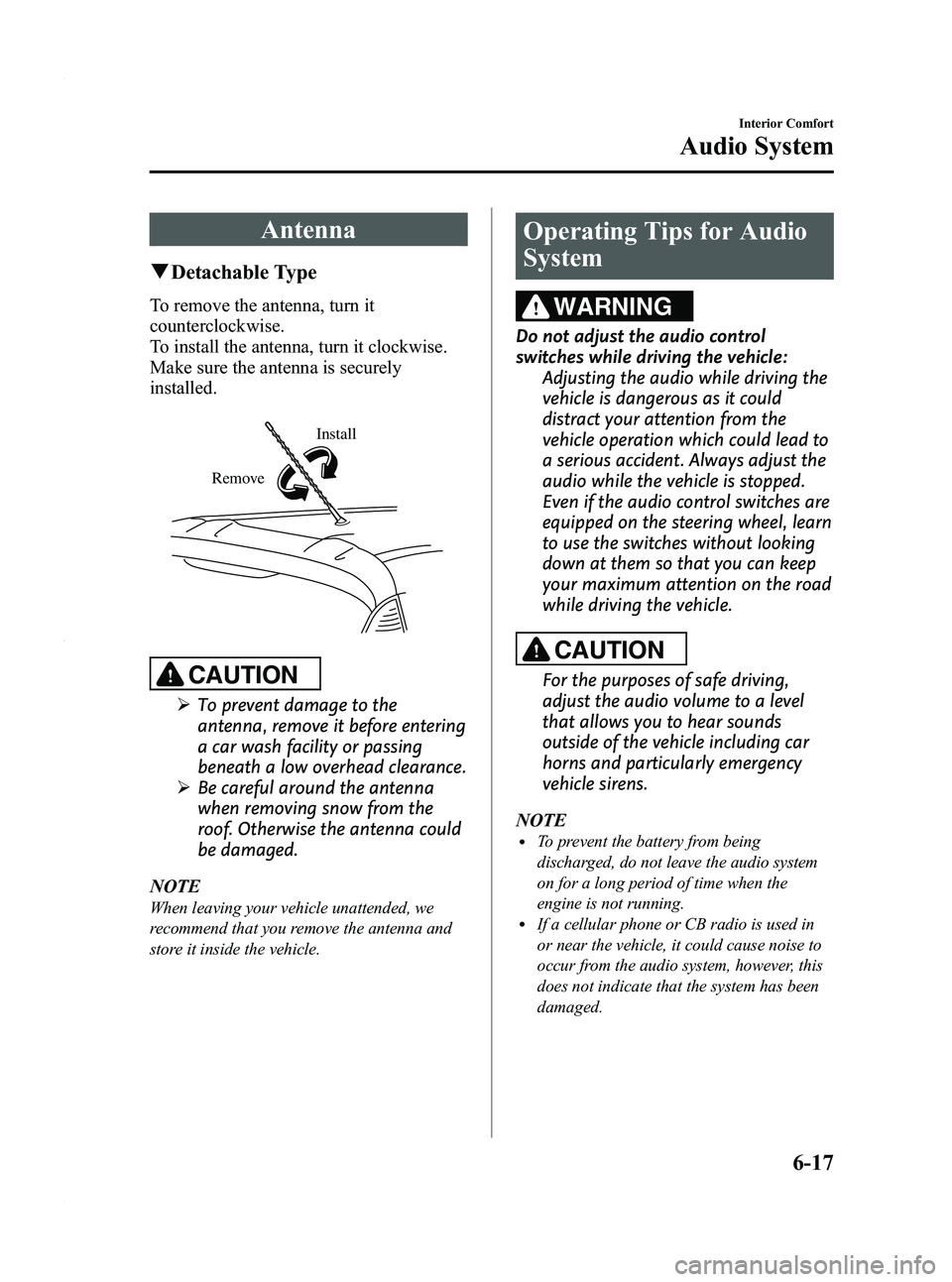
qDetachable Type
To remove the antenna, turn it
counterclockwise.
To install the antenna, turn it clockwise.
Make sure the antenna is securely
installed.
Install
Remove
CAUTION
Ø To prevent damage to the
antenna, remove it before entering
a car wash facility or passing
beneath a low overhead clearance.
Ø Be careful around the antenna
when removing snow from the
roof. Otherwise the antenna could
be damaged.
NOTE
When leaving your vehicle unattended, we
recommend that you remove the antenna and
store it inside the vehicle.
Operating Tips for Audio
System
WARNING
Do not adjust the audio control
switches while driving the vehicle: Adjusting the audio while driving the
vehicle is dangerous as it could
distract your attention from the
vehicle operation which could lead to
a serious accident. Always adjust the
audio while the vehicle is stopped.
Even if the audio control switches are
equipped on the steering wheel, learn
to use the switches without looking
down at them so that you can keep
your maximum attention on the road
while driving the vehicle.
CAUTION
For the purposes of safe driving,
adjust the audio volume to a level
that allows you to hear sounds
outside of the vehicle including car
horns and particularly emergency
vehicle sirens.
NOTE
lTo prevent the battery from being
discharged, do not leave the audio system
on for a long period of time when the
engine is not running.
lIf a cellular phone or CB radio is used in
or near the vehicle, it could cause noise to
occur from the audio system, however, this
does not indicate that the system has been
damaged.
Interior Comfort
Audio System
6-17
Mazda5_8AU7-EA-09H_Edition4 Page185
Tuesday, March 30 2010 1:10 PM
Form No.8AU7-EA-09H
Page 209 of 392

Black plate (209,1)
WARNING
Do not adjust the portable audio unit
or a similar product while driving the
vehicle:Adjusting the portable audio unit or
a similar product while driving the
vehicle is dangerous as it could
distract your attention from the
vehicle operation which could lead to
a serious accident. Always adjust the
portable audio unit or a similar
product while the vehicle is stopped.
Do not allow the connection plug cord
to get tangled with the parking brake
or the shift lever: Allowing the plug cord to become
tangled with the parking brake or
the shift lever is dangerous as it
could interfere with driving, resulting
in an accident.
CAUTION
ØClose the cover when the auxiliary
jack is not in use to prevent
foreign objects and liquids from
penetrating the auxiliary jack.
Ø Do not place objects or apply force
to the auxiliary jack with the plug
connected.
Ø Noise may occur during playback
if the accessory socket equipped
on the vehicle is used. (If noise
occurs, do not use the accessory
socket.) NOTE
lBefore using the auxiliary jack, read the
manufacturer's instructions for the product
being connected.
lUse a commercially-available, non-
impedance (3.5
) stereo mini plug for
connecting the portable audio unit to the
auxiliary jack. Before using the auxiliary
jack, read the manufacture's instructions
for connecting a portable audio unit to the
auxiliary jack.
lTo prevent discharging of the battery, do
not use the auxiliary input for long periods
with the engine off or idling.
lNoise may occur depending on the product
connected to the auxiliary jack.
lWith regard to connecting a portable audio
or similar device to a power source, use the
battery for the device, not the accessory
socket.
lInsert the plug to the auxiliary jack
securely.
lInsert or remove the plug with the plug
perpendicular to the auxiliary jack hole.
lInsert or remove the plug by holding its
base.
To listen to a portable audio unit
1. Turn the ignition switch to the ACC or ON position.
2. Insert the connection plug into the auxiliary jack.
3. Press the power/volume dial to turn the audio system on.
Interior Comfort
Audio System
6-41
Mazda5_8AU7-EA-09H_Edition4 Page209
Tuesday, March 30 2010 1:11 PM
Form No.8AU7-EA-09H
Page 212 of 392
Black plate (212,1)
Bluetooth Hands-Freeí
qWhat is Bluetooth Hands-Free?
Bluetooth Hands-Free Outline
By connecting a Bluetooth equipped
mobile telephone to the hands-free unit
equipped on the vehicle, making and
receiving calls are possible using the
voice recognition/hands-free switch
located on the steering wheel, and saying
the voice commands.
WARNING
Perform phonebook registration related
operations while the vehicle is parked:
Performing phonebook registration
while driving the vehicle could be a
distraction to your driving and result
in an unexpected accident. In
addition, a mistake in performing the
phonebook operation could result in
the loss of important data.
Bluetooth equipped mobile telephone
A Bluetooth equipped mobile telephone
communicates with the hands-free unit
equipped on the vehicle using radio
transmission (Bluetooth).
For example, if the mobile telephone is
placed in a coat pocket, the phone calls
can be made through your mobile service
without taking out and handling the
mobile telephone.
CAUTION
The types of mobile phones which
can be connected to the hands-free
unit are limited. Therefore, before
purchasing or changing your mobile
phone model, consult Mazda
Bluetooth Hands-Free Customer
Service or visit www.MazdaUSA.com/
bluetooth for a complete list of
compatible phones.
Mobile phones which can be
connected to the hands-free system
need to be compliant with Bluetooth
specifications and the appropriate
profile. However, even among these
Bluetooth phones are some which
will not connect with your Mazda or
will have limited function. Therefore,
consult Mazda Bluetooth Hands-Free
Customer Service for information
regarding mobile phone
compatibility:
Phone: 800-430-0153
Web: www.MazdaUSA.com/
bluetooth
Applicable Bluetooth specification
Ver. 1.1 or higher
Response profile
lHFP (Hands Free Profile) Ver. 1.0lDUN (Dial-up Networking Profile)
Ver. 1.1
Bluetooth is the registered trademark of
Bluetooth SIG. Inc.
6-44
Interior Comfort
íSome models.
Bluetooth Hands-Free
Mazda5_8AU7-EA-09H_Edition4 Page212
Tuesday, March 30 2010 1:11 PM
Form No.8AU7-EA-09H
Page 231 of 392

Black plate (231,1)
When Bluetooth Hands-
Free cannot be used
Bluetooth Hands-Free cannot be used
under the following conditions:
lThe mobile telephone is outside of the
communication area.
lThe mobile telephone has a
malfunction.
lThe mobile telephone is not connected
to the hands-free unit equipped on the
vehicle.
lThe mobile telephone battery is weak.lThe mobile telephone is turned off.lThe mobile telephone is placed where
radio reception is difficult.
Safety Certification
FCC ID: CB2MBLUEC07 IC:279B-
MBLUEC07
This device complies with Part 15 of the
FCC Rules and with RSS-210 of Industry
Canada. Operation is subject to the
following two conditions:
(1) This device may not cause harmfulinterference, and
(2) This device must accept any interference received, including
interference that may cause undesired
operation.
WARNING
Changes or modifications not
expressively approved by the party
responsible for compliance could void
the user's authority to operate the
equipment.
The term “IC: ”before the radio
certification number only signifies that
Industry Canada technical specifications
were met.
The antenna used for this transmitter must
not be co-located or operating in
conjunction with any other antenna or
transmitter. End-users and installers must
be provided with installation instructions
and transmitter operating conditions for
satisfying RF exposure compliance.
Interior Comfort
Bluetooth Hands-Free
6-63
Mazda5_8AU7-EA-09H_Edition4 Page231
Tuesday, March 30 2010 1:11 PM
Form No.8AU7-EA-09H
Page 237 of 392

Black plate (237,1)
NOTElUnder the following conditions, the ambient
temperature display may differ from the
actual ambient temperature depending on
the surroundings and vehicle conditions:
lSignificantly cold or hot temperatures.lSudden changes in ambient temperature.lThe vehicle is parked.lThe vehicle is driven at low speeds.lPress the AMB switch for a few seconds or
more to switch the display from Fahrenheit
to Centigrade or vice versa.
lPress the AMB switch again to switch the
display from ambient temperature to the
temperature set for the air conditioner.
qClimate Control Display (Fully
Automatic Type)
The climate control system status is
displayed. To operate the climate control
system, refer to “Climate Control System ”
(page 6-2).
q Audio Display
The audio system status is displayed. To
operate the audio system, refer to
“Audio System ”(page 6-17).
Cup Holder
WARNING
Never use a cup holder to hold hot
liquids while the vehicle is moving:
Using a cup holder to hold hot liquids
while the vehicle is moving is
dangerous. If the contents spill, you
could be scalded.
Do not put anything other than cups or
drink cans in cup holders: Putting objects other than cups or
drink cans in a cup holder is
dangerous.
During sudden braking or
maneuvering, occupants could be hit
and injured, or objects could be
thrown around the vehicle, causing
interference with the driver and the
possibility of an accident. Only use a
cup holder for cups or drink cans.
CAUTION
To reduce the possibility of injury in
an accident or a sudden stop, keep
cup holders closed when not in use.
Interior Comfort
Interior Equipment
6-69
Mazda5_8AU7-EA-09H_Edition4 Page237
Tuesday, March 30 2010 1:11 PM
Form No.8AU7-EA-09H
Page 240 of 392

Black plate (240,1)
Storage Compartments
WARNING
Keep storage boxes closed when
driving:Driving with the storage boxes open
is dangerous. To reduce the
possibility of injury in an accident or
a sudden stop, keep the storage
boxes closed when driving.
CAUTION
Do not leave lighters or eyeglasses in
the storage boxes while parked under
the sun. A lighter could explode or
the plastic material in eyeglasses
could deform and crack from high
temperature.
qGlove Box
To open the glove box, pull the latch
toward you.
Insert the key and turn it clockwise to
lock, counterclockwise to unlock.
Lock
Unlock
q
Center Console
To open, pull the left release latch.
Type A
Type B
Small items can be placed in the tray of
the center console lid.
To open it, pull the right release latch.
6-72
Interior Comfort
Interior Equipment
Mazda5_8AU7-EA-09H_Edition4 Page240
Tuesday, March 30 2010 1:11 PM
Form No.8AU7-EA-09H
Page 243 of 392

Black plate (243,1)
3. More items can be stowed if the coveris removed.
NOTE
The cover can be kept in the seatback pocket of
the driver's seat.
4. Carefully lower the seat bottom
backward until it locks in place.
Attempt to lift the seat bottom to make
sure it is firmly locked down.
To stow the storage box
1. Clean out the inside of the storage box,and then attach the cover to it.
2. Pull the strap and lift the seat bottom up and forward.
3. Make sure the underseat storage area is empty before storing it.
4. Carefully lower the seat bottom backward until it locks in place.
Attempt to lift the seat bottom to make
sure it is firmly locked down.
When folding the seatback of the right
second-row seat, make sure the storage
box is stowed. If the storage box is not
stowed, it could be damaged.
CAUTION
When returning the seat-bottom to
its upright position, make sure there
is no object lodged between the
seatback and the seat belt buckle. If
the seat-bottom is returned to its
upright position in this condition it
could damage the seat belt buckle. If
the seat belt buckle does not return
to its position after removing the
obstruction, move the buckle
rearward with your hand and then
lower the seat-bottom.
Buckle
q Cargo Securing Loops
WARNING
Make sure luggage and cargo is
secured before driving:
Not securing cargo while driving is
dangerous as it could move or be
crushed during sudden braking or a
collision and cause injury.
Interior Comfort
Interior Equipment
6-75
Mazda5_8AU7-EA-09H_Edition4 Page243
Tuesday, March 30 2010 1:11 PM
Form No.8AU7-EA-09H
Page 244 of 392

Black plate (244,1)
Use the loops in the luggage compartment
to secure cargo with a rope or net. The
tensile strength of the loops is 196 N (20
kgf, 44 lbf). Do not apply excessive force
to the loops as it will damage them.
Third-row seat
qCargo Sub-Compartment
Lift the cover.
Trunk board
Cargo sub-
compartment
qRear Coat Hooks
WARNING
Never hang heavy or sharp objects on
the assist grips and coat hooks:
Hanging heavy or sharp-ended
objects such as a coat hanger from
the assist grips or coat hooks is
dangerous as they can fly off and hit
an occupant in the cabin if a curtain
air bag was to deploy, which could
result in serious injury or death.
Always hang clothes on the coat hooks
and the assist grips without hangers.
Coat hook
6-76
Interior Comfort
Interior Equipment
Mazda5_8AU7-EA-09H_Edition4 Page244
Tuesday, March 30 2010 1:11 PM
Form No.8AU7-EA-09H