battery MAZDA MODEL 5 2010 User Guide
[x] Cancel search | Manufacturer: MAZDA, Model Year: 2010, Model line: MODEL 5, Model: MAZDA MODEL 5 2010Pages: 392, PDF Size: 4.81 MB
Page 117 of 392

Black plate (117,1)
If the ABS warning light stays on while
you're driving, the ABS control unit has
detected a system malfunction. If this
occurs, your brakes will function normally
as if the vehicle had no ABS.
Should this happen, consult an Authorized
Mazda Dealer as soon as possible.
NOTE
When the engine is jump-started to charge the
battery, uneven rpm occurs and the ABS
warning light may illuminate. If this occurs, it
is the result of the weak battery and does not
indicate an ABS malfunction.
Recharge the battery.
qElectronic Brake Force
Distribution System Warning
If the electronic brake force distribution
control unit determines that some
components are operating incorrectly, the
control unit may illuminate the brake
system warning light and the ABS
warning light on simultaneously. The
problem is likely to be the electronic
brake force distribution system.
WARNING
Do not drive with both the ABS warning
light and brake warning light
illuminated. Have the vehicle towed to
an Authorized Mazda Dealer to have
the brakes inspected as soon as
possible:
Driving when the brake system
warning light and ABS warning light
are illuminated simultaneously is
dangerous.
When both lights are illuminated, the
rear wheels could lock more quickly
in an emergency stop than under
normal circumstances.
qBrake Assist
During emergency braking situations
when it is necessary to depress the brake
pedal with greater force, the brake assist
system provides braking assistance, thus
enhancing braking performance.
When the brake pedal is depressed hard or
depressed more quickly, the brakes apply
more firmly.
NOTE
lWhen the brake pedal is depressed hard or
depressed more quickly, the pedal will feel
softer but the brakes will apply more firmly.
This is a normal effect of the brake assist
operation and does not indicate an
abnormality.
lWhen the brake pedal is depressed hard or
depressed more quickly, a clicking noise
from the brake booster may be heard. This
is a normal effect of the brake assist and
does not indicate an abnormality.
lThe brake assist equipment does not
supersede the functionality of the vehicle's
main braking system.
Driving Your Mazda
Starting and Driving
5-9
Mazda5_8AU7-EA-09H_Edition4 Page117
Tuesday, March 30 2010 1:10 PM
Form No.8AU7-EA-09H
Page 142 of 392
Black plate (142,1)
For instance, trip meter A can record the
distance from the point of origin, and trip
meter B can record the distance from
where the fuel tank is filled.
When trip meter A is selected, pressing
the selector again within one second will
change to trip meter B mode.
When trip meter A is selected, TRIP A
will be displayed. When trip meter B is
selected, TRIP B will be displayed.
The trip meter records the total distance
the vehicle is driven until the meter is
again reset. Return it to“0.0 ”by holding
the selector depressed for 1 second or
more. Use this meter to measure trip
distances and to compute fuel
consumption.
NOTE
lOnly the trip meters record tenths of
kilometers (miles).
lThe trip record will be erased when:lThe power supply is interrupted (blown
fuse or the battery is disconnected).
lThe vehicle is driven over 999.9 km
(mile).
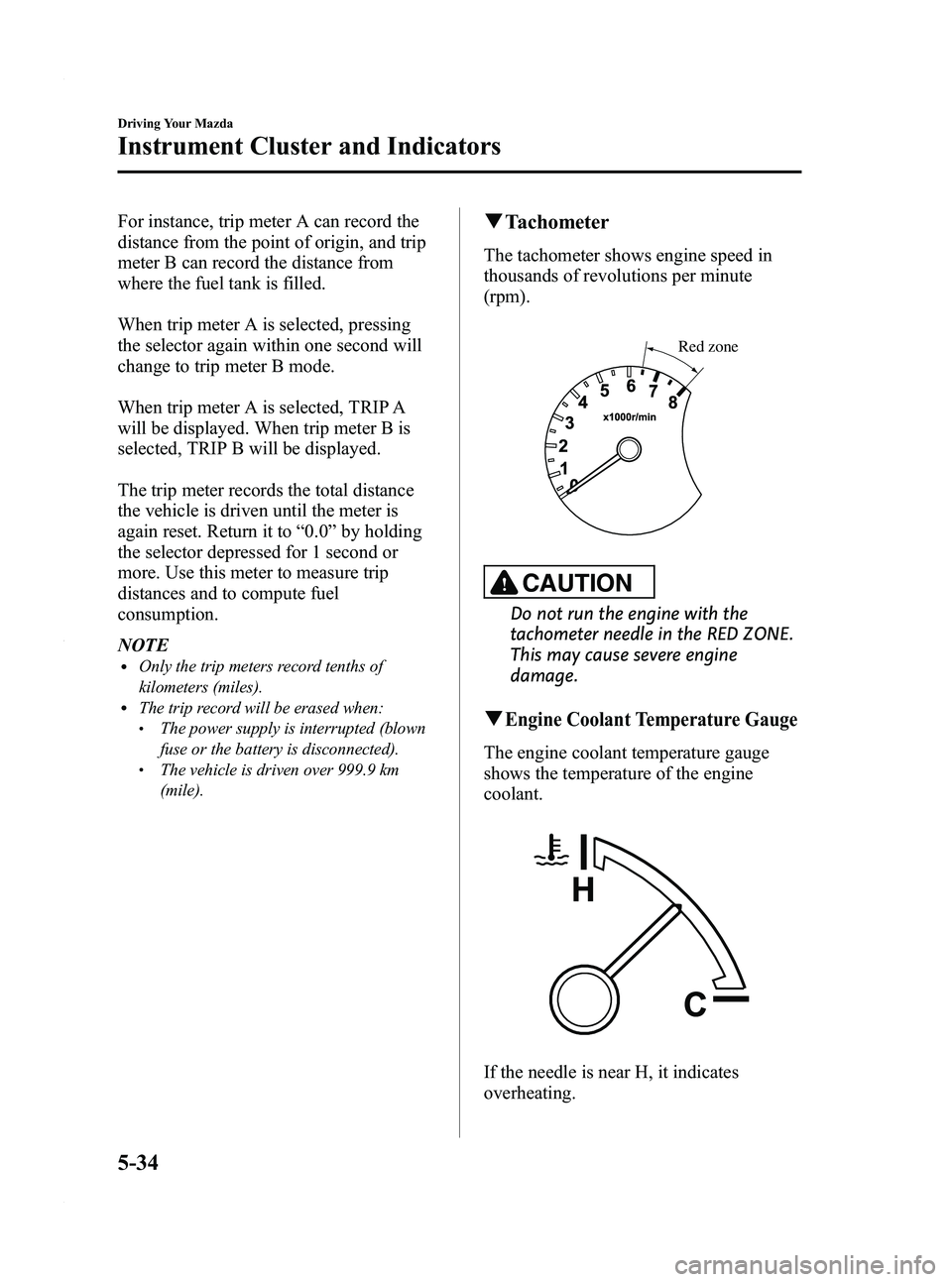
q Tachometer
The tachometer shows engine speed in
thousands of revolutions per minute
(rpm).
Red zone
CAUTION
Do not run the engine with the
tachometer needle in the RED ZONE.
This may cause severe engine
damage.
qEngine Coolant Temperature Gauge
The engine coolant temperature gauge
shows the temperature of the engine
coolant.
If the needle is near H, it indicates
overheating.
5-34
Driving Your Mazda
Instrument Cluster and Indicators
Mazda5_8AU7-EA-09H_Edition4 Page142
Tuesday, March 30 2010 1:10 PM
Form No.8AU7-EA-09H
Page 148 of 392

Black plate (148,1)
NOTE
When the engine is jump-started to charge the
battery, uneven rpm occurs and the ABS
warning light may illuminate. If this occurs, it
is the result of the weak battery and does not
indicate an ABS malfunction.
Recharge the battery.
qElectronic Brake Force
Distribution System Warning
If the electronic brake force distribution
control unit determines that some
components are operating incorrectly, the
control unit may illuminate the brake
system warning light and the ABS
warning light on simultaneously. The
problem is likely to be the electronic
brake force distribution system.
WARNING
Do not drive with both the ABS warning
light and brake warning light
illuminated. Have the vehicle towed to
an Authorized Mazda Dealer to have
the brakes inspected as soon as
possible:
Driving when the brake system
warning light and ABS warning light
are illuminated simultaneously is
dangerous.
When both lights are illuminated, the
rear wheels could lock more quickly
in an emergency stop than under
normal circumstances.
qCharging System Warning Light
This warning light illuminates when the
ignition switch is turned to the ON
position and turns off when the engine is
started.
If the warning light illuminates while
driving, it indicates a malfunction of the
alternator or of the charging system.
Drive to the side of the road and park off
the right-of-way. Consult an Authorized
Mazda Dealer.
CAUTION
Do not continue driving when the
charging system warning light is
illuminated because the engine could
stop unexpectedly.
qEngine Oil Pressure Warning Light
This warning light illuminates when the
ignition switch is turned to the ON
position and turns off when the engine is
started.
This warning light indicates low engine
oil pressure.
5-40
Driving Your Mazda
Warning/Indicator Lights and Beep Sounds
Mazda5_8AU7-EA-09H_Edition4 Page148
Tuesday, March 30 2010 1:10 PM
Form No.8AU7-EA-09H
Page 158 of 392
Black plate (158,1)
Lighting Control
qHeadlights
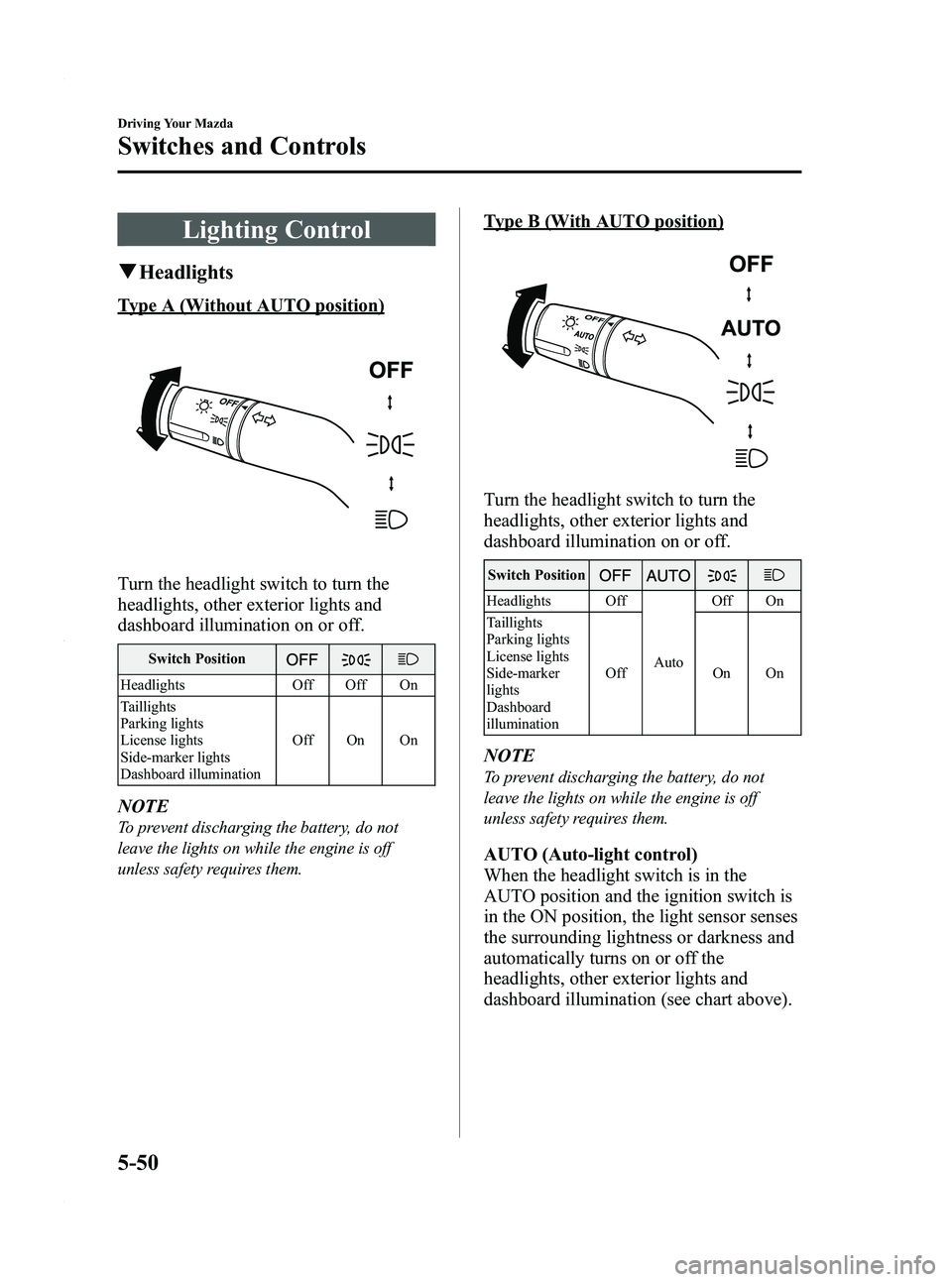
Type A (Without AUTO position)
Turn the headlight switch to turn the
headlights, other exterior lights and
dashboard illumination on or off.
Switch Position
Headlights Off Off On
Taillights
Parking lights
License lights
Side-marker lights
Dashboard illumination Off On On
NOTE
To prevent discharging the battery, do not
leave the lights on while the engine is off
unless safety requires them.
Type B (With AUTO position)
Turn the headlight switch to turn the
headlights, other exterior lights and
dashboard illumination on or off.
Switch Position
Headlights Off
AutoOff On
Taillights
Parking lights
License lights
Side-marker
lights
Dashboard
illumination Off On On
NOTE
To prevent discharging the battery, do not
leave the lights on while the engine is off
unless safety requires them.
AUTO (Auto-light control)
When the headlight switch is in the
AUTO position and the ignition switch is
in the ON position, the light sensor senses
the surrounding lightness or darkness and
automatically turns on or off the
headlights, other exterior lights and
dashboard illumination (see chart above).
5-50
Driving Your Mazda
Switches and Controls
Mazda5_8AU7-EA-09H_Edition4 Page158
Tuesday, March 30 2010 1:10 PM
Form No.8AU7-EA-09H
Page 170 of 392
Black plate (170,1)
Operating Tips
qOperating the Climate Control
System
Operate the climate control system with
the engine running.
NOTE
To prevent the battery from being discharged,
do not leave the fan control dial on for a long
period of time with the ignition switch in the
ON position when the engine is not running.
qClearing the Air Inlet
Clear all obstructions such as leaves,
snow and ice from the hood and the air
inlet in the cowl grille to improve the
system efficiency.
qFoggy Windows
The windows may fog up easily in humid
weather. Use the climate control system to
defog the windows.
To help defog the windows, operate the
air conditioner to dehumidify the air.
NOTE
The air conditioner may be used along with the
heater to dehumidify the air.
qParking in Direct Sunlight
If the vehicle has been parked in direct
sunlight during hot weather, open the
windows to let warm air escape, then run
the climate control system.
qNot Using for a Long Period
Run the air conditioner about 10 minutes
at least once a month to keep internal
parts lubricated.
qCheck the Refrigerant before the
Weather Gets Hot
Have the air conditioner checked before
the weather gets hot. Lack of refrigerant
may make the air conditioner less
efficient. Consult an Authorized Mazda
Dealer for refrigerant inspection.
The air conditioner is filled with
HFC134a (R134a), a refrigerant that will
not damage the ozone layer.
If the air conditioner is low on refrigerant
or has a malfunction, consult an
Authorized Mazda Dealer.
qReplacement of the Cabin Air Filter
If your vehicle is equipped with an air
filter for the air conditioner, it is necessary
to change the filter periodically as
indicated in scheduled maintenance (page
8-3). Consult an Authorized Mazda
Dealer for replacement of the cabin air
filter.
6-2
Interior Comfort
Climate Control System
Mazda5_8AU7-EA-09H_Edition4 Page170
Tuesday, March 30 2010 1:10 PM
Form No.8AU7-EA-09H
Page 185 of 392
Black plate (185,1)
Antenna
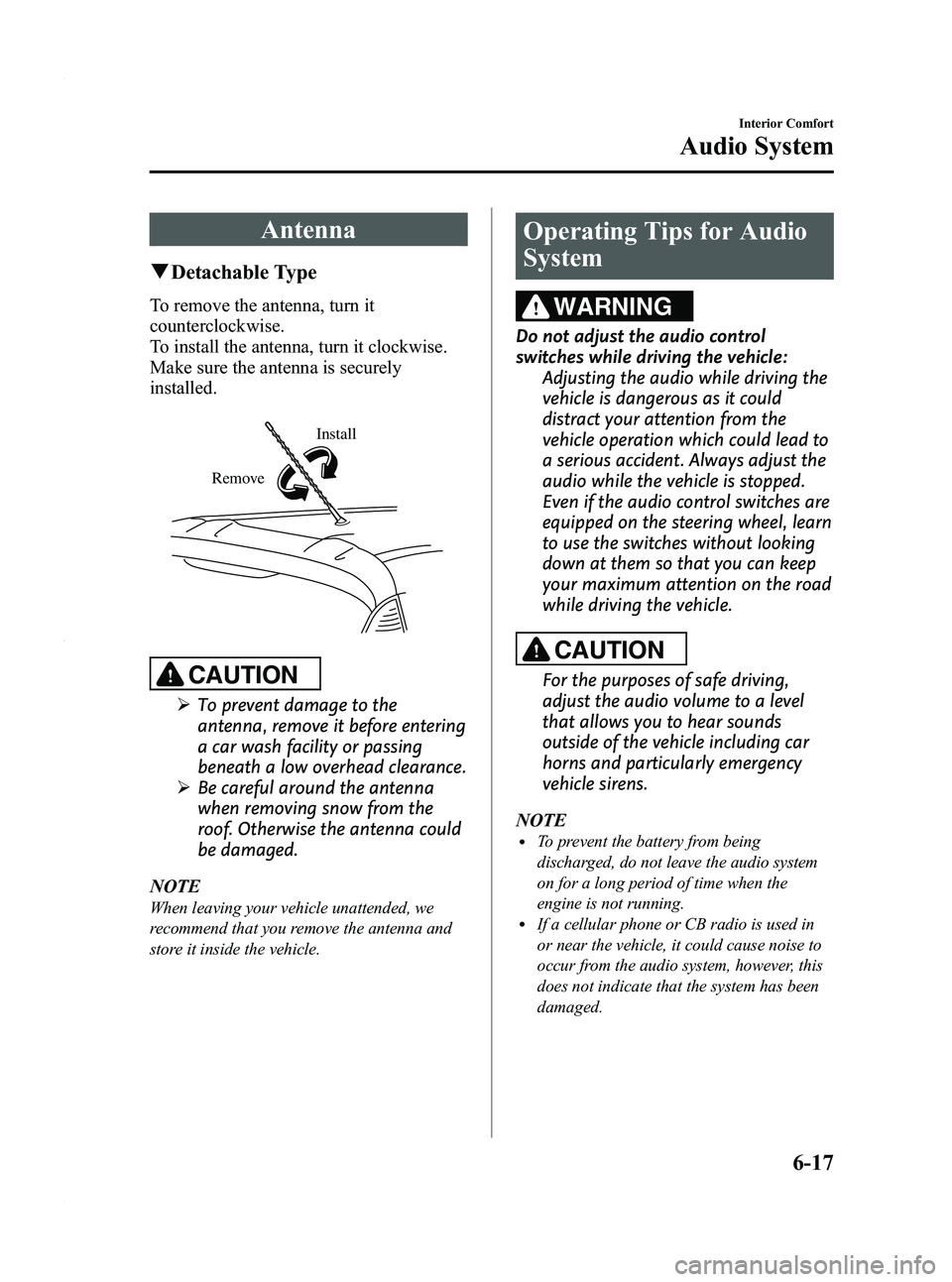
qDetachable Type
To remove the antenna, turn it
counterclockwise.
To install the antenna, turn it clockwise.
Make sure the antenna is securely
installed.
Install
Remove
CAUTION
Ø To prevent damage to the
antenna, remove it before entering
a car wash facility or passing
beneath a low overhead clearance.
Ø Be careful around the antenna
when removing snow from the
roof. Otherwise the antenna could
be damaged.
NOTE
When leaving your vehicle unattended, we
recommend that you remove the antenna and
store it inside the vehicle.
Operating Tips for Audio
System
WARNING
Do not adjust the audio control
switches while driving the vehicle: Adjusting the audio while driving the
vehicle is dangerous as it could
distract your attention from the
vehicle operation which could lead to
a serious accident. Always adjust the
audio while the vehicle is stopped.
Even if the audio control switches are
equipped on the steering wheel, learn
to use the switches without looking
down at them so that you can keep
your maximum attention on the road
while driving the vehicle.
CAUTION
For the purposes of safe driving,
adjust the audio volume to a level
that allows you to hear sounds
outside of the vehicle including car
horns and particularly emergency
vehicle sirens.
NOTE
lTo prevent the battery from being
discharged, do not leave the audio system
on for a long period of time when the
engine is not running.
lIf a cellular phone or CB radio is used in
or near the vehicle, it could cause noise to
occur from the audio system, however, this
does not indicate that the system has been
damaged.
Interior Comfort
Audio System
6-17
Mazda5_8AU7-EA-09H_Edition4 Page185
Tuesday, March 30 2010 1:10 PM
Form No.8AU7-EA-09H
Page 192 of 392

Black plate (192,1)
qPower/Volume/Sound Controls
Power/Volume dial Audio control dial
Power ON/OFF
Turn the ignition switch to the ACC or
ON position.
Press the power/volume dial to turn the
audio system on.
Press the power/volume dial again to turn
the audio system off.
NOTE
To prevent the battery from being discharged,
do not leave the audio system on for a long
period of time when the engine is not running.
Volume adjustment
To adjust the volume, turn the power/
volume dial.
Turn the power/volume dial to the right to
increase volume, to the left to decrease it.
Audio sound adjustment
1. Press the audio control dial to select the
function. The selected function will be
indicated.
*
*
*
Depending on the mode selected, the
indication changes.
6-24
Interior Comfort
Audio System
Mazda5_8AU7-EA-09H_Edition4 Page192
Tuesday, March 30 2010 1:10 PM
Form No.8AU7-EA-09H
Page 196 of 392
Black plate (196,1)
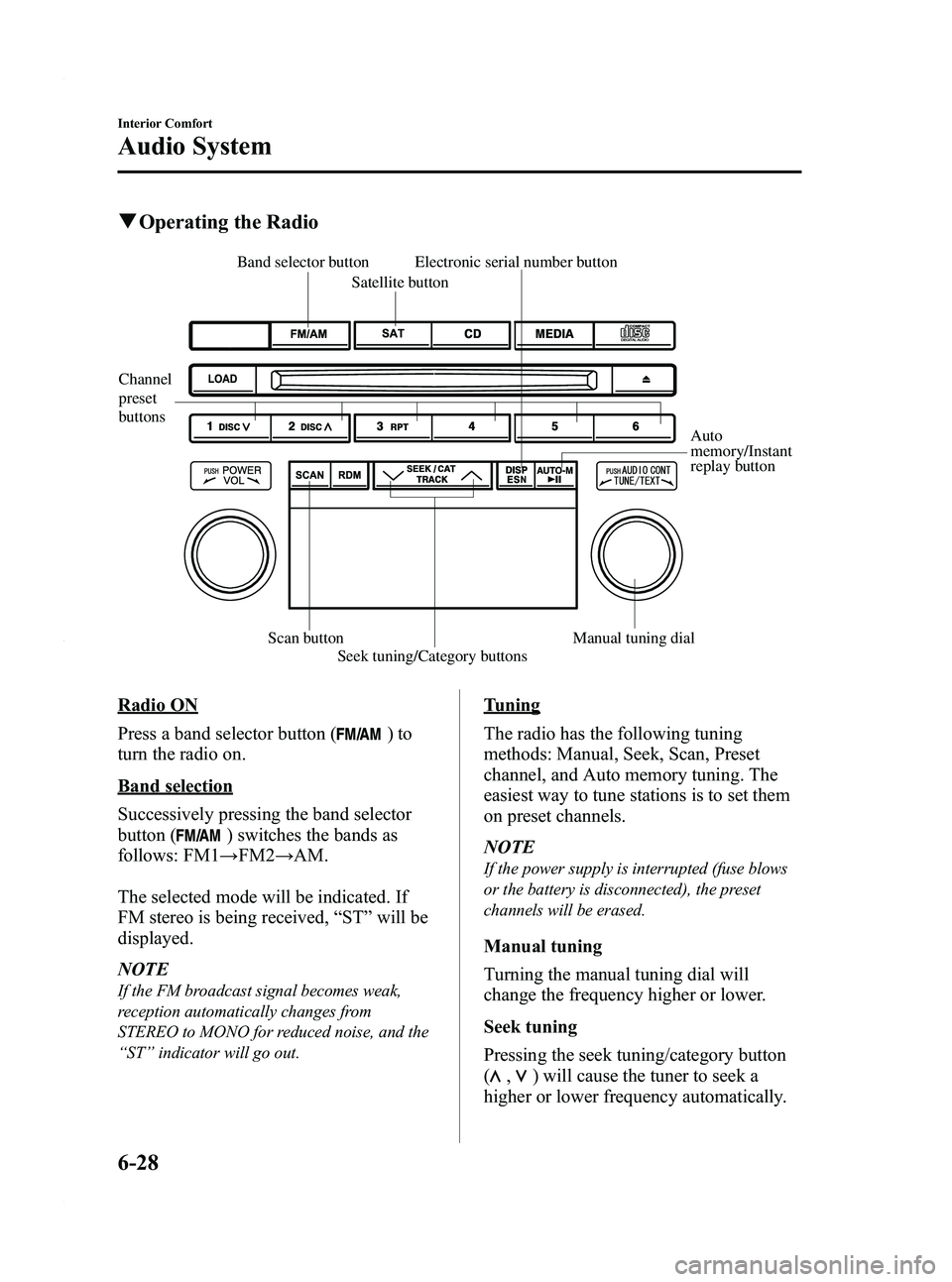
qOperating the Radio
Channel
preset
buttons
Auto
memory/Instant
replay button
Electronic serial number button
Scan button Seek tuning/Category buttons Manual tuning dial
Satellite button
Band selector button
Radio ON
Press a band selector button (
)to
turn the radio on.
Band selection
Successively pressing the band selector
button (
) switches the bands as
follows: FM1 →FM2 →AM.
The selected mode will be indicated. If
FM stereo is being received, “ST ”will be
displayed.
NOTE
If the FM broadcast signal becomes weak,
reception automatically changes from
STEREO to MONO for reduced noise, and the
“ ST ”indicator will go out.
Tuning
The radio has the following tuning
methods: Manual, Seek, Scan, Preset
channel, and Auto memory tuning. The
easiest way to tune stations is to set them
on preset channels.
NOTE
If the power supply is interrupted (fuse blows
or the battery is disconnected), the preset
channels will be erased.
Manual tuning
Turning the manual tuning dial will
change the frequency higher or lower.
Seek tuning
Pressing the seek tuning/category button
(
,) will cause the tuner to seek a
higher or lower frequency automatically.
6-28
Interior Comfort
Audio System
Mazda5_8AU7-EA-09H_Edition4 Page196
Tuesday, March 30 2010 1:10 PM
Form No.8AU7-EA-09H
Page 197 of 392
Black plate (197,1)
NOTE
If you continue to press and hold the button,
the frequency will continue changing without
stopping.
Scan tuning
Press the scan button (
)to
automatically sample strong stations.
Scanning stops at each station for about 5
seconds. To hold a station, press the scan
button (
) again during this interval.
Preset channel tuning
The 6 preset channels can be used to store
6 AM and 12 FM stations.
1. To set a channel first select AM, FM1, or FM2. Tune to the desired station.
2. Depress a channel preset button for about 2 seconds until a beep sound is
heard. The preset channel number and
station frequency will be displayed.
The station is now held in the memory.
3. Repeat this operation for the other stations and bands you want to store.
To tune one in the memory, select AM,
FM1, or FM2 and then press its
channel preset button. The station
frequency and the channel number will
be displayed.
NOTE
If the power supply is interrupted (fuse blows
or the battery is disconnected), the preset
channels will be erased.
Auto memory tuning
This is especially useful when driving in
an area where the local stations are not
known. Additional AM/FM stations can
be stored without disturbing the
previously set channels. Press and hold the auto memory/instant
replay button (
) for about 2
seconds until a beep sound is heard; the
system will automatically scan and
temporarily store up to 6 stations with the
strongest frequencies in each selected
band in that area.
After scanning is completed, the station
with the strongest frequency will be tuned
and its frequency displayed.
Press and release the auto memory/instant
replay button (
) to recall stations
from the auto-stored stations. One stored
station will be selected each time; its
frequency and channel number will be
displayed.
NOTE
If no stations can be tuned after scanning
operations, “A ” will be displayed.
SATELLITE RADIO (SAT)
Vehicles equipped with the separately
purchased SIRIUS digital satellite radio
unit have the ability to receive channels of
digital quality programming coast to coast
via satellite. For information on use, read
the Satellite Radio Kit manual
accompanying the SIRIUS digital satellite
radio unit. A subscription to SIRIUS
digital satellite radio service is required
(available in the U.S. - Except Alaska and
Hawaii) to enable this feature once the
separately purchased SIRIUS digital
satellite radio unit has been installed. For
subscription and channel information, or
for digital satellite radio technical issues,
contact SIRIUS directly at:
- Web: www.siriusradio.com
- Phone (24 hrs/day, 7 days/week): 888-
539-SIRI (7474)
- E-mail: [email protected]
Interior Comfort
Audio System
6-29
Mazda5_8AU7-EA-09H_Edition4 Page197
Tuesday, March 30 2010 1:10 PM
Form No.8AU7-EA-09H
Page 209 of 392

Black plate (209,1)
WARNING
Do not adjust the portable audio unit
or a similar product while driving the
vehicle:Adjusting the portable audio unit or
a similar product while driving the
vehicle is dangerous as it could
distract your attention from the
vehicle operation which could lead to
a serious accident. Always adjust the
portable audio unit or a similar
product while the vehicle is stopped.
Do not allow the connection plug cord
to get tangled with the parking brake
or the shift lever: Allowing the plug cord to become
tangled with the parking brake or
the shift lever is dangerous as it
could interfere with driving, resulting
in an accident.
CAUTION
ØClose the cover when the auxiliary
jack is not in use to prevent
foreign objects and liquids from
penetrating the auxiliary jack.
Ø Do not place objects or apply force
to the auxiliary jack with the plug
connected.
Ø Noise may occur during playback
if the accessory socket equipped
on the vehicle is used. (If noise
occurs, do not use the accessory
socket.) NOTE
lBefore using the auxiliary jack, read the
manufacturer's instructions for the product
being connected.
lUse a commercially-available, non-
impedance (3.5
) stereo mini plug for
connecting the portable audio unit to the
auxiliary jack. Before using the auxiliary
jack, read the manufacture's instructions
for connecting a portable audio unit to the
auxiliary jack.
lTo prevent discharging of the battery, do
not use the auxiliary input for long periods
with the engine off or idling.
lNoise may occur depending on the product
connected to the auxiliary jack.
lWith regard to connecting a portable audio
or similar device to a power source, use the
battery for the device, not the accessory
socket.
lInsert the plug to the auxiliary jack
securely.
lInsert or remove the plug with the plug
perpendicular to the auxiliary jack hole.
lInsert or remove the plug by holding its
base.
To listen to a portable audio unit
1. Turn the ignition switch to the ACC or ON position.
2. Insert the connection plug into the auxiliary jack.
3. Press the power/volume dial to turn the audio system on.
Interior Comfort
Audio System
6-41
Mazda5_8AU7-EA-09H_Edition4 Page209
Tuesday, March 30 2010 1:11 PM
Form No.8AU7-EA-09H