turn signal MAZDA MODEL 5 2010 User Guide
[x] Cancel search | Manufacturer: MAZDA, Model Year: 2010, Model line: MODEL 5, Model: MAZDA MODEL 5 2010Pages: 392, PDF Size: 4.81 MB
Page 168 of 392

Black plate (168,1)
Horn
To sound the horn, press themark on
the steering wheel.
Hazard Warning Flasher
The hazard warning lights should always
be used when you stop on or near a
roadway in an emergency.
The hazard warning lights warn other
drivers that your vehicle is a traffic hazard
and that they must take extreme caution
when near it.
Depress the hazard warning flasher and all
the turn signals will flash.
NOTE
lThe turn signals do not work when the
hazard warning lights are on.
lCheck local regulations about the use of
hazard warning lights while the vehicle is
being towed to verify that it is not in
violation of the law.
5-60
Driving Your Mazda
Switches and Controls
Mazda5_8AU7-EA-09H_Edition4 Page168
Tuesday, March 30 2010 1:10 PM
Form No.8AU7-EA-09H
Page 196 of 392
Black plate (196,1)
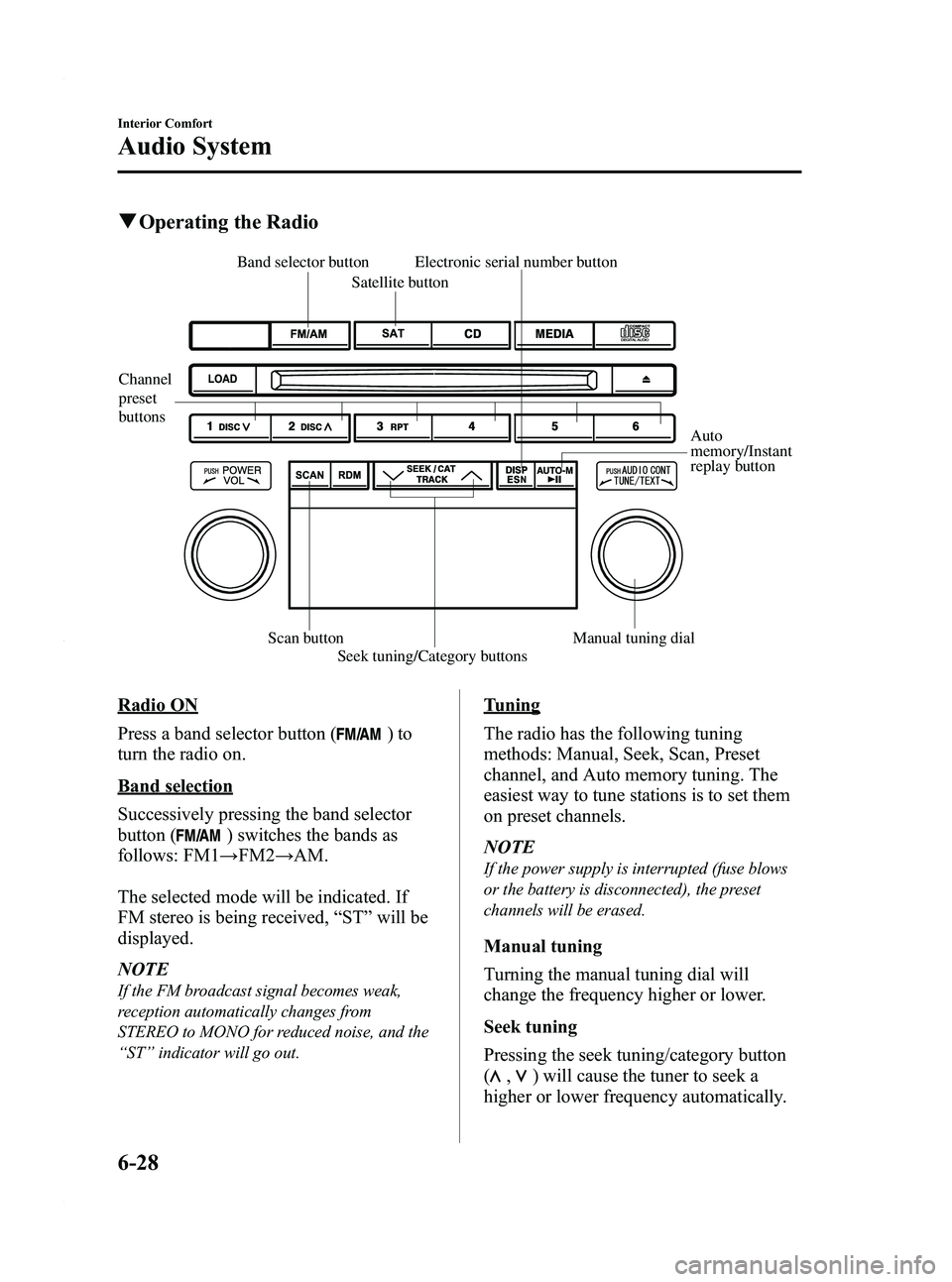
qOperating the Radio
Channel
preset
buttons
Auto
memory/Instant
replay button
Electronic serial number button
Scan button Seek tuning/Category buttons Manual tuning dial
Satellite button
Band selector button
Radio ON
Press a band selector button (
)to
turn the radio on.
Band selection
Successively pressing the band selector
button (
) switches the bands as
follows: FM1 →FM2 →AM.
The selected mode will be indicated. If
FM stereo is being received, “ST ”will be
displayed.
NOTE
If the FM broadcast signal becomes weak,
reception automatically changes from
STEREO to MONO for reduced noise, and the
“ ST ”indicator will go out.
Tuning
The radio has the following tuning
methods: Manual, Seek, Scan, Preset
channel, and Auto memory tuning. The
easiest way to tune stations is to set them
on preset channels.
NOTE
If the power supply is interrupted (fuse blows
or the battery is disconnected), the preset
channels will be erased.
Manual tuning
Turning the manual tuning dial will
change the frequency higher or lower.
Seek tuning
Pressing the seek tuning/category button
(
,) will cause the tuner to seek a
higher or lower frequency automatically.
6-28
Interior Comfort
Audio System
Mazda5_8AU7-EA-09H_Edition4 Page196
Tuesday, March 30 2010 1:10 PM
Form No.8AU7-EA-09H
Page 214 of 392
Black plate (214,1)
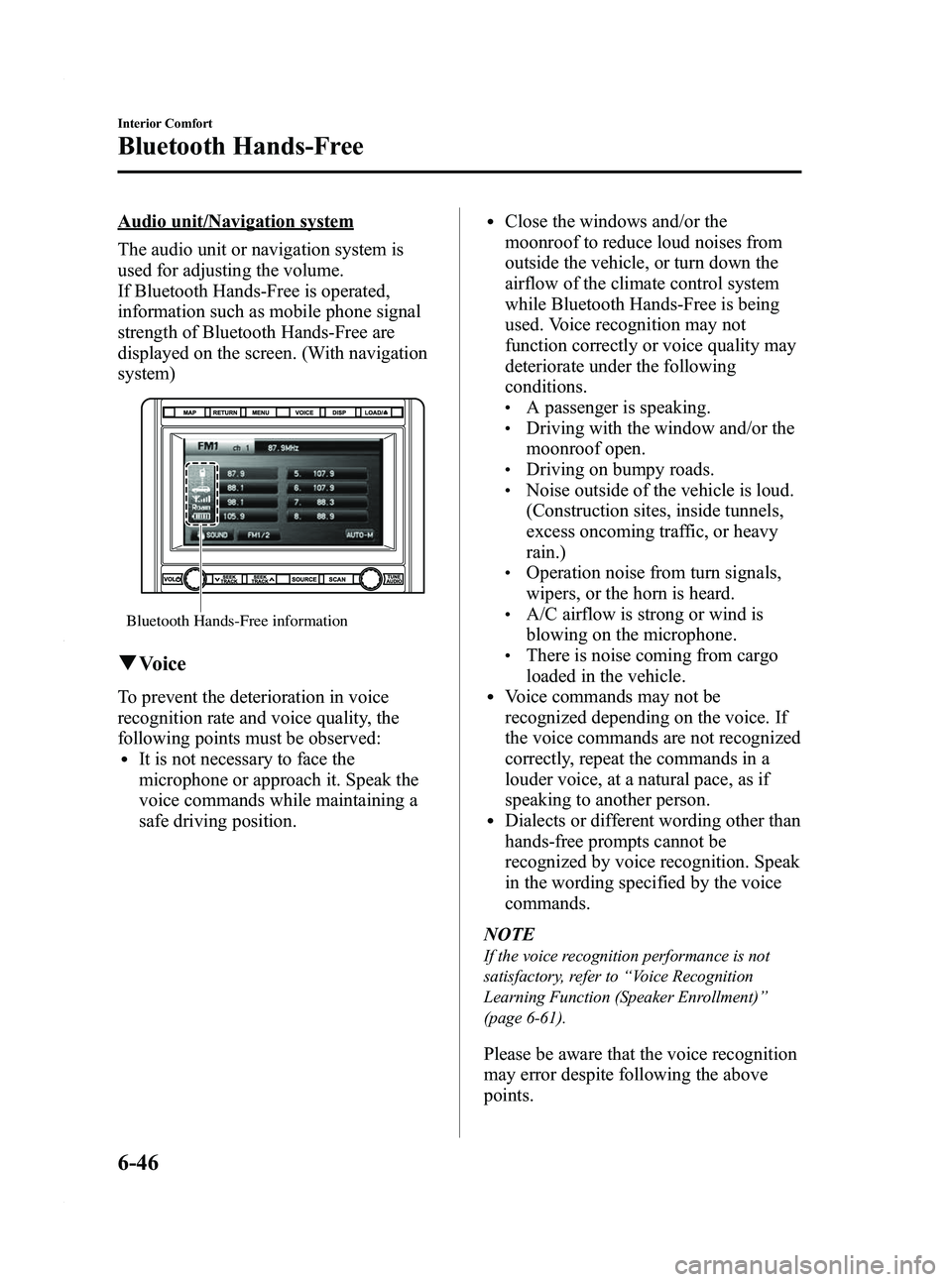
Audio unit/Navigation system
The audio unit or navigation system is
used for adjusting the volume.
If Bluetooth Hands-Free is operated,
information such as mobile phone signal
strength of Bluetooth Hands-Free are
displayed on the screen. (With navigation
system)
Bluetooth Hands-Free information
qVoice
To prevent the deterioration in voice
recognition rate and voice quality, the
following points must be observed:
lIt is not necessary to face the
microphone or approach it. Speak the
voice commands while maintaining a
safe driving position.
lClose the windows and/or the
moonroof to reduce loud noises from
outside the vehicle, or turn down the
airflow of the climate control system
while Bluetooth Hands-Free is being
used. Voice recognition may not
function correctly or voice quality may
deteriorate under the following
conditions.
lA passenger is speaking.lDriving with the window and/or the
moonroof open.
lDriving on bumpy roads.lNoise outside of the vehicle is loud.
(Construction sites, inside tunnels,
excess oncoming traffic, or heavy
rain.)
lOperation noise from turn signals,
wipers, or the horn is heard.
lA/C airflow is strong or wind is
blowing on the microphone.
lThere is noise coming from cargo
loaded in the vehicle.
lVoice commands may not be
recognized depending on the voice. If
the voice commands are not recognized
correctly, repeat the commands in a
louder voice, at a natural pace, as if
speaking to another person.
lDialects or different wording other than
hands-free prompts cannot be
recognized by voice recognition. Speak
in the wording specified by the voice
commands.
NOTE
If the voice recognition performance is not
satisfactory, refer to “Voice Recognition
Learning Function (Speaker Enrollment) ”
(page 6-61).
Please be aware that the voice recognition
may error despite following the above
points.
6-46
Interior Comfort
Bluetooth Hands-Free
Mazda5_8AU7-EA-09H_Edition4 Page214
Tuesday, March 30 2010 1:11 PM
Form No.8AU7-EA-09H
Page 230 of 392
![MAZDA MODEL 5 2010 User Guide Black plate (230,1)
NOTE
For vehicles with the navigation system, you
can also press the voice recognition/hands-free
switch with a short press and say: [Beep]
“Telephone ”or “Phone ”.
2. Say:](/img/28/41017/w960_41017-229.png "MAZDA MODEL 5 2010 User Guide Black plate (230,1)
NOTE
For vehicles with the navigation system, you
can also press the voice recognition/hands-free
switch with a short press and say: [Beep]
“Telephone ”or “Phone ”.
2. Say:")
Black plate (230,1)
NOTE
For vehicles with the navigation system, you
can also press the voice recognition/hands-free
switch with a short press and say: [Beep]
“Telephone ”or “Phone ”.
2. Say: [Beep] “Voice training ”
3. Prompt: “This operation must be
performed in a quiet environment while
the vehicle is stopped. See the owner's
manual for the list of required training
phrases. Press and release the phone
button when you are ready to begin.
Press and hold the phone button to
cancel at any time. ”
4. Press the voice recognition/hands-free switch with a short press.
5. The voice guidance reads out the voice input command number (refer to the
voice input command list for voice
recognition learning). (Ex. “Please read
phrase 1” )
6. Say: [Beep] “0123456789” (Say the
voice input command for voice
recognition learning (1 to 8) according
to the voice guidance.)
7. Prompt: “Speaker enrollment is
complete, returning to main menu. ”
Voice input command list for voice
recognition learning
When reading out, the following points
must be observed:
lRead out the numbers one at a time
correctly and naturally.
(For example, “1234 ”must be read out
“ one, two, three, four ”, not “twelve, thirty
four ”.)
lDo not read out parentheses. “(” and
hyphens “-” are used for separating
numbers in a phone number.
Ex. “
(888) 555-1212 ”must be spoken “Eight,
eight, eight, five, five, five, one, two, one,
two. ”
Phrase Command
1 0123456789
2 (888) 555-1212
3 Call
4 Dial
5 Setup
6 Cancel
7 Continue
8 Help
NOTE
After user voice registration is completed,
voice guidance “Speaker enrollment is
complete, returning to main menu ”is
announced.
q DTMF (dual tone multi-
frequency signal) transmission
This function is used when transmitting
DTMF via the user's voice. The receiver
of a DTMF transmission is generally a
home telephone answering machine or a
company's automated guidance call center
(When you send tone signals back
according to the voice guidance
recording).
1. Press the voice recognition/hands-free
switch with a short press.
2. Say: [Beep] “XXXX... send ”(Say
DTMF code)
3. Prompt: “Sending XXXX... (DTMF
code) ”
6-62
Interior Comfort
Bluetooth Hands-Free
Mazda5_8AU7-EA-09H_Edition4 Page230
Tuesday, March 30 2010 1:11 PM
Form No.8AU7-EA-09H
Page 248 of 392

Black plate (248,1)
Parking in an Emergency
The hazard warning lights should always
be used when you stop on or near a
roadway in an emergency.
The hazard warning lights warn other
drivers that your vehicle is a traffic hazard
and that they must take extreme caution
when near it.
Depress the hazard warning flasher and all
the turn signals will flash.
NOTE
lThe turn signals do not work when the
hazard warning lights are on.
lCheck local regulations about the use of
hazard warning lights while the vehicle is
being towed to verify that it is not in
violation of the law.
7-2
In Case of an Emergency
Parking in an Emergency
Mazda5_8AU7-EA-09H_Edition4 Page248
Tuesday, March 30 2010 1:11 PM
Form No.8AU7-EA-09H
Page 253 of 392
Black plate (253,1)
Changing a Flat Tire
NOTE
If the following occurs while driving, it could
indicate a flat tire.
lSteering becomes difficult.lThe vehicle begins to vibrate excessively.lThe vehicle pulls in one direction.
If you have a flat tire, drive slowly to a
level spot that is well off the road and out
of the way of traffic to change the tire.
Stopping in traffic or on the shoulder of a
busy road is dangerous.
WARNING
Be sure to follow the directions for
changing a tire, and never get under a
vehicle that is supported only by a jack:Changing a tire is dangerous if not
done properly. The vehicle can slip off
the jack and seriously injure
someone.
Never allow anyone inside a vehicle
supported by a jack: Allowing someone to remain in a
vehicle supported by a jack is
dangerous. The occupant could cause
the vehicle to fall resulting in serious
injury.
CAUTION
(With Tire Pressure Monitoring
System)
The wheels equipped on your Mazda
are specially designed for installation
of the tire pressure sensors. Do not
use non-genuine wheels, otherwise it
may not be possible to install the tire
pressure sensors. NOTE
lMake sure the jack is well lubricated before
using it.
(With Tire Pressure Monitoring System)
lBe sure to register the tire pressure sensor
ID signal code whenever tires or wheels are
changed (page 5-30).
1. Park on a level surface off the right-of- way and firmly set the parking brake.
2. Put a vehicle with an automatic transaxle in Park (P), a manual
transaxle in Reverse (R) or 1, and turn
off the engine.
3. Turn on the hazard warning flasher.
4. Have everyone get out of the vehicle and away from the vehicle and traffic.
5. Remove the jack, tool, and spare tire (page 7-3).
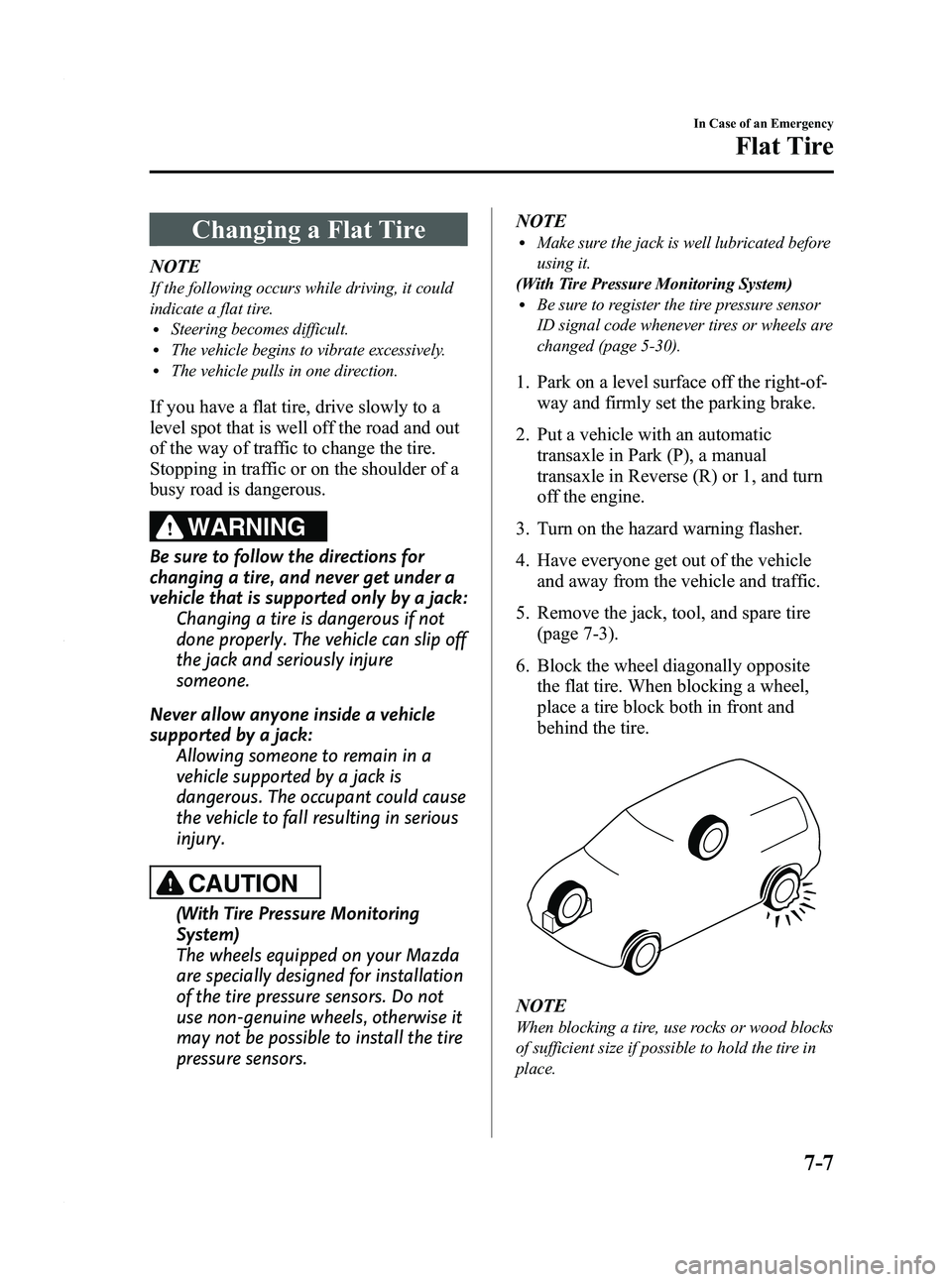
6. Block the wheel diagonally opposite the flat tire. When blocking a wheel,
place a tire block both in front and
behind the tire.
NOTE
When blocking a tire, use rocks or wood blocks
of sufficient size if possible to hold the tire in
place.
In Case of an Emergency
Flat Tire
7-7
Mazda5_8AU7-EA-09H_Edition4 Page253
Tuesday, March 30 2010 1:11 PM
Form No.8AU7-EA-09H
Page 311 of 392
Black plate (311,1)
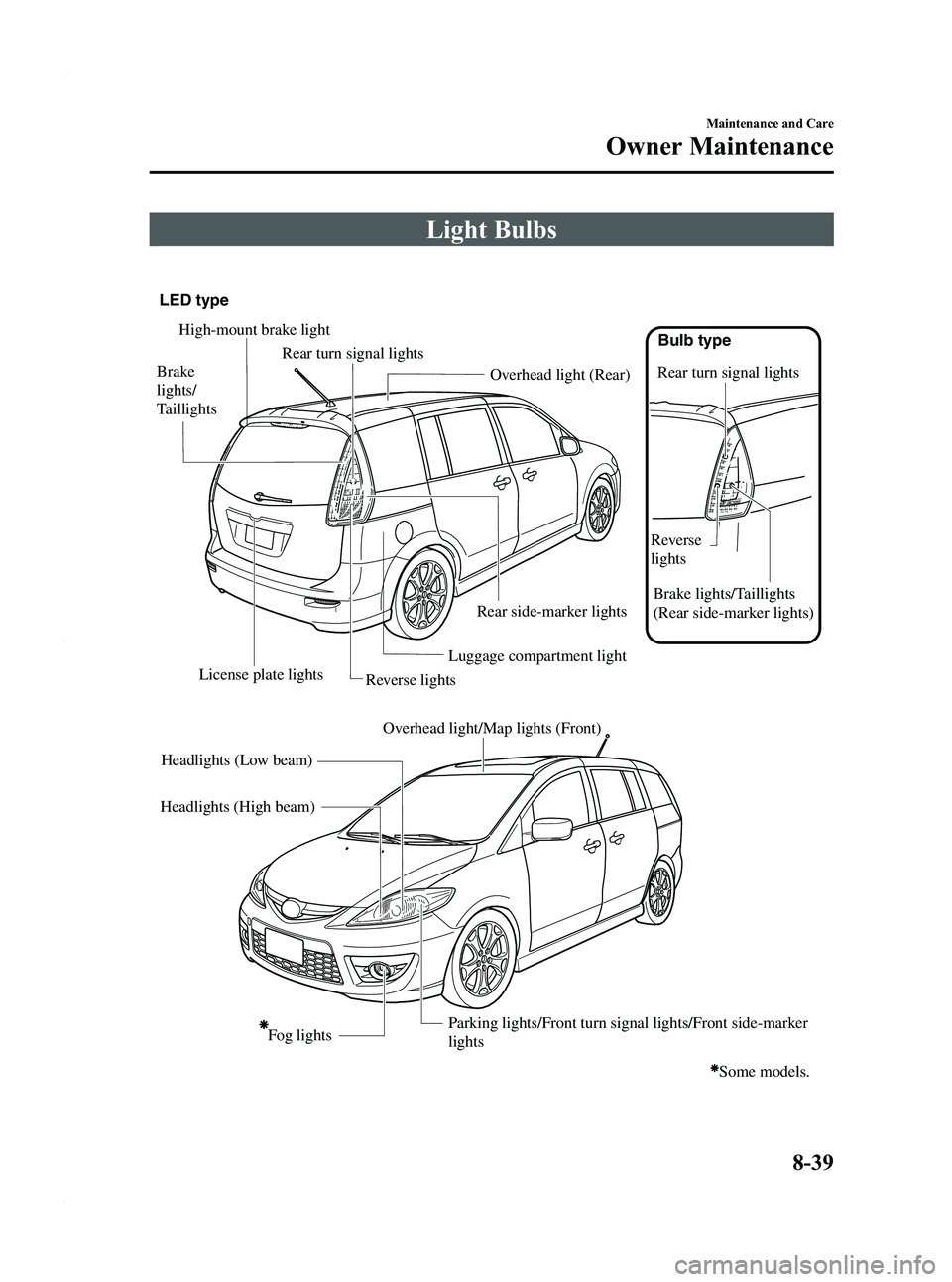
Light Bulbs
Luggage compartment light
LED type
Bulb type
Overhead light (Rear)
License plate lights Rear turn signal lights
Rear turn signal lights
Overhead light/Map lights (Front)
Reverse lights
High-mount brake light
Fog lights
Brake
lights/
Taillights
Reverse
lightsBrake lights/Taillights
(Rear side-marker lights)
Some models.
Parking lights/Front turn signal lights/Front side-marker
lights
Headlights (Low beam)
Headlights (High beam) Rear side-marker lights
Maintenance and Care
Owner Maintenance
8-39
Mazda5_8AU7-EA-09H_Edition4 Page311
Tuesday, March 30 2010 1:11 PM
Form No.8AU7-EA-09H
Page 314 of 392

Black plate (314,1)
NOTElIf the halogen bulb is accidentally touched,
it should be cleaned with rubbing alcohol
before being used.
lUse the protective cover and carton for the
replacement bulb to dispose of the old bulb
promptly and out of the reach of children.
lWhen reinstalling the sealing cover, make
sure
faces up.
Fog light bulbsí
1. Make sure the ignition is switched offand the headlight switch is off.
2. Remove the three screws under the mudguard by turning them
counterclockwise, and partially open
the mudguard.
3. Turn the socket and bulb assemblycounterclockwise, and carefully pull it
rearward. 4. Disconnect the socket and bulb
assembly from the electrical connector
by pressing the tab on the connector
with your finger and pulling it.
5. Install the new socket and bulbassembly in the reverse order of
removal.
NOTE
lIf the halogen bulb is accidentally touched,
it should be cleaned with rubbing alcohol
before being used.
lUse the protective cover and carton for the
replacement bulb to dispose of the old bulb
promptly and out of the reach of children.
Parking lights/Front turn signal lights/
Front side-marker lights
1. Make sure the ignition is switched off and the headlight switch is off.
8-42
Maintenance and Care
íSome models.
Owner Maintenance
Mazda5_8AU7-EA-09H_Edition4 Page314
Tuesday, March 30 2010 1:11 PM
Form No.8AU7-EA-09H
Page 315 of 392

Black plate (315,1)
2. Turn the center section of the plasticretainers counterclockwise and remove
them, then partially peel back the
mudguard.
Removal
Installation
3. Turn the socket and bulb assembly counterclockwise and remove it.
4. Remove the bulb by pushing it in slightly and turning it
counterclockwise.
5. Install the new bulb in the reverse orderof removal.
Brake lights/Taillights (Rear side-
marker lights), Rear turn signal lights,
Reverse lights
1. Make sure the ignition is switched offand the headlight switch is off. 2. Wrap a flathead screwdriver with a soft
cloth to prevent damage to the rear
combination component and gently
insert it in the cover as shown in the
figure, and then remove the cover.
3. Turn the screws counterclockwise and
remove them.
4. Turn the socket and bulb assembly counterclockwise and remove it.
5. Disconnect the bulb from the socket.
Rear turn signal
lights
Reverse lights
Brake lights/Tail
lights (Rear side-
marker lights)
Bulb type
Maintenance and Care
Owner Maintenance
8-43
Mazda5_8AU7-EA-09H_Edition4 Page315
Tuesday, March 30 2010 1:11 PM
Form No.8AU7-EA-09H
Page 316 of 392
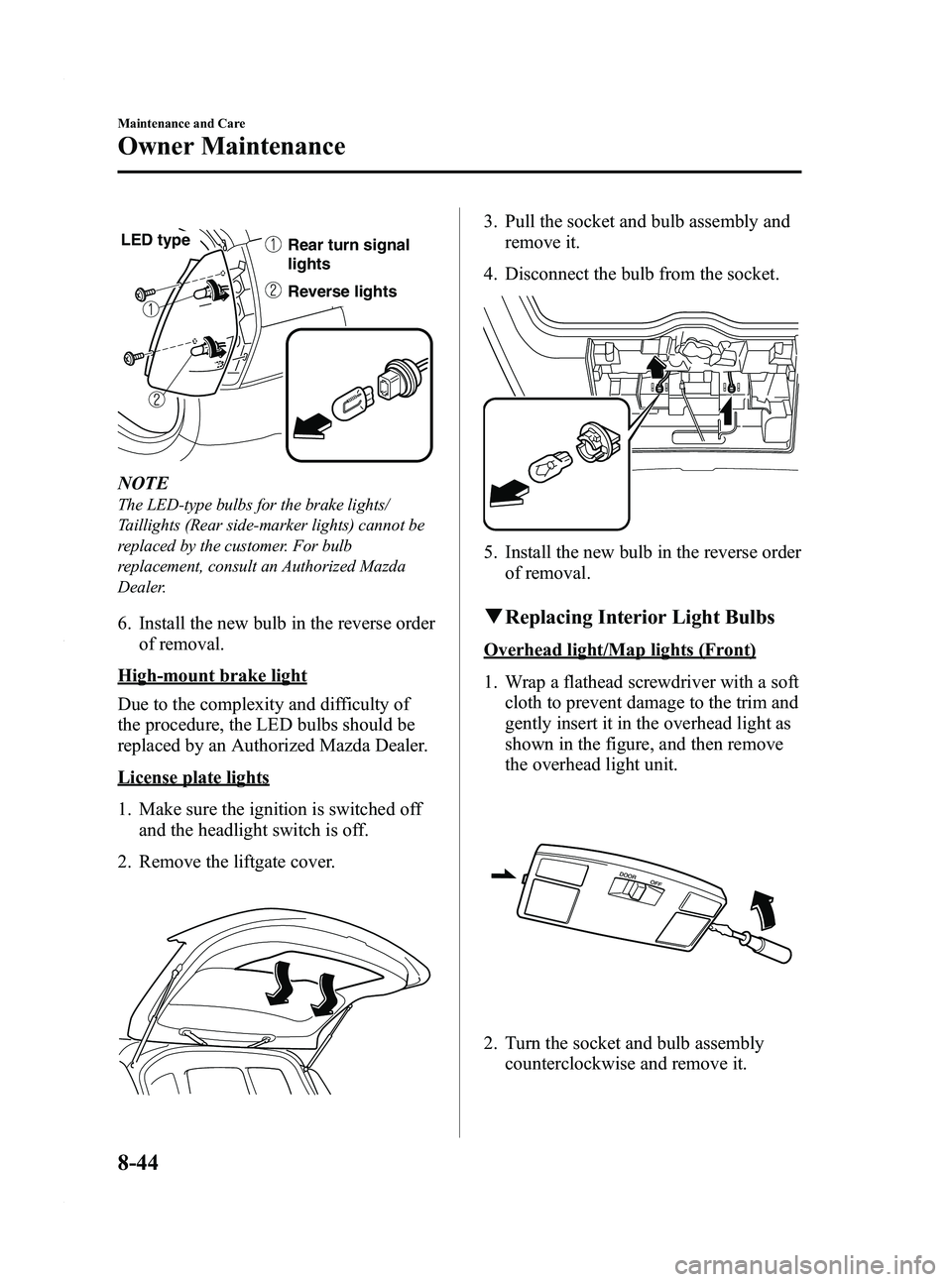
Black plate (316,1)
Reverse lights Rear turn signal
lights
LED type
NOTE
The LED-type bulbs for the brake lights/
Taillights (Rear side-marker lights) cannot be
replaced by the customer. For bulb
replacement, consult an Authorized Mazda
Dealer.
6. Install the new bulb in the reverse orderof removal.
High-mount brake light
Due to the complexity and difficulty of
the procedure, the LED bulbs should be
replaced by an Authorized Mazda Dealer.
License plate lights
1. Make sure the ignition is switched offand the headlight switch is off.
2. Remove the liftgate cover.
3. Pull the socket and bulb assembly and remove it.
4. Disconnect the bulb from the socket.
5. Install the new bulb in the reverse order of removal.
qReplacing Interior Light Bulbs
Overhead light/Map lights (Front)
1. Wrap a flathead screwdriver with a soft
cloth to prevent damage to the trim and
gently insert it in the overhead light as
shown in the figure, and then remove
the overhead light unit.
2. Turn the socket and bulb assemblycounterclockwise and remove it.
8-44
Maintenance and Care
Owner Maintenance
Mazda5_8AU7-EA-09H_Edition4 Page316
Tuesday, March 30 2010 1:11 PM
Form No.8AU7-EA-09H