light MAZDA MODEL 5 2013 Owners Manual
[x] Cancel search | Manufacturer: MAZDA, Model Year: 2013, Model line: MODEL 5, Model: MAZDA MODEL 5 2013Pages: 456, PDF Size: 5.67 MB
Page 180 of 456

Black plate (180,1)
qSeat Belt Warning Beep
If the driver's seat belt is not fastened
when the ignition is switched ON, a beep
sound will be heard for about 6 seconds.
With warning light for front
passenger's seat
If the driver or the front passenger's seat
belt is not fastened and the vehicle is
driven at a speed faster than about 20
km/h (12 mph), a beep sound will be
heard again for a specified period of time.
Refer to Seat Belt Reminder on page
2-29.
Without warning light for front
passenger's seat
If the driver's seat belt is not fastened and
the vehicle is driven at a speed faster than
about 20 km/h (12 mph), a beep sound
will be heard again for a specified period
of time.
Refer to Seat Belt Reminder on page
2-29.
qIgnition Key Reminder
If the ignition is switched off or the
ignition is switched to ACC with the key
inserted, a continuous beep sound will be
heard when the driver's door is opened.
NOTE
A personalized function is available to change
the sound volume for the ignition key reminder.
Refer to Personalization Features on page
10-8.
qLights-On Reminder
If lights are on and the key is removed
from the ignition switch, a continuous
beep sound will be heard when the
driver's door is opened.
NOTE
A personalized function is available to change
the sound volume for the lights-on reminder.
Refer to Personalization Features on page
10-8.
qTire Inflation Pressure Warning
Beepí
The warning beep sound will be heard for
about 3 seconds when there is any
abnormality in tire inflation pressures
(page 5-26).
5-56
Driving Your Mazda
íSome models.
Warning/Indicator Lights and Beep Sounds
Mazda5_8CN3-EA-12I_Edition2 Page180
Wednesday, November 7 2012 11:47 AM
Form No.8CN3-EA-12I
Page 181 of 456
Black plate (181,1)
Lighting Control
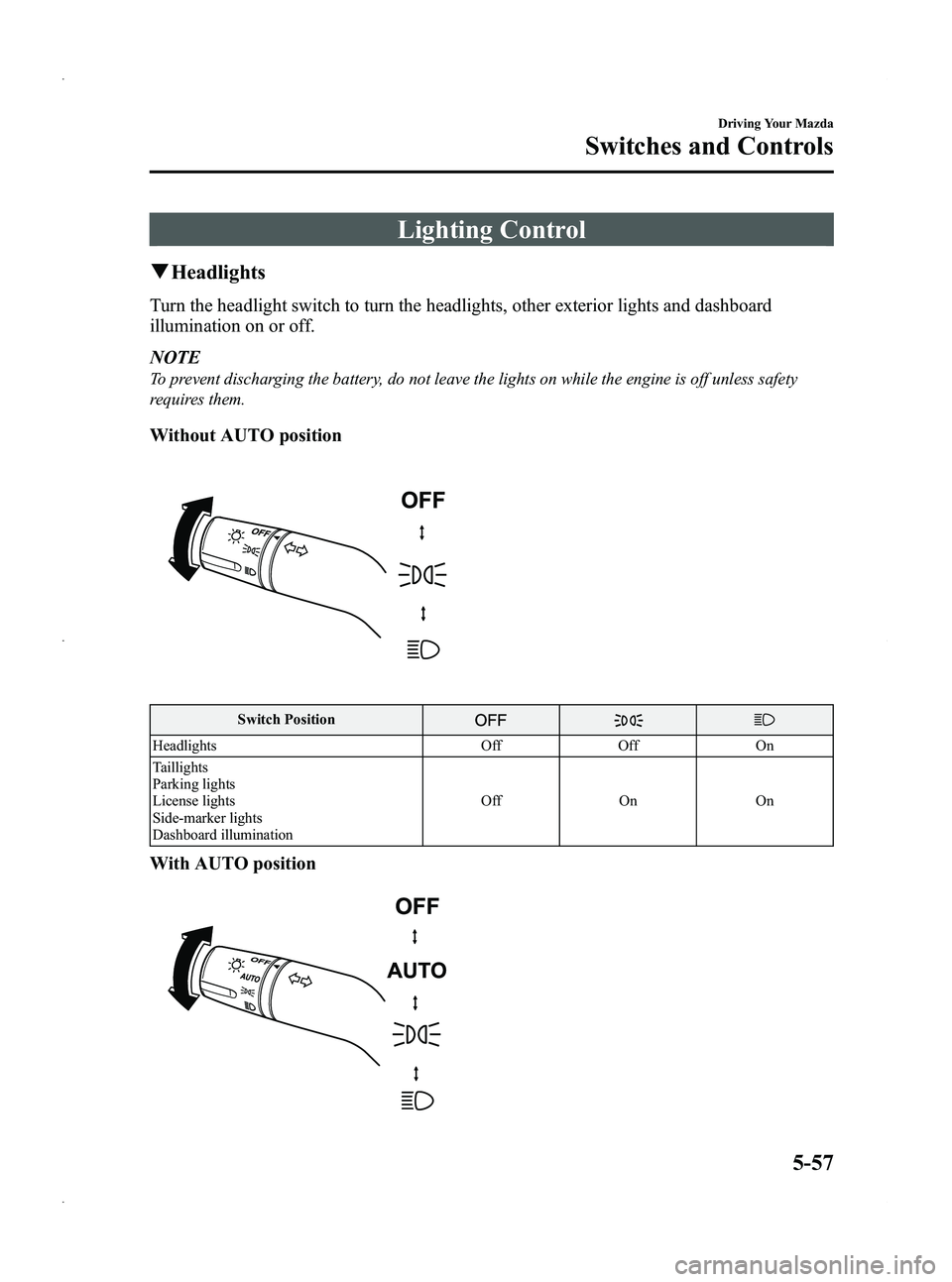
qHeadlights
Turn the headlight switch to turn the headlights, other exterior lights and dashboard
illumination on or off.
NOTE
To prevent discharging the battery, do not leave the lights on while the engine is off unless safety
requires them.
Without AUTO position
Switch Position
Headlights OffOff On
Taillights
Parking lights
License lights
Side-marker lights
Dashboard illumination Off
OnOn
With AUTO position
Driving Your Mazda
Switches and Controls
5-57
Mazda5_8CN3-EA-12I_Edition2 Page181
Wednesday, November 7 2012 11:47 AM
Form No.8CN3-EA-12I
Page 182 of 456

Black plate (182,1)
Switch Position
HeadlightsOff
Auto Off On
Taillights
Parking lights
License lights
Side-marker lights
Dashboard illumination Off On On
AUTO (Auto-light control)
When the headlight switch is in the AUTO position and the ignition is switched ON, the
light sensor senses the surrounding lightness or darkness and automatically turns the
headlights, other exterior lights and dashboard illumination on or off (see chart above).
CAUTION
Ø
Do not shade the light sensor by adhering a sticker or a label on the windshield.
Otherwise the light sensor will not operate correctly.
Light sensor
ØThe light sensor also works as a rain sensor for the auto-wiper control. Keep
hands and scrapers clear of the windshield when the wiper lever is in the AUTO
position and the ignition is switched ON as fingers could be pinched or the wipers
and wiper blades damaged when the wipers activate automatically. If you are
going to clean the windshield, be sure the wipers are turned off completely ―this
is particularly important when clearing ice and snow ―when it is particularly
tempting to leave the engine running.
5-58
Driving Your Mazda
Switches and Controls
Mazda5_8CN3-EA-12I_Edition2 Page182
Wednesday, November 7 2012 11:47 AM
Form No.8CN3-EA-12I
Page 183 of 456

Black plate (183,1)
NOTElThe headlights, other exterior lights and dashboard illumination may not turn off immediately
even if the surrounding area becomes well-lit because the light sensor determines that it is
nighttime if the surrounding area is continuously dark for several minutes such as inside long
tunnels, traffic jams inside tunnels, or in indoor parking lots.
In this case, the light turns off if the light switch is turned to the OFF position.
lThe dashboard illumination can be adjusted by rotating the knob in the instrument cluster. Also,
the day/night mode can be changed by pressing the knob. To adjust the brightness of the
dashboard illumination: Refer to Dashboard Illumination on page 5-41.
lWhen the headlight switch is in the AUTO position and the ignition is switched to ACC or the
ignition is switched off, the headlights, other exterior lights and dashboard illumination will turn
off.
lThe sensitivity of the AUTO lights may be changed by an Authorized Mazda Dealer. Refer to
Personalization Features on page 10-8.
Xenon fusion headlight bulbsí
The low-beam bulbs of the headlights have xenon fusion bulbs that produce a bright white
beam over a wide area.
WARNING
Do not replace the xenon fusion bulbs yourselfReplacing the xenon fusion bulbs yourself is dangerous. Because the xenon fusion
bulbs require high voltage, you could receive an electric shock if the bulbs are
handled incorrectly. Consult an Authorized Mazda Dealer when the replacement is
necessary.
NOTE
If the headlights flicker, or the brightness weakens, the bulb-life may be depleted and a replacement is
necessary. Consult an Authorized Mazda Dealer.
Driving Your Mazda
Switches and Controls
5-59íSome models.
Mazda5_8CN3-EA-12I_Edition2 Page183
Wednesday, November 7 2012 11:47 AM
Form No.8CN3-EA-12I
Page 184 of 456

Black plate (184,1)
qLights-On Reminder
If lights are on and the key is removed
from the ignition switch, a continuous
beep sound will be heard when the
driver's door is opened.
NOTE
A personalized function is available to change
the sound volume for the lights-on reminder.
Refer to Personalization Features on page
10-8.
qHeadlight High-Low Beam
Press the lever forward to turn on the high
beams.
Pull the lever back to its original position
for the low beams.
High beam
Low beam
qFlashing the Headlights
To flash the headlights, pull the lever fully
towards you (the headlight switch does
not need to be on). The lever will return to
the normal position when released.
OFF
Flashing
q Headlight Levelingí
The number of passengers and weight of
cargo in the luggage compartment change
the angle of the headlights.
The headlight leveling switch is used to
adjust the angle of the headlights
manually.
5-60
Driving Your Mazda
íSome models.
Switches and Controls
Mazda5_8CN3-EA-12I_Edition2 Page184
Wednesday, November 7 2012 11:47 AM
Form No.8CN3-EA-12I
Page 185 of 456

Black plate (185,1)
Select the proper headlight angle from the following
chart.Front seat Rear
seat
*1Load Switch
Position
Driver Passenger
× ――― 0
×× ――0
×× × ―1
×× ×× 2
× ―― ×3
×: Yes
― :No
*1 Second-row and third-row seats
qDaytime Running Lights (Canada)
In Canada, vehicles must be driven with
the headlights on during daytime
operation.
For that reason, the daytime running lights
automatically turn on when the ignition is
switched ON.
NOTE
The Daytime Running Lights turn off when the
parking brake is applied.
Turn and Lane-Change
Signals
Turn Signals
Move the signal lever down (for a left
turn) or up (for a right turn) to the stop
position. The signal will self-cancel after
the turn is completed.
If the indicator light continues to flash
after a turn, manually return the lever to
its original position.
Right turn
Left turn
Right lane change
Left lane change OFF
Green indicators on the dashboard show
which signal is working.
Lane-change signals
Move the lever slightly toward the
direction of the change
―until the
indicator flashes ―and hold it there. It
will return to the off position when
released.
NOTE
lIf an indicator light stays on without
flashing or if it flashes abnormally, one of
the turn signal bulbs may be burned out.
lA personalized function is available to
change the turn indicator sound volume.
Refer to Personalization Features on page
10-8.
Driving Your Mazda
Switches and Controls
5-61
Mazda5_8CN3-EA-12I_Edition2 Page185
Wednesday, November 7 2012 11:47 AM
Form No.8CN3-EA-12I
Page 186 of 456

Black plate (186,1)
Fog Lightsí
The fog lights will improve visibility at
night and during foggy conditions.
The headlights must be turned on to turn
on the fog lights.
To turn the fog lights on, rotate the fog
light switch to the
position.
Fog light switch
To turn the fog lights off, rotate the fog
light switch to the OFF position or turn
the headlights off.
NOTE
lThe fog lights will turn off when the
headlights are set at high beam.
l(With auto-light control)
If the headlight switch is in the AUTO
position, the fog lights can be turned on
when the headlights, the exterior lights and
dashboard illumination are on.
Windshield Wipers and
Washer
The ignition must be switched ON.
WARNING
Use only windshield washer fluid or
plain water in the reservoir:Using radiator antifreeze as washer
fluid is dangerous. If sprayed on the
windshield, it will dirty the
windshield, affect your visibility, and
could result in an accident.
Only use windshield washer fluid
mixed with anti-freeze protection in
freezing weather conditions: Using windshield washer fluid
without anti-freeze protection in
freezing weather conditions is
dangerous as it could freeze on the
windshield and block your vision
which could cause an accident.
In addition, make sure the
windshield is sufficiently warmed
using the defroster before spraying
the washer fluid.
5-62
Driving Your Mazda
íSome models.
Switches and Controls
Mazda5_8CN3-EA-12I_Edition2 Page186
Wednesday, November 7 2012 11:47 AM
Form No.8CN3-EA-12I
Page 189 of 456
Black plate (189,1)
ØWhen the wiper lever is in the
AUTO position and the ignition is
switched ON, the wipers may
move automatically in the
following cases:
ØIf the windshield above the rain
sensor is touched or wiped with
a cloth.
ØIf the windshield is struck with
a hand or other object from
either outside or inside the
vehicle.
Keep hands and scrapers clear of
the windshield when the wiper
lever is in the AUTO position and
the ignition is switched ON as
fingers could be pinched or the
wipers and wiper blades damaged
when the wipers activate
automatically.
If you are going to clean the
windshield, be sure the wipers are
turned off completely ―this is
particularly important when
clearing ice and snow ―when it is
most likely that the engine is left
running. NOTE
lSwitching the auto-wiper lever from the
OFF to the AUTO position while driving at
a vehicle speed of 4 km/h (2 mph) or higher
(or after driving the vehicle) activates the
windshield wipers once, after which they
operate according to the rainfall amount.
lThe auto-wiper control may not operate
when the rain sensor temperature is about
_
10 °C (14 °F) or lower, or about 85 °C
(185 °F) or higher.
lIf the windshield is coated with water
repellent, the rain sensor may not be able to
sense the amount of rainfall correctly and
auto-wiper control may not operate
properly.
lIf dirt or foreign matter (Such as ice or
matter containing salt water) adheres to the
windshield above the rain sensor or if the
windshield is iced, it could cause the wipers
to move automatically. However, if the
wipers cannot remove this ice, dirt or
foreign matter, the auto-wiper control will
stop operation. In this case, set the wiper
lever to the low speed position or high
speed position for manual operation, or
remove the ice, dirt or foreign matter by
hand to restore the auto-wiper operation.
lIf the auto-wiper lever is left in the AUTO
position, the wipers could operate
automatically from the effect of strong light
sources, electromagnetic waves, or infrared
light because the rain sensor uses an
optical sensor. It is recommended that the
auto-wiper lever be switched to the OFF
position other than when driving the vehicle
under rainy conditions.
Driving Your Mazda
Switches and Controls
5-65
Mazda5_8CN3-EA-12I_Edition2 Page189
Wednesday, November 7 2012 11:47 AM
Form No.8CN3-EA-12I
Page 191 of 456

Black plate (191,1)
Rear Window Defroster
The rear window defroster clears frost,
fog, and thin ice from the rear window.
The ignition must be switched ON.
Press the switch to turn on the rear
window defroster. The rear window
defroster operates for about 15 minutes
and turns off automatically.
The indicator light illuminates during
operation.
To turn off the rear window defroster
before the 15 minutes has elapsed, press
the switch again.
Indicator light
CAUTION
Do not use sharp instruments or
window cleaners with abrasives to
clean the inside of the rear window
surface. They may damage the
defroster grid inside the window.
NOTE
This defroster is not designed for melting snow.
If there is an accumulation of snow on the rear
window, remove it before using the defroster.
q Mirror Defrosterí
To turn on the mirror defrosters, switch
the ignition ON and press the rear window
defroster switch (page 5-67).
Driving Your Mazda
Switches and Controls
5-67íSome models.
Mazda5_8CN3-EA-12I_Edition2 Page191
Wednesday, November 7 2012 11:47 AM
Form No.8CN3-EA-12I
Page 192 of 456

Black plate (192,1)
Horn
To sound the horn, press themark on
the steering wheel.
Hazard Warning Flasher
The hazard warning lights should always
be used when you stop on or near a
roadway in an emergency.
The hazard warning lights warn other
drivers that your vehicle is a traffic hazard
and that they must take extreme caution
when near it.
Hazard warning flasher
Depress the hazard warning flasher and all
the turn signals will flash.
NOTE
lThe turn signals do not work when the
hazard warning lights are on.
lCheck local regulations about the use of
hazard warning lights while the vehicle is
being towed to verify that it is not in
violation of the law.
5-68
Driving Your Mazda
Switches and Controls
Mazda5_8CN3-EA-12I_Edition2 Page192
Wednesday, November 7 2012 11:48 AM
Form No.8CN3-EA-12I