ignition MAZDA MODEL 5 2013 Owners Manual
[x] Cancel search | Manufacturer: MAZDA, Model Year: 2013, Model line: MODEL 5, Model: MAZDA MODEL 5 2013Pages: 456, PDF Size: 5.67 MB
Page 377 of 456
Black plate (377,1)
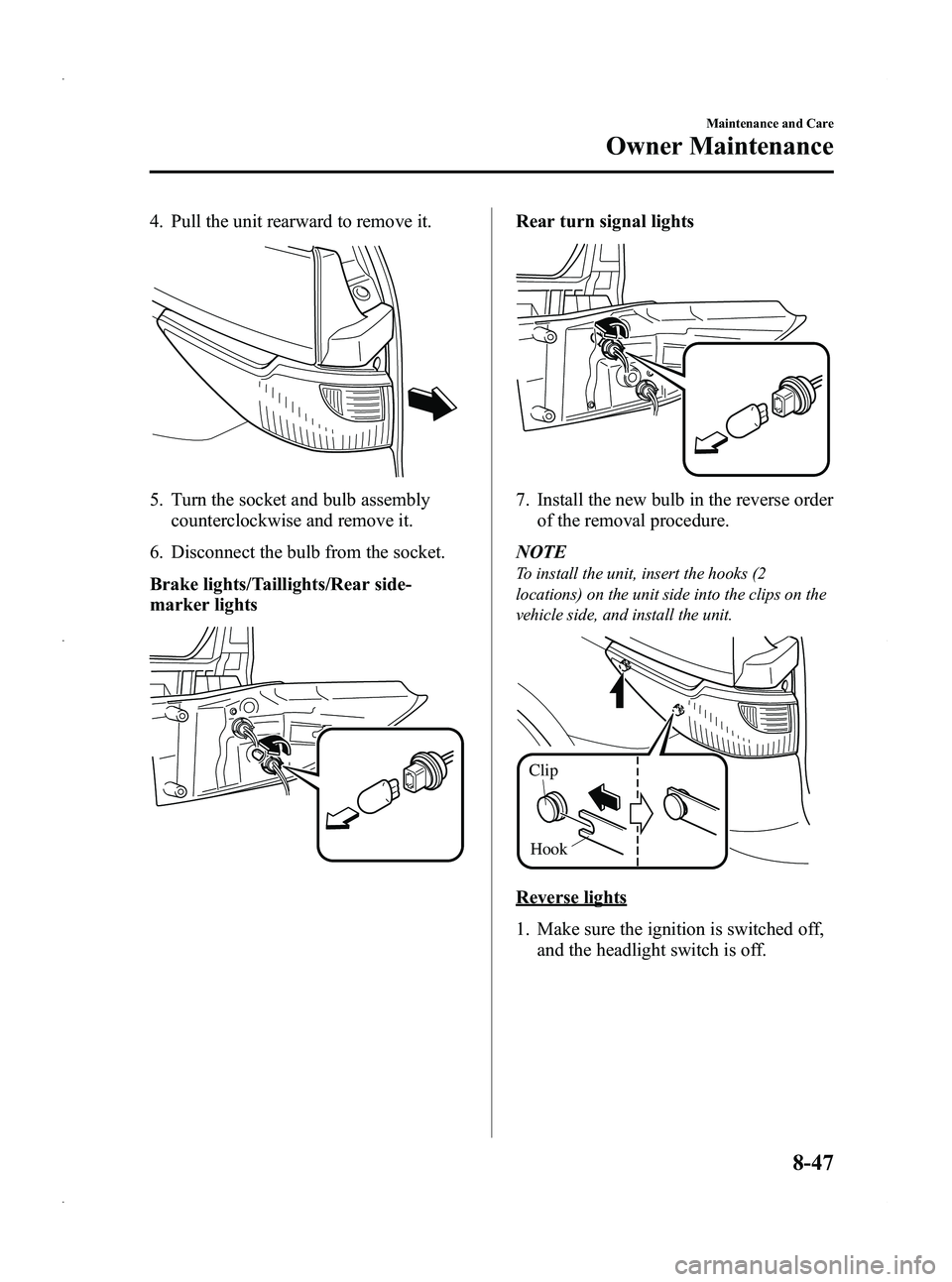
4. Pull the unit rearward to remove it.
5. Turn the socket and bulb assemblycounterclockwise and remove it.
6. Disconnect the bulb from the socket.
Brake lights/Taillights/Rear side-
marker lights
Rear turn signal lights
7. Install the new bulb in the reverse order of the removal procedure.
NOTE
To install the unit, insert the hooks (2
locations) on the unit side into the clips on the
vehicle side, and install the unit.
Clip
Hook
Reverse lights
1. Make sure the ignition is switched off, and the headlight switch is off.
Maintenance and Care
Owner Maintenance
8-47
Mazda5_8CN3-EA-12I_Edition2 Page377
Wednesday, November 7 2012 11:49 AM
Form No.8CN3-EA-12I
Page 378 of 456
Black plate (378,1)
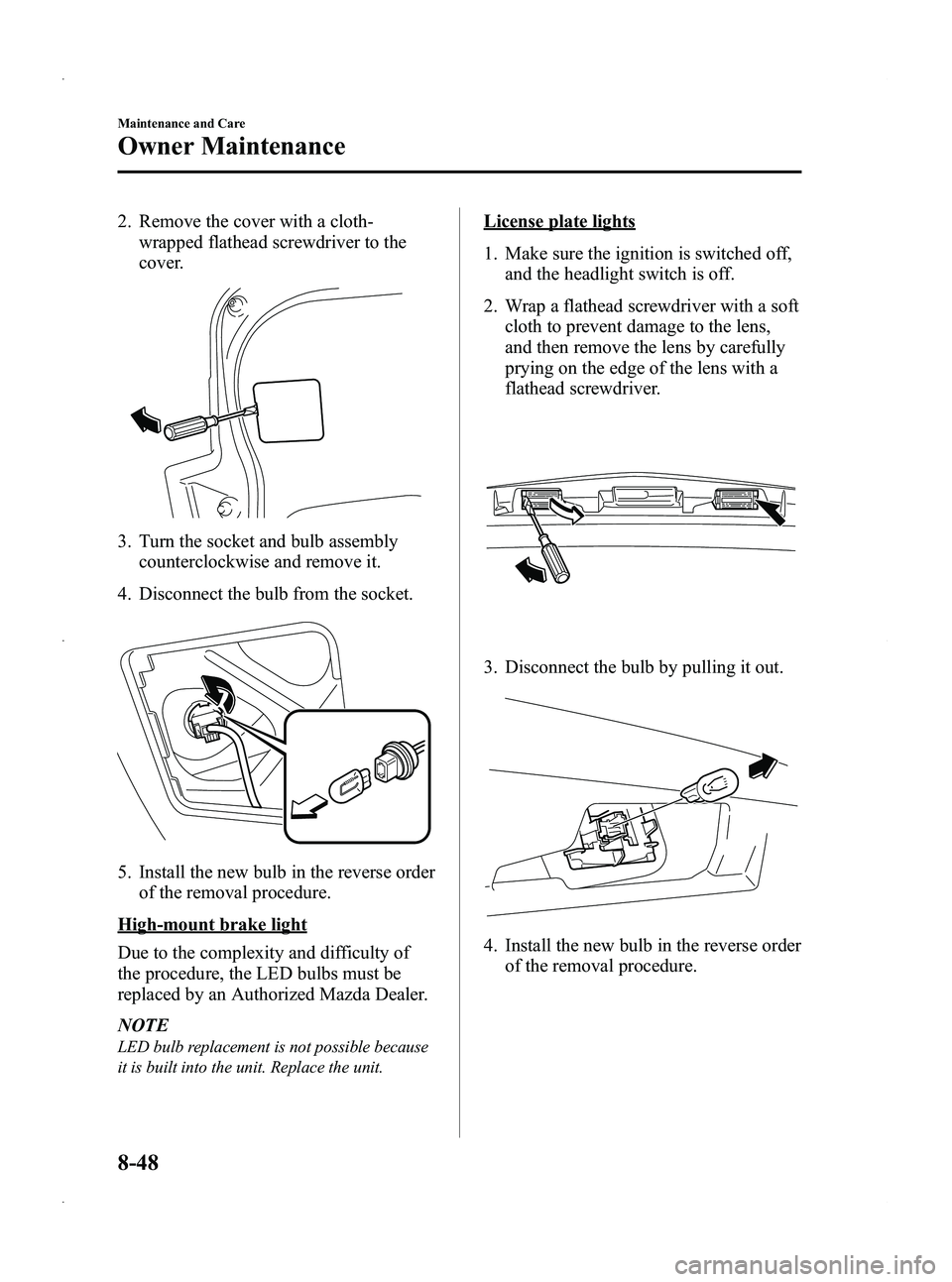
2. Remove the cover with a cloth-wrapped flathead screwdriver to the
cover.
3. Turn the socket and bulb assemblycounterclockwise and remove it.
4. Disconnect the bulb from the socket.
5. Install the new bulb in the reverse order of the removal procedure.
High-mount brake light
Due to the complexity and difficulty of
the procedure, the LED bulbs must be
replaced by an Authorized Mazda Dealer.
NOTE
LED bulb replacement is not possible because
it is built into the unit. Replace the unit.
License plate lights
1. Make sure the ignition is switched off,and the headlight switch is off.
2. Wrap a flathead screwdriver with a soft cloth to prevent damage to the lens,
and then remove the lens by carefully
prying on the edge of the lens with a
flathead screwdriver.
3. Disconnect the bulb by pulling it out.
4. Install the new bulb in the reverse orderof the removal procedure.
8-48
Maintenance and Care
Owner Maintenance
Mazda5_8CN3-EA-12I_Edition2 Page378
Wednesday, November 7 2012 11:49 AM
Form No.8CN3-EA-12I
Page 380 of 456
Black plate (380,1)
3. Install the new bulb in the reverse orderof the removal procedure.Fuses
Your vehicle's electrical system is
protected by fuses.
If any lights, accessories, or controls don't
work, inspect the appropriate circuit
protector. If a fuse has blown, the inside
element will be melted.
If the same fuse blows again, avoid using
that system and consult an Authorized
Mazda Dealer as soon as possible.
qFuse Replacement
Replacing the fuses on the vehicle's left
side
If the electrical system does not work,
first inspect the fuses on the vehicle's left
side.
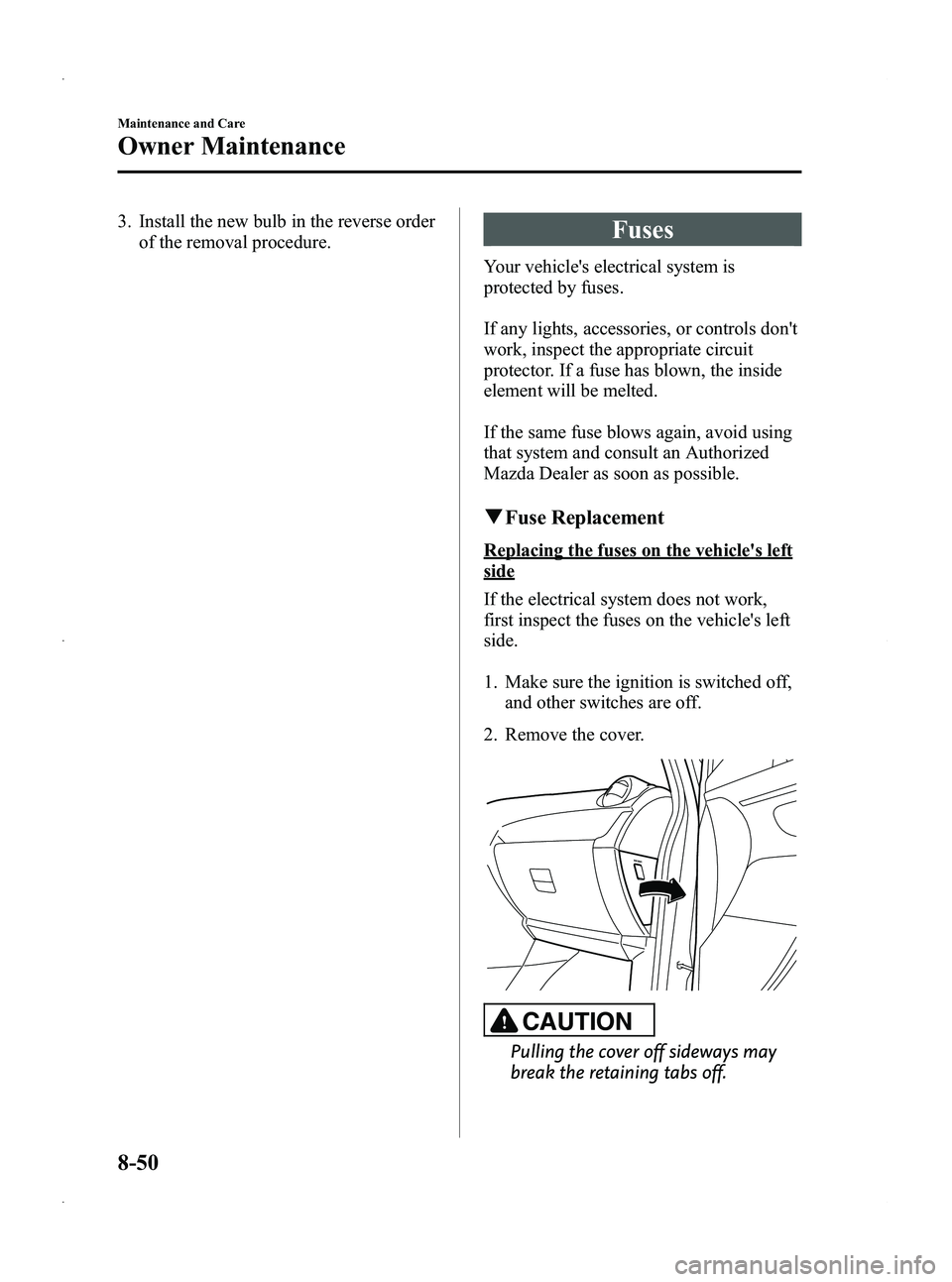
1. Make sure the ignition is switched off,
and other switches are off.
2. Remove the cover.
CAUTION
Pulling the cover off sideways may
break the retaining tabs off.
8-50
Maintenance and Care
Owner Maintenance
Mazda5_8CN3-EA-12I_Edition2 Page380
Wednesday, November 7 2012 11:49 AM
Form No.8CN3-EA-12I
Page 381 of 456

Black plate (381,1)
3. Locate the position of the suspectedfuse by using the chart inside the fuse
block cover.
4. Pull the fuse straight out with the fuse puller provided on the inside of the
engine compartment fuse block cover.
5. Inspect the fuse and replace it if it'sblown.
Normal Blown
6. Insert a new fuse of the same amperage
rating, and make sure it fits tightly. If it
does not fit tightly, have an expert
install it. We recommend an
Authorized Mazda Dealer.
If you have no spare fuses, borrow one
of the same rating from a circuit not
essential to vehicle operation, such as
the AUDIO or CIGAR circuit.
CAUTION
Always replace a fuse with one of the
same rating. Otherwise you may
damage the electric system.
7. Reinstall the cover and make sure that it is securely installed.
Replacing the fuses under the hood
If the headlights or other electrical
components do not work and the fuses in
the cabin are normal, inspect the fuse
block under the hood. If a fuse is blown, it
must be replaced. Follow these steps:
1. Make sure the ignition is switched off,and other switches are off.
2. Remove the fuse block cover.
Fuse block
Maintenance and Care
Owner Maintenance
8-51
Mazda5_8CN3-EA-12I_Edition2 Page381
Wednesday, November 7 2012 11:49 AM
Form No.8CN3-EA-12I
Page 388 of 456

Black plate (388,1)
Exterior Care
Followalllabel and container directions
when using a chemical cleaner or polish.
Read all warnings and cautions.
q Maintaining the Finish
Washing
CAUTION
Ø When the wiper lever is in the
AUTO position and the ignition is
switched ON, the wipers may
move automatically in the
following cases:
ØIf the windshield above the rain
sensor is touched or wiped with
a cloth.
ØIf the windshield is struck with
a hand or other object from
either outside or inside the
vehicle.
Keep hands and scrapers clear of
the windshield when the wiper
lever is in the AUTO position and
the ignition is switched ON as
fingers could be pinched or the
wipers and wiper blades damaged
when the wipers activate
automatically.
If you are going to clean the
windshield, be sure the wipers are
turned off completely ―this is
particularly important when
clearing ice and snow ―when it is
most likely that the engine is left
running.
Ø Do not spray water in the engine
compartment. Otherwise, it could
result in engine-starting problems
or damage to electrical parts. To help protect the finish from rust and
deterioration, wash your Mazda
thoroughly and frequently, at least once a
month, with lukewarm or cold water.
If the vehicle is washed improperly, the
paint surface could be scratched. Here are
some examples of how scratching could
occur.
Scratches occur on the paint surface
when:
lThe vehicle is washed without first
rinsing off dirt and other foreign
matter.
lThe vehicle is washed with a rough,
dry, or dirty cloth.
lThe vehicle is washed at a car wash
that uses brushes that are dirty or too
stiff.
lCleansers or wax containing abrasives
are used.
NOTE
lMazda is not responsible for scratches
caused by automatic car washes or
improper washing.
lScratches are more noticeable on vehicles
with darker paint finishes.
To minimize scratches on the vehicle's
paint finish:
lRinse off any dirt or other foreign
matter using lukewarm or cold water
before washing.
lUse plenty of lukewarm or cold water
and a soft cloth when washing the
vehicle. Do not use a nylon cloth.
lRub gently when washing or drying the
vehicle.
lTake your vehicle only to a car wash
that keeps its brushes well maintained.
lDo not use abrasive cleansers or wax
that contain abrasives.
8-58
Maintenance and Care
Appearance Care
Mazda5_8CN3-EA-12I_Edition2 Page388
Wednesday, November 7 2012 11:49 AM
Form No.8CN3-EA-12I
Page 450 of 456

Black plate (450,1)
A
Accessory Socket ............................ 6-111
Add-On Non-Genuine Parts and
Accessories ....................................... 9-19
Air Bag Systems ............................... 2-46
Ambient Temperature Display .......... 6-98
Antenna ............................................. 6-11
Anti-Lock Brake System (ABS) ......... 5-8Warning light ............................... 5-8
Appearance Care ............................... 8-56
Audio System .................................... 6-11 Audio control switch .................. 6-49
Audio set .................................... 6-25
AUX/USB/iPod Mode ............... 6-52
Operating tips for audio
system ........................................ 6-12
Safety certification ..................... 6-61
Automatic Transaxle Driving tips ................................ 5-18
Fluid ........................................... 8-25
Manual shift mode ..................... 5-14
Shift-lock override ..................... 5-14
Shift-lock system ....................... 5-14
Transaxle ranges ........................ 5-13
B
BatteryEmergency starting .................... 7-16
Maintenance ............................... 8-32
Specifications ............................. 10-4
Beep Sounds Ignition key reminder ................. 5-56
Lights-on reminder ..................... 5-56
Seat belt warning ........................ 5-56
Tire inflation pressure warning ... 5-56
Before Starting the Engine .................. 4-5 After getting in ............................. 4-5
Before getting in .......................... 4-5
B
Bluetooth® Audio ............................ 6-62
Bluetooth® Hands-Free .................... 6-72
Basic Bluetooth® Hands-Free
operation .................................... 6-76
Convenient use of the hands-free
system ........................................ 6-81
Hands-free setting ...................... 6-87
Mazda Bluetooth® Hands-Free
customer service ......................... 6-94
Safety certification ..................... 6-94
When Bluetooth® Hands-Free cannot
be used ....................................... 6-93
Body Lubrication .............................. 8-27
Bottle Holder ................................... 6-103
Brake/Clutch Fluid ........................................... 8-23
Brakes Anti-lock brake system (ABS) ..... 5-8
Brakes assist ................................. 5-9
Foot brake .................................... 5-5
Parking brake ............................... 5-6
Warning light ............................... 5-7
Break-In Period ................................... 4-6
Bulb Replacement ............................. 8-42
C
Capacities .......................................... 10-5
Carbon Monoxide ............................... 4-4
Cargo Securing Loops .................... 6-109
Cargo Sub-Compartment ................ 6-109
Catalytic Converter ............................. 4-3
Cell Phones ....................................... 9-20
Center Console ................................ 6-106
11-2
Index
Mazda5_8CN3-EA-12I_Edition2 Page450
Wednesday, November 7 2012 11:50 AM
Form No.8CN3-EA-12I
Page 452 of 456
Black plate (452,1)
F
Foot Brake .......................................... 5-5
Front Seats .......................................... 2-2
FuelFiller lid and cap ........................ 3-19
Gauge ......................................... 5-40
Requirements ............................... 4-2
Tank capacity ............................. 10-5
Fuses ................................................. 8-50 Panel description ........................ 8-53
Replacement ............................... 8-50
G
Gauges .............................................. 5-38
Glove Compartment ........................ 6-106
H
Hazard Warning Flasher .................... 5-68
Hazardous Driving .............................. 4-7
Head Restraint .................................. 2-14
HeadlightsControl ....................................... 5-57
Flashing ...................................... 5-60
High-low beam .......................... 5-60
Leveling ..................................... 5-60
On reminder ............................... 5-60
Hood Release .................................... 3-20
Horn .................................................. 5-68
I
Ignition Keys ............................................. 3-2
Switch .......................................... 5-2
Illuminated Entry System ................. 6-95
Immobilizer System .......................... 3-24
I
Indicator Lights ................................. 5-42
Cruise ......................................... 5-53
DSC OFF .................................... 5-53
Headlight high-beam .................. 5-52
Low engine coolant
temperature ................................ 5-53
Power steering malfunction ........ 5-54
Security ...................................... 5-52
Shift position .............................. 5-52
TCS/DSC ................................... 5-53
Turn signal/hazard warning ........ 5-54
Information Display .......................... 6-97 Ambient temperature display ..... 6-98
Audio display ............................. 6-98
Climate control display .............. 6-98
Clock .......................................... 6-98
Information display functions .... 6-97
Trip computer ............................. 6-99
Instrument Cluster ............................. 5-38
Interior Care ...................................... 8-62
Interior Lights ................................... 6-95
J
Jump-Starting .................................... 7-17
K
Keyless Entry System ......................... 3-3
Keys .................................................... 3-2
L
Label Information ............................. 10-2
Lane-Change Signals ........................ 5-61
Liftgate .............................................. 3-13
11-4
Index
Mazda5_8CN3-EA-12I_Edition2 Page452
Wednesday, November 7 2012 11:50 AM
Form No.8CN3-EA-12I