battery MAZDA MODEL 5 2013 User Guide
[x] Cancel search | Manufacturer: MAZDA, Model Year: 2013, Model line: MODEL 5, Model: MAZDA MODEL 5 2013Pages: 456, PDF Size: 5.67 MB
Page 130 of 456
Black plate (130,1)
CAUTION
ØDo not drive with your foot held
on the clutch pedal or brake pedal,
or hold the clutch pedal depressed
halfway unnecessarily. Doing so
could result in the following:
ØThe clutch and brake parts will
wear out more quickly.
ØThe brakes can overheat and
adversely affect brake
performance.
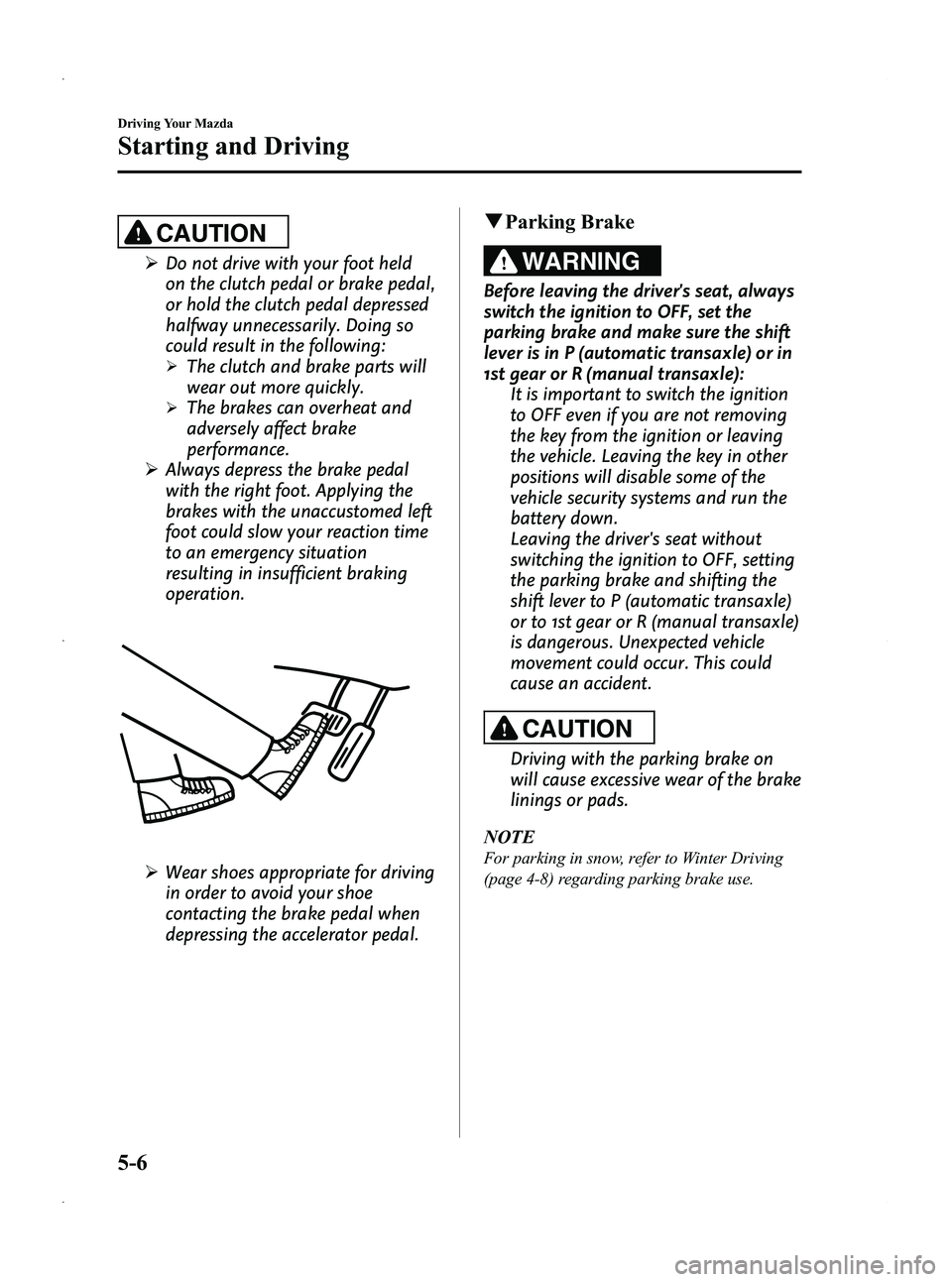
Ø Always depress the brake pedal
with the right foot. Applying the
brakes with the unaccustomed left
foot could slow your reaction time
to an emergency situation
resulting in insufficient braking
operation.
ØWear shoes appropriate for driving
in order to avoid your shoe
contacting the brake pedal when
depressing the accelerator pedal.
qParking Brake
WARNING
Before leaving the driver's seat, always
switch the ignition to OFF, set the
parking brake and make sure the shift
lever is in P (automatic transaxle) or in
1st gear or R (manual transaxle):
It is important to switch the ignition
to OFF even if you are not removing
the key from the ignition or leaving
the vehicle. Leaving the key in other
positions will disable some of the
vehicle security systems and run the
battery down.
Leaving the driver's seat without
switching the ignition to OFF, setting
the parking brake and shifting the
shift lever to P (automatic transaxle)
or to 1st gear or R (manual transaxle)
is dangerous. Unexpected vehicle
movement could occur. This could
cause an accident.
CAUTION
Driving with the parking brake on
will cause excessive wear of the brake
linings or pads.
NOTE
For parking in snow, refer to Winter Driving
(page 4-8) regarding parking brake use.
5-6
Driving Your Mazda
Starting and Driving
Mazda5_8CN3-EA-12I_Edition2 Page130
Wednesday, November 7 2012 11:47 AM
Form No.8CN3-EA-12I
Page 133 of 456

Black plate (133,1)
If the ABS warning light stays on while
you're driving, the ABS control unit has
detected a system malfunction. If this
occurs, your brakes will function normally
as if the vehicle had no ABS.
Should this happen, consult an Authorized
Mazda Dealer as soon as possible.
NOTE
When the engine is jump-started to charge the
battery, uneven rpm occurs and the ABS
warning light may illuminate. If this occurs, it
is the result of the weak battery and does not
indicate an ABS malfunction.
Recharge the battery.
qElectronic Brake Force
Distribution System Warning
If the electronic brake force distribution
control unit determines that some
components are operating incorrectly, the
control unit may illuminate the brake
system warning light and the ABS
warning light on simultaneously. The
problem is likely to be the electronic
brake force distribution system.
WARNING
Do not drive with both the ABS warning
light and brake warning light
illuminated. Have the vehicle towed to
an Authorized Mazda Dealer to have
the brakes inspected as soon as
possible:
Driving when the brake system
warning light and ABS warning light
are illuminated simultaneously is
dangerous.
When both lights are illuminated, the
rear wheels could lock more quickly
in an emergency stop than under
normal circumstances.
qBrake Assist
During emergency braking situations
when it is necessary to depress the brake
pedal with greater force, the brake assist
system provides braking assistance, thus
enhancing braking performance.
When the brake pedal is depressed hard or
depressed more quickly, the brakes apply
more firmly.
NOTE
lWhen the brake pedal is depressed hard or
depressed more quickly, the pedal will feel
softer but the brakes will apply more firmly.
This is a normal effect of the brake assist
operation and does not indicate a
malfunction.
lWhen the brake pedal is depressed hard or
depressed more quickly, a motor/pump
operation noise may be heard. This is a
normal effect of the brake assist and does
not indicate a malfunction.
lThe brake assist equipment does not
supersede the functionality of the vehicle's
main braking system.
Driving Your Mazda
Starting and Driving
5-9
Mazda5_8CN3-EA-12I_Edition2 Page133
Wednesday, November 7 2012 11:47 AM
Form No.8CN3-EA-12I
Page 164 of 456

Black plate (164,1)
For instance, trip meter A can record the
distance from the point of origin, and trip
meter B can record the distance from
where the fuel tank is filled.
When trip meter A is selected, pressing
the selector again within one second will
change to trip meter B mode.
When trip meter A is selected, TRIP A
will be displayed. When trip meter B is
selected, TRIP B will be displayed.
The trip meter records the total distance
the vehicle is driven until the meter is
again reset. Return it to“0.0 ”by holding
the selector depressed for 1 second or
more. Use this meter to measure trip
distances and to compute fuel
consumption.
NOTE
lOnly the trip meters record tenths of
kilometers (miles).
lThe trip record will be erased when:lThe power supply is interrupted (blown
fuse or the battery is disconnected).
lThe vehicle is driven over 999.9 km
(mile).
q Tachometer
The tachometer shows engine speed in
thousands of revolutions per minute
(rpm).
Red zone
CAUTION
Do not run the engine with the
tachometer needle in the RED ZONE.
This may cause severe engine
damage.
qFuel Gauge
The fuel gauge shows approximately how
much fuel is remaining in the tank when
the ignition is switched ON.
We recommend keeping the tank over 1/4
full.
Full
1/4 Full
5-40
Driving Your Mazda
Instrument Cluster and Indicators
Mazda5_8CN3-EA-12I_Edition2 Page164
Wednesday, November 7 2012 11:47 AM
Form No.8CN3-EA-12I
Page 169 of 456

Black plate (169,1)
qMalfunction Warning Light
When the ignition is switched ON, the
malfunction warning light illuminates and
then turns off after a few seconds.
The light stays on if the brake switch has
a malfunction. Consult an Authorized
Mazda Dealer.
WARNING
Do not drive the vehicle with the
malfunction warning light illuminated.
Driving the vehicle with the light
illuminated is dangerous as it could
result in the loss of brake power and
cause an accident. In addition, loss of
brake power could occur when
stopping the vehicle. Have your
vehicle inspected by an Authorized
Mazda Dealer.
qABS Warning Light
The warning light stays on for a few
seconds when the ignition is switched
ON. If the ABS warning light stays on while
you're driving, the ABS control unit has
detected a system malfunction. If this
occurs, your brakes will function normally
as if the vehicle had no ABS.
Should this happen, consult an Authorized
Mazda Dealer as soon as possible.
NOTE
When the engine is jump-started to charge the
battery, uneven rpm occurs and the ABS
warning light may illuminate. If this occurs, it
is the result of the weak battery and does not
indicate an ABS malfunction.
Recharge the battery.
q
Electronic Brake Force
Distribution System Warning
If the electronic brake force distribution
control unit determines that some
components are operating incorrectly, the
control unit may illuminate the brake
system warning light and the ABS
warning light on simultaneously. The
problem is likely to be the electronic
brake force distribution system.
Driving Your Mazda
Warning/Indicator Lights and Beep Sounds
5-45
Mazda5_8CN3-EA-12I_Edition2 Page169
Wednesday, November 7 2012 11:47 AM
Form No.8CN3-EA-12I
Page 181 of 456
Black plate (181,1)
Lighting Control
qHeadlights
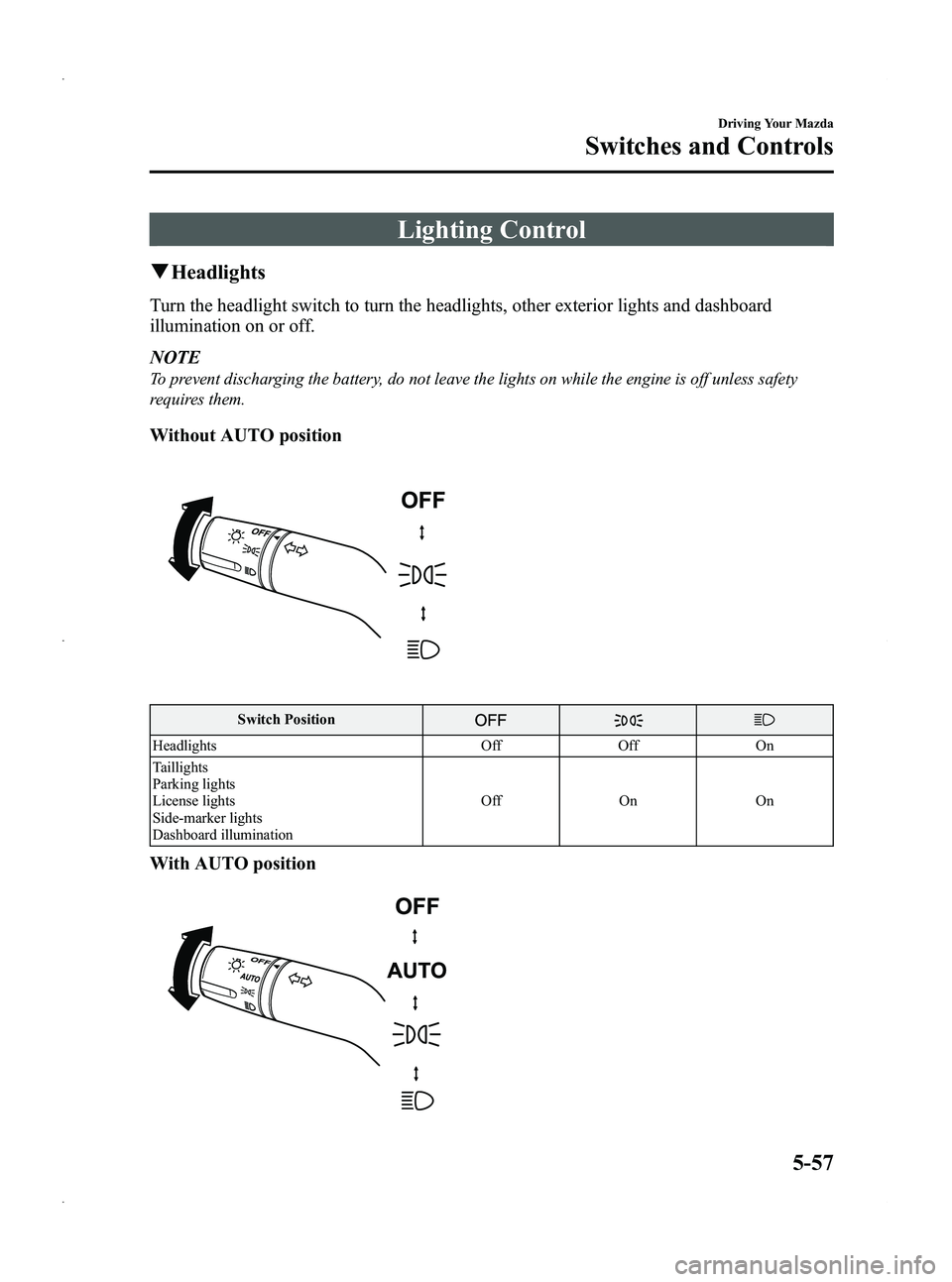
Turn the headlight switch to turn the headlights, other exterior lights and dashboard
illumination on or off.
NOTE
To prevent discharging the battery, do not leave the lights on while the engine is off unless safety
requires them.
Without AUTO position
Switch Position
Headlights OffOff On
Taillights
Parking lights
License lights
Side-marker lights
Dashboard illumination Off
OnOn
With AUTO position
Driving Your Mazda
Switches and Controls
5-57
Mazda5_8CN3-EA-12I_Edition2 Page181
Wednesday, November 7 2012 11:47 AM
Form No.8CN3-EA-12I
Page 194 of 456
Black plate (194,1)
Operating Tips
qOperating the Climate Control
System
Operate the climate control system with
the engine running.
NOTE
To prevent the battery from being discharged,
do not leave the fan control dial on for a long
period of time with the ignition switched ON
when the engine is not running.
qClearing the Air Inlet
Clear all obstructions such as leaves,
snow and ice from the hood and the air
inlet in the cowl grille to improve the
system efficiency.
qFoggy Windows
The windows may fog up easily in humid
weather. Use the climate control system to
defog the windows.
To help defog the windows, operate the
air conditioner to dehumidify the air.
NOTE
The air conditioner may be used along with the
heater to dehumidify the air.
qOutside/Recirculated Air Position
Use the outside air mode for ventilation or
windshield defrosting. The recirculate
mode should be used when the air inside
tunnels or while in traffic jams is polluted,
or you would like to shut off outside air
for quick cooling of the interior.
qParking in Direct Sunlight
If the vehicle has been parked in direct
sunlight during hot weather, open the
windows to let warm air escape, then run
the climate control system.
qNot Using for a Long Period
Run the air conditioner about 10 minutes
at least once a month to keep internal
parts lubricated.
qCheck the Refrigerant before the
Weather Gets Hot
Have the air conditioner checked before
the weather gets hot. Lack of refrigerant
may make the air conditioner less
efficient. Consult an Authorized Mazda
Dealer for refrigerant inspection.
The air conditioner is filled with
HFC134a (R134a), a refrigerant that will
not damage the ozone layer.
If the air conditioner is low on refrigerant
or has a malfunction, consult an
Authorized Mazda Dealer.
qReplacement of the Cabin Air Filter
Your vehicle is equipped with an air filter
for the air conditioner. It is necessary to
change the filter periodically as indicated
in scheduled maintenance (page 8-4).
Consult an Authorized Mazda Dealer for
replacement of the cabin air filter.
6-2
Interior Comfort
Climate Control System
Mazda5_8CN3-EA-12I_Edition2 Page194
Wednesday, November 7 2012 11:48 AM
Form No.8CN3-EA-12I
Page 204 of 456

Black plate (204,1)
Operating Tips for Audio
System
WARNING
Do not adjust the audio control
switches while driving the vehicle:Adjusting the audio while driving the
vehicle is dangerous as it could
distract your attention from the
vehicle operation which could lead to
a serious accident. Always adjust the
audio while the vehicle is stopped.
Even if the audio control switches are
equipped on the steering wheel, learn
to use the switches without looking
down at them so that you can keep
your maximum attention on the road
while driving the vehicle.
CAUTION
For the purposes of safe driving,
adjust the audio volume to a level
that allows you to hear sounds
outside of the vehicle including car
horns and particularly emergency
vehicle sirens.
NOTE
lTo prevent the battery from being
discharged, do not leave the audio system
on for a long period of time when the
engine is not running.
lIf a cellular phone or CB radio is used in
or near the vehicle, it could cause noise to
occur from the audio system, however, this
does not indicate that the system has been
damaged.
q Radio Reception
AM characteristics
AM signals bend around such things as
buildings or mountains and bounce off the
ionosphere. Therefore, they can reach
longer distances than FM signals. Because
of this, two stations may sometimes be
picked up on the same frequency at the
same time.
Station 2
Station 1 Ionosphere
FM characteristics
An FM broadcast range is usually about
40
―50 km (25 ―30 miles) from the
source. Because of extra coding needed to
break the sound into two channels, stereo
FM has even less range than monaural
(non-stereo) FM.
FM Station
40—50km
(25—30 miles)
6-12
Interior Comfort
Audio System
Mazda5_8CN3-EA-12I_Edition2 Page204
Wednesday, November 7 2012 11:48 AM
Form No.8CN3-EA-12I
Page 215 of 456

Black plate (215,1)
CAUTION
ØRemove the iPod when it is not in
use. Because the iPod is not
designed to withstand excessive
changes in temperature inside the
cabin, it could be damaged or the
battery may deteriorate due to the
excessive temperature or humidity
inside the cabin if it is left in the
vehicle.
Ø If data in the iPod is lost while it is
connected to the unit, Mazda
cannot guarantee recovery of any
lost data.
Ø If the iPod battery is deteriorated,
the iPod may not recharge and
playback may not be possible
when it is connected to the unit.
Replace the iPod battery
immediately.
Ø For the details on using the iPod,
refer to the iPod instruction
manual.
Ø When connecting the iPod to a
USB port, all commands are made
from the audio unit. iPod control is
not possible.
NOTE
The audio unit cannot display images or
videos stored in an iPod.
Interior Comfort
Audio System
6-23
Mazda5_8CN3-EA-12I_Edition2 Page215
Wednesday, November 7 2012 11:48 AM
Form No.8CN3-EA-12I
Page 218 of 456

Black plate (218,1)
qPower/Volume/Sound Controls
Audio control dialPower/Volume dial
Power ON/OFF
Switch the ignition to ACC or ON.
Press the power/volume dial to turn the
audio system on.
Press the power/volume dial again to turn
the audio system off.
NOTE
To prevent the battery from being discharged,
do not leave the audio system on for a long
period of time when the engine is not running.
Volume adjustment
To adjust the volume, turn the power/
volume dial.
Turn the power/volume dial to the right to
increase volume, to the left to decrease it.
Audio sound adjustment
1. Press the audio control dial to select the
function. The selected function will be
indicated.
*1 Depending on the mode selected, the indication changes.
*2 Depending on the model, this function, may not be available.
6-26
Interior Comfort
Audio System
Mazda5_8CN3-EA-12I_Edition2 Page218
Wednesday, November 7 2012 11:48 AM
Form No.8CN3-EA-12I
Page 245 of 456

Black plate (245,1)
NOTElBefore using the auxiliary jack/USB port,
refer to the instruction manual for the
portable audio device.
lUse a commercially-available, non-
impedance (3.5
) stereo mini plug for
connecting the portable audio unit to the
auxiliary jack. Before using the auxiliary
jack, read the manufacturer's instructions
for connecting a portable audio unit to the
auxiliary jack.
lTo prevent discharging of the battery, do
not use the auxiliary input for long periods
with the engine off or idling.
lWhen connecting a device to the auxiliary
jack or USB port, noise may occur
depending on the connected device. If the
device is connected to the vehicle's
accessory socket, the noise can be reduced
by unplugging it from the accessory socket.
lInsert the plug to the auxiliary jack/USB
port securely.
lInsert or pull out the plug with the plug
perpendicular to the auxiliary jack/USB
port hole.
lInsert or remove the plug by holding its
base.
q How to use AUX mode
Audio Unit Audio Control
Switches
1. Switch the ignition to ACC or ON.
2. Press the power/volume dial to turn theaudio system on.
3. Press the source change button (
)of
the audio unit or the mode switch
(
) of the audio control switches
on the steering wheel to change to the
AUX mode.
NOTE
lWhen the device is not connected to the
auxiliary jack, the mode does not switch to
the AUX mode.
lSet the volume of the portable audio unit to
the maximum within the range that the
sound does not become distorted, then
adjust the volume using the power/volume
dial of the audio unit or the up/down switch
of the audio control switch.
lAudio adjustments other than audio volume
can only be done using the portable audio
device.
lIf the connection plug is pulled out from the
auxiliary jack while in AUX mode, noise
may occur.
Interior Comfort
Audio System
6-53
Mazda5_8CN3-EA-12I_Edition2 Page245
Wednesday, November 7 2012 11:48 AM
Form No.8CN3-EA-12I