lock MAZDA MODEL 5 2013 Owner's Manual
[x] Cancel search | Manufacturer: MAZDA, Model Year: 2013, Model line: MODEL 5, Model: MAZDA MODEL 5 2013Pages: 456, PDF Size: 5.67 MB
Page 53 of 456

Black plate (53,1)
3. Place the child-restraint system on theseat without putting your weight on the
seat and fasten the seat belt. See the
manufacturer's instructions on the
child-restraint system for belt routing
instructions.
4. To get the retractor into the automatic locking mode, pull the shoulder belt
portion of the seat belt until the entire
length of the belt is out of the retractor.
5. Push the child-restraint system firmly into the vehicle seat. Be sure the belt
retracts as snugly as possible. A
clicking noise from the retractor will be
heard during retraction if the system is
in automatic locking mode. If the belt
does not lock the seat down tight,
repeat the previous step and also this
one.
NOTE
lInspect this function before each use of the
child-restraint system. You should not be
able to pull the shoulder belt out of the
retractor while the system is in the
automatic locking mode. When you remove
the child-restraint system, be sure the belt
fully retracts to return the system to
emergency locking mode before occupants
use the seat belts.
lFollow the child-restraint system
manufacturer's instructions carefully.
Depending on the type of child-restraint
system, it may not employ seat belts which
are in automatic locking mode.
6. Seat your child safely in the child- restraint system and secure the child
according to the instructions from the
child-restraint system manufacturer. 7.
(With Driver and Front Passenger
Occupant Classification System)
Make sure the front passenger air bag
deactivation indicator light illuminates
after installing a child-restraint system
on the front passenger seat.
If the front passenger air bag
deactivation indicator light does not
illuminate, remove the child-restraint
system, switch the ignition to OFF or
ACC, and then re-install the child-
restraint system.
Essential Safety Equipment
Child Restraint
2-41
Mazda5_8CN3-EA-12I_Edition2 Page53
Wednesday, November 7 2012 11:46 AM
Form No.8CN3-EA-12I
Page 56 of 456

Black plate (56,1)
qLATCH Child-Restraint System
Installation Procedure (Second-
Row Seats)
1. Slide the second-row seat as far back as
possible.
2. Make sure the seatback is securely latched by pushing it back until it is
fully locked.
3. Expand the area between the seat bottom and the seatback slightly to
verify the locations of the LATCH
lower anchors.
NOTE
The markings above the LATCH lower anchors
indicate the locations of LATCH lower
anchors for the attachment of a child-restraint
system.
4. Secure the child-restraint system usingBOTH LATCH lower anchors,
following the child-restraint system
manufacturer's instruction. Pull on the
child-restraint to be sure both anchors
are engaged. 5. If your child-restraint system came
equipped with a tether, that means it is
very important to properly secure the
tether for child safety. Please carefully
follow the child-restraint system
manufacturer's instructions when
installing tethers.
Anchor bracket location
Tether strap position
Tether strap
Forward
2-44
Essential Safety Equipment
Child Restraint
Mazda5_8CN3-EA-12I_Edition2 Page56
Wednesday, November 7 2012 11:46 AM
Form No.8CN3-EA-12I
Page 79 of 456
Black plate (79,1)
3Knowing Your Mazda
Explanation of basic operations and controls; opening/closing and adjustment
of various parts.
Doors and Locks ........................................................................... 3-2Keys .......................................................................................... 3-2
Keyless Entry System ............................................................... 3-3
Door Locks ............................................................................... 3-9
Liftgate .................................................................................... 3-13
Power Windows ...................................................................... 3-16
Fuel-Filler Lid and Cap ........................................................... 3-19
Hood ....................................................................................... 3-20
Moonroof
í............................................................................. 3-22
Security System ........................................................................... 3-24 Immobilizer System ................................................................ 3-24
Theft-Deterrent System
í........................................................ 3-28
Steering Wheel and Mirrors ...................................................... 3-31 Steering Wheel ........................................................................ 3-31
Mirrors .................................................................................... 3-31
3-1íSome models.
Mazda5_8CN3-EA-12I_Edition2 Page79
Wednesday, November 7 2012 11:46 AM
Form No.8CN3-EA-12I
Page 80 of 456

Black plate (80,1)
Keys
WARNING
Do not leave the key in your vehicle
with children and keep them in a place
where your children will not find or
play with them:Leaving children in a vehicle with the
key is dangerous. This could result in
someone being badly injured or even
killed. Children may find these new
kinds of keys to be an interesting toy
to play with and could cause the
power windows or other controls to
operate, or even make the vehicle
move.
NOTE
lRefer to Immobilizer System (page 3-24) for
information regarding keys and engine
starting.
l(With theft-deterrent system)
Refer to Theft-Deterrent System (page 3-28)
for information regarding keys and the
prevention of vehicle and vehicle contents
theft.
The keys operate all locks.
Key code number plate
Retractable
type key
A code number is stamped on the plate
attached to the key set; detach this plate
and store it in a safe place (not in the
vehicle) for use if you need to make a
replacement key.
NOTE
lWrite down the code number and keep it in
a separate, safe and convenient place, but
not in the vehicle.
If your key is lost, consult your Authorized
Mazda Dealer and have your code number
ready.
lSome types of key chains cannot be
attached to the retractable type key. In this
case, use the key ring provided with the
transmitter which has the key code number
plate attached.
Key ring
3-2
Knowing Your Mazda
Doors and Locks
Mazda5_8CN3-EA-12I_Edition2 Page80
Wednesday, November 7 2012 11:46 AM
Form No.8CN3-EA-12I
Page 81 of 456
Black plate (81,1)
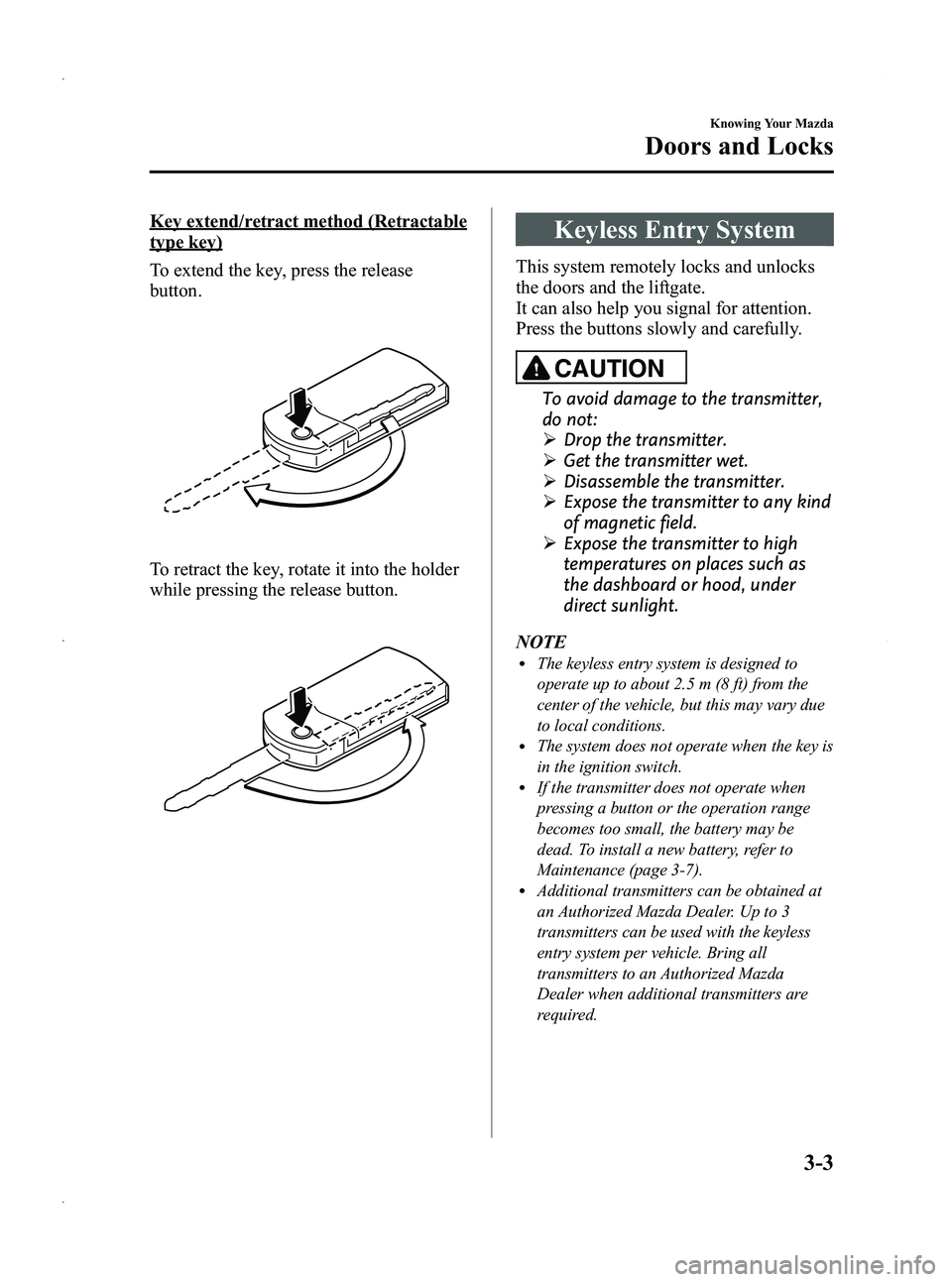
Key extend/retract method (Retractable
type key)
To extend the key, press the release
button.
To retract the key, rotate it into the holder
while pressing the release button.
Keyless Entry System
This system remotely locks and unlocks
the doors and the liftgate.
It can also help you signal for attention.
Press the buttons slowly and carefully.
CAUTION
To avoid damage to the transmitter,
do not:
ØDrop the transmitter.
Ø Get the transmitter wet.
Ø Disassemble the transmitter.
Ø Expose the transmitter to any kind
of magnetic field.
Ø Expose the transmitter to high
temperatures on places such as
the dashboard or hood, under
direct sunlight.
NOTE
lThe keyless entry system is designed to
operate up to about 2.5 m (8 ft) from the
center of the vehicle, but this may vary due
to local conditions.
lThe system does not operate when the key is
in the ignition switch.
lIf the transmitter does not operate when
pressing a button or the operation range
becomes too small, the battery may be
dead. To install a new battery, refer to
Maintenance (page 3-7).
lAdditional transmitters can be obtained at
an Authorized Mazda Dealer. Up to 3
transmitters can be used with the keyless
entry system per vehicle. Bring all
transmitters to an Authorized Mazda
Dealer when additional transmitters are
required.
Knowing Your Mazda
Doors and Locks
3-3
Mazda5_8CN3-EA-12I_Edition2 Page81
Wednesday, November 7 2012 11:46 AM
Form No.8CN3-EA-12I
Page 82 of 456

Black plate (82,1)
qTransmitter
Lock button
Unlock button
Panic button
Operation
indicator light
NOTEl(U.S.A.)
This device complies with Part 15 of the
FCC Rules. Operation is subject to the
following two conditions: (1) this device
may not cause harmful interference, and (2)
this device must accept any interference
received, including interference that may
cause undesired operation.
l(CANADA)
This device complies with RSS-210 of
Industry CANADA. Operation is subject to
the following two conditions: (1) this device
may not cause interference, and (2) this
device must accept any interference,
including interference that may cause
undesired operation of the device.
The operation indicator light flashes when
the buttons are pressed.
Lock button
To lock the doors and the liftgate, press
the lock button and the hazard warning
lights will flash once. To confirm that all doors and the liftgate
have been locked, press the lock button
again within 5 seconds. If they are closed
and locked, the horn will sound and the
hazard warning lights will flash once.
The system can be set not to sound the
horn.
Refer to Personalization Features on page
10-8.
NOTE
lDoors and the liftgate can be locked by
pressing the lock button while any other
door or the liftgate is open. However, the
hazard warning lights will not flash and the
horn will not sound.
l(Without theft-deterrent system)
The hazard warning lights will flash once
to indicate that all doors and the liftgate
are locked.
(With theft-deterrent system)
The hazard warning lights flash when the
theft deterrent system is armed.
The hazard warning lights do not flash if all
the doors and the liftgate are locked before
the theft-deterrent system is properly
armed.
When the doors are locked by pressing the
lock button on the transmitter while the
theft-deterrent system is armed, the hazard
warning lights will flash once to indicate
that the system is armed.
Refer to Theft-Deterrent System on page
3-28.
lThe hazard warning lights can be set to not
flash when the doors are locked or
unlocked.
Refer to Personalization Features on page
10-8.
lAll doors and the liftgate cannot be locked
when the key is in the ignition switch.
lConfirm that all doors and the liftgate are
locked visually or audibly by use of the
double click.
3-4
Knowing Your Mazda
Doors and Locks
Mazda5_8CN3-EA-12I_Edition2 Page82
Wednesday, November 7 2012 11:46 AM
Form No.8CN3-EA-12I
Page 83 of 456
Black plate (83,1)
Unlock button
To unlock the driver's door, press the
unlock button and the hazard warning
lights will flash twice.
To unlock all doors and the liftgate, press
the unlock button again within 5 seconds
and the hazard warning lights will flash
twice.
NOTE
(Without theft-deterrent system)
The hazard warning lights will flash twice to
indicate that all doors and the liftgate are
unlocked.
(With theft-deterrent system)
The hazard warning lights flash when the theft
deterrent system is turned off.
The hazard warning lights do not flash unless
the theft deterrent system has been properly
turned off.
When the doors are unlocked by pressing the
unlock button on the transmitter while the
theft-deterrent system is turned off, the hazard
warning lights will flash twice to indicate that
the system is turned off.
Refer to Theft-Deterrent System on page 3-28.
The system can be set to unlock all doors by
performing a single operation.
Refer to Personalization Features on page
10-8.
NOTE
Auto re-lock function
After unlocking with the transmitter, all doors
and the liftgate will automatically lock if one
of the doors or the liftgate is not opened within
about 30 seconds.
The time required for the doors to lock
automatically can be changed.
Refer to Personalization Features on page
10-8.
Panic button
If you witness from a distance someone
attempting to break into or damage your
vehicle, pressing the panic button will
activate the vehicle's alarm.
NOTE
The panic button will work whether any door
or the liftgate is open or closed.
Turning on the alarm
Pressing the panic button for 1 second or
more will trigger the alarm for about 2
minutes and 30 seconds, and the
following will occur:
lThe horn sounds intermittently.lThe hazard warning lights flash.
Turning off the alarm
Press any button on the transmitter.
Knowing Your Mazda
Doors and Locks
3-5
Mazda5_8CN3-EA-12I_Edition2 Page83
Wednesday, November 7 2012 11:46 AM
Form No.8CN3-EA-12I
Page 84 of 456
Black plate (84,1)
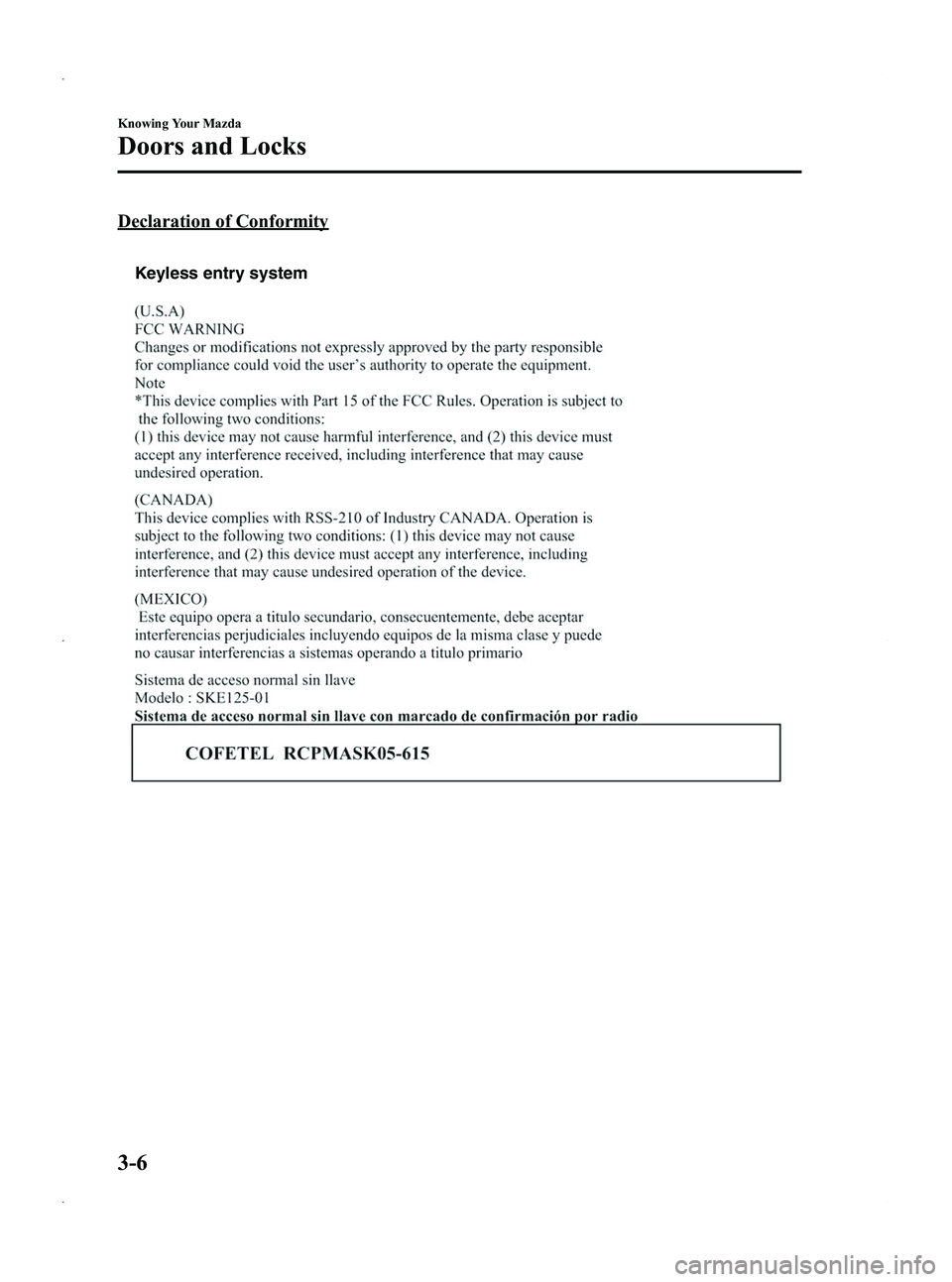
Declaration of Conformity
Keyless entry system
3-6
Knowing Your Mazda
Doors and Locks
Mazda5_8CN3-EA-12I_Edition2 Page84
Wednesday, November 7 2012 11:46 AM
Form No.8CN3-EA-12I
Page 85 of 456

Black plate (85,1)
qTransmitter Maintenance
If the buttons on the transmitter are
inoperable and the operation indicator
light does not flash, the battery may be
dead.
Replace with a new battery before the
transmitter becomes unusable.
CAUTION
Ø Install the battery with the positive
pole (
) facing down. Battery
leakage could occur if it is not
installed correctly.
Ø When replacing the battery, be
careful not to touch any of the
internal circuitry and electrical
terminals, bend the electrical
terminals, or get dirt in the
transmitter as the transmitter
could be damaged.
Ø There is the danger of explosion if
the battery is not correctly
replaced.
Ø Replace only with the same type
battery (CR1620 or equivalent).
Ø Dispose of used batteries
according to the following
instructions.
ØInsulate the plus and minus
terminals of the battery using
cellophane or equivalent tape.
ØNever disassemble.
ØNever throw the battery into
fire and/or water.
ØNever deform or crush.
Replacing the transmitter battery
1. Unfold the key (page 3-2). 2. Insert a screwdriver into the slot and
push the tab to remove the key from
the transmitter.
Ta b
3. Insert a screwdriver into the slot andgently pry open the transmitter.
4. Remove the battery.
Knowing Your Mazda
Doors and Locks
3-7
Mazda5_8CN3-EA-12I_Edition2 Page85
Wednesday, November 7 2012 11:46 AM
Form No.8CN3-EA-12I
Page 86 of 456
Black plate (86,1)
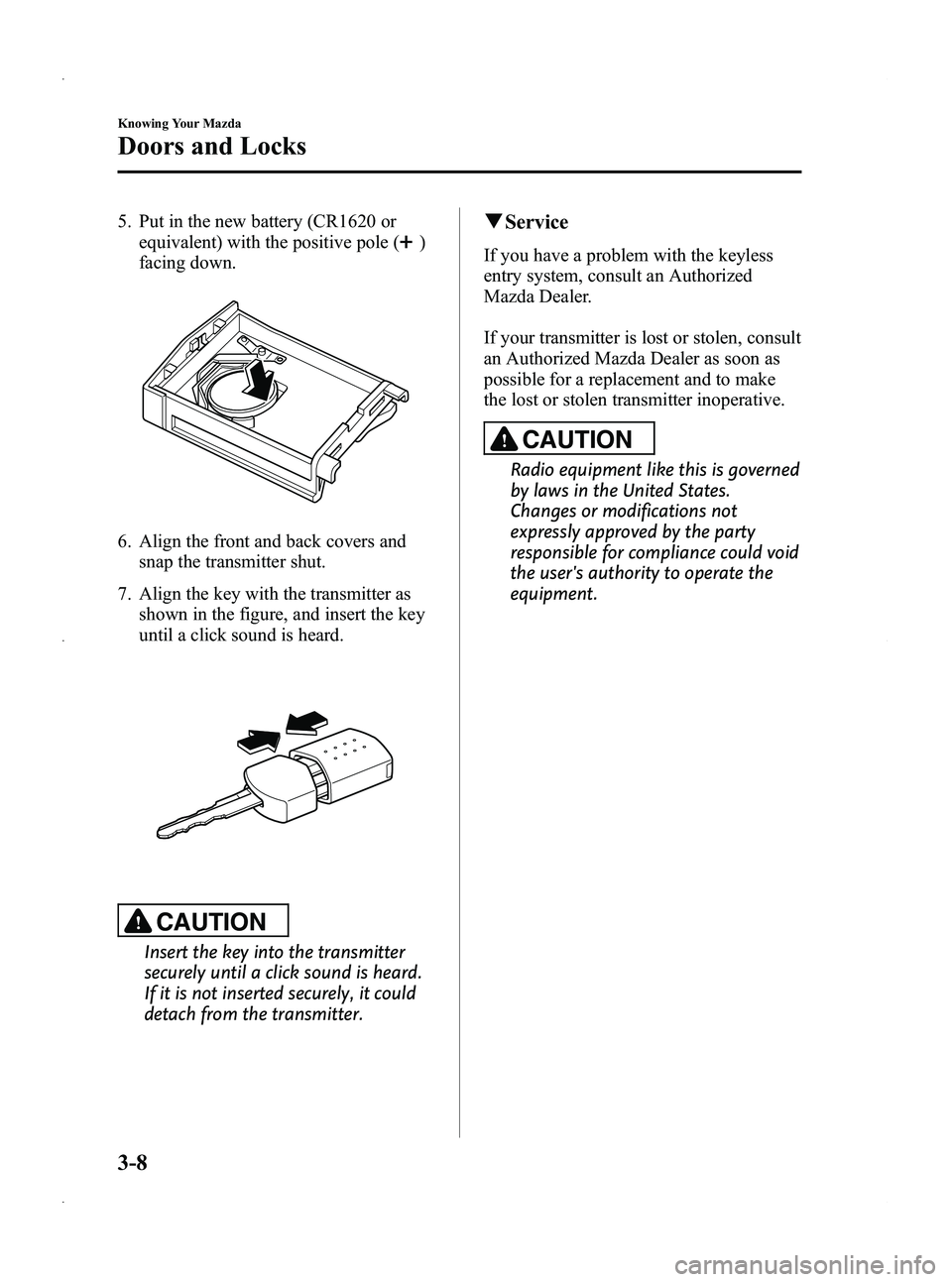
5. Put in the new battery (CR1620 orequivalent) with the positive pole (
)
facing down.
6. Align the front and back covers and snap the transmitter shut.
7. Align the key with the transmitter as shown in the figure, and insert the key
until a click sound is heard.
CAUTION
Insert the key into the transmitter
securely until a click sound is heard.
If it is not inserted securely, it could
detach from the transmitter.
qService
If you have a problem with the keyless
entry system, consult an Authorized
Mazda Dealer.
If your transmitter is lost or stolen, consult
an Authorized Mazda Dealer as soon as
possible for a replacement and to make
the lost or stolen transmitter inoperative.
CAUTION
Radio equipment like this is governed
by laws in the United States.
Changes or modifications not
expressly approved by the party
responsible for compliance could void
the user's authority to operate the
equipment.
3-8
Knowing Your Mazda
Doors and Locks
Mazda5_8CN3-EA-12I_Edition2 Page86
Wednesday, November 7 2012 11:46 AM
Form No.8CN3-EA-12I