battery MAZDA MODEL 5 2014 Owner's Manual
[x] Cancel search | Manufacturer: MAZDA, Model Year: 2014, Model line: MODEL 5, Model: MAZDA MODEL 5 2014Pages: 456, PDF Size: 5.46 MB
Page 255 of 456

Black plate (255,1)
Audio profile
lA2DP (Advanced Audio Distribution
Profile) Ver. 1.0
lAVRCP (Audio/Video Remote Control
Profile) Ver. 1.0/1.3
A2DP is a profile which transmits only
audio to the Bluetooth
®unit. If your
Bluetooth®audio device corresponds only
to A2DP, but not AVRCP, you cannot
operate it using the control panel of the
vehicle's audio system. In this case, the
Bluetooth
®audio device can be operated
by controlling the device itself, the same
as when a portable audio system without
the Bluetooth
®communication function is
connected to the AUX terminal.
Function A2DP A2DP·AVRCP
Ver. 1.0 Ver. 1.3
Playback No Yes Yes
Pause No Yes Yes
File (Track)
up/down No Yes Yes
Reverse No No Yes
Fast-forward No No Yes
Text display No No Yes
Yes: Available
No: Not available NOTE
lThe system may not operate normally
depending on the Bluetooth®audio device.lTo make sure that your Bluetooth®audio
device is Ver. 1.0 or 1.3, refer to the
Owner's Manual for the Bluetooth
®audio
device.
lIt may not be possible to play a Bluetooth®
audio device if it is placed anywhere
transmission is compromised, such as
inside a metal container or the trunk. Move
the Bluetooth
®audio device to a location
where transmission is possible.
lBattery consumption of Bluetooth®audio
devices is higher while Bluetooth®-
connected.
lIf a non-Bluetooth®device is to be used, a
commercially-available Bluetooth®adapter
is required. When playing an audio device
with a Bluetooth
®adapter installed,
programming of the audio device may not
be possible or audio may not be heard from
the vehicle speakers if the connection of the
adapter and the device is poor. If this
happens, check if the Bluetooth
®adapter is
properly connected.
Interior Comfort
Bluetooth® Audio
6-61
Mazda5_8DH4-EA-13H_Edition3 Page255
Tuesday, January 14 2014 9:20 AM
Form No.8DH4-EA-13H
Page 285 of 456

Black plate (285,1)
NOTElThe applicable phrase appears in the
display.
lAfter user voice registration is completed,
voice guidance“Speaker enrollment is
complete ”is announced.
Voice recognition learning on/off
1. Press the pick-up button or talk button
with a short press.
2. Say: [Beep] “Voice training ”
3. Prompt: “Enrollment is enabled/
disabled. Would you like to disable/
enable or retrain? ”
4. Say: [Beep] “Disable ”or “Enable ”
5. When “Disable ”is spoken, the voice
recognition learning is turned off.
When “Enable ”is spoken, the voice
recognition learning is turned on.
6. Prompt: “Speaker Enrollment is
disabled/enabled. ”
When Bluetooth® Hands-
Free Cannot be Used
Bluetooth®Hands-Free cannot be used
under the following conditions:
lThe device is outside of the
communication area.
lThe device has a malfunction.lThe device is not connected to the
hands-free unit equipped on the
vehicle.
lThe device's battery is weak.lThe device is turned off.lThe device is placed where radio
reception is difficult.
lThe ignition is switched off.
Interior Comfort
Bluetooth® Hands-Free
6-91
Mazda5_8DH4-EA-13H_Edition3 Page285
Tuesday, January 14 2014 9:20 AM
Form No.8DH4-EA-13H
Page 287 of 456

Black plate (287,1)
Sunvisors
When you need a sunvisor, lower it for
use in front or swing it to the side.
Sunvisor
qVanity Mirrors
To use the vanity mirror, lower the
sunvisor.
Interior Lights
qIlluminated Entry System
When the illuminated entry system
operates, the overhead light (switch is in
the DOOR position) turns on for:
lAbout 30 seconds after the driver's
door is unlocked and the ignition is
switched off (with the ignition key
removed).
lAbout 15 seconds after all doors are
closed.
lAbout 15 seconds after the ignition is
switched off (with the ignition key
removed) with all doors closed.
The light also turns off when:
lThe ignition is switched ON and all
doors are closed.
lThe driver's door is locked.
NOTE
lBattery saver
If any door is left opened, the light turns off
after about 30 minutes to save the battery.
The light turns on again when the ignition
is switched ON, or when any door is
opened after all doors have been closed.
lThe operation of the illuminated entry
system can be changed.
Refer to Personalization Features on page
10-8.
Interior Comfort
Interior Equipment
6-93
Mazda5_8DH4-EA-13H_Edition3 Page287
Tuesday, January 14 2014 9:20 AM
Form No.8DH4-EA-13H
Page 292 of 456

Black plate (292,1)
Average fuel economy mode
This mode displays the average fuel
economy by calculating the total fuel
consumption and the total traveled
distance since purchasing the vehicle, re-
connecting the battery after disconnection,
or resetting the data. The average fuel
economy is calculated and displayed
every minute.
When this mode is selected, AVG will be
displayed.
U.S.A.
CANADA
To clear the data being displayed, press
the INFO switch for more than 1.5
second.After pressing the INFO switch, - - - L/
100 km (- - - mpg) will be displayed for
about 1 minute before the fuel economy is
recalculated and displayed.
Distance-to-empty mode
This mode displays the approximate
distance you can travel on the remaining
fuel based on the fuel economy.
The distance-to-empty will be calculated
and displayed every second.
When this mode is selected, RANGE will
be displayed.
U.S.A.
CANADA
6-98
Interior Comfort
Interior Equipment
Mazda5_8DH4-EA-13H_Edition3 Page292
Tuesday, January 14 2014 9:20 AM
Form No.8DH4-EA-13H
Page 293 of 456

Black plate (293,1)
NOTElEven though the distance-to-empty display
may indicate a sufficient amount of
remaining mileage before refueling is
required, refuel as soon as possible if the
fuel gauge needle nears E or the low fuel
warning light illuminates.
lThe display won't change unless you add
more than approximately 5 L (6 US qt, 5
Imp qt) of fuel.
Average vehicle speed mode
This mode displays the average vehicle
speed by calculating the distance and the
time traveled since connecting the battery
or resetting the data.
Average vehicle speed will be calculated
and displayed every 10 seconds.
When this mode is selected, AVG will be
displayed.
U.S.A.
CANADA
To clear the data being displayed, press
the INFO switch for more than 1.5
second. After pressing the INFO switch, -
- - km/h (- - - mile/h) will be displayed for
about 1 minute before the vehicle speed is
recalculated and displayed.
Interior Comfort
Interior Equipment
6-99
Mazda5_8DH4-EA-13H_Edition3 Page293
Tuesday, January 14 2014 9:20 AM
Form No.8DH4-EA-13H
Page 303 of 456

Black plate (303,1)
Accessory Sockets
Switch the ignition to ACC or ON.
Only use genuine Mazda accessories or
the equivalent requiring no greater than
120 W (DC 12 V, 10 A).
Front
Rear
CAUTION
ØTo prevent accessory socket
damage or electrical failure, pay
attention to the following:
ØDo not use accessories that
require more than 120 W (DC 12
V, 10 A).
ØDo not use accessories that are
not genuine Mazda accessories
or the equivalent.
ØClose the cover when the
accessory socket is not in use to
prevent foreign objects and
liquids from getting into the
accessory socket.
ØCorrectly insert the plug into
the accessory socket.
Ø Noise may occur on the audio
playback or TV reception
depending on the device connected
to the accessory socket.
Ø Depending on the device
connected to the accessory socket,
the vehicle's electrical system may
be affected, which could cause the
warning light to illuminate.
Disconnect the connected device
and make sure that the problem is
resolved. If the problem is
resolved, disconnect the device
from the socket and switch the
ignition off. If the problem is not
resolved, consult an Authorized
Mazda Dealer.
NOTE
To prevent discharging of the battery, do not
use the socket for long periods with the engine
off or idling.
Interior Comfort
Interior Equipment
6-109
Mazda5_8DH4-EA-13H_Edition3 Page303
Tuesday, January 14 2014 9:20 AM
Form No.8DH4-EA-13H
Page 321 of 456

Black plate (321,1)
Jump-Starting
Jump-starting is dangerous if done incorrectly. So follow the procedure carefully. If you
feel unsure about jump-starting, we strongly recommend that you have a competent service
technician do the work.
WARNING
Follow These Precautions Carefully:
To ensure safe and correct handling of the battery, read the following precautions
carefully before using the battery or inspecting it.
Always wear eye protection when working near the battery:
Working without eye protection is dangerous. Battery fluid contains SULFURIC ACID
which could cause blindness if splashed into your eyes. Also, hydrogen gas produced
during normal battery operation, could ignite and cause the battery to explode.
Wear eye protection and protective gloves to prevent contact with battery
fluid: Spilled battery fluid is dangerous.
Battery fluid contains SULFURIC ACID which could cause serious injuries if it gets in
eyes, skin or clothing. If this happens, immediately flush your eyes with water for 15
minutes or wash your skin thoroughly and get medical attention.
Always keep batteries out of the reach of children:
Allowing children to play near batteries is dangerous. Battery fluid could cause
serious injuries if it gets in the eyes or on the skin.
Do not allow the positive () terminal to contact any other metal object that
could cause sparks: Flames and sparks near open battery cells are dangerous. Hydrogen gas, produced
during normal battery operation, could ignite and cause the battery to explode. An
exploding battery can cause serious burns and injuries. When working near a
battery, do not allow metal tools to contact the positive (
) or negative ()
terminal of the battery.
In Case of an Emergency
Emergency Starting
7-17
Mazda5_8DH4-EA-13H_Edition3 Page321
Tuesday, January 14 2014 9:20 AM
Form No.8DH4-EA-13H
Page 322 of 456

Black plate (322,1)
Keep all flames, including cigarettes, and sparks away from open battery cells:
Flames and sparks near open battery cells are dangerous. Hydrogen gas, produced
during normal battery operation, could ignite and cause the battery to explode. An
exploding battery can cause serious burns and injuries.
Do not jump-start a frozen battery or one with a low fluid level: Jump-starting a frozen battery or one with a low fluid level is dangerous. It may
rupture or explode, causing serious injury.
Connect the negative cable to a good ground point away from the battery: Connecting the end of the second jumper cable to the negative (
) terminal of the
discharged battery is dangerous.
A spark could cause the gas around the battery to explode and injure someone.
Route the jumper cables away from parts that will be moving: Connecting a jumper cable near or to moving parts (cooling fans, belts) is dangerous.
The cable could get caught when the engine starts and cause serious injury.
CAUTION
Use only a 12 V booster system. You can damage a 12 V starter, ignition system, and
other electrical parts beyond repair with a 24 V power supply (two 12 V batteries in
series or a 24 V motor generator set).
Jumper cables
Connect cables in numerical order and disconnect in reverse order.Discharged battery
Booster battery
7-18
In Case of an Emergency
Emergency Starting
Mazda5_8DH4-EA-13H_Edition3 Page322
Tuesday, January 14 2014 9:20 AM
Form No.8DH4-EA-13H
Page 323 of 456
Black plate (323,1)
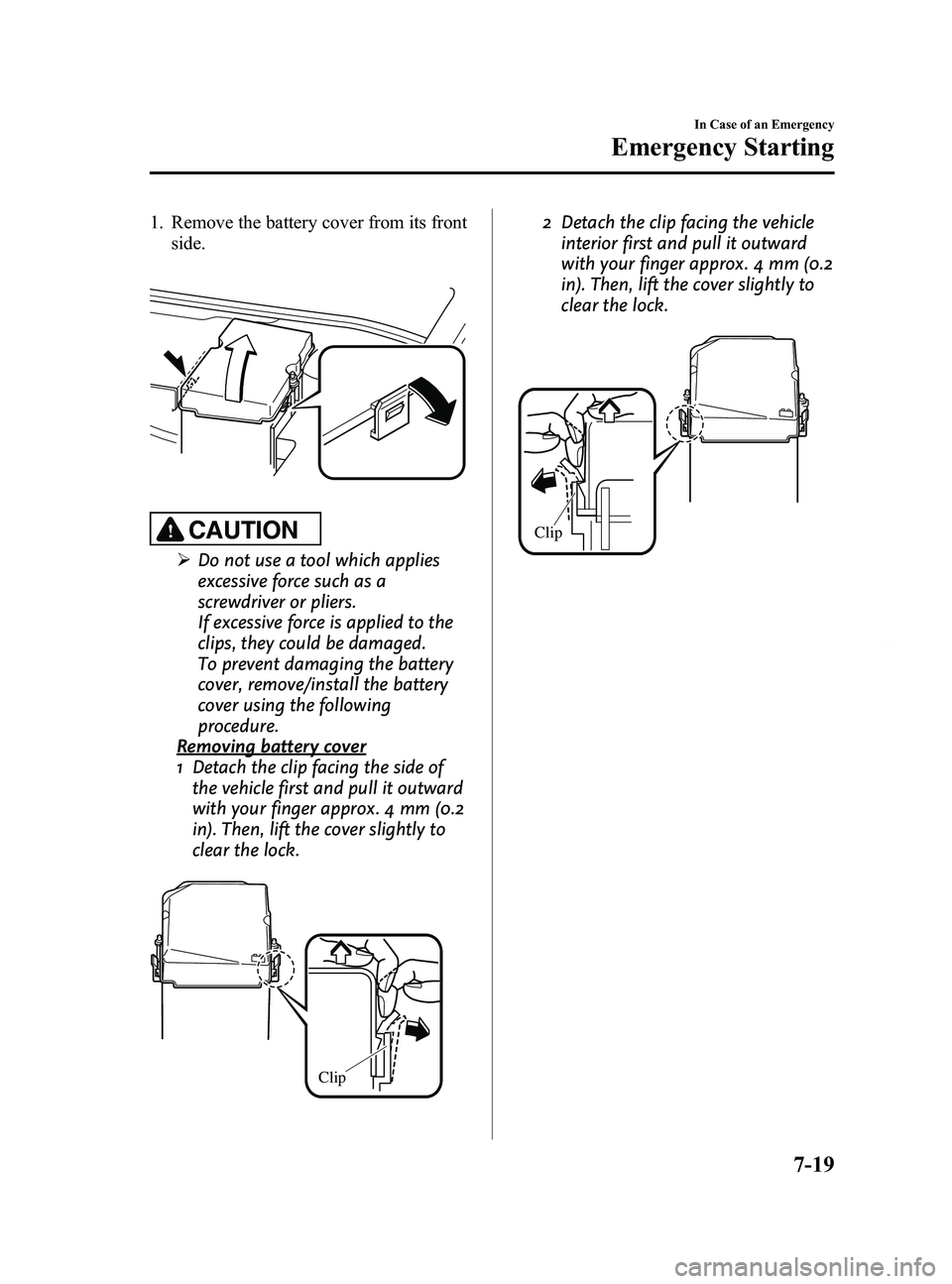
1. Remove the battery cover from its frontside.
CAUTION
ØDo not use a tool which applies
excessive force such as a
screwdriver or pliers.
If excessive force is applied to the
clips, they could be damaged.
To prevent damaging the battery
cover, remove/install the battery
cover using the following
procedure.
Removing battery cover
1 Detach the clip facing the side of
the vehicle first and pull it outward
with your finger approx. 4 mm (0.2
in). Then, lift the cover slightly to
clear the lock.
Clip
2 Detach the clip facing the vehicle interior first and pull it outward
with your finger approx. 4 mm (0.2
in). Then, lift the cover slightly to
clear the lock.
Clip
In Case of an Emergency
Emergency Starting
7-19
Mazda5_8DH4-EA-13H_Edition3 Page323
Tuesday, January 14 2014 9:20 AM
Form No.8DH4-EA-13H
Page 324 of 456

Black plate (324,1)
3 Pull out the battery cover beingcareful not to allow it to contact
the cowl grille.
Battery cover Cowl grille
Installing battery cover
1 Being careful not to contact the
cowl grille, insert the tabs on the
one end of the battery cover into
the holes of the battery tray and
engage the tabs.
Cowl grille TabsHoles
2 Attach the clips on both sides of
the battery cover.
Clip
2. Make sure the booster battery is 12 V and that its negative terminal is
grounded.
3. If the booster battery is in another vehicle, don't allow both vehicles to
touch. Turn off the engine of the
vehicle with the booster battery and all
unnecessary electrical loads in both
vehicles.
4. Connect the jumper cables in the exact sequence as in the illustration.
lConnect one end of a cable to the
positive terminal on the discharged
battery (1).
lAttach the other end to the positive
terminal on the booster battery (2).
lConnect one end of the other cable
to the negative terminal of the
booster battery (3).
lConnect the other end to the ground
point indicated in the illustration
away from the discharged battery
(4).
5. Start the engine of the booster vehicle and run it a few minutes. Then start the
engine of the other vehicle.
7-20
In Case of an Emergency
Emergency Starting
Mazda5_8DH4-EA-13H_Edition3 Page324
Tuesday, January 14 2014 9:20 AM
Form No.8DH4-EA-13H