sport MAZDA MODEL 5 2014 Owners Manual
[x] Cancel search | Manufacturer: MAZDA, Model Year: 2014, Model line: MODEL 5, Model: MAZDA MODEL 5 2014Pages: 456, PDF Size: 5.46 MB
Page 136 of 456

Black plate (136,1)
Automatic Transaxle Controls
Indicates that you must depress the brake pedal to shift (The ignition
must be switched to ACC or ON).
Indicates the shift lever can be shifted freely into any position.
Various Lockouts:
NOTE
The Sport AT has an option that is not included in the traditional automatic transaxle giving the
driver the option of selecting each gear instead of leaving it to the transaxle to shift gears. Even if
you intend to use the automatic transaxle functions as a traditional automatic, you should also be
aware that you can inadvertently shift into manual shift mode and an inappropriate gear may be
retained as the vehicle speed increases. If you notice the engine speed going higher or hear the
engine racing, confirm you have not accidentally slipped into manual shift mode (page 5-14).
5-12
Driving Your Mazda
Starting and Driving
Mazda5_8DH4-EA-13H_Edition3 Page136
Tuesday, January 14 2014 9:19 AM
Form No.8DH4-EA-13H
Page 225 of 456
Black plate (225,1)
NOTE
This equipment has been tested and found to
comply with the limits for a Class B digital
device, pursuant to Part 15 of the FCC Rules.
These limits are designed to provide
reasonable protection against harmful
interference in a residential installation. This
equipment generates, uses, and can radiate
radio frequency energy and if not installed and
used in accordance with the instructions, may
cause harmful interference to radio
communications. However, there is no
guarantee that interference will not occur in a
particular installation. If this equipment does
cause harmful interference to radio or
television reception, which can be determined
by turning the equipment off and on, the user
is encouraged to try to correct the interference
by one or more of the following measures:
- Increase the separation between the
equipment and tuner.
- Connect the equipment into an outlet on a
circuit different from that to which the tuner is
connected.
- Consult the dealer or an experienced radio/
TV technician for help.
What is satellite radio?
With over 130 channels, SIRIUS Satellite
Radio brings you more of what you love.
Get 69 channels of 100 % commercial-
free music, plus all your favorite sports,
news, talk and entertainment. Everything
worth listening to is now on SIRIUS.
100 % Commercial-free Music―With
music from every genre, artist-dedicated
channels, live performances and more,
SIRIUS is the home of 100 %
commercial-free music.
Live Sports Play-by-Play & Expert
Talk ―Hear every NFL game, every
NASCAR
®race and college sports
coverage from over 150 schools. Plus
24/7 sports talk with channels like
SIRIUS NFL Radio, SIRIUS NASCAR
Radio and more.
Exclusive Entertainment and
Talk ―The biggest names, compelling
talk, hilarious comedy. Hear Howard
Stern, Martha Stewart, Jamie Foxx, Blue
Collar Comedy, Playboy Radio, political
talk and more.
World-class News ―Stay informed with
FOX, CNN, CNBC, NPR
®, BBC and
more.
Plus local traffic and weather.
Family & Kids ―Entertain the entire
family with Radio Disney, Kids Place
Live, Laugh USA and more.
Sign up for SIRIUS Radio today! For
more information, visit
www.siriusxm.com.
Satellite radio is only available in regions
providing satellite radio service (some
areas of the United States and Canada).
How to Activate Satellite Radio
You must call SIRIUS to activate your
service. Activation is free and takes only a
few minutes.
Interior Comfort
Audio System
6-31
Mazda5_8DH4-EA-13H_Edition3 Page225
Tuesday, January 14 2014 9:20 AM
Form No.8DH4-EA-13H
Page 327 of 456
Black plate (327,1)
Tiedown Hooks
CAUTION
Do not use the front and rear
tiedown eyelets for towing the
vehicle.
They have been designed only for
securing the vehicle to a transport
vessel during shipping.
Using the eyelets for any other
purpose could result in the vehicle
being damaged.
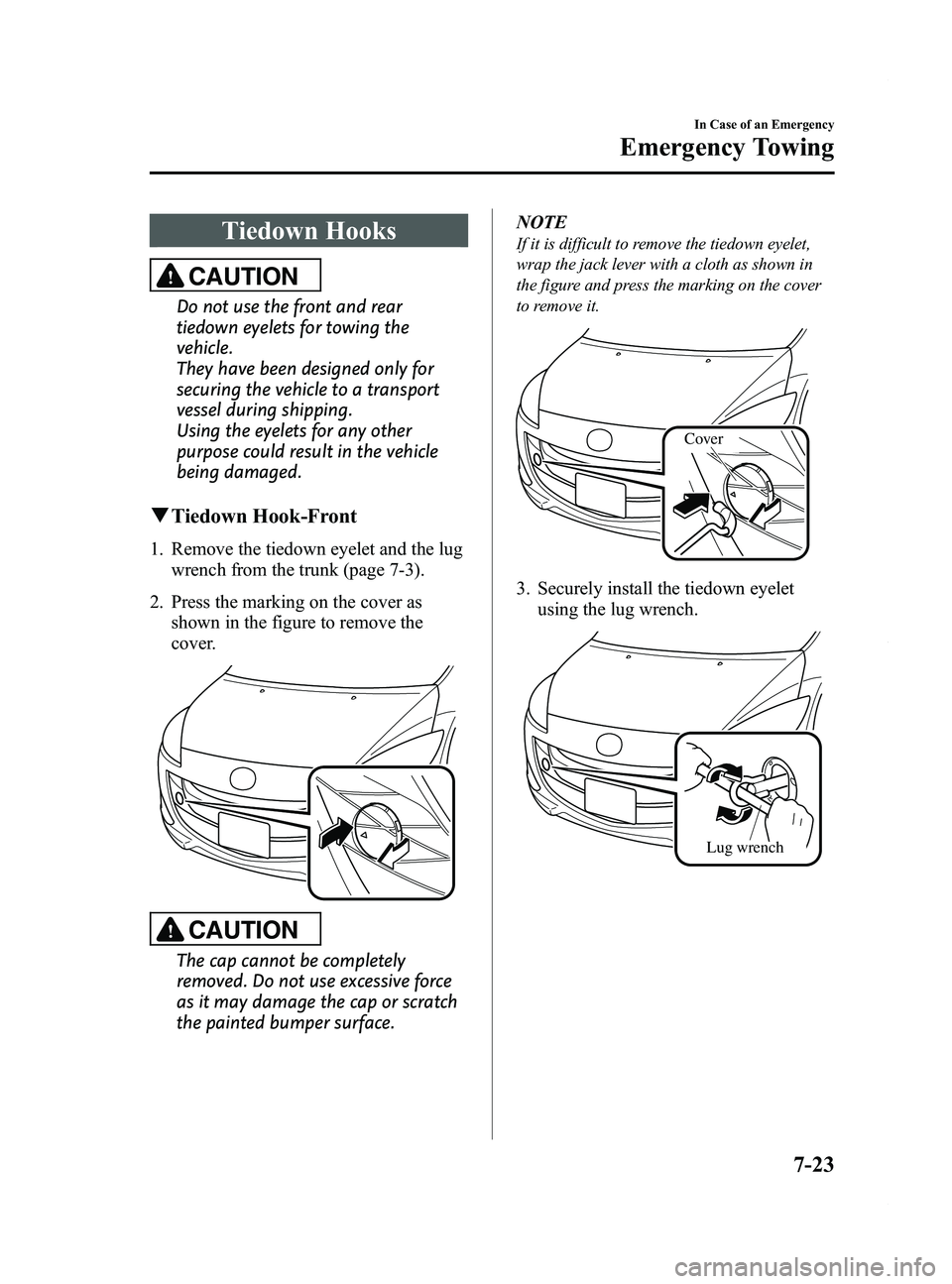
qTiedown Hook-Front
1. Remove the tiedown eyelet and the lug
wrench from the trunk (page 7-3).
2. Press the marking on the cover as shown in the figure to remove the
cover.
CAUTION
The cap cannot be completely
removed. Do not use excessive force
as it may damage the cap or scratch
the painted bumper surface. NOTE
If it is difficult to remove the tiedown eyelet,
wrap the jack lever with a cloth as shown in
the figure and press the marking on the cover
to remove it.
Cover
3. Securely install the tiedown eyelet
using the lug wrench.
Lug wrench
In Case of an Emergency
Emergency Towing
7-23
Mazda5_8DH4-EA-13H_Edition3 Page327
Tuesday, January 14 2014 9:20 AM
Form No.8DH4-EA-13H
Page 328 of 456
Black plate (328,1)
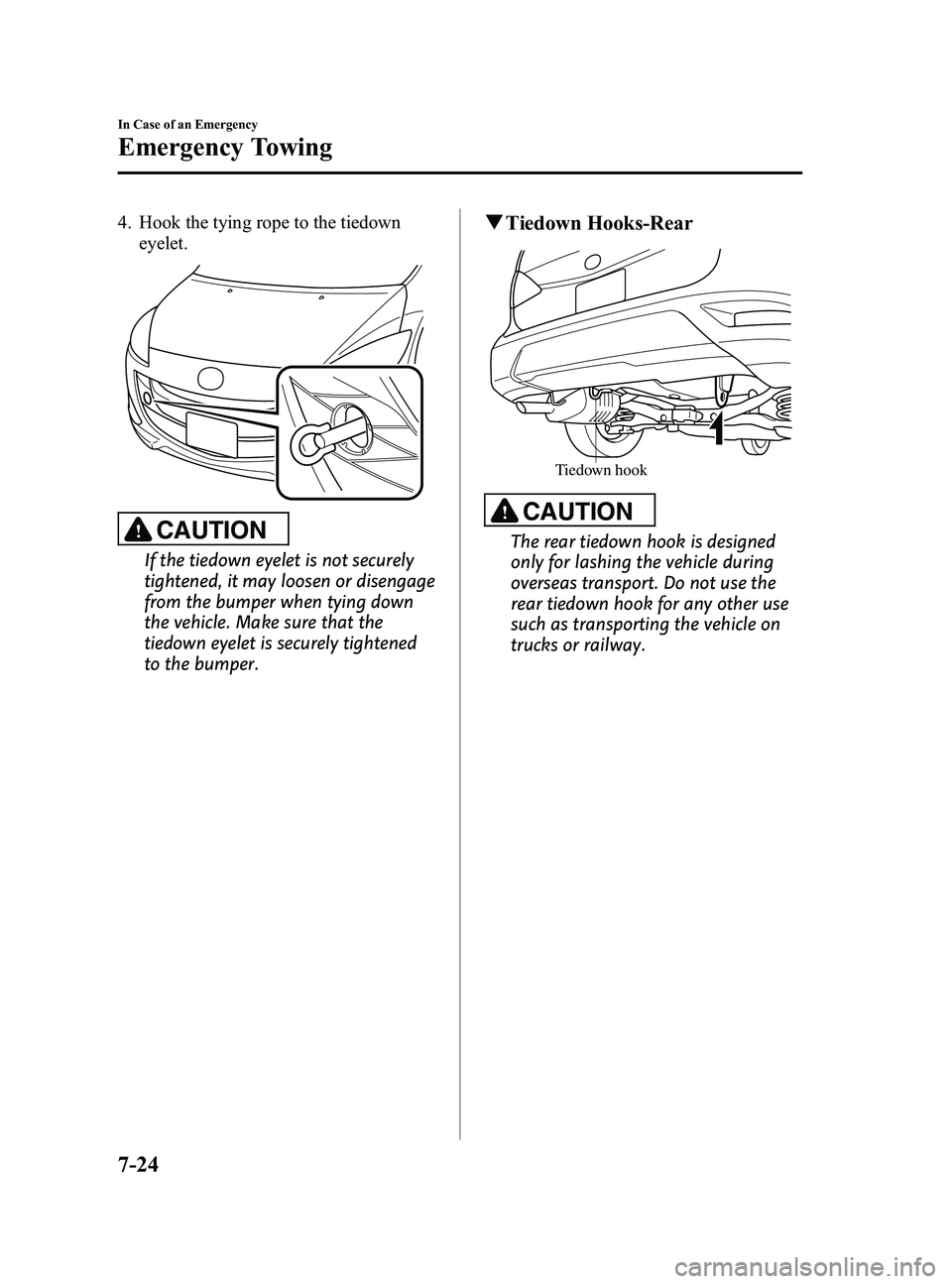
4. Hook the tying rope to the tiedowneyelet.
CAUTION
If the tiedown eyelet is not securely
tightened, it may loosen or disengage
from the bumper when tying down
the vehicle. Make sure that the
tiedown eyelet is securely tightened
to the bumper.
qTiedown Hooks-Rear
Tiedown hook
CAUTION
The rear tiedown hook is designed
only for lashing the vehicle during
overseas transport. Do not use the
rear tiedown hook for any other use
such as transporting the vehicle on
trucks or railway.
7-24
In Case of an Emergency
Emergency Towing
Mazda5_8DH4-EA-13H_Edition3 Page328
Tuesday, January 14 2014 9:20 AM
Form No.8DH4-EA-13H
Page 439 of 456
Black plate (439,1)
Reporting Safety Defects (Canada)
Canadian customers who wish to report a safety-related defect to Transport Canada, Defect
Investigations and Recalls, may telephone the toll free hotline 1-800-333-0510, or contact
Transport Canada by mail at: Transport Canada, ASFAD, Place de Ville Tower C, 330
Sparks Street, Ottawa ON K1A 0N5.
For additional road safety information, please visit the Road Safety website at:
http://www.tc.gc.ca/roadsafety/menu.htm
Customer Information
Reporting Safety Defects
9-43
Mazda5_8DH4-EA-13H_Edition3 Page439
Tuesday, January 14 2014 9:21 AM
Form No.8DH4-EA-13H