horn MAZDA MODEL 6 2003 Quick Tips (in English)
[x] Cancel search | Manufacturer: MAZDA, Model Year: 2003, Model line: MODEL 6, Model: MAZDA MODEL 6 2003Pages: 10, PDF Size: 0.95 MB
Page 2 of 10
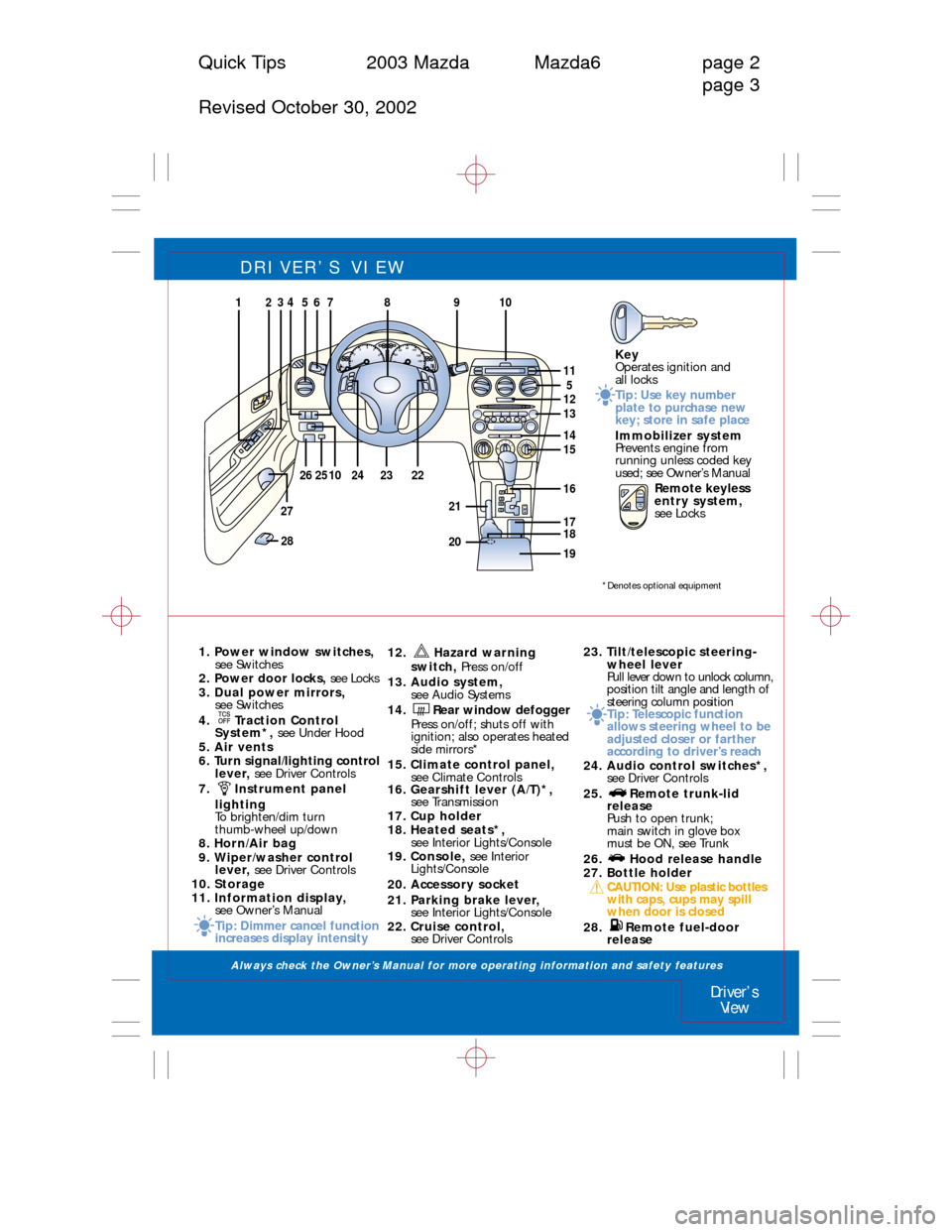
DRIVER’S VIEW
1. Power window switches,
see Switches
2. Power door locks, see Locks
3. Dual power mirrors,
see Switches
4. Traction Control
System*, see Under Hood
5. Air vents
6. Turn signal/lighting control
lever, see Driver Controls
7. Instrument panel
lighting
To brighten/dim turn
thumb-wheel up/down
8. Horn/Air bag
9. Wiper/washer control
lever, see Driver Controls
10. Storage
11. Information display,
see Owner’s Manual
Tip: Dimmer cancel function
increases display intensity12. Hazard warning
switch, Press on/off
13. Audio system,
see Audio Systems
14. Rear window defogger
Press on/off; shuts off with
ignition; also operates heated
side mirrors*
15. Climate control panel,
see Climate Controls
16. Gearshift lever (A/T)*,
see Transmission
17. Cup holder
18. Heated seats*,
see Interior Lights/Console
19. Console, see Interior
Lights/Console
20. Accessory socket
21. Parking brake lever,
see Interior Lights/Console
22. Cruise control,
see Driver Controls23. Tilt/telescopic steering-
wheel lever
Pull lever down to unlock column,
position tilt angle and length of
steering column position
Tip: Telescopic function
allows steering wheel to be
adjusted closer or farther
according to driver’s reach
24. Audio control switches*,
see Driver Controls
25. Remote trunk-lid
release
Push to open trunk;
main switch in glove box
must be ON, see Trunk
26. Hood release handle
27. Bottle holder
CAUTION: Use plastic bottles
with caps, cups may spill
when door is closed
28. Remote fuel-door
release
Driver’s
View
Quick Tips 2003 Mazda Mazda6 page 2
page 3
Revised October 30, 2002
Key
Operates ignition and
all locks
Tip: Use key number
plate to purchase new
key; store in safe place
Immobilizer system
Prevents engine from
running unless coded key
used; see Owner’s Manual
Remote keyless
entry system,
see LocksHF
E C20x1000rpm/m406080
100
120
140
1600 1234
5
6
7
8
PRNDM
012
3
4
9
13
14
125
15
17
26
27
25222423
86752431
1610
281920
21
10
11
18
LOCKUN
LOCK
*Denotes optional equipment
Always check the Owner’s Manual for more operating information and safety features
Page 5 of 10
SWITCHES
Always check the Owner’s Manual for more operating information and safety features
Switches
Locks
Quick Tips 2003 Mazda Mazda 6 page 8
page 9
Revised October 30, 2002
Lock
Unlock
AUT
O5
4
3
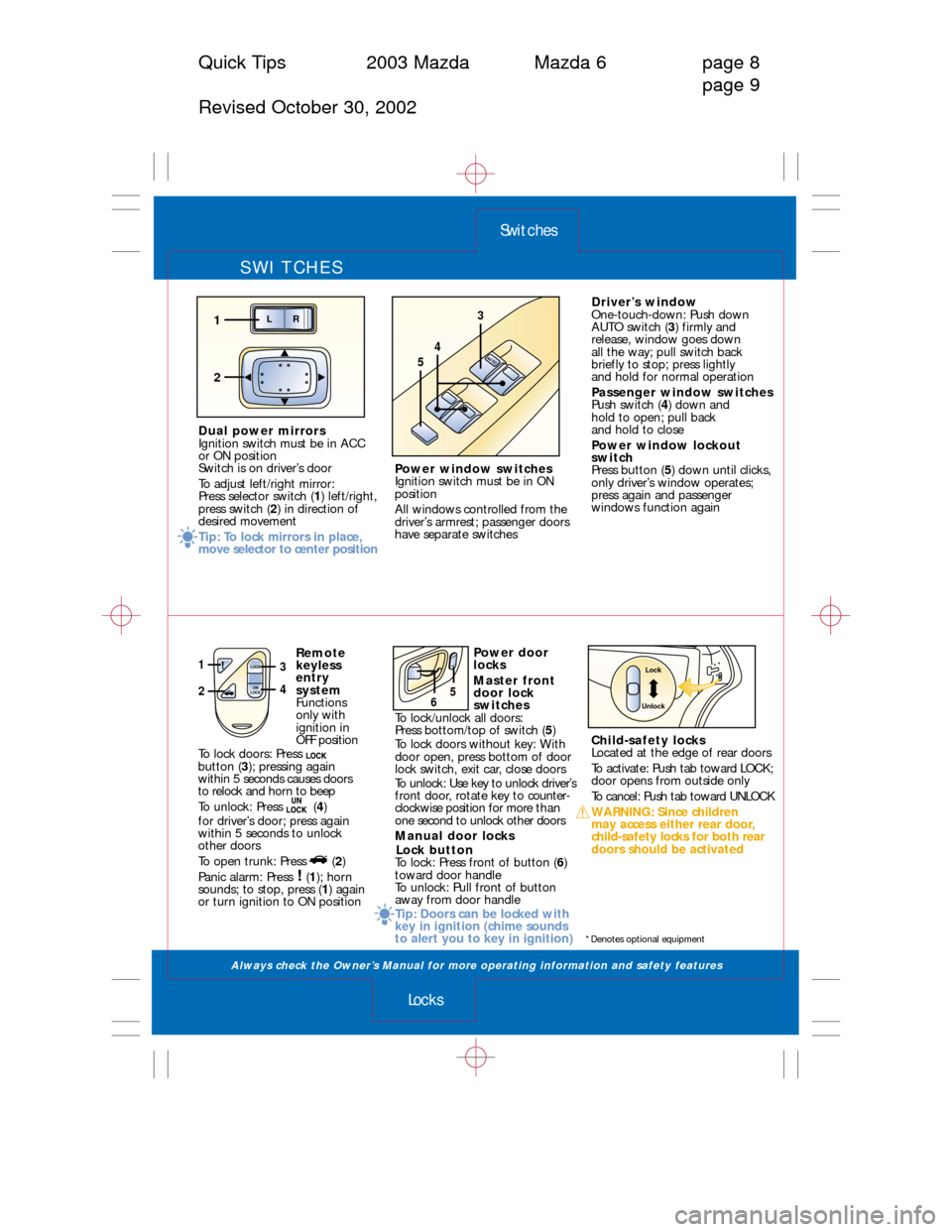
Power window switches
Ignition switch must be in ON
position
All windows controlled from the
driver’s armrest; passenger doors
have separate switches
LR
2
1
Dual power mirrors
Ignition switch must be in ACC
or ON position
Switch is on driver’s door
To adjust left/right mirror:
Press selector switch (1) left/right,
press switch (2) in direction of
desired movement
Tip: To lock mirrors in place,
move selector to center positionDriver’s window
One-touch-down: Push down
AUTO switch (3) firmly and
release, window goes down
all the way; pull switch back
briefly to stop; press lightly
and hold for normal operation
Passenger window switches
Push switch (4) down and
hold to open; pull back
and hold to close
Power window lockout
switch
Press button (5) down until clicks,
only driver’s window operates;
press again and passenger
windows function again
*Denotes optional equipment
Remote
keyless
entry
system
Functions
only with
ignition in
OFF position
To lock doors: Press
button (3); pressing again
within 5 seconds causes doors
to relock and horn to beep
To unlock: Press (4)
for driver’s door; press again
within 5 seconds to unlock
other doors
To open trunk: Press (2)
Panic alarm: Press (1); horn
sounds; to stop, press (1) again
or turn ignition to ON position
Child-safety locks
Located at the edge of rear doors
To activate: Push tab toward LOCK;
door opens from outside only
To cancel: Push tab toward UNLOCK
WARNING: Since children
may access either rear door,
child-safety locks for both rear
doors should be activated Power door
locks
Master front
door lock
switches
To lock/unlock all doors:
Press bottom/top of switch (5)
To lock doors without key: With
door open, press bottom of door
lock switch, exit car, close doors
To unlock: Use key to unlock driver’s
front door, rotate key to counter-
clockwise position for morethan
one second to unlock other doors
Manual door locks
Lock button
To lock: Press front of button (6)
toward door handle
To unlock: Pull front of button
away from door handle
Tip: Doors can be locked with
key in ignition (chime sounds
to alert you to key in ignition)
1
2
LOCK
UN
LOCK3
4
LOCK UNLOCK
56