wheel MAZDA MODEL 6 2007 (in English) Owner's Manual
[x] Cancel search | Manufacturer: MAZDA, Model Year: 2007, Model line: MODEL 6, Model: MAZDA MODEL 6 2007Pages: 384, PDF Size: 4.22 MB
Page 144 of 384

Black plate (144,1)
N (Neutral)
In N, the wheels and transaxle are not
locked. The vehicle will roll freely even
on the slightest incline unless the parking
brake or brakes are on.
WARNING
If the engine is running faster thanidle, do not shift from N or P into adriving gear:
It's dangerous to shift from N or P
into a driving gear when the engine is
running faster than idle. If this is
done, the vehicle could move suddenly,
causing an accident or serious injury.
Do not shift into N when driving thevehicle:
Shifting into N while driving is
dangerous. Engine braking cannot be
applied when decelerating which
could lead to an accident or serious
injury.
CAUTION
Do not shift into N when driving the
vehicle. Doing so can cause transaxle
damage.
NOTE
Apply the parking brake or depress the
brake pedal before moving the shift
lever from N to prevent the vehicle
from moving unexpectedly.
D (Drive)
D is the normal driving position. From a
stop, the transaxle will automatically shift
through a 5-gear/6-gear
*sequence.
* 3.0-liter engine model
M (Manual)
M is the manual shift mode position.
Gears can be shifted up or down by
operating the shift lever.
Refer to Manual Shift Mode (page 5-13).
qShift-Lock System
The shift-lock system prevents shifting
out of P unless the brake pedal is
depressed.
To shift from P:
1. Depress and hold the brake pedal.
2. Start the engine.
3. Move the shift lever.
NOTE
lWhen the ignition switch is in the
LOCK position, the shift lever
cannot be shifted from P.
lTo be sure the vehicle is in park,the
ignition key cannot be removed
unless the shift lever is in P.
5-12
Driving Your Mazda
Starting and Driving
Mazda6_8W89-EA-06K_Edition1 Page144
Tuesday, November 14 2006 1:23 PM
Form No.8W89-EA-06K
Page 145 of 384
Black plate (145,1)
qManual Shift Mode
This mode gives you the feel of driving a
manual transaxle vehicle by operating the
shift lever and allows you to control
engine rpm and torque to the front wheels
much like a manual transaxle when more
control is desired.
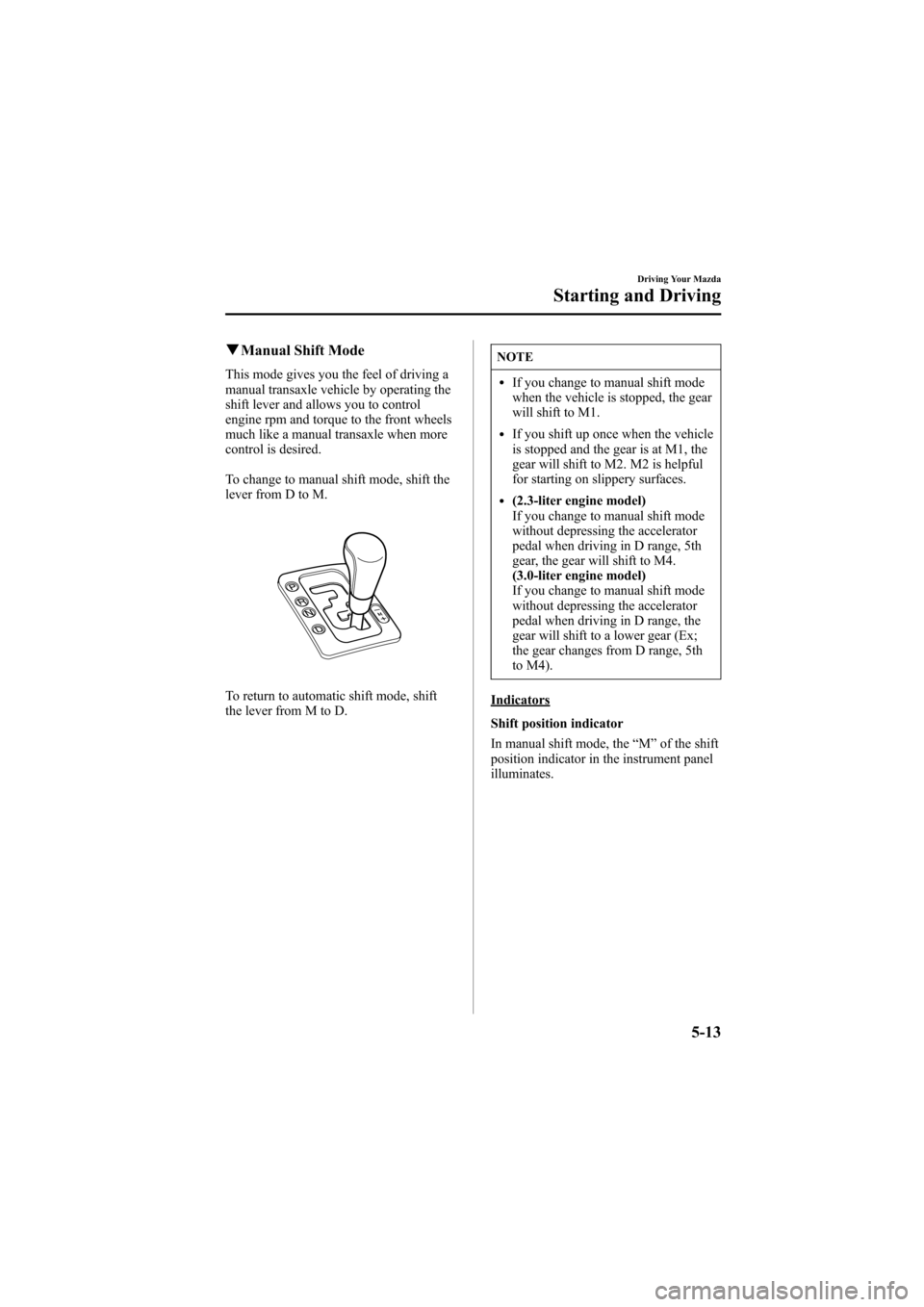
To change to manual shift mode, shift the
lever from D to M.
To return to automatic shift mode, shift
the lever from M to D.
NOTE
lIf you change to manual shift mode
when the vehicle is stopped, the gear
will shift to M1.
lIf you shift up once when the vehicle
is stopped and the gear is at M1, the
gear will shift to M2. M2 is helpful
for starting on slippery surfaces.
l(2.3-liter engine model)
If you change to manual shift mode
without depressing the accelerator
pedal when driving in D range, 5th
gear, the gear will shift to M4.
(3.0-liter engine model)
If you change to manual shift mode
without depressing the accelerator
pedal when driving in D range, the
gear will shift to a lower gear (Ex;
the gear changes from D range, 5th
to M4).
Indicators
Shift position indicator
In manual shift mode, the“M”of the shift
position indicator in the instrument panel
illuminates.
Driving Your Mazda
Starting and Driving
5-13
Mazda6_8W89-EA-06K_Edition1 Page145
Tuesday, November 14 2006 1:23 PM
Form No.8W89-EA-06K
Page 150 of 384

Black plate (150,1)
Power Steering
Power steering is only operable when the
engine is running. If the engine is off or if
the power steering system is inoperable,
you can still steer, but it requires more
physical effort.
If the steering feels rigid during normal
driving, consult an Authorized Mazda
Dealer.
CAUTION
Never hold the steering wheel to the
extreme left or right for more than 5
seconds with the engine running.
This could damage the power steering
system.
Cruise Control
With cruise control, you can set and
automatically maintain any speed of more
than about 30 km/h (19 mph).
WARNING
Do not use the cruise control underthe following conditions:
Using the cruise control under the
following conditions is dangerous and
could result in loss of vehicle control.
lHilly terrainlSteep inclineslHeavy or unsteady trafficlSlippery or winding roadslSimilar restrictions that require
inconsistent speed
qCruise Main Indicator Light
This light comes on when the ON/OFF
switch is pressed and the cruise control
system is activated.
5-18
Driving Your Mazda
Starting and Driving
Mazda6_8W89-EA-06K_Edition1 Page150
Tuesday, November 14 2006 1:23 PM
Form No.8W89-EA-06K
Page 154 of 384

Black plate (154,1)
Traction Control System
(TCS)í
The Traction Control System (TCS)
enhances traction and safety by
controlling engine torque. When the TCS
detects driving wheel slippage, it lowers
engine torque to prevent loss of traction.
This means that on a slick surface, the
engine adjusts automatically to provide
optimum power to the drive wheels
without causing them to spin and lose
traction.
WARNING
Do not rely on the traction controlsystem as a substitute for safe driving:
The traction control system (TCS)
cannot compensate for unsafe and
reckless driving, excessive speed,
tailgating (following another vehicle
too closely), and hydroplaning
(reduced tire friction and road contact
because of water on the road surface).
You can still have an accident.
Use snow tires and drive at reducedspeeds when roads are covered withice and/or snow:
Driving without proper traction
devices on snow and/or ice-covered
roads is dangerous. The traction
control system (TCS) alone cannot
provide adequate traction and you
could still have an accident.
qTCS Indicator Light
This indicator light stays on for a few
seconds when the ignition switch is turned
to the ON position. If the TCS is
operating, the indicator light flashes.
If the light stays on, the TCS may have a
malfunction and it may not operate
correctly. Take your vehicle to an
Authorized Mazda Dealer.
NOTE
lIn addition to the indicator light
flashing, a slight lugging sound will
come from the engine. This indicates
that the TCS is operating properly.
lOn slippery surfaces, such as fresh
snow, it will be impossible to
achieve high rpm when the TCS is
on.
qTCS OFF Indicator Light
This indicator light stays on for a few
seconds when the ignition switch is turned
to the ON position.
It also comes on when the TCS OFF
switch is pressed and TCS is switched off.
5-22
Driving Your Mazda
íSome models.
Starting and Driving
Mazda6_8W89-EA-06K_Edition1 Page154
Tuesday, November 14 2006 1:23 PM
Form No.8W89-EA-06K
Page 159 of 384

Black plate (159,1)
qFuel Gauge
The fuel gauge shows approximately how
much fuel is in the tank. We recommend
keeping the tank over 1/4 full. When the
low fuel warning light illuminates or
when the needle is near E, refuel as soon
as possible.
Low fuel
warning light
NOTE
The direction of the arrow () shown
that the fuel-filler lid is on the left side
of the vehicle.
qDashboard Illumination
Rotate the thumb wheel to adjust the
brightness of the instrument cluster and
other illuminations in the dashboard.
NOTE
lThe brightness of dashboard
illuminations (except instrument
cluster) can be adjusted when the
headlight switch is in the
orposition.
l(Black-out meter)
The brightness of the instrument
cluster illumination can be adjusted
when the headlight switch is in any
position.
Dim Bright
Canceling the illumination dimmer(Black-out meter and dashboardilluminations)
When the headlight switch is in the
orposition, the illumination of the
instrument cluster and the information
display dims.
Driving Your Mazda
Instrument Cluster and Indicators
5-27
Mazda6_8W89-EA-06K_Edition1 Page159
Tuesday, November 14 2006 1:23 PM
Form No.8W89-EA-06K
Page 160 of 384

Black plate (160,1)
When driving on snowy or foggy roads,
or in other situations when the instrument
cluster or information display's visibility
is reduced due to glare from surrounding
brightness, cancel the illumination
dimmer and increase the illumination
intensity.
To cancel the illumination dimmer, rotate
the thumb wheel upward fully. You may
hear a click sound and the illumination
dimmer will be canceled.
NOTE
If the dashboard illumination switch is
kept at the illumination dimmer cancel
position, the instrument cluster and the
information display will not dim when
the headlight switch is turned to the
orposition again.
5-28
Driving Your Mazda
Instrument Cluster and Indicators
Mazda6_8W89-EA-06K_Edition1 Page160
Tuesday, November 14 2006 1:23 PM
Form No.8W89-EA-06K
Page 164 of 384

Black plate (164,1)
If the ABS warning light stays on while
you're driving, the ABS control unit has
detected a system malfunction. If this
occurs, your brakes will function normally
as if the vehicle had no ABS.
Should this happen, consult an Authorized
Mazda Dealer as soon as possible.
NOTE
When the engine is jump-started to
charge the battery, uneven rpm occurs
and the ABS warning light comes on.
This is due to a weak battery, not a
malfunction.
Recharge the battery.
qElectronic Brake Force
Distribution System Warning
If the electronic brake force distribution
control unit determines that some
components are operating incorrectly, the
control unit may turn the brake system
warning light and the ABS warning light
on at the same time. The problem is likely
to be an electronic brake force distribution
system.
WARNING
Do not drive with both the ABSwarning light and brake warning lightilluminated. Have the vehicle towed toan Authorized Mazda Dealer to havethe brakes inspected as soon aspossible:
Driving when the brake system
warning light and ABS warning light
are illuminated at the same time is
dangerous.
When both lights are illuminated, the
rear wheels could lock more quickly in
an emergency stop than under normal
circumstances.
qCharging System Warning Light
This warning light illuminates when the
ignition switch is turned to the ON
position and turns off when the engine is
started.
If the warning light illuminates while
driving, it indicates a malfunction of the
alternator or of the charging system.
Drive to the side of the road and park off
the right-of-way. Consult an Authorized
Mazda Dealer.
5-32
Driving Your Mazda
Warning/Indicator Lights and Beep Sounds
Mazda6_8W89-EA-06K_Edition1 Page164
Tuesday, November 14 2006 1:23 PM
Form No.8W89-EA-06K
Page 178 of 384

Black plate (178,1)
Horn
To sound the horn, press around themark on the steering wheel.
Hazard Warning Flasher
The hazard warning lights should always
be used when you stop on or near a
roadway.
The hazard warning lights warn other
drivers that your vehicle is a traffic hazard
and that they must take extreme caution
when near it.
Depress the hazard warning flasher and all
four turn signals will flash.
NOTE
lThe turn signals don't work when the
hazard warning lights are on.
lCheck local regulations about the use
of hazard warning lights while the
vehicle is being towed. They may
forbid it.
5-46
Driving Your Mazda
Switches and Controls
Mazda6_8W89-EA-06K_Edition1 Page178
Tuesday, November 14 2006 1:23 PM
Form No.8W89-EA-06K
Page 183 of 384
Black plate (183,1)
6Interior Comfort
Use of various features for drive comfort, including air-conditioning and audio
system.
Climate Control System ............................................................... 6-2
Operating Tips ........................................................................... 6-2
Vent Operation .......................................................................... 6-3
Types of the Climate Control System ....................................... 6-5
Manual Type ............................................................................. 6-6
Fully Automatic Type ............................................................. 6-11
Audio System ............................................................................... 6-16
Antenna ................................................................................... 6-16
Operating Tips for Audio System ........................................... 6-16
Audio Set ................................................................................ 6-27
Audio Control Switch Operation (Steering Wheel)
í............. 6-45
Safety Certification ................................................................. 6-48
Interior Equipment ..................................................................... 6-49
Sunvisors ................................................................................. 6-49
Interior Lights ......................................................................... 6-49
Information Display ................................................................ 6-52
Cup Holder .............................................................................. 6-54
Bottle Holder ........................................................................... 6-55
Storage Compartments ............................................................ 6-56
Accessory Sockets .................................................................. 6-59
6-1íSome models.
Mazda6_8W89-EA-06K_Edition1 Page183
Tuesday, November 14 2006 1:24 PM
Form No.8W89-EA-06K
Page 198 of 384
Black plate (198,1)
Antenna
qDetachable Type
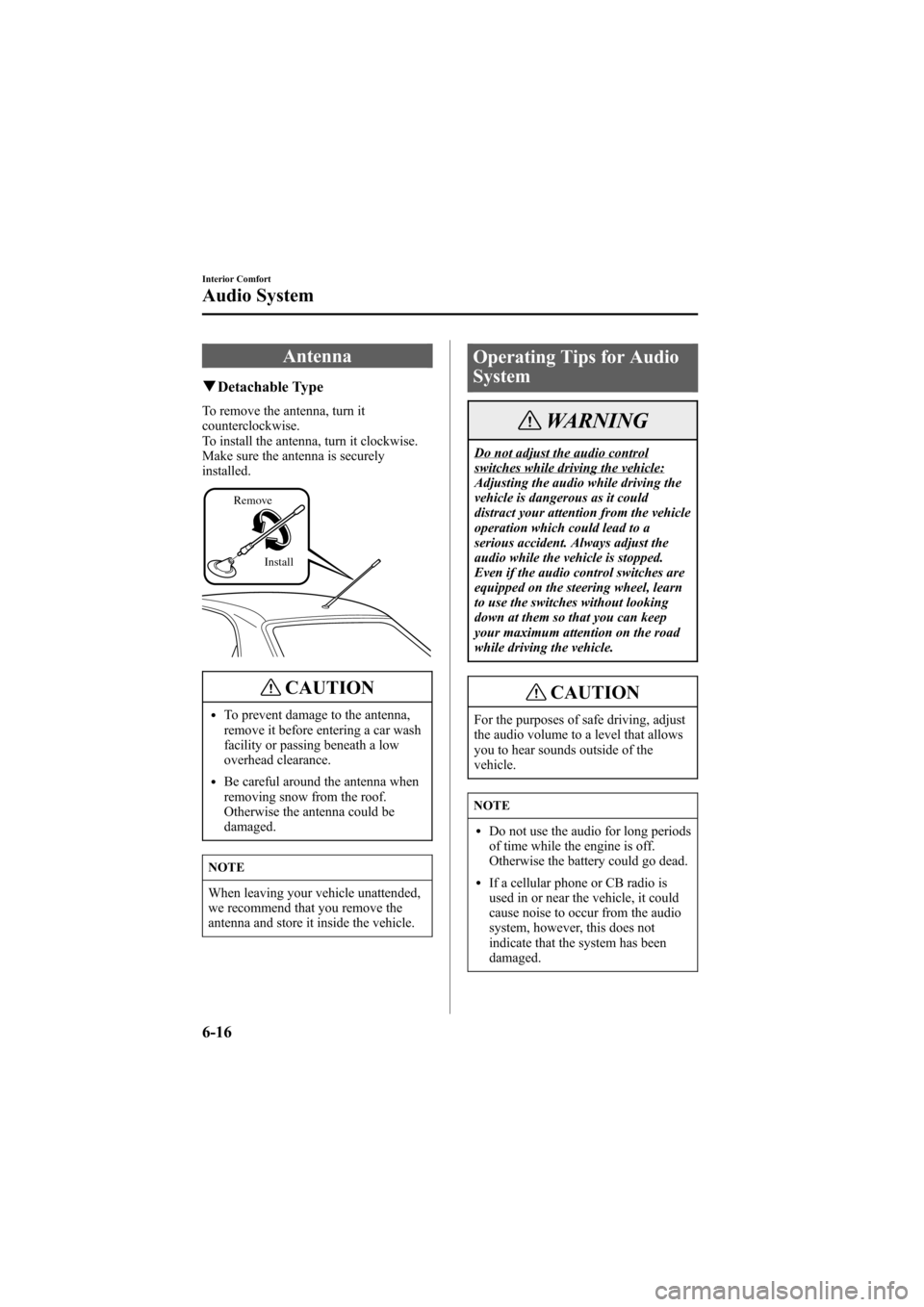
To remove the antenna, turn it
counterclockwise.
To install the antenna, turn it clockwise.
Make sure the antenna is securely
installed.
Install Remove
CAUTION
lTo prevent damage to the antenna,
remove it before entering a car wash
facility or passing beneath a low
overhead clearance.
lBe careful around the antenna when
removing snow from the roof.
Otherwise the antenna could be
damaged.
NOTE
When leaving your vehicle unattended,
we recommend that you remove the
antenna and store it inside the vehicle.
Operating Tips for Audio
System
WARNING
Do not adjust the audio controlswitches while driving the vehicle:
Adjusting the audio while driving the
vehicle is dangerous as it could
distract your attention from the vehicle
operation which could lead to a
serious accident. Always adjust the
audio while the vehicle is stopped.
Even if the audio control switches are
equipped on the steering wheel, learn
to use the switches without looking
down at them so that you can keep
your maximum attention on the road
while driving the vehicle.
CAUTION
For the purposes of safe driving, adjust
the audio volume to a level that allows
you to hear sounds outside of the
vehicle.
NOTE
lDo not use the audio for long periods
of time while the engine is off.
Otherwise the battery could go dead.
lIf a cellular phone or CB radio is
used in or near the vehicle, it could
cause noise to occur from the audio
system, however, this does not
indicate that the system has been
damaged.
6-16
Interior Comfort
Audio System
Mazda6_8W89-EA-06K_Edition1 Page198
Tuesday, November 14 2006 1:24 PM
Form No.8W89-EA-06K