phone MAZDA MODEL 6 2019 (in English) User Guide
[x] Cancel search | Manufacturer: MAZDA, Model Year: 2019, Model line: MODEL 6, Model: MAZDA MODEL 6 2019Pages: 668, PDF Size: 9.4 MB
Page 409 of 668

How to use Android Auto™ mode*
▼What is Android Auto™?
Android Auto™ is an application which allows the operation of a
n Android™ Smartphone
using the vehicle's audio. Android Auto™ functions such as the phone, messages, music,
and map can be used with the vehicle's audio system.
CAUTION
YOU EXPRESSLY ACKNOWLEDGE AND AGREE THAT USE OF ANDROID AUTO™ (“THE
APPLICATION”) IS AT YOUR SOLE RISK AND THAT THE ENTIRE RISK AS TO SATISFACTORY
QUALITY, PERFORMANCE, ACCURACY AND EFFO RT IS WITH YOU TO THE MAXIMUM EXTENT
PERMITTED BY APPLICABLE LAW, AND THAT THE APPLICATION AND INFORMATION ON THE
APPLICATION IS PROVIDED “AS IS” AND “AS AVAILABLE,” WITH ALL FAULTS AND WITHOUT
WARRANTY OF ANY KIND, AND MAZDA HERE BY DISCLAIMS ALL WARRANTIES AND
CONDITIONS WITH RESPECT TO THE APPLICATION AND INFORMATION ON THE
APPLICATION, EITHER EXPRESS, IMPLIED OR STATUTORY, INCLUDING, BUT NOT LIMITED TO,
THE IMPLIED WARRANTIES AND/OR CONDITIONS OF MERCHANTABIL ITY, SATISFACTORY
QUALITY, FITNESS FOR A PARTICULAR PURP OSE, ACCURACY, QUIET ENJOYMENT, AND
NONINFRINGEMENT OF THIRD PARTY RIGHTS. AS EXAMPLES, AND WITHOUT LIMITATION,
MAZDA DISCLAIMS ANY WARRANTY REGARDING THE ACCURACY OF DATA PROVIDED BY
THE APPLICATION, SUCH AS THE ACCURACY OF DIRECTIONS, ESTIMATED TRAVEL TIME,
SPEED LIMITS, ROAD CONDITIONS, NEWS, WEATHER, TRAFFIC, OR OTHER CONTENT
PROVIDED BY GOOGLE, ITS AFFILIATES, OR THIRD PARTY PROVIDERS; MAZDA DOES NOT
GUARANTEE AGAINST LOSS OF APPLICATION DATA, WHICH MAY BE LOST AT ANY TIME;
MAZDA DOES NOT GUARANTEE THAT THE APPLICATION OR ANY SERVICES PROVIDED
THROUGH THEM WILL BE PROVIDED AT ALL TI MES OR THAT ANY OR ALL SERVICES WILL BE
AVAILABLE AT ANY PARTICULAR TIME OR LOCATION. FOR EXAMPLE, SERVICES MAY BE
SUSPENDED OR INTERRUPTED WITHOUT NOTI CE FOR REPAIR, MAINTENANCE, SECURITY
FIXES, UPDATES, ETC., SERVIC ES MAY BE UNAVAILABLE IN YOUR AREA OR LOCATION, ETC.
IN ADDITION, YOU UNDERSTAND THAT CHANGES IN THIRD PARTY TECHNOLOGY OR
GOVERNMENT REGULATION MAY RENDER THE SERVICES AND/OR APPLICATIONS
OBSOLETE AND/OR UNUSABLE.
TO THE EXTENT NOT PROHIBITED BY LAW, IN NO EVENT SHALL MAZDA OR ITS AFFILIATES
BE LIABLE FOR PERSONAL INJURY, OR ANY INCIDENTAL, SPECIAL, INDIRECT OR
CONSEQUENTIAL DAMAGES WHATSOEVER, INCLUDING, WITHOUT LIMITATION, DAMAGES
FOR LOSS OF PROFITS, CORRUPTION OR LOSS OF DATA, FAILURE TO TRANSMIT OR RECEIVE
ANY DATA, BUSINESS INTERRUPTION OR AN Y OTHER COMMERCIAL DAMAGES OR LOSSES,
ARISING OUT OF OR RELATED TO THE APPLICATION OR YOUR USE OF OR INABILITY TO USE
THE APPLICATION OR INFORMATION ON THE APPLICATION.
Interior Features
Audio Set
*Some models.5-37
Mazda6_8HK6-EA-19A_Edition1 2018-11-15 9:36:06
Page 410 of 668
When using Android Auto™, please avoid di straction and use Android Auto™ responsibly.
Stay fully aware of driving conditions and always obey applicable laws.
NOTE
Android Auto™ is provided by Google and its use is subject to your agreement to the
Android Auto™ terms of use.
When using Android Auto™, location, speed, and other vehicle data is transferred to your
smart phone. For further details, refer to Google’s Privacy Policy.
▼ How to use the Android Auto™ mode
Insert an Android™ Smartphone-genuine connector cord into the U
SB terminal indicated by
the
icon to connect the Smartphone.
Refer to How to connect USB port/Auxiliary jack on page 5-11.
NOTE
When an Android™ Smartphone connected to Bluetooth® is connected to the vehicle's
USB terminal, Bluetooth
® is used by Android Auto™ and the system switches to Android
Auto™ mode.
If the Android™ Smartphone is conn ected to a USB terminal with no icon indicated,
the system operates in USB mode.
Display of Android Auto™ Mode Screen
Use any of the following methods t o display the Android Auto™ mode screen in the center
display.
Select on the home screen, and select from the Applications screen.
Select on the home screen.
Press and hold on the commander switch.
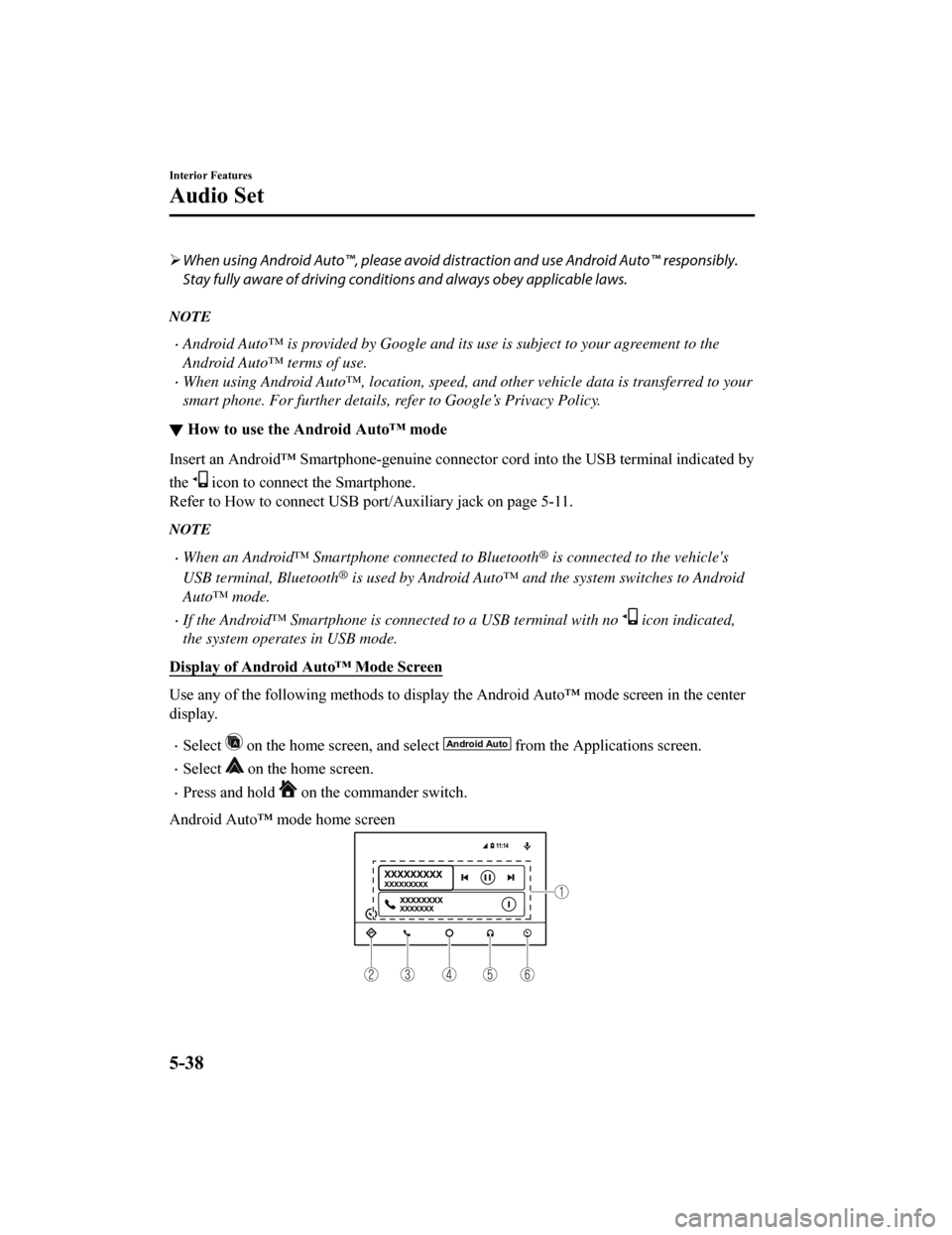
Android Auto™ mode home screen
Interior Features
Audio Set
5-38
Mazda6_8HK6-EA-19A_Edition1 2018-11-15 9:36:06
Page 411 of 668
NOTE
The media displayed on the Android Auto™ home screen may differ depending on the use
conditions and version of the connected Android™ Smartphone.
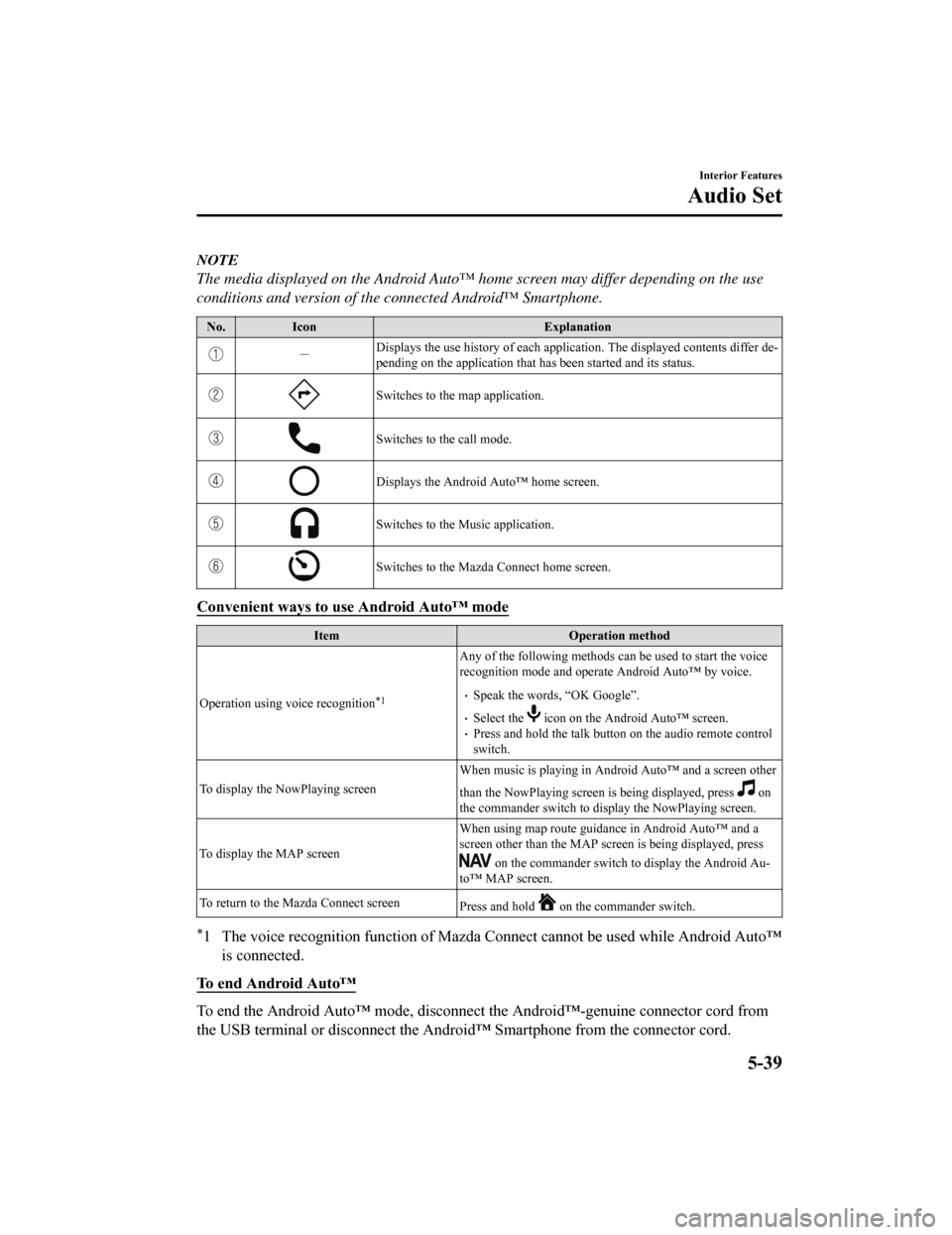
No. Icon Explanation
-Displays the use history of each
application. The displayed contents differ de‐
pending on the application that has been started and its status .
Switches to the map application.
Switches to the call mode.
Displays the Android Auto™ home screen.
Switches to the Music application.
Switches to the Mazda Connect home screen.
Convenient ways to use Android Auto™ mode
ItemOperation method
Operation using voice recognition
*1
Any of the following methods can be used to start the voice
recognition mode and operate Android Auto™ by voice.
Speak the words, “OK Google”.
Select the icon on the Android Auto™ screen.Press and hold the talk butt on on the audio remote control
switch.
To display the NowPlaying screen When music is playing in Android Auto™ and a screen other
than the NowPlaying screen is being displayed, press
on
the commander switch to display the NowPlaying screen.
To display the MAP screen When using map route guidance in Android Auto™ and a
screen other than the MAP screen is being displayed, press
on the commander switch to
display the Android Au‐
to™ MAP screen.
To return to the Mazda Connect screen Press and hold
on the commander switch.
*1 The voice recognition function of Mazda Connect cannot be used while Android Auto™
is connected.
To end Android Auto™
To end the Android Auto™ mode, di sconnect the Android™-genuine connector cord from
the USB terminal or disconnect the Android™ Smartphone from the connector cord.
Interior Features
Audio Set
5-39
Mazda6_8HK6-EA-19A_Edition1 2018-11-15 9:36:06
Page 412 of 668
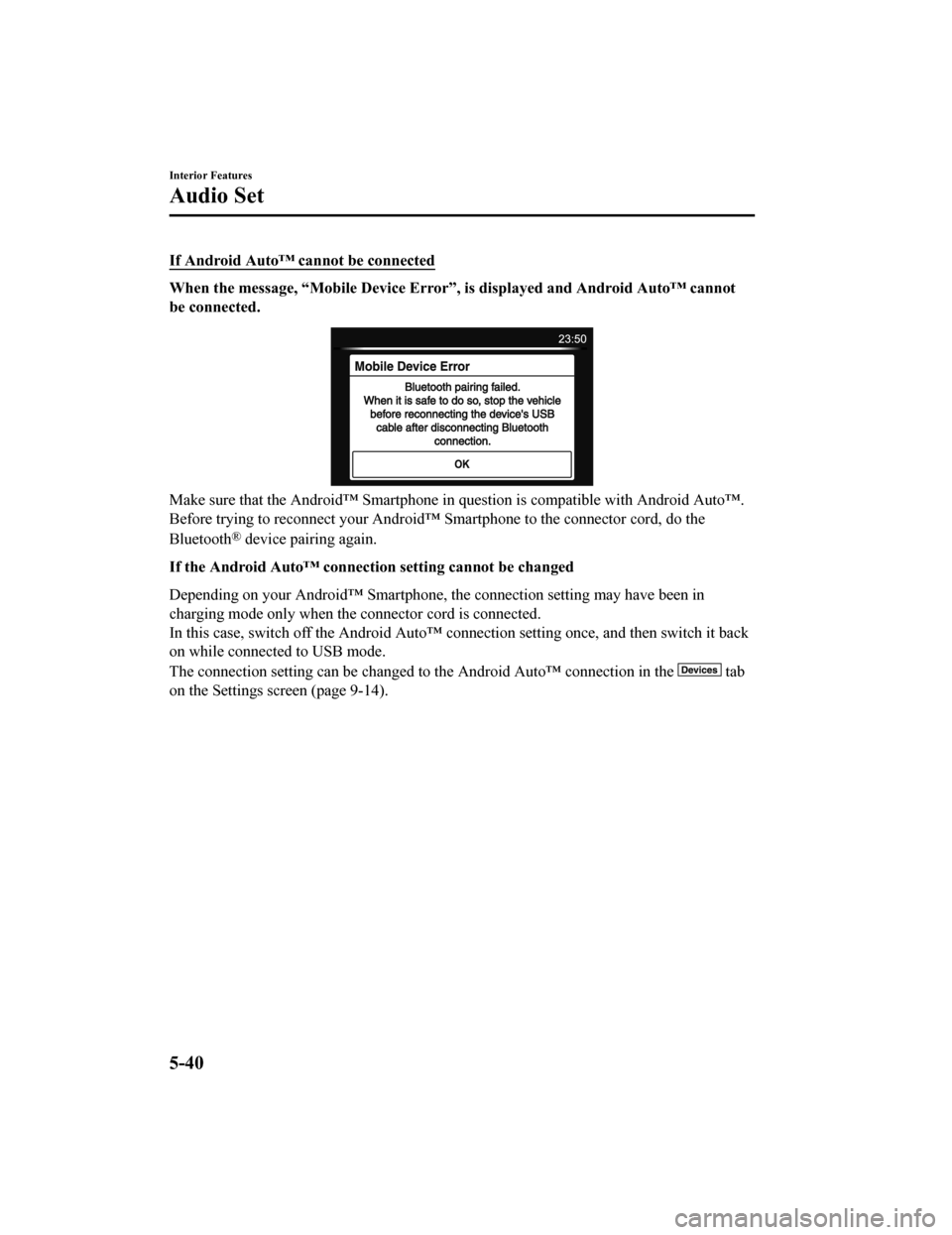
If Android Auto™ cannot be connected
When the message, “Mobile Device Error”, is displayed and Android Auto™ cannot
be connected.
Make sure that the Android™ Smartphone in question is compatibl e with Android Auto™.
Before trying to reconnect your Android™ Smartphone to the conn ector cord, do the
Bluetooth
® device pairing again.
If the Android Auto™ connection setting cannot be changed
Depending on your Android™ Smartphone, the connection setting m ay have been in
charging mode only when the connector cord is connected.
In this case, switch off the Andr oid Auto™ connection setting o nce, and then switch it back
on while connected to USB mode.
The connection setting can be changed to the Android Auto™ conn ection in the
tab
on the Settings screen (page 9-14).
Interior Features
Audio Set
5-40
Mazda6_8HK6-EA-19A_Edition1 2018-11-15 9:36:06
Page 413 of 668

Bluetooth®
▼Introduction
Bluetooth® Hands-Free outline
When a Bluetooth® device (mobile phone) is connected to the vehicle's Bluetooth® unit via
radio wave transmission, a call c an be made or received by pressing the talk button, pick-up
button, or hang-up button on th e audio remote control switch, o r by operating the center
display. For example, even if a device (mobile phone) is in you r coat pocket, a call can be
made without taking the device (mobile phone) out and operating it directly.
Bluetooth
® audio outline
When a portable audio unit equipped with the Bluetooth® communication function is paired
to the vehicle, you can listen to music stored on the paired portable audio device from the
vehicle's speakers. It is not necessary to connect the portable audio device to the vehicle's
external input terminal. After programming, operate the vehicle audio control panel to play/
stop the audio.
NOTE
For your safety, a device can be paired only when the vehicle is parked. If the vehicle
starts to move, the pairing procedure will en d. Park the vehicle in a safe place before
pairing.
The communication range of a Bluetooth® equipped device is about 10 meters (32 ft) or
less.
Basic audio operation is available us ing voice commands even if Bluetooth® is not
connected.
For safety reasons, operation of the center di splay is disabled while the vehicle is being
driven. However, items not displayed in gray can be operated using the commander
switch while the vehicle is being driven.
CAUTION
Some Bluetooth® mobile devices are not compatible wi th the vehicle. Consult an Authorized
Mazda Dealer, Mazda's call center or Web support center for information regarding
Bluetooth
® mobile device compatibility:
U.S.A.
Phone: 800-430-0153
Web: www.mazdausa.com/mazdaconnect
Interior Features
Audio Set
5-41
Mazda6_8HK6-EA-19A_Edition1 2018-11-15 9:36:06
Page 414 of 668
Canada
Phone: 800-430-0153
Web: www.mazdahandsfree.ca
Mexico
Center of Attention to Client (CAC)
Phone: 01-800-01-MAZDA
Web: www.mazdamexico.com.mx
Applicable Bluetooth
® specification (Recommended)
Ver. 1.1/1.2/2.0
EDR/2.1 EDR/3.0 (conformity)
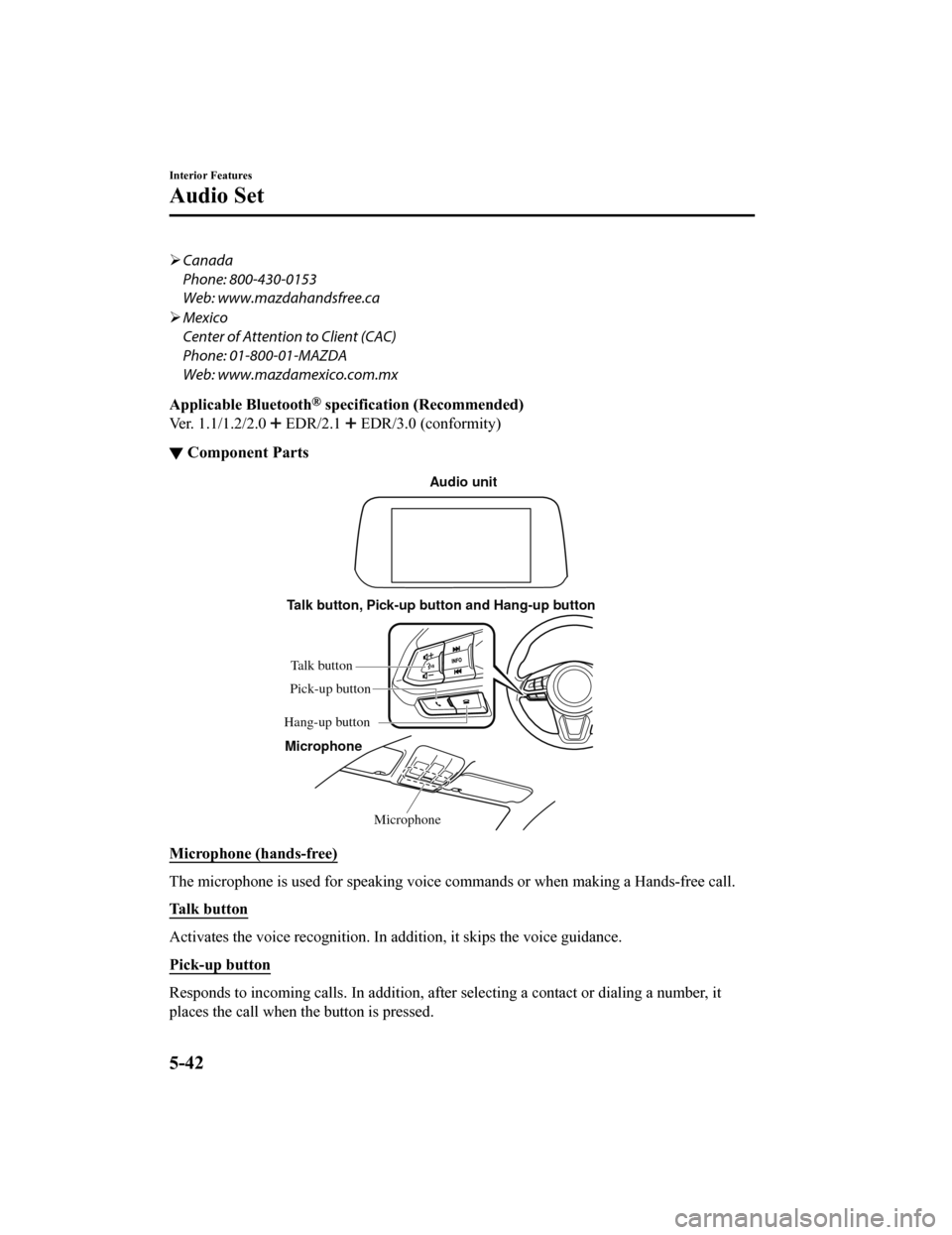
▼ Component Parts
Microphone
Talk button, Pick-up button and Hang-up button
Microphone Audio unit
Talk button
Hang-up button Pick-up button
Microphone (hands-free)
The microphone is used for speaking voice commands or when maki
ng a Hands-free call.
Talk button
Activates the voice recognition . In addition, it skips the voice guidance.
Pick-up button
Responds to incoming calls. In addition, after selecting a cont act or dialing a number, it
places the call when the button is pressed.
Interior Features
Audio Set
5-42
Mazda6_8HK6-EA-19A_Edition1 2018-11-15 9:36:06
Page 416 of 668

Bluetooth® Preparation
▼Device pairing
To use Bluetooth® audio and Hands-Free,
the device equipped with Bluetooth
® has
to be paired to the unit using the following
procedure. A maximum of 7 devices
including Bluetooth
® audio devices and
hands-free mobile phones can be paired.
NOTE
The Bluetooth® system may not operate
for 1 or 2 minutes after the ignition is
switched to ACC or ON. However, this
does not indicate a problem. If the
Bluetooth
® system does not connect
automatically after 1 or 2 minutes have
elapsed, make sure that the Bluetooth
®
setting on the device is normal and
attempt to reconnect the Bluetooth
®
device from the vehicle side.
If Bluetooth®-enabled devices are used
in the following loca tions or conditions,
connection via Bluetooth
® may not be
possible.
The device is in a location hidden
from the center display such as behind
or under a seat, or inside the glove
compartment.
The device contacts or is covered by a
metal object or body.
The device is set to power-saving
mode.
Pairing Procedure
1. Select the
icon on the home screen
to display the Settings screen.
2. Select the
tab.
3. Select
.
4. Turn the Bluetooth® setting on.
5. Select
to display the
message and switch to the device
operation.
6. Using your device, perform a search
for the Bluetooth
® device (Peripheral
device).
7. Select “Mazda” from the device list searched by the device.
8. (Device with Bluetooth
® version 2.0)
Input the displayed 4-digit pairing
code into the device.
(Device with Bluetooth
® version 2.1
or higher)
Make sure the displayed 6-digit code
on the audio is also displayed on the
device, and touch the
.
Connection permission and phonebook
access permission for your mobile
device may be required depending on
the mobile device.
9. If pairing is successful, the functions
of the device connected to Bluetooth
®
are displayed.
10. (Devices compatible with Mazda
E-mail / SMS function)
SMS (Short Message Service)
messages, and E-mail for the device
are downloaded automatically. A
download permission operation for
your device may be required
depending on the device.
NOTE
When Call history and messages are
downloaded automatically, each
automatic download setting must be on.
Refer to Communication Settings on
page 5-65.
Interior Features
Audio Set
5-44
Mazda6_8HK6-EA-19A_Edition1 2018-11-15 9:36:06
Page 417 of 668

After a device is registered, the system
automatically identifies the device. By
activating Bluetooth
® Hands-Free again,
or by activating Bluetooth
® Hands-Free
first after switching the ignition from OFF
to ACC, the device connection condition
is indicated in the center display.
IMPORTANT note about pairing and
automatic reconnection:
If pairing is redone on the same
mobile phone device, first clear
“Mazda” displayed on the Bluetooth
®
setting screen of the mobile device.
When the OS of the device is updated,
the pairing information may be deleted.
If this happens, reprogram the pairing
information to the Bluetooth
® unit.
Before you pair your device, make sure
that Bluetooth
® is “ON”, both on your
phone and on the vehicle.
▼ Device selection
If several devices have been paired, the
Bluetooth
® unit links the device last
paired. If you would like to link a different
paired device, it is n ecessary to change the
link. The order of device priority after the
link has been changed is maintained even
when the ignition is switched off.
Connecting other devices
1. Select the
icon on the home screen
to display the Settings screen.
2. Select the
tab.
3. Select
.
4. Turn the Bluetooth
® setting on.
5. Select the name of the device you
would like to connect.
6. selection
Connects both devices as hands-free
and Bluetooth
® audio.
selection
Connects as a hands-free device.
selection
Connects as Bluetooth
® audio.
NOTE
The following functions can be used for
the Hands-free or audio.
Hands-free: Phone calls and
E-mail/SMS
Audio: Bluetooth® audio, Pandora®,
Aha™, Stitcher™ radio
Disconnecting a device
1. Select the
icon on the home screen
to display the Settings screen.
2. Select the
tab.
3. Select
.
4. Turn the Bluetooth
® setting on.
5. Select the device name which is currently connected.
6. Select
.
▼ Deleting a device
Selecting and deleting devices
1. Select the
icon on the home screen
to display the Settings screen.
2. Select the
tab.
3. Select
.
4. Turn the Bluetooth
® setting on.
5. Select the device name which you would like to delete.
6. Select
.
7. Select
.
Interior Features
Audio Set
5-45
Mazda6_8HK6-EA-19A_Edition1 2018-11-15 9:36:06
Page 419 of 668
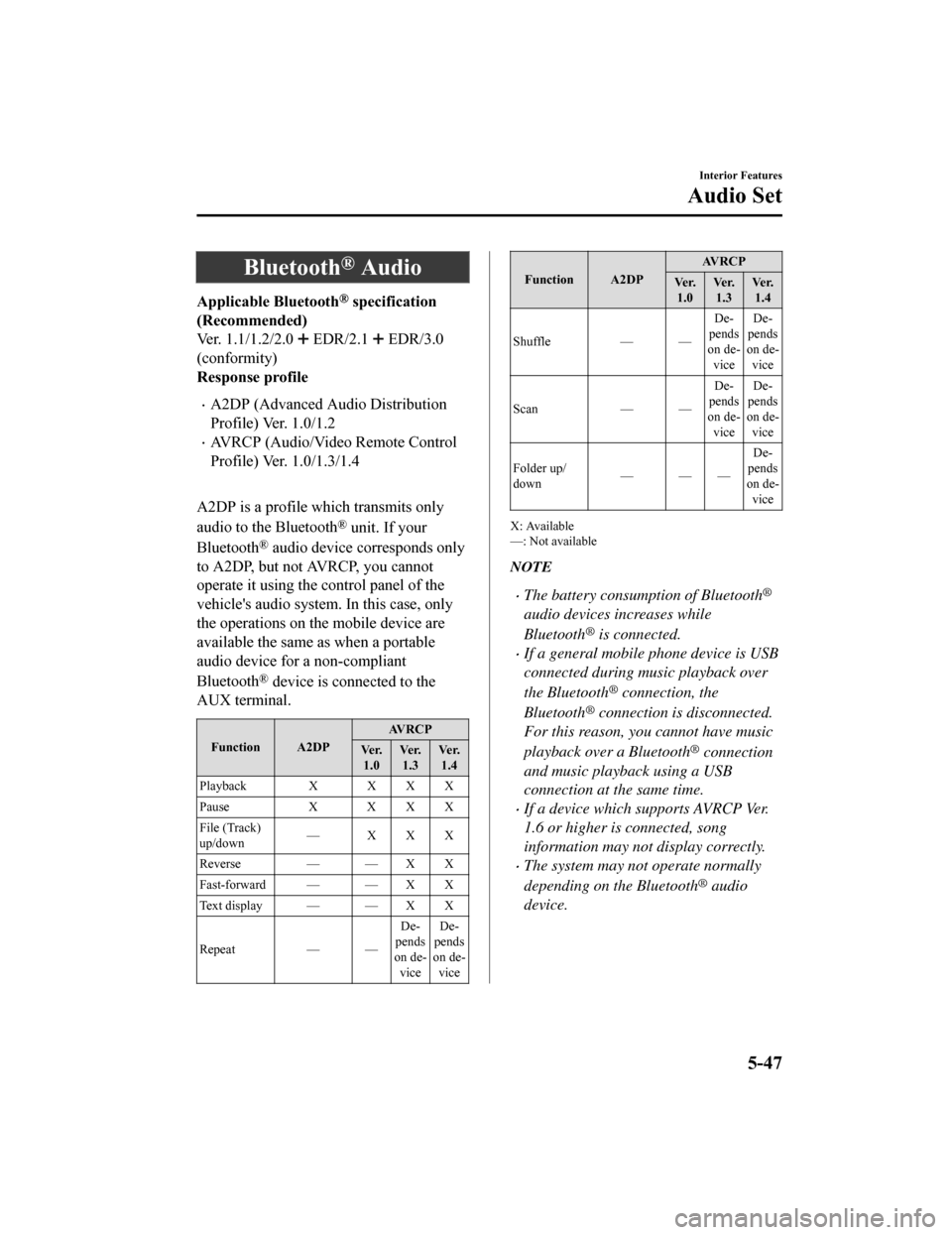
Bluetooth® Audio
Applicable Bluetooth® specification
(Recommended)
Ver. 1.1/1.2/2.0
EDR/2.1 EDR/3.0
(conformity)
Response profile
A2DP (Advanced Audio Distribution
Profile) Ver. 1.0/1.2
AVRCP (Audio/Video Remote Control
Profile) Ver. 1.0/1.3/1.4
A2DP is a profile which transmits only
audio to the Bluetooth
® unit. If your
Bluetooth
® audio device corresponds only
to A2DP, but not AVRCP, you cannot
operate it using the control panel of the
vehicle's audio system. In this case, only
the operations on the mobile device are
available the same as when a portable
audio device for a non-compliant
Bluetooth
® device is connected to the
AUX terminal.
Function A2DP AVRCP
Ve r. 1.0 Ve r.
1.3 Ve r.
1.4
Playback X X X X
Pause X XXX
File (Track)
up/down — XXX
Reverse — — X X
Fast-forward — — X X
Te x t d i s p l a y — — X X
Repeat — — De‐
pends
on de‐ vice De‐
pends
on de‐ vice
Function A2DP AV R C P
Ve r. 1.0 Ve r.
1.3 Ve r.
1.4
Shuffle — — De‐
pends
on de‐ vice De‐
pends
on de‐ vice
Scan — —De‐
pends
on de‐ vice De‐
pends
on de‐ vice
Folder up/
down ——— De‐
pends
on de‐
vice
X: Available
—: Not available
NOTE
The battery consumption of Bluetooth®
audio devices increases while
Bluetooth
® is connected.
If a general mobile phone device is USB
connected during music playback over
the Bluetooth
® connection, the
Bluetooth
® connection is disconnected.
For this reason, you cannot have music
playback over a Bluetooth
® connection
and music playback using a USB
connection at the same time.
If a device which supports AVRCP Ver.
1.6 or higher is connected, song
information may not display correctly.
The system may not operate normally
depending on the Bluetooth
® audio
device.
Interior Features
Audio Set
5-47
Mazda6_8HK6-EA-19A_Edition1 2018-11-15 9:36:06
Page 426 of 668

Ta bF u n c t i o n
Nearby Select the desired station.
Guidance is provided to the sear
ched destination near the vehicle's posi‐
tion.
You can designate desired categor ies previously set using the filter setting
on your device.
NOTE
The available Location Based Services may differ because the services depend on the
content provided by Aha™.
Example of use (Location Based
Services)
1. Select the desired station from the “Nearby” tab on the main menu.
The destination name or address
playback starts in the order of the
destination name list.
2. When the icon is selected, the
currently displayed destination is
displayed on the navigation system
(vehicles with navigation system).
3. When the
icon is selected, a phone
call is placed to the currently displayed
destination.
4. Select the
icon to display the
content list.
Selection of other destinations from
the list can be made.
Interior Features
Audio Set
5-54
Mazda6_8HK6-EA-19A_Edition1 2018-11-15 9:36:06