low beam MAZDA MODEL 6 2019 Owner's Manual (in English)
[x] Cancel search | Manufacturer: MAZDA, Model Year: 2019, Model line: MODEL 6, Model: MAZDA MODEL 6 2019Pages: 668, PDF Size: 9.4 MB
Page 157 of 668

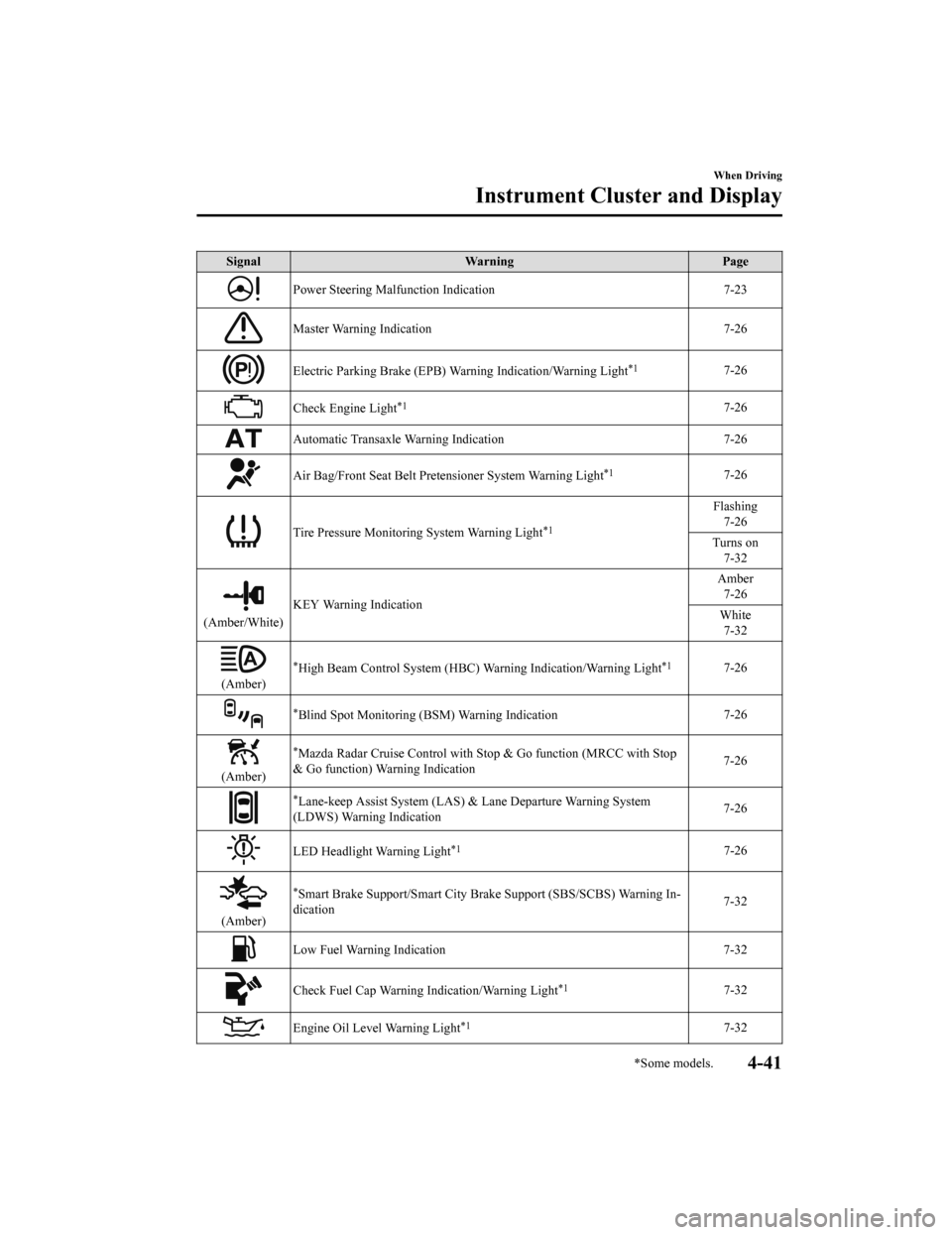
SignalWarning Page
Master Warning Indication 7-26
Electric Parking Brake (EPB) Warning Indication/Warning Light*17-26
Check Engine Light*17-26
Automatic Transaxle Warning Indication 7-26
Air Bag/Front Seat Belt Pretensioner System Warning Light*17-26
Tire Pressure Monitoring System Warning Light*1
Flashing
7-26
Turns on 7-32
(Amber/White) KEY Warning Indication Amber
7-26
White 7-32
(Amber) High Beam Control System (HBC) Warning Indication/Warning Light
*17-26
Blind Spot Monitoring (BSM)
Warning Indication 7-26
(Amber)
*Mazda Radar Cruise Control with Stop & Go function (MRCC with Stop
& Go function) War ning Indication 7-26
(Amber)Lane-keep Assist System (LAS) & Lane Departure Warning System
(LDWS) Warning Indication
7-26
LED Headlight Warning Light*17-26
*Smart Brake Support/Smart City B
rake Support (SBS/SCBS) Warning In‐
dication 7-32
Low Fuel Warning Indication/Warning Light
7-32
Check Fuel Cap Warning Indication/Warning Light*17-32
Engine Oil Level Warning Light*17-32
Seat Belt Warning Light (Front seat) 7-32
When Driving
Instrument Cluster and Display
*Some models.4-25
Mazda6_8HK6-EA-19A_Edition1 2018-11-15 9:36:06
Page 159 of 668

SignalIndicator Page
Headlight High-Beam Indicator Light Headlight
High-Low Beam 4-77
Flashing the Headlights 4-77
Turn Signal/Hazard Warning Indicator Lights Turn and
Lane-Change Signals4-79
Hazard Warning Flasher4-85
AUTOHOLD Active Indicator Light*14-101
*Mazda Radar Cruise Control with Stop & Go function (MRCC with Stop
& Go function) indicator Light 4-153
TCS/DSC Indicator Light*1
Traction Control
System (TCS) 4-106
Dynamic Stabil‐ ity Control(DSC)4-107
Turns on 7-26
DSC OFF Indicator Light*14-107
Select Mode Indication 4-113
(Green)High Beam Control System (HBC) Indicator Light 4-120
Blind Spot Monitoring (BS
M) OFF Indicator Light*1
Malfunction
7-26
Except malfunc‐ tion
4-127
(White)
*Mazda Radar Cruise Control with Stop & Go function (MRCC with Stop
& Go function) Main Indication 4-148
(Green)
*Mazda Radar Cruise Control with
Stop & Go function (MRCC with Stop
& Go function) Set Indication 4-148
When Driving
Instrument Cluster and Display
*Some models.4-27
Mazda6_8HK6-EA-19A_Edition1
2018-11-15 9:36:06
Page 173 of 668
SignalWarning Page
Power Steering Malfunction Indication 7-23
Master Warning Indication 7-26
Electric Parking Brake (EPB) Warning Indication/Warning Light*17-26
Check Engine Light*17-26
Automatic Transaxle Warning Indication 7-26
Air Bag/Front Seat Belt Pretensioner System Warning Light*17-26
Tire Pressure Monitoring System Warning Light*1
Flashing
7-26
Turns on 7-32
(Amber/White) KEY Warning Indication Amber
7-26
White 7-32
(Amber)
*High Beam Control System (HBC) Warning Indication/Warning Light*17-26
*Blind Spot Monitoring (BSM) Warning Indication 7-26
(Amber)
*Mazda Radar Cruise Control with
Stop & Go function (MRCC with Stop
& Go function) War ning Indication 7-26
*Lane-keep Assist System (LAS) & Lane Departure Warning System
(LDWS) Warning Indication 7-26
LED Headlight Warning Light*17-26
(Amber)
*Smart Brake Support/Smart City B
rake Support (SBS/SCBS) Warning In‐
dication 7-32
Low Fuel Warning Indication
7-32
Check Fuel Cap Warning Indication/Warning Light*17-32
Engine Oil Level Warning Light*17-32
When Driving
Instrument Cluster and Display
*Some models.4-41
Mazda6_8HK6-EA-19A_Edition1 2018-11-15 9:36:06
Page 175 of 668

SignalIndicator Page
Headlight High-Beam Indicator Light Headlight
High-Low Beam 4-77
Flashing the Headlights 4-77
Turn Signal/Hazard Warning Indicator Lights Turn and
Lane-Change Signals4-79
Hazard Warning Flasher4-85
AUTOHOLD Active Indicator Light*14-101
*Mazda Radar Cruise Control with Stop & Go function (MRCC with Stop
& Go function) indicator Light 4-153
TCS/DSC Indicator Light*1
Traction Control
System (TCS) 4-106
Dynamic Stabil‐ ity Control(DSC)4-107
Turns on 7-26
DSC OFF Indicator Light*14-107
*Select Mode Indication 4-113
(Green)
*High Beam Control System (HBC) Indicator Light4-120
*Blind Spot Monitoring (BSM) OFF Indicator Light*1
Malfunction
7-26
Except malfunc‐ tion
4-127
(White)
*Mazda Radar Cruise Control with Stop & Go function (MRCC with Stop
& Go function) Main Indication 4-148
(Green)
*Mazda Radar Cruise Control with
Stop & Go function (MRCC with Stop
& Go function) Set Indication 4-148
When Driving
Instrument Cluster and Display
*Some models.4-43
Mazda6_8HK6-EA-19A_Edition1
2018-11-15 9:36:06
Page 188 of 668
*1 The light turns on when the ignition is switched on for an operation check, and turns off a few seconds later or
when the engine is started. If the light does not turn on or remains turned on, have the vehicle inspected at an
Authorized Mazda Dealer.
*2 The light turns on continuously when the parking brake is applied.
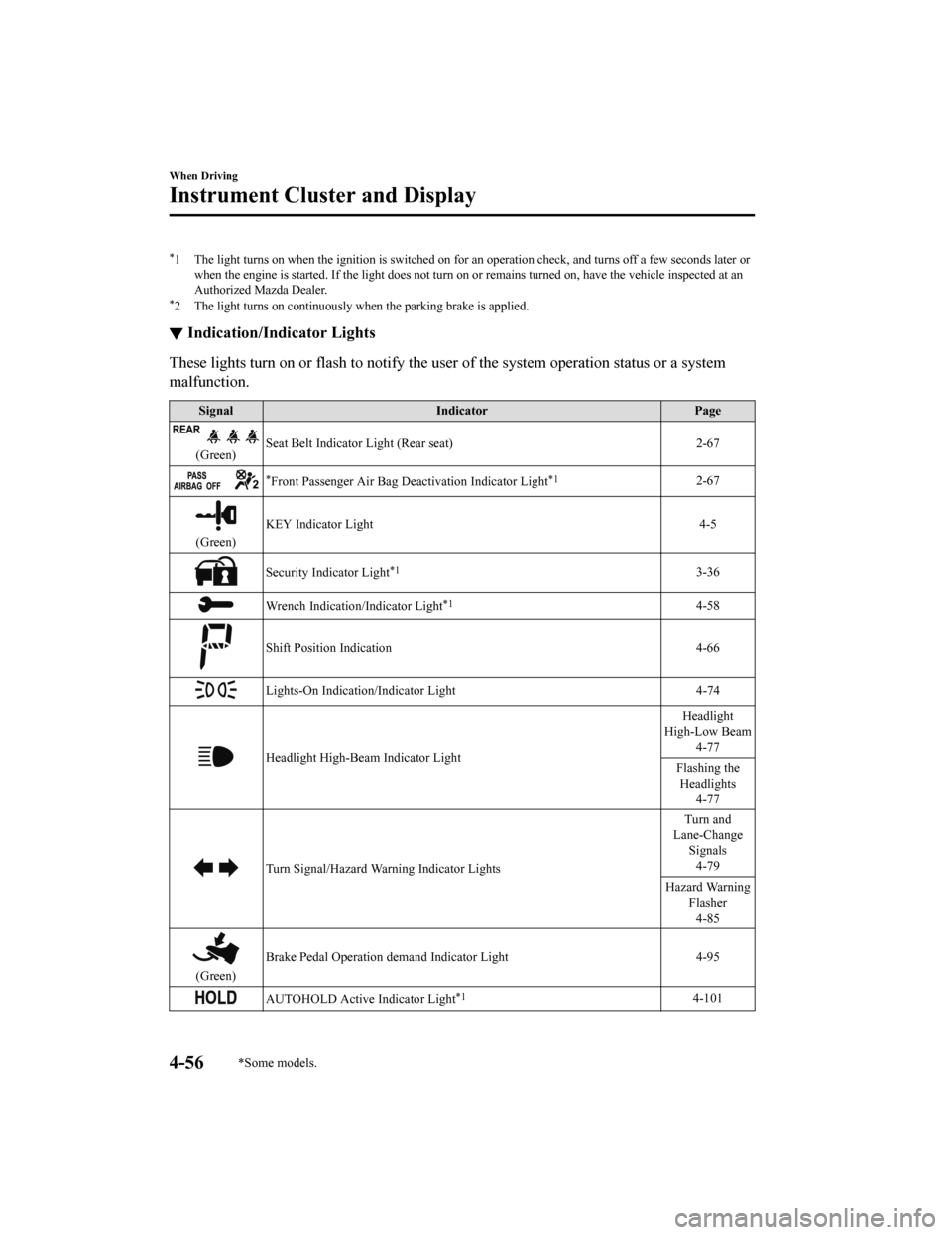
▼Indication/Indicator Lights
These lights turn on or flash to notify the user of the system
operation status or a system
malfunction.
Signal Indicator Page
(Green)Seat Belt Indicator Light (Rear seat) 2-67
*Front Passenger Air Bag Deactivation Indicator Light*12-67
(Green)KEY Indicator Light 4-5
Security Indicator Light*13-36
Wrench Indication/Indicator Light*14-58
Shift Position Indication
4-66
Lights-On Indication/Indicator Light 4-74
Headlight High-Beam Indicator LightHeadlight
High-Low Beam 4-77
Flashing the Headlights 4-77
Turn Signal/Hazard Warning Indicator Lights Turn and
Lane-Change Signals4-79
Hazard Warning Flasher4-85
(Green) Brake Pedal Operation demand Indicator Light 4-95
AUTOHOLD Active Indicator Light*14-101
When Driving
Instrument Cluster and Display
4-56*Some models.
Mazda6_8HK6-EA-19A_Edition1
2018-11-15 9:36:06
Page 209 of 668

▼Headlight High-Low Beam
The headlights switch between high and
low beams by moving the lever forward or
backward.
High beam
Low beam
When the headlight high-beams are on, the
headlight high-beam indicator light is
turned on.
▼ Flashing the Headlights
Can be used when the ignition is switched
ON.
To flash the headlight
s, pull the lever fully
towards you (th e headlight switch does not
need to be on).
OFF
Headlight
flashing
The headlight high-beam indicator light in
the instrument cluster illuminates
simultaneously. The lever will return to
the normal position when released.
▼ Coming Home Light
The coming home light turns on the
headlights (low beams) when the lever is
operated.
To turn on the lights
When the lever is pulled with the ignition
switched to ACC or OFF, the low beam
headlights turn on.
The headlights turn off after a certain
period of time has elapsed after the doors
are closed.
NOTE
The time until the headlights turn off
after all of the doors are closed can be
changed.
Refer to Vehicle Equipment on page
9-13.
If no operations are done for 3 minutes
after the lever is pulled, the headlights
turn off.
The headlights turn off if the lever is
pulled again while the headlights are
illuminated.
When Driving
Switches and Controls
4-77
Mazda6_8HK6-EA-19A_Edition1
2018-11-15 9:36:06
Page 210 of 668
▼Leaving Home Light
The leaving home light turns on the lights
when the transmitte
r unlock button is
pressed while away from the vehicle.
The following light s turn on when the
leaving home light is operated.
Low beams, Parking lights, Taillights,
License plate lights.
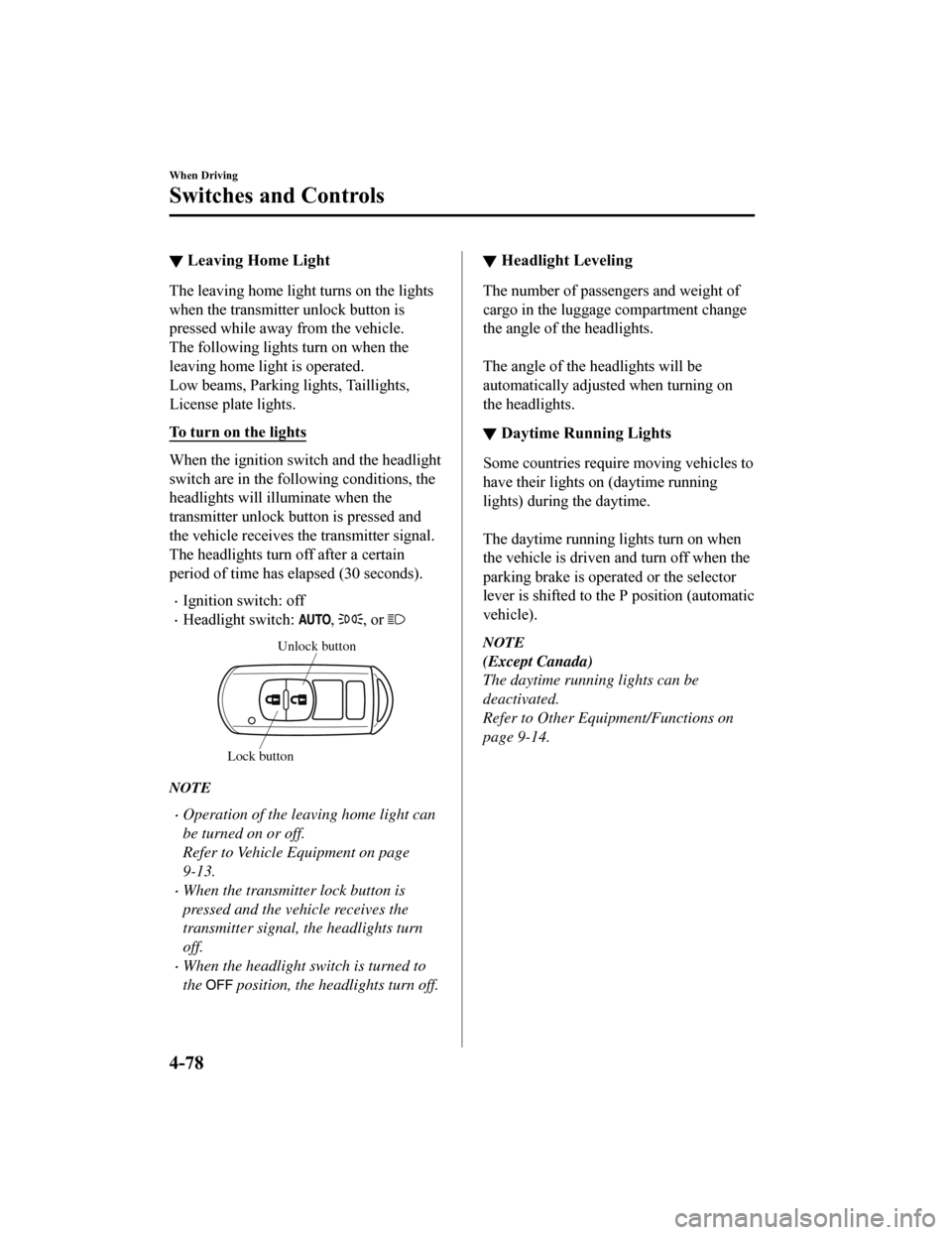
To turn on the lights
When the ignition switch and the headlight
switch are in the following conditions, the
headlights will il luminate when the
transmitter unlock button is pressed and
the vehicle receives the transmitter signal.
The headlights turn off after a certain
period of time has elapsed (30 seconds).
Ignition switch: off
Headlight switch: , , or
Unlock button
Lock button
NOTE
Operation of the leaving home light can
be turned on or off.
Refer to Vehicle Equipment on page
9-13.
When the transmitter lock button is
pressed and the vehicle receives the
transmitter signal, the headlights turn
off.
When the headlight switch is turned to
the
position, the headlights turn off.
▼ Headlight Leveling
The number of passengers and weight of
cargo in the luggage compartment change
the angle of the headlights.
The angle of the headlights will be
automatically adjusted when turning on
the headlights.
▼Daytime Running Lights
Some countries requir
e moving vehicles to
have their lights on (daytime running
lights) during the daytime.
The daytime running lights turn on when
the vehicle is driven and turn off when the
parking brake is operated or the selector
lever is shifted to th e P position (automatic
vehicle).
NOTE
(Except Canada)
The daytime running lights can be
deactivated.
Refer to Other Equipment/Functions on
page 9-14.
When Driving
Switches and Controls
4-78
Mazda6_8HK6-EA-19A_Edition1 2018-11-15 9:36:06
Page 248 of 668

Collision damage reduction in low vehicle speed range
Forward driving
Smart City Brake Support (SCBS).......................................................................... page 4-171
Advanced Smart City Brake Support (Advanced SCBS).............. .......................... page 4-168
Collision damage reduction in medium/high speed range
Smart Brake Support (SBS)..................................................................................... page 4-174
▼Camera and Sensors
Forward Sensing Camera (FSC)
The Forward Sensing Camera (FSC) detects lane indications and r
ecognizes headlights,
taillights and city lights during nighttime driving. In addition, it also detects the vehicle
ahead, pedestrians, or obstructions. The following systems also use the Forward Sensing
Camera (FSC).
High Beam Control system (HBC)
Lane-keep Assist System (LAS) & Lane Departure Warning System ( LDWS)
Traffic Sign Recognition System (TSR)
Mazda Radar Cruise Control with Stop & Go function (MRCC with Stop & Go function)
Advanced Smart City Brake Support (Advanced SCBS)
Smart City Brake Support (SCBS)
Smart Brake Support (SBS)
The Forward Sensing Camera (FSC) is installed at the top of the windshield near the
rearview mirror.
Refer to Forward Sensing Camera (FSC) on page 4-204.
Radar sensor (front)
The radar sensor (front) function s by detecting the radio waves reflected off a vehicle ahead
sent from the radar sensor. The following systems also use the radar sensor (front).
Mazda Radar Cruise Control with S top & Go function (MRCC with Stop & Go function)
Distance Recognition Support System (DRSS)
Smart Brake Support (SBS)
The radar sensor (front) is moun ted behind the radiator grille.
Refer to Radar S ensor (Front) on page 4-209.
Radar sensors (rear)
The radar sensors (rear) function by detecting the radio waves reflected off a vehicle
approaching from the rear or an obstruction sent from the radar sensors. The following
systems also use the radar sensors (rear).
When Driving
i-ACTIVSENSE
4-116
Mazda6_8HK6-EA-19A_Edition1 2018-11-15 9:36:06
Page 251 of 668
High Beam Control System (HBC)*
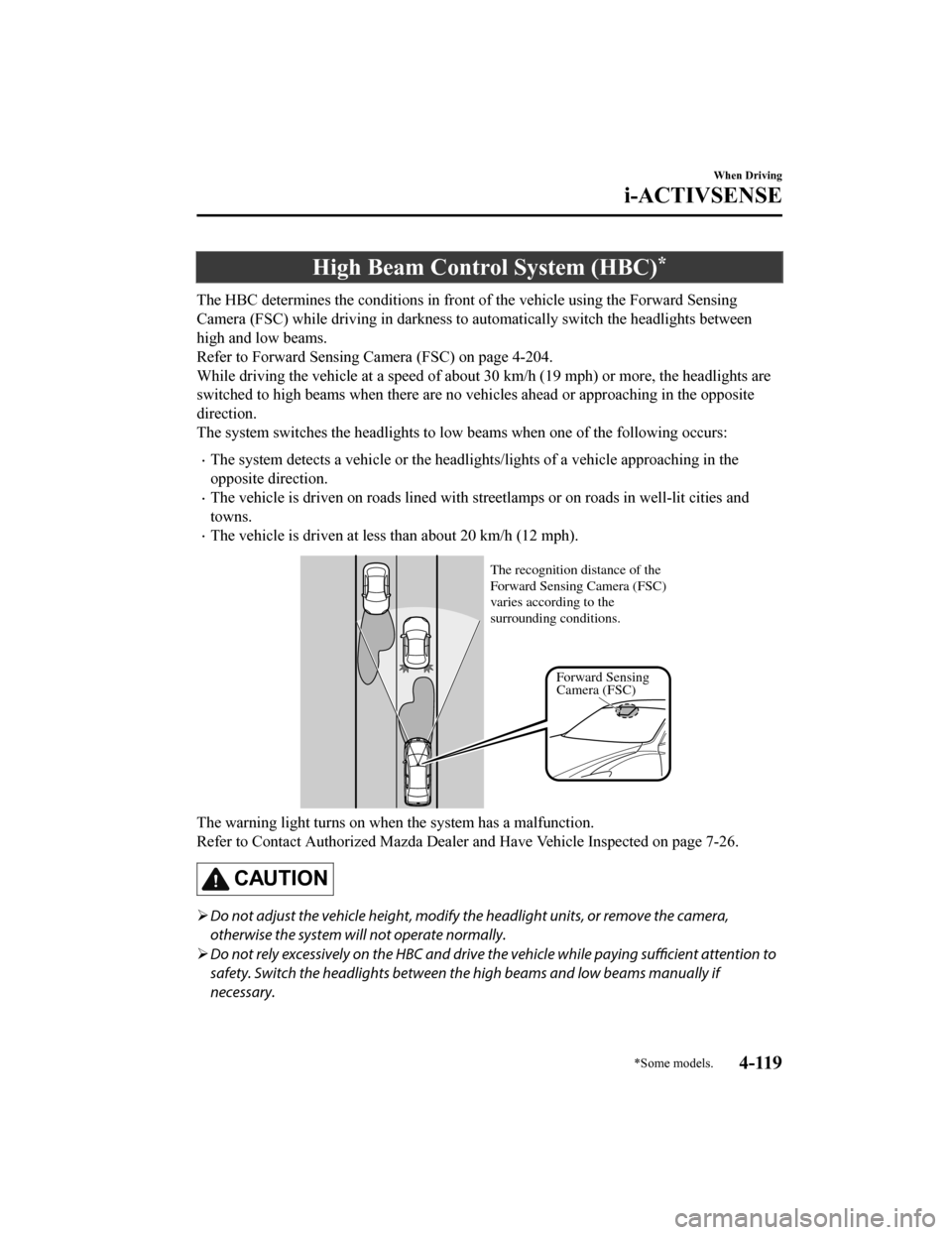
The HBC determines the conditions in front of the vehicle using the Forward Sensing
Camera (FSC) while driving in darkness to automatically switch the headlights between
high and low beams.
Refer to Forward Sensing Camera (FSC) on page 4-204.
While driving the vehicle at a speed of about 30 km/h (19 mph) or more, the headlights are
switched to high beams when there are no vehicles ahead or appr oaching in the opposite
direction.
The system switches the headlights to low beams when one of the following occurs:
The system detects a vehicle or the headlights/lights of a vehicle approaching in the
opposite direction.
The vehicle is driven on roads lin ed with streetlamps or on roads in well-lit cities and
towns.
The vehicle is driven at less than about 20 km/h (12 mph).
Forward Sensing
Camera (FSC)
The recognition distance of the
Forward Sensing Camera (FSC)
varies according to the
surrounding conditions.
The warning light turns on when the system has a malfunction.
Refer to Contact Authorized Mazda Dealer and Have Vehicle Inspe
cted on page 7-26.
CAUTION
Do not adjust the vehicle he ight, modify the headlight units, or remove the camera,
otherwise the system will not operate normally.
Do not rely excessively on the HBC and drive the vehicle while paying sufficient attention to
safety. Switch the headlights between th e high beams and low beams manually if
necessary.
When Driving
i-ACTIVSENSE
*Some models.4-119
Mazda6_8HK6-EA-19A_Edition1 2018-11-15 9:36:06
Page 252 of 668
NOTE
The timing in which the system switches the headlights changes under the following
conditions. If the system does not switch the headlights appropriately, manually switch
between high and low beams according to the visibility as well as road and traffic
conditions.
When there are sources of light in the area such as street lamps, illuminated signboards,
and traffic signals.
When there are reflective objects in the surrounding area such as reflective plates and
signs.
When visibility is reduced under rain, snow and foggy conditions.
When driving on roads with sharp turn or hilly terrain.
When the headlights/rear lamps of vehicles in front of you or in the opposite lane are dim
or not illuminated.
When there is insufficient darkness such as at dawn or dusk.
When the luggage compartment is loaded with heavy objects or the rear passenger seats
are occupied.
When visibility is reduced due to a vehicle in front of you spraying water from its tires
onto your windshield.
▼ To Operate the System
The HBC operates to sw
itch the headlights
automatically between high and low
beams after the ignition is switched ON
and the headlight switch is in the AUTO
and high beam position.
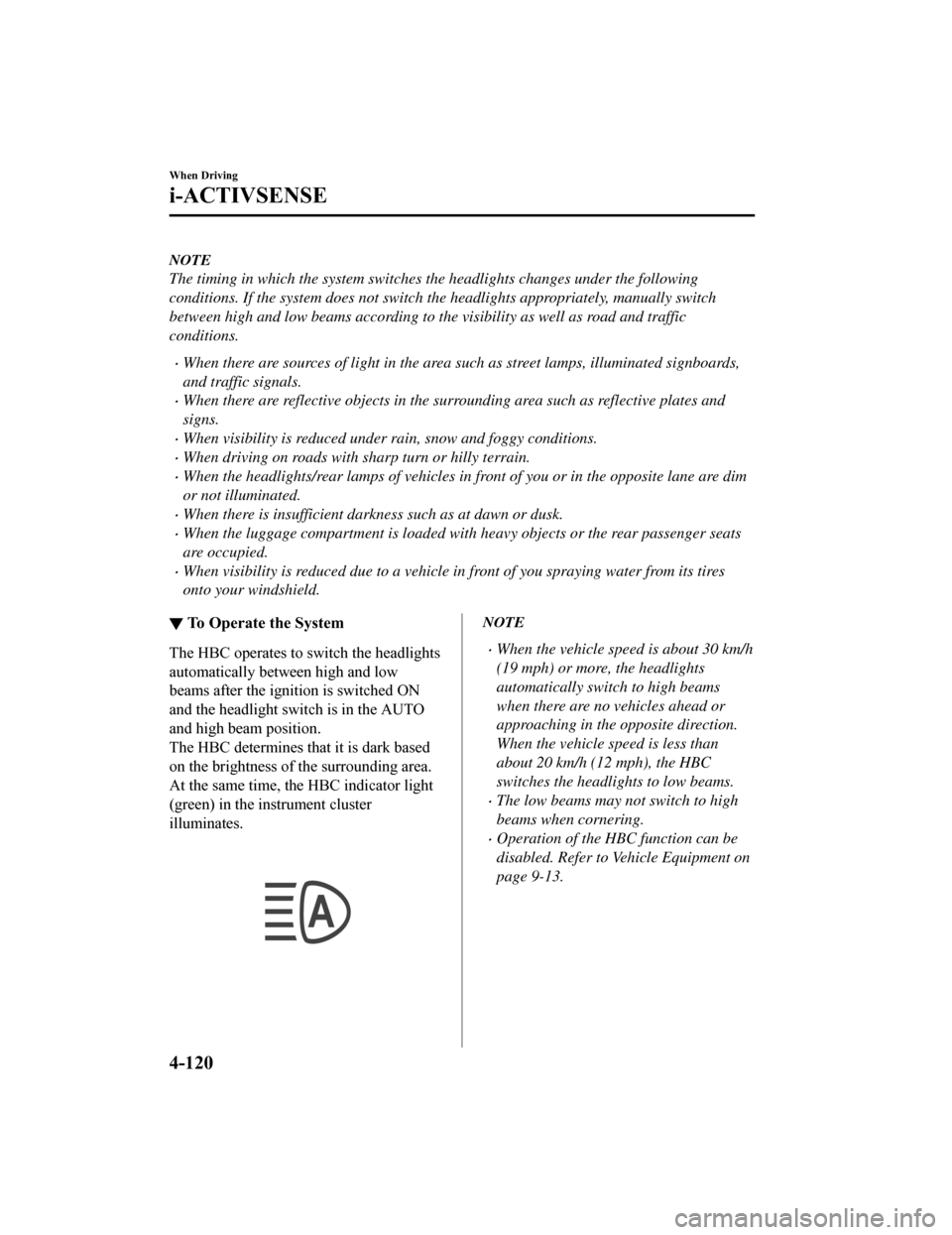
The HBC determines t hat it is dark based
on the brightness of the surrounding area.
At the same time, th e HBC indicator light
(green) in the instrument cluster
illuminates.
NOTE
When the vehicle speed is about 30 km/h
(19 mph) or more, the headlights
automatically switch to high beams
when there are no vehicles ahead or
approaching in the opposite direction.
When the vehicle speed is less than
about 20 km/h (12 mph), the HBC
switches the headlights to low beams.
The low beams may not switch to high
beams when cornering.
Operation of the HBC function can be
disabled. Refer to Vehicle Equipment on
page 9-13.
When Driving
i-ACTIVSENSE
4-120
Mazda6_8HK6-EA-19A_Edition1 2018-11-15 9:36:06