roof MAZDA MODEL 6 2021 User Guide
[x] Cancel search | Manufacturer: MAZDA, Model Year: 2021, Model line: MODEL 6, Model: MAZDA MODEL 6 2021Pages: 634, PDF Size: 71.37 MB
Page 123 of 634

Moonroof*
The moonroof can be opened or closed
when operating the overhead tilt/slide
switch at the front seats.
WARNING
Do not let passengers stand up or extend
part of the body through the open
moonroof while the vehicle is moving:
Extending the head, arms, or other parts of
the body through the moonroof is
dangerous. The head or arms could hit
something while the vehicle is moving. This
could cause serious injury or death.
Never allow children to play with the tilt/
slide switch:
The tilt/slide switch would allow children to
operate the moonroof unintentionally,
which could result in serious injury if a
child's hands, head or neck becomes
caught by the moonroof.
Make sure the opening is clear before
closing the moonroof:
A closing moonroof is dangerous. The
hands, head, or even neck of a person,
especially a child, could be caught in it as it
closes, causing serious injury or even death.
Make sure nothing blocks the moonroof
just before it reaches the fully closed
position:
Blocking the moonroof just before it
reaches the closed position is dangerous.
In this case, the jam-safe function cannot
prevent the moonroof from closing. If
fingers are caught, serious injuries could
occur.
CAUTION
Do not sit on or put heavy items on the
area where the moonroof opens and
closes. Otherwise, the moonroof could be
damaged.
Do not open or close the moonroof
forcefully during freezing temperatures
or snowfall. Otherwise, the moonroof
could be damaged.
The sunshade does not tilt. To avoid
damaging the sunshade, do not push it
up.
Do not close the sunshade while the
moonroof is opening. Trying to force the
sunshade closed could damage it.
▼ Tilt/Slide Operation
The moonroof can be opened or closed
electrically only when the ignition is
switched ON.
Before leaving the vehicle or washing
your Mazda, make sure the moonroof is
completely closed so that water does not
get inside the cabin area.
After washing your Mazda or after it
rains, wipe the water off the moonroof
before operating it to avoid water
penetration which could cause rust and
water damage to your headliner.
Tilt/Slide switch
Before Driving
Windows
*Some models.3-37
Mazda6_8JN3-EA-20H_Edition1_old
2020-6-18 17:31:27
Page 124 of 634

Tilt Operation
The rear of the moonroof can be tilted
open to provide more ventilation.
To fully tilt automatically, momentarily
press the tilt/slide switch.
To fully close automatically, momentarily
press the tilt/slide s witch in the forward
direction.
To stop tilting partway, press the tilt/slide
switch.
When the moonroof is already slid open
and you want to tilt it open, first close the
moonroof and then do a tilt operation.
Close (Tilt down) Tilt up
Slide Operation
To fully open automa
tically, momentarily
press the tilt/slide sw itch in the backward
direction.
To fully close automatically, momentarily
press the tilt/slide s witch in the forward
direction.
To stop sliding partway, press the tilt/slide
switch.
When the moonroof is already tilted open
and you want to slide it open, first close
the moonroof and then do a slide
operation.
Close Open
NOTE
If the moonroof does not operate normally,
do the following procedure:
1. Switch the ignition ON.
2. Press the tilt switch, to partially tilt
open the rear of the moonroof.
3. Repeat Step 2. The rear of the moonroof tilts open to the fully open
position, then closes a little.
If the reset procedure is performed while
the moonroof is in the slide position
(partially open) it will close before the
rear tilt opens.
Before Driving
Windows
3-38
Mazda6_8JN3-EA-20H_Edition1_old 2020-6-18 17:31:27
Page 125 of 634

▼Jam-safe Moonroof
If a person's hands, head or an object
blocks the moonroof while it is closing,
the moonroof will stop and move in the
open direction.
NOTE
The jam-safe function may operate
under the following conditions:
A strong impact is detected while the
moonroof is closing automatically.
The moonroof is closing automatically
during very low temperatures.
In the event the jam-safe function
activates and the moonroof cannot be
closed automatically, press the tilt/slide
switch and the moonroof will close.
The jam-safe moonroof function does
not operate until the system has been
reset.
▼Sunshade
The sunshade can be opened and closed by
hand.
The sunshade opens at the same time as
the moonroof slides open, but it must be
closed by hand.
Sunshade
Before Driving
Windows
3-39
Mazda6_8JN3-EA-20H_Edition1_old
2020-6-18 17:31:27
Page 128 of 634
Theft-Deterrent System*
If the theft-deterrent system detects an
inappropriate entry into the vehicle, which
could result in the vehicle or its contents
being stolen, the alarm alerts the
surrounding area of an abnormality by
sounding the horn and flashing the hazard
warning lights.
The system will not function unless it's
properly armed. So when you leave the
vehicle, follow the arming procedure
correctly.
▼ Operation
System triggering conditions
The horn sounds intermittently and the
hazard warning lights flash for about 30
seconds when the sys
tem is triggered by
any one of the following:
Unlocking a door with the auxiliary key,
door lock switch, or an inside door-lock
knob.
Forcing open a door, the hood or the
trunk lid.
Opening the hood by operating the hood
release handle.
Switching the ignition ON without using
the push button start.
If the system is triggered again, the lights
and horn will activate until the driver's
door or the trunk lid is unlocked with the
transmitter.
(With the advanced keyless function)
The lights and horn can also be
deactivated by pressing the request switch
on a door.
NOTE
If the battery goes dead while the
theft-deterrent system is armed, the horn
will activate and the hazard warning
lights will flash wh en the battery is
charged or replaced.
▼ How to Arm the System
1. Close the windows and the moonroof*
securely.
2. Switch the ignition OFF.
3. Make sure the hood, the doors, and the trunk lid are closed.
4. Press the lock butto n on the transmitter
or lock the driver's door from the
outside with the auxiliary key.
The hazard warning lights will flash
once.
The following method will also arm
the theft-deterrent system:
Press the door-lock switch “
” while
any door is open and then close all of
the doors.
(With the advanced keyless function)
Press a request switch.
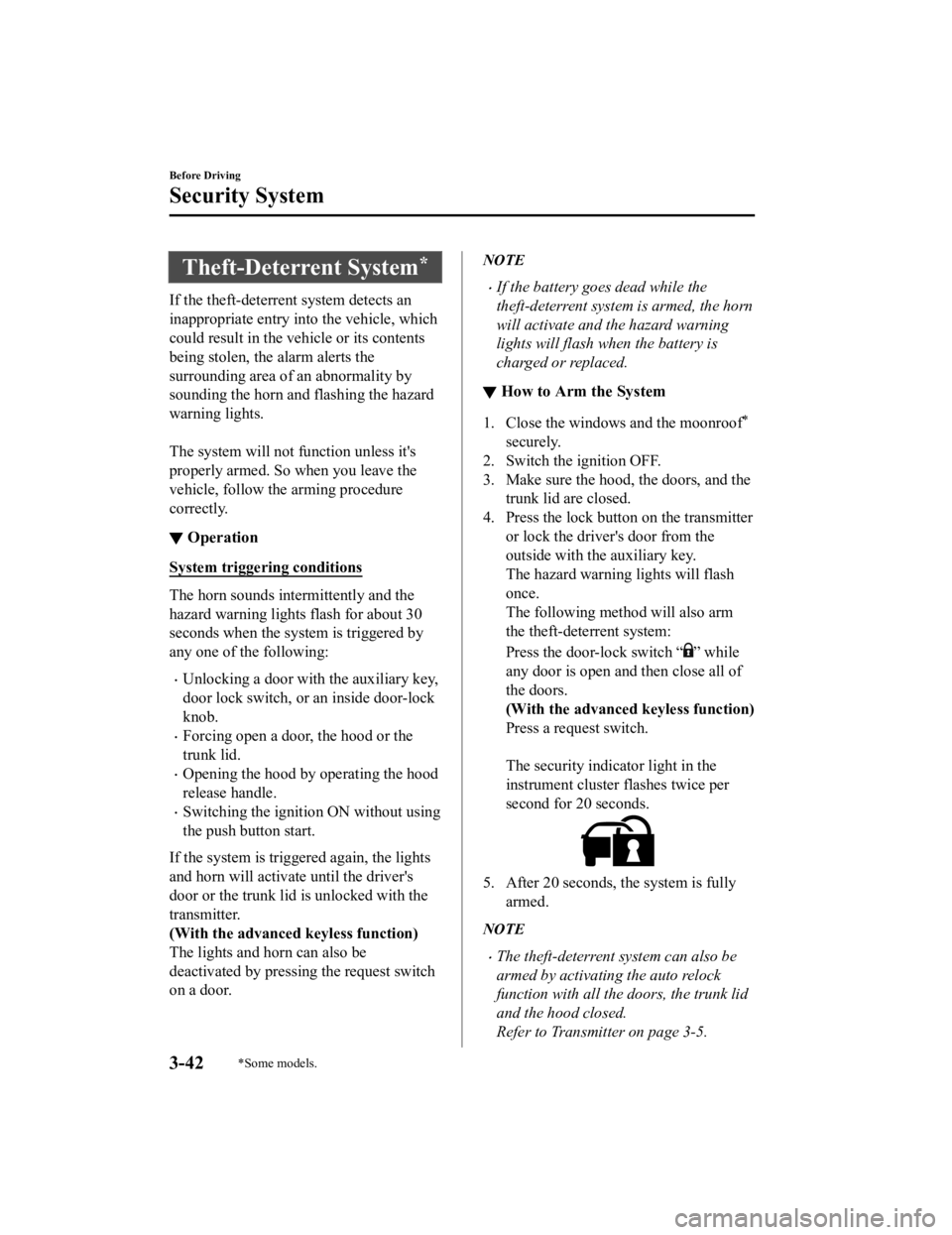
The security indicator light in the
instrument cluster flashes twice per
second for 20 seconds.
5. After 20 seconds, the system is fully
armed.
NOTE
The theft-deterrent system can also be
armed by activating the auto relock
function with all the doors, the trunk lid
and the hood closed.
Refer to Transmitter on page 3-5.
Before Driving
Security System
3-42*Some models.
Mazda6_8JN3-EA-20H_Edition1_old 2020-6-18 17:31:27
Page 202 of 634

Active Driving Display*
Dust-proof sheet
Display
Optical
receiver
WA R N I N G
Always adjust the display brightness and position with the vehicle stopped:
Adjusting the display brightness and position while driving the vehicle is dangerous as doing
so could distract your attention from the road ahead and lead to an accident.
CAUTION
Do not place beverages near the active driving display. If water or other liquids are splashed
on the active driving display, it could cause damage.
Do not place objects above the active driving display or apply stickers to the dust-proof
sheet/optical receiver as they will cause interference.
A sensor is integrated to control the display's luminosity. If the optical receiver is covered,
the display's luminosity will lower making the display
difficult to view.
Do not allow intense light to hit the optical receiver. Otherwise, it could cause damage.
NOTE
Wearing polarized sunglasses will reduce the visi bility of the active driving display due to
the characteristics of the display.
If the battery has been removed and re-installed or the battery voltage is low, the adjusted
position may deviate.
The display may be difficult to view or temporarily affected by weather conditions such as
rain, snow, light, and temperature.
If the audio system is removed, the active driving display cannot be operated.
When Driving
Instrument Cluster and Display
4-64*Some models.
Mazda6_8JN3-EA-20H_Edition1_old 2020-6-18 17:31:27
Page 328 of 634

CAUTION
Do not use the 360°View Monitor unde r any of the following conditions.
Icy or snow-covered roads.
Tire chains or a temporary spare tire is installed.
The front doors or the trunk is not fully closed.
The vehicle is on a road incline.
The door mirrors are retracted.
Do not hit the front/rear camera, front bump er, and door mirrors forcefully. The camera
position or installation angle may shift.
The cameras are of a waterproof structure. Do not disassemble, modify, or remove a
camera.
The camera cover is made of hard plastic, therefore do not apply oil film remover, organic
solvents, wax, or coating agents. If any such agent gets on the camera cover, wipe it off
using a soft cloth immediately.
Do not rub the camera lens forcefully, or clean it with an abrasive or hard brush. Otherwise,
it could scratch the camera lens and negatively affect the images.
Consult an Authorized Mazda Dealer for repair , painting, or replacement of the front/rear
camera, front bumper and door mirrors.
Heed the following cautions to assure that the 360°View Monitor operates normally.
Do not modify the vehicle suspensions or lower/raise the vehicle body, or both.
Always use wheels of the specified type and size for the front and rear wheels. Consult an
Authorized Mazda Dealer for tire replacement.
When the display is cold, images may leave trails or the screen might be darker than usual,
making it
difficult to check the vehicle surroundings. Always
confirm the safety at the front
and around the vehicle visually when driving.
The method for parking/stopping the vehicle using the 360°View Monitor differs depending
on the road circumstances/conditions and th e vehicle conditions. When and how much you
turn the steering wheel will differ depending on the situation, , therefore always check the
vehicle surroundings directly with your eyes while using the system.
Also, before using the system, always make su re that the vehicle can be parked/stopped in
the parking/stopping space.
When Driving
i-ACTIVSENSE
4-190
Mazda6_8JN3-EA-20H_Edition1_old 2020-6-18 17:31:27
Page 355 of 634

Always use tires for all wheels that are of the
specified size, and the same manufacturer,
brand, and tread pattern. In addition, do not use tires with significantly different wear
patterns on the same vehicle as the system may not operate normally.
The Forward Sensing Camera (FSC) includes a function for detecting a soiled windshield
and informing the driver, however, depending on the conditions, it may not detect plastic
shopping bags, ice or snow on the windshield . In such cases, the system cannot accurately
determine a vehicle ahead and may not be able to operate normally. Always drive carefully
and pay attention to the road ahead.
NOTE
In the following cases, the Forward Sensing Camera (FSC) cannot detect target objects
correctly, and each system may be unable to operate normally.
The height of the vehicle ahead is low.
You drive your vehicle at the same speed as the vehicle ahead.
Headlights are not turned on during the night or when going through a tunnel.
In the following cases, the Forward Sensing Camera (FSC) may not be able to detect
target objects correctly.
Under bad weather condition, such as rain, fog and snow.
The window washer is being used or the windshield wipers are not used when it's
raining.
Ice, fog, snow, frost, rainfall, dirt, or foreign matter such as a plastic bag is stuck on the
windshield.
Trucks with low loading platforms and vehicl es with an extremely low or high profile.
When driving next to walls with no patterning (including fences and longitudinally
striped walls).
The taillights of the vehicle ahead are turned off.
A vehicle is outside the illumi nation range of the headlights.
The vehicle is making a sharp turn, or ascending or descending a steep slope.
Entering or exiting a tunnel.
Heavy luggage is loaded causing the vehicle to tilt.
Strong light is shone at the front of the vehicle (back light or high-beam light from
on-coming vehicles).
There are many light emitters on the vehicle ahead.
When the vehicle ahead is not equipped with taillights or the taillights are turned off at
nighttime.
Elongated luggage or cargo is loaded onto installed roof rails and covers the Forward
Sensing Camera (FSC).
Exhaust gas from the vehicle in front, sand, snow, and water vapor rising from
manholes and grating, and water splashed into the air.
When towing a malfunctioning vehicle.
When Driving
i-ACTIVSENSE
4-217
Mazda6_8JN3-EA-20H_Edition1_old 2020-6-18 17:31:27
Page 378 of 634
Rear View Monitor*
The rear view monitor provides visual images of the rear of the vehicle when reversing.
WA R N I N G
Always drive carefully
confirming the safety of the rear and the surrounding conditions by
looking directly with your eyes:
Reversing the vehicle by only looking at the screen is dangerous as it may cause an accident
or a collision with an object. The rear view monitor is only a visual assist device when
reversing the vehicle. The images on the screen may be different from the actual conditions.
CAUTION
Do not use the rear view monitor under the following conditions: Using the rear view
monitor under the following conditions is dang erous and could result in injury or vehicle
damage or both.
Icy or snow-covered roads.
Tire chains or a temporary spare tire is installed.
The trunk lid is not fully closed.
The vehicle is on a road incline.
When the display is cold, images may course across the monitor or the screen and may be
dimmer than usual, which could cause
difficulty in
confirming the surrounding conditions
of the vehicle. Always drive carefully confirm ing the safety of the rear and the surrounding
conditions by looking directly with your eyes.
Do not apply excessive force to the camera. The camera position and angle may deviate.
Do not disassemble, modify, or remove it as it may no longer be waterproof.
The camera cover is made of plastic. Do not apply degreasing agents, organic solvents,
wax, or glass coating agents to the camera co ver. If any are spilled on the cover, wipe off
with a soft cloth immediately.
Do not rub the camera cover forcefully with an abrasive or hard brush. The camera cover or
lens may be scratched which might affect the images.
NOTE
If water, snow, or mud is stuck on the camera lens, wipe it off using a soft cloth. If it
cannot be wiped off, use a mild detergent.
If the camera temperature changes rapidly (Hot to cold, cold to hot), the rear view
monitor may not ope rate correctly.
When replacing the tires, consult an Author ized Mazda Dealer. Replacing the tires could
result in deviation of the guide lines which appear on the display.
When Driving
Rear View Monitor
4-240*Some models.
Mazda6_8JN3-EA-20H_Edition1_old 2020-6-18 17:31:27
Page 412 of 634

Say, “Cancel”.
Operate the commander switch or the center display (only when vehicle is stopped).
Skipping Voice Guidance (for faster operation)
Press and release the talk button.
Troubleshooting for Voice Recognition
If you do not understand an operation method while in the voice recognition mode, say
“Tutorial” or “Help”.
Commands useable anytime during voice recognition
“Go Back” and “Cancel” are commands which can be used at anytim e during voice
recognition.
Returning to previous operation
To return to the previous operation, say, “Go Back” while in vo ice recognition mode.
Cancel
To put the Bluetooth
® Hands-Free system in standby mode, say, “Cancel” while in voic e
recognition mode.
To prevent a deterioration in the voice recognition rate and vo ice quality, the following
points should be observed:
The voice recognition cannot be performed while voice guidance or the beep sound is
operating. Wait until the voice g uidance or the beep sound is finished before saying a
command.
Phone related commands are available only when a phone is conne cted via Bluetooth®.
Make sure a phone is connected via Bluetooth
® before you operate phone related voice
commands.
Music play commands, such as Play Artist and Play Album can be used only in USB
audio mode.
Do not speak too slowly or loudly (no loud voice).
Speak clearly, without pausing between words or numbers.
Dialects or different wording ot her than hands-free prompts can not be recognized by
voice recognition. Speak in the wording specified by the voice commands.
It is not necessary to face the microphone or be close to it. Speak the voice commands
while maintaining a safe driving position.
Close the windows and/or the mo onroof to reduce loud noises from outside the vehicle, or
turn down the airflow of the cli mate control system while Bluet ooth
® Hands-Free is being
used.
Make sure the vents are not directing air up towards the microp hone.
Interior Features
Mazda Connect
5-18
Mazda6_8JN3-EA-20H_Edition1_old 2020-6-18 17:31:27
Page 492 of 634

DESCRIPTIONFUSE
RATING PROTECTED COMPONENT
6 D.LOCK 25 A Power door locks
7 SEAT WARM 20 A Seat warmer
*
8 SUNROOF 10 AMoonroof*
9 R.OUTLET1 15 A ―
10 MIRROR 7.5 A Power control mirror 11 AT IND 7.5 A AT shift indicator
12 INTERIOR1 15 A For protection of various circuits
13 INTERIOR2 10 A For protection of various circuits
14 R.OUTLET2 15 A Accessory sockets
15 USB 7.5 A
USB power outlet
*
16 SCR3 15 A
Engine control system*
17 SCR4 15 A
Engine control system*
18 AUDIO3 15 A Audio system
19 R.SHADE 7.5 A ―
20 M.DEF 7.5 A
Mirror defogger
*
21 ― ― ―
Maintenance and Care
Owner Maintenance
6-58*Some models.
Mazda6_8JN3-EA-20H_Edition1_old 2020-6-18 17:31:27