radio MAZDA MODEL 6 2021 Owner's Manual
[x] Cancel search | Manufacturer: MAZDA, Model Year: 2021, Model line: MODEL 6, Model: MAZDA MODEL 6 2021Pages: 634, PDF Size: 71.37 MB
Page 370 of 634

Tire Pressure Monitoring System
The Tire Pressure Monitoring System (TPMS) monitors the pressure for each tire.
If tire pressure is to o low in one or more tires, the system will inform the driver via the
warning light in the instrument cluster and by the warning beep sound.
Refer to Contact Authorized Mazda Dealer and Have Vehicle Inspected on page 7-28.
Refer to Taking Action on page 7-35.
Refer to Tire Inflation Pressu re Warning Beep on page 7-48.
The tire pressure sensors installed on each wheel send tire pre ssure data by radio signal to
the receiver unit in the vehicle.
Tire pressure sensors
NOTE
When the ambient temperature is low due to seasonal changes, tire temperatures are also
lower. When the tire temperature decreases, the air pressure decreases as well. The TPMS
warning light may illumina te more frequently. Visually inspect the tires daily before driving,
and check tire pressures monthly with a tire pressure gauge. When checking tire pressures,
use of a digital tire pressure gauge is recommended.
TPMS does not alleviate your need to check the pressure and con dition of all four tires
regularly.
CAUTION
Each tire, including the spare (if provided), should be checked monthly when cold and
inflated to the
inflation pressure recommended by the vehi
cle manufacturer on the vehicle
placard or tire inflation pressure label. (If your vehicle has tires of a different size than the
size indicated on the vehicle placard or tire inflation pressure label, you should determine
the proper tire inflation pressure for those tires.)
When Driving
Tire Pressure Monitoring System
4-232
Mazda6_8JN3-EA-20H_Edition1_old 2020-6-18 17:31:27
Page 371 of 634

As an added safety feature, your vehicle has been equipped with a tire pressure monitoring
system (TPMS) that illuminates a low tire pre ssure telltale when one or more of your tires is
significantly under-inflated. Accordingly, when th e low tire pressure telltale illuminates, you
should stop and check your tires as soon as possible, and inflate them to the proper
pressure. Driving on a significantly under-in flated tire causes the tire to overheat and can
lead to tire failure. Under-inflation also reduce s fuel efficiency and tire tread life, and may
affect the vehicle's handling and stopping ability.
Please note that the TPMS is not a substitute for proper tire maintenance, and it is the
driver's responsibility to maintain correct ti re pressure, even if under-inflation has not
reached the level to trigger illumination of the TPMS low tire pressure telltale.
Your vehicle has also been equipped with a TPMS malfunction indicator to indicate when
the system is not operating properly.
The TPMS malfunction indicator is combined with the low tire pressure telltale. When the
system detects a malfunction, the telltale wi ll flash for approximately one minute and then
remain continuously illuminated. This sequence will continue upon subsequent vehicle
start-ups as long as the malfunction exists. When the malfunction indicator is illuminated,
the system may not be able to detect or signal low tire pressure as intended. TPMS
malfunctions may occur for a variety of reasons, including the installation of replacement
or alternate tires or wheels on the vehicle th at prevent the TPMS from functioning properly.
Always check the TPMS malfunction telltale after replacing one or more tires or wheels on
your vehicle to ensure that the replacement or alternate tires and wheels allow the TPMS to
continue to function properly.
To avoid false readings, the system samples for a little while before indicating a problem. As
a result it will not instantaneously regi ster a rapid tire deflation or blow out.
▼System Error Activation
When the warning light flashes, there may
be a system malfunction. Consult an
Authorized Mazda Dealer.
A system error activation may occur in the
following cases:
When there is equipment or a device
near the vehicle using the same radio
frequency as that of the tire pressure
sensors.
When a metallic device such as a
non-genuine navigation system is
equipped near the center of the
dashboard, which may block radio
signals from the tire
pressure sensor to
the receiver unit.
When using the following devices in the
vehicle that may cause radio
interference with the receiver unit.
A digital device such as a personal
computer.
A current converter device such as a
DC-AC converter.
When excess snow or ice adheres to the
vehicle, especially around the wheels.
When the tire pressu re sensor batteries
are exhausted.
When using a wheel with no tire
pressure sensor installed.
When using tires with steel wire
reinforcement in the sidewalls.
When using tire chains.
When Driving
Tire Pressure Monitoring System
4-233
Mazda6_8JN3-EA-20H_Edition1_old 2020-6-18 17:31:27
Page 387 of 634

Anything which generates ultrasound is near the vehicle, such as another vehicle's
horn, the engine sound of a motorcycle, the air brake sound of a large-sized vehicle, or
another vehicle's sensors.
The vehicle is driven in heavy rain or in road conditions causing water-splash.
A commercially-available fender pole or an antenna for a radio transmitter is installed
to the vehicle.
The vehicle is moving towards a tall or square curbstone.
An obstruction is too close to the sensor.
Obstructions under the bumper may not be detected. Obstructions that are lower than the
bumper or thin which may have been initially detected may no longer be detected as the
vehicle approaches more closely to the obstruction.
The following types of obstructions may not be detected:
Thin objects such as wire or rope
Things which absorb sonic waves easily such as cotton or snow
Angular shaped objects
Very tall objects, and those which are wide at the top
Small, short objects
Always have the system inspected at an Authorized Mazda Dealer if any shock is applied
to the bumpers, even in a minor accident. If the sensors are deviated, they cannot detect
obstructions.
The system may have a malfunction if the beep does not operate or the indicator light
does not illuminate when the parking sensor switch is turned on. Consult an Authorized
Mazda Dealer.
The system may have a malfunction if the beep sound which indicates a system
malfunction is heard and the i ndicator light flashes. Consult an Authorized Mazda Dealer.
The beeper which indicates a system malf unction may not be heard if the ambient
temperature is extremely cold, or mud, ice, or snow adheres to the sensor area. Remove
any foreign material from the sensor area.
When Driving
Parking Sensor System
4-249
Mazda6_8JN3-EA-20H_Edition1_old 2020-6-18 17:31:27
Page 403 of 634
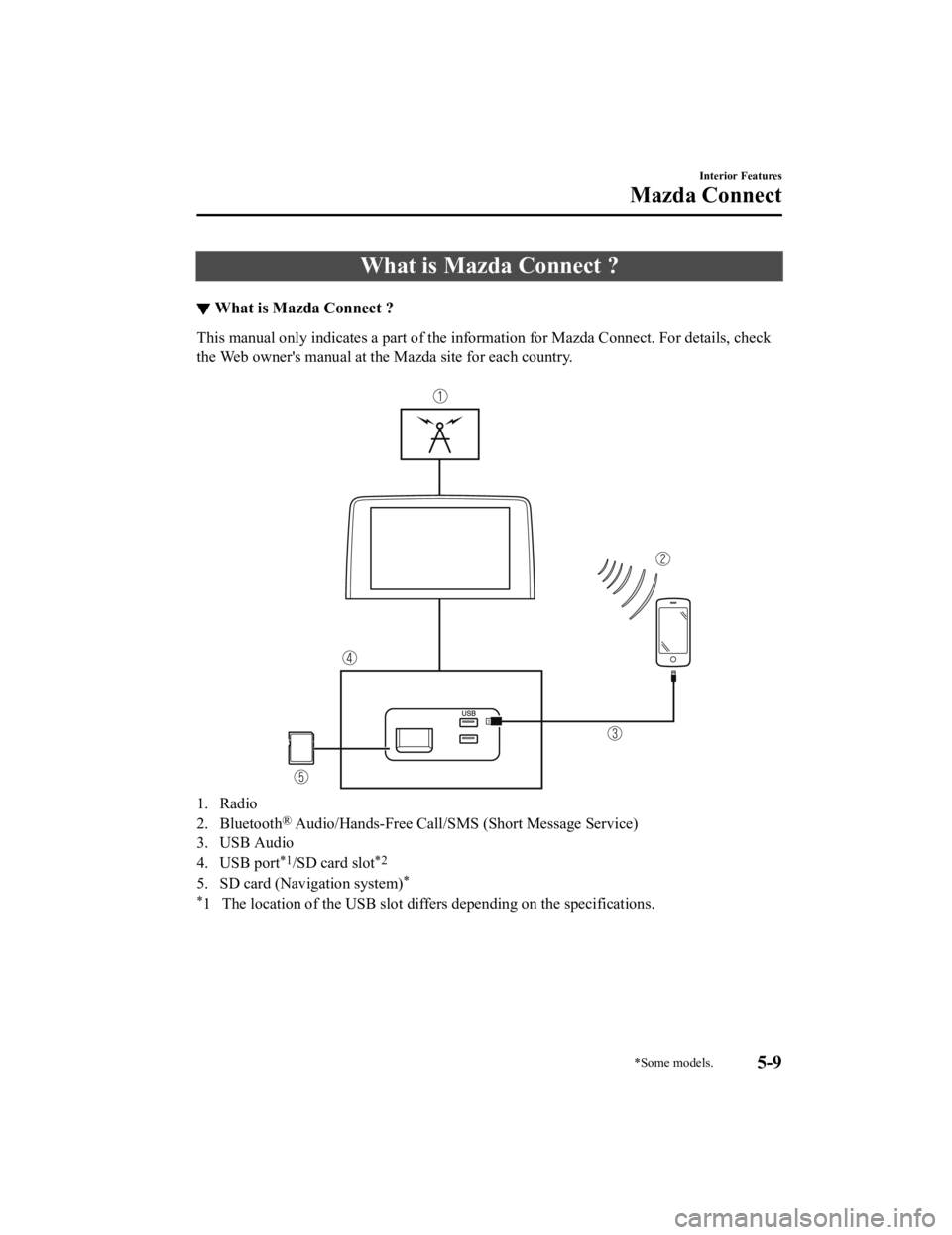
What is Mazda Connect ?
▼What is Mazda Connect ?
This manual only indicates a part
of the information for Mazda Connect. For details, check
the Web owner's manual at the Mazda site for each country.
1. Radio
2. Bluetooth
® Audio/Hands-Free Call/S MS (Short Message Service)
3. USB Audio
4. USB port
*1/SD card slot*2
5. SD card (Navigation system)*
*
1 The location of the USB slot differs depending on the specifications.
Interior Features
Mazda Connect
*Some models.5-9
Mazda6_8JN3-EA-20H_Edition1_old 2020-6-18 17:31:27
Page 404 of 634
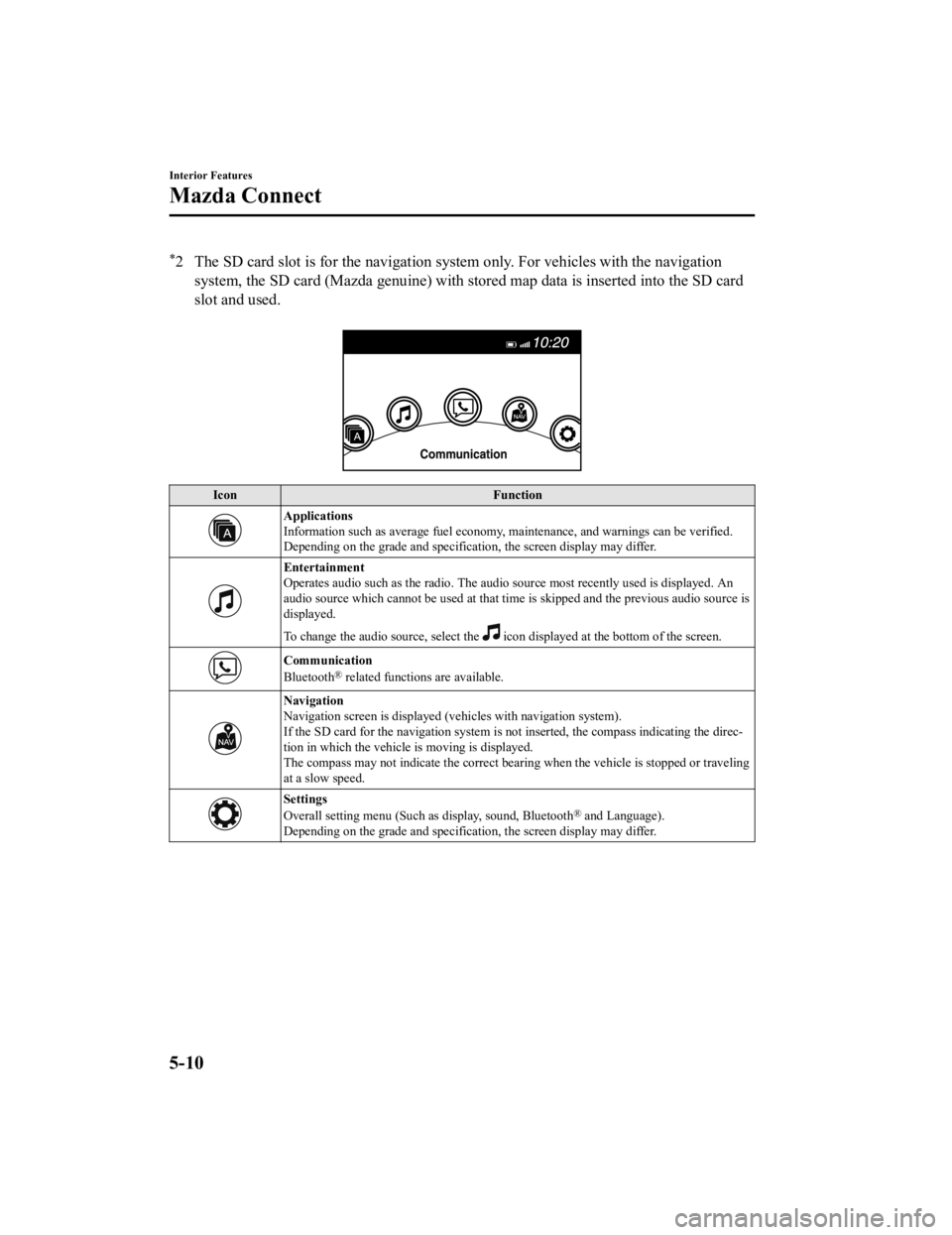
*2 The SD card slot is for the navigation system only. For vehicles with the navigation
system, the SD card (Mazda genuine) with stored map data is ins erted into the SD card
slot and used.
Icon Function
Applications
Information such as average fuel economy, maintenance, and warn ings can be verified.
Depending on the grade and specification, the screen display ma y differ.
Entertainment
Operates audio such as the radio. The audio source most recently used is displayed. An
audio source which cannot be used at that time is skipped and t he previous audio source is
displayed.
To change the audio source, select the
icon displayed at the bottom of the screen.
Communication
Bluetooth® related functions are available.
Navigation
Navigation screen is displayed (v ehicles with navigation system).
If the SD card for the navigation system is not inserted, the c ompass indicating the direc‐
tion in which the vehicle is moving is displayed.
The compass may not indicate th e correct bearing when the vehicle is stopped or traveling
at a slow speed.
Settings
Overall setting menu (Such as display, sound, Bluetooth® and Language).
Depending on the grade and specification, the screen display ma y differ.
Interior Features
Mazda Connect
5-10
Mazda6_8JN3-EA-20H_Edition1_old 2020-6-18 17:31:27
Page 405 of 634

WARNING
Always adjust Mazda Connect while the vehicle is stopped:
Do not adjust Mazda Connect with the Commander switch while driving the vehicle.
Adjusting Mazda Connect with the Commander switch while driving the vehicle is dangerous
as it could distract your attention from the vehicle operation which could lead to a serious
accident.
Even if the audio remote control switches are equipped on the steering wheel, learn to use the
switches without looking down at them so that you can keep your maximum attention on the
road while driving the vehicle.
Do not allow the connection plug cord to get tangled with the selector lever:
Allowing the plug cord to beco me tangled with the selector lever is dangerous as it could
interfere with driving, resulting in an accident.
Do not adjust a mobile device or a similar product while driving the vehicle:
Adjusting a mobile device or a similar produc t while driving the vehicle is dangerous as it
could distract your attention from the vehi cle operation which could lead to a serious
accident. Always adjust a mobi le device or a similar product while the vehicle is stopped.
CAUTION
For the purposes of safe driving, adjust the au dio volume to a level that allows you to hear
sounds outside of the vehicle including car horns and particularly emergency vehicle sirens.
NOTE
Do not use Mazda Connect for a long time with the engine stopped. Otherwise, the battery
power could be depleted.
If a mobile phone or CB radio is used in or near the vehicle, it could cause noise to occur
from the audio system. However, this does not indicate a problem.
Interior Features
Mazda Connect
5-11
Mazda6_8JN3-EA-20H_Edition1_old 2020-6-18 17:31:27
Page 408 of 634

Return to previous screen
1. Touch the
.
Displaying the home screen
1. Touch the
.
▼ Commander Switch Operation
NOTE
For safety reasons, some operations are disabled while the vehicle is being driven.
Volume dial operation
Volume dial
Press the volume dial
to mute and pause. However, while an audi o source which cannot be
paused such as FM radio is playing, only mute is available. Pre ss the volume dial again to
resume the audio.
Turn the volume dial to adjust the volume. The volume increases by turning the dial
clockwise, and decreases by turning it counterclockwise.
Switches around commander knob
The following operations can be done by pressing the switches a round the commander
knob.
: Displays the home screen.
: Displays the En tertainment screen.
Interior Features
Mazda Connect
5-14
Mazda6_8JN3-EA-20H_Edition1_old 2020-6-18 17:31:27
Page 409 of 634
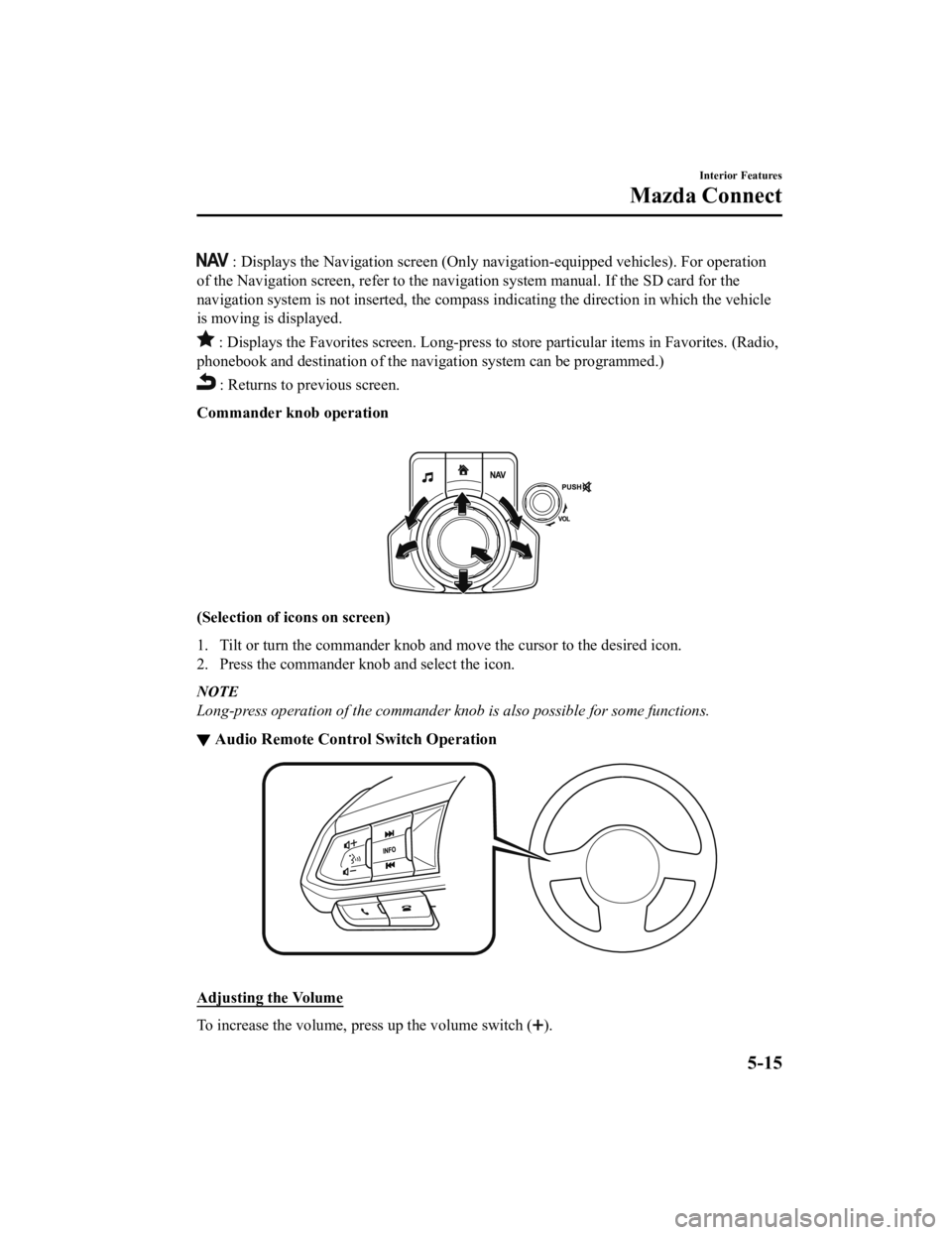
: Displays the Navigation screen (Only navigation-equipped vehicles). For operation
of the Navigation screen, refer to the navigation system manual . If the SD card for the
navigation system is not inserted , the compass indicating the direction in which the vehicle
is moving is displayed.
: Displays the Favor ites screen. Long-press to store particula r items in Favorites. (Radio,
phonebook and destination of the navigation system can be progr ammed.)
: Returns to previous screen.
Commander knob operation
(Selection of ic ons on screen)
1. Tilt or turn the commander knob and move the cursor to the de sired icon.
2. Press the commander knob and select the icon.
NOTE
Long-press operation of the commander knob is also possible for some functions.
▼ Audio Remote Control Switch Operation
Adjusting
the Volume
To increase the volume, press up the volume switch ().
Interior Features
Mazda Connect
5-15
Mazda6_8JN3-EA-20H_Edition1_old 2020-6-18 17:31:27
Page 410 of 634

To decrease the volume, press down the volume switch ().
Seek Switch
AM/FM radio
Press the seek switch (
, ). The radio switches to the next/previous stored station in th e
order that it was stored.
Press and hold the seek switch (
, ) to seek all usable stations at a higher or lower
frequency whether programmed or not.
Radio stations which have been previously stored in favorites c an be called up by pressing
the seek switch (
, ) while any radio station stored in the favorite radio is being received.
Radio stations can be called up in the order they were stored w ith each press of the switch
(
, ).
USB Audio/Bluetooth® Audio /CD
Press the seek switch (
) to skip forward to the beginning of the next track.
Press the seek switch (
) within a few seconds after playback begins to track down to t he
beginning of the previous track.
Press the seek switch (
) after a few seconds have elapsed to start playback from the
beginning of the current track.
Press and hold the seek switch (
, ) to continuously switch the tracks up or down.
Pandora
®/Aha™/Stitcher™ Radio
Press the seek switch (
) to skip forward to the beginning of the next track.
Press and hold the seek switch (
) to evaluate the playback of the current song as “Like”.
Press and hold the seek switch (
) to evaluate the playb ack of the current song as
“Dislike”.
Interior Features
Mazda Connect
5-16
Mazda6_8JN3-EA-20H_Edition1_old 2020-6-18 17:31:27
Page 414 of 634

▼Appendix
Gracenote® Database
When a USB device or Bluetooth® device is connected to this unit and the audio is played,
the album name, artist name, genre and title information are automatically displayed if there
is a match in the vehicle's database compilation to the music b eing played. The information
stored in this device uses database information in the Gracenot e
® music recognition service.
SiriusXM
® Satellite Radio*
SiriusXM® All Access Subscription
Hopefully, you're already loving SiriusXM in your new Mazda. Bu t don't stop there — you
can also listen on the app and online. All Access is the very b est subscription package –
with the most channels and the mo st flexibility. With All Access, you get every channel
available on satellite radio, plus you can listen on the app an d online — so you can enjoy
SiriusXM wherever you are. Here's what's included:
-Over 150 satellite channels to enjoy in your car, coast-to-coast, 24/7.
-All kinds of commercial-free music, plus every major sport, wo rld-class news and the
biggest names in talk & entertainment.
-All of our premium programming, including Howard Stern, every NFL, MLB
®, and NBA
game, NHL
® games, every NASCAR® race, 24/7 talk channels dedicated to the biggest
leagues, and much more.
All SiriusXM services require a subscription, sold separately or as a package by SiriusXM
Radio Inc. (or, in Canada, SiriusXM Canada Inc.), after any tri al subscription which may be
included with your vehicle purchase or lease. To subscribe afte r your trial subscription, call
1-877-447-0011 (U.S.A.) or 1-877-438-9677 (Canada).
Interior Features
Mazda Connect
5-20*Some models.
Mazda6_8JN3-EA-20H_Edition1_old 2020-6-18 17:31:27