lights MAZDA MODEL 6 2021 Owner's Guide
[x] Cancel search | Manufacturer: MAZDA, Model Year: 2021, Model line: MODEL 6, Model: MAZDA MODEL 6 2021Pages: 634, PDF Size: 71.37 MB
Page 218 of 634

(Canada)
Ignition PositionACC or OFF ON
Switch Position OFF
*1AUTOOFF*1AUTO
Headlights Off Off Off Off
Auto
*2*4Auto*3*4
On
Daytime running
lights Off Off Off Off
Off
Taillights
Parking lights
License plate lights
Side-marker lights Off
On
*5OnOn*5On
*1 The light switch returns to t he AUTO position automatically.*2 During the daytime, the daytime running lights turn on automat ically. During the nighttime, the headlights,
parking lights, taillights, and the license plate lights turn o n automatically.
*3 During the daytime, the daytime running lights, parking lights , taillights, and the license plate lights turn on
automatically. During the nighttime, the headlights, parking lights, taillights, and the lic ense plate lights turn
on automatically.
*4 When the light switch is switched to the OFF position while th e vehicle is stopped, all of the lights that are
turned on turn off. When the li ght switch is switched from a po sition other than
to the position
while the vehicle is stopped, the daytime running lights or the headlights turn off. When starting to drive the
vehicle, the lights that are turned off turn on again.
*5 The lights are turned on for th e specified period by the auto headlight off function.
Auto-light control*
(Except Cnnada)
When the headlight switch is in the AUTO position and the ignit ion is switched ON, the
light sensor senses the surrounding lightness or darkness and a utomatically turns the
headlights and other exterior lights on or off.
(Canada)
When the headlight switch is in a position other than
and the ignition is switched ON, the
light sensor senses the surrounding lightness or darkness and a utomatically turns the
headlights and other exterior lights on or off.
When Driving
Switches and Controls
4-80*Some models.
Mazda6_8JN3-EA-20H_Edition1_old 2020-6-18 17:31:27
Page 219 of 634
CAUTION
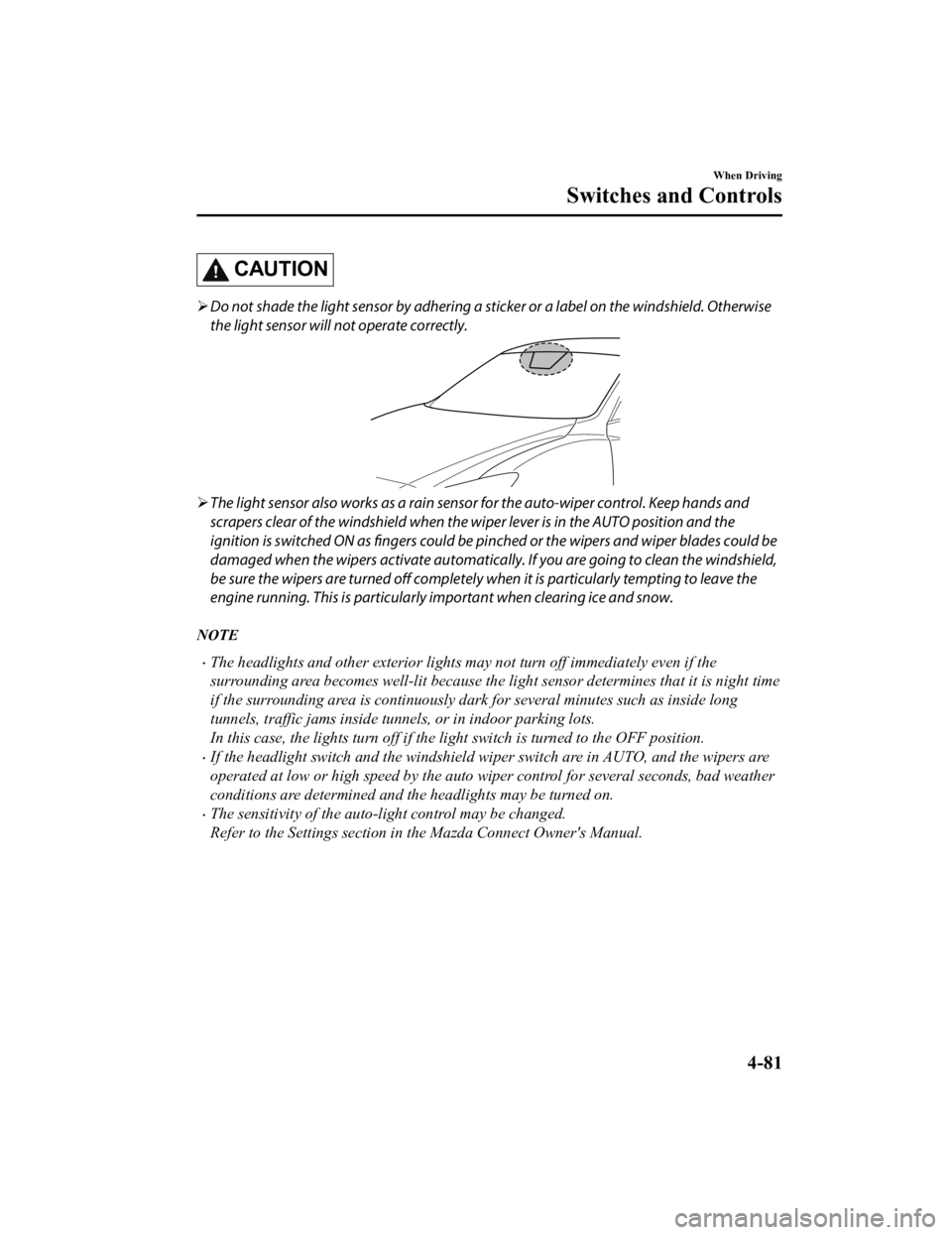
Do not shade the light sensor by adhering a st icker or a label on the windshield. Otherwise
the light sensor will not operate correctly.
The light sensor also works as a rain sensor for the auto-wiper control. Keep hands and
scrapers clear of the windshield when the wi per lever is in the AUTO position and the
ignition is switched ON as fingers could be pinched or the wipers and wiper blades could be
damaged when the wipers activa te automatically. If you are going to clean the windshield,
be sure the wipers are turned off completely wh en it is particularly tempting to leave the
engine running. This is particularly important when clearing ice and snow.
NOTE
The headlights and other exterior lights may not turn off immediately even if the
surrounding area becomes well-lit because the light sensor determines that it is night time
if the surrounding area is continuously dark for several minute s such as inside long
tunnels, traffic jams inside tunn els, or in indoor parking lots.
In this case, the ligh ts turn off if the light switch is turned to the OFF position.
If the headlight switch and the windshield wiper switch are in AUTO, and the wipers are
operated at low or high speed by the auto wi per control for several seconds, bad weather
conditions are determined and the headlights may be turned on.
The sensitivity of the auto-light control may be changed.
Refer to the Settings section in the Mazda Connect Owner's Manual.
When Driving
Switches and Controls
4-81
Mazda6_8JN3-EA-20H_Edition1_old 2020-6-18 17:31:27
Page 220 of 634

▼Headlight High-Low Beam
The headlights switch between high and
low beams by moving the lever forward or
backward.
High beam
Low beam
When the headlight high-beams are on, the
headlight high-beam indicator light is
turned on.
▼ Flashing the Headlights
Can be used when the ignition is switched
ON.
To flash the headlights
, pull the lever fully
towards you (the headlight switch does not
need to be on).
OFF
Headlight
flashing
The headlight high-b eam indicator light in
the instrument cluster illuminates
simultaneously. The lever will return to
the normal position when released.
▼ Coming Home Light
The coming home light turns on the
headlights (low beam
s) when the lever is
operated.
To turn on the lights
When the lever is pulled with the ignition
switched to ACC or OFF, the low beam
headlights turn on.
The headlights turn o ff after a certain
period of time has elapsed after all of the
doors are closed.
NOTE
The time until the headlights turn off
after all of the doors are closed can be
changed.
Refer to the Settings section in the
Mazda Connect Owner's Manual.
If no operations are done for 3 minutes
after the lever is pu lled, the headlights
turn off.
The headlights turn off if the lever is
pulled again while the headlights are
illuminated.
When Driving
Switches and Controls
4-82
Mazda6_8JN3-EA-20H_Edition1_old 2020-6-18 17:31:27
Page 221 of 634

▼Leaving Home Light
The leaving home light turns on the lights
when the transmitter unlock button is
pressed while away from the vehicle.
The following lights turn on when the
leaving home light is operated.
Low beams, Parking lights, Taillights,
License plate lights.
To turn on the lights
When the ignition swi
tch and the headlight
switch are in the following conditions, the
headlights will illuminate when the
transmitter unlock button is pressed and
the vehicle receives the transmitter signal.
The headlights turn off after a certain
period of time has elapsed (30 seconds).
Ignition switch: off
Headlight switch: AUTO, , or
Unlock
button Lock button
NOTE
Operation of the leaving home light can
be turned on or off.
Refer to the Settings section in the
Mazda Connect Owner's Manual.
When the transmitter lock button is
pressed and the vehicle receives the
transmitter signal, the headlights turn
off.
When the headlight switch is turned to
the OFF position, the headlights turn
off.
▼ Headlight Leveling
The number of passengers and weight of
cargo in the luggage compartment change
the angle of the headlights.
The angle of the headlights will be
automatically adjusted when turning on
the headlights.
▼Daytime Running Lights
Some countries require moving vehicles to
have their lights on (daytime running
lights) during the daytime.
Except Canada
The daytime running lights turn on when
the vehicle is driven and turn off when the
parking brake is operated or the selector
lever is shifted to
the P position.
NOTE
The daytime running lights can be
deactivated.
Refer to the Settings section in the Mazda
Connect Owner's Manual.
Canada
The daytime running lights continuously
turn on when the ignition is switched ON.
When the light switch is switched to the
OFF or
position while the vehicle is
stopped, the daytime running lights turns
off. When you start driving the vehicle,
they turn on again.
When Driving
Switches and Controls
4-83
Mazda6_8JN3-EA-20H_Edition1_old 2020-6-18 17:31:27
Page 222 of 634

NOTE
When the light switch is switched to the
position, the daytime running lights turn
off. If you want to drive the vehicle with
the daytime running lights turned on,
switch the light switch to a position other
than
.
Turn and Lane-Change Signals
The ignition must be switched ON to use
the turn and lane-change signals.
▼Tu r n S i g n a l s
Move the signal lever down (for a left
turn) or up (for a right turn) to the stop
position. The signal will self-cancel after
the turn is completed.
If the indicator light continues to flash
after a turn, ma
nually return th e lever to its
original position.
Right turn
Left turn
Right lane change
Left lane change OFF
The turn signal indicators in the
instrument cluster
flash according to the
operation of the turn signal lever to show
which signal is working.
When Driving
Switches and Controls
4-84
Mazda6_8JN3-EA-20H_Edition1_old 2020-6-18 17:31:27
Page 223 of 634

NOTE
There may be a problem with the turn
signal lights if they do not flash but
remain turned on, or they flash
abnormally. Have your vehicle inspected
by an Authorized Mazda Dealer.
A personalized function is available to
change the turn indicator sound volume.
Refer to the Settings section in the
Mazda Connect Owner's Manual.
▼Lane-Change Signals
Move the lever halfway toward the
direction of the lane change―until the
indicator flashes― and hold it there. It
will return to the off position when
released.
▼Three-Flash Turn Signal
After releasing the turn signal lever, the
turn signal indicato
r flashes 3 times. The
operation can be canceled by moving the
lever in the direction opposite to which it
was operated.
NOTE
The three-flash turn signal function can be
switched to operable/inoperable using the
personalization function.
Refer to the Settings section in the Mazda
Connect Owner's Manual.
Windshield Wipers and
Wa s h e r
The ignition must be switched ON to use
the wipers.
WA R N I N G
Use only windshield washer fluid or plain
water in the reservoir:
Using radiator antifreeze as washer fluid is
dangerous. If sprayed on the windshield, it
will dirty the windshield, affect your
visibility, and could result in an accident.
Only use windshield washer fluid mixed
with anti-freeze protection in freezing
weather conditions:
Using windshield washer fluid without
anti-freeze protection in freezing weather
conditions is dangerous as it could freeze
on the windshield and block your vision
which could cause an accident. In addition,
make sure the windshield is sufficiently
warmed using the defroster before
spraying the washer fluid.
CAUTION
When the wipers are not used during
freezing temperatures or for a long time,
the wiper rubber may adhere to the
glass. If the wipers are operated while
adhered to the glass, it could damage
the wiper rubber and motor.
If the wipers are operated while the glass
is dry, the glass could be scratched and
the wiper rubber damaged. When the
glass is dry, spray washer fluid before
operating the wipers.
When Driving
Switches and Controls
4-85
Mazda6_8JN3-EA-20H_Edition1_old 2020-6-18 17:31:27
Page 226 of 634

When the ignition is switched ON and
the wiper lever is in the AUTO position
and the position, th e windshield wipers
may operate automatically in the
following cases:
The area of the windshield above the
rain sensor is touched or wiped with a
cloth.
The windshield or the rain sensor area
in the cabin is hit.
When the ignition is switched ON and
the wiper lever is in the AUTO position,
do not touch the windshield or the
windshield wipers Otherwise, the
windshield wipers will operate
automatically which could catch your fingers or damage the windshield wipers.
When removing ice or snow, or cleaning
the windshield, always make sure the
wiper lever is in the OFF position.
NOTE
Switching the auto-wiper lever from the
OFF to the AUTO position while driving
activates the windshield wipers once,
after which they operate according to
the rainfall amount.
The auto-wiper control may not operate
when the rain sensor temperature is
about
-10 °C (14 °F) or lower, or
about 85 °C (185 °F) or higher.
If the windshield is coated with water
repellent, the rain sensor may not be
able to sense the amount of rainfall
correctly and the auto-wiper control
may not operate properly.
If dirt or foreign matter (such as ice or
matter containing salt water) adheres to
the windshield above the rain sensor, or
if the windshield is iced, it could cause
the wipers to move automatically.
However, if the wi pers cannot remove
this ice, dirt or foreign matter, the
auto-wiper control will stop operation.
In this case, set th e wiper lever to the
low speed position or high speed
position for manual operation, or
remove the ice, dirt or foreign matter by
hand to restore the auto-wiper
operation.
If the auto-wiper lever is left in the
AUTO position, the wipers could
operate automatically from the effect of
strong light sources, electromagnetic
waves, or infrared light because the rain
sensor uses an optical sensor. It is
recommended that the auto-wiper lever
be switched to the OFF position other
than when driving the vehicle under
rainy conditions.
(With auto-wiper control)
If the headlight switch and the
windshield wiper switch are in AUTO,
and the wipers are operated at low or
high speed by the auto wiper control for
several seconds, bad weather conditions
are determined and the headlights may
be turned on.
The auto-wiper control functions can be
turned off. Refer to the Settings section
in the Mazda Connect Owner's Manual.
When Driving
Switches and Controls
4-88
Mazda6_8JN3-EA-20H_Edition1_old 2020-6-18 17:31:27
Page 229 of 634

Horn
To sound the horn, press the mark on
the steering wheel.
Hazard Warning Flasher
The hazard warning lights should always
be used when you stop on or near a
roadway in an emergency.
The hazard warning lights warn other
drivers that your vehicle is a traffic hazard
and that they must take extreme caution
when near it.
Depress the hazard warning flasher and all
the turn signals will flash. The hazard
warning indicator lights in the instrument
cluster flash simultaneously.
NOTE
The turn signals do not work when the
hazard warning lights are on.
Check local regulations about the use of
hazard warning lights while the vehicle
is being towed to verify that it is not in
violation of the law.
When Driving
Switches and Controls
4-91
Mazda6_8JN3-EA-20H_Edition1_old 2020-6-18 17:31:27
Page 237 of 634

1. Press the two outer HomeLink buttonscontinuously at the same time until the
indicator light flashes.
HomeLink button 1
HomeLink button 3
2. Stop pressing the HomeLink buttons.
▼Garage Door Two-Way
Communication
The garage door two-way communication
is a function that communicates with the
garage door opener and indicates whether
the garages door is open or closed using
the indicator lights in the rear view mirror.
It can indicate the status of the garage door
within a range up-to 250 m (820 ft).
NOTE
The communication range may shorten
depending on obstructions.
Programming two-way communication
Within five seconds after programming a
new HomeLink button, both of the garage
door status indicator lights will flash
rapidly in green indicating that the garage
door two-way communication has been
established. If the garage door status
indicator lights flash, the two-way
communication programming is complete.
If the garage door status indicator lights do
not flash, the two-way communication
programming is not completed. For
additional HomeLink information and
programming videos, refer to the
following Websites:
www.HomeLink.com
www.youtube.com/HomeLinkGentex
Operating the garage door two-way
communication
By pressing HomeLink buttons 1 and 2 at
the same time for two seconds, the status
of the garage door is indicated for about 3
seconds as follows:
HomeLink button 1HomeLink button 2
Garage door
status Indicator light
Closing Amber flashes
Opening Amber flashes
ClosedGreen turns on
Opened Green turns on
NOTE
The programming will not be erased even
if the battery is disconnected.
When Driving
Switches and Controls
4-99
Mazda6_8JN3-EA-20H_Edition1_old
2020-6-18 17:31:27
Page 258 of 634

Driver support systems
Inter-vehicle distance
Mazda Radar Cruise Control with Stop & Go function (MRCC with Stop & Go
function)...................................................... ............................................................. page 4-150
Lane departure
Lane-keep Assist System (LAS).................................. ............................................ page 4-164
▼Pre-Crash Safety Technology
Pre-crash safety technology is designed to assist the driver in
averting collisions or reduce
their severity in situations where they cannot be avoided.
Collision damage reduction in low vehicle speed range
Forward driving
Smart City Brake Support [Forward] (SCBS F).................... ..................................page 4-178
Advanced Smart City Brake S upport (Advanced SCBS).............. .......................... page 4-175
Reverse driving
Smart City Brake Support [Reverse] (SCBS R).................... .................................. page 4-182
Collision damage reduction in medium/high speed range
Smart Brake Support (SBS)..................................................................................... page 4-186
▼Camera and Sensors
Forward Sensing Camera (FSC)
The Forward Sensing Camera (FSC) detects lane indications and r
ecognizes headlights,
taillights and city lights during nighttime driving. In addition, it also detects the vehicle
ahead, pedestrians, or obstructions. The following systems also use the Forward Sensing
Camera (FSC).
High Beam Control System (HBC)
Lane-keep Assist System (LAS) & Lane Departure Warning System ( LDWS)
Traffic Sign Recognition System (TSR)
Advanced Smart City Brake Support (Advanced SCBS)
Smart City Brake Support [Forward] (SCBS F)
Smart Brake Support (SBS)
Mazda Radar Cruise Control with S top & Go function (MRCC with Stop & Go function)
The Forward Sensing Camera (FSC) is installed at the top of the windshield near the
rearview mirror.
Refer to Forward Sensing Camera (FSC) on page 4-215.
When Driving
i-ACTIVSENSE
4-120
Mazda6_8JN3-EA-20H_Edition1_old 2020-6-18 17:31:27