dashboard MAZDA MODEL 6 SPORT WAGON 2006 User Guide
[x] Cancel search | Manufacturer: MAZDA, Model Year: 2006, Model line: MODEL 6 SPORT WAGON, Model: MAZDA MODEL 6 SPORT WAGON 2006Pages: 390, PDF Size: 3.6 MB
Page 162 of 390
Black plate (162,1)
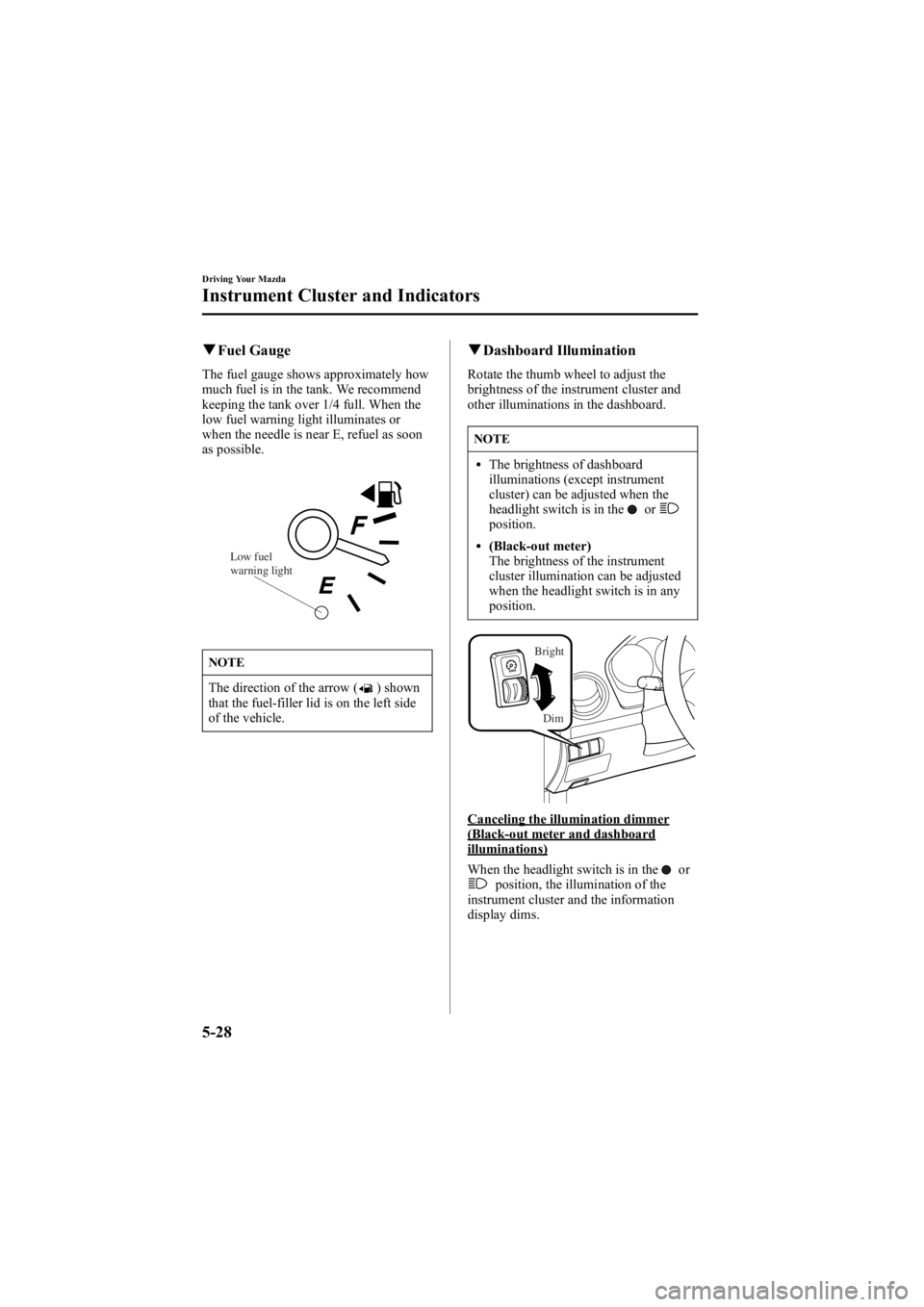
qFuel Gauge
The fuel gauge shows approximately how
much fuel is in the tank. We recommend
keeping the tank over 1/4 full. When the
low fuel warning light illuminates or
when the needle is near E, refuel as soon
as possible.
Low fuel
warning light
NOTE
The direction of the arrow () shown
that the fuel-filler lid is on the left side
of the vehicle.
q Dashboard Illumination
Rotate the thumb wheel to adjust the
brightness of the instrument cluster and
other illuminations in the dashboard.
NOTE
lThe brightness of dashboard
illuminations (except instrument
cluster) can be adjusted when the
headlight switch is in the
orposition.
l(Black-out meter)
The brightness of the instrument
cluster illumination can be adjusted
when the headlight switch is in any
position.
Dim
Bright
Canceling the illumination dimmer(Black-out meter and dashboardilluminations)
When the headlight switch is in the
orposition, the illumination of the
instrument cluster and the information
display dims.
5-28
Driving Your Mazda
Instrument Cluster and Indicators
Mazda6_8V40-EA-05L_Edition1 Page162
Monday, November 28 2005 6:9 PM
Form No.8V40-EA-05L
Page 163 of 390
Black plate (163,1)
When driving on snowy or foggy roads,
or in other situations when the instrument
cluster or information display's visibility
is reduced due to glare from surrounding
brightness, cancel the illumination
dimmer and increase the illumination
intensity.
To cancel the illumination dimmer, rotate
the thumb wheel upward fully. You may
hear a click sound and the illumination
dimmer will be canceled.
NOTE
If the dashboard illumination switch is
kept at the illumination dimmer cancel
position, the instrument cluster and the
information display will not dim when
the headlight switch is turned to the
orposition again.
Driving Your Mazda
Instrument Cluster and Indicators
5-29
Mazda6_8V40-EA-05L_Edition1 Page163
Monday, November 28 2005 6:9 PM
Form No.8V40-EA-05L
Page 173 of 390
Black plate (173,1)
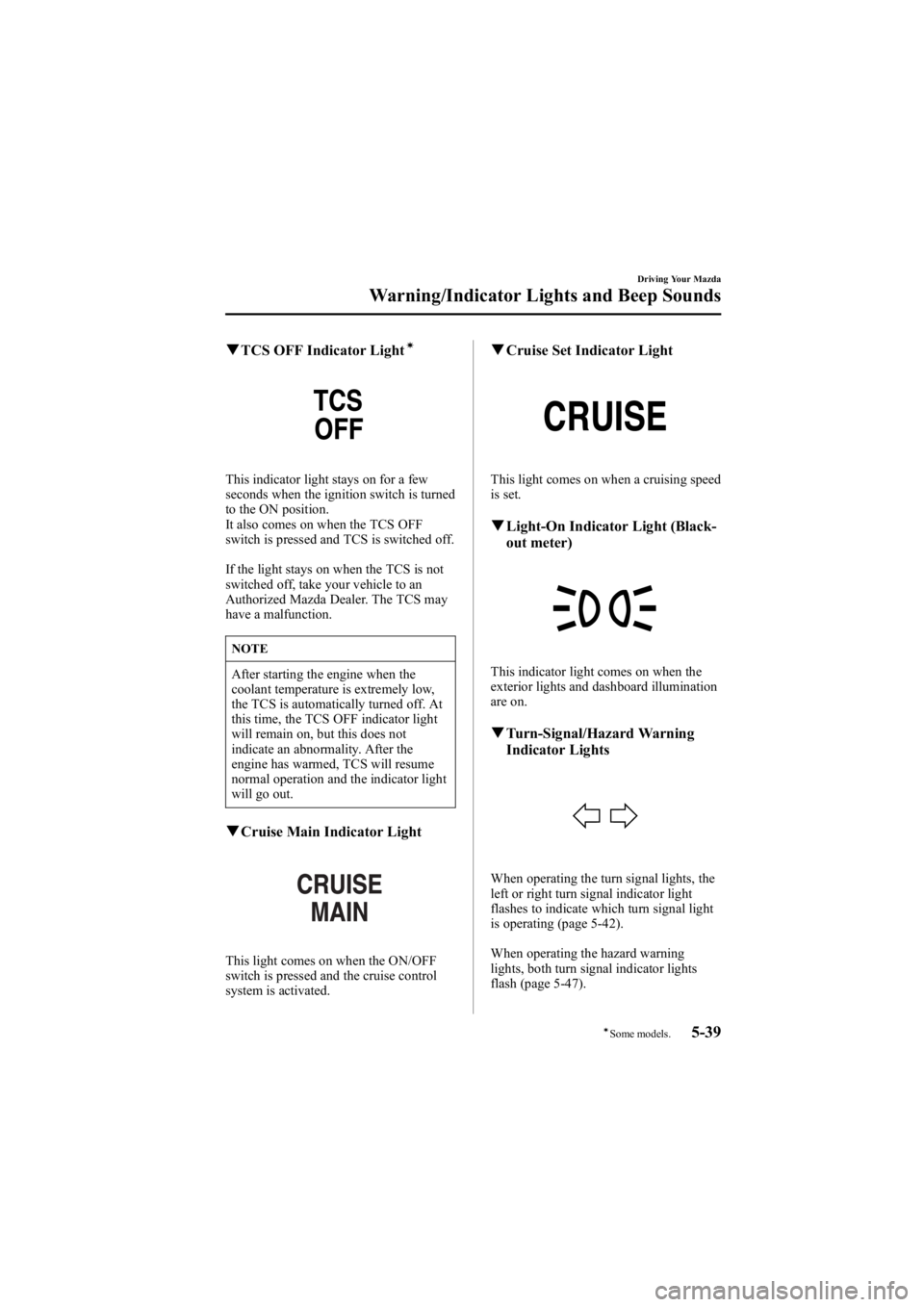
qTCS OFF Indicator Lightí
This indicator light stays on for a few
seconds when the ignition switch is turned
to the ON position.
It also comes on when the TCS OFF
switch is pressed and TCS is switched off.
If the light stays on when the TCS is not
switched off, take your vehicle to an
Authorized Mazda Dealer. The TCS may
have a malfunction.
NOTE
After starting the engine when the
coolant temperature is extremely low,
the TCS is automatically turned off. At
this time, the TCS OFF indicator light
will remain on, but this does not
indicate an abnormality. After the
engine has warmed, TCS will resume
normal operation and the indicator light
will go out.
qCruise Main Indicator Light
This light comes on when the ON/OFF
switch is pressed and the cruise control
system is activated.
qCruise Set Indicator Light
This light comes on when a cruising speed
is set.
qLight-On Indicator Light (Black-
out meter)
This indicator light comes on when the
exterior lights and dashboard illumination
are on.
qTurn-Signal/Hazard Warning
Indicator Lights
When operating the turn signal lights, the
left or right turn signal indicator light
flashes to indicate which turn signal light
is operating (page 5-42).
When operating the hazard warning
lights, both turn signal indicator lights
flash (page 5-47).
Driving Your Mazda
Warning/Indicator Lights and Beep Sounds
5-39íSome models.
Mazda6_8V40-EA-05L_Edition1 Page173
Monday, November 28 2005 6:10 PM
Form No.8V40-EA-05L
Page 175 of 390
Black plate (175,1)
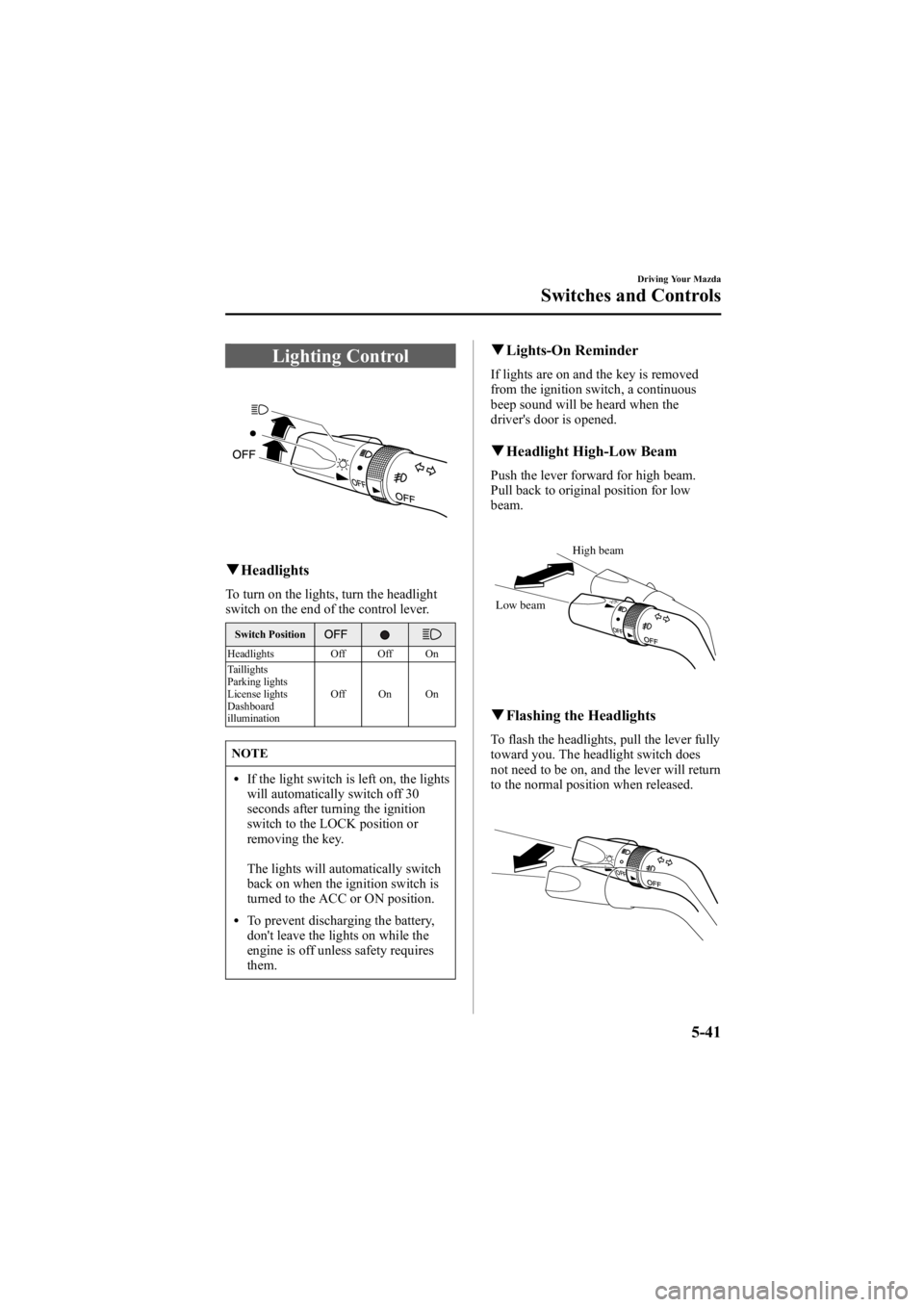
Lighting Control
qHeadlights
To turn on the lights, turn the headlight
switch on the end of the control lever.
Switch Position
Headlights Off Off On
Taillights
Parking lights
License lights
Dashboard
illumination Off On On
NOTE
lIf the light switch is left on, the lights
will automatically switch off 30
seconds after turning the ignition
switch to the LOCK position or
removing the key.
The lights will automatically switch
back on when the ignition switch is
turned to the ACC or ON position.
lTo prevent discharging the battery,
don't leave the lights on while the
engine is off unless safety requires
them.
q
Lights-On Reminder
If lights are on and the key is removed
from the ignition switch, a continuous
beep sound will be heard when the
driver's door is opened.
qHeadlight High-Low Beam
Push the lever forward for high beam.
Pull back to original position for low
beam.
High beam
Low beam
q Flashing the Headlights
To flash the headlights, pull the lever fully
toward you. The headlight switch does
not need to be on, and the lever will return
to the normal position when released.
Driving Your Mazda
Switches and Controls
5-41
Mazda6_8V40-EA-05L_Edition1 Page175
Monday, November 28 2005 6:10 PM
Form No.8V40-EA-05L
Page 176 of 390
Black plate (176,1)
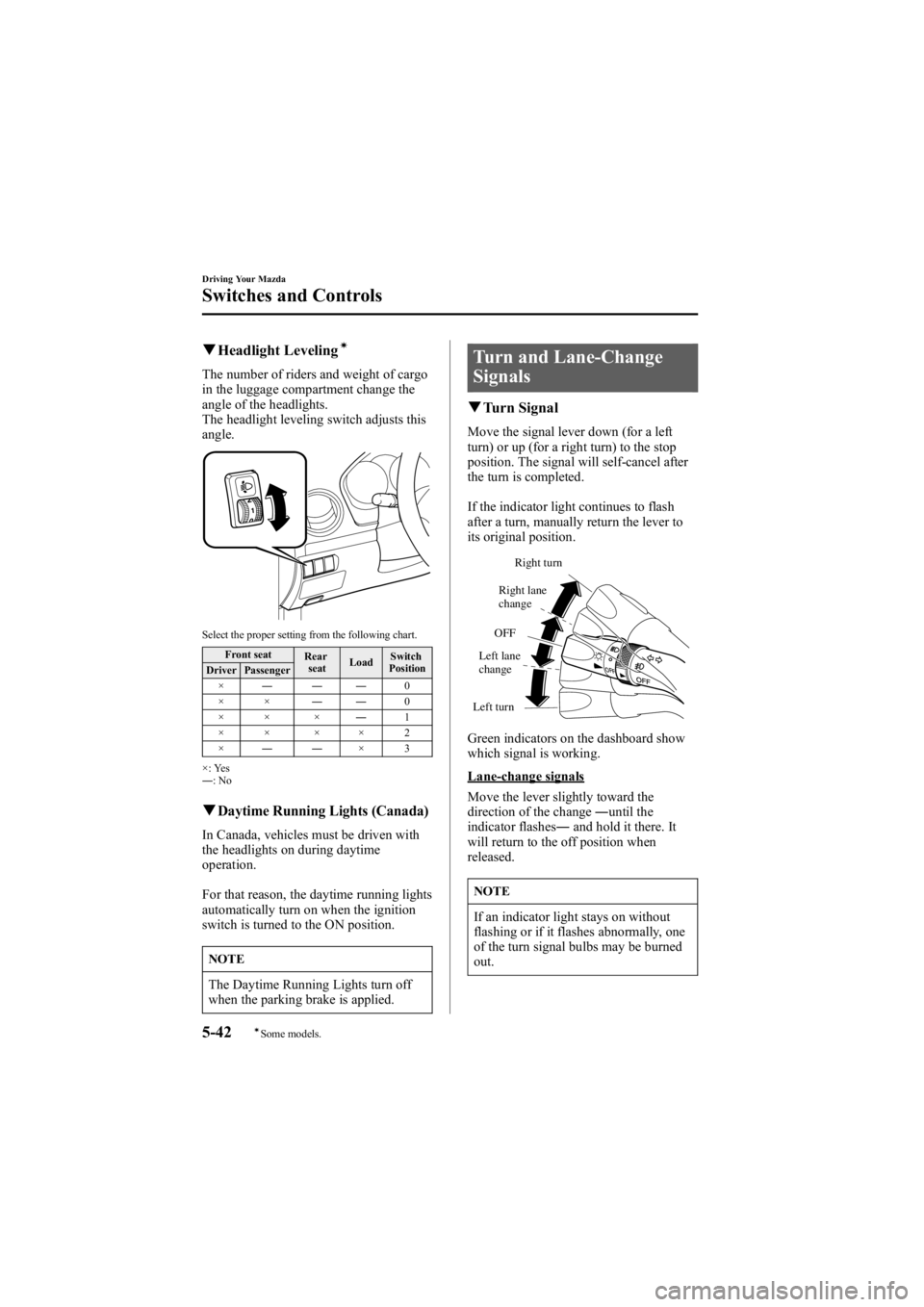
qHeadlight Levelingí
The number of riders and weight of cargo
in the luggage compartment change the
angle of the headlights.
The headlight leveling switch adjusts this
angle.
Select the proper setting from the following chart.
Front seat Rear
seat Load Switch
Position
Driver Passenger
× ――― 0
×× ――0
×× × ―1
×× ×× 2
× ―― ×3
×: Yes
― :No
qDaytime Running Lights (Canada)
In Canada, vehicles must be driven with
the headlights on during daytime
operation.
For that reason, the daytime running lights
automatically turn on when the ignition
switch is turned to the ON position.
NOTE
The Daytime Running Lights turn off
when the parking brake is applied.
Turn and Lane-Change
Signals
q Turn Signal
Move the signal lever down (for a left
turn) or up (for a right turn) to the stop
position. The signal will self-cancel after
the turn is completed.
If the indicator light continues to flash
after a turn, manually return the lever to
its original position.
Right turn
Left turn OFF
Right lane
change
Left lane
change
Green indicators on the dashboard show
which signal is working.
Lane-change signals
Move the lever slightly toward the
direction of the change ―until the
indicator flashes ―and hold it there. It
will return to the off position when
released.
NOTE
If an indicator light stays on without
flashing or if it flashes abnormally, one
of the turn signal bulbs may be burned
out.
5-42
Driving Your Mazda
íSome models.
Switches and Controls
Mazda6_8V40-EA-05L_Edition1 Page176
Monday, November 28 2005 6:10 PM
Form No.8V40-EA-05L
Page 190 of 390
Black plate (190,1)
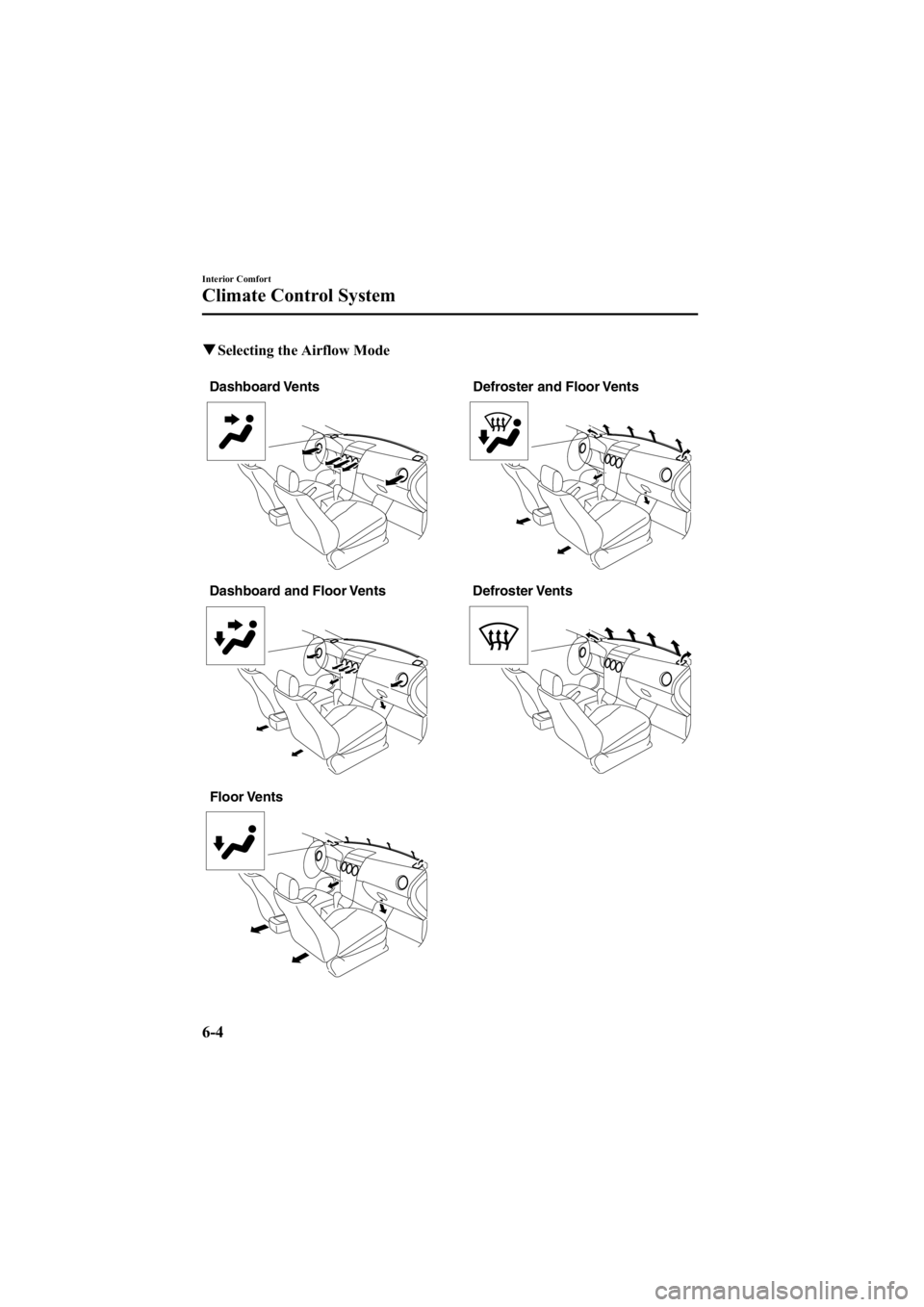
qSelecting the Airflow Mode
Defroster and Floor Vents
Dashboard Vents
Floor Vents Defroster Vents
Dashboard and Floor Vents
6-4
Interior Comfort
Climate Control System
Mazda6_8V40-EA-05L_Edition1 Page190
Monday, November 28 2005 6:10 PM
Form No.8V40-EA-05L
Page 229 of 390
Black plate (229,1)
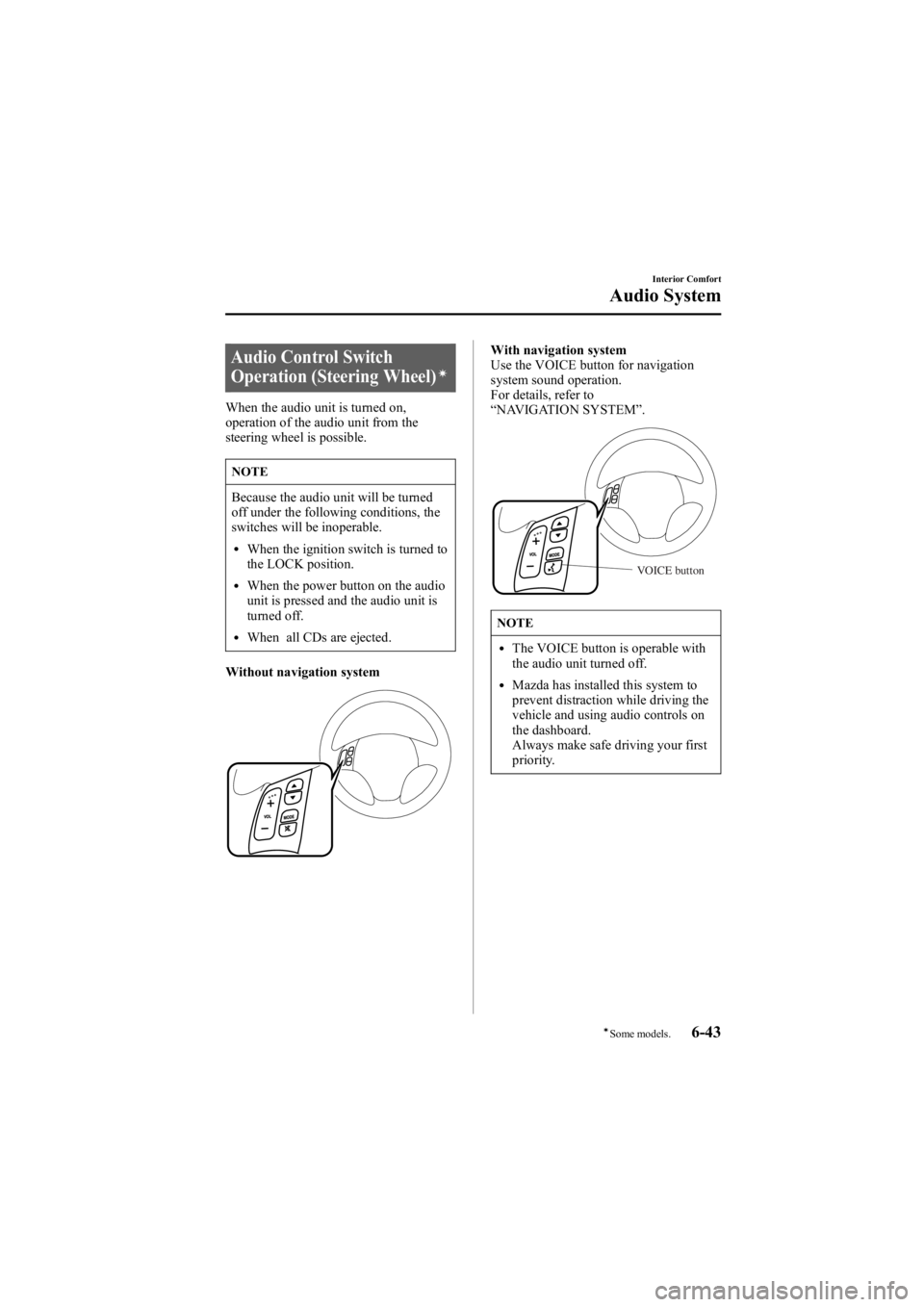
Audio Control Switch
Operation (Steering Wheel)í
When the audio unit is turned on,
operation of the audio unit from the
steering wheel is possible.
NOTE
Because the audio unit will be turned
off under the following conditions, the
switches will be inoperable.
lWhen the ignition switch is turned to
the LOCK position.
lWhen the power button on the audio
unit is pressed and the audio unit is
turned off.
lWhen all CDs are ejected.
Without navigation system
With navigation system
Use the VOICE button for navigation
system sound operation.
For details, refer to
“ NAVIGATION SYSTEM ”.
VOICE button
NOTE
lThe VOICE button is operable with
the audio unit turned off.
lMazda has installed this system to
prevent distraction while driving the
vehicle and using audio controls on
the dashboard.
Always make safe driving your first
priority.
Interior Comfort
Audio System
6-43íSome models.
Mazda6_8V40-EA-05L_Edition1 Page229
Monday, November 28 2005 6:10 PM
Form No.8V40-EA-05L
Page 322 of 390
Black plate (322,1)
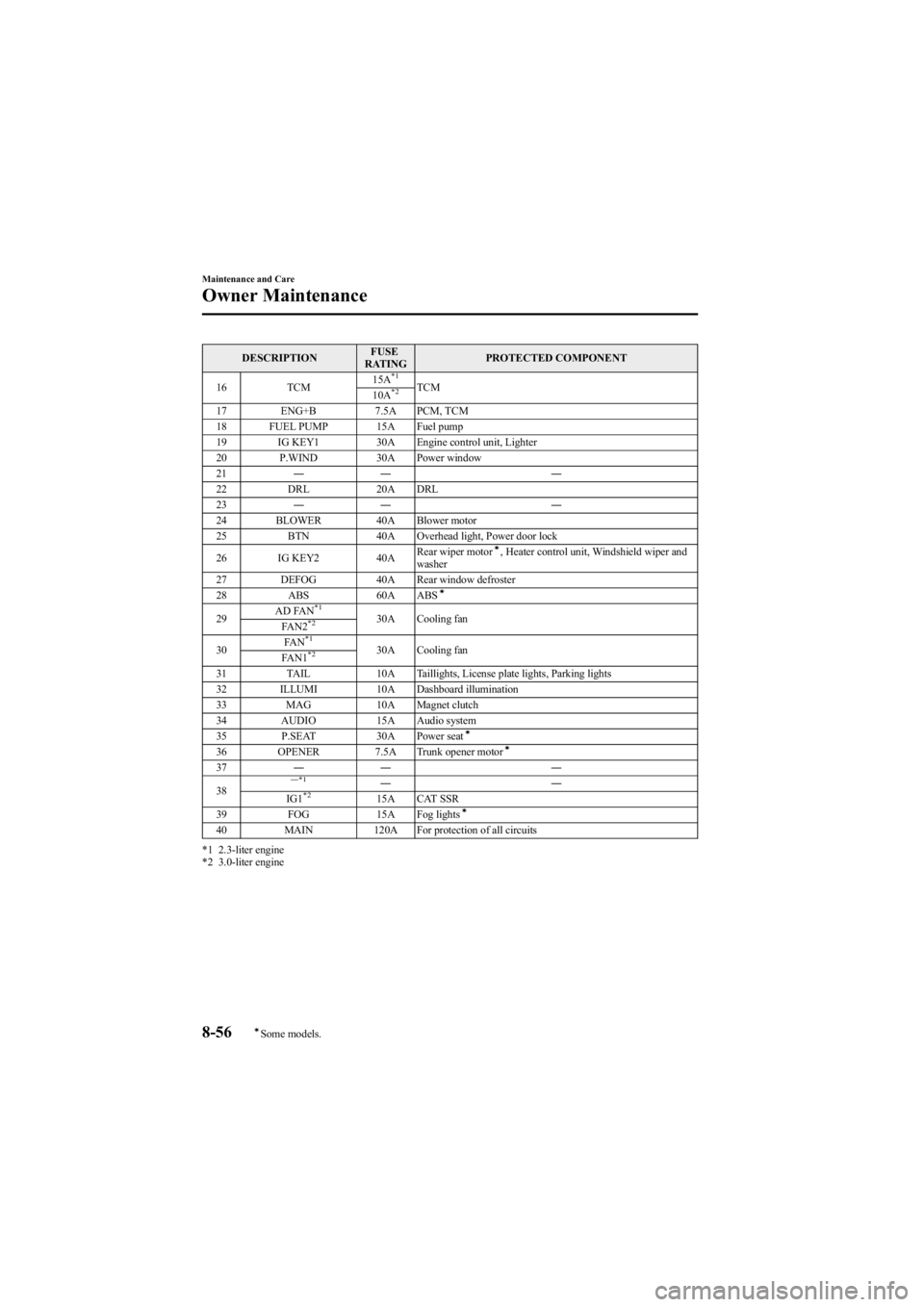
DESCRIPTIONFUSE
RATING PROTECTED COMPONENT
16 TCM 15A
*1TCM
10A*2
17 ENG+B 7.5A PCM, TCM
18 FUEL PUMP 15A Fuel pump
19 IG KEY1 30A Engine control unit, Lighter
20 P.WIND 30A Power window
21 ―― ―
22 DRL 20A DRL
23 ―― ―
24 BLOWER 40A Blower motor
25 BTN 40A Overhead light, Power door lock
26 IG KEY2 40ARear wiper motor
í, Heater control unit, Windshield wiper and
washer
27 DEFOG 40A Rear window defroster
28 ABS 60A ABS
í
29 AD FAN*130A Cooling fan
FAN2*2
30 FA N*130A Cooling fan
FAN1*2
31 TAIL 10A Taillights, License plate lights, Parking lights
32 ILLUMI 10A Dashboard illumination
33 MAG 10A Magnet clutch
34 AUDIO 15A Audio system
35 P.SEAT 30A Power seat
í
36 OPENER7.5A Trunk opener motorí
37―― ―
38― *1――
IG1*215A CAT SSR
39 FOG 15A Fog lightsí
40 MAIN 120A For protection of all circuits
*1 2.3-liter engine
*2 3.0-liter engine
8-56
Maintenance and Care
íSome models.
Owner Maintenance
Mazda6_8V40-EA-05L_Edition1 Page322
Monday, November 28 2005 6:11 PM
Form No.8V40-EA-05L
Page 329 of 390
Black plate (329,1)
Interior Care
qDashboard Precautions
Prevent caustic solutions such as perfume
and cosmetic oils from contacting the
dashboard. They'll damage and discolor it.
If these solutions get on the dashboard,
wipe them off immediately.
CAUTION
Do not use glazing agents.
Glazing agents contain ingredients
which may cause discoloration,
wrinkling, cracks and peeling.
qCleaning the Upholstery and
Interior Trim
Vinyl
Remove dust and loose dirt from vinyl
with a whisk broom or vacuum cleaner.
Clean vinyl with a leather-and-vinyl
cleaner.
Leatherí
Real leather isn't uniform and may have
scars, scratches, and wrinkles. Clean it
with a leather cleaner or mild soap.
Wipe it with a dampsoft cloth; then dry
and buff it with a drysoft cloth.
Fabricí
Remove dust and loose dirt from fabric
with a whisk broom or vacuum cleaner.
Clean it with a mild soap solution good
for upholstery and carpets. Remove fresh
spots immediately with a fabric spot
cleaner. To keep the fabric looking clean and
fresh, take care of it. Otherwise its color
will be affected, it can be stained easily,
and its fire-resistance may be reduced.
CAUTION
Use only recommended cleaners and
procedures. Others may affect
appearance and fire-resistance.
q
Cleaning the Lap/Shoulder Belt
Webbing
Clean the webbing with a mild soap
solution recommended for upholstery or
carpets. Follow instructions. Don't bleach
or dye the webbing; this may weaken it.
After cleaning the belts, thoroughly dry
the belt webbing and make sure there is
no remaining moisture before retracting
them.
WARNING
Damaged Seat Belt:
Using damaged seat belts is
dangerous. In a collision, damaged
belts cannot provide adequate
protection. Have an Authorized Mazda
Dealer replace damaged belts
immediately.
Maintenance and Care
Appearance Care
8-63íSome models.
Mazda6_8V40-EA-05L_Edition1 Page329
Monday, November 28 2005 6:11 PM
Form No.8V40-EA-05L
Page 376 of 390
Black plate (376,1)
Vehicle Information Labels
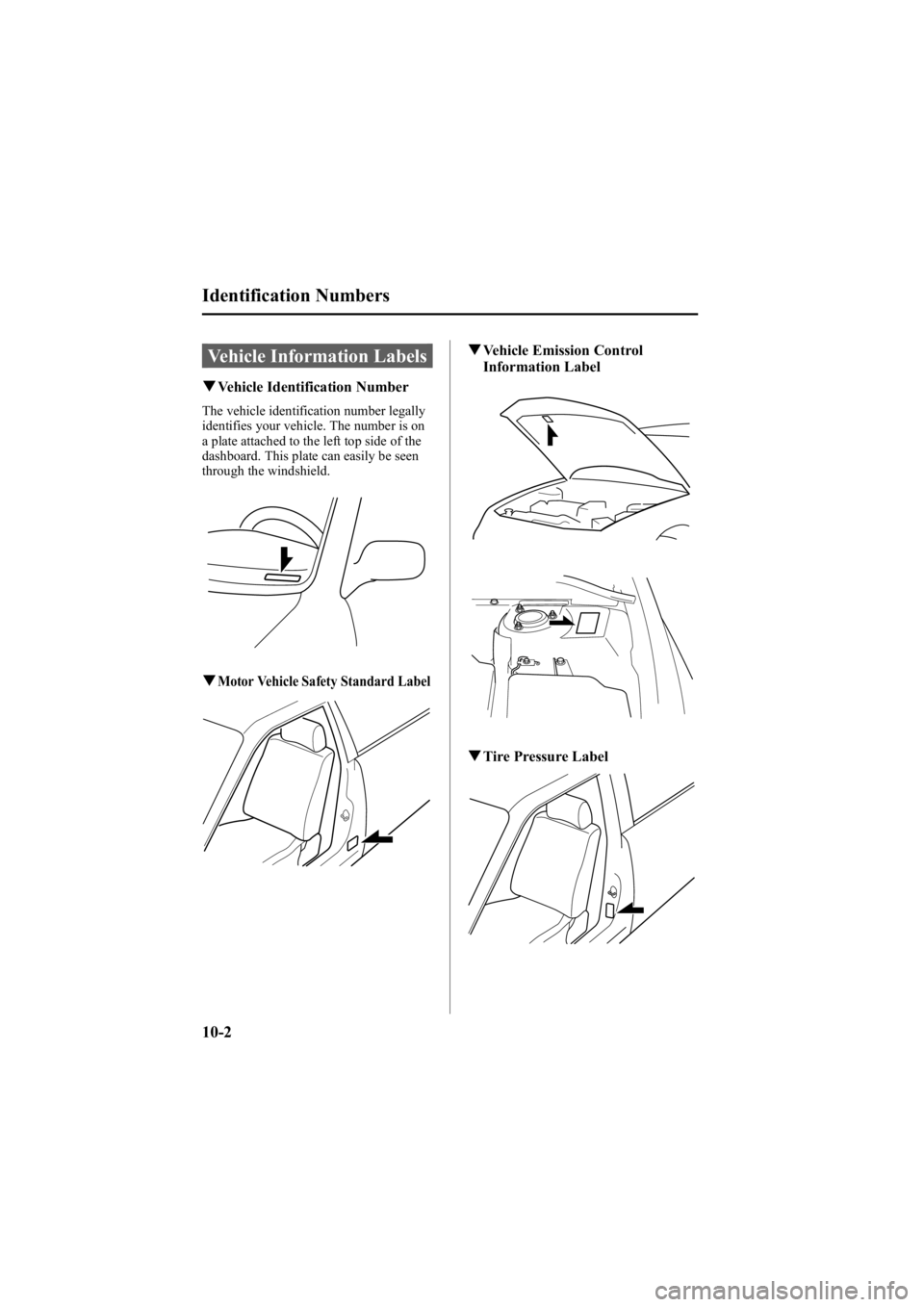
qVehicle Identification Number
The vehicle identification number legally
identifies your vehicle. The number is on
a plate attached to the left top side of the
dashboard. This plate can easily be seen
through the windshield.
qMotor Vehicle Safety Standard Label
qVehicle Emission Control
Information Label
qTire Pressure Label
10-2
Identification Numbers
Mazda6_8V40-EA-05L_Edition1 Page376
Monday, November 28 2005 6:11 PM
Form No.8V40-EA-05L