lights MAZDA MODEL B3000 4WD 2002 User Guide
[x] Cancel search | Manufacturer: MAZDA, Model Year: 2002, Model line: MODEL B3000 4WD, Model: MAZDA MODEL B3000 4WD 2002Pages: 288, PDF Size: 1.87 MB
Page 78 of 288
To install the new bulb:
Handle a halogen headlamp bulb carefully and keep out of
children’s reach. Grasp the bulb only by its plastic base and do
not touch the glass. The oil from your hands could cause the bulb
to break the next time the headlamps are operated.
NOTE: If the bulb is accidentally touched, it should be cleaned with
rubbing alcohol before being used.1. With the flat side of the bulb’s plastic base facing upward, insert the glass end of the bulb into the lamp assembly. You may need to turn
the bulb left or right to align the grooves in the plastic base with the
tabs in the lamp assembly. When the grooves are aligned, push the
bulb into the lamp assembly until the plastic base contacts the rear
of the lamp assembly.
2. Install the bulb retaining ring over the plastic base until it contacts the rear of the socket by rotating clockwise until you feel a “stop.”
3. Install the electrical connector into the plastic base until it snaps, locking it into position.
4. Install the headlamp on vehicle, push rearward and secure with two retainer pins.
5. Turn the headlamps on and make sure they work properly. If the headlamp was correctly aligned before you changed the bulb, you
should not need to align it again.
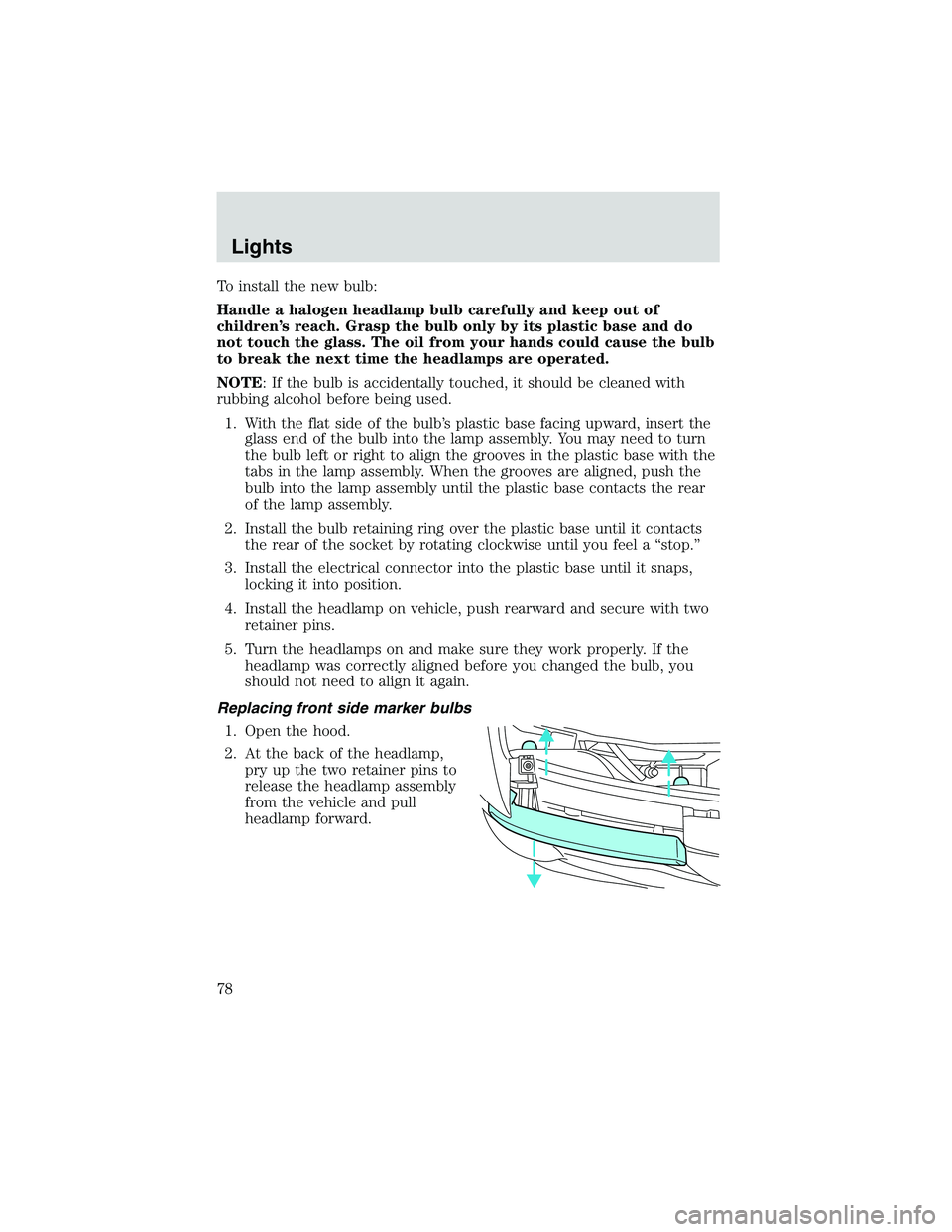
Replacing front side marker bulbs 1. Open the hood.
2. At the back of the headlamp, pry up the two retainer pins to
release the headlamp assembly
from the vehicle and pull
headlamp forward.
Lights
78
Page 79 of 288

3. Remove screw(s) from lampassembly.
4. Disengage lamp assembly (it has a snap fit).
5. Rotate bulb socket counterclockwise and remove
from lamp assembly.
6. Carefully pull bulb straight out of socket and push in the new
bulb.
7. Install the bulb socket in lamp assembly by turning clockwise.
8. Align the lamp on the vehicle and push to snap in place.
9. Install screw(s) on lamp assembly.
10. Install the headlamp on vehicle, push rearward and secure with two retainer pins.
Lights
79
Page 80 of 288

Replacing tail lamp/backup lamp bulbs
The tail lamp/backup lamp bulbs are
located in the same portion of the
tail lamp assembly, one just below
the other. Follow the same steps to
replace either bulb:1. Open the tailgate to expose the lamp assemblies.
2. Remove the four screws and the lamp assembly from vehicle.
3. Rotate bulb socket counterclockwise turn and
remove from lamp assembly.
4. Carefully pull the bulb straight out of the socket and push in
the new bulb.
5. Install the bulb socket in lamp assembly by turning clockwise.
6. Install the lamp assembly and secure with four screws.
Replacing fog lamp bulbs 1. Remove the bulb socket from the fog lamp by turning
counterclockwise.
2. Disconnect the electrical connector from the fog lamp
bulb.
Lights
80
Page 81 of 288

3. Connect the electrical connector to the new fog lamp bulb.
4. Install the bulb socket in the fog lamp turning clockwise.
Replacing high-mount brake lamp and cargo lamp bulbs
The replacement of the high-mount brake lamp bulb and cargo lamp bulb
is basically the same. This procedure covers the high-mount brake lamp
bulb.
To remove the brake lamp assembly: 1. Remove the two screws and lamp assembly from vehicle.
2. Remove the bulb socket from lamp assembly by rotating it
counterclockwise.
3. Carefully pull bulb straight out of socket and push in the new
bulb.
To install the brake lamp assembly: 1. Install the bulb socket into the lamp assembly by rotating
clockwise.
2. Install the lamp assembly on the vehicle and secure with two screws.
Replacing license plate lamp bulbs
The license plate bulbs are located
behind the rear bumper. To change
the license plate lamp bulbs: 1. Reach behind the rear bumper to locate the bulb socket.
2. Twist the socket counterclockwise and remove.
3. Pull out the old bulb from socket and push in the new
bulb.
4. Install the bulb socket in lamp assembly by turning it clockwise.
Lights
81
Page 86 of 288

AUTOMATIC DIMMING REAR VIEW MIRRORS (IF EQUIPPED)
Your vehicle is equipped with an inside rear view mirror with an
auto-dimming function. The electronic day/night mirror will change from
the normal state to the non-glare state when bright lights (glare) reach
the inside rear view mirror. When the inside rear view mirror detects
bright light from behind the vehicle, the inside rear view mirror will
automatically adjust (darken) to minimize glare.
Do not block the sensor on the backside of the inside rear view mirror
since this may impair proper system performance.
Press the left button on the mirror
to turn the auto dimming ON or
OFF. The green indicator light left
of the display will illuminate when
this feature is ON.
The mirror will automatically return
to the normal state whenever the
vehicle is placed in R
(Reverse)(when the mirror is on) to
ensure a bright clear view when
backing up.
COMPASS/TEMPERATURE EC MIRROR (IF EQUIPPED)
The compass reading may be affected when you drive near large
buildings, bridges, power lines and powerful broadcast antennas.
Magnetic or metallic objects placed in, on or near the vehicle may also
affect compass accuracy.
Usually, when something affects the compass readings, the compass will
correct itself after a few days of operating your vehicle in normal
conditions. If the compass still appears to be inaccurate, a manual
calibration may be necessary. Refer toCompass calibration
adjustment.
Most geographic areas (zones) have a magnetic north compass point that
varies slightly from the northerly direction on maps. This variation is four
degrees between adjacent zones and will become noticeable as the
vehicle crosses multiple zones. A correct zone setting will eliminate this
error. Refer to Compass zone adjustment.
Driver Controls
86
Page 98 of 288

Unlocking the doors
Press this control to unlock the
driver’s door. The interior lamps will
illuminate.
Press the control a second time
within five seconds to unlock all
doors.
Locking the doors
Press this control to lock all doors.
To confirm all doors are closed and
locked, press the control a second
time within five seconds. The doors
will lock again, the horn will chirp
and the lamps will flash.
If any of the doors are ajar, the horn
will make two quick chirps,
reminding you to properly close all
doors.
Illuminated entry
The interior lamps illuminate when the remote entry system is used to
unlock the door(s) or sound the personal alarm.
The system automatically turns off after 25 seconds or when the ignition
is turned to the ON or ACC position.
NOTE:The dome lamp control (if equipped) must notbe set to the
OFF position for the illuminated entry system to operate.
The inside lights will not turn off if:
• they have been turned on with the dimmer control, or
• any door is open.
NOTE: The battery saver will shut off the interior lamps 45 minutes
after the ignition has been turned to the OFF position.
Locks and Security
98
Page 125 of 288
WARNING: Several air bag system components get hot after
inflation. Do not touch them after inflation or you may be
burned.
WARNING: If the air bag has deployed, the air bag will not
function again and must be replaced immediately. If the air bag
is not replaced, the unrepaired area will increase the risk of
injury in a collision.
The SRS consists of:
• driver and passenger air bag modules (which include the inflators and
air bags),
• passenger air bag deactivation switch and restraint control module
(RCM)
• a readiness light and tone,
• and the electrical wiring which connects the components.
The RCM (restraints control module) monitors its own internal circuits
and the supplemental air bag electrical system warning (including the
passenger air bag deactivation switch, the system wiring, the air bag
system readiness light, the air bag back up power and the air bag
ignitors).
Determining if the system is operational
The SRS uses readiness lights in the instrument cluster and the
passenger air bag deactivate switch or a tone to indicate the condition of
the system. Refer to the Air bag readinesssection in the
Instrumentation chapter orPassenger air bag deactivate switch
section in this chapter. Routine maintenance of the air bag is not
required.
A difficulty with the system is indicated by one or more of the following:
• The readiness lights will either
flash or stay lit.
• The readiness lights will not
illuminate immediately after
ignition is turned on.
• A series of five beeps will be heard. The tone pattern will repeat
periodically until the problem and/or light are repaired.
Seating and Safety Restraints
125
Page 148 of 288
STARTING
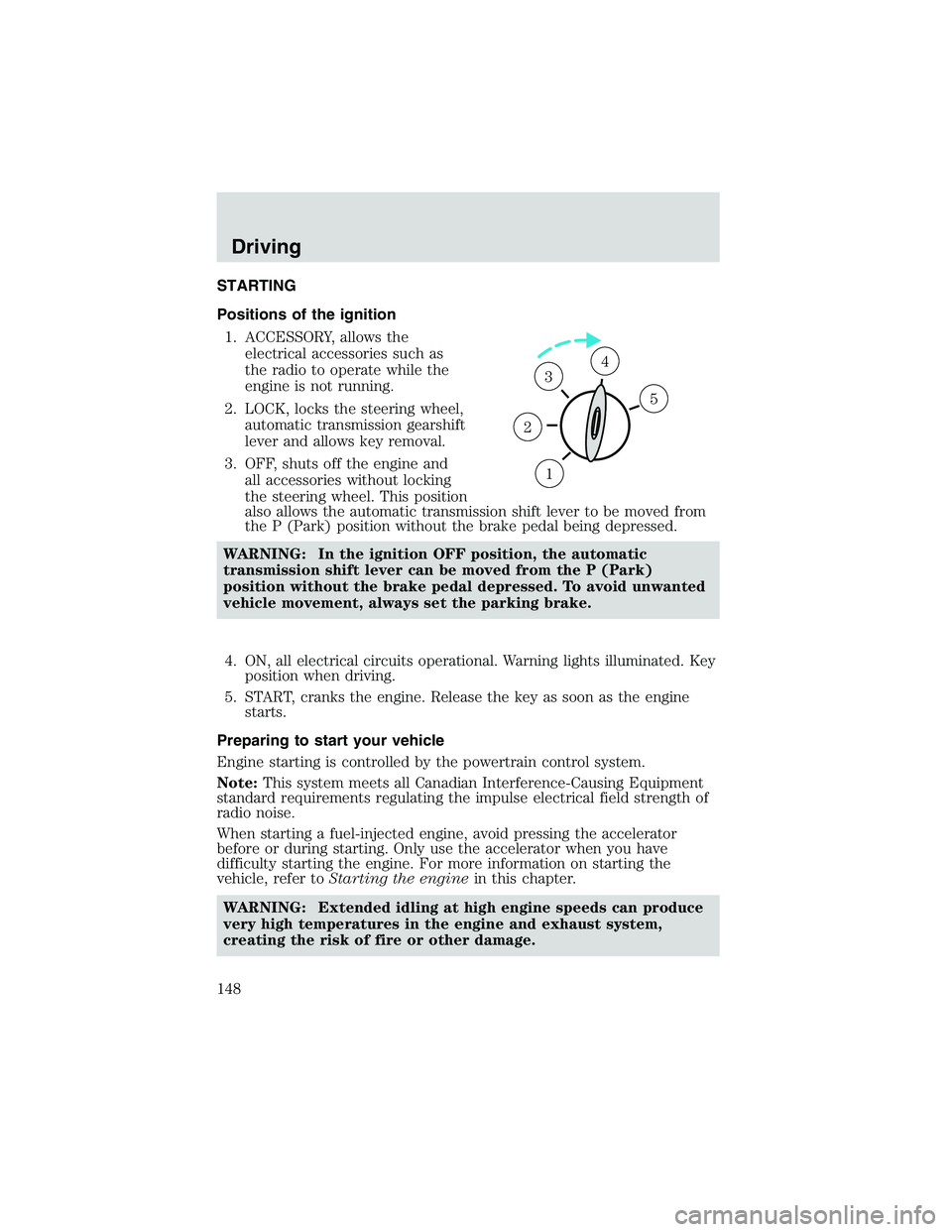
Positions of the ignition1. ACCESSORY, allows the electrical accessories such as
the radio to operate while the
engine is not running.
2. LOCK, locks the steering wheel, automatic transmission gearshift
lever and allows key removal.
3. OFF, shuts off the engine and all accessories without locking
the steering wheel. This position
also allows the automatic transmission shift lever to be moved from
the P (Park) position without the brake pedal being depressed.
WARNING: In the ignition OFF position, the automatic
transmission shift lever can be moved from the P (Park)
position without the brake pedal depressed. To avoid unwanted
vehicle movement, always set the parking brake.
4. ON, all electrical circuits operational. Warning lights illuminated. Key position when driving.
5. START, cranks the engine. Release the key as soon as the engine starts.
Preparing to start your vehicle
Engine starting is controlled by the powertrain control system.
Note: This system meets all Canadian Interference-Causing Equipment
standard requirements regulating the impulse electrical field strength of
radio noise.
When starting a fuel-injected engine, avoid pressing the accelerator
before or during starting. Only use the accelerator when you have
difficulty starting the engine. For more information on starting the
vehicle, refer to Starting the engine in this chapter.
WARNING: Extended idling at high engine speeds can produce
very high temperatures in the engine and exhaust system,
creating the risk of fire or other damage.
1
2
34
5
Driving
148
Page 150 of 288

If starting a vehicle with a manual
transmission:
•Make sure the parking brake is
set.
• Push the clutch pedal to the
floor.
3. Turn the key to 4 (ON) without turning the key to 5 (START).
Make sure the corresponding lights illuminate or illuminate briefly. If a
light fails to illuminate, have the vehicle serviced.
• Note: If the driver’s safety belt is fastened, the
light may not
illuminate.
Starting the engine
Note: Whenever you start your vehicle, release the key as soon as the
engine starts. Excessive cranking could damage the starter.
1
2
34
5
C
012
3
4
5
6
RPMx1000
ABS!
BRAKE
CHECK
ENGINE
CHECK FUEL CAP
E FH
H
H
P
RN D 2 1THEFT
SPEED
CONT
4WD
HIGH 4WD
LOW
O/D
OFFL
L
10MPH
20 50
60
70
30 40
80
90
km/h
0 0 0
101
00
1
20
1
0 0 0 0 0 040 60
80
100
120
140
160180
20
DOOR
AJAR
CHECK
GAGE
Driving
150
Page 165 of 288

FOUR-WHEEL DRIVE (4WD) OPERATION (IF EQUIPPED)
WARNING: For important information regarding safe operation
of this type of vehicle, see Preparing to drive your vehicle in
this chapter.
When four–wheel drive (4WD) is engaged, power is supplied to all four
wheels through a transfer case. 4WD can be selected when additional
driving power is desired.
If equipped with the Electronic Shift 4WD System, and 4WD Low
is selected while the vehicle is moving, the 4WD system will not
engage. This is normal and should be no reason for concern.
Before 4WD Low can be engaged, the vehicle must be brought to
a complete stop, the brake pedal depressed and the transmission
placed in neutral (or the clutch pedal depressed on manual
transmissions).
4WD operation is not recommended on dry pavement. Doing so could
result in difficult disengagement of the transfer case, increased tire wear
and decreased fuel economy.
4WD system indicator lights
The 4WD system indicator lights illuminate only under the following
conditions. If these lights illuminate when driving in 2WD, contact your
Mazda dealer as soon as possible.
• 4WD -momentarily illuminates
when the vehicle is started.
Illuminates when 4H (4WD High)
is engaged.
• 4WD LOW –momentarily
illuminates when the vehicle is
started. Illuminates when 4L
(4WD Low) is engaged.
Using the electronic shift 4WD system (if equipped)
Positions of the electronic shift system
2WD (2WD High) – Power to rear axle only.
4X4 HIGH (4WD High) – Power delivered to front and rear axles for
increased traction.
4X4 LOW (4WD Low) – Power to front and rear axles at low speeds.
4WD
LOW
Driving
165