brakes MAZDA MODEL CX-3 2019 (in English) User Guide
[x] Cancel search | Manufacturer: MAZDA, Model Year: 2019, Model line: MODEL CX-3, Model: MAZDA MODEL CX-3 2019Pages: 608, PDF Size: 7.89 MB
Page 191 of 608

▼AUTOHOLD System is Turned On
Press the AUTOHOLD
switch and when
the AUTOHOLD standby indicator light
turns on, the AUTOHOLD function turns
on.
AUTOHOLD standby
indicator light
NOTE
When all of the following conditions are
met, the AUTOHOLD standby indicator
light turns on when the AUTOHOLD
switch is pressed and the AUTOHOLD
function turns on.
•The ignition is switched ON (engine is
running).
•The driver's seat belt is fastened.
•The driver's door is closed.
•There is no problem with the
AUTOHOLD function.
To operate AUTOHOLD and hold the
brakes
1. Depress the brake pedal and bring the
vehicle to a complete stop.
2. The AUTOHOLD active indicator
light in the instrume nt cluster turns on
and the brakes are held.
3. The vehicle is held in its stopped position even with the brake pedal
released.
NOTE
When all of the following conditions are
met, the AUTOHOLD operates and the
brakes are held.
•The ignition is swit ched ON (engine is
running).
•The vehicle is stopped.
•The brake pedal is being depressed.
•The AUTOHOLD active indicator light
turns on.
•The accelerator pedal is not depressed.
•The driver's seat belt is fastened.
•The driver's door is closed.
•There is no problem with the
AUTOHOLD function.
•The parking brake is released.
•There is no problem with the electric
parking brake (EPB) function.
•(Automatic transaxle vehicle)
The selector lever is in a position other
than R position or the vehicle tilts
forward with the selector lever in the R
position.
When Driving
Brake
4-63
CX-3_8GR7-EA-18B_Edition1 2017-12-20 16:18:14
Page 192 of 608
To release AUTOHOLD and start
driving the vehicle
If you do any of the following actions to
resume driving the v ehicle, the brakes
release automatically and the
AUTOHOLD active indi cator light turns
off.
•(Manual transaxle vehicle)
You start to release the clutch pedal with
the shift lever shifted to a position other
than the neutral position
•(Automatic transaxle vehicle)
•The accelerator pedal is depressed.
•The vehicle tilts rearward or the
selector lever is shifted to the R
position on level ground.
NOTE
•If the electric parking brake (EPB)
switch is pulled while the AUTOHOLD
is operating, the parking brake is
applied and the AUTOHOLD is
released. In addition, if the parking
brake is released under this condition,
the AUTOHOLD operates to hold the
brakes.
•Under the following conditions, the
parking brake is automatically applied
and the AUTOHOLD is released. The
AUTOHOLD is re-enabled when the
conditions before the AUTOHOLD is
released are restored.
•The driver’s seat belt is unfastened.
•The driver’s door is opened.
•When about 10 minutes or longer have
passed since the AUTOHOLD operation
started, the parking brake is
automatically applie d. Because the
AUTOHOLD is restored when releasing
the parking brake, the hold on the
brakes by AUTOHOLD function
resumes.
•(Manual transaxle vehicle)
When starting to drive the vehicle
forward or in reverse on a down slope,
depress the clutch pedal and shift the
shift lever to the appropriate position for
driving in the desired direction, and then
depress the accelerator pedal to release
the AUTOHOLD.
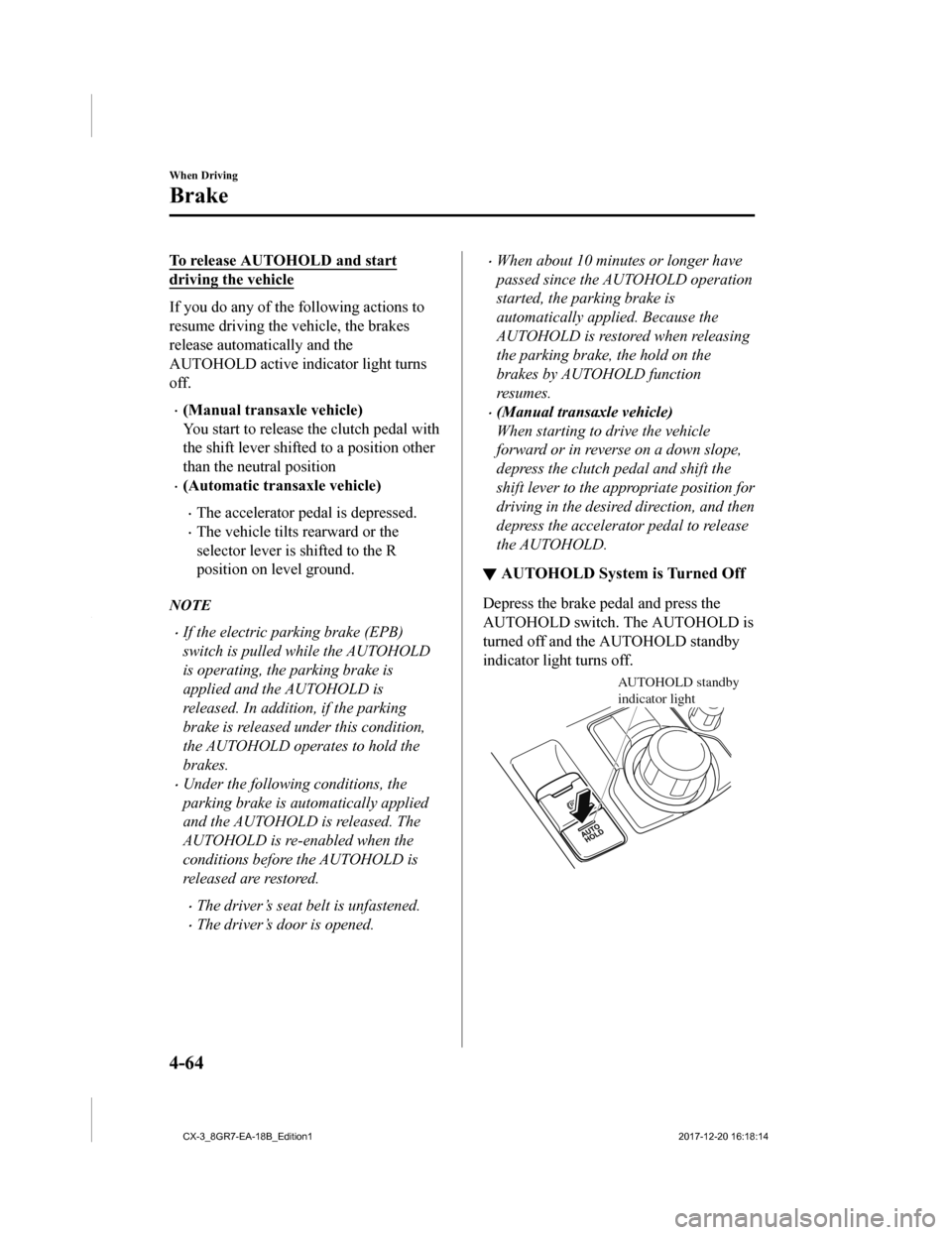
▼ AUTOHOLD System is Turned Off
Depress the brake pedal and press the
AUTOHOLD switch. The AUTOHOLD is
turned off and the AUTOHOLD standby
indicator light turns off.
AUTOHOLD standby
indicator light
When Driving
Brake
4-64
CX-3_8GR7-EA-18B_Edition1
2017-12-20 16:18:14
Page 193 of 608

NOTE
•When the brakes are not held such as
while driving the vehicle, the
AUTOHOLD can be turned off only by
pressing the AUTOHOLD switch.
•If the AUTOHOLD switch is pressed
without depressing the brake pedal
while the AUTOHOLD is operating
(AUTOHOLD active indicator light is
turned on), the brake pedal operation
demand indicator light (green) in the
instrument cluster turns on to notify the
driver that it is necessary to depress the
brake pedal.
(Green)
•If any of the following conditions occurs
while the AUTOHOLD function is
operating (AUTOHOLD active indicator
light is turned on), the parking brake is
applied automatically and the
AUTOHOLD function turns off. For the
electric parking brake (EPB) operation,
refer to the electric parking brake (EPB)
on page 4-57.
•The ignition is switched OFF.
•There is a problem with the
AUTOHOLD function.
Hill Launch Assist (HLA)
HLA is a function which assists the driver
in accelerating from a stop while on a
slope. When the driver releases the brake
pedal and depresses the accelerator pedal
while on a slope, the function prevents the
vehicle from rolling. T he braking force is
maintained automatically after the brake
pedal is released on a steep grade.
For vehicles with a manual transaxle,
HLA operates on a downward slope when
the shift lever is in the reverse (R)
position, and on an upward slope when the
shift lever is in a position other than the
reverse (R) position.
For vehicles with an automatic transaxle,
HLA operates on a downward slope when
the selector lever is in the reverse (R)
position, and on an upward slope when the
selector lever is in a forward gear.
WA R N I N G
Do not rely completely on HLA:
HLA is an auxiliary device for accelerating
from a stop on a slope. The system only
operates for about two seconds and
therefore, relying only on the system, when
accelerating from a stop is dangerous
because the vehicle may move (roll)
unexpectedly and cause an accident.
The vehicle could roll depending on the
vehicle's load or if it is towing something. In
addition, for vehicles with a manual
transaxle, the vehicle could still roll
depending on how the clutch pedal or the
accelerator pedal is operated.
Always confirm the safety around the
vehicle before starting to drive the vehicle.
When Driving
Brake
4-65
CX-3_8GR7-EA-18B_Edition1 2017-12-20 16:18:14
Page 195 of 608
Antilock Brake System(ABS)
The ABS control unit continuously
monitors the speed of each wheel. If one
wheel is about to lock up, the ABS
responds by automatically releasing and
reapplying that wheel's brake.
The driver will feel a slight vibration in
the brake pedal and may hear a chattering
noise from the brake system. This is
normal ABS system operation. Continue
to depress the brake pedal without
pumping the brakes.
The warning light turns on when the
system has a malfunction.
Refer to Contact Authorized Mazda
Dealer and Have Vehicle Inspected on
page 7-30.
WA R N I N G
Do not rely on ABS as a substitute for safe
driving:
The ABS cannot compensate for unsafe
and reckless driving, excessive speed,
tailgating (following another vehicle too
closely), driving on ice and snow, and
hydroplaning (reduced tire friction and
road contact because of water on the road
surface). You can still have an accident.
NOTE
•Braking distances may be longer on
loose surfaces (snow or gravel, for
example) which usually have a hard
foundation. A vehicle with a normal
braking system may require less
distance to stop under these conditions
because the tires will build up a wedge
of surface layer when the wheels skid.
•The sound of the ABS operating may be
heard when starting the engine or
immediately after starting the vehicle,
however, it does not indicate a
malfunction.
When Driving
ABS/TCS/DSC
4-67
CX-3_8GR7-EA-18B_Edition1 2017-12-20 16:18:14
Page 196 of 608

Traction Control System(TCS)
The Traction Control System (TCS)
enhances traction and safety by controlling
engine torque and braking. When the TCS
detects driving wheel slippage, it lowers
engine torque and operates the brakes to
prevent loss of traction.
This means that on a slick surface, the
engine adjusts autom atically to provide
optimum power to th e drive wheels,
limiting wheel spin a nd loss of traction.
The warning light turns on when the
system has a malfunction.
Refer to Contact Authorized Mazda
Dealer and Have Vehicle Inspected on
page 7-30.
WA R N I N G
Do not rely on the Traction Control System
(TCS) as a substitute for safe driving:
The Traction Control System (TCS) cannot
compensate for unsafe and reckless
driving, excessive speed, tailgating
(following another vehicle too closely), and
hydroplaning (reduced tire friction and
road contact because of water on the road
surface). You can still have an accident.
Use snow tires or tire chains and drive at
reduced speeds when roads are covered
with ice and/or snow:
Driving without proper traction devices on
snow and/or ice-covered roads is
dangerous. The Traction Control System
(TCS) alone cannot provide adequate
traction and you could still have an
accident.
NOTE
To turn off the TCS, press the TCS OFF
switch (page 4-69).
▼ TCS/DSC Indicator Light
This indicator light stays on for a few
seconds when the ignition is switched ON.
If the TCS or DSC is operating, the
indicator light flashes.
If the light stays on, the TCS, DSC or the
brake assist system may have a
malfunction and they may not operate
correctly. Take your vehicle to an
Authorized Mazda Dealer.
NOTE
•In addition to the indicator light
flashing, a slight lugging sound will
come from the engine. This indicates
that the TCS/DSC is operating properly.
•On slippery surfaces, such as fresh
snow, it will be impossible to achieve
high rpm when the TCS is on.
When Driving
ABS/TCS/DSC
4-68
CX-3_8GR7-EA-18B_Edition1
2017-12-20 16:18:14
Page 235 of 608
Mazda Radar Cruise Control with Stop & Go function(MRCC with Stop & Go function)
*
The MRCC with Stop & Go function system is designed to maintain headway control*1
with a vehicle ahead according to your vehicle's speed using a radar sensor (front) to detect
the distance to the vehicle ahead and a preset vehicle speed without you having to use the
accelerator or brake pedals.
*1 Headway Control: Control of the distance between your vehicle and the vehicle ahead
detected by the Mazda Radar Cr uise Control (MRCC) system.
Additionally, if your vehicle s tarts closing in on the vehicle ahead such as if the vehicle
ahead brakes suddenly, a warning sound and a warning indication in the display are
activated simultaneously to alert you to maintain a sufficient distance between the vehicles.
If the vehicle ahead stops while you are following behind it, your vehicle will stop and be
held stopped automatically (stop hold control), and headway con trol will resume when you
resume driving the vehicle such a s by pressing the RES switch.
Also refer to the following before using the MRCC with Stop & G o function.
•AUTOHOLD (page 4-61)
•Forward Sensing Camera (FSC) (page 4-130)
•Radar sensor (front) (page 4-135)
WA R N I N G
Do not rely completely on the MRCC with Stop & Go function:
The MRCC with Stop & Go function system has detection limitations depending on the type of
vehicle ahead and its conditions, the weat her conditions, and the road conditions.
Additionally, the system may be unable to decelerate sufficiently to avoid hitting the vehicle
ahead if the vehicle ahead applies the brakes sudd enly or another vehicle cuts into the driving
lane, which could result in an accident.
Always drive carefully and verify the surrounding conditions and depress the brake pedal or
accelerator pedal while keeping a safer distance from vehicles ahead or on-coming vehicles.
Do not use the MRCC with Stop & Go function system in the following locations, using the
MRCC with Stop & Go function system at the following locations may result in an unexpected
accident:
General roads other than highways (Driving under these conditions using the MRCC with
Stop & Go function system is not possible.)
Roads with sharp curves and where vehicle
traffic is heavy and there is
insufficient space
between vehicles.
When Driving
i-ACTIVSENSE
*Some models.4-107
CX-3_8GR7-EA-18B_Edition1 2017-12-20 16:18:14
Page 236 of 608

Roads where frequent and repetitive accelerati on and deceleration occur (Driving under
these conditions using the MRCC with Stop & Go function system is not possible).
When entering and exiting interchanges, servic e areas, and parking areas of highways (If
you exit a highway while headway control is in use, the vehicle ahead will no longer be
tracked and your vehicle may accelerate to the set speed).
Slippery roads such as ice or snow-bound roads (Tires could spin causing you to lose vehicle
control, or the stop hold control may not operate.)
Long, descending slopes (to maintain distance between vehicles, the system automatically
and continuously applies the brakes which could result in the loss of brake power.)
Slopes with a steep gradient (The vehicle ahea d may not be detected correctly, your vehicle
may slide while stopped by the stop hold control, and it may accelerate suddenly after it
starts moving.)
For safety purposes, switch the MRCC with Stop & Go function system off when it is not being
used.
Do not get out of the vehicle while the stop hold control is operating:
Getting out of the vehicle while the stop hold co ntrol is operating is dangerous as the vehicle
may move unexpectedly and result in an accident. Before getting out of the vehicle, switch the
MRCC with Stop & Go function system off, shift the selector lever to the P position, and apply
the parking brake.
CAUTION
If your vehicle is towed or you are towing something, switch the MRCC with Stop & Go
function system off to prevent a mis-operation.
NOTE
•The MRCC with Stop & Go function system does not detect the following as physical
objects.
•Vehicles approaching in the opposite direction
•Pedestrians
•Stationary objects (stopped vehicles, obstructions)
•If a vehicle ahead is traveling at an extremely low speed, the system may not detect it
correctly.
•During headway control travel, do not set the system for detection of two-wheeled
vehicles such as motorcycles and bicycles.
•Do not use the MRCC with Stop & Go function system under conditions in which close
proximity warnings are frequently activated.
When Driving
i-ACTIVSENSE
4-108
CX-3_8GR7-EA-18B_Edition1 2017-12-20 16:18:14
Page 237 of 608

•During headway control travel, the system accelerates and decelerates your vehicle in
conjunction with the speed of the vehicle ahead. However, if it is necessary to accelerate
for a lane change or if the vehicle ahead brakes suddenly causing you to close in on the
vehicle rapidly, accelerate using the accelerator pedal or decelerate using the brake
pedal depending on the conditions.
•While the MRCC with Stop & Go function system is in use, it does not cancel even if the
selector lever is operated and any intended engine braking does not occur. If deceleration
is required, lower the set speed or depress the brake pedal.
•The sound of the automatic brakes operating may be heard, however, it does not indicate
a problem.
•The brake lights turn on while the MRCC with Stop & Go function automatic braking is
operating, however, they may not turn on while the vehicle is on a downslope at the set
vehicle speed or traveling at a constant speed and following a vehicle ahead.
▼Mazda Radar Cruise Control with
Stop & Go function (MRCC with S top & Go
function) Display Indication
The MRCC with Stop & Go function setting status and operation conditions are indicated
on the active driving display.
Vehicle ahead display
MRCC Distance
between vehicle
display
MRCC Set vehicle speed
If there is a problem with the MRCC with Stop & Go function sys tem, MRCC with Stop &
Go function warning light (amber) turns on. Check the center di splay to verify the problem
and then have your vehicle inspected by an Authorized Mazda Dea ler.
▼Close Proximity Warning
If your vehicle rapidly closes in on the vehicle ahead because
the vehicle ahead applies the
brakes suddenly while you are traveling in headway control, the warning sound activates
and the brake warning is indicat ed in the display. Always verify the safety of the
surrounding area and depress the brake pedal while keeping a sa fer distance from the
vehicle ahead. Additionally, keep a safer distance from the veh icles behind you.
When Driving
i-ACTIVSENSE
4-109
CX-3_8GR7-EA-18B_Edition1 2017-12-20 16:18:14
Page 238 of 608

NOTE
In the following cases, the warnings and brakes may not operate even if your vehicle starts
closing in on the vehicle ahead.
•You are driving your vehicle at the same speed as the vehicle ahead.
•Directly after the MRCC with Stop & Go function system has been set.
•Directly after the accelerator pedal is released.
•Another vehicle cuts into the driving lane.
▼Setting the System
The MRCC with Stop & Go function system operates when all of th
e following conditions
are met.
•Vehicle speed is 0 km/h (0 mph) to 145 km/h (90 mph)
•The MRCC with Stop & Go function is turned on.
•The brake pedal is not depressed.
•The electric parking brake (EPB) is released (electric parking brake (EPB) indicator light
is turned off).
•There is no problem with the DSC.
•All the doors are closed.
•The driver's seat belt is fastened.
•The selector lever is in the driv e (D) position or manual (M) position (manual mode).
NOTE
•In the following cases, the MRCC with Stop & Go function system is canceled when the
vehicle is traveling at 30 km/h (19 mph) or less and “MRCC Disabled under 30 km/h” is
displayed in the active driving display.
•The Forward Sensing Camera (FSC) cannot detect target objects (There is problem
with the Forward Sensing Camera (FSC) or windshield is dirty).
•There is a problem with the stop hold control function.
•There is a problem with the electric parking brake (EPB).
•It may not be possible to set the MRCC with Stop & Go function system directly after
starting the engine, while the DSC operation is being checked.
When Driving
i-ACTIVSENSE
4-110
CX-3_8GR7-EA-18B_Edition1 2017-12-20 16:18:14
Page 247 of 608

Advanced Smart City Brake Support (Advanced SCBS)*
The Advanced SCBS alerts the driver of a possible collision usi ng the display and a warning
sound when the Forward Sensing Camera (FSC) detects a vehicle a head or pedestrian and
determines that a collision with the object is unavoidable whil e the vehicle is driven at a
vehicle speed of about 4 to 80 km/h (2 to 50 mph) if the object is a vehicle ahead and about
10 to 80 km/h (6.2 to 50 mph) if the object is a pedestrian. In addition, the system reduces
damage in the event of a collision by operating the brake contr ol (Advanced SCBS brake)
when the system determines that a collision is unavoidable. In addition, when the driver
depresses the brake pedal, the brakes are applied firmly and qu ickly to assist. (Brake Assist
(Advanced SCBS brake assist))
Forward Sensing
Camera (FSC)
WA R N I N G
Do not rely completely on the Advanced SCBS system:
The Advanced SCBS system is only designed to reduce damage in the event of a collision.
Over reliance on the system leading to the accelerator pedal or brake pedal being
mistakenly operated could result in an accident.
The Advanced SCBS system operates in response to a vehicle ahead, a 2-wheeled vehicle, or
a pedestrian. The system does not operate in response to obstructions such as a wall or
animals.
When Driving
i-ACTIVSENSE
*Some models.4-119
CX-3_8GR7-EA-18B_Edition1 2017-12-20 16:18:14