fuel MAZDA MODEL CX-3 2019 (in English) Owner's Manual
[x] Cancel search | Manufacturer: MAZDA, Model Year: 2019, Model line: MODEL CX-3, Model: MAZDA MODEL CX-3 2019Pages: 608, PDF Size: 7.89 MB
Page 154 of 608

SignalWarning Lights Page
Check Fuel Cap Warning Light*17-34
Seat Belt Warning Light (Front seat) 7-34
Door-Ajar Warning Light7-34
*Low Washer Fluid Level Warning Light7-34
(Amber)
*Smart Brake Support/Smart City Brake Support (SBS/SCBS)
Warning Light 7-34
*1 The light turns on when the ignition is switched on for an ope
ration check, and turns off a few seconds later or
when the engine is started. If the light does not turn on or remains turned on, have the vehicle inspected at an
Authorized Mazda Dealer.
*2 The light turns on continuously when the parking brake is applied.
▼Indicator Lights
These lights turn on or flash to notify the user of the system
operation status or a system
malfunction.
Signal Indicator Lights Page
Front Passenger Air Bag Deactivation Indicator Light*12-61
(Green)KEY Indicator Light
3-9
Security Indicator Light*13-40
Wrench Indicator Light*14-29
(Blue)Low Engine Coolant Temperature Indicator Light 4-29
*Shift Position Indication
4-34
Lights-On Indicator Light
4-43
When Driving
Instrument Cluster and Display
4-26*Some models.
CX-3_8GR7-EA-18B_Edition1 2017-12-20 16:18:14
Page 159 of 608

▼Gear Shift Indicator (GSI)
The GSI supports you to obtain optimum
fuel economy and smooth driving. It
displays the selected gear position in the
instrument cluster as well as notifies the
driver to change to the most suitable gear
position corresponding to the actual
driving condition.
Selected gear position Suitable gear position
Indication
Condition
Numeral The selected gear position is dis-
played.
and numeral
Shift up or down to the indicated
gear position is recommended.
CAUTION
Do not rely solely on the shift-up/
shift-down recommendations by
indications. The actual driving situation
might require shift operations different
from indication. To avoid the risk of
accidents, the road and traffic conditions
have to be judged correctly by the driver
before shifting.
NOTE
The GSI turns off when the following
operations are performed.
•The vehicle is stopped.
•The vehicle is put in neutral.
•The vehicle is driven in reverse.
•The clutch is not fully engaged when
accelerating from a stop.
•The clutch pedal remains depressed for
2 seconds or longer while driving.
▼
Recommendations for Shifting
Upshifting
For normal acceleration, Mazda
recommends these shift points:
Gear
Vehicle speed
1 to 2 24 km/h (15 mph)
2 to 3 42 km/h (26 mph)
3 to 4 60 km/h (37 mph)
4 to 5 74 km/h (46 mph)
5 to 6 79 km/h (49 mph)
For cruising, Mazda recommends these
shift points:
Gear Vehicle speed
1 to 2 13 km/h (8 mph)
2 to 3 29 km/h (18 mph)
3 to 4 48 km/h (30 mph)
4 to 5 63 km/h (39 mph)
5 to 6 69 km/h (43 mph)
Downshifting
When you must slow down in heavy
traffic or on a steep upgrade, downshift
before the engine starts to overwork. This
reduces the chance of stalling and gives
better acceleration when you need more
speed.
On a steep downgrade, downshifting
helps maintain safe speed and prolongs
brake life.
When Driving
Manual Transaxle Operation
4-31
CX-3_8GR7-EA-18B_Edition1 2017-12-20 16:18:14
Page 199 of 608
Fuel Economy Monitor*
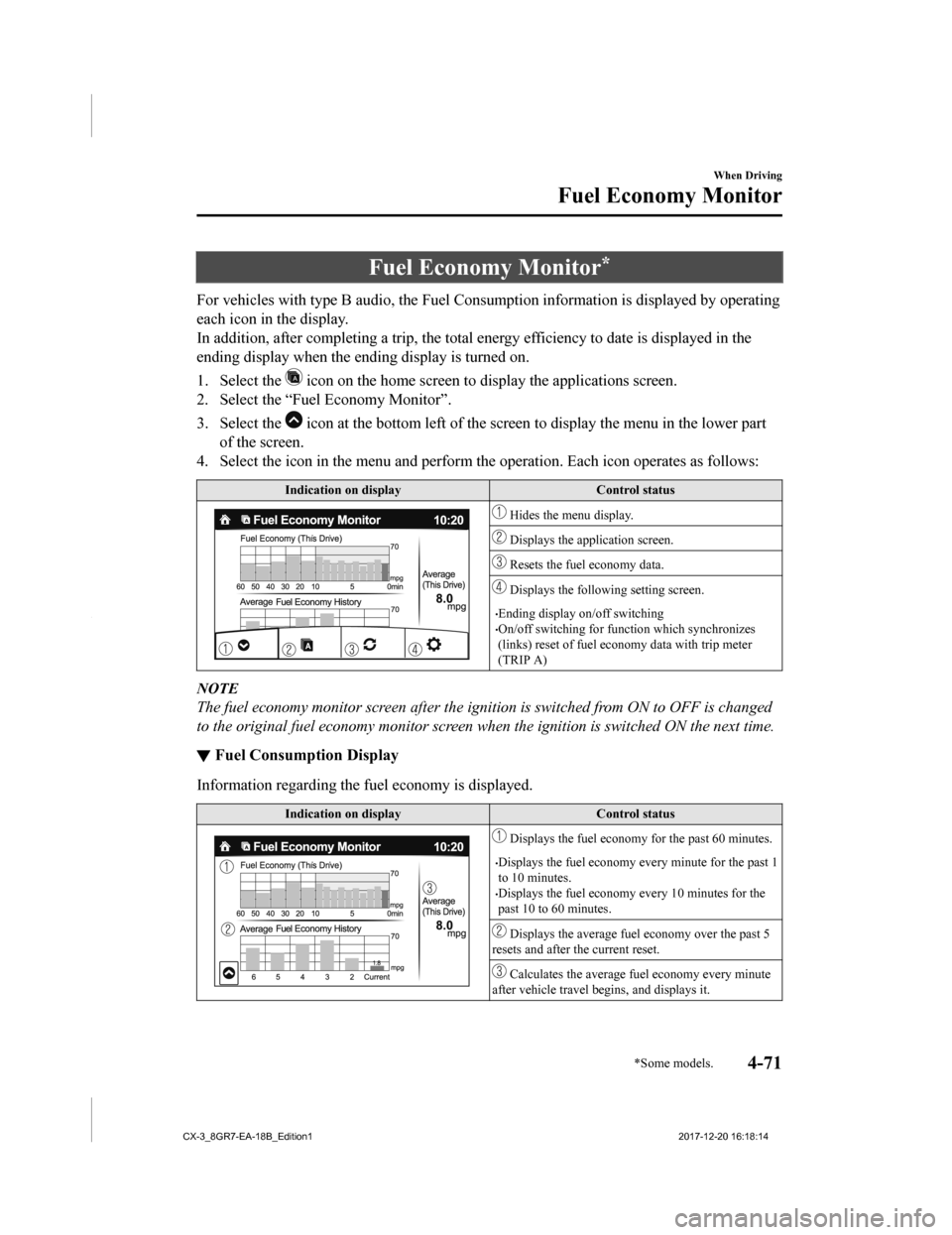
For vehicles with type B audio, the Fuel Consumption information is displayed by operating
each icon in the display.
In addition, after completing a t rip, the total energy efficiency to date is displayed in the
ending display when the ending display is turned on.
1. Select the
icon on the home screen to display the applications screen.
2. Select the “Fuel Economy Monitor”.
3. Select the
icon at the bottom left of the screen to display the menu in t he lower part
of the screen.
4. Select the icon in the menu and perform the operation. Each i con operates as follows:
Indication on display Control status
Hides the menu display.
Displays the application screen.
Resets the fuel economy data.
Displays the following setting screen.
•Ending display on/off switching•On/off switching for function which synchronizes
(links) reset of fuel econo my data with trip meter
(TRIP A)
NOTE
The fuel economy monitor screen after the ignition is switched from ON to OFF is changed
to the original fuel economy monitor screen wh en the ignition is switched ON the next time.
▼Fuel Consumption Display
Information regarding the fuel economy is displayed.
Indication on display
Control status
Displays the fuel economy for the past 60 minutes.
•Displays the fuel economy every minute for the past 1
to 10 minutes.
•Displays the fuel economy every 10 minutes for the
past 10 to 60 minutes.
Displays the average fuel economy over the past 5
resets and after the current reset.
Calculates the average fu el economy every minute
after vehicle travel b egins, and displays it.
When Driving
Fuel Economy Monitor
*Some models.4-71
CX-3_8GR7-EA-18B_Edition1 2017-12-20 16:18:14
Page 200 of 608

NOTE
•The fuel economy data is synchronized (linked) with the average fuel economy displayed
in the trip computer.
•To reset the fuel economy data, press the icon in the menu. (The average fuel economy
displayed in the trip computer resets at the same time.)
•After resetting the fuel economy data, “-- -” is displayed while the average fuel economy
is being calculated.
▼ Ending Screen Display
If the ending display on the fuel economy monitor is on when th
e ignition is switched from
ON to OFF, the informa tion regarding the fuel economy is displa yed.
▼Fuel Economy Data Reset and Trip
Meter (TRIP A) Synchronization (Linking)
Because the average fuel economy indication on the instrument cluster display is linked
with the “Average Fuel Economy History” (Current) indication on the center display, when
one is reset the other is also reset.
In addition, switching between reset and no reset of the averag e fuel economy indication on
the instrument cluster display and the “Average Fuel Economy Hi story” (Current) indication
on the center display when reset ting the trip meter (TRIP A) is possible.
Reset operation item Synchronized (linked) and reset information
Trip meter (TRIP A) Average fuel econo-
my on instrument cluster display “Average Fuel
Economy History” (Current) indica-
tion on the center display
Trip meter (TRIP A) X X/—
*1X/—*1
Average fuel economy on instrument cluster
display —X X
“Average Fuel Economy History” (Current)
indication on the center display —X X
X: Reset
—: Not reset
*1 Can be personalized.
Refer to Personalization Features on page 9-9.
When Driving
Fuel Economy Monitor
4-72
CX-3_8GR7-EA-18B_Edition1 2017-12-20 16:18:14
Page 201 of 608

Drive Selection*
Drive selection is a system to switch the vehicle's drive mode. When the sport mode is
selected, vehicle's response against accelerator operation is enhanced. This provides
additional quick acceleration which may be needed to safely mak e maneuvers such as lane
changes, merging onto freeways, or passing other vehicles.
CAUTION
Do not use the sport mode when driving on slip pery roads such as wet or snow-covered roads.
It may cause tire slipping.
NOTE
•When the sport mode is selected, driving at higher engine speeds increases and it may
increase fuel consumption. Mazda recommends that you cancel the sport mode on normal
driving.
•Drive mode cannot be switched in the following conditions:
•ABS/TCS/DSC is operating
•The Mazda Radar Cruise Control with St op & Go function (MRCC with Stop & Go
function) System/cruise control is operating.
•Steering wheel is being operated abruptly
▼ Drive Selection Switch
Press the drive selection switch forward
(“
”) to select the sport mode.
Pull the drive selection switch back
(“
”) to cancel the sport mode.
NOTE
•When the ignition is switched off, the
sport mode is canceled.
•Depending on the driving conditions
when sport mode is selected, the vehicle
may perform shift-down or slightly
accelerate.
▼ Select Mode Indicator Light
When the sport mode is selected, the select
mode indicator light turns on in the
instrument cluster.
When Driving
Drive Selection
*Some models.4-73
CX-3_8GR7-EA-18B_Edition1
2017-12-20 16:18:14
Page 273 of 608

As an added safety feature, your vehicle has been equipped with a tire pressure monitoring
system (TPMS) that illuminates a low tire pre ssure telltale when one or more of your tires is
significantly under-inflated. Accordingly, when th e low tire pressure telltale illuminates, you
should stop and check your tires as soon as possible, and inflate them to the proper
pressure. Driving on a significantly under-in flated tire causes the tire to overheat and can
lead to tire failure. Under-inflation also reduce s fuel efficiency and tire tread life, and may
affect the vehicle's handling and stopping ability.
Please note that the TPMS is not a substitute for proper tire maintenance, and it is the
driver's responsibility to maintain correct ti re pressure, even if under-inflation has not
reached the level to trigger illumination of the TPMS low tire pressure telltale.
Your vehicle has also been equipped with a TPMS malfunction indicator to indicate when
the system is not operating properly.
The TPMS malfunction indicator is combined with the low tire pressure telltale. When the
system detects a malfunction, the telltale wi ll flash for approximately one minute and then
remain continuously illuminated. This sequence will continue upon subsequent vehicle
start-ups as long as the malfunction exists. When the malfunction indicator is illuminated,
the system may not be able to detect or signal low tire pressure as intended. TPMS
malfunctions may occur for a variety of reasons, including the installation of replacement
or alternate tires or wheels on the vehicle th at prevent the TPMS from functioning properly.
Always check the TPMS malfunction telltale after replacing one or more tires or wheels on
your vehicle to ensure that the replacement or alternate tires and wheels allow the TPMS to
continue to function properly.
To avoid false readings, the system samples for a little while before indicating a problem. As
a result it will not instantaneously regi ster a rapid tire deflation or blow out.
▼System Error Activation
When the warning light flashes, there may
be a system malfunction. Consult an
Authorized Mazda Dealer.
A system error activation may occur in the
following cases:
•When there is equipment or a device
near the vehicle using the same radio
frequency as that of the tire pressure
sensors.
•When a metallic device such as a
non-genuine navigation system is
equipped near the center of the
dashboard, which may block radio
signals from the tire
pressure sensor to
the receiver unit.
•When using the following devices in the
vehicle that may cause radio
interference with the receiver unit.
•A digital device such as a personal
computer.
•A current converter device such as a
DC-AC converter.
•When excess snow or ice adheres to the
vehicle, especially around the wheels.
•When the tire pressu re sensor batteries
are exhausted.
•When using a wheel with no tire
pressure sensor installed.
•When using tires with steel wire
reinforcement in the side walls.
•When using tire chains.
When Driving
Tire Pressure Monitoring System
4-145
CX-3_8GR7-EA-18B_Edition1 2017-12-20 16:18:14
Page 352 of 608
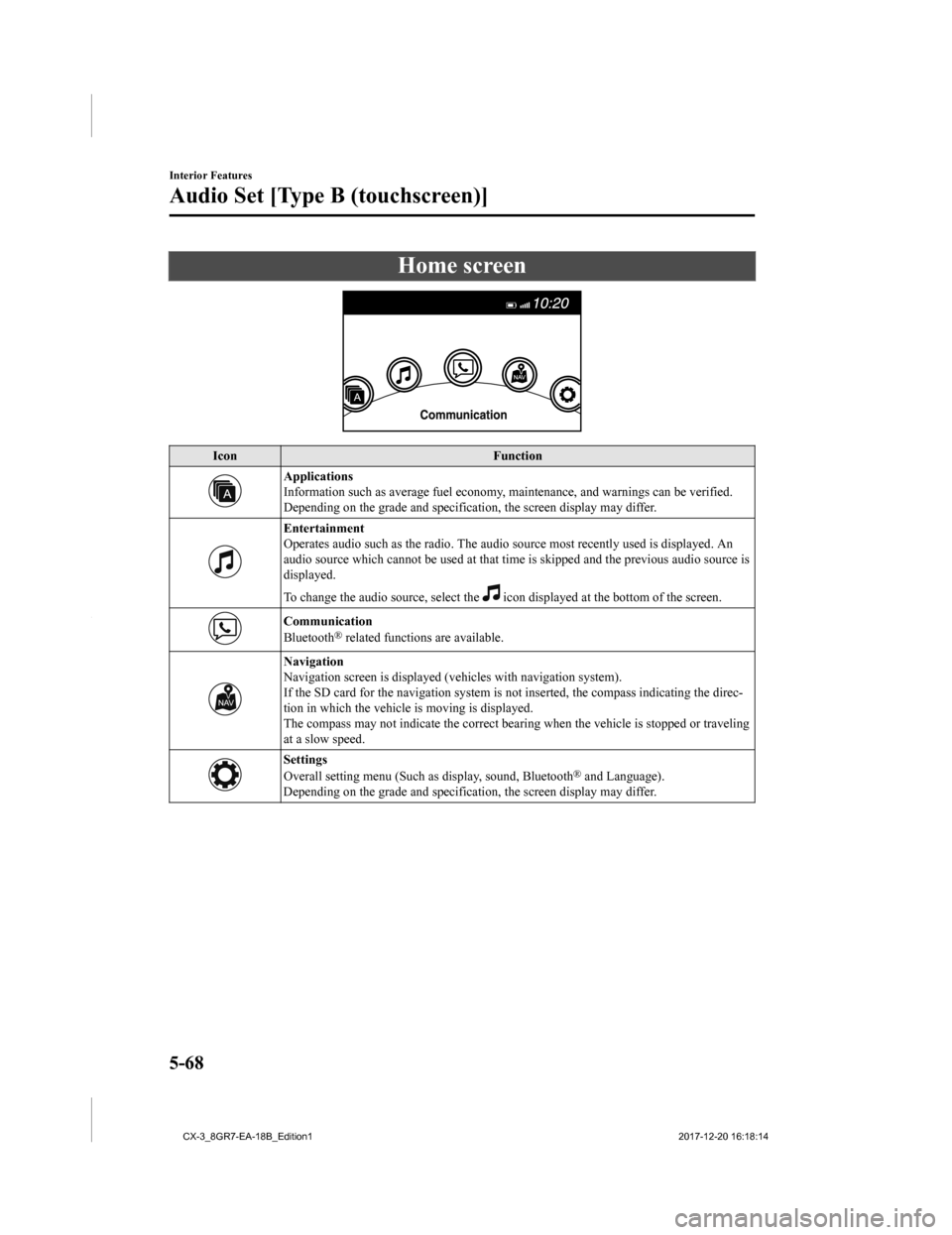
Home screen
IconFunction
Applications
Information such as average fuel economy, maintenance, and warn ings can be verified.
Depending on the grade and specification, the screen display ma y differ.
Entertainment
Operates audio such as the radio. The audio source most recently used is displayed. An
audio source which cannot be used at that time is skipped and t he previous audio source is
displayed.
To change the audio source, select the
icon displayed at the bottom of the screen.
Communication
Bluetooth® related functions are available.
Navigation
Navigation screen is displayed (v ehicles with navigation system).
If the SD card for the navigation system is not inserted, the c ompass indicating the direc-
tion in which the vehicle is moving is displayed.
The compass may not indicate th e correct bearing when the vehicle is stopped or traveling
at a slow speed.
Settings
Overall setting menu (Such as display, sound, Bluetooth® and Language).
Depending on the grade and specification, the screen display ma y differ.
Interior Features
Audio Set [Type B (touchscreen)]
5-68
CX-3_8GR7-EA-18B_Edition1 2017-12-20 16:18:14
Page 398 of 608
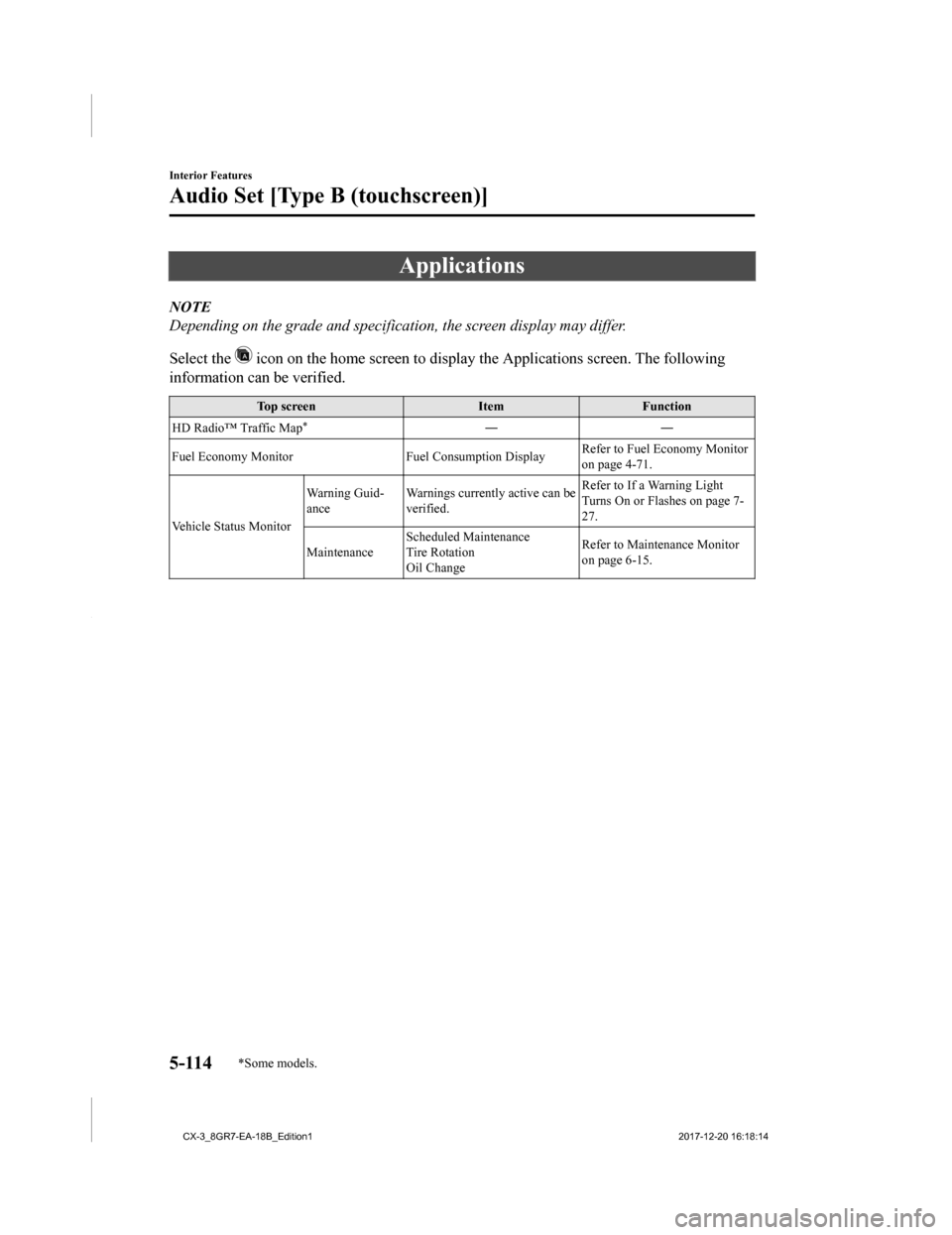
Applications
NOTE
Depending on the grade and specification, the screen display may differ.
Select the
icon on the home screen to display the Applications screen. The following
information can be verified.
Top screen ItemFunction
HD Radio™ Traffic Map
*――
Fuel Economy Monitor Fuel Consumption DisplayRefer to Fuel Economy Monitor
on page 4-71.
Vehicle Status Monitor Warning Guid-
ance
Warnings currently active can be
verified. Refer to If a Warning Light
Turns On or Flashes on page 7-
27.
Maintenance Scheduled Maintenance
Tire Rotation
Oil Change Refer to Maintenance Monitor
on page 6-15.
Interior Features
Audio Set [Type B (touchscreen)]
5-114*Some models.
CX-3_8GR7-EA-18B_Edition1
2017-12-20 16:18:14
Page 423 of 608

▼Schedule 1
U.S.A. and Puerto Rico residents
- Engine oil flexible maintenance interval
Use when the maintenance monitor for “Oil Change” is set to “Fl exible”. For details,
see maintenance monitor. (page 6-15)
Maintenance Interval Number of months or kilometers (miles), whichever comes first.
Months 12 24 36 48 60 72 84 96
×1000 km 12 24 36 48 60 72 84 96
×1000 miles 7.5 15
22.53037.54552.560
Drive belts II
Engine oil & filter
*1Replace when wrench indicator light is ON. (Max interval:12 months or 12,000 km (7,500 miles))
Engine coolant
*2Replace at first 192,000 km (120,000 miles) or 10 years; after that, every 96,000 km (60,000 miles) or 5 years.
Air filter RR
Fuel lines and hoses
*3IIII
Hoses and tubes for emission
*3II
Spark plugs Replace every 120,000 km (75,000 miles).
Brake lines, hoses and connections II II
Disc brakes IIIIIIII
Tire (Rotation) Rotate every 12,000 km (7,500 miles).
Steering operation and linkages II II
Front and rear suspension, ball joints and wheel
bearing axial play IIII
Rear differential oil
*4*5
Transfer oil*5
Driveshaft dust boots II II
Bolts and nuts on chassis and body TTTT
Exhaust system and heat shields I
Emergency flat tire repair kit (if installed)
*6Inspect annually.
Cabin air filter R R R R
Chart symbols:
I: Inspect: Inspect and clean, re pair, adjust, fill up, or replac e if necessary.
R: Replace
L: Lubricate
C: Clean
T: Tighten
D: Drain
Maintenance and Care
Scheduled Maintenance
6-5
CX-3_8GR7-EA-18B_Edition1 2017-12-20 16:18:14
Page 424 of 608

Remarks:
*1 The engine oil and filter must be changed at least once a year or within 12,000 km (7,500 miles) since last
engine oil and filter change. Re set the engine oil data whenever replacing the engine oil regardless of the
message/wrench indicator light display.
*2 Use of FL-22 is recommended when replacing engine coolant. Using engine coolant other than FL-22 may
cause serious damage to the engine and cooling system.
*3 According to state/provincial and federal regulations, failure to perform maintenance on these items will not
void your emissions warranties. H owever, Mazda recommends that all maintenance services be performed at
the recommended time or mileage/kilometer period to ensure long -term reliability.
*4 If the vehicle is operated primarily under any of the following conditions, replace the rear differential oil at
every 48,000 km (30,000 miles).
a) Towing a trailer or using a car-top carrier
b) Driving in dusty, sandy or wet conditions
c) Extended periods of idli ng or low speed operation
d) Repeated short trips of less than 16 km (10 miles)
*5 If this component has been submerged in water, the oil should be replaced.*6 Check the tire repair fluid expiration date every year when performing the periodic maintenance. Replace the
tire repair fluid bottle with ne w one before the expiration dat e.
▼Schedule 2
U.S.A. and Puerto Rico residents - Severe driving conditions ma
intenance interval
Maintenance IntervalNumber of months or kilometers (miles), whichever comes first.
Months 6 1218243036424854606672
×1000 km 8 16 24 32 40 48 56 64 72 80 88 96
×1000 miles 5 10 15 20 25 30 35 40 45 50 55 60
Drive belts II I
Engine oil & filter Flexible
*1Replace when wrench indicator light is ON. (Max interval:12
months or 12,000 km (7,500 miles))
Fixed RRRRRRRRRRRR
Engine coolant
*2Replace at first 192,000 km (120, 000 miles) or 10 years; after
that, every 96,000 km (60,000 miles) or 5 years.
Engine coolant level IIIIIIIIIIII
Air filter
*3RR
Fuel lines and hoses
*4IIII
Hoses and tubes for emission
*4II
Spark plugs Replace every 12 0,000 km (75,000 miles).
Function of all lights IIIIIIIIIIII
Brake lines, hoses and connections II II
Brake and clutch fluid level I I I I I I I I I I I I
Disc brakes IIIIIIIIIIII
Tire (Rotation) Rotate every 8,000 km (5,000 miles).
Tire inflation pressure and tire wear IIIIIIIIIIII
Maintenance and Care
Scheduled Maintenance
6-6
CX-3_8GR7-EA-18B_Edition1 2017-12-20 16:18:14