wheel MAZDA MODEL CX-30 2020 Workshop Manual
[x] Cancel search | Manufacturer: MAZDA, Model Year: 2020, Model line: MODEL CX-30, Model: MAZDA MODEL CX-30 2020Pages: 562, PDF Size: 83 MB
Page 279 of 562

Steering assist function
If any of the following conditions occurs, the steering assist function is temporarily
canceled.
The headway control function is canceled.White (yellow) lane lines cannot be detected or a vehicle ahead cannot be
recognized.
Your vehicle speed is more than about 64 km/h (40 mph).The accelerator pedal is operated.The turn signal lever is operated.The vehicle is being driven on a sharp curve.The width of a lane is excessively narrow or wide.The vehicle crosses a lane line.The driver takes his/her hands off the steering wheel.The steering wheel is operated abruptly.There is a problem with the system.The temperature in the Forward Sensing Camera (FSC) is too high or too low.The windshield around the Forward Sensing Camera (FSC) is foggy.The windshield around the Forward Sensing Camera (FSC) is blocked by an
obstruction, causing poor forward visibility.
NOTE
If you take your hands off the steering wheel (not holding the steering wheel), the
warning sound is activated and an alert is indicated on the multi-information display
and the active driving display.
Multi-information display
Active driving display
When Driving
i-ACTIVSENSE
4-143
CX-30_8HG6-EA-19I_Edition1_new 2019-6-13 18:45:11
Page 280 of 562

If the steering wheel is held lightly, or depending on the road conditions, the system
determines that you have released the steering wheel (not holding the steering
wheel) even if you are holding it, and an alert is indicated on the multi-information
display and the active driving display.
To resume operation
If the TJA is temporarily canceled, it will resume operation at the previously set speed
by pressing the RES switch after all of the operation conditions have been met.
NOTE
If the set speed is not indicated on the display, the system does not operate even if
the RES switch is pressed.
After the operation, the steering assist operation may not operate for a period of 5
seconds at the most until the lane lines are detected or a vehicle ahead is
recognized.
Tu r n i n g off
When the TJA switch is pressed while the TJA is operating, the TJA turns off.
▼Shift-up/Shift-down Request
Display (Manual Transmission)
The shift-up or shift-down request
display might be displayed while the
TJA is operating. When this occurs, shift
gears because the gear position is not
appropriate.
Request Indication on display
Shift up Shift Up to a Higher Gear
Shift down Shift Down to a Lower Gear
NOTE
If the gears are not shifted up even
though the shift-up request
indication is displayed, load will be
applied to the engine and the TJA
might be automatically canceled or
engine damage could occur.
If the gears are not shifted down
even though the shift-down request
indication is displayed, the TJA might
be automatically canceled or engine
stalling could occur.
▼ Stop Hold Control (Automatic
Transmission)
While in headway control using the
TJA, your vehicle will stop when a
vehicle ahead stops. When the vehicle
is stopped and the stop hold control
operates, the TJA indicator light turns
on.
NOTE
Even if the TJA is temporarily
canceled during stop hold control,
the vehicle is held in its stopped
position.
When Driving
i-ACTIVSENSE
4-144
CX-30_8HG6-EA-19I_Edition1_new
2019-6-13 18:45:11
Page 282 of 562
Lane-keep Assist System(LAS)
*
▼Lane-keep Assist System (LAS)
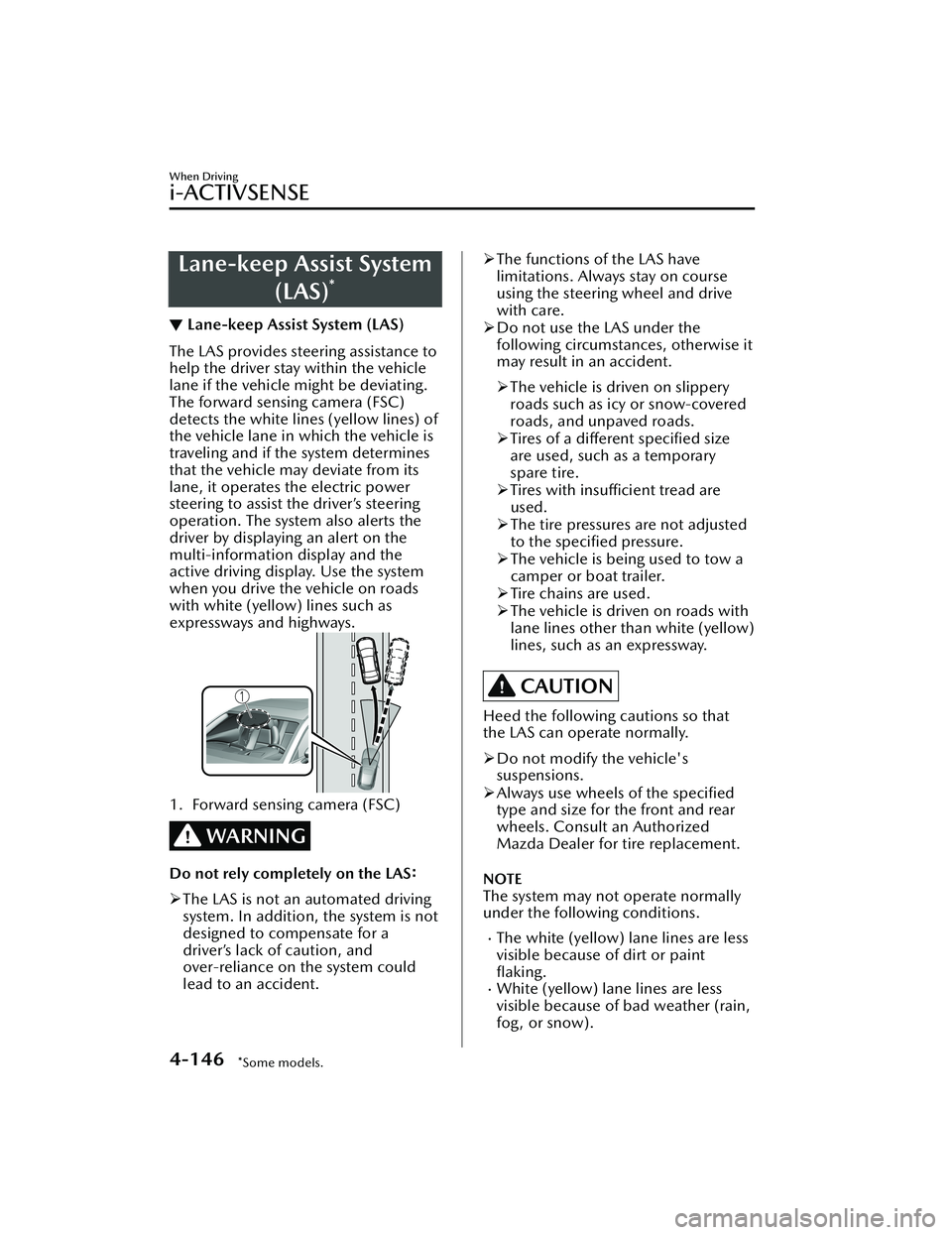
The LAS provides steering assistance to
help the driver stay within the vehicle
lane if the vehicle might be deviating.
The forward sensing camera (FSC)
detects the white lines (yellow lines) of
the vehicle lane in
which the vehicle is
traveling and if the system determines
that the vehicle may deviate from its
lane, it operates the electric power
steering to assist the driver’s steering
operation. The system also alerts the
driver by displaying an alert on the
multi-information display and the
active driving display. Use the system
when you drive the vehicle on roads
with white (yellow) lines such as
expressways and highways.
1. Forward sensing camera (FSC)
WARNING
Do not rely completely on the LAS:
The LAS is not an automated driving
system. In addition, the system is not
designed to compensate for a
driver’s lack of caution, and
over-reliance on the system could
lead to an accident.
The functions of the LAS have
limitations. Always stay on course
using the steering wheel and drive
with care.
Do not use the LAS under the
following circumstances, otherwise it
may result in an accident.
The vehicle is driven on slippery
roads such as icy or snow-covered
roads, and unpaved roads.
Tires of a
different
specified size
are used, such as a temporary
spare tire.
Tires with
insufficient tread are
used.
The tire pressures are not adjusted
to the
specified pressure.
The vehicle is being used to tow a
camper or boat trailer.
Tire chains are used.
The vehicle is driven on roads with
lane lines other than white (yellow)
lines, such as an expressway.
CAUTION
Heed the following cautions so that
the LAS can operate normally.
Do not modify the vehicle's
suspensions.
Always use wheels of the specified
type and size for the front and rear
wheels. Consult an Authorized
Mazda Dealer for tire replacement.
NOTE
The system may not operate normally
under the following conditions.
The white (yellow) lane lines are less
visible because of dirt or paint
flaking.
White (yellow) lane lines are less
visible because of bad weather (rain,
fog, or snow).
When Driving
i-ACTIVSENSE
4-146*Some models.
CX-30_8HG6-EA-19I_Edition1_new 2019-6-13 18:45:11
Page 284 of 562

When temporarily canceling the
system
The LAS goes on standby in the
following cases: The LAS operation is
automatically restored when the
system's operation conditions are met.
The system cannot detect white
(yellow) lane lines.
The vehicle speed is less than about
56 km/h (35 mph).
The turn signal lever is operated.The accelerator pedal is depressed
abruptly.
The TCS/DSC is operating.The TCS is turned off.The steering wheel is operated.The brake pedal is operated.
The function is temporarily stopped.
The LAS stops functioning in the
following cases:
The temperature in the forward
sensing camera (FSC) is too high or
too low.
The windshield around the forward
sensing camera (FSC) is foggy.
The windshield around the forward
sensing camera (FSC) is blocked by
an obstruction, causing poor forward
visibility.
Strong light (such as sunlight, or
headlights (high-beam) of
on-coming vehicles) is directed at
the forward sensing camera (FSC).
System malfunction
If there is a problem with the system,
the i-ACTIVSENSE status symbol
(warning/risk avoidance support
system) (white) and the i-ACTIVSENSE
warning indication/warning light on
the multi-information display turns on
and a message is indicated.
Refer to i-ACTIVSENSE Status Symbol
(Warning/Risk Avoidance Support
System) on page 4-84.
▼ Steering Wheel Operation Assist
When the system determines that the
vehicle might be deviating from its
lane, the steering wheel operation
assist operates.
The system notifies the driver that it
provided steering wheel operation
assistance on the multi-information
display and the active driving display.
Multi-information display (Basic
display)
Multi-information display
(i-ACTIVSENSE display)
When Driving
i-ACTIVSENSE
4-148
CX-30_8HG6-EA-19I_Edition1_new
2019-6-13 18:45:11
Page 285 of 562

Active driving display
NOTE
When the driver operates the steering
wheel while the steering wheel
operation assist is operating, the
steering wheel operation assistance is
canceled.
▼System Canceling
The LAS can be set to inoperable.
(If only the LAS is turned
off)
Refer to the Settings section in the
Mazda Connect Owner's Manual.
(If the LAS is turned off by operating
the i-ACTIVSENSE switch)
Refer to i-ACTIVSENSE Switch on
page 4-85.
NOTE
If the ignition is switched OFF while
you have canceled the system using the
i-ACTIVSENSE switch, the system is
automatically enabled the next time
the ignition is switched ON. However,
if the system is canceled using the
personalization features, the system is
not automatically enabled.
Smart Brake Support
(SBS)
*
▼Smart Brake Support (SBS)
The SBS alerts the driver of a possible
collision using the warning indications
in the display and a warning sound if
the front radar sensor and Forward
Sensing Camera (FSC) determine that
there is the possibility of a collision
with a vehicle ahead, pedestrian, or a
bicycle. Furthermore, if a collision is
unavoidable, the automatic brake
control is performed to reduce damage
in the event of a collision. In addition,
when the driver depresses the brake
pedal, the brakes are applied firmly
and quickly to assist.
(Vehicles with Driver Monitoring
(DM))
When the SBS determines that the
driver is not paying attention to the
road using the driver monitoring
camera and it determines that there is
the possibility of a collision with an
obstruction, the SBS activates the
collision warning earlier than normal.
WARNING
Do not rely completely on the
SBS:
The SBS is only designed to reduce
damage in the event of a collision.
The ability to detect obstructions is
limited depending on the obstructions,
weather conditions, or traffic
conditions. Over reliance on the
system leading to the accelerator pedal
or brake pedal being mistakenly
operated could result in an accident.
When Driving
i-ACTIVSENSE
*Some models.4-149
CX-30_8HG6-EA-19I_Edition1_new 2019-6-13 18:45:11
Page 286 of 562

CAUTION
In the following cases, turn the system
off to prevent an unexpected
operation.
The vehicle is being towed or when
towing another vehicle.
The vehicle is on a chassis roller.
When driving on rough roads such as
in areas of dense grass or off-road.
See the next page on how to turn
off
the system.
Refer to Stopping the Smart Brake
Support (SBS) System Operation on
page 4-151.
Operation conditions
The SBS operates when all of the
following conditions are met.
The ignition is switched ON.The SBS is on.The i-ACTIVSENSE warning
indication/warning light is not
turned on.
(Object is vehicle ahead)
The vehicle speed is about 4 km/h
(2 mph) or higher.
(Object is a pedestrian or bicycle)
The vehicle speed is between about
10 to 80 km/h (6.2 to 50 mph).
The DSC does not operate.
NOTE
Under the following conditions, the
SBS may not operate.
If there is the possibility of hitting
only a part of a vehicle or
obstruction ahead.
You are driving your vehicle at the
same speed as the vehicle ahead.
When the driver deliberately
performs driving operations
(accelerator operation, steering
wheel operation).
The accelerator pedal is depressed
abruptly.
The brake pedal is being
depressed.
The steering wheel is being
operated.
The selector lever is being shifted.The turn signal lever is being
operated.
When warnings and messages,
such as a dirty windshield, related
to the Forward Sensing Camera
(FSC) or front radar sensor are
being displayed on the
multi-information display.
The SBS may operate under the
following conditions.
There is an object in the road at
the entrance to a curve (including
guardrails and snow banks).
Passing an approaching vehicle
while rounding a curve.
When crossing a narrow bridge,
and passing through low gates,
narrow gates, car washing
machines, or tunnels.
When passing through a toll gate.When entering an underground
parking area.
There is a metal object, bump, or a
protruding object on the road.
If you suddenly come close to a
vehicle ahead.
There is an animal, wall, or tree.Notifies the driver with a warning
indication on the multi-information
display and the active driving display
(vehicles with active driving display)
while the system is operating.
When Driving
i-ACTIVSENSE
4-150
CX-30_8HG6-EA-19I_Edition1_new 2019-6-13 18:45:11
Page 289 of 562

Do not apply a strong force to a rear
ultrasonic sensor and rear camera:
When washing the vehicle, do not
spray highly pressurized water against a
rear ultrasonic sensor and rear camera,
or rub it strongly. In addition, do not
hit the rear bumper forcefully when
loading and unloading cargo.
Otherwise, the sensors may not detect
obstructions correctly which could
cause the SBS-R system to not operate
normally, or it could operate
unnecessarily.
CAUTION
When driving off-road in areas where
there is grass or foliage, it is
recommended that the
SBS-R system
be turned off.
Always use tires of the specified size
and the same manufacturer, brand,
and tread pattern on all 4 wheels. In
addition, do not use tires with
significantly different wear patterns
on the same vehicle. Otherwise, the
SBS-R system may not operate
normally.
If ice or snow is stuck on the rear
ultrasonic sensor and rear camera
they may not be able to detect
obstructions correctly depending on
the conditions. In such cases, the
system may not be able to perform
controls correctly. Always drive
carefully and pay attention to the
rear of the vehicle.
NOTE
The vehicle posture changes
depending on the accelerator pedal,
brake pedal and steering wheel
operations, which could make it
difficult for the system to recognize
an obstruction, or it could facilitate
unnecessary detection. In such cases,
the SBS-R may or may not operate.
The SBS-R system will operate under
the following conditions.
The engine is running.The shift lever (manual
transmission ve hicle) or the
selector lever (automatic
transmission vehicl e) is in the R
(reverse) position.
i-ACTIVSENSE warning indication/
warning light is not displayed in the
multi-information display.
The vehicle speed is between
about 2 to 8 km/h (2 to 4 mph).
The SBS-R is not turned off.The DSC is not malfunctioning.In the following cases, the rear
ultrasonic sensor and rear camera
cannot detect obstructions and the
SBS-R may not operate.
The height of the obstruction is
low such as low walls or trucks
with low loading platforms.
The height of the obstruction is
high such as trucks with high
loading platforms.
The obstruction is small.The obstruction is thin such as a
signpost.
The surface of the obstruction is
not pointed vertically relative to
the vehicle.
The obstruction is soft such as a
hanging curtain or snow stuck to a
vehicle.
The obstruction is shaped
irregularly.
When Driving
i-ACTIVSENSE
4-153
CX-30_8HG6-EA-19I_Edition1_new 2019-6-13 18:45:11
Page 290 of 562

The obstruction is extremely close.In the following cases, the rear
ultrasonic sensor and rear camera
cannot detect obstructions correctly
and the SBS-R may not operate.
Something is stuck on the bumper
near a rear ultrasonic sensor.
The brake or accelerator pedal is
operated.
There is another obstruction near
one obstruction.
During inclement weather such as
rain, fog and snow.
High or low humidity.High or low temperaturesStrong winds.The path of travel is not flat.Heavy luggage is loaded in the
luggage compartment or on the
rear seat.
Objects such as a wireless antenna,
fog light, or illuminated license
plate is installed near a rear
ultrasonic sensor.
The orientation of a rear ultrasonic
sensor has deviated for reasons
such as a collision.
The vehicle is affected by other
sound waves such as the horn,
engine noise, ultrasonic sensor of
another vehicle.
In the following cases, a rear
ultrasonic sensor and rear camera
may detect something as a target
obstruction which could cause the SBS-R system to operate.
Driving on a steep slope.Wheel blocks.Hanging curtains, gate poles such
as at toll gates and railroad
crossing.
When traveling near objects such
as foliage, barriers, vehicles, walls,
and fences along a road.
When driving off-road in areas
where there is grass and forage.
When passing through low gates,
narrow gates, car washing
machines, and tunnels.
A trailer is connected.A bright light source such as
sunlight hits the rear camera.
The surroundings are dark.An exterior accessory such as a
bicycle carrier is installed around a
rear ultrasonic sensor.
(Manual transmission)
If the vehicle is stopped by the SBS-R
operation and the clutch pedal is not
depressed, the engine stops.
When the system operates, the user
is notified by the multi-information
display.
The collision warning beep sounds
intermittently while the SBS-R brake
is operating.
If the vehicle is stopped by the SBS-R
operation and the brake pedal is not
depressed, displaying in meter
“Emergency Braking Activated.
Depress Brake Pedal to Hold Stop”,
after about 2 seconds and the SBS-R
brake is automatically released.
Turn off the SBS-R system while
pulling a trailer or while an accessory
such as a bicycle carrier is installed to
the rear of the vehicle.
▼ Collision Warning
If there is a possibility of a collision, the
collision warning sound is activated
continuously and a warning is
displayed on the active driving display
and the multi-information display.
When Driving
i-ACTIVSENSE
4-154
CX-30_8HG6-EA-19I_Edition1_new
2019-6-13 18:45:11
Page 292 of 562

WARNING
Always check the surrounding area
visually before actually putting the
vehicle in reverse:
The system is only designed to assist
you in backing out of the lot when
putting the vehicle in reverse. Due to
certain limitations with the operation
of this system, the SBS-RC system may
not operate brake or it might be
delayed even though a vehicle is
behind your vehicle. Always make it
your responsibility as a driver to check
the rear.
Do not rely completely on the SBS-RC
system:
The
SBS-RC system is only designed
to reduce damage in the event of a
collision. Over reliance on the system
leading to the accelerator pedal or
brake pedal being mistakenly
operated could result in an accident.
The SBS-RC system operates in
response to a vehicle. The system
does not operate in response to
obstructions such as a wall,
pedestrians, 2-wheeled vehicles, or
animals.
To assure the correct operation of the
SBS-RC, heed the following cautions.
Do not apply a sticker to a rear radar
and rear camera. Otherwise, the rear
radar and rear camera may not be
able to detect vehicles or
obstructions which could result in an
accident.
Do not disassemble a rear radar and
rear camera.
If cracks or damage caused by flying
gravel or debris is visible around a
rear radar and rear camera, stop
using the SBS-RC system
immediately and have your vehicle
inspected by an Authorized Mazda
Dealer. If the vehicle continues to be
driven with cracks or scratch marks
left around an ultrasonic sensor, the
system may operate unnecessarily
and cause an unexpected accident.
Refer to Stopping the Smart Brake
Support [Rear Crossing] (SBS-RC)
System Operation on page 4-159.
Consult an Authorized Mazda Dealer
for rear bumper replacement.
Do not modify the suspension:
If the vehicle height or inclination is
changed, the SBS-RC system may not
operate correctly because it cannot
detect obstructions correctly.
Do not apply a strong force to a rear
radar and rear camera:
When washing the vehicle, do not
spray highly pressurized water against a
rear radar and rear camera, or rub it
strongly. In addition, do not hit the rear
bumper forcefully when loading and
unloading cargo. Otherwise, the
sensors may not detect obstructions
correctly which could cause the
SBS-RC system to not operate
normally, or it could operate
unnecessarily.
NOTE
The SBS-RC system will operate
under the following conditions.
The engine is running.
When Driving
i-ACTIVSENSE
4-156
CX-30_8HG6-EA-19I_Edition1_new 2019-6-13 18:45:11
Page 297 of 562
The shooting range of the cameras and
detection range of the sensors are
limited. For example, the areas in black
at the front and rear of the vehicle
image and the seams where each of
the camera images merge are blind
spots where an obstruction may not be
visible. In addition, the extended
vehicle width lines and projected
vehicle path lines are only to be used
as references, and the images on the
screen may differ from the actual
conditions.
CAUTION
Do not use the 360°View Monitor
under any of the following
conditions.
Icy or snow-covered roads.
Tire chains or a temporary spare
tire is installed.
The front or rear doors are not fully
closed.
The vehicle is on a road incline.
The door mirrors are retracted.
Do not hit the front/rear camera,
front bumper, liftgate, and door
mirrors forcefully. The camera
position or installation angle may
shift.
The cameras are waterproof. Do not
disassemble, modify, or remove a
camera.
The camera cover is made of hard
plastic, therefore do not apply oil
film remover, organic solvents, wax,
or coating agents. If any such agent
gets on the camera cover, wipe it off
using a soft cloth immediately.
Do not rub the camera lens
forcefully, or clean it with an abrasive
or hard brush. Otherwise, it could
scratch the camera lens and
negatively affect the images.
Consult an Authorized Mazda Dealer
for repair, painting , or replacement
of the front/rear camera, front
bumper, liftgate and door mirrors.
Heed the following cautions to
assure that the 360°View Monitor
operates normally.
Do not modify the vehicle
suspensions or lower/raise the
vehicle body, or both.
Always use wheels of the
specified
type and size for the front and rear
wheels. Consult an Authorized
Mazda Dealer for tire replacement.
When the display is cold, images
may leave trails or the screen might
be darker than usual, making it
difficult to check the vehicle
surroundings. Always confirm the
safety at the front and around the
vehicle visually when driving.
The method for parking/stopping
the vehicle using the 360°View
Monitor
differs depending on the
road circumstances/conditions and
the vehicle conditions. When and
how much you turn the steering
wheel will differ depending on the
situation, , therefore always check
the vehicle surroundings directly with
your eyes while using the system.
Also, before using the system, always
make sure that the vehicle can be
parked/stopped in the parking/
stopping space.
NOTE
If there are water droplets, snow, or
mud on the camera lens, wipe it off
using a soft cloth. If the camera lens
is especially dirty, wash it off with
mild detergent.
When Driving
i-ACTIVSENSE
4-161
CX-30_8HG6-EA-19I_Edition1_new 2019-6-13 18:45:11