heating MAZDA MODEL CX-30 2020 Owners Manual
[x] Cancel search | Manufacturer: MAZDA, Model Year: 2020, Model line: MODEL CX-30, Model: MAZDA MODEL CX-30 2020Pages: 562, PDF Size: 83 MB
Page 32 of 562
People who are intoxicated
People who have taken
sleep-inducing medicine such as
sleeping pills or cold medicine
Do not use the seat warmer with
anything having high
moisture-retention ability such as a
blanket or cushion on the seat:
The seat may be heated excessively
and cause a low-temperature burn.
Do not use the seat warmer even
when taking a short nap in the
vehicle:
The seat may be heated excessively
and cause a low-temperature burn.
Do not place heavy objects with sharp
projections on the seat, or insert
needles or pins into it:
This could cause the seat to become
excessively heated and result in injury
from a minor burn.
CAUTION
Do not use organic solvents to clean
the seat. It may damage the seat
surface and the heater.
Heated Steering Wheel*
▼ Heated Steering Wheel
The grips on the left and right of the
steering wheel can be warmed up
when the ignition is switched ON.
While the heated steering wheel is
operating , the indicator light in the
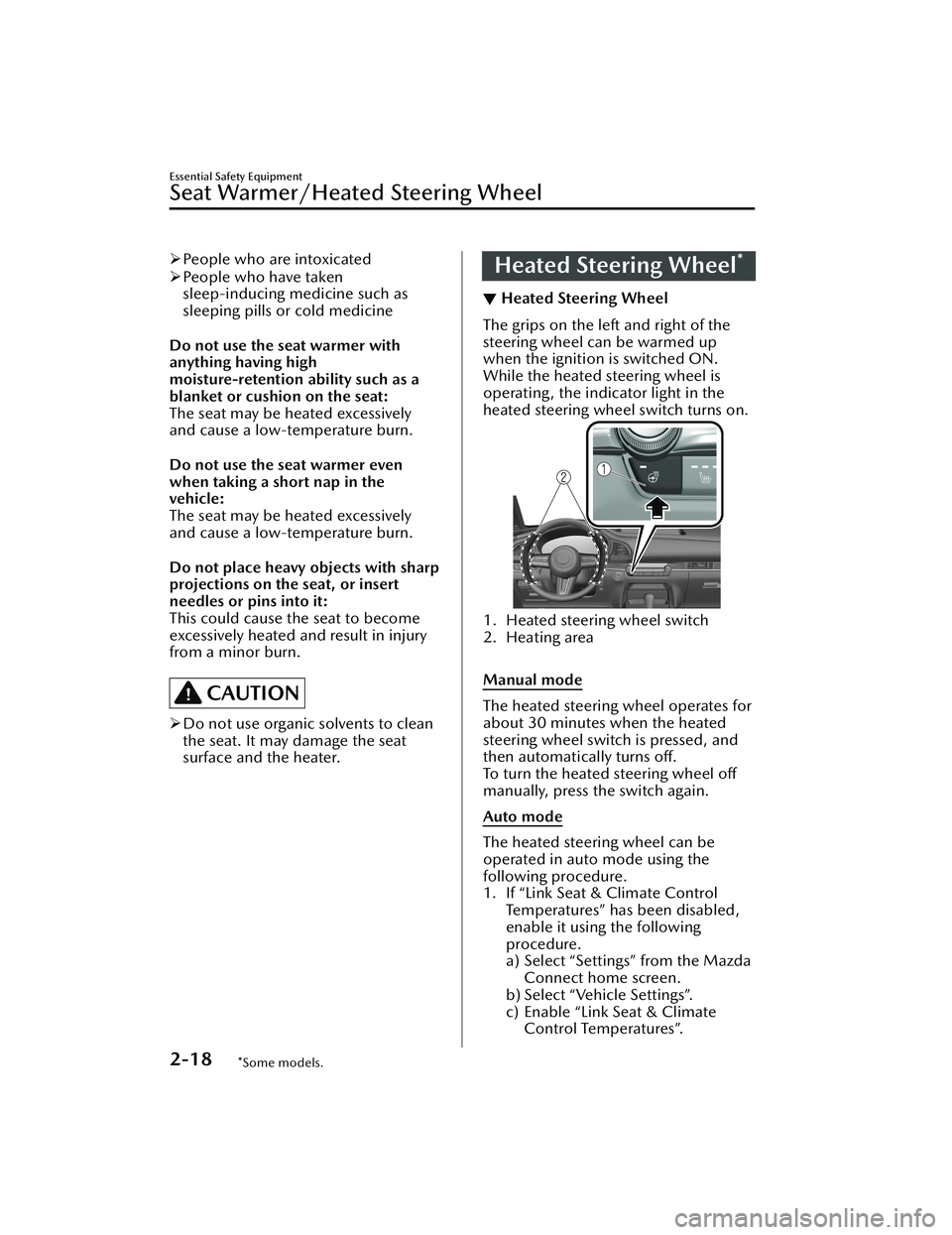
heated steering wheel switch turns on.
1. Heated steering wheel switch
2. Heating area
Manual mode
The heated steering wheel operates for
about 30 minutes when the heated
steering wheel switch is pressed, and
then automatically turns off.
To turn the heated steering wheel off
manually, press the switch again.
Auto mode
The heated steering wheel can be
operated in auto mode using the
following procedure.
1. If “Link Seat & Climate Control
Temperatures” has been disabled,
enable it using the following
procedure.
a) Select “Settings” from the MazdaConnect home screen.
b) Select “Vehicle Settings”.
c) Enable “Link Seat & Climate Control Temperatures”.
Essential Safety Equipment
Seat Warmer/Heated Steering Wheel
2-18*Some models.
CX-30_8HG6-EA-19I_Edition1_new 2019-6-13 18:45:11
Page 112 of 562
Open the windows or adjust the
heating or cooling system to draw
fresh air when idling the engine:
Exhaust gas is dangerous. When the
vehicle is stopped with the windows
closed and the engine running for a
long time even in an open area,
exhaust gas, which contains poisonous
carbon monoxide, could enter the
cabin. Loss of consciousness or even
death could occur.
Clear snow from underneath and
around your vehicle, particularly the
tail pipe, before starting the engine:
Running the engine when a vehicle is
stopped in deep snow is dangerous.
The exhaust pipe could be blocked by
the snow, allowing exhaust gas to
enter the cabin. Because exhaust gas
contains poisonous carbon monoxide,
it could cause loss of consciousness or
even death to occupants in the cabin.Fuel-Filler Lid and Cap
▼Fuel-Filler Lid and Cap
WARNING
When removing the fuel-filler cap,
loosen the cap slightly and wait for
any hissing to stop, then remove it:
Fuel spray is dangerous. Fuel can burn
skin and eyes and cause illness if
ingested. Fuel spray is released when
there is pressure in the fuel tank and
the fuel-filler cap is removed too
quickly.
Before refueling, stop the engine, and
always keep sparks and flames away
from the filler neck:
Fuel vapor is dangerous. It could be
ignited by sparks or flames causing
serious burns and injuries.
Additionally, use of the incorrect
fuel-filler cap or not using a fuel-filler
cap may result in a fuel leak, which
could result in serious burns or death
in an accident.
Do not continue refueling after the
fuel pump nozzle shuts off
automatically:
Continuing to add fuel after the fuel
pump nozzle has shut off automatically
is dangerous because
overfilling the
fuel tank may cause fuel overflow or
leakage. Fuel overflow and leakage
could damage the vehicle and if the
fuel ignites it could cause a fire and
explosion resulting in serious injury or
death.
Before Driving
Fuel and Emission
3-30
CX-30_8HG6-EA-19I_Edition1_new 2019-6-13 18:45:11
Page 132 of 562

Rocking the Vehicle
▼Rocking the Vehicle
WARNING
Do not spin the wheels at more than
56 km/h (35 mph), and do not allow
anyone to stand behind a wheel when
pushing the vehicle:
When the vehicle is stuck, spinning the
wheels at high speed is dangerous. The
spinning tire could overheat and
explode. This could cause serious
injuries.
CAUTION
Too much rocking may cause engine
overheating , transmission failure, and
tire damage.
If you must rock the vehicle to free it
from snow, sand or mud, depress the
accelerator slightly and slowly move
the shift lever/selector lever from 1 (D)
to R position.
Winter Driving
▼ Winter Driving
Carry emergency gear, including tire
chains, window scraper,
flares, a small
shovel, jumper cables, and a small bag
of sand or salt.
Ask an Authorized Mazda Dealer to
check the following:
Have the proper ratio of antifreeze in
the radiator.
Refer to Engine Coolant on page
6-17.
Inspect the battery and its cables.
Cold reduces battery capacity.
Use an engine oil appropriate for the
lowest ambient temperatures that
the vehicle will be driven in (page
6-15).
Inspect the ignition system for
damage and loose connections.
Use washer fluid made with
antifreeze ―but do not use engine
coolant antifreeze for washer fluid
(page 6-19).
NOTE
Remove snow before driving. Snow
left on the windshield is dangerous
as it could obstruct vision.
Do not apply excessive force to a
window scraper when removing ice
or frozen snow on the mirror glass
and windshield.
Never use warm or hot water for
removing snow or ice from windows
and mirrors as it could result in the
glass cracking.
Before Driving
Driving Tips
3-50
CX-30_8HG6-EA-19I_Edition1_new 2019-6-13 18:45:11
Page 151 of 562

▼Odometer, Trip Meter and Trip
Meter Selector
You can switch between the odometer
and trip meter display using the TRIP
switch.
1. TRIP switch
2. Odometer display
3. Trip meter A display
4. Trip meter B display
Odometer
The odometer records the total
distance the vehicle has been driven.
Tr i p m e t e r
The driving distance for a specified
interval is indicated. Two types (TRIP A,
TRIP B) of interval distance and the
average fuel economy for each can be
measured.
For instance, trip meter A can record
the distance from the point of origin,
and trip meter B can record the
distance from where the fuel tank is
filled.
When trip meter A is selected, TRIP A
will be displayed. When trip meter B is
selected, TRIP B will be displayed.
The trip meter and average fuel
economy can be reset by pressing the
TRIP switch for 1.5 seconds or more
while in each mode.
NOTE
Only the trip meters record tenths of
kilometers (miles).
The trip record will be erased when:
The power supply is interrupted
(blown fuse or the battery is
disconnected).
The vehicle is driven over 9999.9
km (mile).
▼Engine Coolant Temperature
Gauge
Displays the engine coolant
temperature. The blue range of the
gauge indicates that the engine coolant
temperature is low, and the red range
of the gauge indicates that the engine
coolant temperature is high and
overheating.
When Driving
Instrument Cluster and Display
4-15
CX-30_8HG6-EA-19I_Edition1_new
2019-6-13 18:45:11
Page 152 of 562

CAUTION
When the engine coolant temperature
gauge needle is in the red range, the
engine coolant temperature is
extremely high. Drive slowly to reduce
engine load. If the engine coolant
temperature gauge needle is in the red
range, there is the possibility of
overheating. Park the vehicle in a safe
place immediately and take
appropriate measures.
Refer to Overheating on page 7-17.
NOTE
If the engine or engine coolant
temperature is high or low, the
engine output may be restricted to
protect the engine.
During normal driving , the engine
coolant temperature stabilizes at 100
°C (210 °F) or less, and the gauge
indicates a range lower than 100 °C
(210 °F).
▼Fuel Gauge
The fuel gauge shows approximately
how much fuel is remaining in the tank
when the ignition is switched ON. We
recommend keeping the tank over 1/4
full.
1. Full
2. 1/4 Full
3. Empty
If the low fuel warning light illuminates
or the fuel level is very low, refuel as
soon as possible.
If inconsistency in engine performance
or stalling occurs due to low fuel level
conditions, refuel the vehicle as soon
as possible and add at least 10 L (2.7
US gal, 2.2 Imp gal) of fuel.
Refer to Low Fuel Warning Indication/
Warning Light on page 7-29.
NOTE
After refueling , it may require some
time for the indicator to stabilize. In
addition, the indicator may deviate
while driving on a slope or curve
since the fuel moves in the tank.
When Driving
Instrument Cluster and Display
4-16
CX-30_8HG6-EA-19I_Edition1_new
2019-6-13 18:45:11
Page 177 of 562

Driving Tips
▼Driving Tips
WARNING
Do not let the vehicle move in a
direction opposite to the direction
selected by the selector lever:
Do not let the vehicle move backward
with the selector lever in a forward
position, or do not let the vehicle
move forward with the selector lever in
the reverse position. Otherwise, the
engine may stop, causing the loss of
the power brake and power steering
functions, and make it difficult to
control the vehicle which could result
in an accident.
Pa s s i n g
For extra power when passing another
vehicle or climbing steep grades,
depress the accelerator fully. The
transmission will shift to a lower gear,
depending on vehicle speed.
NOTE
The accelerator pedal may initially
feel heavy as it is being depressed,
then feel lighter as it is depressed
further. This change in pedal force
aids the engine control system in
determining how much the
accelerator pedal has been
depressed for performing kickdown,
and functions to control whether or
not kickdown should be performed.
While the selector lever is in the M
position and the TCS is turned off,
manual shift mode does not switch
to automatic shift mode even if the
accelerator pedal is completely
depressed. Operate the selector
lever.
Climbing steep grades from a stop
To climb a steep grade from a stopped
position:
1. Depress the brake pedal.
2. Shift to D or M1, depending on the
load weight and grade steepness.
3. Release the brake pedal while
gradually accelerating.
Descending steep grades
When descending a steep grade, shift
to lower gears, depending on load
weight and grade steepness. Descend
slowly, using the brakes only
occasionally to prevent them from
overheating.
When Driving
Automatic Transmission
4-41
CX-30_8HG6-EA-19I_Edition1_new 2019-6-13 18:45:11
Page 194 of 562

the HomeLink System with the
following:
NOTE
If programming a garage door opener
or gate operator, it is advised to unplug
the device during the “cycling” process
to prevent possible overheating.
While the indicator light is flashing in
amber, press the button on the
hand-held transmitter for 2 seconds
and release it repeatedly until the
indicator light changes from amber to
green.
Go back to Step 4 of Programming the
HomeLink System to complete the
procedure.
▼ Operating the HomeLink System
Press the programmed HomeLink
button to operate a programmed
device.
▼Reprogramming the HomeLink
system
To program a device to HomeLink
using a HomeLink button previously
trained, follow these steps:
1. Press and hold the desired
HomeLink button. DO NOT release
the button.
2. After 20 seconds, the indicator light
flashes in amber. After the indicator
light flashes, release the HomeLink
button.
3. Go back to Step 2 of Programming the HomeLink System to complete
the procedure.
NOTE
If the programming has not been
completed, the system returns to the
previous programming.
▼Erasing Programmed HomeLink
Buttons
NOTE
All of the programmed HomeLink
buttons are reset. Individual buttons
cannot be reset, however, individual
buttons can be reprogrammed. For
individual button reprogramming,
refer to Reprogramming the
HomeLink System (page 4-58).
Verify that the programming has
been erased if you resell the vehicle.
1. Press the two outer HomeLink buttons continuously at the same
time until the indicator light flashes.
1. HomeLink button 3
2. HomeLink button 1
2. Stop pressing the HomeLink buttons.
▼Garage Door Two-Way
Communication
The garage door two-way
communication is a function that
communicates with the garage door
opener and indicates whether the
garages door is open or closed using
the indicator lights in the rear view
mirror. It can indicate the status of the
garage door within a range up-to 250
m (820 ft).
NOTE
The communication range may shorten
depending on obstructions.
When Driving
Switches and Controls
4-58
CX-30_8HG6-EA-19I_Edition1_new
2019-6-13 18:45:11
Page 215 of 562
i-ACTIV AWD Operation*
▼i-ACTIV AWD Operation
AWD provides excellent drivability on
snow-covered and ice-packed roads,
sand and mud, as well as on steep
slopes and other slippery surfaces.
A system malfunction or operation
conditions are indicated by a warning.
Refer to AWD Wa
rning Indication/
Warning Light on page 7-26.
WARNING
Never spin a wheel that is off the
ground:
Spinning a wheel that is off the ground
as a result of the vehicle being stuck or
in a ditch is dangerous. The drive
assembly could be seriously damaged
which could lead to an accident or
could even lead to overheating, oil
leakage, and a fire.
▼AWD Driving
WARNING
Avoid sharp turns, excessive speed
and abrupt maneuvers when driving
this vehicle:
Sharp turns, excessive speed and
abrupt maneuvering of this vehicle is
dangerous as it could result in the
increased risk of loss of vehicle control,
vehicle roll-over, personal injury or
death.
This vehicle has a higher center of
gravity. Vehicles with a higher center of
gravity such as utility and AWD vehicles
handle differently than vehicles with a
lower center of gravity.
Utility and AWD vehicles are not
designed for cornering at high speeds
any more than low profile sports cars
are designed to perform satisfactorily
under off-road conditions. In addition,
utility vehicles have a significantly
higher rollover rate than other types of
vehicles.
Drive carefully when the vehicle is
loaded by lowering vehicle speed and
applying the brakes earlier:
Abrupt maneuvering and sudden
braking when driving a loaded vehicle
is dangerous as the driving behavior of
a vehicle with a high center of gravity is
different when it is loaded compared
to when it is not, and could result in
the loss of vehicle control and an
accident.
▼Tires and Tire Chains
The condition of the tires plays a large
role in the performance of the vehicle.
Moreover, to prevent adverse
effects to
the drive assembly, please note the
following:
Tires
When replacing tires, always replace
all front and rear tires at the same
time.
All tires must be of the same size,
manufacture, brand and tread
pattern. Pay particular attention
when equipping snow or other types
of winter tires.
Do not mix tread-worn tires with
normal tires.
Inspect tire inflation pressures at the specified periods adjust to the
specified pressures.
When Driving
i-ACTIV AWD
*Some models.4-79
CX-30_8HG6-EA-19I_Edition1_new 2019-6-13 18:45:11
Page 372 of 562

The fan has seven speeds.
Mode selector switches
The desired airflow mode can be
selected (page 5-4).
A/C switch
Press the A/C switch to turn the air
conditioner on. The indicator light on
the switch will illuminate when the fan
control dial is in any position except
OFF.
Press the switch once again to turn the
air conditioner off.
NOTE
The air conditioner may not function
when the outside temperature
approaches 0 °C (32 °F).
Air intake selector switch
This switch controls the source of air
entering the vehicle.
Outside or recirculated air positions
can be selected. Press the switch to
select outside/recirculated air
positions.
Recirculated air position (indicator
light illuminated)
Outside air is shut off. Use this position
when going through tunnels, driving in
congested traffic (high engine exhaust
areas) or when quick cooling is
desired.
Outside air position (indicator light
turned off)
Outside air is allowed to enter the
cabin. Use this mode for ventilation or
windshield defrosting.
WARNING
Do not use the position (indicator
light turns on) in cold or rainy
weather:
Using the
position (indicator light
turns on) in cold or rainy weather is
dangerous as it will cause the windows
to fog up. Your vision will be
hampered, which could lead to a
serious accident.
Windshield defroster switch
Press the switch to defrost the
windshield and front door windows.
Refer to Windshield Defrosting and
Defogging on page 5-7.
Rear window defogger switch
Press the rear window defogger switch
to defrost the rear window.
Refer to Rear Window Defogger on
page 4-53.
▼ Heating
1. Press the switch.
2. Set the air intake selector to the outside air position (indicator light
turns off).
3. Set the temperature control dial to the hot position.
4. Set the fan control dial to the desired speed.
5. If dehumidified heating is desired, turn on the air conditioner.
NOTE
If the windshield fo gs up easily, press
the
switch.If cooler air is desired at face level,
press the
switch and adjust the
temperature control dial to maintain
maximum comfort.
Interior Features
Climate Control System
5-6
CX-30_8HG6-EA-19I_Edition1_new 2019-6-13 18:45:11
Page 373 of 562

The air to the floor is warmer than air
to the face (except when the
temperature control dial is set at the
extreme hot or cold position).
▼Cooling
1. Press the switch.
2. Set the temperature control dial to the cold position.
3. Set the fan control dial to the desired speed.
4. Turn on the air conditioner by pressing the A/C switch.
5. After cooling begins, adjust the fan control dial and temperature
control dial as needed to maintain
maximum comfort.
CAUTION
If the air conditioner is used while
driving up long hills or in heavy traffic,
monitor the high engine coolant
temperature warning indication to see
if it is displayed (page 7-24).
The air conditioner may cause engine
overheating. If the warning indication
is displayed, turn the air conditioner
off (page 7-17).
NOTE
When maximum cooling is desired,
set the temperature control dial to
the extreme cold position and set
the air intake selector to the
recirculated air position, then turn
the fan control dial fully clockwise.
If warmer air is desired at floor level,
press the
switch and adjust the
temperature control dial to maintain
maximum comfort.
The air to the floor is warmer than air
to the face (except when the
temperature control dial is set at the
extreme hot or cold position).
▼ Ve n t i l a t i o n
1. Press the switch.
2. Set the air intake selector to the outside air position (indicator light
turns off).
3. Set the temperature control dial to the desired position.
4. Set the fan control dial to the desired speed.
▼Windshield Defrosting and
Defogging
1. Press the switch.
2. Set the temperature control dial to the desired position.
3. Set the fan control dial to the desired speed.
4. If dehumidified heating is desired, turn on the air conditioner.
WARNING
Do not defog the windshield using the
switch with the temperature
control set to the cold position:
Using the
switch with the
temperature control set to the cold
position is dangerous as it will cause
the outside of the windshield to fog
up. Your vision wi ll be hampered,
which could lead to a serious accident.
Set the temperature control to the hot
or warm position when using the
switch.
NOTE
Fogging on the windows clears up
more easily while the air conditioner
is on, but they will fog up more easily
if the air conditioner is turned off.
Be careful that the windows do not
fog up when doing any of the
following:
Switching to recirculate mode
Interior Features
Climate Control System
5-7
CX-30_8HG6-EA-19I_Edition1_new 2019-6-13 18:45:11