bumper MAZDA MODEL CX-30 2021 User Guide
[x] Cancel search | Manufacturer: MAZDA, Model Year: 2021, Model line: MODEL CX-30, Model: MAZDA MODEL CX-30 2021Pages: 594, PDF Size: 83.37 MB
Page 312 of 594

Rear Cross Traffic Alert (RCTA)
If there is the possibility of a collision
with an approaching vehicle while
the rear view/rear wide view is
displayed, a warning is displayed on
the center display.
The Rear Cross Traffic Alert (RCTA)
uses rear side radar sensor to detect
vehicles approaching from the rear
left and right sides of the vehicle,
and it assists the driver in checking
the rear of the vehicle while reversing
by flashing the Blind Spot Monitoring
(BSM) warning lights and activating
the warning sound.
Refer to Rear Cross Traffic Alert
(RCTA) on page 4-115.
360°View Monitor Range
1. Cameras
2. Ultrasonic sensors
3. Front/Rear side radar sensors
WARNING
Always confirm the safety of the area
around the vehicle with the mirrors
and directly with your eyes when
driving:
The 360°View Monitor is an auxiliary
device which assi sts the driver in
checking the safety of the area around
the vehicle.
The shooting range of the cameras and
detection range of the sensors are
limited. For example, the areas in black
at the front and rear of the vehicle
image and the seams where each of
the camera images merge are blind
spots where an obstruction may not be
visible. In addition, the extended
vehicle width lines and projected
vehicle path lines are only to be used
as references, and the images on the
screen may differ from the actual
conditions.
CAUTION
Do not use the 360°View Monitor
under any of the following
conditions.
Icy or snow-covered roads.
Tire chains or a temporary spare
tire is installed.
The front or rear doors are not fully
closed.
The vehicle is on a road incline.
The door mirrors are retracted.
Do not hit the front/rear camera,
front bumper, liftgate, and door
mirrors forcefully. The camera
position or installation angle may
shift.
The cameras are waterproof. Do not
disassemble, modify, or remove a
camera.
The camera cover is made of hard
plastic, therefore do not apply oil
film remover, organic solvents, wax,
or coating agents. If any such agent
gets on the camera cover, wipe it off
using a soft cloth immediately.
Do not rub the camera lens
forcefully, or clean it with an abrasive
or hard brush. Otherwise, it could
scratch the camera lens and
negatively affect the images.
When Driving
i-ACTIVSENSE
4-166
CX-30_8JP5-EA-20K_Edition1_new 2020-7-22 15:50:09
Page 313 of 594

Consult an Authorized Mazda Dealer
for repair, painting, or replacement
of the front/rear camera, front
bumper, liftgate and door mirrors.
Heed the following cautions to
assure that the 360°View Monitor
operates normally.
Do not modify the vehicle
suspensions or lower/raise the
vehicle body, or both.
Always use tires of the
specified
type and size for the front and rear
wheels. Consult an Authorized
Mazda Dealer for tire replacement.
When the display is cold, images
may leave trails or the screen might
be darker than usual, making it
difficult to check the vehicle
surroundings. Always confirm the
safety at the front and around the
vehicle visually when driving.
The method for parking/stopping
the vehicle using the 360°View
Monitor differs depending on the
road circumstances/conditions and
the vehicle conditions. When and
how much you turn the steering
wheel will differ depending on the
situation, , therefore always check
the vehicle surroundings directly with
your eyes while using the system.
Also, before using the system, always
make sure that the vehicle can be
parked/stopped in the parking/
stopping space.
NOTE
If there are water droplets, snow, or
mud on the camera lens, wipe it off
using a soft cloth. If the camera lens
is especially dirty, wash it off with
mild detergent.
If the camera lens is touched or there
is any dirt on it, it could affect the
screen image. Wipe the lens using a
soft cloth.
If the area where the camera is
installed, such as the front bumper,
liftgate or door mirrors, has been
damaged in a vehicle accident, the
camera (position, installation angle)
may have shifted. Always consult an
Authorized Mazda Dealer to have
the vehicle inspected.
If the camera is subjected to
excessive changes in temperature
such as by pouring hot water on the
camera during cold weather, the
360°View Monitor may not operate
normally.
If the vehicle is driven during cold
temperatures and the camera
temperature decreases, the top view
and the side view may become
u n c l ea r. H o we v e r, t h i s d o e s n o t
indicate a problem. If the vehicle is
stopped for a while and the camera
temperature increases, the top view
and the side view will return to the
normal condition.
If the battery voltage is low, the
screen might be temporarily difficult
to view, however, this does not
indicate a problem.
The 360°View Monitor has
limitations. Objects under the
bumper or near both ends of the
bumper cannot be displayed.
Obstructions above the upper image
range of the camera are not
displayed.
Under the following conditions, the
screen might be difficult to view,
however this does not indicate a
problem.
The temperature near the lens is
high/low.
When Driving
i-ACTIVSENSE
4-167
CX-30_8JP5-EA-20K_Edition1_new 2020-7-22 15:50:09
Page 324 of 594

Viewing the screen
Display/IconContent
(1) Tire icon Indicates the tire direction. Moves in conjunction with
the steering wheel operation.
(2) Projected vehicle path lines (yellow & red) Indicates the approximate projected path of the vehicle.
Moves in conjunction with the steering wheel operation.
a) Indicates the path where the edge of the front bumper
is expected to travel.
b) Indicates the path where the inner side of the vehicle
is expected to travel.
(3) Extended vehicle width lines (blue) Indicates the approximate width of the vehicle.
(4) Projected vehicle path distance guide lines (yellow & red) Indicates the distance (from front end of bumper) in
front of the vehicle.
The red line indicates the point about 0.5 m (19 in)
from the front end of the bumper.
The yellow lines indicate the points about 1.0 m (39
in) and 2.0 m (78 in) from the front end of the bump-
er.
CAUTION
The parking sensor detection range has limitations. For example, obstructions
closing in from the side and objects shor
t in height may not be detected. Always
confirm the safety around the vehicle visually when driving.
For details, refer to the parking sensor obstruction detection indication and warning
sound.
Refer to Parking Sensor System on page 4-232.
When Driving
i-ACTIVSENSE
4-178
CX-30_8JP5-EA-20K_Edition1_new 2020-7-22 15:50:09
Page 327 of 594

Viewing the screen
Display/IconContent
(1) Extended vehicle width lines and distance guide lines (blue & red) Indicates the approximate width of the vehicle and the
distance (from front end of bumper) in front of the vehi-
cle.
The red lines indicate the points up to about 0.5 m (19
in) from the front end of the bumper.
NOTE
The front wide view screen displays the image in front of the vehicle at a wide angle
and corrects the image to help detect approaching obstructions from the side.
Therefore, it differs from the actual view.
When Driving
i-ACTIVSENSE
4-181
CX-30_8JP5-EA-20K_Edition1_new
2020-7-22 15:50:09
Page 329 of 594

Viewing the screen
Display/IconContent
(1) Projected vehicle path lines (yellow) Indicates the approximate projected path of the vehicle. Moves in conjunction with the steering wheel operation.
The projected vehicle path lines (yellow) indicate the
path the inner side of the vehicle is expected to travel.
(2) Vehicle parallel guide lines (blue) Indicates the approximate vehicle width including the door mirrors.
(3) Vehicle front end guide lines (blue) Indicates the point about 0.25 m (9.84 in) from the front edge of the vehicle (front edge of the bumper).
NOTE
The setting can be changed so that the projected vehicle path lines are not
displayed.
Refer to the Settings section in the Mazda Connect Owner's Manual.
When Driving
i-ACTIVSENSE
4-183
CX-30_8JP5-EA-20K_Edition1_new 2020-7-22 15:50:09
Page 332 of 594

Lines on the road may appear distorted at the seams where each of the camera
images merge.
The screen area for each camera may appear bright/dark depending on the
illumination level around any of the cameras.
Viewing the screen
Display/Icon Content
(1) Tire icon Indicates the tire direction. Moves in conjunction with
the steering wheel operation.
(2) Projected vehicle path lines (yellow & red) Indicates the approximate projected path of the vehicle.
Moves in conjunction with the steering wheel operation.
a) Indicates the path where the edge of the rear bumper
is expected to travel.
b) Indicates the path where the outer side of the vehicle
is expected to travel.
(3) Extended vehicle width lines (blue) These guide lines indicate the approximate width of the vehicle.
(4) Projected vehicle path distance guide lines (yellow & red) These guide lines indicate the approximate distance to a
point measured from the rear of the vehicle (from the
end of the bumper).
The red line indicates the point about 0.5 m (19 in)
from the rear end of the bumper.
The yellow lines indicate the points about 1.0 m (39
in) and 2.0 m (78 in) from the rear end of the bumper.
NOTE
The setting can be changed so that th
e projected vehicle path lines are not
displayed.
Refer to the Settings section in the Mazda Connect Owner's Manual.
When Driving
i-ACTIVSENSE
4-186
CX-30_8JP5-EA-20K_Edition1_new 2020-7-22 15:50:09
Page 337 of 594

Viewing the screen
Display/IconContent
(1) Extended vehicle width lines and distance guide lines (blue & red) These guide lines indicate the approximate width of the
vehicle and distance to a point measured from the rear
of the vehicle (from the end of the bumper).
The red lines indicate the points up to about 0.5 m
(19 in) from the rear end of the bumper.
NOTE
The top view/rear wide view screen displays the image at the rear of the vehicle at a
wide angle and corrects the image to help
detect approaching obstructions from the
side. Therefore, it differs from the actual view.
When Driving
i-ACTIVSENSE
4-191
CX-30_8JP5-EA-20K_Edition1_new 2020-7-22 15:50:09
Page 348 of 594
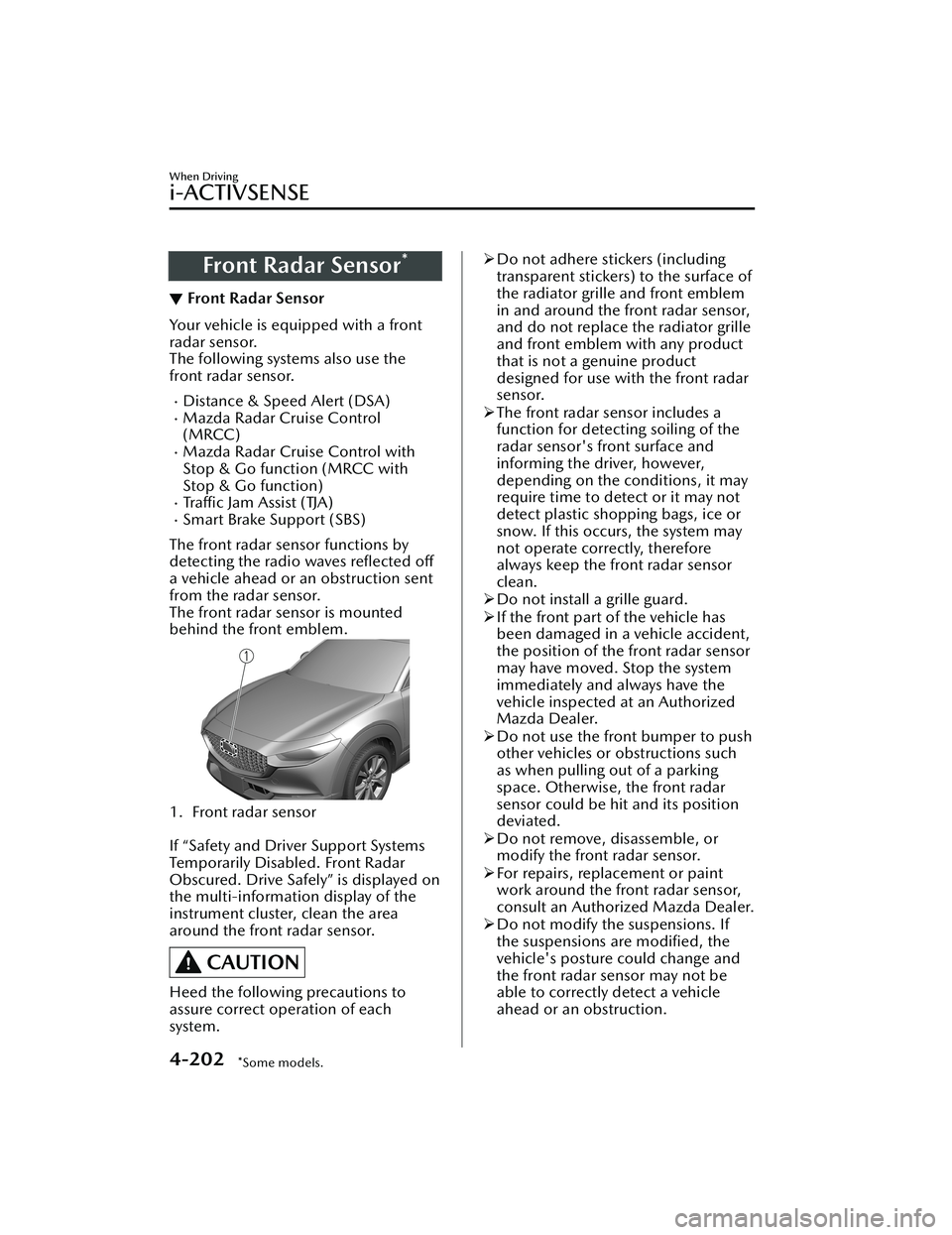
Front Radar Sensor*
▼Front Radar Sensor
Your vehicle is equipped with a front
radar sensor.
The following systems also use the
front radar sensor.
Distance & Speed Alert (DSA)Mazda Radar Cruise Control
(MRCC)
Mazda Radar Cruise Control with
Stop & Go function (MRCC with
Stop & Go function)
Tra ffi c Ja m A s s i s t ( TJ A )Smart Brake Support (SBS)
The front radar sensor functions by
detecting the radio waves reflected off
a vehicle ahead or an obstruction sent
from the radar sensor.
The front radar sensor is mounted
behind the front emblem.
1. Front radar sensor
If “Safety and Driver Support Systems
Temporarily Disabled. Front Radar
Obscured. Drive Safely” is displayed on
the multi-information display of the
instrument cluster, clean the area
around the front radar sensor.
CAUTION
Heed the following precautions to
assure correct operation of each
system.
Do not adhere stickers (including
transparent stickers) to the surface of
the radiator grille and front emblem
in and around the front radar sensor,
and do not replace the radiator grille
and front emblem with any product
that is not a genuine product
designed for use with the front radar
sensor.
The front radar sensor includes a
function for detecting soiling of the
radar sensor's front surface and
informing the driver, however,
depending on the conditions, it may
require time to detect or it may not
detect plastic shopping bags, ice or
snow. If this occurs, the system may
not operate correctly, therefore
always keep the front radar sensor
clean.
Do not install a grille guard.
If the front part of the vehicle has
been damaged in a vehicle accident,
the position of the front radar sensor
may have moved. Stop the system
immediately and always have the
vehicle inspected at an Authorized
Mazda Dealer.
Do not use the front bumper to push
other vehicles or obstructions such
as when pulling out of a parking
space. Otherwise, the front radar
sensor could be hit and its position
deviated.
Do not remove, disassemble, or
modify the front radar sensor.
For repairs, replacement or paint
work around the front radar sensor,
consult an Authorized Mazda Dealer.
Do not modify the suspensions. If
the suspensions are modified, the
vehicle's posture could change and
the front radar sensor may not be
able to correctly detect a vehicle
ahead or an obstruction.
When Driving
i-ACTIVSENSE
4-202*Some models.
CX-30_8JP5-EA-20K_Edition1_new 2020-7-22 15:50:09
Page 350 of 594

Front Side Radar Sensor*
▼Front Side Radar Sensor
Your vehicle is equipped with front
side radar sensor. The following
systems also use the front side radar
sensor.
Front Cross Traffic Alert (FCTA)
The front side radar sensor function by
detecting the radio waves reflected off
a vehicle approaching from the front or
an obstruction sent from the radar
sensor.
1. Front side radar sensor
The front side radar sensors are
installed inside the front bumper, one
on each side.
Always keep the surface of the front
bumper near the front side radar
sensors clean so that they operate
normally. Also, do not apply items such
as stickers.
Refer to Exterior Care on page 6-43.
CAUTION
If the front bumper receives a severe
impact, the system may no longer
operate normally. Stop the system
immediately and have the vehicle
inspected at an Authorized Mazda
Dealer.
NOTE
The detection ability of the front side
radar sensor has limitations. In the
following cases, the detection ability
may lower and the system may not
operate normally.
The front bumper near the front
side radar sensor has become
deformed.
Snow, ice or mud adheres to the
front side radar sensor on the front
bumper.
Under bad weather conditions
such as rain, snow and fog.
Under the following conditions, the
front side radar sensor cannot detect
target objects or it may be difficult to
detect them.
Small motorcycles, bicycles,
pedestrians, animals, shopping
carts, and stationary objects on a
road or a road side.
Vehicle shapes which do not
reflect radar waves well such as
empty trailers with a low vehicle
height and sports cars.
Vehicles are shipped with the
direction of the front side radar
sensor adjusted for each vehicle to a
loaded vehicle condition so that the
front side radar sensor detect
approaching vehicles correctly. If the
direction of the front side radar
sensor has deviated for some reason,
have the vehicle inspected at an
Authorized Mazda Dealer.
For repairs or replacement of the
front side radar sensor, or bumper
repairs, paintwork, and replacement
near the radar sensors, consult an
Authorized Mazda Dealer.
When Driving
i-ACTIVSENSE
4-204*Some models.
CX-30_8JP5-EA-20K_Edition1_new 2020-7-22 15:50:09
Page 351 of 594

The radar sensors are regulated by
the relevant radio wave laws of the
country in which the vehicle is
driven. If the vehicle is driven
abroad, authorization from the
country in which the vehicle is driven
may be required.Rear Side Radar Sensor*
▼Rear Side Radar Sensor
Your vehicle is equipped with rear side
radar sensor. The following systems
also use the rear side radar sensor.
Blind Spot Monitoring (BSM)Rear Cross Traffic Alert (RCTA)Smart Brake Support [Rear Crossing]
(SBS-RC)
The rear side radar sensors emit radio
waves and detect the radio waves
reflected off a vehicle approaching
from the rear or an obstruction.
1. Rear side radar sensor
The rear side radar sensors are installed
inside the rear bumper, one on each
side.
Always keep the surface of the rear
bumper near the rear side radar
sensors clean so that they operate
normally. Also, do not apply items such
as stickers.
Refer to Exterior Care on page 6-43.
CAUTION
If the rear bumper receives a severe
impact, the system may no longer
operate normally. Stop the system
immediately and have the vehicle
inspected at an Authorized Mazda
Dealer.
When Driving
i-ACTIVSENSE
*Some models.4-205
CX-30_8JP5-EA-20K_Edition1_new 2020-7-22 15:50:09