change wheel MAZDA MODEL CX-30 2021 Owner's Manual
[x] Cancel search | Manufacturer: MAZDA, Model Year: 2021, Model line: MODEL CX-30, Model: MAZDA MODEL CX-30 2021Pages: 594, PDF Size: 83.37 MB
Page 367 of 594

▼Viewing the Display
Predicted vehicle path assist lines display type
The projected path guidance mode displays
the predicted path of the vehicle after
you turn the steering wheel.
Use this mode for parking your vehi cle in a parking space or garage.
a) Projected vehicle path (yellow)
These lines are displayed as a reference for the projected path of the vehicle.
The lines displaying the projected vehicle path change after you turn the steering
wheel.
b) Extended vehicle width lines (blue) These lines indicate the vehicle's extended width.
These lines are not displayed when the vehicle's wheels are in the straight-ahead
position.
c) Distance guide lines (red) These lines indicate the approximate distance to a point measured from the
vehicle's rear (from the end of the bumper).
The blue line indicates the point about 0.5 m (19 in) from the rear bumper.
The red and yellow lines, wh ich change position after you turn the steering wheel,
indicate the points about 0.5 m (19 in) for the red line and 1.0 m (39 in) and 2.0
m (78 in) for the yellow lines from the rear bumper (at the center point of each of
the lines).
A degree of error occurs when the wheels are not in the straight-ahead position.
In the above illustration, the right side of the vehicle is in a position closer to the
actual distance displayed by the distance guide lines (red: about 0.5 m (19 in)
point, yellow: about 1.0 m (39 in), and yellow: about 2.0 m (78 in) point behind
the rear bumper), whereas the left side is in a position farther away.
CAUTION
The indicated position of the guide lines on the display changes depending on the
vehicle conditions (such as the number of occupants/cargo load) and the road
conditions (such as a steep gradient to the rear of the vehicle).
Always check the area to the vehicle's re ar and the surrounding area directly with
your eyes while backing up.
When Driving
Rear View Monitor
4-221
CX-30_8JP5-EA-20K_Edition1_new 2020-7-22 15:50:09
Page 402 of 594
No. MenuExplanation
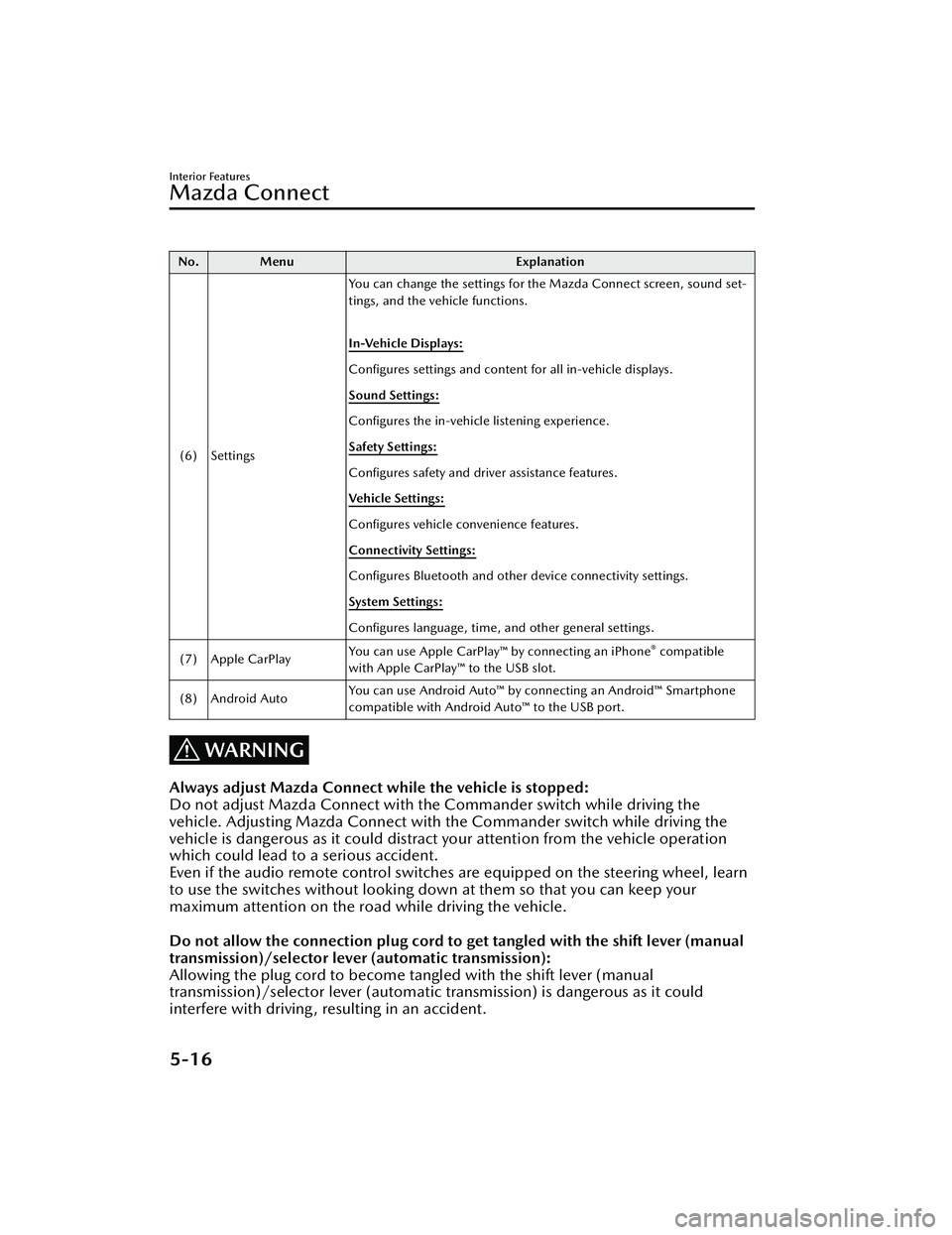
(6) Settings You can change the settings for the Mazda Connect screen, sound set-
tings, and the vehicle functions.
In-Vehicle Displays:
Configures settings and content for all in-vehicle displays.
Sound Settings:
Configures
the in-vehicle listening experience.
Safety Settings:
Configures safety and driver assistance features.
Ve h i c l e S e t t i n g s :
Configures vehicle convenience features.
Connectivity Settings:
Configures Bluetooth and other device connectivity settings.
System Settings:
Configures language, time, and other general settings.
(7) Apple CarPlay You can use Apple CarPlay™ by connecting an iPhone
® compatible
with Apple CarPlay™ to the USB slot.
(8) Android Auto You can use Android Auto™ by connecting an Android™ Smartphone
compatible with Android Auto™ to the USB port.
WARNING
Always adjust Mazda Connect while the vehicle is stopped:
Do not adjust Mazda Connect with th
e Commander switch while driving the
vehicle. Adjusting Mazda Connect with the Commander switch while driving the
vehicle is dangerous as it could distract your attention from the vehicle operation
which could lead to a serious accident.
Even if the audio remote control switches are equipped on the steering wheel, learn
to use the switches without looking down at them so that you can keep your
maximum attention on the road while driving the vehicle.
Do not allow the connection plug cord to get tangled with the shift lever (manual
transmission)/selector lever (automatic transmission):
Allowing the plug cord to become tangled with the shift lever (manual
transmission)/selector lever (automatic transmission) is dangerous as it could
interfere with driving , resulting in an accident.
Interior Features
Mazda Connect
5-16
CX-30_8JP5-EA-20K_Edition1_new 2020-7-22 15:50:09
Page 408 of 594
▼Audio Remote Control Switch Operation
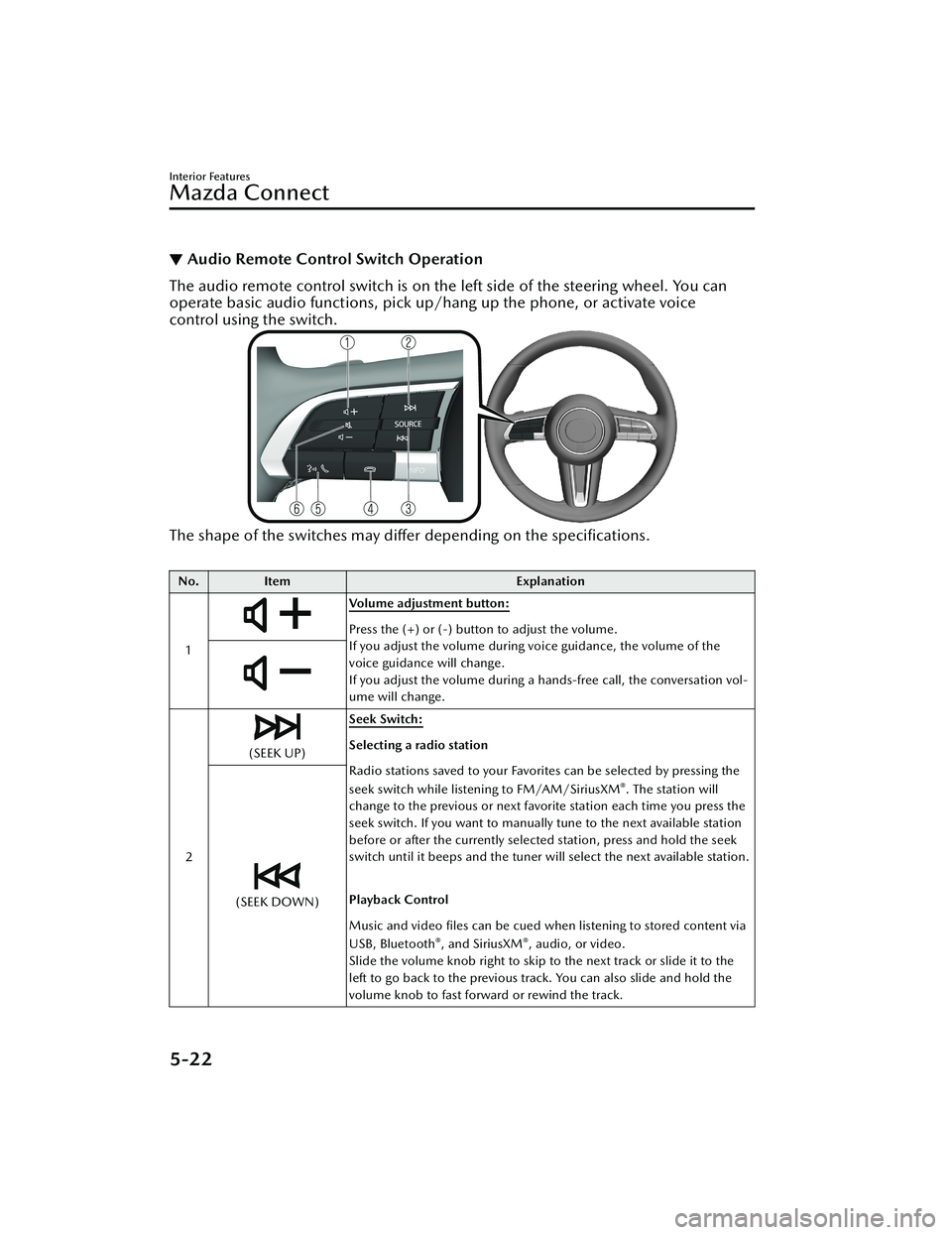
The audio remote control switch is on the left side of the steering wheel. You can
operate basic audio functions, pick up/hang up the phone, or activate voice
control using the switch.
The shape of the switches may
differ depending on the
specifications.
No. Item Explanation
1
Volume adjustment button:
Press the (+) or (-) button to adjust the volume.
If you adjust the volume during voice guidance, the volume of the
voice guidance will change.
If you adjust the volume during a hands-free call, the conversation vol-
ume will change.
2
(SEEK UP) Seek Switch:Selecting a radio station
Radio stations saved to your Favorites can be selected by pressing the
seek switch while listening to FM/AM/SiriusXM
®. The station will
change to the previous or next favorite station each time you press the
seek switch. If you want to manually tune to the next available station
before or after the currently selected station, press and hold the seek
switch until it beeps and the tuner will select the next available station.
Playback Control
Music and video files can be cued when listening to stored content via
USB, Bluetooth
®, and SiriusXM®, audio, or video.
Slide the volume knob right to skip to the next track or slide it to the
left to go back to the previous track. You can also slide and hold the
volume knob to fast forward or rewind the track.
(SEEK DOWN)
Interior Features
Mazda Connect
5-22
CX-30_8JP5-EA-20K_Edition1_new 2020-7-22 15:50:09
Page 489 of 594

CAUTION
Align the notch on the wheel cover
with the valve stem when installing
it.
1. Notch
2. Tire valve
Damage could occur during
installation if the wheel cover is not
properly aligned.
2. Loosen the lug nuts by turning them
counterclockwise one turn each,
but do not remove any lug nuts
until the tire has been raised off the
ground.
NOTE
If your Mazda is equipped with the
optional antitheft wheel lug nuts, a
special key must be used to unlock
the locking lug nut for each wheel.
For details, refer to the Locking Lug
Nuts on page 7-10.
3. Place the jack on the ground.
4. Turn the jack screw in the directionshown in the figure and adjust the
jack head so that it is close to the
jack-up position.
1. Jack head
5. Place the jack under the jack-up
position closest to the tire being
changed with the jack head
squarely under the jack-up point.
1. Jacking position
If Trouble Arises
Flat Tire
7-7
CX-30_8JP5-EA-20K_Edition1_new 2020-7-22 15:50:09
Page 514 of 594

▼Door-Ajar/Liftgate-Ajar Warning
Indication/Warning Light
The light turns on if any door/liftgate is
not closed securely.
Action to be taken
Close the door/liftgate securely.
▼Tire Pressure Monitoring System
(TPMS) Warning Indication/
Warning Light (Turns on)
If a tire pressure decreases below the
specified air pressure, the TPMS
warning light turns on.
At the same time, a message and the
tire pressure of each tire are displayed
on the multi-information display
alternately. In addition, the tire (s) with
low air pressure is displayed in yellow.
WARNING
Do not drive the vehicle at high
speeds if the TPMS warning light turns
on or
flashes:
Driving the vehicle at high speeds
while the TPMS warning light is turned
on or flashing is dangerous because
the brake performance and the
steering wheel operability will be
reduced. If the vehicle is driven at high
speeds or the brakes are suddenly
applied, it could lead to an accident.
Gradually apply the brakes to lower the
vehicle's speed.
Do not ignore the TPMS warning light
when it is turned on or flashing:
Continuing to driv e the vehicle while
ignoring the illumi nation/flashing of
the TPMS warning light is dangerous
because a tire may burst which could
lead to an accident. Take appropriate
measures as soon as possible.
NOTE
While the TPMS is learning the tire
positions, such as immediately after a
tire position has been changed, the tire
pressure at the tire position prior to it
being changed is displayed until the
system completes the learning. For this
reason, the tire pressures displayed for
the tire positions may be different from
the actual tire pressures at the tire
positions.
Action to be taken
Adjust the tire pressures to the
appropriate pressures.
Refer to Tire Inflation Pressure on page
6-31.
If Trouble Arises
Warning/Indicator Lights and Warning Sounds
7-32
CX-30_8JP5-EA-20K_Edition1_new 2020-7-22 15:50:09
Page 591 of 594

Index
Heated steering wheel.......... 2-19
Horn.................................... 4-56
Storage Compartments.............. 5-43 Center console..................... 5-44
Glove compartment..............5-43
Luggage compartment.......... 5-44
Overhead console................ 5-43
Storage pocket..................... 5-43
Storage Pocket.......................... 5-43
Sunshade.................................. 3-44
Sunvisors.................................. 5-36
T
Theft-Deterrent System.............. 3-47
Three-flash Turn Signal...............4-50
Tiedown Hook.......................... 7-20
Tires......................................... 6-31 Replacing a tire.................... 6-33
Replacing a wheel................ 6-34
Snow tires............................ 3-53
Specifications......................... 9-8
Temporary spare tire............. 6-33
Tire chains............................3-53
Tire inflation pressure............6-31
Tire rotation......................... 6-32
Uniform tire quality grading
system (UTQGS)................... 8-22
Tire Information Location of the tire label
(placard).............................. 8-28
Steps for determining the correct
load limit............................. 8-35
Tire labeling......................... 8-24
Tire maintenance.................. 8-30
Vehicle loading.....................8-31
Tire Pressure Monitoring
System.................................... 4-213
Touch Sensor Inoperable Warning
Beep (With the advanced keyless
function)...................................7-39
To w i n g Recreational towing.............. 3-57
Trailer towing....................... 3-57
Towing Description................... 7-19
Traction Control System (TCS).... 4-76 TCS OFF Indicator Light......... 4-77
TCS OFF switch.................... 4-77
TCS/DSC indicator light........4-76
Traffic Jam Assist (TJA).............. 4-137 Close proximity warning...... 4-142
Display indication............... 4-141
Setting the system...............4-143
Shift-up/shift-down request
display............................... 4-149
Stop hold control............... 4-150
Tra ffi c Sign Recognition System
(TSR)...................................... 4-101
Trouble Battery runs out.................... 7-13
Emergency starting................7-16
Flat tire.................................. 7-5
Overheating......................... 7-17
Parking in an emergency......... 7-2
When liftgate cannot be
opened................................ 7-43
Turn and Lane-Change Signals.... 4-49
Turn Signals.............................. 4-49
U
Ultrasonic Sensor.................... 4-207
V
Vehicle Information Labels Chassis number...................... 9-2
Engine number....................... 9-3
Motor vehicle safety standard
label...................................... 9-2
Tire pressure label.................. 9-2
Vehicle emission control
information label.................... 9-2
10-9
CX-30_8JP5-EA-20K_Edition1_new 2020-7-22 15:50:09