steering wheel MAZDA MODEL CX-30 2021 Owner's Manual
[x] Cancel search | Manufacturer: MAZDA, Model Year: 2021, Model line: MODEL CX-30, Model: MAZDA MODEL CX-30 2021Pages: 594, PDF Size: 83.37 MB
Page 239 of 594

Lane Departure WarningSystem (LDWS)
*
▼Lane Departure Warning System
(LDWS)
The LDWS alerts the driver that the
vehicle may be deviating from its lane.
The system detects the white (yellow)
lines on the traffic lane using the
forward sensing camera (FSC) and if it
determines that the vehicle might be
deviating from its lane, it
notifies the
driver by the LDWS.
Refer to Forward Sensing Camera
(FSC) on page 4-198.
Use the LDWS when you drive the
vehicle on roads with white (yellow)
lines.
1. Forward sensing camera (FSC)
WARNING
Do not rely completely on the LDWS:
The LDWS system is not designed to
compensate for a driver’s lack of
caution and relying too much on the
system could lead to an accident.
The functions of the LDWS have
limitations. Always stay on course
using the steering wheel and drive
with care.
CAUTION
Heed the following cautions so that
the LDWS can operate normally.
Do not modify the vehicle's
suspensions.
Always use tires of the specified type
and size for the front and rear
wheels. Consult an Authorized
Mazda Dealer for tire replacement.
NOTE
The system may not operate normally
under the following conditions.
The white (yellow) lane lines are less
visible because of dirt or paint
flaking.
White (yellow) lane lines are less
visible because of bad weather (rain,
fog, or snow).
The vehicle is driven on a temporary
lane or section with a closed lane
resulting from construction where
there might be multiple white
(yellow) lane lines, or they are
interrupted.
The camera picks up an obscure line,
such as a temporary line being used
for construction, or because of
shade, unmelted snow, or groovesfilled with water.
When Driving
i-ACTIVSENSE
*Some models.4-93
CX-30_8JP5-EA-20K_Edition1_new 2020-7-22 15:50:09
Page 241 of 594

When temporarily canceling the
system
The LDWS goes on standby in the
following cases: The LDWS operation
is automatically restored when the
system's operation conditions are met.
The system cannot detect white
(yellow) lane lines.
The vehicle speed is less than about
56 km/h (35 mph).
The turn signal lever is operated.The accelerator pedal is depressed.The steering wheel is operated.The brake pedal is operated.
The function is temporarily stopped.
The LDWS stops functioning in the
following cases:
The temperature in the forward
sensing camera (FSC) is too high or
too low.
The windshield around the forward
sensing camera (FSC) is foggy.
The windshield around the forward
sensing camera (FSC) is blocked by
an obstruction, causing poor forward
visibility.
Strong light (such as sunlight, or
headlights (high-beam) of
on-coming vehicles) is directed at
the forward sensing camera (FSC).
System malfunction
If there is a problem with the system,
the i-ACTIVSENSE status symbol
(warning/risk avoidance support
system) (white) and the i-ACTIVSENSE
warning indication/warning light on
the multi-information display turns on
and a message is indicated.
Refer to i-ACTIVSENSE Status Symbol
(Warning/Risk Avoidance Support
System) on page 4-88.
▼ LDWS Warning
If the system determines that the
vehicle may deviate from its lane, a
warning (beep sound, steering wheel
vibration) is activated and the direction
in which the system determines that
the vehicle may deviate is indicated on
the multi-information display and the
active driving display.
Multi-information display
Active driving display
NOTE
The LDWS settings can be changed.
Refer to the Settings section in the
Mazda Connect Owner's Manual.
You may not be able to hear the
LDWS warning sound depending on
the surrounding conditions such as
outside noise.
If you set the LDWS to vibrate the
steering wheel, you may not feel the
vibrations depending on the road
surface conditions.
When Driving
i-ACTIVSENSE
4-95
CX-30_8JP5-EA-20K_Edition1_new
2020-7-22 15:50:09
Page 255 of 594

WARNING
Do not rely completely on DAA and
always drive carefully:
The DAA detects driver fatigue and
decreased attentiveness and
encourages the driver to take a rest,
however, it is not designed to prevent
the vehicle from straying. If you rely too
much on the DAA it could lead to an
accident. Drive carefully and operate
the steering wheel appropriately.
In addition, the system may not be
able to detect driver fatigue and
decreased attentiveness correctly
depending on the traffic and driving
conditions. The driver must take
sufficient rest in order to drive safely.
NOTE
The DAA operates when all of the
following conditions are met.
The vehicle speed is about 65 to
140 km/h (41 to 86 mph).
The system detects white (yellow)
lane lines.
The system has completed learning
of the driver’s driving data after 60
minutes have passed since the
driver began driving vehicle.
The DAA does not operate under the
following conditions.
The vehicle speed is less than
about 65 km/h (41 mph).
The vehicle speed exceeds about
140 km/h (86 mph).
The vehicle is making a sharp turn.The vehicle is changing lanes.The system cannot detect white
(yellow) lane lines.
The DAA may not operate normally
under the following conditions.
White (yellow) lane lines are less
visible because of dirt or fading/
patchiness.
The vehicle is jolted or swayed
continuously by strong winds or
rough roads.
The vehicle is driven aggressively.When making frequent lane
changes.
The vehicle is making a curve.The DAA detects driver fatigue and
decreased attentiveness based on
the driving data when the vehicle is
driven at about 65 to 140 km/h (41
to 86 mph) for about 20 minutes.
The driving data will be reset under
the following conditions.
The vehicle is stopped for 15
minutes or longer.
The vehicle is driven at less than
about 65 km/h (41 mph) for
about 30 minutes.
The ignition is switched off.After the DAA has displayed the first
message encouraging rest, it does
not display the next one until 60
minutes have passed.
When Driving
i-ACTIVSENSE
4-109
CX-30_8JP5-EA-20K_Edition1_new 2020-7-22 15:50:09
Page 257 of 594
WARNING
Do not rely completely on the DM
and always drive carefully:
The DM is a system which detects
driver fatigue and sleepiness, and
encourages the driver to take a rest.
This is not designed to prevent driver
fatigue and sleepiness, and
over-reliance on the system could lead
to an accident. Drive carefully and turn
the steering wheel appropriately.
In addition, the system may not be
able to detect driver fatigue and
sleepiness correctly depending on the
traffic and driving conditions. The
driver must take sufficient rest in order
to drive safely.
Operation conditions
The DM begins monitoring after 20
minutes have passed since the driver
began driving the vehicle and when
the vehicle speed is about 5 km/h (3
mph) or faster.
NOTE
If the vehicle speed decreases to less
than about 5 km/h (3 mph) while
the DM is monitoring , the DM stops
monitoring for 6 mi nutes even if the
vehicle speed returns to about 5
km/h (3 mph) or faster.
If the driver monitoring camera does
not recognize the driver correctly, the
DM may not monitor correctly.
Refer to Driver Monitoring Camera
on page 4-208.
After the DM has displayed the first
message encouraging the driver to
take a rest, it does not display it
again during the following periods.
After displaying the warning
pattern (caution), the next warning
pattern (caution) is not displayed
until 45 minutes have passed.
After displaying the warning
pattern (warning), the next
warning pattern (warning) is not
displayed until 15 minutes have
passed.
After displaying the warning
pattern (warning), the next
warning pattern (caution) is not
displayed until 45 minutes have
passed.
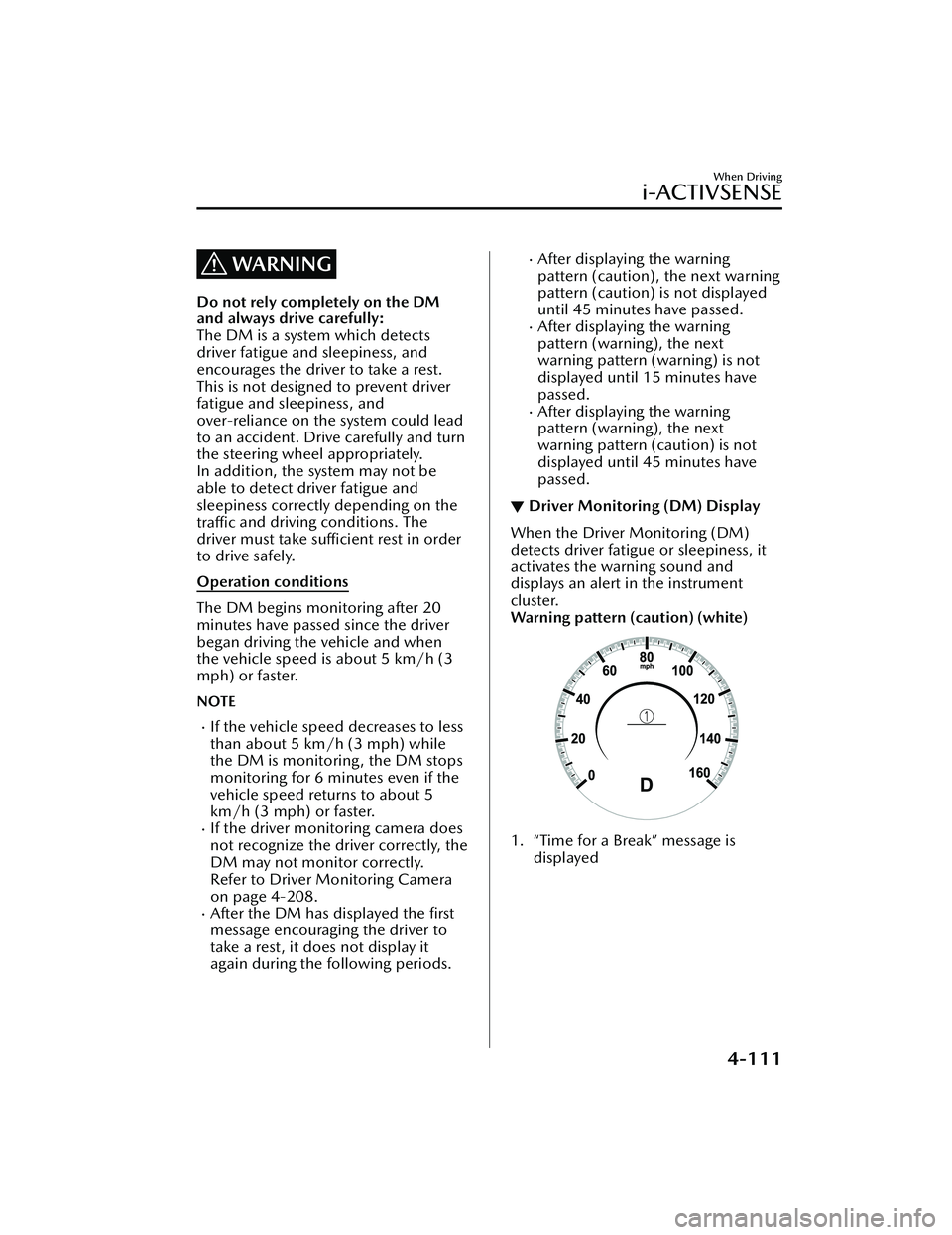
▼ Driver Monitoring (DM) Display
When the Driver Monitoring (DM)
detects driver fatigue or sleepiness, it
activates the warning sound and
displays an alert in the instrument
cluster.
Warning pattern (caution) (white)
1. “Time for a Break” message is
displayed
When Driving
i-ACTIVSENSE
4-111
CX-30_8JP5-EA-20K_Edition1_new 2020-7-22 15:50:09
Page 283 of 594

NOTE
When you resume driving by pressing
the RES switch, your vehicle does not
start moving until the distance
between your vehicle and the vehicle
ahead lengthens to the specified
distance or farther.
If the MRCC with Stop & Go
function is temporarily canceled
during stop hold control, you cannot
resume driving by pressing the RES
switch when there are no vehicles in
front of your vehicle. Depress the
accelerator pedal and resume driving
the vehicle.
If the vehicle ahead starts moving
within 3 seconds after your vehicle is
stopped by the stop hold control,
headway control will resume even if
you do not resume driving your
vehicle, such as by depressing the
accelerator pedal.
Resume driving information
If you do not resume driving within a
few seconds after the vehicle ahead
starts moving , the multi-information
display vehicle-ahead indication
flashes to urge the driver to resume
driving. If you do not resume driving
after the indicator light flashes, a
sound is activated to urge you to
resume driving.
Traffic Jam Assist (TJA)*
▼ Tra ffi c
Jam Assist (TJA)
The TJA is a system which consists of a
headway control function and a
steering assist function for reducing
driver fatigue during traffic jams when
driving on expressways or highways.
This system performs headway control
to maintain a constant distance
between your vehicle and a vehicle
ahead at a preset vehicle speed
without you having to use the
accelerator or brake pedal. Even
further, with the steering assist
function, when vehicle lane lines are
detected, the function assists the driver
in keeping the vehicle within the lane
lines. If lane lines are not detected, the
function provides the driver driving
assistance in keeping the vehicle along
the motion path with the vehicle
ahead.
WARNING
Do not rely completely on TJA:
The TJA is not an automated driving
system. In addition, the functions
have limitations. Do not rely
completely on the system and always
stay on course using the steering
wheel.
Set a vehicle speed within the speed
limit according to the road
conditions and the weather
conditions.
When Driving
i-ACTIVSENSE
*Some models.4-137
CX-30_8JP5-EA-20K_Edition1_new 2020-7-22 15:50:09
Page 287 of 594

NOTE
Steering assist limit warning
If the steering assist function cannot
keep the vehicle within the lane lines
while the steering assist function is
operating , a warning sound is activated
and a warning is displayed on the
multi-information display to urge the
driver to operate the steering wheel.
▼Tra ffi c
Jam Assist (TJA) Display
Indication
The TJA setting status and operation
conditions are indicated on the
multi-information display or the active
driving display.
Multi-information display (Basic
display)
1. Vehicle ahead display
2. TJA set vehicle speed
Multi-information display
(i-ACTIVSENSE display)
1. Vehicle ahead display
2. TJA set vehicle speed
Active driving display
1. Vehicle ahead display
2. TJA set vehicle speed
Steering assist function display
When the steering assist function
operates, the steering assist operation
display on the display changes from
white to green.
NOTE
You can view the multi-information
display to check whether the steering
assist is performing controls in
conjunction with the traffic lane lines
or a vehicle ahead.
When Driving
i-ACTIVSENSE
4-141
CX-30_8JP5-EA-20K_Edition1_new 2020-7-22 15:50:09
Page 289 of 594

▼Setting the System
Operation conditions
Headway control function
The TJA operates when all of th
e following conditions are met.
(Automatic transmission vehicle)
The vehicle speed is about 0 km/h (0 mph) to 145 km/h (90 mph).The selector lever is in the D or M position (manual mode).(Manual transmission vehicle)
The vehicle speed is about 30 km/h (19 mph) to 145 km/h (90 mph).The shift lever is in a position other than the R or N position.The clutch pedal is not depressed.The TJA is operating.The headway control function of the Mazda Radar Cruise Control (MRCC) or
Mazda Radar Cruise Contro l with Stop & Go function (MRCC with Stop & Go
function) is set to operable (if it was set to inoperable, set it to operable using the
personalization function).
The brake pedal is not depressed.The parking brake is released (Electric Parking Brake (EPB) indicator light is turned
off).
There is no problem with the DSC.All the doors are closed.The driver's seat belt is fastened.
NOTE
(Automatic transmission vehicle)
Under the following conditions, the TJA cannot be used when the vehicle speed is
30 km/h (19 mph) or slower.
There is a problem with the stop hold control function.There is a problem with the Electric Parking Brake (EPB).The TJA may not launch directly after the engine starts.
Steering assist function
The steering assist function operates when all of the following conditions are met.
Your vehicle is moving and less than about 56 km/h (35 mph).White (yellow) lane lines on both sides are detected and you are driving near the
center of the lane, or your vehicle detects a vehicle ahead.
The steering wheel is not turned sharply.The turn signal lever is not operated.The headway control function is operating.
When Driving
i-ACTIVSENSE
4-143
CX-30_8JP5-EA-20K_Edition1_new 2020-7-22 15:50:09
Page 294 of 594

Steering assist function
If any of the following conditions occurs, the steering assist function is temporarily
canceled.
The headway control function is canceled.White (yellow) lane lines cannot be detected or a vehicle ahead cannot be
recognized.
Your vehicle speed is more than about 64 km/h (40 mph).The accelerator pedal is operated.The turn signal lever is operated.The vehicle is being driven on a sharp curve.The width of a lane is excessively narrow or wide.The vehicle crosses a lane line.The driver takes his/her hands off the steering wheel.The steering wheel is operated abruptly.There is a problem with the system.The temperature in the Forward Sensing Camera (FSC) is too high or too low.The windshield around the Forwar d Sensing Camera (FSC) is foggy.The windshield around the Forward Se nsing Camera (FSC) is blocked by an
obstruction, causing poor forward visibility.
NOTE
If you take your hands off the steering wheel (not holding the steering wheel), the
warning sound is activated and an alert is indicated on the multi-information display
and the active driving display.
Multi-information display
Active driving display
When Driving
i-ACTIVSENSE
4-148
CX-30_8JP5-EA-20K_Edition1_new 2020-7-22 15:50:09
Page 295 of 594

If the steering wheel is held lightly, or depending on the road conditions, the system
determines that you have released the steering wheel (not holding the steering
wheel) even if you are holding it, and an al ert is indicated on the multi-information
display and the active driving display.
To r e s u m e o p e ra t i o n
If the TJA is temporarily canceled, it will resume operation at the previously set speed
by pressing the RES switch after all of the operation conditions have been met.
NOTE
If the set speed is not indicated on the display, the system does not operate even if
the RES switch is pressed.
After the operation, the steering assist op eration may not operate for a period of 5
seconds at the most until the lane lines are detected or a vehicle ahead is
recognized.
Tu r n i n g off
When the TJA switch is pressed while the TJA is operating, the TJA turns off.
▼Shift-up/Shift-down Request
Display (Manual Transmission)
The shift-up or shift-down request
display might be displayed while the
TJA is operating. When this occurs, shift
gears because the gear position is not
appropriate.
Request Indication on display
Shift up Shift Up to a Higher Gear
Shift down Shift Down to a Lower Gear
NOTE
If the gears are not shifted up even
though the shift-up request
indication is displayed, load will be
applied to the engine and the TJA
might be automatically canceled or
engine damage could occur.
If the gears are not shifted down
even though the shift-down request
indication is displayed, the TJA might
be automatically canceled or engine
stalling could occur.
When Driving
i-ACTIVSENSE
4-149
CX-30_8JP5-EA-20K_Edition1_new 2020-7-22 15:50:09
Page 297 of 594

Lane-keep Assist System(LAS)
*
▼Lane-keep Assist System (LAS)
The LAS provides steering assistance to
help the driver stay within the vehicle
lane if the vehicle might be deviating.
The forward sensing camera (FSC)
detects the white lines (yellow lines) of
the vehicle lane in which the vehicle is
traveling and if the system determines
that the vehicle may deviate from its
lane, it operates the electric power
steering to assist the driver’s steering
operation. The system also alerts the
driver by displaying an alert on the
multi-information display and the
active driving display. Use the system
when you drive the vehicle on roads
with white (yellow) lines such as
expressways and highways.
1. Forward sensing camera (FSC)
WARNING
Do not rely completely on the LAS:
The LAS is not an automated driving
system. In addition, the system is not
designed to compensate for a
driver’s lack of caution, and
over-reliance on the system could
lead to an accident.
The functions of the LAS have
limitations. Always stay on course
using the steering wheel and drive
with care.
Do not use the LAS under the
following circumstances, otherwise it
may result in an accident.
The vehicle is driven on slippery
roads such as icy or snow-covered
roads, and unpaved roads.
Tires of a
different
specified size
are used, such as a temporary
spare tire.
Tires with
insufficient tread are
used.
The tire pressures are not adjusted
to the
specified pressure.
The vehicle is being used to tow a
camper or boat trailer.
Tire chains are used.
The vehicle is driven on roads with
lane lines other than white (yellow)
lines, such as an expressway.
CAUTION
Heed the following cautions so that
the LAS can operate normally.
Do not modify the vehicle's
suspensions.
Always use tires of the specified type
and size for the front and rear
wheels. Consult an Authorized
Mazda Dealer for tire replacement.
When Driving
i-ACTIVSENSE
*Some models.4-151
CX-30_8JP5-EA-20K_Edition1_new 2020-7-22 15:50:09