back seat MAZDA MODEL CX-30 2022 Owner's Guide
[x] Cancel search | Manufacturer: MAZDA, Model Year: 2022, Model line: MODEL CX-30, Model: MAZDA MODEL CX-30 2022Pages: 595, PDF Size: 84.02 MB
Page 87 of 595
A rear passenger or luggage push or
pull down on the front passenger
seatback.
A rear passenger steps on the front
passenger seat rails with their feet.
Luggage or other items are placed on
the seatback or hung on the head
restraint.
Heavy items are placed in the
seatback map pocket.
The seat is washed.
Liquids are spilled on the seat.
The front passenger seat is moved
backward, pushing into luggage or
other items placed behind it.
The front passenger seatback
contacts the rear seat.
Luggage or other items are placed
between the front passenger seat
and driver seat.
Any accessories which might increase
the total seated weight on the front
passenger seat are attached to the
front passenger seat.
CAUTION
To assure proper deployment of the
front air bag and to prevent damage
to the sensors in the front seat
bottoms:
Do not place sharp objects on the
front seat bottoms or leave heavy
luggage on them.
Do not spill any liquids on the
front seats or under the front seats.
To allow the sensors to function
properly, always perform the
following:
Adjust the front seats as far back as
possible and always sit upright
against the seatbacks with seat
belts worn properly.
If you place your child on the front
passenger seat, secure the
child-restraint system properly and
slide the front passenger seat as far
back as possible (page 2-43).
NOTE
The system requires about 10
seconds to alternate between turning
the front passenger front and side air
bags and knee air bags, and seat belt
pretensioner system on or off.
The front passenger air bag
deactivation indicator light may
illuminate repeatedly if luggage or
other items are put on the front
passenger seat, or if the temperature
of the vehicle's interior changes
suddenly.
The front passenger air bag
deactivation indicator light may
illuminate for 10 seconds if the total
seated weight on the front passenger
seat changes.
The air bag/front seat belt
pretensioner system warning light
might illuminate if the front
passenger seat receives a severe
impact.
If the front passenger air bag
deactivation indicator light does not
illuminate after installing a
child-restraint system on the front
passenger seat,
first, re-install your
child-restraint system according to
the procedure in this owner's
manual. Then, if the front passenger
air bag deactivation indicator light
still does not illuminate, install the
child-restraint system on the rear seat
and consult an Authorized Mazda
Dealer as soon as possible.
Essential Safety Equipment
SRS Air Bags
2-70
CX-30_8KN2-EA-21L_Edition1_new 2021-9-15 19:39:56
Page 88 of 595

If the front passenger air bag
deactivation indicator light
illuminates when an adult is seated
in the front passenger seat, have the
passenger re-adjust their posture by
sitting with their feet on the floor,
and then re-fastening the seat belt. If
the front passenger air bag
deactivation indicator light still
illuminates, move the passenger to
the rear seat. If sitting in the rear seat
is not possible, slide the front
passenger seat as far back as
possible. Consult an Authorized
Mazda Dealer as soon as possible.
▼Driver and Front Passenger Buckle
Switches
The buckle switches on the front seat
belts detect whether or not the front
seat belts are securely fastened and
further control the deployment of the
air bags.
Constant Monitoring
▼Constant Monitoring
The following components of the air
bag systems are monitored by a
diagnostic system:
Front air bag sensorsCrash sensors, and diagnostic
module (SAS unit)
Side crash sensorsAir bag modulesFront seat belt pretensionersAir bag/Front seat belt pretensioner
system warning light
Related wiring
(With Driver and Front Passenger
Occupant Classification System)
Driver seat slide position sensor*
Front passenger occupant
classification sensor
Front passenger occupantclassification module
Front passenger air bag deactivation
indicator light
Front passenger seat belt buckle
switch
The diagnostic module continuously
monitors the system's readiness. This
begins when the ignition is switched
ON and continues while the vehicle is
being driven.
Essential Safety Equipment
SRS Air Bags
*Some models.2-71
CX-30_8KN2-EA-21L_Edition1_new 2021-9-15 19:39:56
Page 110 of 595
Liftgate
▼Liftgate
WARNING
Never allow a person to ride in the
luggage compartment:
Allowing a person to ride in the
luggage compartment is dangerous.
The person in the luggage
compartment could be seriously
injured or killed during sudden braking
or a collision.
Do not drive with the liftgate open:
Exhaust gas in the cabin of a vehicle is
dangerous. An open liftgate in a
moving vehicle will cause exhaust gas
to be drawn into the cabin. This gas
contains CO (carbon monoxide),
which is colorless, odorless, and highly
poisonous, and it can cause loss of
consciousness and death. Moreover,
an open liftgate could cause occupants
to fall out in an accident.
Do not stack or leave loaded luggage
unsecured in the luggage
compartment:
Otherwise, the luggage may move or
collapse, resulting in injury or an
accident. In addition, do not load
luggage higher than the seatbacks. It
may affect the side or rear field of view.
Additionally, if the air bags deploy, the
cargo may scatter which could result in
serious injury or death.
CAUTION
Before opening the liftgate, remove
any snow and ice accumulation on it.
Otherwise, the liftgate could close
under the weight of the snow and ice
resulting in injury.
Be careful when opening/closing the
liftgate during strong winds. If a
strong gust blows against the liftgate,
it could close suddenly resulting in
injury.
Fully open the liftgate and make sure
that it stays open. If the liftgate is
only opened partially, it could slam
shut by vibration or wind gusts
resulting in injury.
When loading or unloading luggage
in the luggage compartment, turn
off
the engine. Otherwise, you could get
burned by the heat of the exhaust
gas.
Be careful not to apply excessive
force to the damper stay on the
liftgate such as by putting your hand
on the stay. Otherwise, the damper
stay may bend and
affect the liftgate
operation.
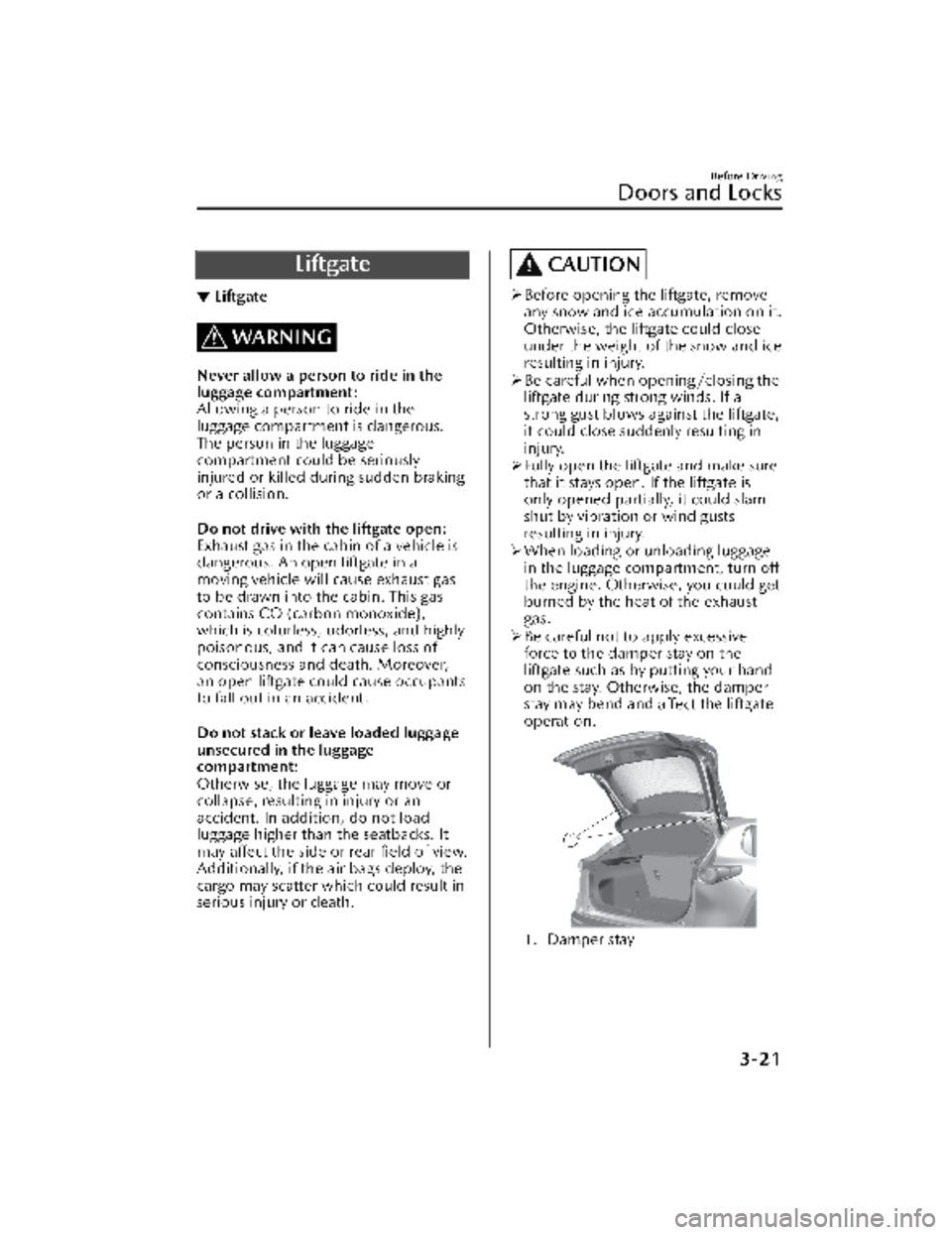
1. Damper stay
Before Driving
Doors and Locks
3-21
CX-30_8KN2-EA-21L_Edition1_new 2021-9-15 19:39:56
Page 126 of 595

▼Rearview Mirror
WARNING
Do not stack cargo or objects higher
than the seatbacks:
Cargo stacked higher than the
seatbacks is dangerous. It can block
your view in the rearview mirror, which
might cause you to hit another car
when changing lanes.
Rearview mirror adjustment
Before driving, adjust the rearview
mirror to center on the scene through
the rear window.
NOTE
For the manual day/night mirror,
perform the adjustment with the day/
night lever in the day position.
Reducing glare from headlights
Manual day/night mirror
Push the day/night lever forward for
day driving. Pull it back to reduce glare
of headlights from vehicles at the rear.
1. Day/Night lever
2. Night
3. Day
Auto-dimming mirror
The auto-dimming mirror
automatically reduces the glare of
headlights from vehicles at the rear
when the ignition is switched ON.
(With ON/OFF button)
Press the ON/OFF button (
) to cancel
the auto-dimming function. The
indicator light will turn off.
To reactivate the auto-dimming
function, press the ON/OFF button
(
). The indicator light will illuminate.
1. ON/OFF button
2. Indicator light
Before Driving
Mirrors
3-37
CX-30_8KN2-EA-21L_Edition1_new 2021-9-15 19:39:56
Page 248 of 595

When there is insufficient darkness
such as at dawn or dusk.
When the luggage compartment is
loaded with heavy objects or the rear
passenger seats are occupied.
When visibility is reduced due to a
vehicle in front of you spraying water
from its tires onto your windshield.
▼To Operate the System
The HBC operates to switch the
headlights automatically between high
and low beams after the ignition is
switched ON and the headlight switch
is in the AUTO and low beam position.
The HBC determines that it is dark
based on the brightness of the
surrounding area. At the same time,
the HBC indicator light (green) in the
instrument cluster illuminates.
NOTE
Operation of the HBC function can be
disabled.
Refer to the Settings section in the
Mazda Connect Owner's Manual.
▼Manual Switching
Switching to low beams
Switch the headlight switch to the
position, or press the high beam
control switch.
The HBC indicator light (green) turns
off.
1. High beam control switch
If the HBC is turned off using the high
beam control switch, press the high
beam control switch again to turn the
HBC back on.
Switching to high beams
Shift the lever to the high beam
position.
The HBC indicator light (green) turns
off and the headlight high-beam
indicator light is illuminated.
When Driving
i-ACTIVSENSE
4-101
CX-30_8KN2-EA-21L_Edition1_new
2021-9-15 19:39:56
Page 250 of 595

The surrounding brightness suddenly
changes such as when entering or
exiting a tunnel.
Back-light is reflected off the road
surface.
The road surface is wet and shiny
after rain, or there are puddles on
the road.
The width of a lane is excessively
narrow.
The vehicle is driven on roads with
tight curves.
Heavy luggage is loaded in the
luggage compartment or on the rear
seat causing the vehicle to tilt.
The vehicle is driven through a fork in
the road or a junction.
The shade of a guardrail parallel to a
white (yellow) lane line is cast on the
road.
The illumination of the headlights is
weakened because of dirt or the
optical axis is deviated at night.
The road is excessively uneven.The vehicle is shaken after hitting a
road bump.
A vehicle in front of your vehicle is
running near a white (yellow) lane
line making it less visible.
The windshield is dirty or foggy.Strong light is directed from the front
of the vehicle (such as sunlight, or
headlights (high-beam) of
on-coming vehicles).
The vehicle is driven through an
intersection or a roundabout.
▼When the System Operates
When the ignition is switched ON, the
i-ACTIVSENSE status symbol (warning/
risk avoidance support system) (white)
turns on and the system goes on
standby.
NOTE
If the i-ACTIVSENSE status symbol
(warning/risk avoidance support
system) (white) does not turn on, the
system is canceled using the
i-ACTIVSENSE OFF switch or the
personalization feature.
Operation conditions
When all of the following conditions
are met, the i-ACTIVSENSE status
symbol (warning/risk avoidance
support system) on the
multi-information display changes
from white to green and the system
becomes operational.
The ignition is switched ON.The vehicle speed is about 64 km/h
(40 mph) or faster.
The system detects white (yellow)
lane lines.
NOTE
When the system does not detect a
white (yellow) lane line on one side
only, the system does not operate on
the side that is not being detected.
When Driving
i-ACTIVSENSE
4-103
CX-30_8KN2-EA-21L_Edition1_new
2021-9-15 19:39:56
Page 259 of 595

An object placed on the dashboard is reflected in the windshield and picked up
by the camera.
Heavy luggage is loaded in the luggage compartment or on the rear seat and the
vehicle is tilted.
The tire pressures are not adjusted to the specified pressure.Tires other than standard tires are equipped.The vehicle is driven on the ramp and surrounding area to or from a rest area or
a tollgate on a highway.
When surrounding brightness suddenly changes such as when entering or exiting
a tunnel.
The illumination of the headlights is weakened because of dirt or the optical axis
is deviated.
The windshield is dirty or foggy.The windshield and camera are fogged (water droplets).Strong light is directed at the front of the vehicle (such as backlight or high-beam
headlights of on-coming vehicles).
The vehicle is making a sharp turn.Strong light reflects off the road.A traffic sign is in a position which makes it difficult to reflect the light from the
vehicle's headlights, such as when the ve hicle is driven at night or in a tunnel.
The vehicle is driven under weather conditions such as rain, fog, or snow.The stored map data for the navigation system is not current.A traffic sign is obscured by mud or snow.A traffic sign is concealed by trees or a vehicle.A traffic sign is partially shaded.A traffic sign is bent or warped.A traffic sign is too low or too high.A traffic sign is too bright or too dark (including electronic traffic signs).A traffic sign is too big or too small.There is an object similar to the traffic sign being read (such as another traffic
sign or other signs resembling it).
The TSR can be set to invisible on the active driving display.
Refer to the Settings section in the Mazda Connect Owner's Manual.
▼Traffic Sign Display Indication
The following traffic signs are displayed
on the active driving display/
instrument cluster.
Speed limit signs
Do not enter signs
Stop signs
NOTE
Speed limit signs
When the vehicle speed is about 1
km/h (0.6 mph) or faster, the speed
limit sign is displayed when any one
of the following conditions are met.
When Driving
i-ACTIVSENSE
4-112
CX-30_8KN2-EA-21L_Edition1_new
2021-9-15 19:39:56
Page 287 of 595

If there is a structure on the road or
an object (such as a monorail) at a
low height off the ground in front of
the vehicle, the system may operate.
Therefore, do not use the TJA.
Do not use the TJA under conditions
in which close proximity warnings
are frequently activated.
If it is necessary to accelerate for a
lane change or the vehicle ahead
brakes suddenly causing you to close
in on the vehicle rapidly, accelerate
using the accelerator pedal or
decelerate using the brake pedal
depending on the conditions.
While the TJA is in use, any intended
engine braking does not occur even
if you shift the selector lever. If
deceleration is required, lower the
vehicle speed setting or depress the
brake pedal.
While braking by the TJA control is
operating, you might hear an
operation sound, however, this does
not indicate a problem.
The brake lights turn on while
braking by the TJA control is
operating, however, they may not
turn on while the vehicle is on a
down slope at the set vehicle speed
or traveling at a constant speed and
following a vehicle ahead.
Under the following conditions, the
TJA may not be able to detect white
(yellow) lines or vehicles ahead
correctly and the TJA may not
operate normally.
The forward sensing camera (FSC)
cannot recognize the area in front
of the vehicle due to soiling or fog.
The white (yellow) lane lines are
less visible because of dirt or paintflaking.
White (yellow) lane lines or
vehicles ahead are less visible
because of bad weather (rain, fog ,
or snow).
The vehicle is driven on a
temporary lane or section with a
closed lane resulting from
construction where there might be
multiple white (yellow) lane lines,
or they are interrupted.
The camera picks up an obscure
line, such as a temporary line being
used for construction, or because
of shade, unmelted snow, or
grooves filled with water.
The road surface is wet and shiny
after rain, or there are puddles on
the road.
Heavy luggage is loaded in the
luggage compartment or on the
rear seat causing the vehicle to tilt.
A vehicle in front of your vehicle is
running near a white (yellow) lane
line making it less visible.
The windshield is dirty or foggy.The vehicle is driven through an
intersection, a junction, or a fork in
the road.
While white (yellow) lane lines
cannot be detected due to road or
weather conditions.
The surrounding brightness
suddenly changes such as when
entering or exiting a tunnel.
The illumination of the headlights
is weakened because of dirt or the
optical axis is deviated at night.
Back-light is reflected off the road
surface or the road surface is wet
and shiny after rain.
The shade of a guardrail parallel to
a white (yellow) lane line is cast on
the road.
The width of a lane is excessively
narrow or wide.
The road is excessively uneven.
When Driving
i-ACTIVSENSE
4-140
CX-30_8KN2-EA-21L_Edition1_new 2021-9-15 19:39:56
Page 300 of 595

NOTE
The system may not operate normally
under the following conditions.
The white (yellow) lane lines are less
visible because of dirt or paint
flaking.
White (yellow) lane lines are less
visible because of bad weather (rain,
fog , or snow).
The vehicle is driven on a temporary
lane or section with a closed lane
resulting from construction where
there might be multiple white
(yellow) lane lines, or they are
interrupted.
The camera picks up an obscure line,
such as a temporary line being used
for construction, or because of
shade, unmelted snow, or grooves
filled with water.
The surrounding brightness suddenly
changes such as when entering or
exiting a tunnel.
Back-light is reflected off the road
surface.
The road surface is wet and shiny
after rain, or there are puddles on
the road.
The width of a lane is excessively
narrow.
The vehicle is driven on roads with
tight curves.
Heavy luggage is loaded in the
luggage compartment or on the rear
seat causing the vehicle to tilt.
The vehicle is driven through a fork in
the road or a junction.
The shade of a guardrail parallel to a
white (yellow) lane line is cast on the
road.
The illumination of the headlights is
weakened because of dirt or the
optical axis is deviated at night.
The road is excessively uneven.The vehicle is shaken after hitting a
road bump.
A vehicle in front of your vehicle is
running near a white (yellow) lane
line making it less visible.
The windshield is dirty or foggy.Strong light is directed from the front
of the vehicle (such as sunlight, or
headlights (high-beam) of
on-coming vehicles).
▼System Operation
When the ignition is switched ON, the
i-ACTIVSENSE status symbol (warning/
risk avoidance support system) (white)
turns on and the system goes on
standby.
NOTE
If the i-ACTIVSENSE status symbol
(warning/risk avoidance support
system) (white) does not turn on, the
system is canceled using the
i-ACTIVSENSE OFF switch or the
personalization feature.
Operation conditions
When all of the following conditions
are met, the i-ACTIVSENSE status
symbol (warning/risk avoidance
support system) on the
multi-information display changes
from white to green and the system
becomes operational.
The vehicle speed is about 64 km/h
(40 mph) or faster.
The system detects white (yellow)
lane lines.
When Driving
i-ACTIVSENSE
4-153
CX-30_8KN2-EA-21L_Edition1_new
2021-9-15 19:39:56
Page 432 of 595
▼Center Console
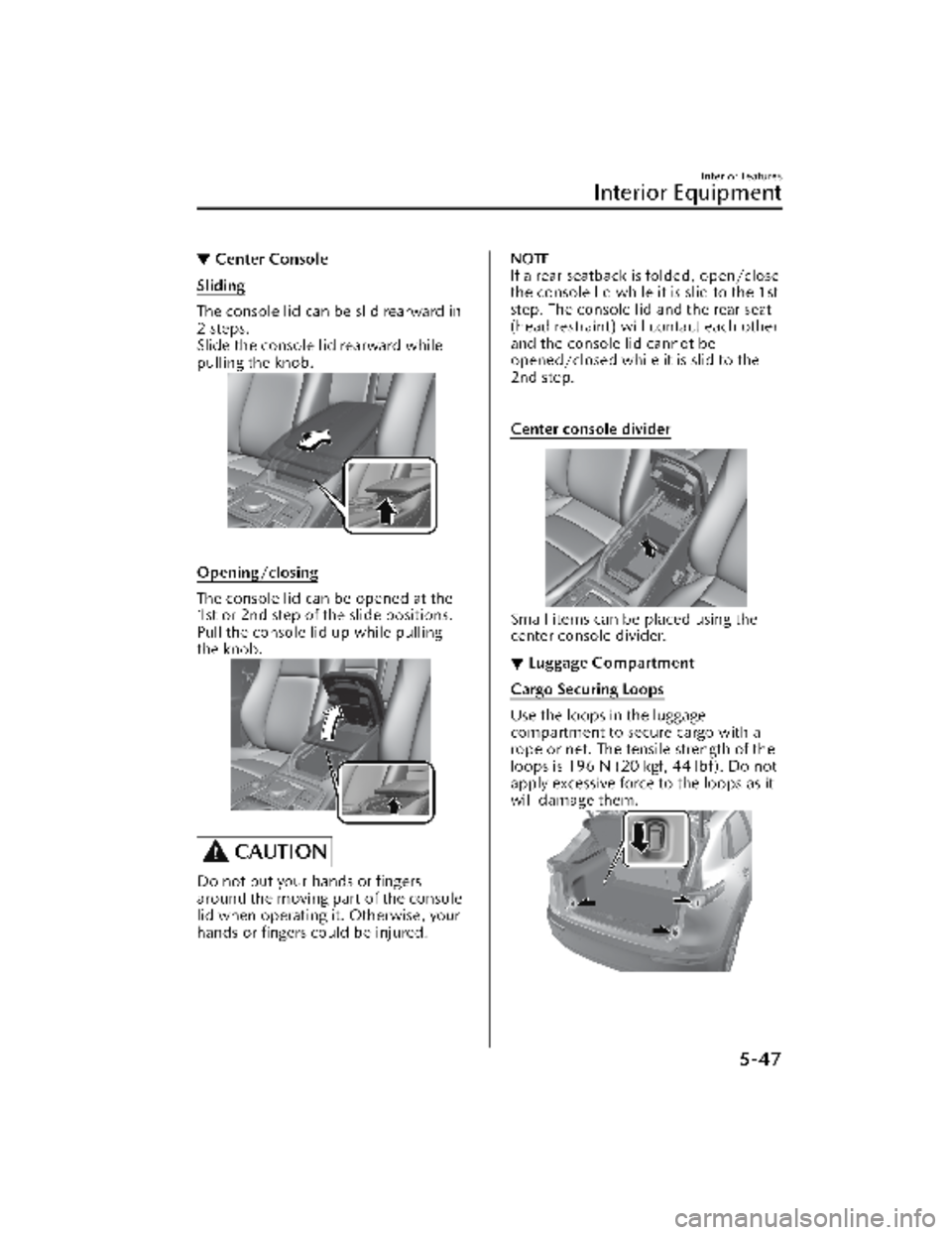
Sliding
The console lid can be slid rearward in
2 steps.
Slide the console lid rearward while
pulling the knob.
Opening/closing
The console lid can be opened at the
1st or 2nd step of the slide positions.
Pull the console lid up while pulling
the knob.
CAUTION
Do not put your hands or fingers
around the moving part of the console
lid when operating it. Otherwise, your
hands or fingers could be injured.
NOTE
If a rear seatback is folded, open/close
the console lid while it is slid to the 1st
step. The console lid and the rear seat
(head restraint) will contact each other
and the console lid cannot be
opened/closed while it is slid to the
2nd step.
Center console divider
Small items can be placed using the
center console divider.
▼Luggage Compartment
Cargo Securing Loops
Use the loops in the luggage
compartment to secure cargo with a
rope or net. The tensile strength of the
loops is 196 N (20 kgf, 44 lbf). Do not
apply excessive force to the loops as it
will damage them.
Interior Features
Interior Equipment
5-47
CX-30_8KN2-EA-21L_Edition1_new
2021-9-15 19:39:56