AUX MAZDA MODEL CX-5 2014 (in English) User Guide
[x] Cancel search | Manufacturer: MAZDA, Model Year: 2014, Model line: MODEL CX-5, Model: MAZDA MODEL CX-5 2014Pages: 528, PDF Size: 7.97 MB
Page 296 of 528

Black plate (296,1)
AUX/USB/iPod mode
Audio can be heard from the vehicle's
speakers by connecting a commercially-
available portable audio unit to the
auxiliary jack.
A commercially-available, non-impedance
(3.5
) stereo mini plug cable is required.
Contact an Authorized Mazda Dealer for
details.
In addition, audio can be played from the
vehicle audio device by connecting USB
device or an iPod to the USB port.
Auxiliary jack/USB port
How to use AUX mode ....... page 5-60
How to use USB mode (Type
A) ......................................... page 5-62
How to use USB mode (Type
B) ......................................... page 5-66
How to use iPod mode (Type
A) ......................................... page 5-70
How to use iPod mode (Type
B) ......................................... page 5-74
5-58
Interior Features
Audio System
CX-5_8CT5-EA-12K_Edition1 Page296
Friday, October 19 2012 3:11 PM
Form No.8CT5-EA-12K
Page 297 of 528

Black plate (297,1)
WARNING
Do not adjust the portable audio unit
or a similar product while driving the
vehicle:
Adjusting the portable audio unit or
a similar product while driving the
vehicle is dangerous as it could
distract your attention from the
vehicle operation which could lead to
a serious accident. Always adjust the
portable audio unit or a similar
product while the vehicle is stopped.
CAUTION
ØAlways close the auxiliary jack/
USB port lid when it is not in use.
If foreign matter or liquid
penetrates the auxiliary jack/USB
port, it may cause a malfunction.
ØDepending on the portable audio
device, noise may occur when the
device is connected to the vehicle
accessory socket. (If noise occurs,
do not use the accessory socket.)NOTE
lBefore using the auxiliary jack/USB port,
refer to the instruction manual for the
portable audio device.
lUse a commercially-available, non-
impedance (3.5
) stereo mini plug for
connecting the portable audio unit to the
auxiliary jack. Before using the auxiliary
jack, read the manufacturer's instructions
for connecting a portable audio unit to the
auxiliary jack.
lTo prevent discharging of the battery, do
not use the auxiliary input for long periods
with the engine off or idling.
lWhen connecting a device to the auxiliary
jack or USB port, noise may occur
depending on the connected device. If the
device is connected to the vehicle's
accessory socket, the noise can be reduced
by unplugging it from the accessory socket.
qHow to connect USB port/
Auxiliary jack
USB port Auxiliary jack
Connecting a device
1. Open the console lid.
2. Open the auxiliary jack/USB port lid.
3. Connect the device plug to the USB
port.
Interior Features
Audio System
5-59
CX-5_8CT5-EA-12K_Edition1 Page297
Friday, October 19 2012 3:11 PM
Form No.8CT5-EA-12K
Page 298 of 528

Black plate (298,1)
Connecting with connector cable
1. Open the console lid.
2. Open the auxiliary jack/USB port lid.
3. Pass the connection plug cord through
the cutout of the console and insert the
plug into the auxiliary jack.
WARNING
Do not allow the connection plug cord
to get tangled with the parking brake
or the shift lever:
Allowing the plug cord to become
tangled with the parking brake or
the shift lever is dangerous as it
could interfere with driving, resulting
in an accident.
CAUTION
Do not place objects or apply force to
the auxiliary jack with the plug
connected.
NOTE
lInsert the plug to the auxiliary jack/USB
port securely.
lInsert or pull out the plug with the plug
perpendicular to the auxiliary jack/USB
port hole.
lInsert or remove the plug by holding its
base.
qHow to use AUX mode
Type A Type B
(Type A)
1. Switch the ignition to ACC or ON.
2. Press the power/volume dial to turn the
audio system on.
3. Press the USB/AUX button (
) of the
audio unit to change to the AUX mode.
(Type B)
1. Switch the ignition to ACC or ON.
2. Press the power/volume dial to turn the
audio system on.
3. Press the audio button (
)to
display the audio screen.
4. Press the
on-screen tab to switch
to the AUX mode.
5-60
Interior Features
Audio System
CX-5_8CT5-EA-12K_Edition1 Page298
Friday, October 19 2012 3:11 PM
Form No.8CT5-EA-12K
Page 299 of 528

Black plate (299,1)
NOTElWhen the device is not connected to the
auxiliary jack, the mode does not switch to
the AUX mode.
lSet the volume of the portable audio unit to
the maximum within the range that the
sound does not become distorted, then
adjust the volume using the power/volume
dial of the audio unit or the up/down switch
of the audio control switch.
lAudio adjustments other than audio volume
can only be done using the portable audio
device.
lIf the connection plug is pulled out from the
auxiliary jack while in AUX mode, noise
may occur.
Interior Features
Audio System
5-61
CX-5_8CT5-EA-12K_Edition1 Page299
Friday, October 19 2012 3:11 PM
Form No.8CT5-EA-12K
Page 300 of 528

Black plate (300,1)
qHow to use USB mode (Type A)
Track up/Fast-forward button
Track down/Reverse buttonRepeat button
Random button
Folder down button Folder up button
Text button
Scan button USB/AUX button
File dial
Type Playable data
USB mode MP3/WMA/AAC file
Playback
1. Switch the ignition to ACC or ON.
2. Press the power/volume dial to turn the
audio system on.
3. Press the USB/AUX button (
)to
switch to the USB mode and start
playback.
NOTE
lSome devices such as smart phones may
require a setting change to allow USB
operation.
lWhen the USB device is not connected, the
mode does not switch to USB mode.
lWhen there is no playable data in the USB
device,“NO CONTENTS”is flashed.
lPlayback of the USB device is in the order
of the folder numbers. Folders which have
no MP3/WMA/AAC files are skipped.
lDo not remove the USB device while in the
USB mode. The data may be damaged.
Fast-forward/Reverse
Press and hold the fast-forward button
(
) to advance through a track at high
speed.Press and hold the reverse button (
)to
reverse through a track at high speed.
Track search
Press the track up button (
) or turn the
file dial clockwise once to skip forward to
the beginning of the next track.
Press the track down button (
) or turn
the file dial counterclockwise within a few
seconds after playback begins to track
down to the beginning of the previous
track.
Press the track down button (
) or turn
the file dial counterclockwise after a few
seconds have elapsed to start playback
from the beginning of the current track.
Folder search
To change to the previous folder, press the
folder down button (
), or press the
folder up button (
) to advance to the
next folder.
Music Scan
This function scans the titles in a folder
currently being played and plays ten
seconds of each song to aid you in finding
a song you want to listen to.
5-62
Interior Features
Audio System
CX-5_8CT5-EA-12K_Edition1 Page300
Friday, October 19 2012 3:11 PM
Form No.8CT5-EA-12K
Page 308 of 528
Black plate (308,1)
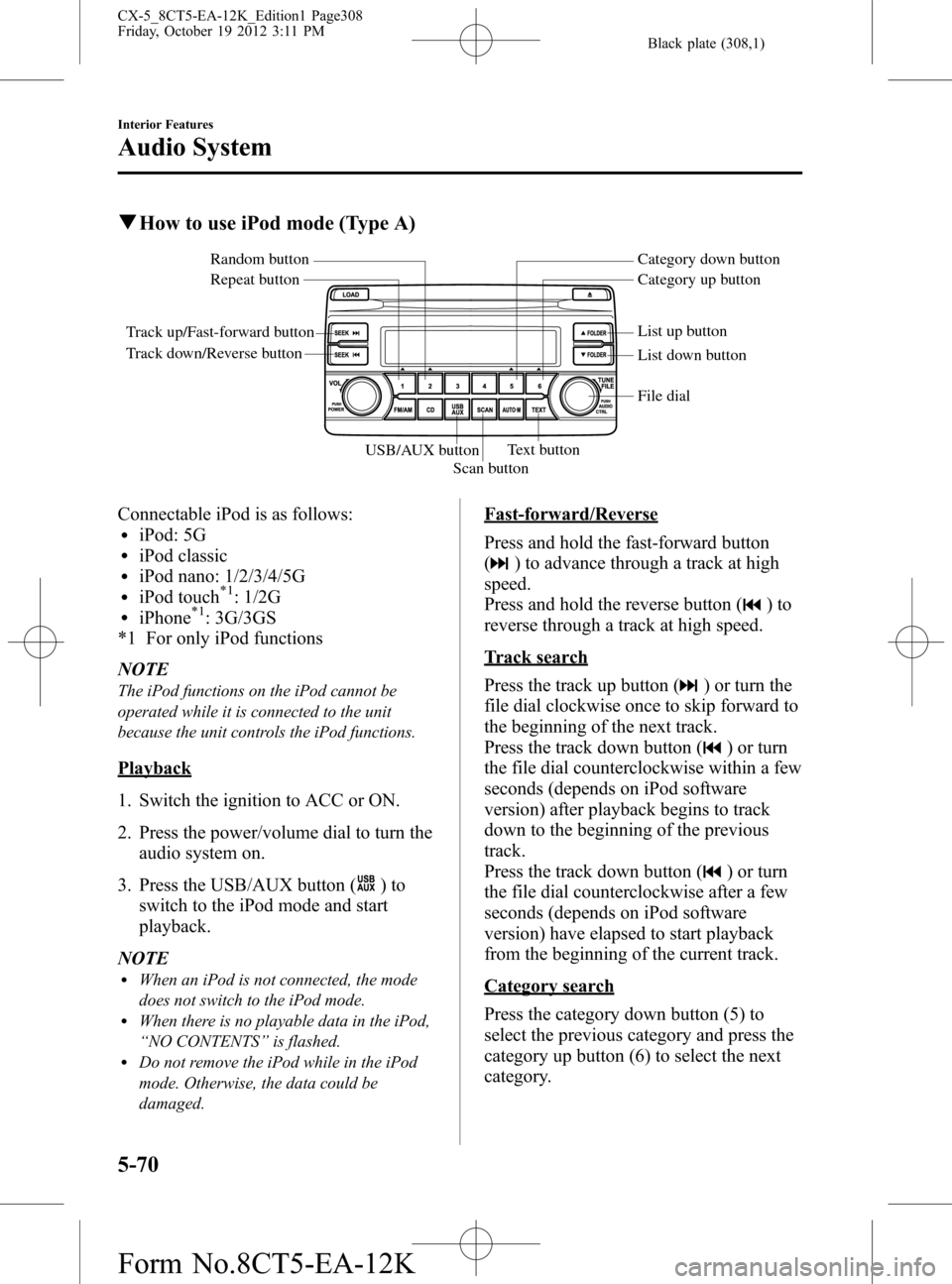
qHow to use iPod mode (Type A)
Track up/Fast-forward button
Track down/Reverse buttonRepeat button Random button Category down button
Category up button
List down button List up button
Text button
Scan button USB/AUX button
File dial
Connectable iPod is as follows:liPod: 5GliPod classicliPod nano: 1/2/3/4/5GliPod touch*1: 1/2GliPhone*1: 3G/3GS
*1 For only iPod functions
NOTE
The iPod functions on the iPod cannot be
operated while it is connected to the unit
because the unit controls the iPod functions.
Playback
1. Switch the ignition to ACC or ON.
2. Press the power/volume dial to turn the
audio system on.
3. Press the USB/AUX button (
)to
switch to the iPod mode and start
playback.
NOTE
lWhen an iPod is not connected, the mode
does not switch to the iPod mode.
lWhen there is no playable data in the iPod,
“NO CONTENTS”is flashed.
lDo not remove the iPod while in the iPod
mode. Otherwise, the data could be
damaged.
Fast-forward/Reverse
Press and hold the fast-forward button
(
) to advance through a track at high
speed.
Press and hold the reverse button (
)to
reverse through a track at high speed.
Track search
Press the track up button (
) or turn the
file dial clockwise once to skip forward to
the beginning of the next track.
Press the track down button (
) or turn
the file dial counterclockwise within a few
seconds (depends on iPod software
version) after playback begins to track
down to the beginning of the previous
track.
Press the track down button (
) or turn
the file dial counterclockwise after a few
seconds (depends on iPod software
version) have elapsed to start playback
from the beginning of the current track.
Category search
Press the category down button (5) to
select the previous category and press the
category up button (6) to select the next
category.
5-70
Interior Features
Audio System
CX-5_8CT5-EA-12K_Edition1 Page308
Friday, October 19 2012 3:11 PM
Form No.8CT5-EA-12K
Page 328 of 528
Black plate (328,1)
3. Touch theon-screen button.
4. Touch the
on-screen button.
NOTE
The messages stored in a device cannot be
erased.
qDon't Disturb Me function
Setting can be made to not notify you of
received phone calls and messages.
1. Touch the
on-screen tab.
2. Touch the
on-screen
button.
3. To set, touch the
on-screen button
or the
on-screen button.
4. Touch the
on screen button.
NOTE
The following operations are possible even
when the Don't Disturb Me function is on.
lDownloading messageslDownloading phone bookslDownloading the incoming/outgoing call
record
lSending messages
qAudio Operation Using Voice
Recognition
Audio on/off, audio mode switching, and
audio operations can be done using voice
recognition.
NOTE
(When playing a USB or iPod)
When a track is selected using voice
recognition, the track list is set to VR Playlist.
Starting the audio
The audio can be started using voice
recognition.
1. Press the talk button.
2.Prompt:“Ready”
3.Say:[Beep]“Turn on audio”
4. Power to the audio is turned on.
Turning off the audio
1. Press the talk button.
2.Prompt:“Ready”
3.Say:[Beep]“Change mode”
4.Prompt:“Available audio modes are:
AM, FM, FM1, FM2, Sirius, Sirius1,
Sirius2, Sirius3, USB, iPod,
Bluetooth
®audio, Pandora®, CD,
AUX, Turn off audio”
5.Say:[Beep]“Turn off audio”
6. Power to the audio is turned off.
Mode switching
1. Press the talk button.
2.Prompt:“Ready”
3.Say:[Beep]“Change mode”
4.Prompt:“Available audio modes are:
AM, FM, FM1, FM2, Sirius, Sirius1,
Sirius2, Sirius3, USB, iPod,
Bluetooth
®audio, Pandora®, CD,
AUX, Turn off audio”
5.Say:[Beep]“XXX (Ex.“AM”) (audio
source)”
6. The audio source is switched.
5-90
Interior Features
Bluetooth®
CX-5_8CT5-EA-12K_Edition1 Page328
Friday, October 19 2012 3:12 PM
Form No.8CT5-EA-12K
Page 329 of 528
Black plate (329,1)
NOTE
CD, SIRIUS digital satellite radio, USB, iPod,
BT audio, and Pandora®modes cannot be
selected in the following cases:
lSIRIUS digital satellite radio unit, USB
device, iPod, BT audio, or Pandora®unit is
not equipped on the audio system.
lCD has not been inserted.
The AUX mode is locked out unless you
connect a commercially available portable
audio unit (such as an MP3 player) to the
auxiliary jack. Connect a portable audio unit
or similar product on the market to the
auxiliary jack to listen to music or audio over
the vehicle's speakers.
Playing selected track numbers
(When playing a CD)
A desired track number on a CD can be
played using voice recognition.
Refer to Operating the Compact Disc
(CD) Player on page 5-52.
1. Press the talk button.
2.Prompt:“Ready”
3.Say:[Beep]“Play track”
4.Prompt:“What track number would
you like to play?”
5.Say:[Beep]“XXX (Ex.“15”) (Track
number)”
6. The selected track number is played.
Playing selected artist
(When playing a USB or iPod)
Tracks from a desired artist on a USB
device or iPod can be played using voice
recognition.
Refer to How to use USB mode (Type B)
on page 5-66.Refer to How to use iPod
mode (Type B) on page 5-74.
1. Press the talk button.2.Prompt:“Ready”
3.Say:[Beep]“Play”
4.Prompt:“Would you like to play by
Artist, Album, Playlist, or Genre?”
5.Say:[Beep]“Artist”
6.Prompt:“What artist would you like
to play?”
7.Say:[Beep]“XXXXX... (Ex.
“Michael”) (Artist name)”
8. The name spoken will be searched for
in the USB device or iPod.
If a contact is matched, go to Step 10.
If multiple contacts are matched, go to
Step 9.
9.Prompt:“Would you like to play
XXXXX... (Choice 1)?”
(Artist you would like to play)
Say:[Beep]“Yes.”Then go to Step 10.
(Artist you do not want to play)
Say:[Beep]“No.”Then go to Step 9.
(Maximum 3 times)
10. The tracks for the selected artist are
played.
Playing selected album
(When playing a USB or iPod)
The tracks from a desired album on a
USB device or iPod can be played using
voice recognition.
Refer to How to use USB mode (Type B)
on page 5-66.Refer to How to use iPod
mode (Type B) on page 5-74.
1. Press the talk button.
2.Prompt:“Ready”
3.Say:[Beep]“Play”
4.Prompt:“Would you like to play by
Artist, Album, Playlist, or Genre?”
Interior Features
Bluetooth®
5-91
CX-5_8CT5-EA-12K_Edition1 Page329
Friday, October 19 2012 3:12 PM
Form No.8CT5-EA-12K
Page 340 of 528
Black plate (340,1)
Bluetooth® Audio
Applicable Bluetooth®specification
Ver. 2.0 or higher
Response profile
lA2DP (Advanced Audio Distribution
Profile) Ver. 1.0/1.2
lAVRCP (Audio/Video Remote Control
Profile) Ver. 1.0/1.3/1.4
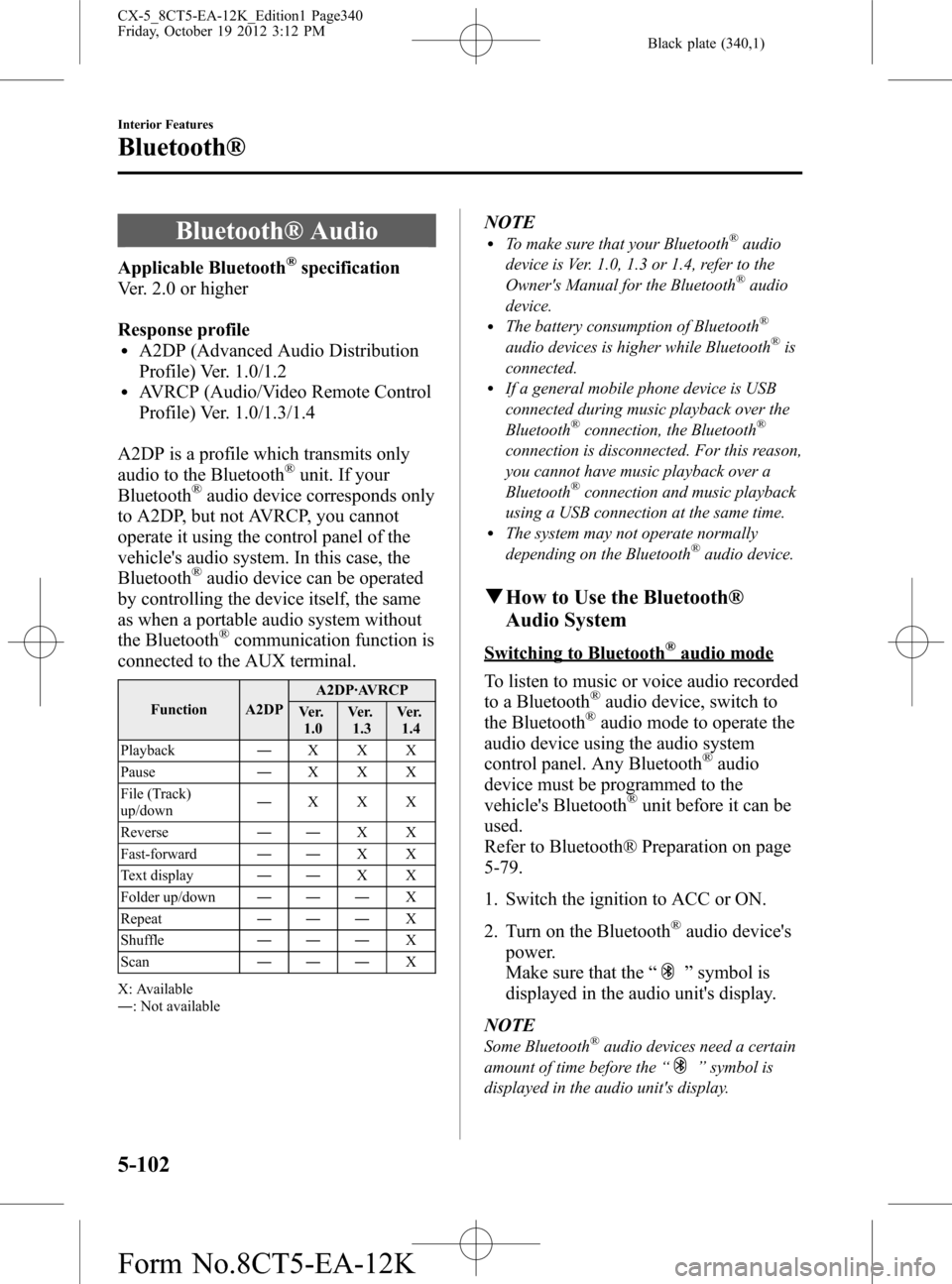
A2DP is a profile which transmits only
audio to the Bluetooth
®unit. If your
Bluetooth®audio device corresponds only
to A2DP, but not AVRCP, you cannot
operate it using the control panel of the
vehicle's audio system. In this case, the
Bluetooth
®audio device can be operated
by controlling the device itself, the same
as when a portable audio system without
the Bluetooth
®communication function is
connected to the AUX terminal.
Function A2DPA2DP·AVRCP
Ve r.
1.0Ve r.
1.3Ve r.
1.4
Playback―XXX
Pause―XXX
File (Track)
up/down―XXX
Reverse――XX
Fast-forward――XX
Text display――XX
Folder up/down―――X
Repeat―――X
Shuffle―――X
Scan―――X
X: Available
―: Not available
NOTElTo make sure that your Bluetooth®audio
device is Ver. 1.0, 1.3 or 1.4, refer to the
Owner's Manual for the Bluetooth
®audio
device.
lThe battery consumption of Bluetooth®
audio devices is higher while Bluetooth®is
connected.
lIf a general mobile phone device is USB
connected during music playback over the
Bluetooth
®connection, the Bluetooth®
connection is disconnected. For this reason,
you cannot have music playback over a
Bluetooth
®connection and music playback
using a USB connection at the same time.
lThe system may not operate normally
depending on the Bluetooth®audio device.
qHow to Use the Bluetooth®
Audio System
Switching to Bluetooth®audio mode
To listen to music or voice audio recorded
to a Bluetooth
®audio device, switch to
the Bluetooth®audio mode to operate the
audio device using the audio system
control panel. Any Bluetooth
®audio
device must be programmed to the
vehicle's Bluetooth
®unit before it can be
used.
Refer to Bluetooth® Preparation on page
5-79.
1. Switch the ignition to ACC or ON.
2. Turn on the Bluetooth
®audio device's
power.
Make sure that the“
”symbol is
displayed in the audio unit's display.
NOTE
Some Bluetooth®audio devices need a certain
amount of time before the“
”symbol is
displayed in the audio unit's display.
5-102
Interior Features
Bluetooth®
CX-5_8CT5-EA-12K_Edition1 Page340
Friday, October 19 2012 3:12 PM
Form No.8CT5-EA-12K
Page 391 of 528

Black plate (391,1)
Replace Electrical Battery
If the buttons on the transmitter are
inoperable and the operation indicator
light does not flash, the battery may be
dead.
Replace with a new battery before the
transmitter becomes unusable.
CAUTION
ØMake sure the battery is installed
correctly. Battery leakage could
occur if it is not installed correctly.
ØWhen replacing the battery, be
careful not to touch any of the
internal circuitry and electrical
terminals, bend the electrical
terminals, or get dirt in the
transmitter as the transmitter
could be damaged.
ØThere is the danger of explosion if
the battery is not correctly
replaced.
ØDispose of used batteries
according to the following
instructions.
ØInsulate the plus and minus
terminals of the battery using
cellophane or equivalent tape.
ØNever disassemble.
ØNever throw the battery into
fire or water.
ØNever deform or crush.
ØReplace only with the same type
battery (CR2025 or equivalent).
The following conditions indicate that the
battery power is low:
lThe KEY indicator light (green) flashes
in the instrument cluster for about 30
seconds after the engine is turned off
(for vehicles with a type A meter,
messages are displayed in the
instrument cluster).
lThe system does not operate and the
operation indicator light on the
transmitter does not flash when the
buttons are pressed.
lThe system's operational range is
reduced.
Replacing the battery at an Authorized
Mazda Dealer is recommended to prevent
damage to the key. If replacing the battery
by yourself, follow the instruction below.
Replacing the key battery
1. Pull out the auxiliary key.
2. Insert a small, flathead screwdriver into
the groove shown in the figure and
rotate the screwdriver to open the cover
slightly.
Maintenance and Care
Owner Maintenance
6-33
CX-5_8CT5-EA-12K_Edition1 Page391
Friday, October 19 2012 3:12 PM
Form No.8CT5-EA-12K