camera MAZDA MODEL CX-5 2014 Owners Manual (in English)
[x] Cancel search | Manufacturer: MAZDA, Model Year: 2014, Model line: MODEL CX-5, Model: MAZDA MODEL CX-5 2014Pages: 528, PDF Size: 7.97 MB
Page 228 of 528

Black plate (228,1)
Rear View Monitorí
The rear view monitor is a visual assist system when reversing the vehicle that provides
images from the rear of the vehicle.
WARNING
Always drive carefully confirming the safety of the rear and the surrounding
conditions by looking directly with your eyes:
Reversing the vehicle by only looking at the screen is dangerous as it may cause an
accident or a collision with an object. The rear view monitor is only a visual assist
device when reversing the vehicle. The images on the screen may be different from
the actual conditions.
CAUTION
ØDo not use the rear view monitor under the following conditions: Using the rear
view monitor under the following conditions is dangerous and could result in
injury or vehicle damage or both.
ØIcy or snow-covered roads.
ØTire chains or a temporary spare tire is installed.
ØThe liftgate is not fully closed.
ØThe vehicle is on a road incline.
ØWhen the display is cold, images may course across the monitor or the screen and
may be dimmer than usual, which could cause difficulty in confirming the
surrounding conditions of the vehicle. Always drive carefully confirming the safety
of the rear and the surrounding conditions by looking directly with your eyes.
ØDo not apply excessive force to the camera. The camera position and angle may
deviate.
ØDo not disassemble, modify, or remove it as it may no longer be waterproof.
ØThe camera cover is made of plastic. Do not apply degreasing agents, organic
solvents, wax, or glass coating agents to the camera cover. If any are spilled on
the cover, wipe off with a soft cloth immediately.
ØDo not rub the cover excessively, or polish it using an abrasive compound or a
hard brush. The cover may be damaged affecting the image.
4-100
When Driving
íSome models.
Rear View Monitor
CX-5_8CT5-EA-12K_Edition1 Page228
Friday, October 19 2012 3:11 PM
Form No.8CT5-EA-12K
Page 229 of 528

Black plate (229,1)
NOTElIf water, snow, or mud is stuck on the camera lens, wipe it off using a soft cloth. If it cannot be
wiped off, use a mild detergent.
lIf the camera temperature changes rapidly (Hot to cold, cold to hot), the rear view monitor may
not operate correctly.
lWhen replacing the tires, consult an Authorized Mazda Dealer. Replacing the tires could result in
deviation of the guide lines which appear on the display.
lIf the vehicle's front, side, or rear has been involved in a collision, the alignment of the rear view
parking camera (location, installation angle) may have deviated. Always consult an Authorized
Mazda Dealer to have the vehicle inspected.
qRear View Parking Camera Location
Rear View Parking Camera
qSwitching to the Rear View Monitor Display
Shift the shift lever to R with the ignition switched ON to switch the display to the rear
view monitor display.
NOTE
When the shift lever is shifted from R to another shift lever position, the screen returns to the previous
display.
When Driving
Rear View Monitor
4-101
CX-5_8CT5-EA-12K_Edition1 Page229
Friday, October 19 2012 3:11 PM
Form No.8CT5-EA-12K
Page 230 of 528

Black plate (230,1)
qDisplayable Range on the Screen
The images on the screen may be different from the actual conditions.
(Screen display)
(Actual view)
Object Garnish
Bumper
NOTElThe displayable range varies depending on the vehicle and road conditions.lThe displayable range is limited. Objects under the bumper or around the bumper ends cannot be
displayed.
lThe distance appearing in the displayed image is different from the actual distance because the
rear view parking camera is equipped with a specific lens.
lSome optionally installed vehicle accessories may be picked up by the camera. Do not install any
optional parts that can interfere with the camera view, such as illuminating parts or parts made of
reflective material.
lIt may be difficult to see the display under the following conditions, however, it does not indicate a
malfunction.
lIn darkened areas.lWhen the temperature around the lens is high/low.lWhen the camera is wet such as on a rainy day or during periods of high humidity.lWhen foreign material such as mud is stuck around the camera.lWhen the camera lens reflects sunlight or headlight beams.lImage display may be delayed it the temperature around the camera is low.
4-102
When Driving
Rear View Monitor
CX-5_8CT5-EA-12K_Edition1 Page230
Friday, October 19 2012 3:11 PM
Form No.8CT5-EA-12K
Page 231 of 528

Black plate (231,1)
qViewing the Display
Guide lines which indicate the width of the vehicle (yellow) are displayed on the screen as
a reference to the approximate width of the vehicle in comparison to the width of the
parking space you are about to back into.
Use this display view for parking your vehicle in a parking space or garage.
b
a
a) Vehicle width guide lines (yellow)
Guide lines serve as a reference to the approximate width of the vehicle.
b) Distance guide lines
These guide lines indicate the approximate distance to a point measured from the
vehicle's rear (from the end of the bumper).
The red and yellow lines indicate the points about 50 cm (red) and 1 meter (yellow)
from the rear bumper (at the center point of each of the lines).
CAUTION
The guide lines on the screen are fixed lines. They are not synced to the driver's
turning of the steering wheel. Always be careful and check the area to the vehicle's
rear and the surrounding area directly with your eyes while backing up.
qRear View Monitor Operation
The operation of the rear view monitor when reversing the vehicle varies depending on the
traffic, road, and vehicle conditions. The amount of steering and the timing also varies
depending on conditions, so confirm the surrounding conditions directly with your eyes
and steer the vehicle in accordance with the conditions.
Be well aware of the above cautions prior to using the rear view monitor.
NOTE
Images displayed on the monitor from the rear view parking camera are reversed images (mirror
images).
1. Shift the shift lever to R to switch the display to the rear view monitor display.
When Driving
Rear View Monitor
4-103
CX-5_8CT5-EA-12K_Edition1 Page231
Friday, October 19 2012 3:11 PM
Form No.8CT5-EA-12K
Page 237 of 528

Black plate (237,1)
Three-dimensional object on vehicle rear
Because the distance guide lines are displayed based on a flat surface, the distance to the
three-dimensional object displayed on the screen is different from the actual distance.
A
A
C B
CB
(Actual distance) B>C=A
Sensed distance on screen A>B>C(Screen display)
(Actual condition)
qPicture Quality Adjustment
WARNING
Always adjust the picture quality of the rear view monitor while the vehicle is
stopped:
Do not adjust the picture quality of the rear view monitor while driving the vehicle.
Adjusting the picture quality of the rear view monitor such as brightness, contrast,
color, and tint while driving the vehicle is dangerous as it could distract your
attention from the vehicle operation which could lead to an accident.
Picture quality adjustment can be done while the shift lever is in reverse (R).
There are four settings which can be adjusted including, brightness, contrast, color, and
tint. When adjusting, pay sufficient attention to the vehicle surroundings.
1. Press the setup button (
) to display the picture quality adjustment screen.
2. Touch the
andon-screen buttons to change the set value.
Touch the
on-screen button to return to the camera image display.
When Driving
Rear View Monitor
4-109
CX-5_8CT5-EA-12K_Edition1 Page237
Friday, October 19 2012 3:11 PM
Form No.8CT5-EA-12K
Page 274 of 528
Black plate (274,1)
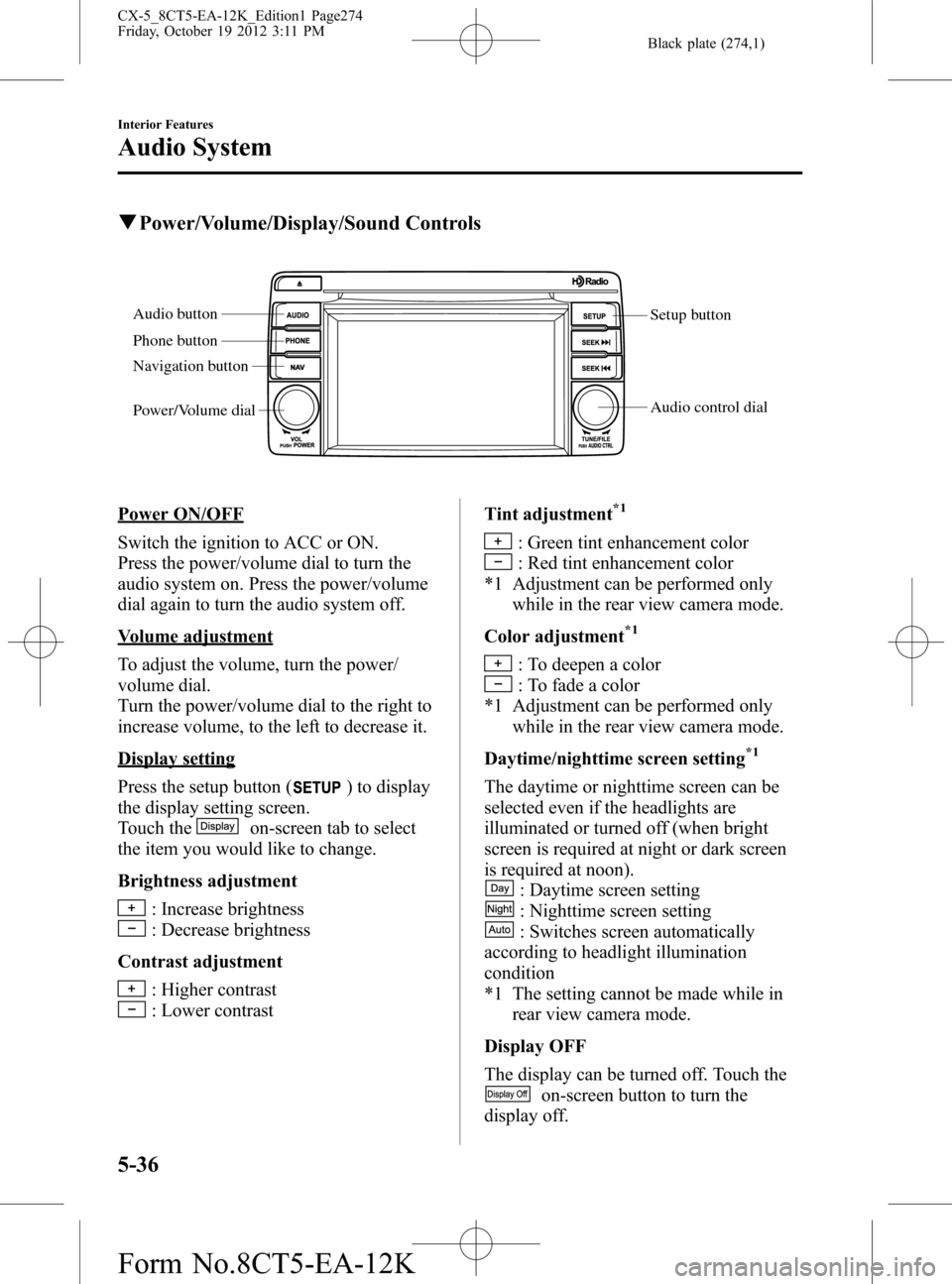
qPower/Volume/Display/Sound Controls
Setup button
Audio control dial Audio button
Phone button
Navigation button
Power/Volume dial
Power ON/OFF
Switch the ignition to ACC or ON.
Press the power/volume dial to turn the
audio system on. Press the power/volume
dial again to turn the audio system off.
Volume adjustment
To adjust the volume, turn the power/
volume dial.
Turn the power/volume dial to the right to
increase volume, to the left to decrease it.
Display setting
Press the setup button (
) to display
the display setting screen.
Touch the
on-screen tab to select
the item you would like to change.
Brightness adjustment
: Increase brightness
: Decrease brightness
Contrast adjustment
: Higher contrast
: Lower contrastTint adjustment
*1
: Green tint enhancement color
: Red tint enhancement color
*1 Adjustment can be performed only
while in the rear view camera mode.
Color adjustment
*1
: To deepen a color
: To fade a color
*1 Adjustment can be performed only
while in the rear view camera mode.
Daytime/nighttime screen setting
*1
The daytime or nighttime screen can be
selected even if the headlights are
illuminated or turned off (when bright
screen is required at night or dark screen
is required at noon).
: Daytime screen setting
: Nighttime screen setting
: Switches screen automatically
according to headlight illumination
condition
*1 The setting cannot be made while in
rear view camera mode.
Display OFF
The display can be turned off. Touch the
on-screen button to turn the
display off.
5-36
Interior Features
Audio System
CX-5_8CT5-EA-12K_Edition1 Page274
Friday, October 19 2012 3:11 PM
Form No.8CT5-EA-12K
Page 275 of 528
Black plate (275,1)
The display can be turned back on as
follows:
lPress the audio button ()to
display the audio screen.
lPress the navigation button ()to
display the navigation screen.
lPress the phone button ()to
display the Bluetooth®dial screen.lPress the setup button ()to
display the setup dial setting screen.
lPress the audio control dial to display
the setup sound setting screen.
lShift to the R position to change to the
rear view camera mode.
Shift to a position other than R to
return to the display off condition.
NOTE
The screen can also be turned off using voice
recognition.
Refer to Component Parts on page 5-78.
Display setting reset
All of the screen setting values can be
reset to their initial settings.
1. Touch the
on-screen button.
2. Touch the
on-screen button.
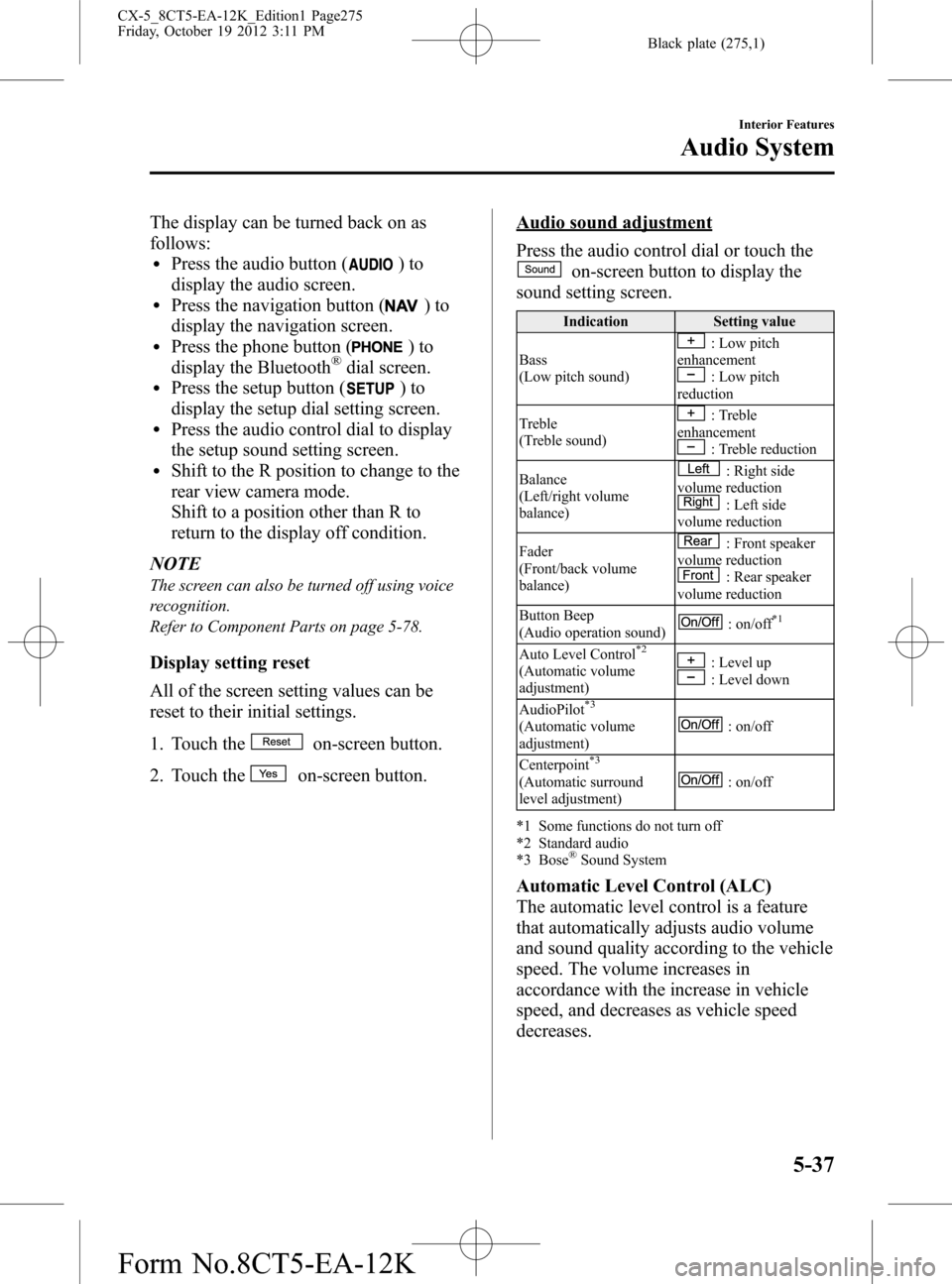
Audio sound adjustment
Press the audio control dial or touch the
on-screen button to display the
sound setting screen.
Indication Setting value
Bass
(Low pitch sound)
: Low pitch
enhancement
: Low pitch
reduction
Treble
(Treble sound)
: Treble
enhancement
: Treble reduction
Balance
(Left/right volume
balance)
: Right side
volume reduction
: Left side
volume reduction
Fader
(Front/back volume
balance)
: Front speaker
volume reduction
: Rear speaker
volume reduction
Button Beep
(Audio operation sound)
: on/off*1
Auto Level Control*2
(Automatic volume
adjustment): Level up: Level down
AudioPilot
*3
(Automatic volume
adjustment): on/off
Centerpoint
*3
(Automatic surround
level adjustment): on/off
*1 Some functions do not turn off
*2 Standard audio
*3 Bose
®Sound System
Automatic Level Control (ALC)
The automatic level control is a feature
that automatically adjusts audio volume
and sound quality according to the vehicle
speed. The volume increases in
accordance with the increase in vehicle
speed, and decreases as vehicle speed
decreases.
Interior Features
Audio System
5-37
CX-5_8CT5-EA-12K_Edition1 Page275
Friday, October 19 2012 3:11 PM
Form No.8CT5-EA-12K